
Adjustments & Refunds Activity Report Overview
Parent Hub: 💰 Finance & Accounting Reports
Category: 💳 Payments & Transactions / ⚖️ Ledgers & Trial Balance
Target Roles: Directors of Finance & Controllers, Front Office Managers, Night Auditors, Accounting Clerks
Key Value: Maintain strict audit compliance and internal revenue controls by tracking every charge adjustment, rate rebate, and payment refund executed across the property, complete with transaction timestamps, reason codes, tax impacts, and processing user IDs.
Executive Summary
The Adjustments & Refunds Activity Report is a primary financial control and audit tool within the 💳 Payments & Transactions and ⚖️ Ledgers & Trial Balance modules. Designed to enforce internal revenue controls and facilitate transaction reconciliation, it provides an itemized, transparent record of all rate adjustments, charge rebates, and payment refunds executed within a specified reporting period.
By dividing transaction activity into six distinct operational sections—itemized charge corrections (Adjustments), managerial posting write-offs (Manager Charge Adjustments), direct tender repayments (Refunds), managerial payment reversals (Manager Refund), and two aggregate rollups (Adjustment Summary and Refund Summary)—this report enables controllers and front office managers to detect unauthorized rate overrides, audit service recovery write-offs, verify tax adjustment accruals, and maintain complete staff accountability.
Key Capabilities
-
Six Explicit Operational Sections: Fully captures line-item transaction activity (Adjustments, Manager Charge Adjustments, Refunds, Manager Refund) alongside macro summary rollups (Adjustment Summary, Refund Summary).
-
Managerial vs. Standard Escalation Isolation: Explicitly separates standard front desk posting corrections from senior managerial overrides (Manager Charge Adjustments, Manager Refund).
-
Granular Audit Traceability: Captures exact transaction timestamps (Date, Time), transaction source types (Reservation, Group Block), guest room/reservation identifiers, reason codes, staff usernames, and manager remarks.
-
Net Revenue & Tax Separation: Isolates base net adjustment amounts (Adjusted Amount) from statutory tax adjustments (Adjusted Tax) to ensure accurate tax ledger reconciliation.
Report Views & Functional Breakdown (All 6 Sections)
The Adjustments & Refunds Activity Report presents financial write-off and repayment data across six structured operational sections:
┌────────────────────────────────────────────────────────────────────────┐
│               ADJUSTMENTS & REFUNDS ACTIVITY REPORT                    │
├──────────────────────────┬──────────────────────────┬──────────────────┤
│ 1. Adjustments           │ 2. Manager Charge        │ 3. Refunds       │
│    (Standard Write-Offs) │    Adjustments           │    (Standard     │
│                          │    (Manager Overrides)   │     Repayments)  │
├──────────────────────────┼──────────────────────────┼──────────────────┤
│ 4. Manager Refund        │ 5. Adjustment Summary    │ 6. Refund        │
│    (Manager Reversals)   │    (Charge Code &        │    Summary       │
│                          │     User Rollups)        │    (Tender &     │
│                          │                          │     Reason Codes)│
└──────────────────────────┴──────────────────────────┴──────────────────┘
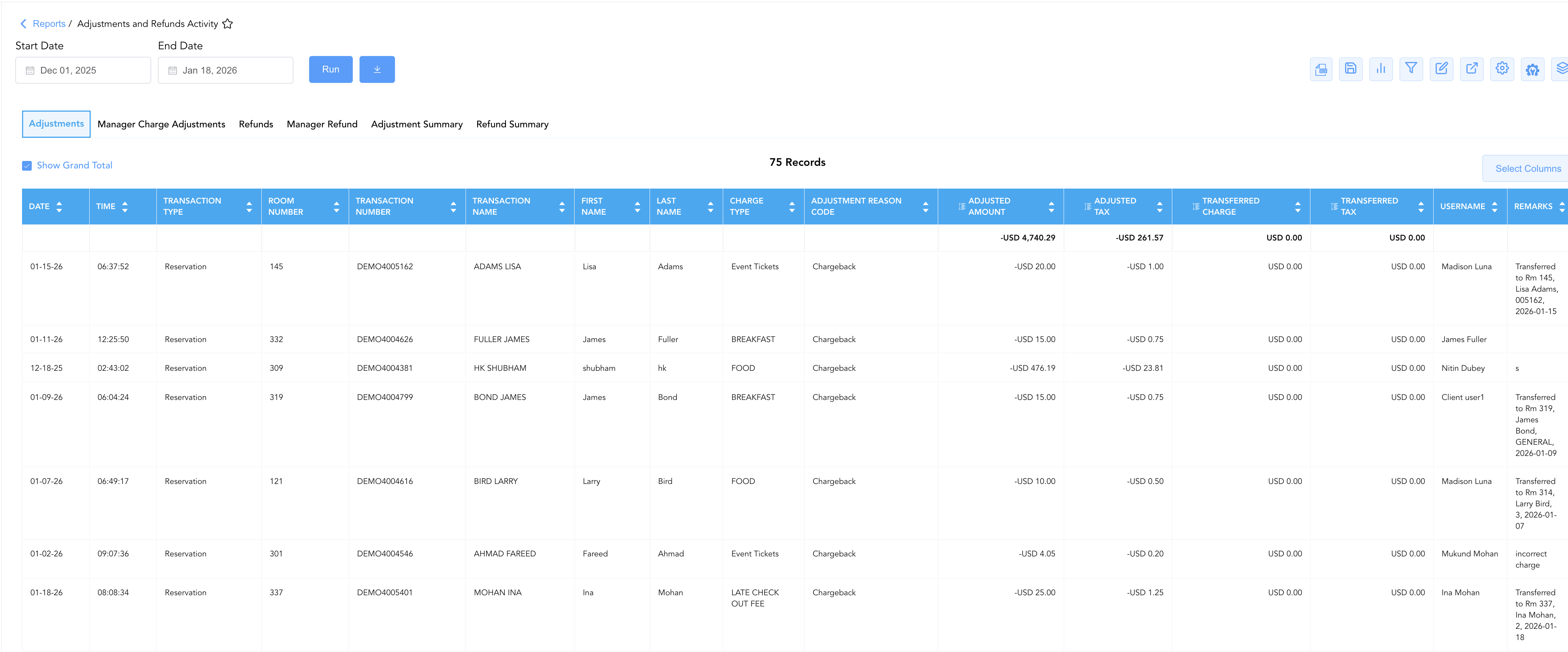
1. Adjustments
Itemizes all standard same-day and post-posting charge reductions, rate rebates, price overrides, and posting corrections applied across guest folios and reservations.
-
Primary Use: Auditing day-to-day front desk charge corrections, investigating guest service recovery write-offs, and tracking base vs. tax adjustments.
-
Key Metrics: Date, Time, Transaction Type, Charge Type, Transaction Name, First/Last Name, Transaction Number, Room Number, Adjustment Reason Code, Adjusted Amount, Adjusted Tax, Transferred Charge, Transferred Tax, Username, Remarks.
2. Manager Charge Adjustments
Isolates charge adjustments and revenue write-offs authorized or posted specifically under managerial security permissions.
-
Primary Use: Auditing executive rate overrides, high-value supervisory concessions, and enforcing senior management authorization thresholds.
-
Key Metrics: Date, Time, Transaction Type, Charge Type, Transaction Name, First/Last Name, Transaction Number, Room Number, Adjusted Amount, Adjusted Tax, Username, Remarks.

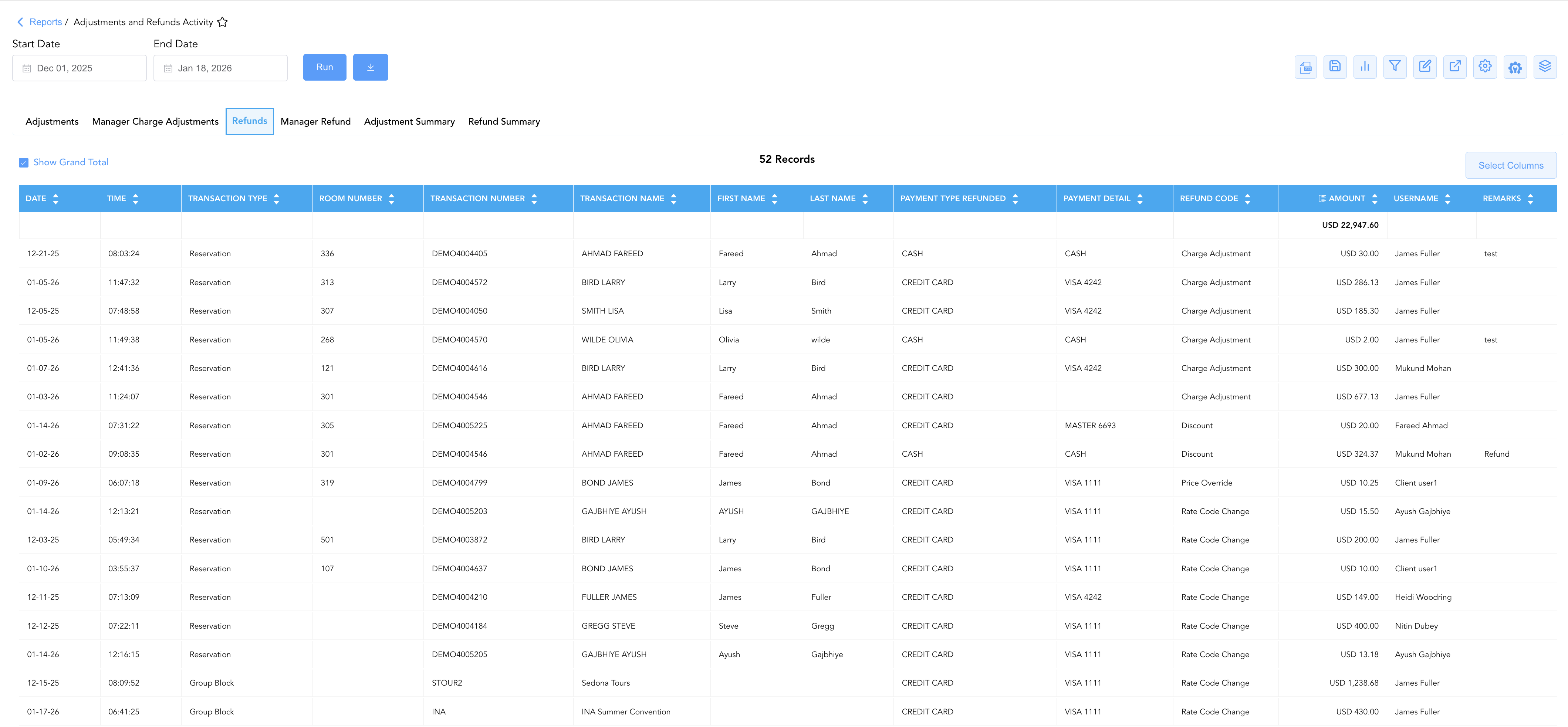
3. Refunds
Details individual standard payment refunds and tender repayments processed back to guest credit cards, cash drawers, or direct-bill accounts.
-
Primary Use: Verifying standard card/cash refund legitimacy, auditing refund reason codes, and matching merchant processing gateway credit logs.
-
Key Metrics: Date, Time, Transaction Type, Transaction Name, First/Last Name, Transaction Number, Room Number, Payment Detail, Refund Code, Payment Type Refunded, Amount, Username, Remarks.
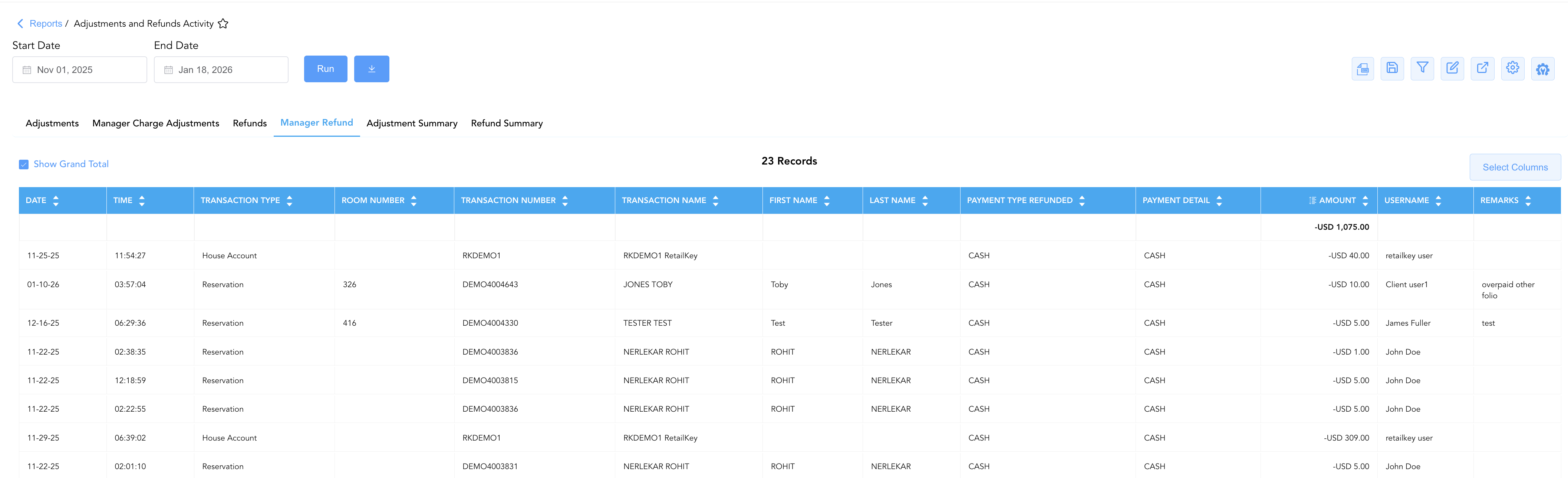
4. Manager Refund
Isolates payment refunds and tender repayments authorized or executed specifically under managerial security override levels.
-
Primary Use: Investigating high-value cash/card refund reversals, auditing managerial refund approvals, and preventing cashier refund fraud.
-
Key Metrics: Date, Time, Transaction Number, Transaction Type, Transaction Name, First/Last Name, Room Number, Payment Type Refunded, Payment Detail, Amount, Username, Remarks.
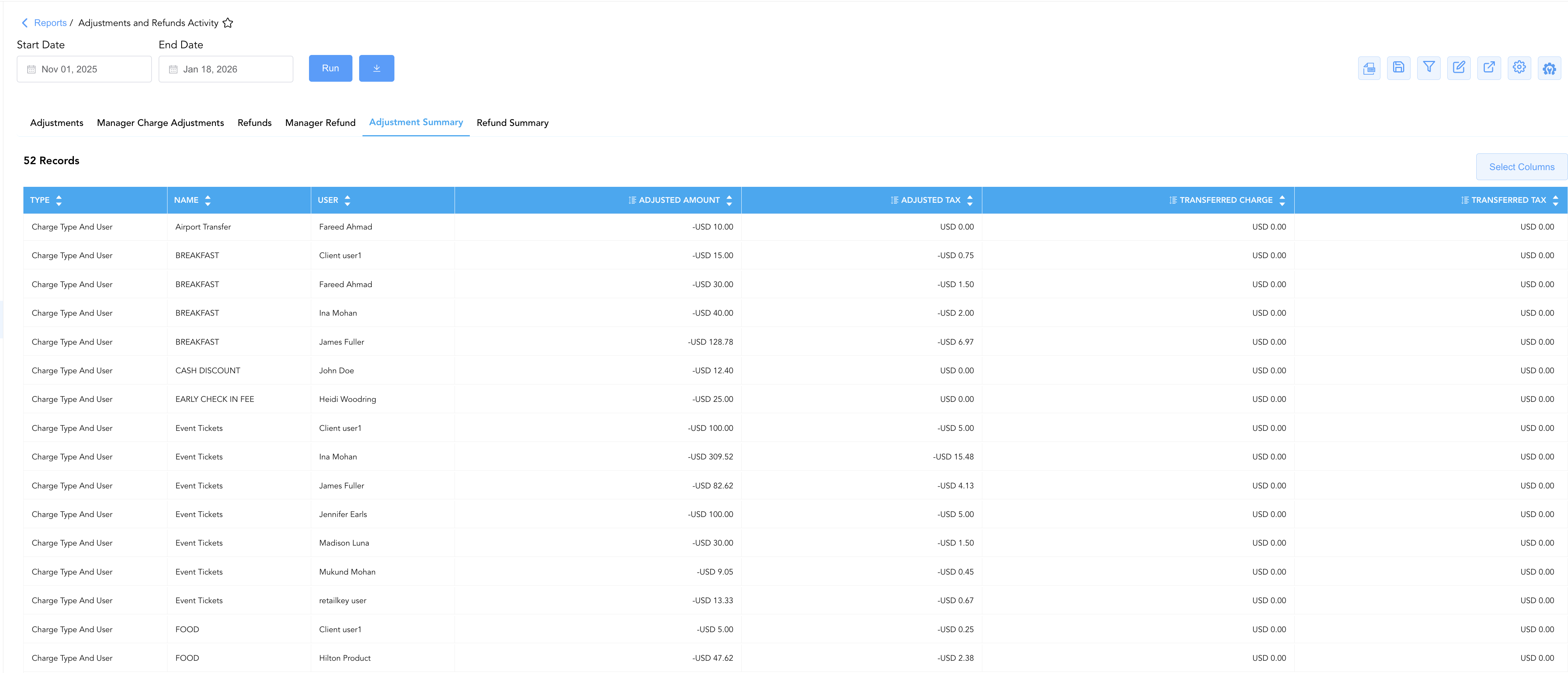
5. Adjustment Summary
Provides cumulative total write-off amounts aggregated by adjustment category (e.g., Charge Type and User, Reason Code).
-
Primary Use: Evaluating departmental write-off volumes, monitoring top adjustment reason codes, and tracking total gross revenue adjustments per staff member.
-
Key Metrics: Type (Charge Type And User, Reason Code), Name, User, Adjusted Amount, Adjusted Tax, Transferred Charge, Transferred Tax.
6. Refund Summary
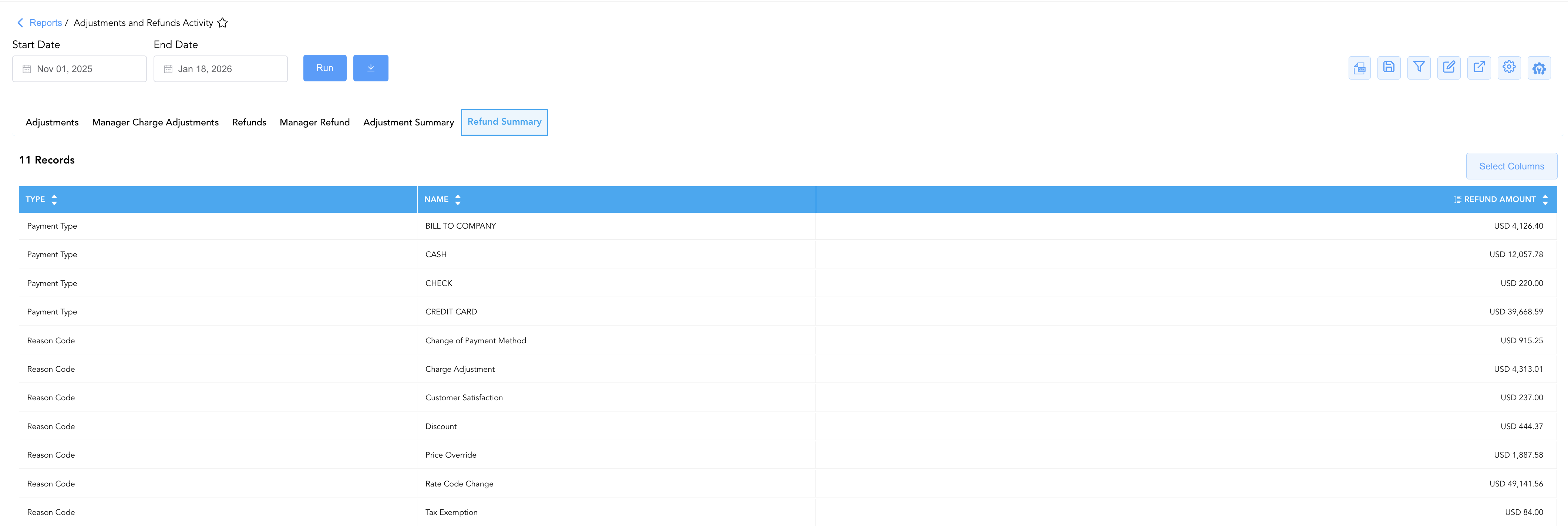
Aggregates total monetary refund volumes for the selected date range grouped by payment tender type or refund reason code.
-
Primary Use: High-level executive review of total property cash/credit card outflows, balancing cashier drawers, and evaluating financial return trends.
-
Key Metrics: Type (Payment Type, Reason Code), Name, Refund Amount.
Data Dictionary (Dynamic View Columns Across All 6 Sections)
Customize your default view using the Configure (⚙️) icon on the report page. Below is the full data dictionary representing every column across all 6 sections of this report:
💡 Tax Treatment Note: Adjusted Amount in Adjustments, Manager Charge Adjustments, and Adjustment Summary represents base net revenue figures exclusive of taxes. Amount in Refunds / Manager Refund and REFUND AMOUNT in Refund Summary represent Gross Amounts (Includes Taxes & Fees) refunded to the guest or payment instrument.
|
Column Name |
Section(s) Where Column Appears |
Description |
Data Source / System Mapping |
Includes Taxes & Fees? |
|---|---|---|---|---|
|
Date |
1, 2, 3, 4 |
Official date when the adjustment or refund transaction was processed. |
Transaction Timestamp |
N/A |
|
Time |
1, 2, 3, 4 |
Exact system time when the transaction was executed. |
Transaction Timestamp |
N/A |
|
Transaction Type |
1, 2, 3, 4 |
Originating account category (Reservation, Group Block, House Account, etc.). |
System Account Engine |
N/A |
|
Charge Type |
1, 2 |
Specific revenue or fee posting code being adjusted (ROOM RENT, FOOD, PET FEE, etc.). |
Transaction Code Engine |
N/A |
|
Transaction Name |
1, 2, 3, 4 |
Full primary guest or account name linked to the entry ( |
|
N/A |
|
First Name / Last Name |
1, 2, 3, 4 |
Individual guest first name and last name. |
|
N/A |
|
Transaction Number |
1, 2, 3, 4 |
Unique system reference ID assigned to the reservation or adjustment entry (e.g., |
System Audit Engine |
N/A |
|
Room Number |
1, 2, 3, 4 |
Physical guest room number linked to the transaction. |
|
N/A |
|
Adjustment Reason Code |
1 |
Standardized system code explaining the reason for the charge correction (Chargeback, DISCOUNT, Price Override). |
Reason Code Configuration |
N/A |
|
Refund Code |
3 |
Standardized system code explaining the reason for the payment refund (Discount, Charge Adjustment, Rate Code Change). |
Reason Code Configuration |
N/A |
|
Payment Detail |
3, 4 |
Specific payment instrument, card brand, or token details (VISA 4242, CASH, CHECK). |
Payment Gateway Token |
N/A |
|
Payment Type Refunded |
3, 4 |
Tender classification used for the refund (CREDIT CARD, CASH, CHECK). |
Payment Gateway Engine |
N/A |
|
Adjusted Amount |
1, 2, 5 |
Total net base charge amount adjusted or written off (exclusive of taxes). |
Base Ledger Posting Engine |
❌ No |
|
Adjusted Tax |
1, 2, 5 |
Total statutory tax amount adjusted or reversed in the transaction. |
Tax Engine Calculation |
🟢 Yes |
|
Transferred Charge |
1, 5 |
Net charge amounts transferred between guest folios or house accounts. |
Folio Transfer Engine |
❌ No |
|
Transferred Tax |
1, 5 |
Statutory tax amounts transferred between guest folios or house accounts. |
Folio Transfer Engine |
🟢 Yes |
|
Amount |
3, 4 |
Total gross monetary value refunded back to the guest or payment tender. |
Payment Processing Engine |
🟢 Yes |
|
REFUND AMOUNT |
6 |
Cumulative gross total refunded within the reporting period for the specific group or tender. |
|
🟢 Yes |
|
Username / User |
1, 2, 3, 4, 5 |
System ID or full name of the staff member who processed the transaction. |
System Audit Log |
N/A |
|
Remarks |
1, 2, 3, 4 |
Additional explanatory notes, transfer details, or manager comments entered during processing. |
Transaction Notes |
N/A |
|
Type |
5, 6 |
Grouping classification category (Charge Type And User, Reason Code, Payment Type). |
Dimension Tag |
N/A |
|
Name |
5, 6 |
Human-readable title, charge code description, or reason code name corresponding to the type. |
System Master Description |
N/A |
Customization & Platform Features
User & Property Preferences
-
Personal Preference: Tailor your individual view by hiding or dragging columns. Your preference saves automatically for future sessions.
-
Property Defaults: System Admins can configure standard default layouts across all property users to streamline operational reporting. To maximize audit efficiency, group the columns into the below logical blocks:
-
Section 1: Adjustments
-
Audit Timestamps & Account (Cols 1–4):
Date|Time|Transaction Type|Room Number -
Guest Identifiers (Cols 5–7):
Transaction Number|Transaction Name|First Name|Last Name -
Posting & Reason Classification (Cols 8–10):
Charge Type|Adjustment Reason Code -
Financial Adjustment Breakdown (Cols 11–14):
Adustment Amount|Adusted Tax|Transferred Charge|Transferred Tax -
Staff Attribution & Notes (Cols 15–16):
Username|Remarks
-
-
Section 2: Manager Charge Adjustments
-
Audit Timestamps & Account (Cols 1–4):
Date|Time|Transaction Type|Room Number -
Guest Identifiers (Cols 5–7):
Transaction Number|Transaction Name|First Name|Last Name -
Posting Classification (Cols 8–9):
Charge Type -
Financial Adjustment (Cols 10–11):
Adustment Amount|Adusted Tax -
Staff Attribution & Notes (Cols 12–13):
Username|Remarks
-
-
Section 3: Refunds
-
Audit Timestamps & Account (Cols 1–4):
Date|Time|Transaction Type|Room Number -
Guest Identifiers (Cols 5–7):
Transaction Number|Transaction Name|First Name|Last Name -
Payment & Refund Method (Cols 8–10):
Payment Type Refund|Payment Detail|Refund Code -
Financial Total (Col 11):
Amount -
Staff Attribution & Notes (Cols 12–13):
Username|Remarks
-
-
Section 4: Manager Refund
-
Audit Timestamps & Account (Cols 1–4):
Date|Time|Transaction Type|Room Number -
Guest Identifiers (Cols 5–7):
Transaction Number | Transaction Name | First Name | Last Name -
Payment Method (Cols 8–9):
Payment Type Refund|Payment Detail -
Financial Total (Col 10):
Amount -
Staff Attribution & Notes (Cols 11–12):
Username|Remarks
-
-
Section 5: Adjustment Summary
-
Category & User Context (Cols 1–3):
Type|Name|User -
Financial Adjustment Totals (Cols 4–7): A
Adustment Amount|Adusted Tax|Transferred Charge|Transferred Tax
-
-
Section 6: Refund Summary
-
Rollup Group & Description (Cols 1–2):
Type|Name -
Financial Refund Total (Col 3):
Refund Amount
-
-
Report Toolbar & Quick Actions
Use the top-right toolbar icons on the report page to manage and export your data view:
|
Icon |
Action / Feature |
Description |

|
Knowledge Article |
Opens the knowledge base article to learn how to interpret this report. |

|
Background Export |
Allows users to download up to 365 days of data directly to their computer in CSV format. |

|
Saved Views |
Saves your column filtering, sorting, and highlight preferences so you can easily reload your custom view later without reconfiguring the report. |

|
Bar Chart |
Displays report data in a visual bar chart format. |

|
Filter |
Opens filter controls to isolate specific data within a column based on your selected criteria. |

|
Highlight |
Highlights column values in a designated color based on selected conditions. |

|
Export |
Exports and downloads the report in various formats (Excel, PDF, CSV) for offline analysis or printing. |

|
Configure |
Opens column selection controls to toggle visibility, reorder columns, or hide rows with all zeros. |

|
Additional Configuration |
Provides advanced report configuration and display formatting options to customize data presentation. |

|
Group By |
Summarize and group report data dynamically in real time. |
Interactive Visualizations & Grouping Controls
-
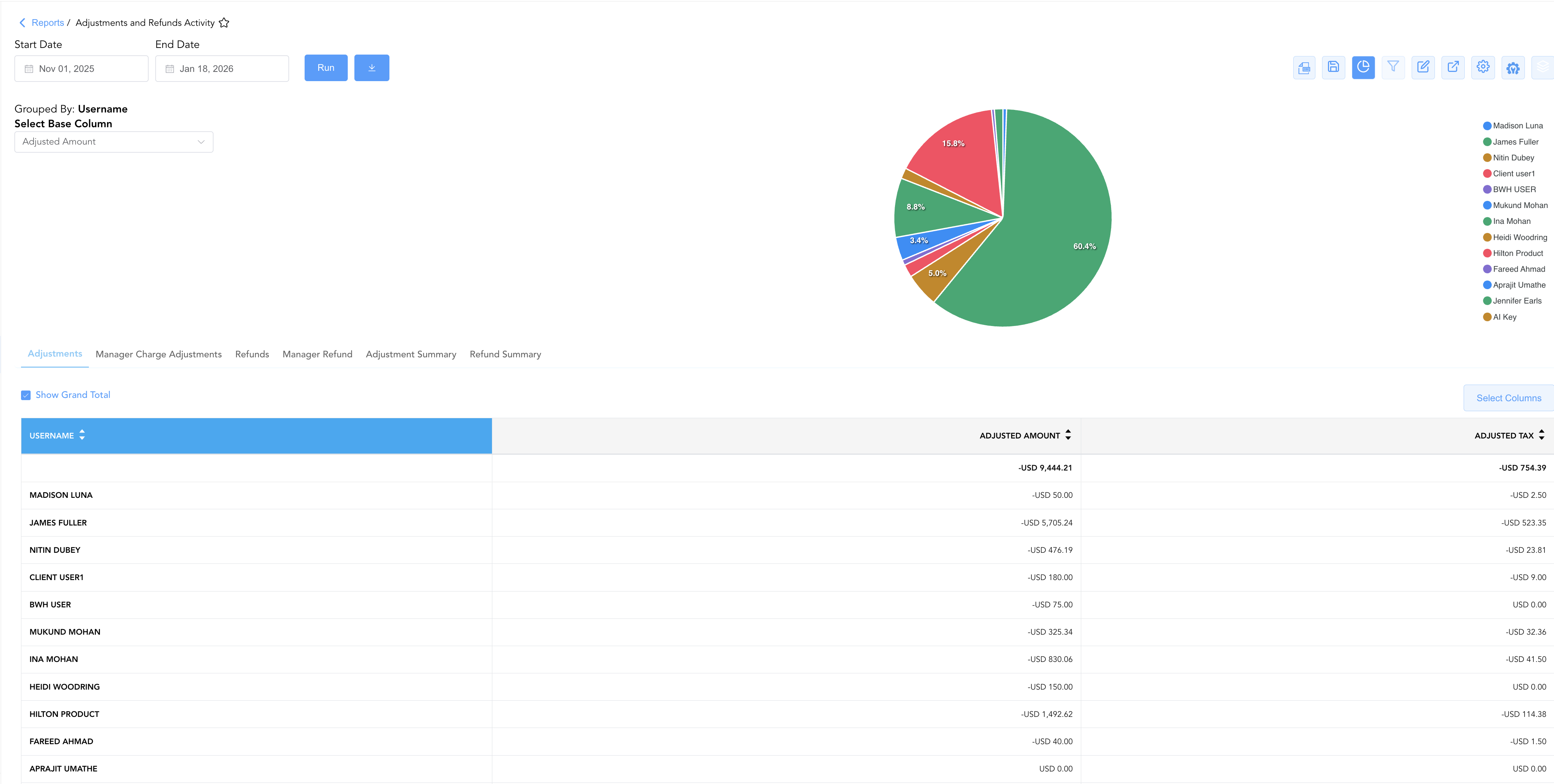
Group By & Pie Chart Visualization: The Adjustments and Refunds Activity report includes an interactive pie chart to analyze financial write-offs, manager overrides, and tax adjustment trends. Users can group adjustment and refund entries on the fly by Adjustment Reason Code, User Name, or All to quickly evaluate write-off patterns. By selecting a metric from the Select Base Column dropdown menu—either Adjusted Amount or Adjusted Tax—the chart dynamically renders percentage share breakdowns accompanied by an interactive color-coded legend across the Adjustments, Manage Charge Adjustments and Refunds tabs.
-
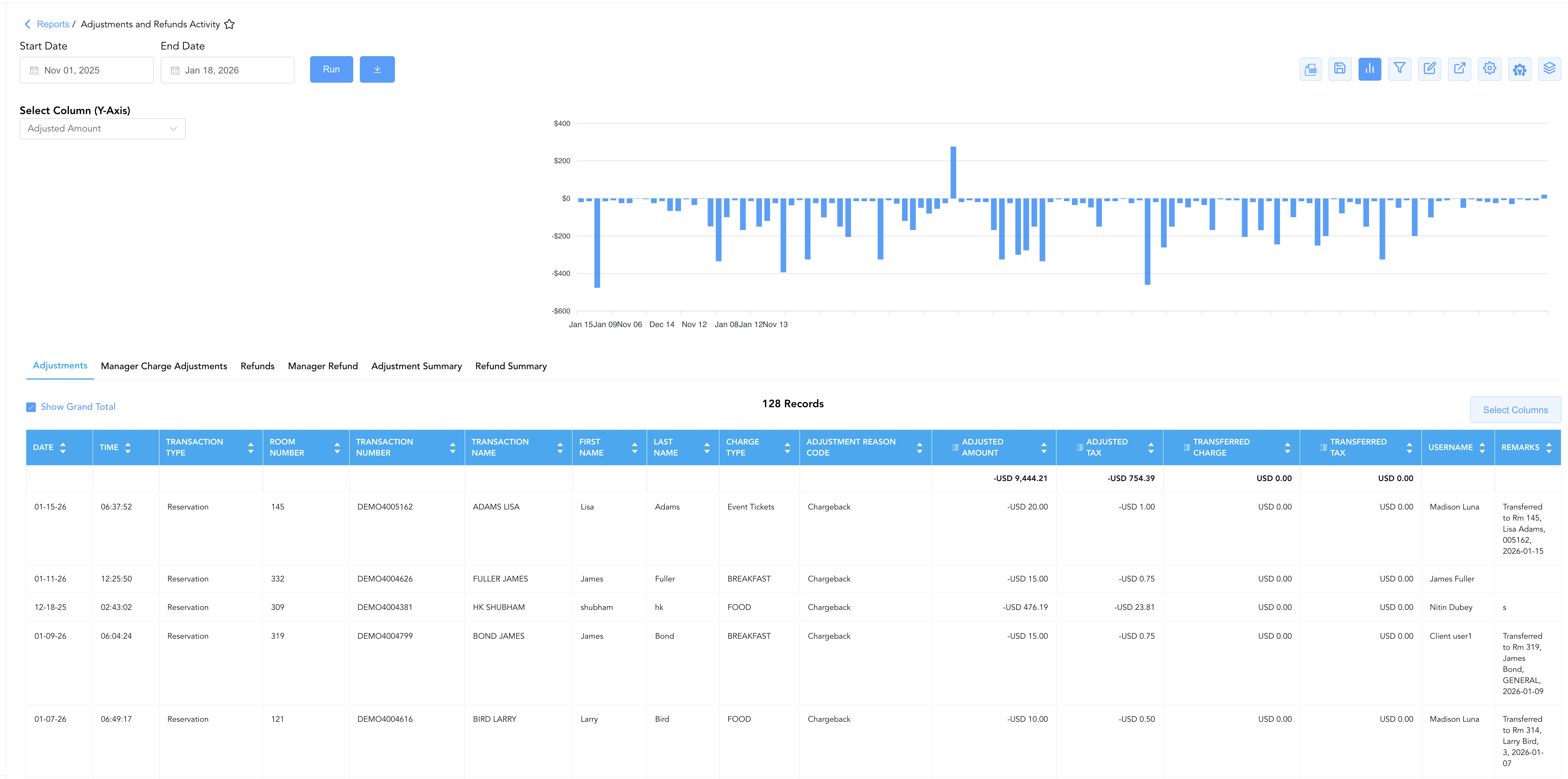
Bar Chart Visualizer: The Adjustments and Refunds Activity report features an interactive bar chart to help analyze financial write-off, refund, and override trends over time. By selecting Amount from the Select Column (Y-Axis) dropdown menu, users can visually track daily transaction spikes alongside the detailed record table across all sub-tabs (Adjustments, Manager Charge Adjustments, or Refunds, Manager Refund).
Advanced Controls
-
Exporting & Audit Delivery: Download in Excel or PDF format to support end-of-month financial audits or manager shift reviews.
-
Filtering: Filter data by specific Username, Transaction Type, date ranges, or minimum adjustment amounts.
-
Highlighting (Conditional Formatting): Apply custom rules to automatically highlight high-value write-offs or refunds exceeding authorized thresholds.
🔗 Related Reports & Next Steps
Within 💳 Payments & Transactions & ⚖️ Ledgers & Trial Balance:
-
Payment Activity Overview – Line-item transaction audit capturing token details and gateway approvals for all payments.
-
All Transactions – Complete ledger log of every positive charge and negative adjustment posted across property folios.
-
Control Report – Audit cashier shift drops, paid-outs, and credit card processing gateway batches.
-
Day End Summary – Review consolidated daily revenue, tax, payment, and deposit blueprints at business date close.
-
Trial Balance – Translate daily write-offs and refunds into formal General Ledger asset, liability, and revenue accounts.
Cross-Pillar Deep Dives:
-
🏛️ Taxes & Expenses: To audit tax percentage adjustments and verify tax-exempt postings, review Tax Summary or Active Taxes and Charge Types.
-
📬 Billing & Receivables (AR): To inspect adjustments applied to corporate direct-bill accounts or city ledger invoices, review Accounts Receivable Activity or Invoice Details.
-
📈 Forward Revenue & Analytics: Looking for forward-facing revenue projections or macro performance metrics (like RevPAR or ADR)? Please visit the 📈 Revenue & Analytics reporting hub.