
All Rooms Report Overview
Parent Hub: 🧹 Rooms & Facilities
Category: 🛏️ Room Status
Target Roles: Executive Housekeepers, Housekeeping Supervisors, Housekeeping Attendants, Front Office Managers, Maintenance Directors, General Managers
Key Value: Serves as a master physical room inventory, cleanliness state, and housekeeping schedule manifest across the property, tracking physical room cleanliness, occupancy states, last cleaned dates, scheduled cleaning types, guest room feature flags, and in-house guest assignments.
Executive Summary
The All Rooms Report is an essential property-wide room status manifest, housekeeping operational schedule, and room cleanliness audit document within the 🛏️ Room Status category of the 🧹 Rooms & Facilities hub. Designed to deliver complete operational and physical visibility over every constructed guest room on property, it itemizes real-time cleanliness states, physical occupancy statuses, maintenance conditions, historical cleaning records, and upcoming housekeeping service schedules.
-
By mapping physical room attributes (
Room Number,ROOM AREA,Room Type,Pets,Smoking,Accessible) to real-time physical states (Occupancy Status,Housekeeping Status,Maintenance Status), historical turnover metrics (Date Last Occupied,Days Without Occupancy,Date Last Cleaned,Days Since Last Cleaned,Last Service Type), scheduled service plans (NEXT CLEANING DATE,NEXT SERVICE TYPE,Housekeeping Requests,Housekeeping Remarks), and active guest stays (Guest Name,Check In Date,Check Out Date,Adults,Children,Stay Remarks), this report enables housekeeping managers, front office leads, and maintenance teams to plan daily room cleaning assignments, track room turnover cycles, audit room cleanliness compliance, and optimize guest room releases.
Key Capabilities
-
Master Room Inventory & Physical Status Audit: Itemizes every physical guest room (
Room Number,Room Type) to provide an operational snapshot of real-time occupancy (Occupancy Status, e.g.,VACANT,STAY OVER,PENDING DEPARTURE) and cleanliness (Housekeeping Status, e.g.,READY,DIRTY). -
Housekeeping Service Schedule & Task Planning: Projects upcoming cleaning dates (
NEXT CLEANING DATE) and task types (NEXT SERVICE TYPE, e.g.,CHECKOUT SERVICE,STAYOVER SERVICE) to organize daily room attendant workloads. -
Turnover History & Idle Room Tracking: Logs the exact dates a room was last inhabited (
Date Last Occupied) and cleaned (Date Last Cleaned), calculating cumulative days without occupancy (Days Without Occupancy) or since last service (Days Since Last Cleaned) to schedule deep cleaning cycles. -
Maintenance & Out-of-Order Integration: Flags rooms removed from service for maintenance or repair (
Maintenance Status, e.g.,OOO) to prevent assigning defective rooms to guests. -
Room Feature & Guest Accommodation Flags: Displays physical room attributes (
Pets,Smoking,Accessible) alongside active guest occupant profiles (Guest Name,Adults,Children) and handling notes (Housekeeping Remarks,Stay Remarks,Housekeeping Requests).
Report Views & Functional Breakdown
The All Rooms Report presents property-wide room status data in a unified single-table master matrix supporting three primary operational perspectives:
┌────────────────────────────────────────────────────────────────────────┐
│                          ALL ROOMS REPORT                              │
├────────────────────────────────────────────────────────────────────────┤
│                         Unified Matrix View                            │
├──────────────────────────┬──────────────────────────┬──────────────────┤
│ 1. Physical Room State & │ 2. Housekeeping Schedule │ 3. Guest Occupancy│
│    Inventory Matrix      │    & Service History     │    & Room Features│
└──────────────────────────┴──────────────────────────┴──────────────────┘
1. Physical Room State & Inventory Matrix
Monitors room allocations, room categories, physical occupancy statuses, housekeeping cleanliness states, and maintenance flags.
-
Primary Use: Scanning property-wide room readiness during morning front desk / housekeeping briefings to prioritize room cleaning releases and verify vacant/ready inventory.
-
Key Metrics: Room Number, ROOM AREA, Room Type, Occupancy Status, Housekeeping Status, Maintenance Status.
2. Housekeeping Schedule & Service History
Tracks historical turnover dates, days idle without occupancy or cleaning, and projected next service types and dates.
-
Primary Use: Planning room attendant daily cleaning boards, scheduling checkout vs. stayover services, and identifying long-idle vacant rooms for refresh cleans.
-
Key Metrics: Date Last Occupied, Days Without Occupancy, Date Last Cleaned, Days Since Last Cleaned, Last Service Type, NEXT CLEANING DATE, NEXT SERVICE TYPE.
3. Guest Occupancy & Room Features
Correlates physical room assignments with physical feature flags, active guest occupants, stay durations, and special operational notes.
-
Primary Use: Verifying pet-friendly or ADA accessible room assignments, reviewing guest headcounts, and executing special housekeeping request notes.
-
Key Metrics: Pets, Smoking, Accessible, Guest Name, Check In Date, Check Out Date, Adults, Children, Housekeeping Remarks, Stay Remarks, Housekeeping Requests.
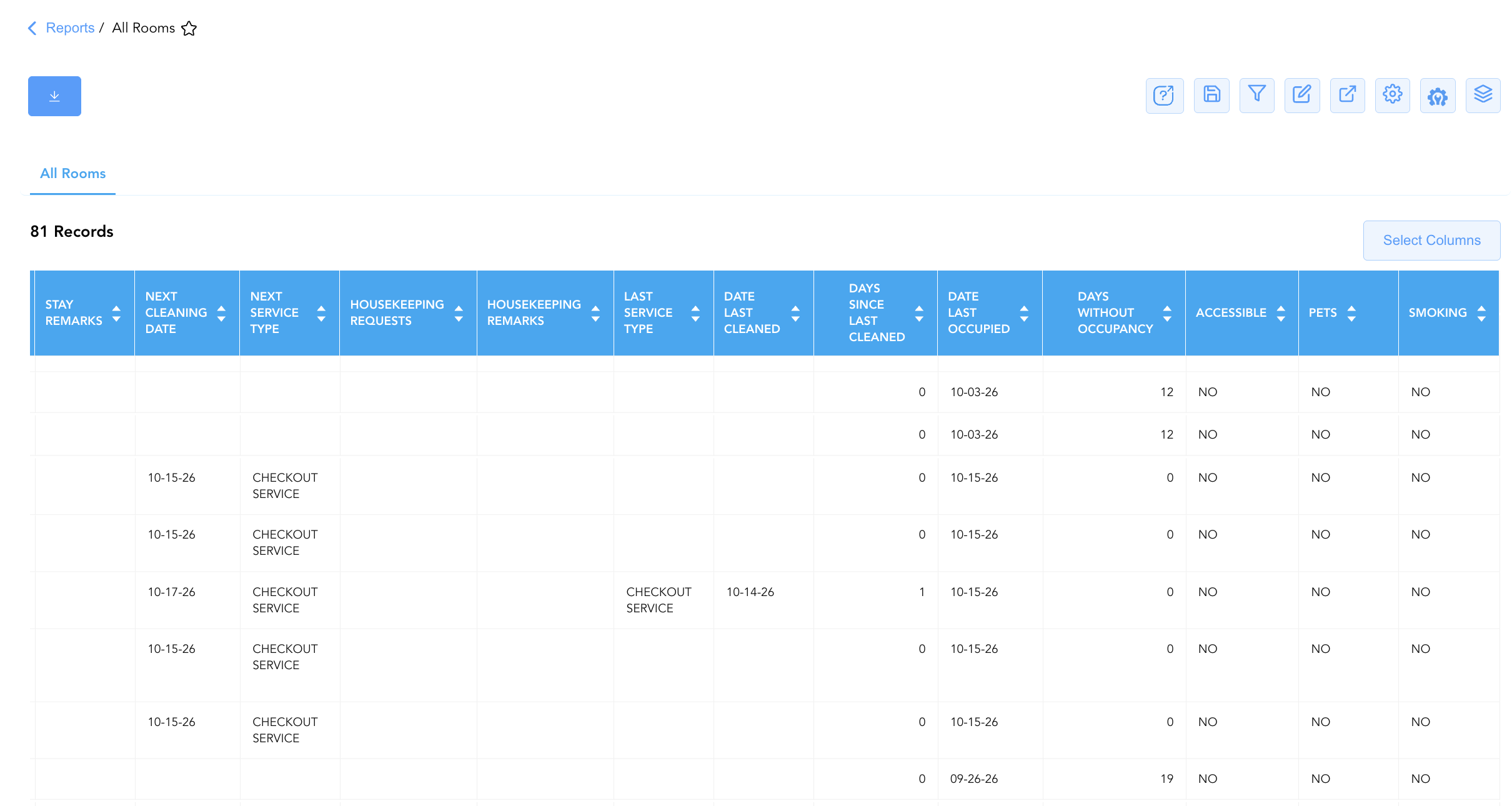
Data Dictionary (Dynamic View Columns)
Customize your default view using the Configure (⚙️) icon on the report page. Below is the full data dictionary representing all 24 columns available in this report:
|
Column Name |
Description |
Data Source / System Mapping |
Includes Taxes & Fees? |
|
Room Number |
Physical guest room number assigned on property (e.g., |
PMS > Physical Room ID |
N/A |
|
ROOM AREA |
Numerical designation for physical building section or floor zone. |
PMS > Room Area Zone |
N/A |
|
Room Type |
Alphanumeric code representing the room category (e.g., |
PMS > Room Category Code |
N/A |
|
Stay Remarks |
Free-text operational remarks attached to the active reservation. |
Reservation System > Stay Remarks |
N/A |
|
Housekeeping Remarks |
Free-text handling instructions for housekeeping staff. |
Housekeeping Engine > Remarks |
N/A |
|
Occupancy Status |
Real-time physical occupancy state (e.g., |
PMS Inventory Engine > Occupancy Flag |
N/A |
|
Housekeeping Status |
Real-time physical cleanliness state (e.g., |
Housekeeping Engine > Cleanliness Status |
N/A |
|
Maintenance Status |
Out-of-order or out-of-service maintenance flag (e.g., |
Engineering / Maintenance > OOO Flag |
N/A |
|
Housekeeping Requests |
Specific guest-requested housekeeping amenities or service times. |
Guest Preferences > HK Requests |
N/A |
|
Date Last Occupied |
Most recent calendar date the room was inhabited by a guest. |
PMS Inventory Audit > Last Occupied Date |
N/A |
|
Days Without Occupancy |
Cumulative count of physical days the room has remained vacant. |
Calculated: $\text{Current Date} - \text{Date Last Occupied}$ |
N/A |
|
Date Last Cleaned |
Calendar date when the room was last serviced or cleaned by an attendant. |
Housekeeping Audit > Last Cleaned Date |
N/A |
|
Days Since Last Cleaned |
Cumulative count of days elapsed since the last recorded room clean. |
Calculated: Current Date - Date Last Cleaned |
N/A |
|
Last Service Type |
Classification of the most recent service performed (e.g., |
Housekeeping Engine > Last Task Type |
N/A |
|
NEXT CLEANING DATE |
Scheduled calendar date for the next required room service. |
Housekeeping Schedule > Next Clean Date |
N/A |
|
NEXT SERVICE TYPE |
Scheduled housekeeping service type (e.g., |
Housekeeping Schedule > Task Type |
N/A |
|
Pets |
Physical room policy flag indicating pet-friendly designation (e.g., |
PMS Room Setup > Pet Policy Flag |
N/A |
|
Smoking |
Physical room policy flag indicating smoking designation (e.g., |
PMS Room Setup > Smoking Policy Flag |
N/A |
|
Accessible |
Physical room feature flag indicating ADA mobility/communication accessibility (e.g., |
PMS Room Setup > ADA Accessibility Flag |
N/A |
|
Guest Name |
Combined full name of the registered primary guest occupant (Blank if vacant). |
Guest Profile > Full Name |
N/A |
|
Check In Date |
Actual or scheduled arrival date of the active reservation. |
Reservation System > Arrival Date |
N/A |
|
Check Out Date |
Scheduled departure date of the active reservation. |
Reservation System > Departure Date |
N/A |
|
Adults |
Registered count of adult occupants sharing the room. |
Reservation System > Adult Count |
N/A |
|
Children |
Registered count of child occupants sharing the room. |
Reservation System > Child Count |
N/A |
Customization & Platform Features
User & Property Preferences
-
Personal Preference: Tailor your individual view by hiding or dragging columns. Your preferences save automatically for future sessions.
-
Property Defaults: System Admins can configure standard default layouts across all property users to streamline operational reporting. To maximize audit efficiency, group the columns into the below logical blocks:
-
Physical Locators & Core Room Status (Cols 1–6):
Room Number|Room Type|Occupancy Status|Housekeeping Status|Maintenance Status|ROOM AREA -
Current Guest & Stay Window (Cols 7–12):
Guest Name|Check In Date|Check Out Date|Adults|Children|Stay Remarks -
Housekeeping Schedule & Cleaning Tracking (Cols 13–20):
NEXT CLEANING DATE|NEXT SERVICE TYPE|Housekeeping Requests|Housekeeping Remarks|Last Service Type|Date Last Cleaned|Days Since Last Cleaned|Date Last Occupied -
Inactivity & Physical Room Attributes (Cols 21–24):
Days Without Occupancy|Accessible|Pets|Smoking
-
Report Toolbar & Quick Actions
Use the top-right toolbar icons on the report page to manage and export your data view:
|
Icon |
Action / Feature |
Description |

|
Knowledge Article |
Opens the knowledge base article to learn how to interpret this report. |

|
Saved Views |
Saves your column filtering, sorting, and highlight preferences so you can easily reload your custom view later without reconfiguring the report. |

|
Filter |
Opens filter controls to isolate specific data within a column based on your selected criteria. |

|
Highlight |
Highlights column values in a designated color based on selected conditions. |

|
Export |
Exports and downloads the report in various formats (Excel, PDF, CSV) for offline analysis or printing. |

|
Configure |
Opens column selection controls to toggle visibility, reorder columns, or hide rows with all zeros. |

|
Additional Configuration |
Provides advanced report configuration and display formatting options to customize data presentation. |

|
Group By |
Summarize and group report data dynamically in real time. |
Interactive Visualizations & Grouping Controls
-
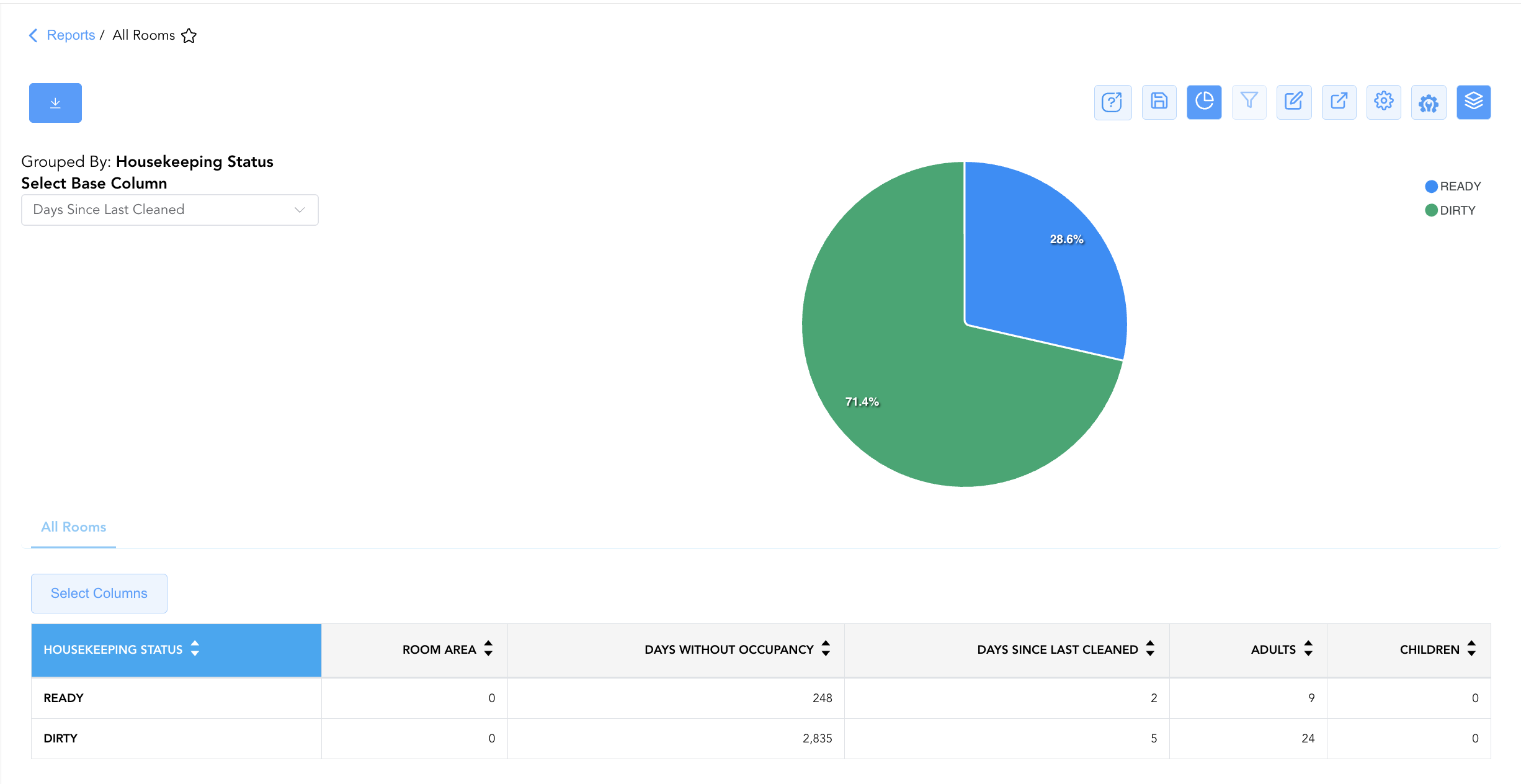
Group By & Pie Chart Visualization: The All Rooms report features an interactive pie chart to help analyze housekeeping status distribution and room maintenance metrics across property inventory. Users can group room records on the fly by Housekeeping Status to evaluate floor-by-floor cleaning progress and physical inventory distribution. By selecting a metric from the Select Base Column dropdown menu—such as Room Area, Days Without Occupancy, Days Since Last Cleaned, Adults, or Children—the chart dynamically renders percentage share breakdowns accompanied by an interactive color-coded legend.
Advanced Controls
-
Daily Housekeeping Board Exporting: Schedule an automated morning PDF/Excel export (e.g., 07:00) to generate daily room cleaning assignment sheets for housekeeping attendants.
-
Filtering: Filter data by
Occupancy Status = PENDING DEPARTUREandHousekeeping Status = DIRTYto prioritize rooms requiring immediate turnover for afternoon check-ins. -
Highlighting (Conditional Formatting): Apply custom rules to automatically highlight out-of-order rooms (
Maintenance Status = OOO), long-idle vacant rooms (Days Without Occupancy > 5), or ADA accessible rooms (Accessible = YES).
🔗 Related Reports & Next Steps
Within 🧹 Rooms & Facilities & 🛏️ Room Status:
-
Room Detail – Master room-by-room physical status, housekeeping, and maintenance audit matrix.
-
Maintenance Activity – Comprehensive maintenance log tracking rooms removed from service for repair.
-
Stay Request Details – Task dispatch report tracking guest housekeeping and maintenance amenity requests.
Cross-Pillar Deep Dives:
-
🛎️ Front Desk & Guest Services: Cross-reference room readiness (
Housekeeping Status = READY) with Arrivals List to assign clean rooms to arriving guests. -
🛠️ Facilities Maintenance: Coordinate out-of-order room flags (
Maintenance Status = OOO) with Maintenance Activity to restore sellable inventory.