
Report Description: The Arrivals Report shows all arriving reservations for a specified date, and all relevant operational details related to these reservations.
Date Range: One day (can show up to 365 days in the future)
Available Report Columns for Following Sections:
|
Column Name |
Column Description |
Amount Includes Taxes and Fees |
Calculation |
|
Guest Name |
Primary guest name on the reservation |
Not Applicable |
Not Applicable |
|
Additional Guests |
Secondary guest name, if provided |
Not Applicable |
Not Applicable |
|
Arrival Date |
Arrival date on the reservation |
Not Applicable |
Not Applicable |
|
Departure Date |
Departure date on the reservation |
Not Applicable |
Not Applicable |
|
Confirmation Number |
Confirmation number of the reservation |
Not Applicable |
Not Applicable |
|
Rate Plan |
Rate plan code on the reservation |
Not Applicable |
Not Applicable |
|
Adults |
Number of adult guests associated with the reservation |
Not Applicable |
Not Applicable |
|
Children |
Number of child guests associated with the reservation |
Not Applicable |
Not Applicable |
|
Average Room Rate |
Average room rate across the reservation stay dates
*Includes taxes if Tax Inclusive rates
*Excludes taxes if Tax Exclusive rates |
YES* |
=sum(total room revenue) / (number of nights) |
|
Average Room Taxes |
Provided if rates are Tax Exclusive
Example - In US, Average Room Rate is $100 and taxes are $25, the guest will pay $125 total and see it broken between room and tax |
YES |
=sum(average room rate) + (taxes) |
|
Fee |
Fee amount listed on the reservation, if applicable |
Not Applicable |
Not Applicable |
|
Loyalty Tier |
Loyalty tier name on the reservation, if applicable |
Not Applicable |
Not Applicable |
|
Add On |
Add-ons listed on the reservation, if applicable |
Not Applicable |
Not Applicable |
|
Requests |
Any remarks on the reservation (pulling from Booking Remarks in Stay tab) |
Not Applicable |
Not Applicable |
|
Arrival Time |
Arrival time listed on the reservation, if added |
Not Applicable |
Not Applicable |
|
Digital Check-In |
Indicates if the reservation is marked for digital check-in |
Not Applicable |
Not Applicable |
|
Digital Key |
Indicates if the reservation has Digital Key |
Not Applicable |
Not Applicable |
|
Room Type |
Room type code of the reservation (example - KNGN) |
Not Applicable |
Not Applicable |
|
Room Number |
Room number assigned on the reservation |
Not Applicable |
Not Applicable |
|
Connecting Room |
Indicates if the room is a connected room |
Not Applicable |
Not Applicable |
|
Guarantee Type |
Guarantee type on the reservation (example - Property Guarantee, Credit Card) |
Not Applicable |
Not Applicable |
|
VIP Guest |
Indicates if this is a VIP Guest (Located in Guest Details) |
Not Applicable |
Not Applicable |
|
Guest Tier |
Shows the tier of the guest, if applicable |
Not Applicable |
Not Applicable |
|
Housekeeping Remarks |
Indicates if there are housekeeping remarks on the reservation (Located in Stay tab) |
Not Applicable |
Not Applicable |
|
Virtual CC |
Indicates if the reservation has a virtual credit card as a guarantee type. |
Not Applicable |
Not Applicable |
|
Booking Remarks |
Remarks or notes entered at the time of booking |
Not Applicable |
Not Applicable |
|
Stay Remarks |
Remarks or notes related to the guest's stay |
Not Applicable |
Not Applicable |
|
Group Remarks |
Remarks or notes related to the group |
Not Applicable |
Not Applicable |
|
Linked Reservations |
Indicates if the reservation has other reservations associated |
Not Applicable |
Not Applicable |
|
Stay Requests |
Any special requests related to the guest's stay |
Not Applicable |
Not Applicable |
|
Room Preferences |
Any specific room preferences requested by the guest |
Not Applicable |
Not Applicable |
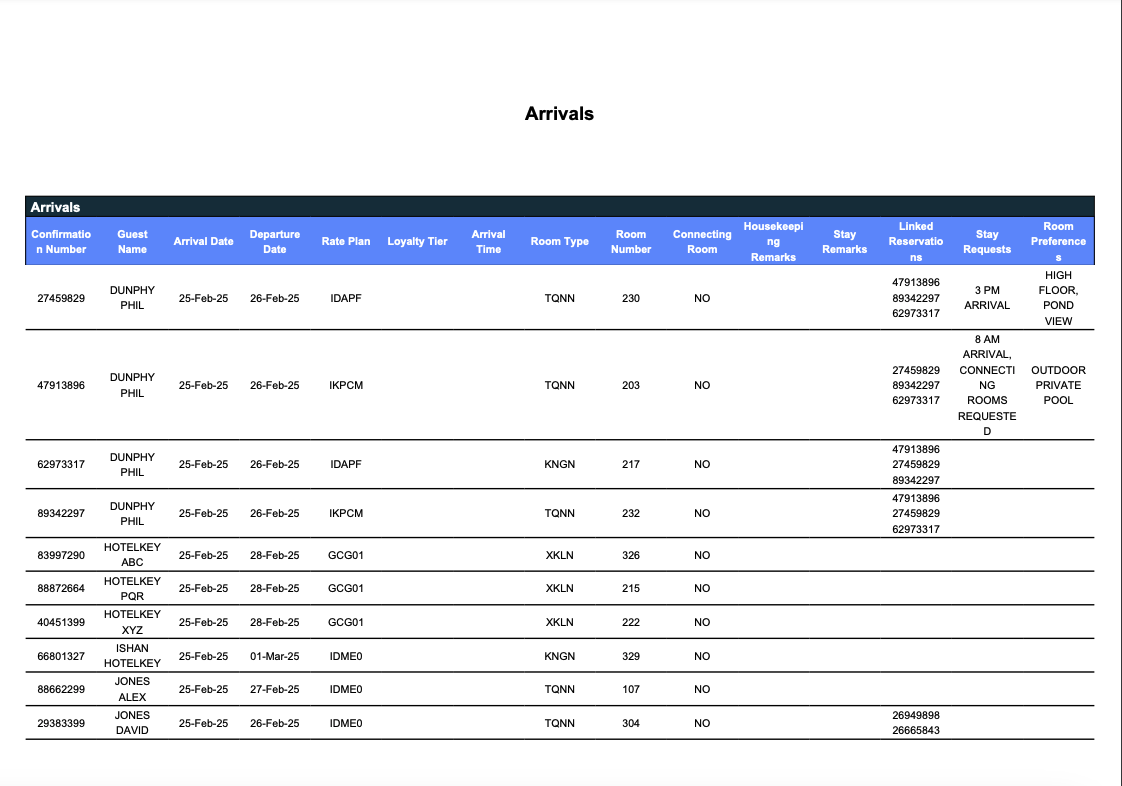
Misc Report Information:
Available Features:
-
Export: ability to download and save the file into an alternate format.
-
Filter: filter a range of data based on criteria defined by the user.
-
Highlight: also known as conditional formatting is the ability to highlight certain values making them easier to identify.
Available Configuration:
-
User Preferences: allows the user to customize their report view by repositioning or removing columns.
-
Property Preferences: allows the property to customize the report view for all users by repositioning or removing columns.