
Clerk Shift Report Overview
Parent Hub: ⚙️ System & Administration Reports
Category: 👤 User Activity Reports
Target Roles: Front Office Managers, Night Auditors, General Cashiers, Hotel Controllers, Operations Supervisors, General Managers
Key Value: Comprehensive multi-shift cash drawer balancing, tender reconciliation across cash and credit cards, cash drop tracking, audit of cashier paid-outs and currency conversions, supervisor shift closure verification, and cash over/short variance management.
Executive Summary
The Clerk Shift Report is a critical financial control, shift reconciliation, and cashiering accountability document within the 👤 User Activity Reports category of the ⚙️ System & Administration Reports hub. Designed to provide front office management, night audit, and accounting teams with full visibility into cashiering operations, it aggregates payment collections, tender adjustments, cash drops, paid-out disbursements, shift opening/closing milestones, user-level payment breakdowns, and foreign currency exchange transactions across specified date windows.
-
By organizing operational cashiering data into 7 defined report sections: Payment Information, Deposit Drop Information, Summary, Shift Details, Paid Out Summary, Summary Payment By User, and Currency Exchange Summary, this report enables front office leaders to evaluate property-wide tender collections (
Payment Information), deposit drop tracking (Deposit Drop Information), overall shift balancing and cash variances (Summary), cashier shift active hours (Shift Details), cash disbursement audit trails (Paid Out Summary), user-specific payment totals (Summary Payment By User), and foreign currency conversions (Currency Exchange Summary). It correlates tender types (Payment Type), transaction amounts (Actual,Adjusted,Net Today,Amount,Converted Value), staff credentials (Username,Closed By), shift operating timestamps (Start Time,End Time,Time), expense categories (Expense Type), and currency conversion parameters (Type,Converted From,Conversion Rate) to ensure zero unexplained variance during night audit drawer closures.
Key Capabilities
-
Seven-Section Multi-Tier Cashiering Audit: Consolidates high-level payment category totals, deposit drops, balancing summaries, staff shift intervals, cash disbursements, individual clerk production, and currency exchanges into an integrated audit structure.
-
Cash Over / Short Variance Detection: Directly reconciles total cash drops and calculated deposits against drawer balances in Section 3 (
Summary) to immediately flag cash overages or shortages (CASH OVER / SHORT). -
User-Level Payment Method Disaggregation: Itemizes every payment and refund transaction posted by each clerk (
Username) across specific payment methods (Payment Type, e.g., Cash, Visa, MasterCard, Amex, Direct Bill) in Section 6. -
Shift Duration & Closure Verification: Tracks exact opening timestamps (
Start Time), closing timestamps (End Time), and supervisory approval credentials (Closed By) in Section 4 to maintain strict front office shift protocols. -
Paid-Out & Currency Exchange Governance: Provides forensic logs for front desk cash paid-outs (
Paid Out Summary) and foreign currency exchanges (Currency Exchange Summary), capturing source currencies, applied exchange rates, and converted local currency totals.
Report Views & Functional Breakdown
The Clerk Shift Report presents cashiering, shift balancing, and transaction data across 7 defined sections:
┌────────────────────────────────────────────────────────────────────────┐
│                         CLERK SHIFT REPORT                             │
├────────────────────────────────────────────────────────────────────────┤
│                       7 Defined Report Sections                        │
├──────────────────────┬──────────────────────┬──────────────────────────┤
│ 1. Payment           │ 2. Deposit Drop      │ 3. Summary               │
│    Information       │    Information       │    (Over/Short Audit)    │
├──────────────────────┼──────────────────────┼──────────────────────────┤
│ 4. Shift Details     │ 5. Paid Out Summary  │ 6. Summary Payment       │
│    (Active Hours)    │    (Disbursements)   │    By User (Clerk Prod.) │
├──────────────────────┴──────────────────────┴──────────────────────────┤
│ 7. Currency Exchange Summary (Foreign Exchange Log)                   │
└────────────────────────────────────────────────────────────────────────┘
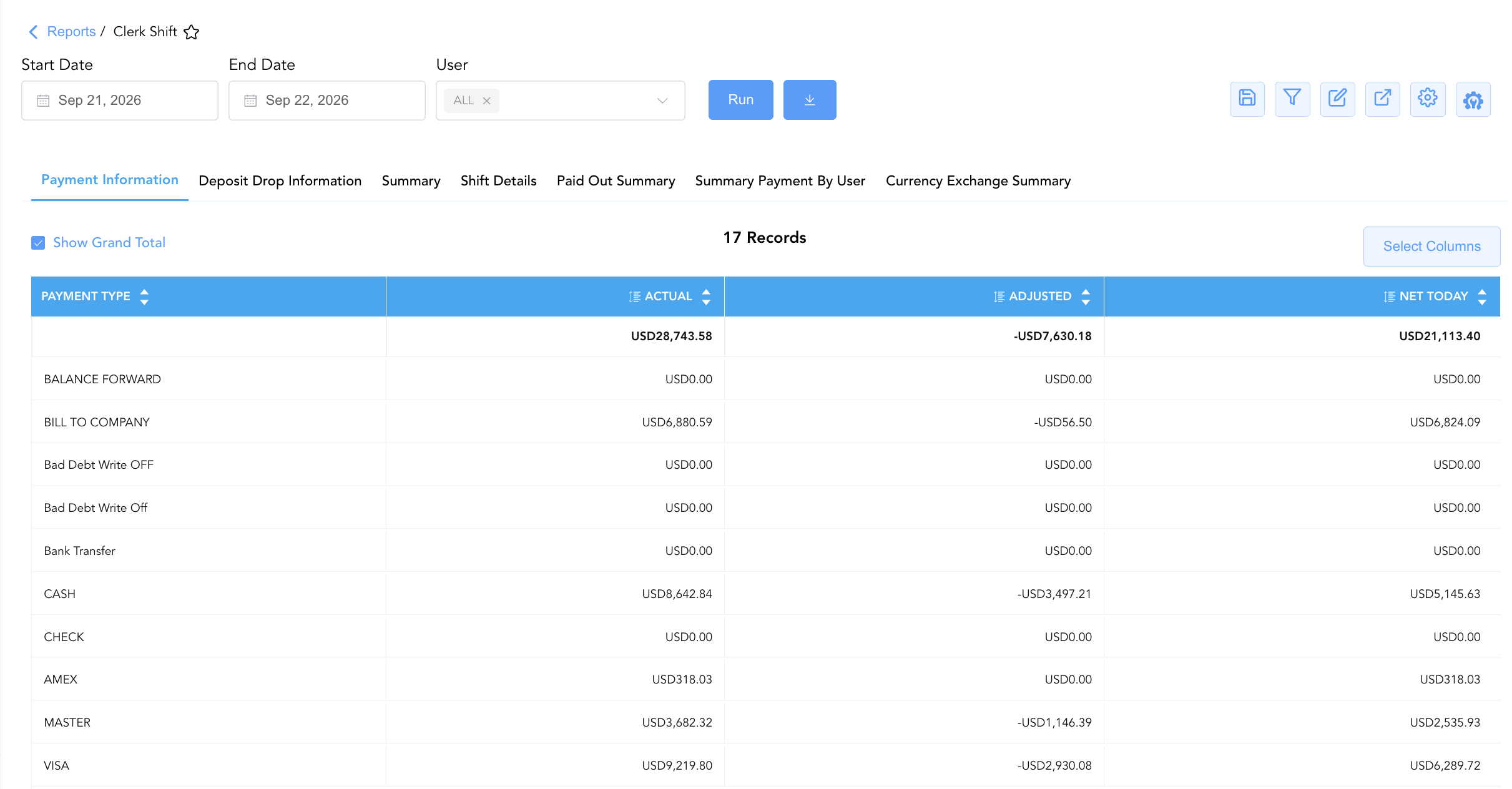
1. Payment Information Section (Tender Ledger Totals)
Monitors property-wide financial collections disaggregated by tender type and ledger classification, comparing gross actual collections, adjustments/refunds, and net intake.
-
Primary Use: Evaluating overall property-level payment intake, reviewing ledger adjustments, and verifying credit card and direct billing totals.
-
Key Metrics: Payment Type, Actual, Adjusted, Net Today.
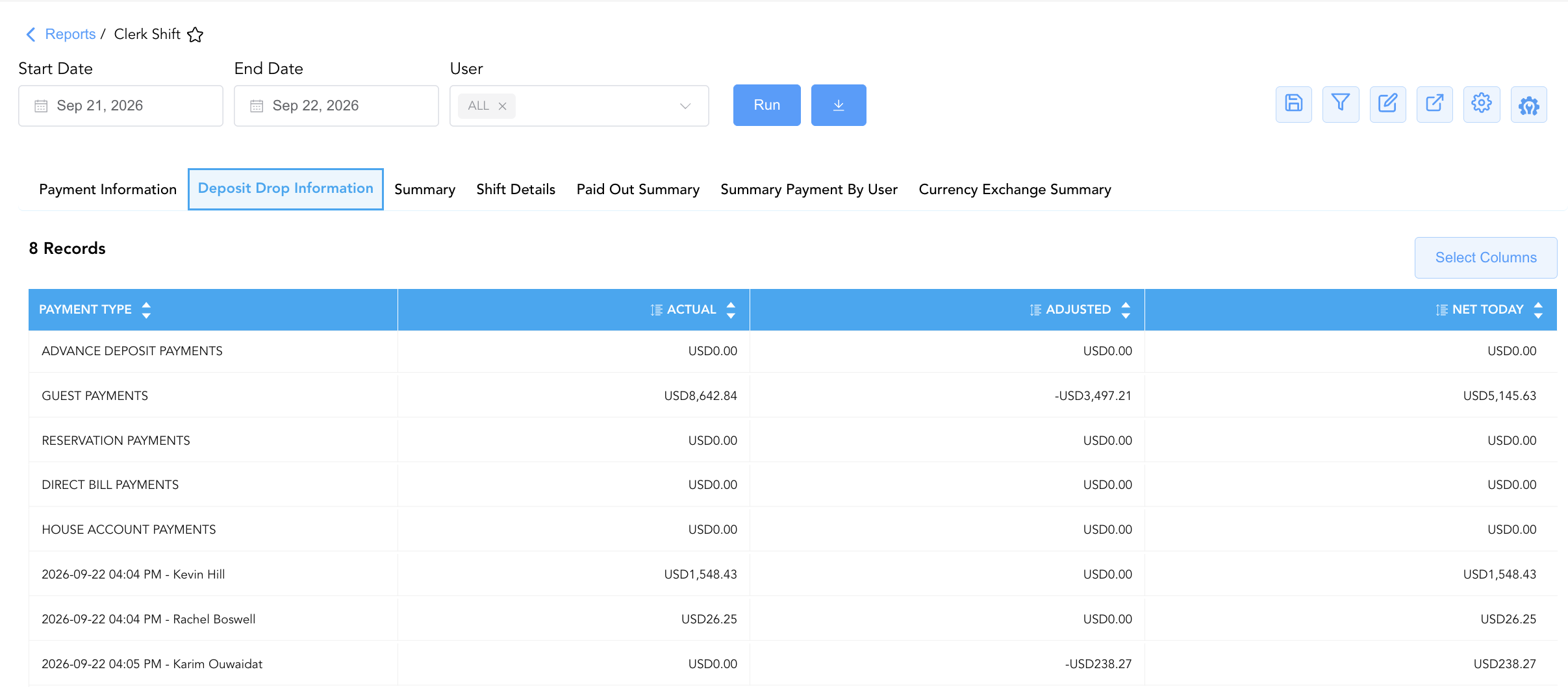
2. Deposit Drop Information Section (Deposit Intake & Batch Drops)
Tracks advance deposit payments, in-house guest payments, reservation deposits, and timestamped cashier envelope drops.
-
Primary Use: Verifying scheduled deposit drop amounts against physical drop safe envelopes prepared by front desk clerks.
-
Key Metrics: Payment Type, Actual, Adjusted, Net Today.
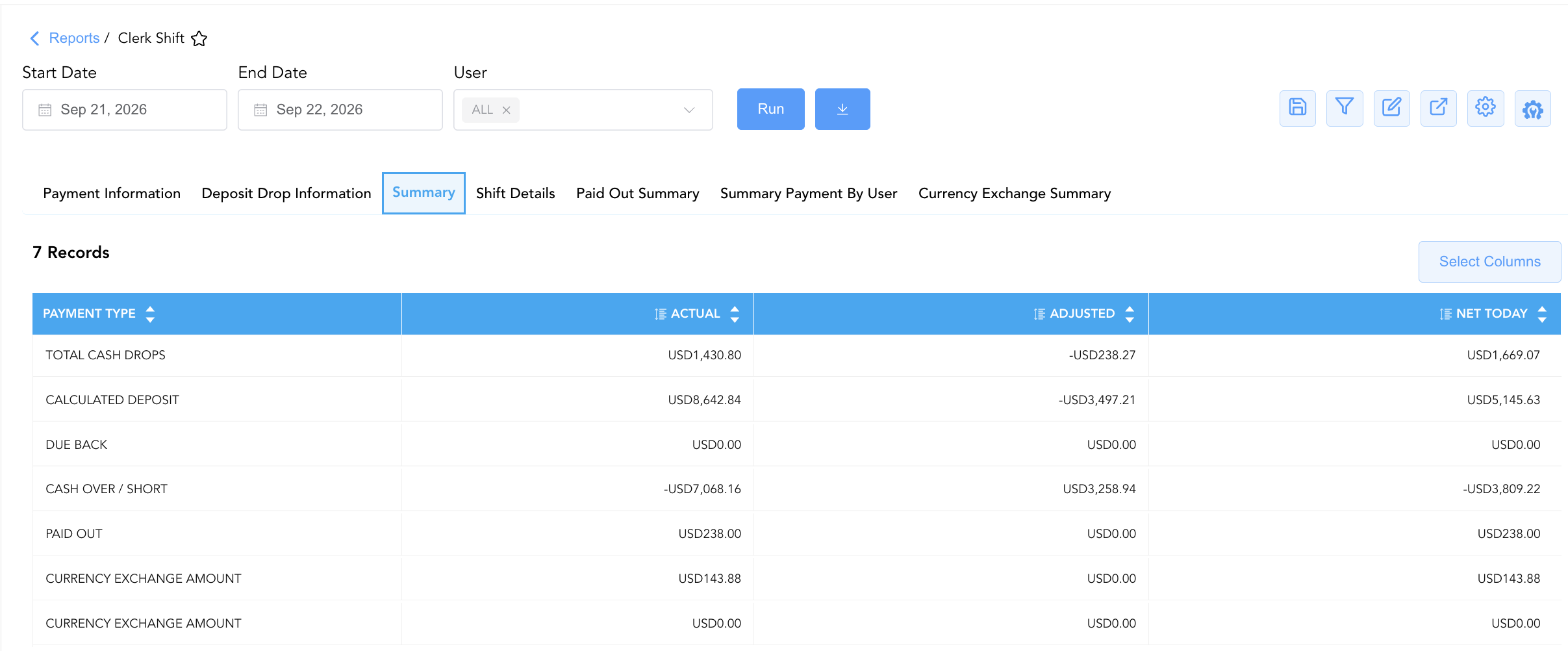
3. Summary Section (Drawer Balancing & Over/Short Audit)
Reconciles total cash drops, calculated system deposits, due backs, paid-outs, and currency exchanges to establish the net cash variance (CASH OVER / SHORT).
-
Primary Use: Performing daily cash drawer balancing, identifying cash shortages or overages, and verifying drop safe reconciliation during night audit.
-
Key Metrics: Payment Type, Actual, Adjusted, Net Today.
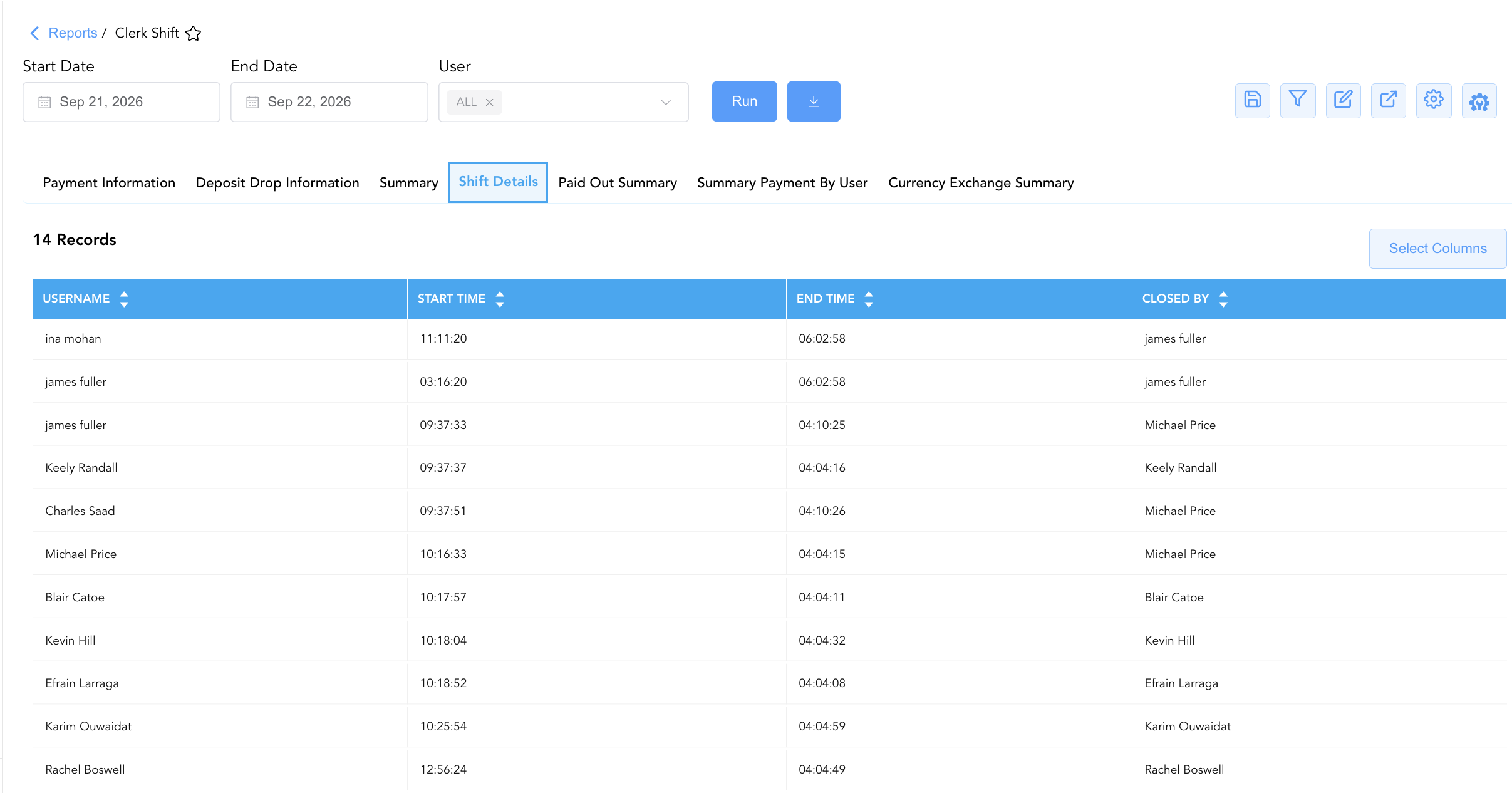
4. Shift Details Section (Shift Operating Intervals)
Logs operating shift intervals for all cashiers active during the reporting period, capturing drawer opening times, drawer closing times, and closing supervisors.
-
Primary Use: Auditing cashier work hours, verifying that all clerks closed their shifts before night audit rollover, and tracking supervisory sign-offs.
-
Key Metrics: Username, Start Time, End Time, Closed By.
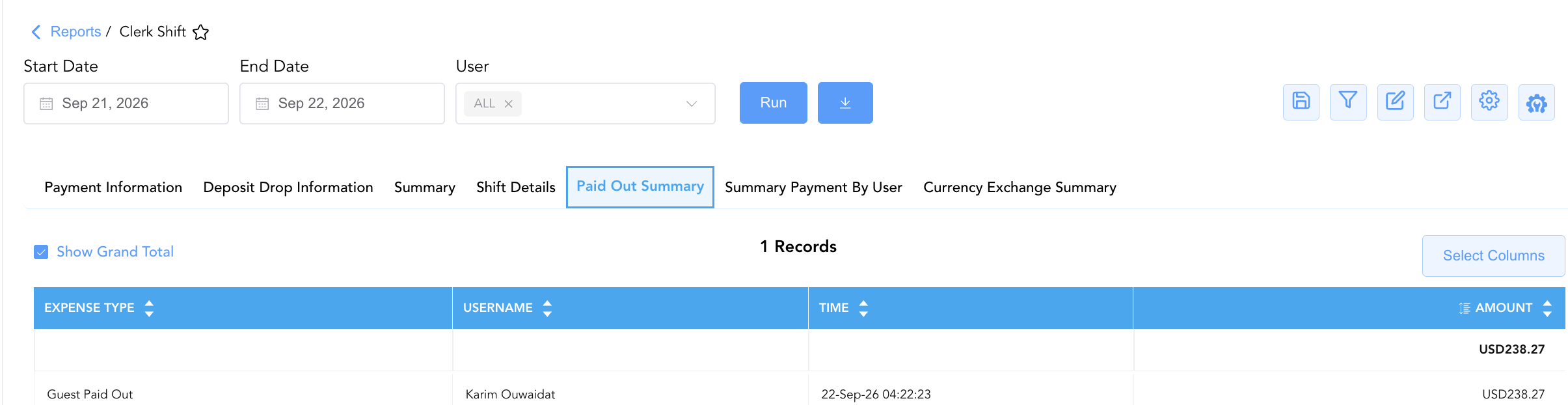
5. Paid Out Summary Section (Cash Disbursements)
Itemizes all cash disbursements paid out from front office drawers to guests or staff, capturing expense types, amounts, timestamps, and operating clerks.
-
Primary Use: Auditing front desk cash disbursements (such as guest paid-outs, dry cleaning payments, or emergency petty cash expenses) against receipts.
-
Key Metrics: Expense Type, Amount, Time, Username.
6. Summary Payment By User Section (Individual Clerk Production)
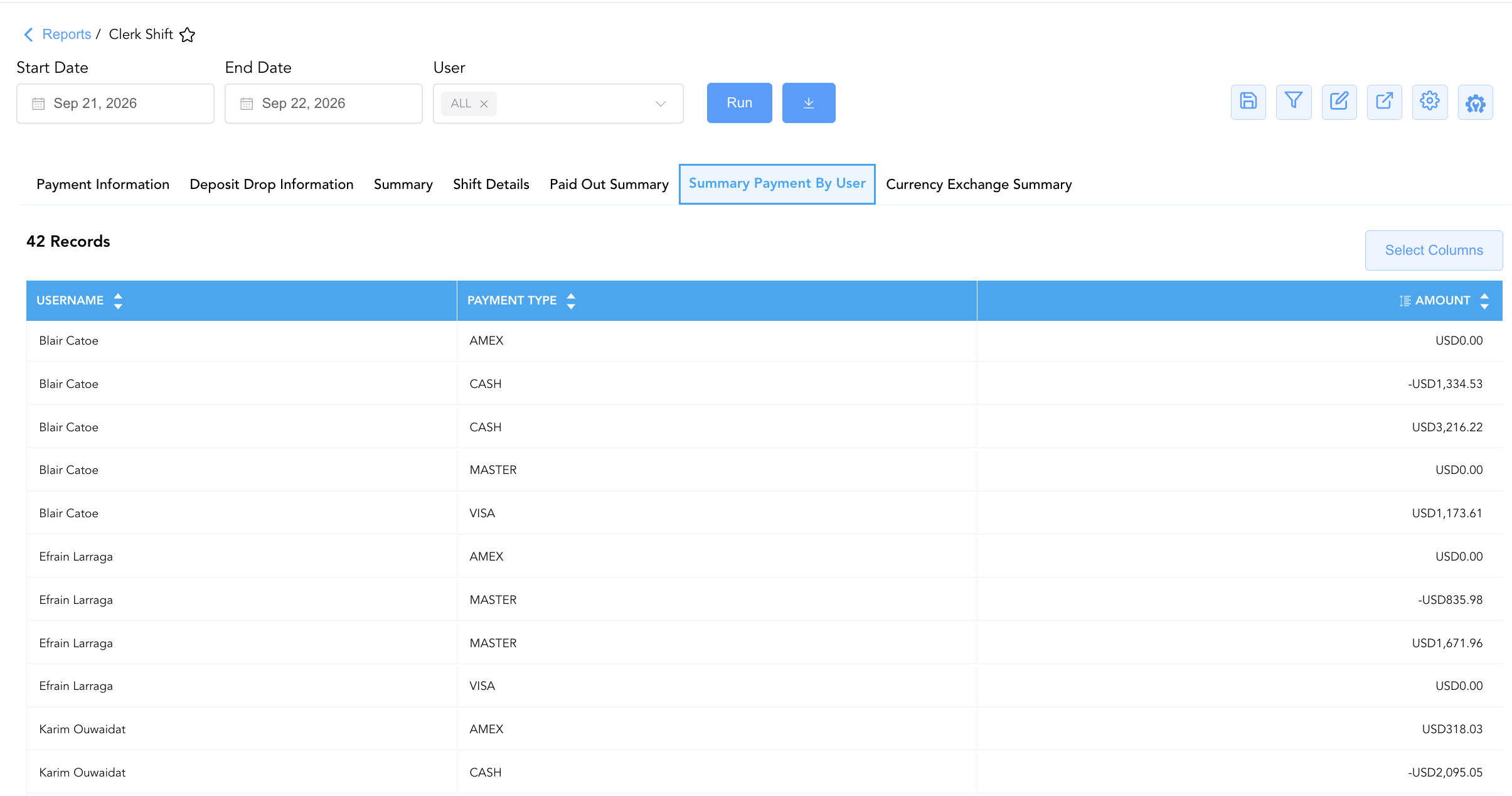
Disaggregates transaction volumes and monetary amounts by individual cashier and specific payment method.
-
Primary Use: Auditing individual cashier performance, cross-checking credit card transaction batches per clerk, and balancing individual cashier cash drops.
-
Key Metrics: Username, Payment Type, Amount.
7. Currency Exchange Summary Section (Foreign Exchange Log)
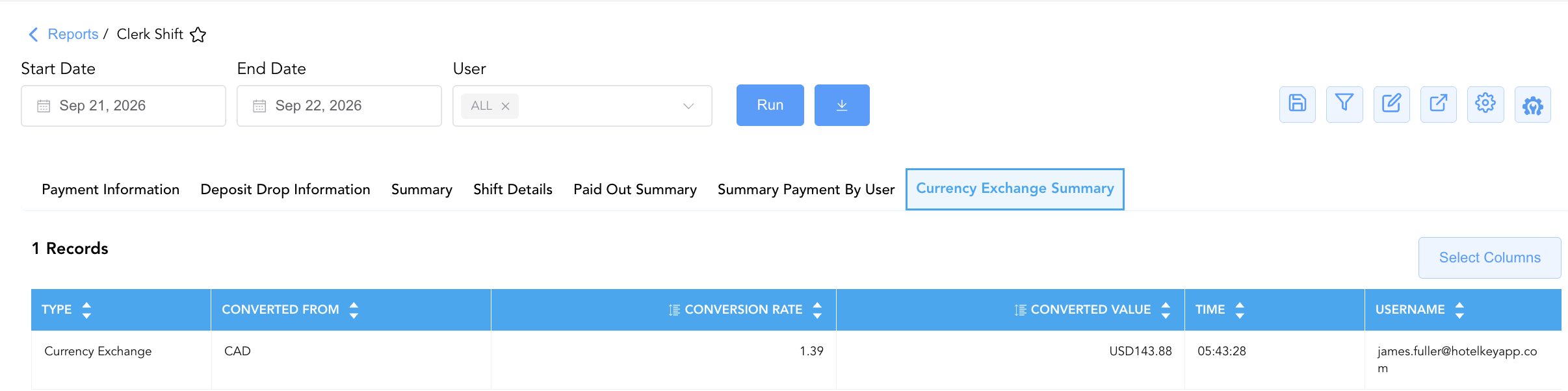
Details foreign currency exchange services provided to guests at the front desk, capturing transaction categories, foreign currency codes, exchange rates, converted local currency amounts, timestamps, and clerk credentials.
-
Primary Use: Verifying foreign currency conversion rates, auditing foreign currency drawer envelopes, and reconciling general ledger exchange gains/losses.
-
Key Metrics: Type, Converted From, Conversion Rate, Converted Value, Time, Username.
Data Dictionary (Dynamic View Columns)
Customize your default view using the Configure (⚙️) icon on the report page. Below is the full data dictionary representing all 15 exact dynamic columns available across the 7 report sections, sorted in alphabetical order by column name:
💰 Financial Posting Logic: Figures in
Actual,Adjusted,Net Today,Amount, andConverted Valuereflect monetary values posted to cashier drawers, master folios, or drop safes. In Sections 1, 2, and 3,Net Todayis dynamically calculated as Actual + Adjusted. In Section 3,CASH OVER / SHORTrepresents the variance between physical cash drops and calculated system expectations.
|
Column Name |
Section Applicability |
Description |
Data Source / System Mapping |
Includes Taxes & Fees? |
|
Actual |
Sections 1, 2, 3 |
Gross or unadjusted payment, deposit, or cash total recorded during the shift window. |
Front Office Ledger > Gross Transactions |
🟢 Yes |
|
Adjusted |
Sections 1, 2, 3 |
Monetary sum of corrections, refunds, voids, or adjustments applied to the line item during the shift. |
Front Office Ledger > Adjustments / Refunds |
🟢 Yes |
|
Amount |
Sections 5, 6 |
Monetary transaction value posted for an individual paid-out expense or clerk payment tender. |
Cashier Drawer Engine > Transaction Value |
🟢 Yes |
|
Closed By |
Section 4 |
Username or full name of the manager, supervisor, or clerk who officially performed the shift closeout. |
User Security Master > Approver Username |
N/A |
|
Conversion Rate |
Section 7 |
Foreign currency exchange rate applied to convert the foreign tender into local operating currency. |
Financial Setup > FX Exchange Rate |
N/A |
|
Converted From |
Section 7 |
Source foreign currency code being tendered by the guest (e.g., |
Currency Master > Source Currency Code |
N/A |
|
Converted Value |
Section 7 |
Resulting monetary value realized in the local operating currency after applying the exchange rate. |
Calculated: FX Net Local Tender |
🟢 Yes |
|
End Time |
Section 4 |
Time of day when the clerk's operating shift was officially closed and finalized. |
Shift Management Engine > Close Timestamp |
N/A |
|
Expense Type |
Section 5 |
Operational classification of the cash paid-out transaction (e.g., |
Cashier Setup > Expense Classification |
N/A |
|
Net Today |
Sections 1, 2, 3 |
Net total monetary value realized during the shift (Actual + Adjusted). |
Calculated: Net Line Tender |
🟢 Yes |
|
Payment Type |
Sections 1, 2, 3, 6 |
Tender method, ledger category, deposit classification, or balancing line item (e.g., |
Payment Gateway / Cashier Setup |
🟢 Yes |
|
Start Time |
Section 4 |
Time of day when the clerk officially opened their operating shift drawer. |
Shift Management Engine > Open Timestamp |
N/A |
|
Time |
Sections 5, 7 |
Exact timestamp when the paid-out expense or foreign currency exchange transaction was posted. |
Audit Trail > Transaction Time |
N/A |
|
Type |
Section 7 |
Functional category of the currency exchange or financial service transaction (e.g., |
Cashier Master > Transaction Type |
N/A |
|
Username |
Sections 4, 5, 6, 7 |
Full name, login ID, or email address of the clerk or cashier associated with the shift, payment, paid out, or exchange entry. |
User Security Master > Username |
N/A |
Customization & Platform Features
User & Property Preferences
-
Personal Preference: Tailor your individual view by hiding or dragging columns. Your preferences save automatically for future sessions.
-
Property Defaults: System Admins can configure standard default layouts across all property users to streamline operational reporting. To maximize audit efficiency, group the columns into the below logical blocks:
-
Section 1: Payment Information
-
Tender Classification & Baseline Metrics (Cols 1–2):
Payment Type|Actual -
Adjustments & Net Realized Inflow (Cols 3–4):
Adjusted|Net Today
-
-
Section 2: Deposit Drop Information
-
Payment Deposit Classification & Baseline Metrics (Cols 1–2):
Payment Type|Actual -
Adjustments & Net Deposit Inflow (Cols 3–4):
Adjusted|Net Today
-
-
Section 3: Summary
-
Reconciliation Line Item & Baseline Totals (Cols 1–2):
Payment Type|Actual -
Adjustments & Net Drawer Balances (Cols 3–4):
Adjusted|Net Today
-
-
Section 4: Shift Details
-
Clerk Accountability & Shift Lifecycle Window (Cols 1–3):
Username|Start Time|End Time -
Manager Supervision Audit (Col 4):
Closed By
-
-
Section 5: Paid Out Summary
-
Disbursement Classification & Accountability (Cols 1–2):
Expense Type|Username -
Chronological Execution Time (Col 3):
Time -
Financial Disbursement KPI (Col 4):
Amount
-
-
Section 6: Summary Payment By User
-
Clerk Accountability & Payment Tender (Cols 1–2):
Username|Payment Type -
Net Inflow Metric (Col 3):
Amount
-
-
Section 7: Currency Exchange Summary
-
Exchange Type & Source Currency (Cols 1–2):
Type|Converted From -
Conversion Parameters & Converted Inflow (Cols 3–4):
Conversion Rate|Converted Value -
Audit Timestamp & Clerk Accountability (Cols 5–6):
Time|Username
-
-
Report Toolbar & Quick Actions
Use the top-right toolbar icons on the report page to manage and export your data view:
|
Icon |
Action / Feature |
Description |

|
Knowledge Article |
Opens the knowledge base article to learn how to interpret this report. |

|
Saved Views |
Saves your column filtering, sorting, and highlight preferences so you can easily reload your custom view later without reconfiguring the report. |

|
Filter |
Opens filter controls to isolate specific data within a column based on your selected criteria. |

|
Highlight |
Highlights column values in a designated color based on selected conditions. |

|
Export |
Exports and downloads the report in various formats (Excel, PDF, CSV) for offline analysis or printing. |

|
Configure |
Opens column selection controls to toggle visibility, reorder columns, or hide rows with all zeros. |

|
Additional Configuration |
Provides advanced report configuration and display formatting options to customize data presentation. |
Advanced Controls
-
Night Audit Shift Balancing: Cross-reference Section 3 (
Summary) line items (TOTAL CASH DROPS,CALCULATED DEPOSIT,CASH OVER / SHORT) to verify that physical cash envelope drops match system calculations prior to closing the audit day. -
Paid-Out Receipt Reconciliation: Match every entry in Section 5 (
Paid Out Summary) against physical guest-signed receipts attached to cashier shift envelopes. -
Highlighting (Conditional Formatting): Apply custom rules to automatically highlight cash shortages or overages (
CASH OVER / SHORT != $0), unclosed shifts (End Time = Blank), or high-value paid-outs (Amount > $100).
🔗 Related Reports & Next Steps
Within ⚙️ System & Administration Reports & 👤 User Activity Reports:
-
Clerk Activity – Two-section cashiering audit tracking line-item payments and shift tender summaries by clerk.
-
Clerk Reservation Summary – Staff performance audit tracking booking volume, lodging revenue yield, and cancellations by clerk.
-
User Activity Report – Comprehensive security log tracking user logins, system navigation, and configuration updates.
Cross-Pillar Deep Dives:
-
💳 Financial & General Ledger: Reconcile Section 1 net payment collections (
Net Today) with Revenue Summary, Trial Balance, and Credit Card Status to ensure complete ledger balancing. -
🛎️ Front Desk & Guest Services: Cross-reference cashier paid-outs (
Paid Out Summary) and currency exchanges (Currency Exchange Summary) with Closed Folio Balance and In House Guest Balances to resolve guest billing inquiries.