
Direct Bill Aging Report Overview
Parent Hub: 💰 Finance & Accounting Reports
Category: 📬 Billing & Receivables (AR)
Target Roles: Directors of Finance & Controllers, Accounting Managers & Clerks, AR Specialists
Key Value: Provide comprehensive lifecycle visibility into city ledger debts by segmenting corporate obligations across Accounts Receivables, Billed Invoices, Applied Settlements, and Consolidated Net Summaries across granular aging buckets.
Executive Summary
The Direct Bill Aging Report is a core credit governance tool within the 📬 Billing & Receivables (AR) module. Designed for multi-stage collections management, it segments outstanding corporate direct-bill debt across its entire operational lifecycle—from unbilled guest ledger transfers to generated city ledger invoices and applied account settlements.
By categorizing accounts across highly granular aging intervals (Current, Over 7, Over 14, Over 30, Over 60, Over 90, Over 120 Days, and Over 150 Days), this report empowers controllers and accounting teams to isolate unbilled balances, track invoice payment velocity, monitor unallocated credit settlements, and evaluate overall net corporate debt exposure.
Key Capabilities
-
Four Lifecycle Perspectives: Segments debt across unbilled Accounts Receivables, generated Invoices, applied Settlements, and a net Summary By Company.
-
Granular Aging Bands: Tracks collection velocity across 8 distinct time bands (from Current through Over 150 Days).
-
Net Balance Reconciliation: Automatically offsets unapplied client credits and payments on account against open billed invoices to display true net corporate liability.
Report Views & Functional Breakdown
The Direct Bill Aging Report organizes corporate receivables across five structured operational sections:
┌────────────────────────────────────────────────────────────────────────┐
│                       DIRECT BILL AGING REPORT                         │
├──────────────────────────┬──────────────────────────┬──────────────────┤
│ 1. Accounts Receivables  │ 2. Invoices              │ 3. Settlements   │
│    (Unbilled Folios)     │    (Billed Invoices)     │    (Credit Tenders)│
├──────────────────────────┴──────────────────────────┴──────────────────┤
│ 4. Summary By Company    │ 5. Totals                                   │
│    (Net Debt Exposure)   │    (Property Macro Rollup)                     │
└──────────────────────────┴──────────────────────────┴──────────────────┘
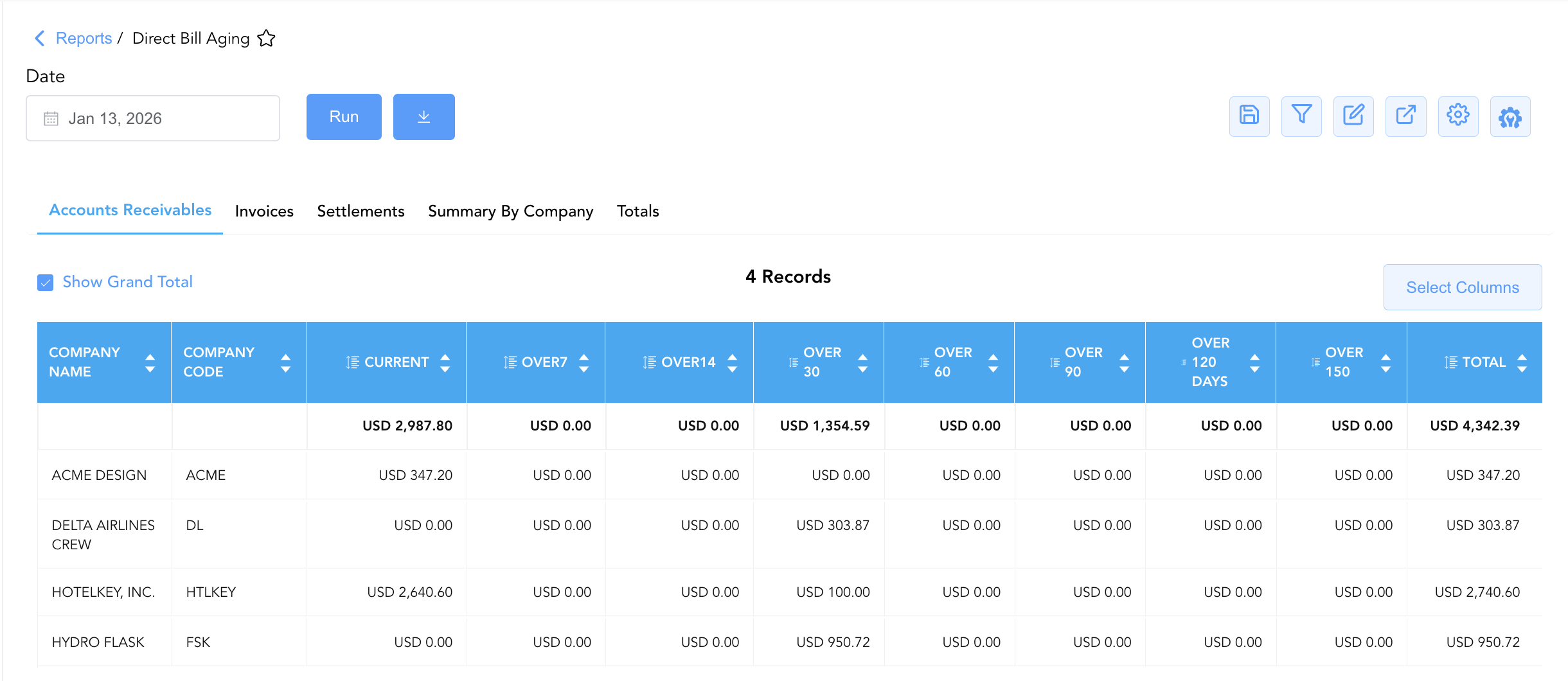
1. Accounts Receivables
Tracks direct-bill charges transferred from checked-out guest folios or house accounts that have not yet been compiled into formal city ledger invoices.
-
Primary Use: Identifying pending unbilled guest transfers and preparing batch invoice runs.
-
Key Metrics: Company Name, Company Code, Current, Over 7–150+ Days, Total Unbilled Receivables.
2. Invoices
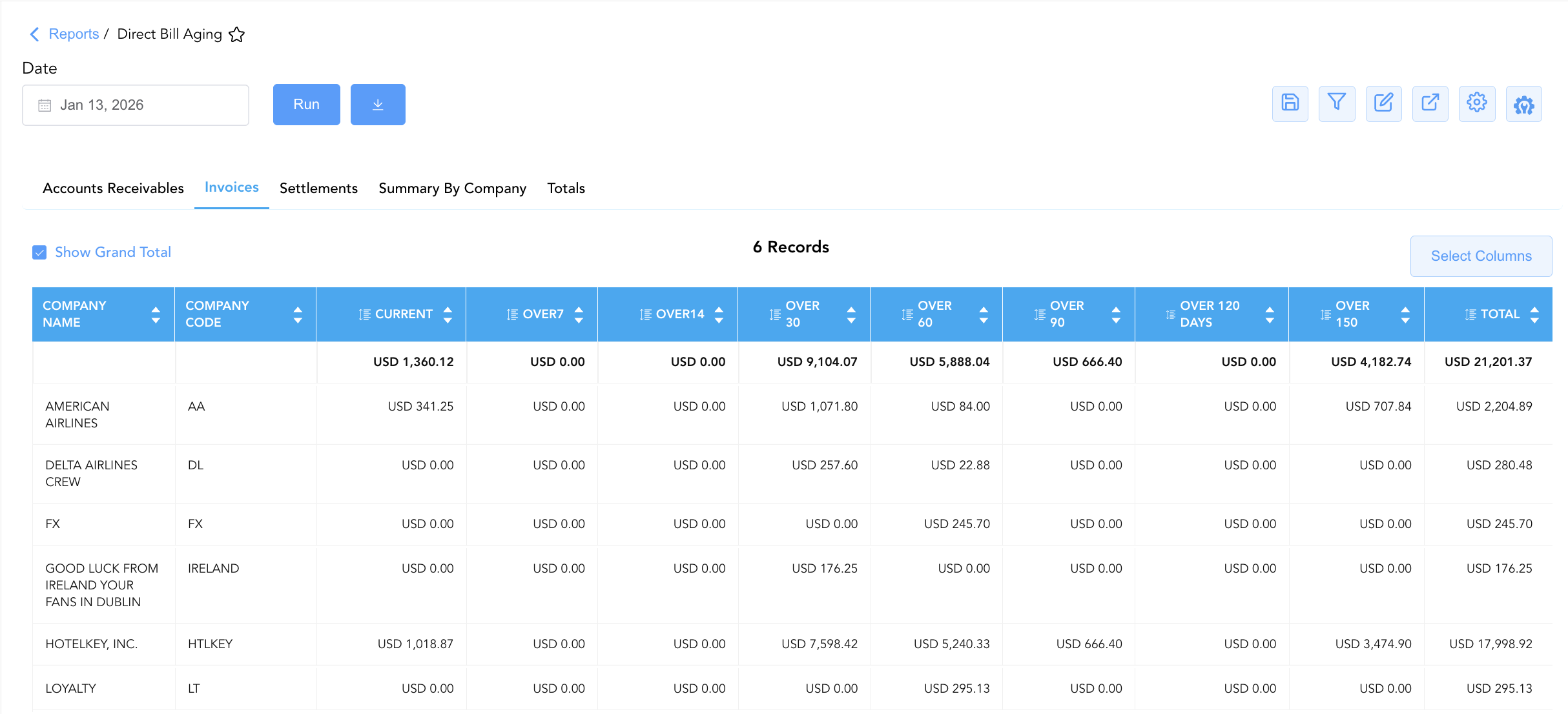
Itemizes generated city ledger invoices currently awaiting client settlement across aging buckets.
-
Primary Use: Managing active accounts receivable collections, issuing statement reminders, and auditing invoice delinquency.
-
Key Metrics: Company Name, Company Code, Current, Over 7–150+ Days, Total Billed Invoices.
3. Settlements
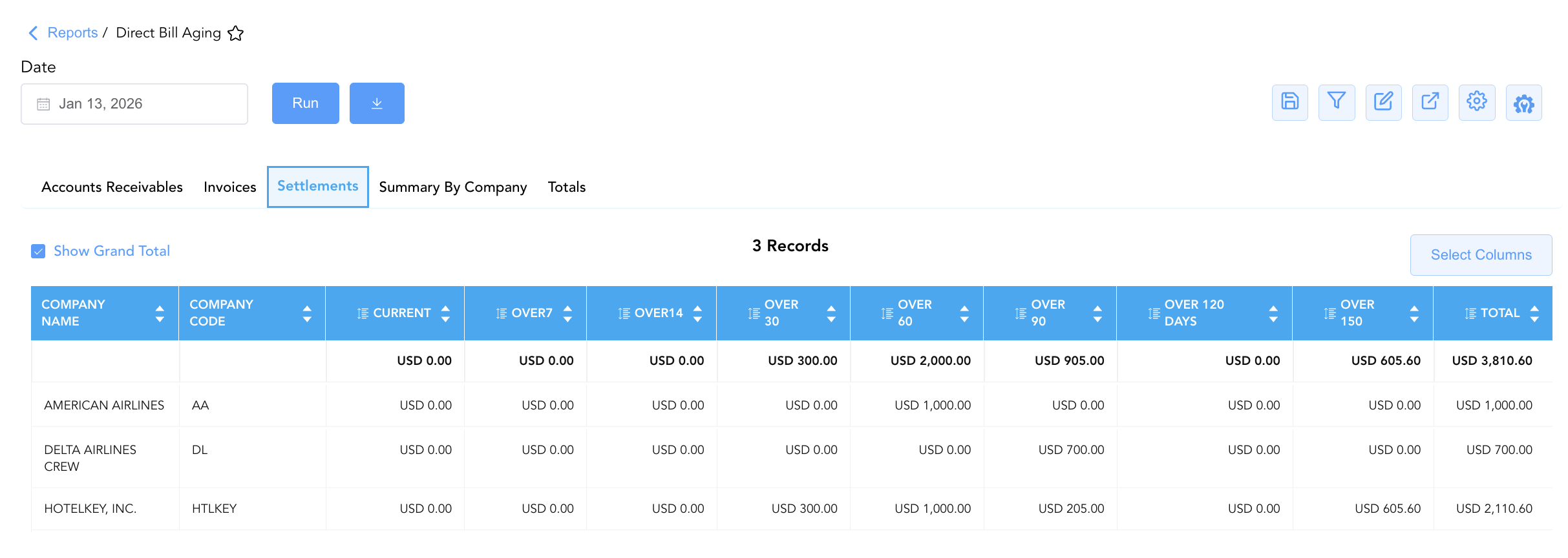
Isolates applied payments, checks, credit card deposits, and unallocated credits posted to corporate accounts.
-
Primary Use: Auditing client payments on account, verifying bank wire receipts, and matching unapplied credits against open invoices.
-
Key Metrics: Company Name, Company Code, Current, Over 7–150+ Days, Total Settlements.
4. Summary By Company
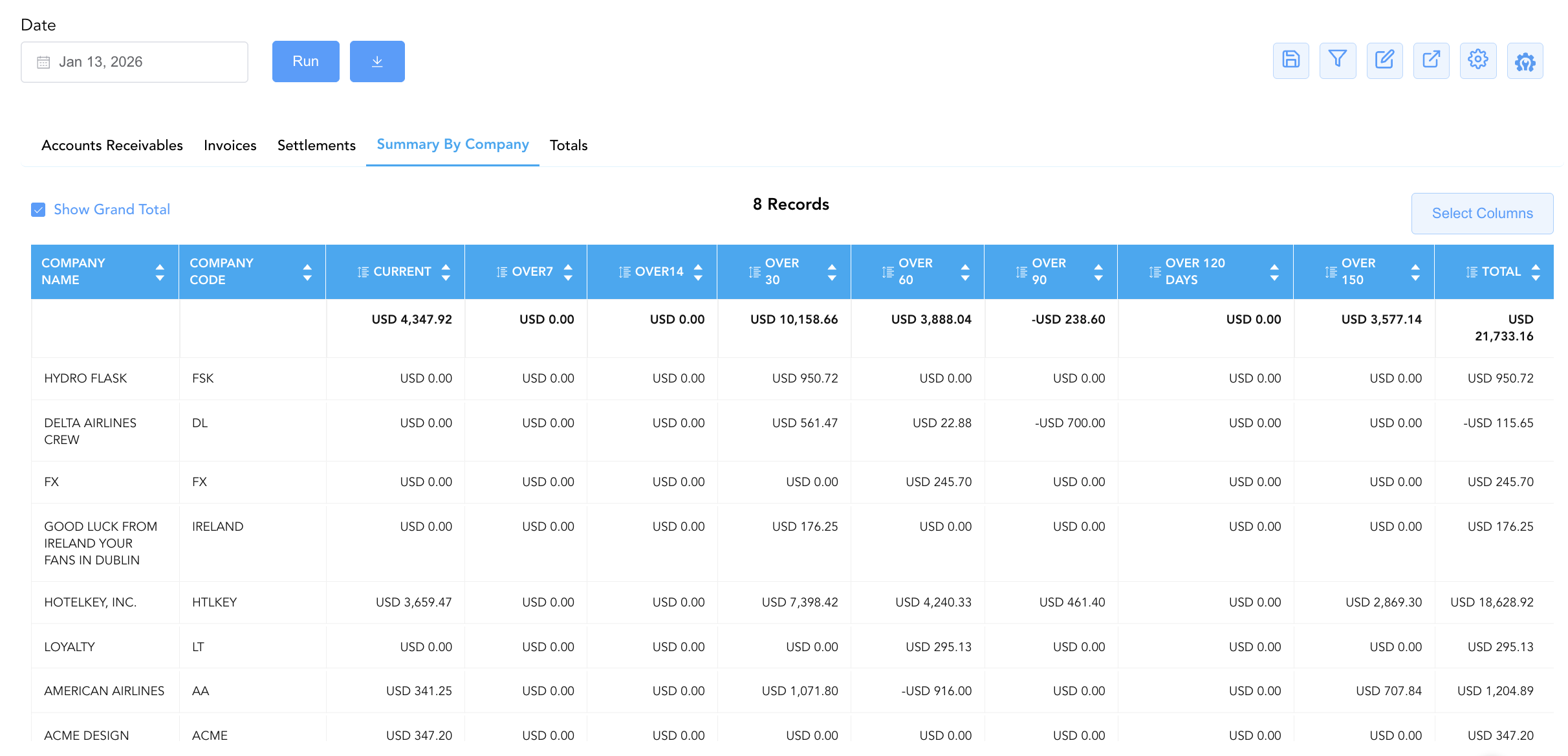
Consolidates total corporate liabilities by calculating the net balance per company (Accounts Receivables + Invoices - Settlements).
-
Primary Use: Evaluating total net financial exposure per corporate client and enforcing account-level credit limits.
-
Key Metrics: Company Name, Company Code, Net Current, Net Over 30/60/90/120/150+ Days, Net Total Debt.
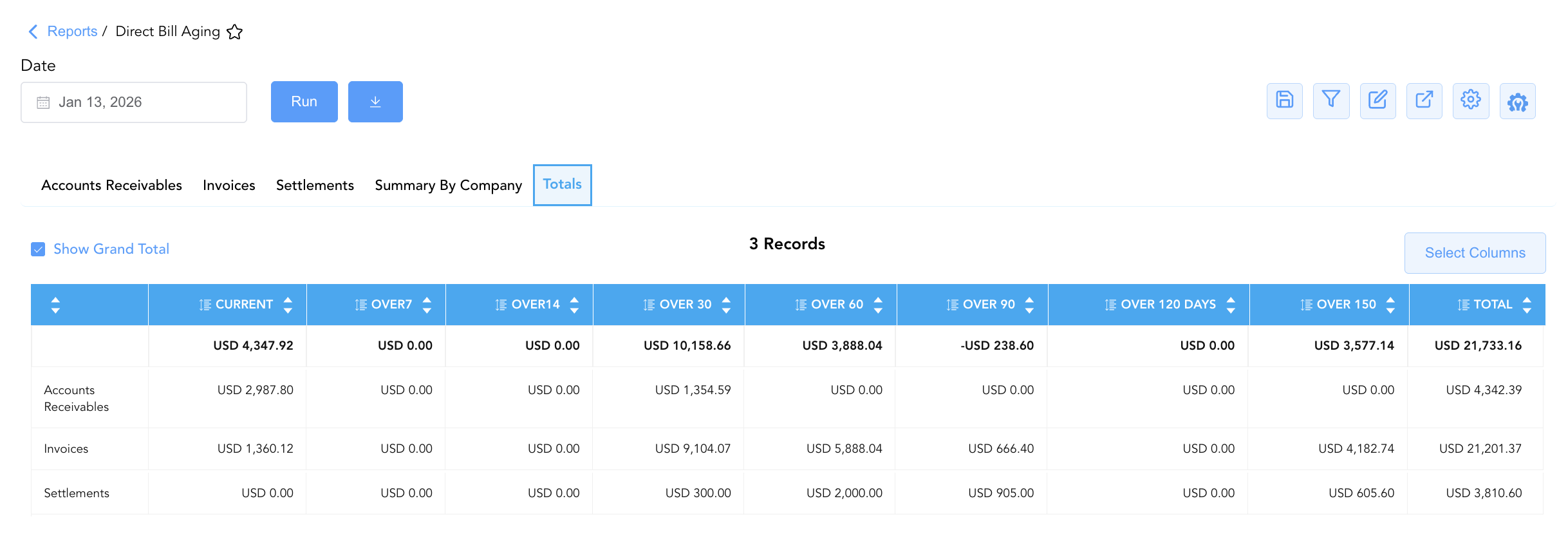
5. Totals
Delivers a property-wide macro rollup summarizing total portfolio liabilities across all four lifecycle stages.
-
Primary Use: Month-end financial tie-outs, trial balance verification, and executive cash flow forecasting.
-
Key Metrics: Macro Totals for Accounts Receivables, Invoices, Settlements, and Net Property Receivable.
Data Dictionary (Dynamic View Columns)
Customize your default view using the Configure (⚙️) icon on the report page. Below is the full data dictionary available for this report:
💡 Tax Treatment Note: All aging bucket figures (Current through Over 150) and the Total balance fields represent Gross Amounts (Includes Taxes and Fees) transferred from originating folios or city ledger invoices.
|
Column Name |
Description |
Data Source / System Mapping |
Includes Taxes & Fees? |
|
Company Name |
Official corporate account name contracted for direct-bill privileges. |
|
N/A |
|
Company Code |
Unique identifier code assigned to the corporate profile. |
|
N/A |
|
Current |
Outstanding balance within the active 0–6 day billing window. |
System Aging Calculation (0–6 Days) |
🟢 Yes |
|
Over 7 |
Outstanding balance between 7 and 13 days past posting. |
System Aging Calculation (7–13 Days) |
🟢 Yes |
|
Over 14 |
Outstanding balance between 14 and 29 days past posting. |
System Aging Calculation (14–29 Days) |
🟢 Yes |
|
Over 30 |
Outstanding balance between 30 and 59 days past posting. |
System Aging Calculation (30–59 Days) |
🟢 Yes |
|
Over 60 |
Outstanding balance between 60 and 89 days past posting. |
System Aging Calculation (60–89 Days) |
🟢 Yes |
|
Over 90 |
Outstanding balance between 90 and 119 days past posting. |
System Aging Calculation (90–119 Days) |
🟢 Yes |
|
Over 120 Days |
Outstanding balance between 120 and 149 days past posting. |
System Aging Calculation (120–149 Days) |
🟢 Yes |
|
Over 150 |
Outstanding balance exceeding 150 days (high risk / delinquent). |
System Aging Calculation (≥ 150 Days) |
🟢 Yes |
|
Total |
Net cumulative balance owed for the section or corporate account. |
|
🟢 Yes |
Customization & Platform Features
User & Property Preferences
-
Personal Preference: Tailor your individual view by hiding or dragging columns. Your preference saves automatically for future sessions.
-
Property Defaults: System Admins can configure standard default layouts across all property users to streamline operational reporting. To maximize audit efficiency, group the columns into the below logical blocks:
-
Section 1: Accounts Receivables
-
Account Context (Cols 1–2):
Company Name|Company Code -
Aging Breakdown & Balances (Cols 3–11):
Current|Over7|Over14|Over 30|Over 60|Over 90|Over 120 Days|Over 150|Total
-
-
Section 2: Invoices
-
Account Context (Cols 1–2):
Company Name|Company Code -
Aging Breakdown & Balances (Cols 3–11):
Current|Over7|Over14|Over 30|Over 60|Over 90|Over 120 Days|Over 150|Total
-
-
Section 3: Settlements
-
Account Context (Cols 1–2):
Company Name|Company Code -
Aging Breakdown & Credit Allocation (Cols 3–11):
Current|Over7|Over14|Over 30|Over 60|Over 90|Over 120 Days|Over 150|Total
-
-
Section 4: Summary by Company
-
Account Context (Cols 1–2):
Company Name|Company Code -
Aging Breakdown & Credit Allocation (Cols 3–11):
Current|Over7|Over14|Over 30|Over 60|Over 90|Over 120 Days|Over 150|Total
-
-
Section 5: Totals
-
Module Classification (Col 1): Module Type (e.g.,
Accounts Receivables,Invoices,Settlements) -
Portfolio Aging Rollup (Cols 2–10):
Current|Over7|Over14|Over 30|Over 60|Over 90|Over 120 Days|Over 150|Total
-
-
Report Toolbar & Quick Actions
Use the top-right toolbar icons on the report page to manage and export your data view:
|
Icon |
Action / Feature |
Description |

|
Knowledge Article |
Opens the knowledge base article to learn how to interpret this report. |

|
Saved Views |
Saves your column filtering, sorting, and highlight preferences so you can easily reload your custom view later without reconfiguring the report. |

|
Filter |
Opens filter controls to isolate specific data within a column based on your selected criteria. |

|
Highlight |
Highlights column values in a designated color based on selected conditions. |

|
Export |
Exports and downloads the report in various formats (Excel, PDF, CSV) for offline analysis or printing. |

|
Configure |
Opens column selection controls to toggle visibility, reorder columns, or hide rows with all zeros. |

|
Additional Configuration |
Provides advanced report configuration and display formatting options to customize data presentation. |
Advanced Controls
-
Exporting & Report Distribution: Download in Excel or PDF format to distribute collection packets to corporate accounts or audit teams.
-
Filtering: Filter data by specific date ranges, corporate account status, or aging buckets.
-
Highlighting (Conditional Formatting): Apply custom rules to automatically highlight overdue balances exceeding 60 days or accounts with high unbilled receivables.
🔗 Related Reports & Next Steps
Within 📬 Billing & Receivables (AR):
-
Accounts Receivable Activity – Audit line-item transaction entries hitting the direct-bill ledger.
-
AR Invoice Aging – Categorize open invoice balances across 30-day time bands.
-
Direct Bill Reconciliation – Identify payment gaps and verify guarantee statuses for corporate invoicing.
-
Customer Statement – Generate client-facing statements with invoice details and remittance bank info.
-
Invoice Details – Detailed lifecycle tracking of every generated invoice.
Cross-Pillar Deep Dives:
-
⚖️ Ledgers & Trial Balance: To reconcile direct-bill aging totals against general ledger accounts, review Direct Bill Ledger.
-
💳 Payments & Transactions: To inspect corporate check settlements or credit card prepayments, cross-reference Payment Activity.
-
📈 Forward Revenue & Analytics: Looking for forward-facing revenue projections or macro performance metrics (like RevPAR or ADR)? Please visit the 📈 Revenue & Analytics reporting hub.