
Enterprise All Events Report
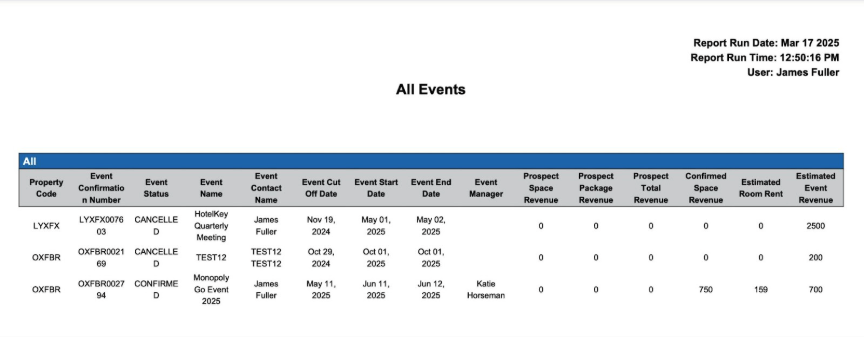
Report Description: The Enterprise All Events report provides a comprehensive overview of all enterprise properties Events (canceled, prospect, tentative, confirmed and end) within a specific date range.
Date Range: This report can render the data for up to 365 days in the past or future
Available Report Columns for Following Sections:
|
Column Name |
Column Description |
Amount Includes Taxes and Fees |
Calculation |
|
Property Code |
Unique identifier for the property |
Not Applicable |
Not Applicable |
|
Market Segment |
Market segment associated with the event |
Not Applicable |
Not Applicable |
|
Source |
Information on the source of the reservation (e.g. direct booking, email, MeetingBroker, etc.) |
Not Applicable |
Not Applicable |
|
Event Type |
This value further describes the potential business (for example, Social, Wedding, or Conference). |
Not Applicable |
Not Applicable |
|
Event Confirmation Number |
Unique identifier for the event confirmation |
Not Applicable |
Not Applicable |
|
Event Status |
Current status of the event (e.g. canceled, prospect, tentative, confirmed, ended) |
Not Applicable |
Not Applicable |
|
Event Name |
Name of the event |
Not Applicable |
Not Applicable |
|
Event Contact Name |
Name of the primary contact for the event |
Not Applicable |
Not Applicable |
|
Date |
Date the event was created in EventKey |
Not Applicable |
Not Applicable |
|
Event Cut Off Date |
The last day that a meeting can reduce the number of rooms or attendance without being charged cancellation penalties |
Not Applicable |
Not Applicable |
|
Confirmation Date |
Date the event moved to “Confirmed” status |
Not Applicable |
Not Applicable |
|
Cancellation Date |
Date the event moved to “Canceled” status |
Not Applicable |
Not Applicable |
|
Event Start Date |
The first day of the event |
Not Applicable |
Not Applicable |
|
Event End Date |
The last day of the event |
Not Applicable |
Not Applicable |
|
Event Manager |
The associate at the property responsible for the entire process of planning and executing an event |
Not Applicable |
Not Applicable |
|
Catering Manager |
The associate at the property responsible for all aspects of catering services for events and conferences |
Not Applicable |
Not Applicable |
|
Service Manager |
The associate at the property responsible for planning the layout and setup of an event, along with handling the staff that will cater to the guests |
Not Applicable |
Not Applicable |
|
Conference Coordinator |
The associate at the property who acts like a liaison directly with the client to manage the event from the venue, food, and beverage perspective |
Not Applicable |
Not Applicable |
|
Group Sales Administrator |
The associate at the property who provides end-to-end service, developing leads, making sales presentations, coordinating events, and following up with clients |
Not Applicable |
Not Applicable |
|
Group Sales Representative |
The associate at the property who manages the group block end to end process |
Not Applicable |
Not Applicable |
|
Others |
Other associates who may support events and/or clients |
Not Applicable |
Not Applicable |
|
Leader |
The name of the event leader (may or may not be different than the event contact) |
Not Applicable |
Not Applicable |
|
Signer |
The name of the individual who is authorized to sign the agreement (may or may not be different than the event contact) |
Not Applicable |
Not Applicable |
|
Onsite |
The name of the individual who will be onsite |
Not Applicable |
Not Applicable |
|
Remarks |
Remarks added to the event |
Not Applicable |
Not Applicable |
|
Created By |
The associate at the property who created the event |
Not Applicable |
Not Applicable |
|
Company Name |
Name of the company the event is affiliated with |
Not Applicable |
Not Applicable |
|
Sub Status |
The status the sales associate has the event in (open, in progress, working, turndown, lost, etc.) |
Not Applicable |
Not Applicable |
|
Estimated Max Attendance |
The estimated maximum number of individuals attending the event sales associate is expecting |
Not Applicable |
Not Applicable |
|
Estimated Total Rooms |
The estimated total number of picked up sleeping rooms for the event the sales associate is expecting |
Not Applicable |
Not Applicable |
|
Estimated Max Allocations Per Night |
The estimated maximum number of sleeping rooms held per night for the event sales associate is expecting |
Not Applicable |
Not Applicable |
|
Estimated Room Rent |
The estimated rate for the sleeping rooms (e.g. 159) |
NO |
Not Applicable |
|
Estimated Event Revenue |
The estimated total event revenue sales associate is expecting |
NO |
Not Applicable |
|
DUNS Number |
If your property is integrated with Dun & Bradstreet and the inquiry's account matches an account in the D&B database, a DUNS number displays. DUNS stands for Data Universal Numbering System, a unique nine-digit identifier assigned to a business entity by Dun & Bradstreet. This number is universally recognized as a way to track and learn about a business. |
Not Applicable |
Not Applicable |
|
Rating |
This value indicates the likelihood the inquiry will materialize into future business. |
Not Applicable |
Not Applicable |
|
Travel Agent |
Name of the travel agent the event is affiliated with |
Not Applicable |
Not Applicable |
|
Travel Agent Commission |
The estimated commission amount due to a travel agent for making an event on behalf of the property |
NO |
Not Applicable |
|
Event Contact Phone |
Phone number of the primary contact for the event |
Not Applicable |
Not Applicable |
|
Event Contact Email |
Email of the primary contact for the event |
Not Applicable |
Not Applicable |
Misc Report Information:
Available Features:
-
Export: ability to download and save the file into an alternate format.
-
Filter: filter a range of data based on criteria defined by the user.
-
Highlight: also known as conditional formatting is the ability to highlight certain values making them easier to identify.
Available Configuration:
-
User Preferences: allows the user to customize their report view by repositioning or removing columns.
-
Property Preferences: allows the property to customize the report view for all users by repositioning or removing columns.
Baseline Configuration:
-
Property Preferences Settings:
-
Following columns to be disabled for initial deployment:
-
Not Applicable
-
-