
Enterprise Housekeeping Summary Report
Report Description: The Enterprise Housekeeping Summary Report provides a summary of the housekeeping status of all rooms within the property during a specified date range. This report helps property staff make informed decisions about staffing levels and room allocation to ensure rooms are cleaned in a timely manner. Careful attention to housekeeping status improves the guest experience, helping to ensure guests are satisfied with their stay.
Date Range: This report can render the data for up to 365 days in the past.
Summary by Property section: provides a count of rooms serviced by room type for the defined period.
Available Report Columns for Following Sections:
|
Column Name |
Column Description |
Amount Includes Taxes and Fees |
Calculation |
|
Property Code |
Identifies the hotel code |
Not Applicable |
Not Applicable |
|
Property Name |
Identifies the name of the hotel |
Not Applicable |
Not Applicable |
|
Property City |
Identifies the City the hotel is operating |
Not Applicable |
Not Applicable |
|
Property State |
Identifies the State the hotel is operating |
Not Applicable |
Not Applicable |
|
Room Type Code |
Category or classification of the room |
Not Applicable |
Not Applicable |
|
Service Type |
Type of service provided |
Not Applicable |
Not Applicable |
|
Service Time |
The amount of time allotted to clean the room |
Not Applicable |
Not Applicable |
|
Total Time |
Total duration of the service in minutes |
Not Applicable |
=sum(start time) + (end time) |
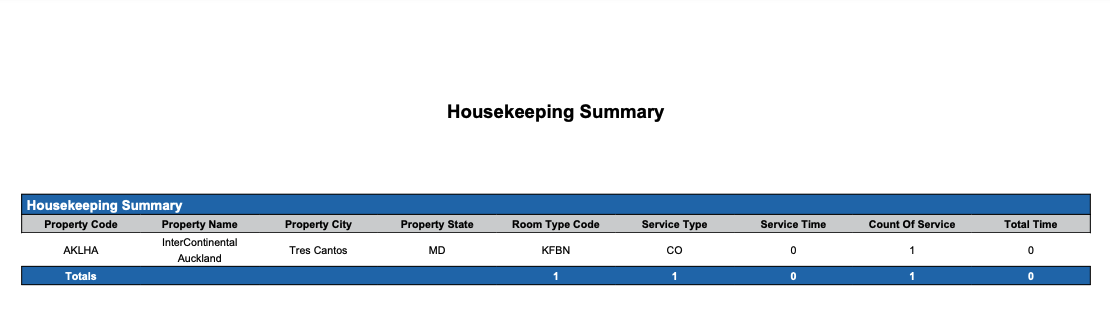
Summary by Room Section: provides a summary of services by room type at the specific property for the defined period.
Available Report Columns for Following Sections:
|
Column Name |
Column Description |
Amount Includes Taxes and Fees |
Calculation |
|
Room Number |
Unique identifier for each room |
Not Applicable |
Not Applicable |
|
Service Type |
Type of housekeeping service completed for the room (e.g., check-out, stayover) |
Not Applicable |
Not Applicable |
|
Room Status |
Current condition or status of the room (e.g., clean, dirty, under maintenance) |
Not Applicable |
Not Applicable |
|
Occupancy Status |
Indicates whether the room is currently occupied or vacant |
Not Applicable |
Not Applicable |
|
DND |
Indicates if the guest has requested "Do Not Disturb" status for the room |
Not Applicable |
Not Applicable |
|
Guest Refused |
Indicates if the guest refused housekeeping services for the room |
Not Applicable |
Not Applicable |
|
Assigned Housekeeper |
Housekeeper assigned to clean the room |
Not Applicable |
Not Applicable |
|
Housekeeping Team |
Team or staff responsible to clean the room |
Not Applicable |
Not Applicable |
|
Housekeeping Remarks |
Any specific remarks or notes related to housekeeping tasks for the room |
Not Applicable |
Not Applicable |
|
Remarks |
Additional comments or instructions regarding the room |
Not Applicable |
Not Applicable |
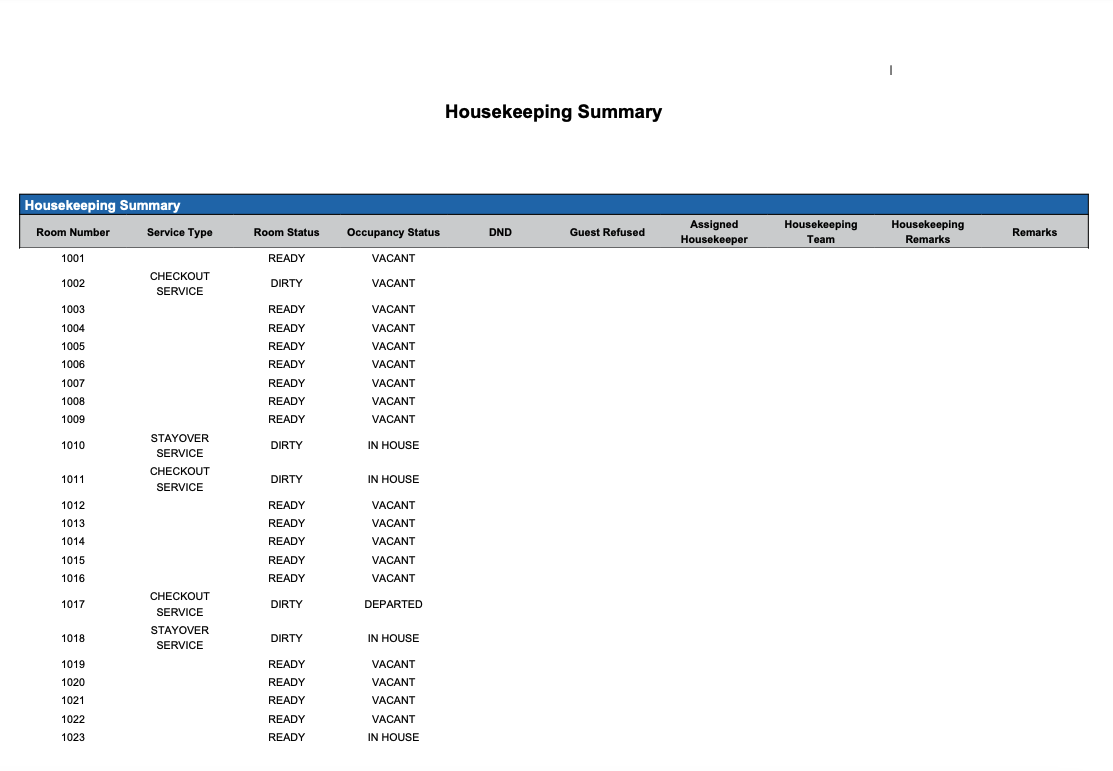
Misc Report Information:
Available Features:
-
Export: ability to download and save the file into an alternate format.
-
Filter: filter a range of data based on criteria defined by the user.
-
Highlight: also known as conditional formatting is the ability to highlight certain values making them easier to identify.
-
Grouping: ability to view the data grouped by: All, Service Type, Room Status, Occupancy Status or Assigned Housekeeper
Available Configuration:
-
User Preferences: allows the user to customize their report view by repositioning or removing columns.
-
Property Preferences: allows the property to customize the report view for all users by repositioning or removing columns.