
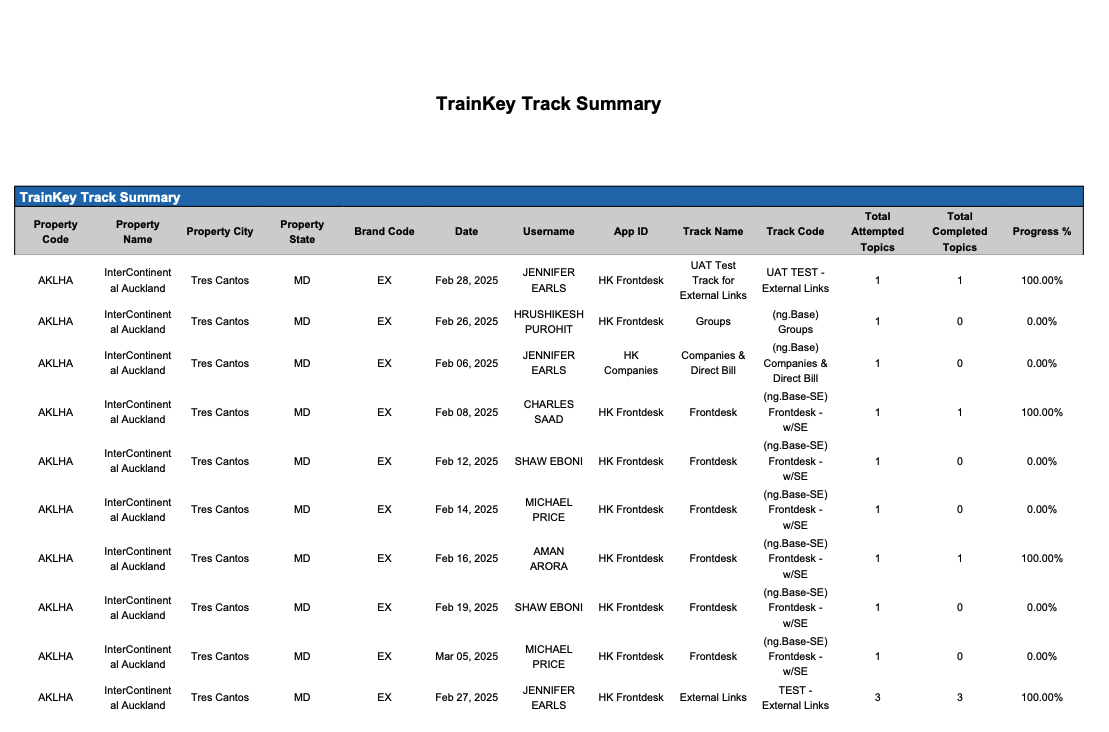
Enterprise TrainKey Track Summary Report
Report Description: The Enterprise TrainKey Track Summary report provides a list of users; their hotel code and the progress of completion for specific Topics and Tracks
Date Range: This report provides data up to 365 days in the past
Available Report Columns for Following Sections:
|
Column Name |
Column Description |
Amount Includes Taxes and Fees |
Calculation |
|
Property Code |
Identifies the hotel code |
Not Applicable |
Not Applicable |
|
Property Name |
Identifies the name of the hotel |
Not Applicable |
Not Applicable |
|
Property City |
Identifies the City the hotel is operating |
Not Applicable |
Not Applicable |
|
Property State |
Identifies the State the hotel is operating |
Not Applicable |
Not Applicable |
|
Brand Code |
Identifying code for the Brand of the property |
Not Applicable |
Not Applicable |
|
Date |
date the user accessed the topic listed |
Not Applicable |
Not Applicable |
|
Username |
name of the user |
Not Applicable |
Not Applicable |
|
App ID |
client application the user accessed the trainkey track for (frontdesk, companies, ect) |
Not Applicable |
Not Applicable |
|
Track Name |
name of the TrainKey Track |
Not Applicable |
Not Applicable |
|
Track Code |
unique identifier used for the Track |
Not Applicable |
Not Applicable |
|
Total Attempted Topics |
number of Topic the user started on the Track |
Not Applicable |
Not Applicable |
|
Total Completed Topics |
number of Topics the user completed on the Track |
Not Applicable |
Not Applicable |
|
Progress % |
percentage of completion for the Topic on the specified Track |
Not Applicable |
sum= (Completed Attempts / Total Attempts) x 100 |
Misc Report Information:
Available Features:
-
Export: ability to download and save the file into an alternate format.
-
Filter: filter a range of data based on criteria defined by the user.
-
Highlight: also known as conditional formatting is the ability to highlight certain values making them easier to identify.
Available Configuration:
-
User Preferences: allows the user to customize their report view by repositioning or removing columns.
-
Property Preferences: allows the property to customize the report view for all users by repositioning or removing columns.