
Expired Payment Source Report Overview
Parent Hub: 💰 Finance & Accounting Reports
Category: 💳 Payments & Transactions
Target Roles: Directors of Finance & Controllers, Night Auditors, Front Office Managers, Cashiers & Reservations Staff
Key Value: Maintain credit card processing compliance and payment guarantee security by tracking reservations backed by expired credit cards, identifying virtual card expiration risks, and auditing guarantee instruments across active and upcoming guest stays.
Executive Summary
The Expired Payment Source Report is a primary payment security and credit risk audit tool within the 💳 Payments & Transactions category of the 💰 Finance & Accounting Reports suite. Designed to prevent merchant credit card transaction declines and guarantee defaults, it provides a comprehensive audit log of all guest reservations backed by expired or expiring payment card instruments.
By pairing reservation identifiers (Confirmation Number, Status, Guest Name, First Name, Last Name) with stay/booking schedules (Booking Date, Arrival Date, Departure Date, Nights), inventory/rate setups (Room Type, Rate Plan, Source, Loyalty Tier), and payment security flags (Guarantee Type, Last 4 Digits, Virtual CC, Expired CC, Sub Source Code, Sub Source Name), this report enables controllers, night auditors, and front desk supervisors to identify expired payment cards prior to arrival or checkout, request updated payment instruments, and eliminate uncollected revenue exposure.
Key Capabilities
-
Expired Payment Source Detection: Flags reservations secured by expired credit card guarantee instruments (Expired CC = Yes).
-
Virtual Card & OTA Payment Auditing: Distinguishes standard credit card guarantees from virtual credit cards (Virtual CC = Yes / No) issued by online travel agencies (OTAs).
-
Stay Status & Credit Risk Integration: Cross-references expired payment sources against live reservation states (CHECKED_IN, HOLD, NO_SHOW, CANCELLED) and loyalty program tiers (Loyalty Tier).
Report Views & Functional Breakdown
The Expired Payment Source Report presents payment guarantee data in a unified single-table ledger that supports three distinct analytical perspectives:
┌────────────────────────────────────────────────────────────────────────┐
│               EXPIRED PAYMENT SOURCE REPORT                            │
├────────────────────────────────────────────────────────────────────────┤
│                       Unified Exception Ledger                         │
├──────────────────────────┬──────────────────────────┬──────────────────┤
│ 1. Pre-Arrival & Active  │ 2. OTA Virtual Card      │ 3. Booking Source &│
│    Guarantee Audit       │    Expiration Control    │    Rate Risk     │
│                          │                          │    Analysis      │
└──────────────────────────┴──────────────────────────┴──────────────────┘
1. Pre-Arrival & Active Guarantee Audit
Identifies upcoming arrivals and checked-in guests whose guarantee payment cards have expired.
-
Primary Use: Reviewing upcoming stays (
Status = HOLD) and in-house reservations (Status = CHECKED_IN) secured by expired payment cards, triggering digital payment link requests, and obtaining updated card details at check-in. -
Key Metrics: Confirmation Number, Status, Guest Name, Room Type, Rate Plan, Arrival Date, Departure Date, Last 4 Digits, Expired CC.
2. OTA Virtual Card Expiration Control
Isolates virtual credit cards (VCCs) issued by third-party distribution channels and OTAs.
-
Primary Use: Verifying virtual card activation windows, preventing early card charge attempts before activation, and ensuring VCC funds are settled prior to card expiration.
-
Key Metrics: Confirmation Number, Source, Sub Source Code, Sub Source Name, Virtual CC, Expired CC, Last 4 Digits, Arrival Date, Departure Date.
3. Booking Source & Rate Risk Analysis
Evaluates credit risk across booking channels, rate plans, and non-arrival statuses.
-
Primary Use: Auditing advance purchase rate plans (
Rate Plan), reviewing no-show billing risks (Status = NO_SHOW), and verifying credit card guarantee policies across booking channels (Source). -
Key Metrics: Confirmation Number, Status, Source, Rate Plan, Booking Date, Nights, Guarantee Type, Expired CC.
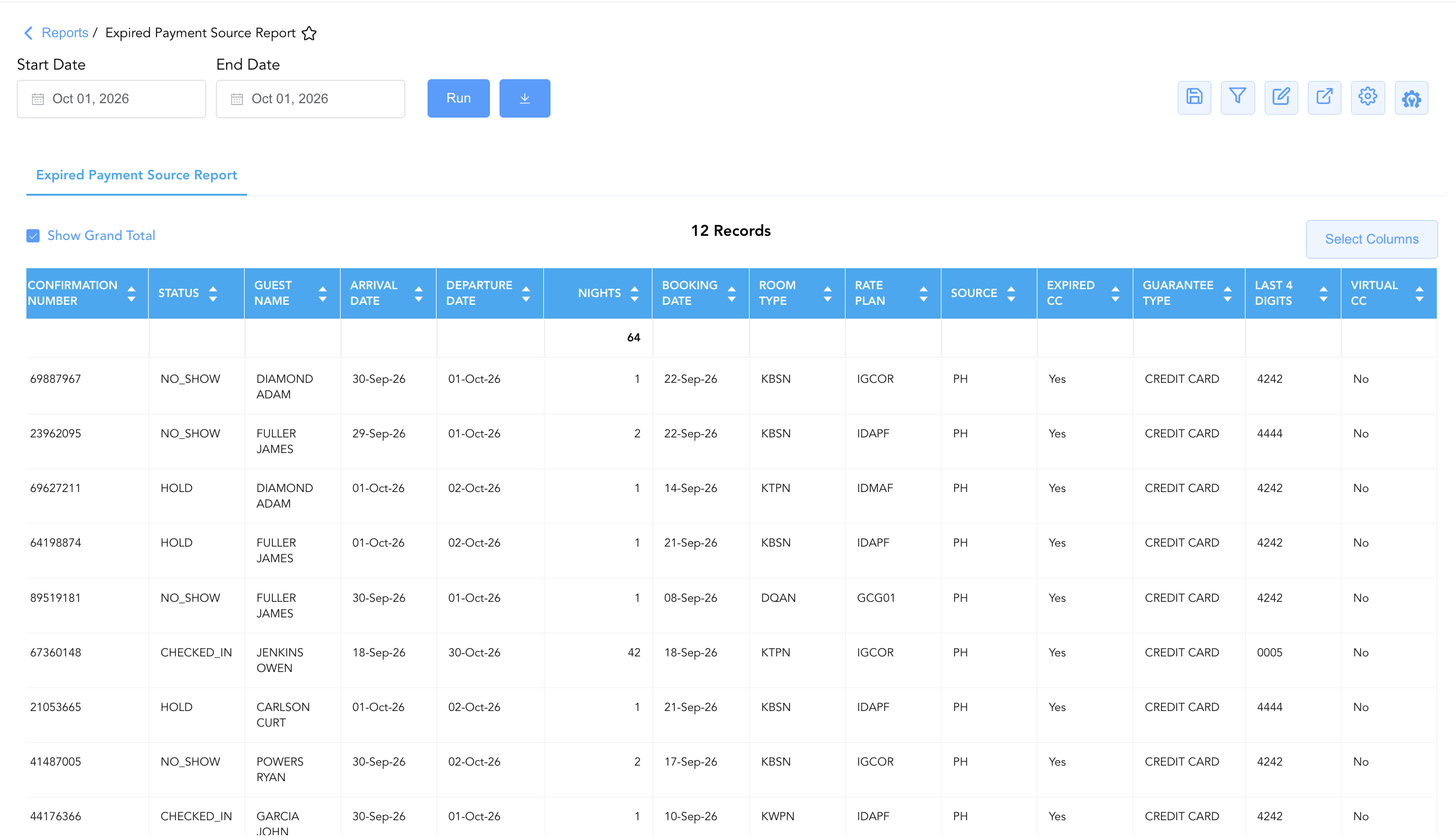
Data Dictionary (Dynamic View Columns)
Customize your default view using the Configure (⚙️) icon on the report page. Below is the full data dictionary representing every column available in this report:
💡 PCI & Security Note: Last 4 Digits displays masked payment card digits for security compliance. Expired CC flags payment cards whose expiration date precedes the current business date or stay window.
|
Column Name |
Description |
Data Source / System Mapping |
Includes Taxes & Fees? |
|
Confirmation Number |
Unique reference code assigned to the reservation. |
System Reservation ID |
N/A |
|
Status |
Current operational state of the reservation ( |
System Reservation Engine |
N/A |
|
Guest Name |
Combined full primary guest name ( |
|
N/A |
|
First Name |
Primary guest first name registered on the reservation. |
|
N/A |
|
Last Name |
Primary guest last name registered on the reservation. |
|
N/A |
|
Loyalty Tier |
Membership level or loyalty program tier of the primary guest (e.g., Diamond Elite, Platinum Elite). |
|
N/A |
|
Room Type |
Contracted room category code assigned to the reservation (e.g., |
Room Type Setup |
N/A |
|
Rate Plan |
Rate plan code assigned to the reservation governing pricing and payment policies (e.g., |
Rate Code Configuration |
N/A |
|
Source |
Primary booking channel origin code (e.g., |
Distribution Engine |
N/A |
|
Booking Date |
Date when the reservation was created in the system. |
Reservation Timestamp |
N/A |
|
Arrival Date |
Scheduled or actual arrival date of the reservation. |
|
N/A |
|
Departure Date |
Scheduled or actual departure date of the reservation. |
|
N/A |
|
Nights |
Total length of stay calculated in nights. |
|
N/A |
|
Guarantee Type |
Form of reservation guarantee on file ( |
Guarantee Policy Setup |
N/A |
|
Last 4 Digits |
Masked payment card digits used for guarantee verification (e.g., |
Payment Gateway Token |
N/A |
|
Virtual CC |
Indicates if the payment card instrument is an OTA-issued Virtual Credit Card ( |
Payment Gateway Token |
N/A |
|
Expired CC |
Flag indicating if the payment card expiration date has passed ( |
Payment Gateway Token |
N/A |
|
Sub Source Code |
Secondary distribution channel or partner code. |
Distribution Engine |
N/A |
|
Sub Source Name |
Human-readable title of the secondary distribution channel or booking sub-source. |
Distribution Engine |
N/A |
Customization & Platform Features
User & Property Preferences
-
Personal Preference: Tailor your individual view by hiding or dragging columns. Your preferences save automatically for future sessions.
-
Property Defaults: System Admins can configure standard default layouts across all property users to streamline operational reporting. To maximize audit efficiency, group the columns into the below logical blocks:
-
Reservation & Account Anchors (Cols 1–2):
Confirmation Number|Status -
Guest Profile & Loyalty (Cols 3–6):
Guest Name|First Name|Last Name|Loyalty Tier -
Booking Source & Stay Window (Cols 7–15):
Arrival Date|Departure Date|Nights|Booking Date|Room Type|Rate Plan|Source|Sub Source Code|Sub Source Name -
Payment Source & Expiration Audit Controls (Cols 16–19):
Expired CC|Guarantee Type|Last 4 Digits|Virtual CC
-
Report Toolbar & Quick Actions
Use the top-right toolbar icons on the report page to manage and export your data view:
|
Icon |
Action / Feature |
Description |

|
Knowledge Article |
Opens the knowledge base article to learn how to interpret this report. |

|
Saved Views |
Saves your column filtering, sorting, and highlight preferences so you can easily reload your custom view later without reconfiguring the report. |

|
Filter |
Opens filter controls to isolate specific data within a column based on your selected criteria. |

|
Highlight |
Highlights column values in a designated color based on selected conditions. |

|
Export |
Exports and downloads the report in various formats (Excel, PDF, CSV) for offline analysis or printing. |

|
Configure |
Opens column selection controls to toggle visibility, reorder columns, or hide rows with all zeros. |

|
Additional Configuration |
Provides advanced report configuration and display formatting options to customize data presentation. |
Advanced Controls
-
Exporting & Credit Audit Follow-Up: Download in Excel or PDF format to support pre-arrival payment verification call sheets, reservation guarantee audits, and front desk shift handovers.
-
Filtering: Filter data by specific Status (
HOLD,CHECKED_IN,NO_SHOW), Virtual CC (Yes/No), Expired CC (Yes), or date ranges. -
Highlighting (Conditional Formatting): Apply custom rules to automatically highlight imminent arrivals with expired cards (
Status = HOLDandExpired CC = Yes) or checked-in guests needing updated payment methods.
🔗 Related Reports & Next Steps
Within 💳 Payments & Transactions & ⚖️ Ledgers & Trial Balance:
-
Declined Payments – Audit credit card payment rejections, card declines, and failed authorization attempts.
-
Payment Link Details – Dispatch digital remote payment links to guests with expired cards for secure online settlement.
-
Authorized Payments – Audit active credit card pre-authorization holds, capture approvals, and card refund processing.
-
Credit Card Status – Monitor credit card pre-authorizations, remaining authorization headroom, and stop-charge flags across in-house guests.
Cross-Pillar Deep Dives:
-
🛎️ Front Desk & Guest Services: To cross-reference upcoming arrivals needing payment method updates, review Arrivals List.
-
👥 Group Blocks: To inspect group master payment card guarantees and expiration dates, review Group Reservations.