
Final Audit Report Overview
Parent Hub: 💰 Finance & Accounting Reports
Category: ⚖️ Ledgers & Trial Balance / 📈 Revenue & Analytics
Target Roles: Directors of Finance & Controllers, General Managers, Night Auditors, Revenue Managers
Key Value: Serve as the definitive end-of-day financial certificate and operational blueprint, synthesizing daily revenues, tax liabilities, payment collections, market segment performance, occupancy statistics, and ledger balancing into a single audit-ready report.
Executive Summary
The Final Audit Report is the flagship financial certificate and daily closing document produced at the conclusion of the PMS night audit process within the ⚖️ Ledgers & Trial Balance and 📈 Revenue & Analytics reporting suites. It provides an exhaustive, multi-dimensional audit trail capturing every operational and financial transaction executed across the property during the business day.
By consolidating daily revenue postings (Room Revenue, Charges), tax accruals (Taxes), payment collections (Payments, Settlements), cash drops, guest room statistics, occupancy ratios, market segment yields, and master ledger roll-forwards (Balance Information) alongside Year-to-Date (Y-T-D) and Month-to-Date (M-T-D) comparative metrics, this report serves as the primary source of truth for hotel controllers, general managers, and corporate finance leads.
Key Capabilities
-
Comprehensive Night Audit Certification: Validates property-wide financial balancing across all operational departments prior to rolling the PMS business date.
-
Multi-Period Variance Analysis: Contrasts daily performance (Actual Today, Adjusted, Net Today) against cumulative M-T-D and Y-T-D totals alongside year-over-year variances (LY-M-T-D, LY-T-D).
-
Complete Revenue & Statistical Integration: Combines financial ledger postings with operational KPI statistics including ADR, RevPAR, Occupancy percentages, and Market Segment distributions.
Report Views & Functional Breakdown (All 19 Sections)
The Final Audit Report organizes property operations across 19 distinct operational sections:
┌────────────────────────────────────────────────────────────────────────┐
│                          FINAL AUDIT REPORT                            │
├────────────────────────────────────────────────────────────────────────┤
│  1. Room Revenue           2. Other Room Revenue    3. Charges         │
│  4. Fees                   5. Revenue & Charges     6. Taxes           │
│  7. Payments               8. Settlement Payment    9. Settlement      │
│                               Information              Expense         │
│ 10. Cash Deposit & Drop   11. Statistical Counts   12. Occupancy       │
│ 13. Revenue Statistics    14. Stats by Market Seg  15. Rev by Market Seg│
│ 16. Local Mkt Seg Stats   17. Local Mkt Seg Rev    18. Balance Info    │
│ 19. Turn Away Info                                                     │
└────────────────────────────────────────────────────────────────────────┘
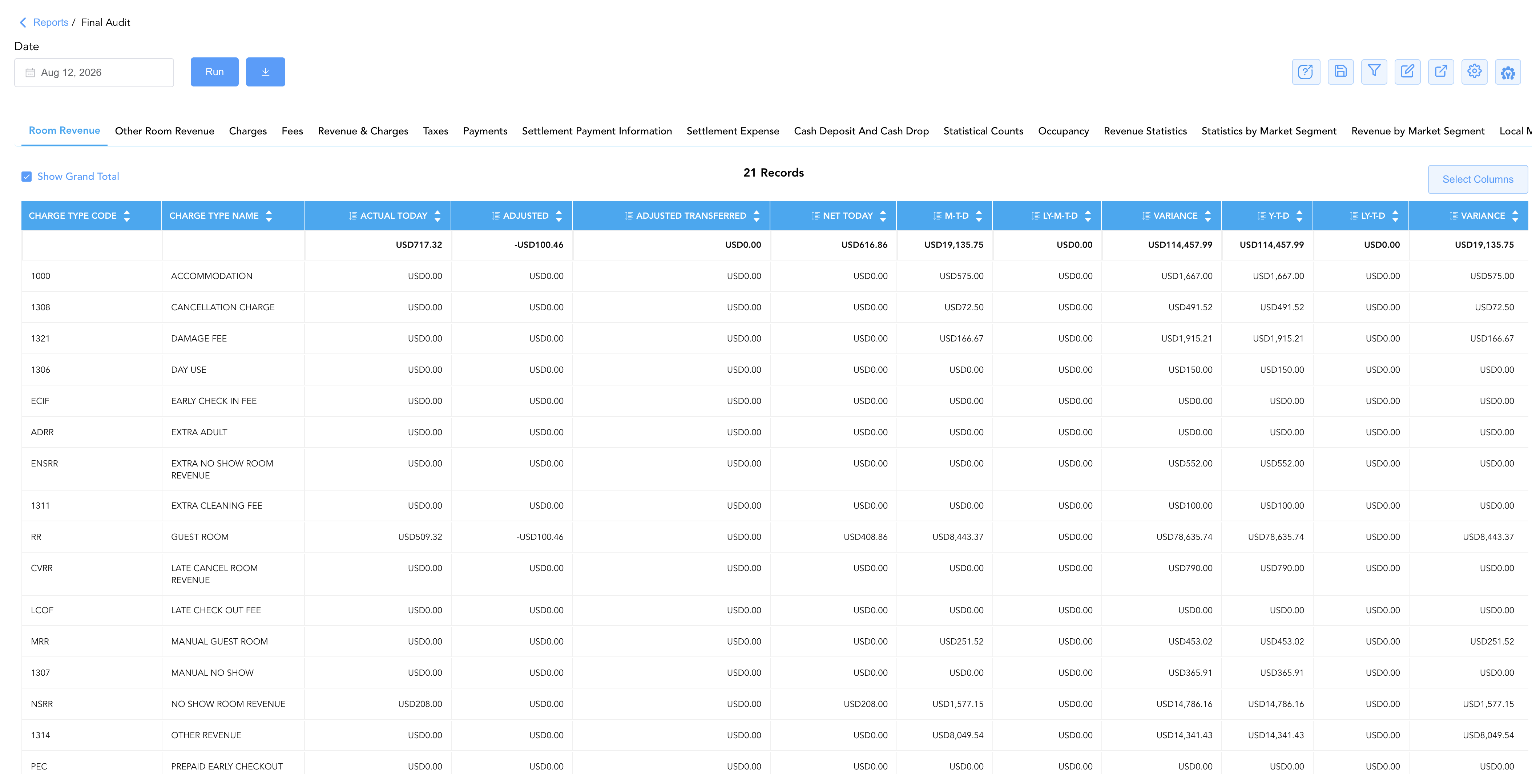
1. Room Revenue
Audits room rent accommodation revenues, extra adult/child fees, damage fees, day use, rollaways, and no-show room earnings.
-
Key Metrics: Charge Type Name, Charge Type Code, Actual Today, Adjusted, Adjusted Transferred, Net Today, M-T-D, LY-M-T-D, Variance, Y-T-D, LY-T-D, Variance.
2. Other Room Revenue
Isolates secondary or non-standard room revenue line items.
-
Key Metrics: Charge Type Name, Charge Type Code, Actual Today, Adjusted, Adjusted Transferred, Net Today, M-T-D, LY-M-T-D, Variance, Y-T-D, LY-T-D, Variance.
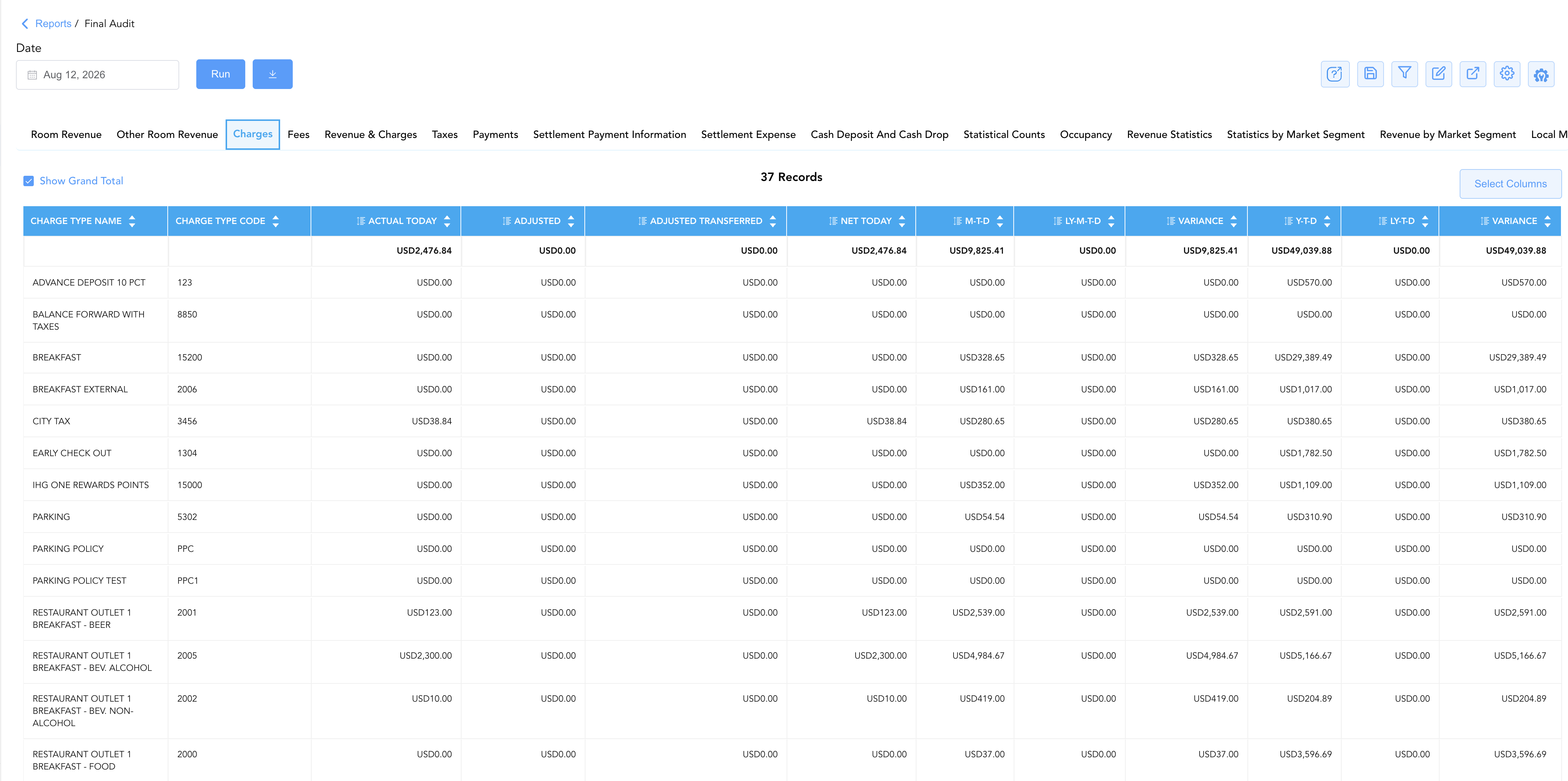
3. Charges
Audits non-room operational earnings across food and beverage outlets (breakfast, lunch, dinner, alcohol sales), parking, rewards points, early checkouts, and service charges.
-
Key Metrics: Charge Type Name, Charge Type Code, Actual Today, Adjusted, Adjusted Transferred, Net Today, M-T-D, LY-M-T-D, Variance, Y-T-D, LY-T-D, Variance.
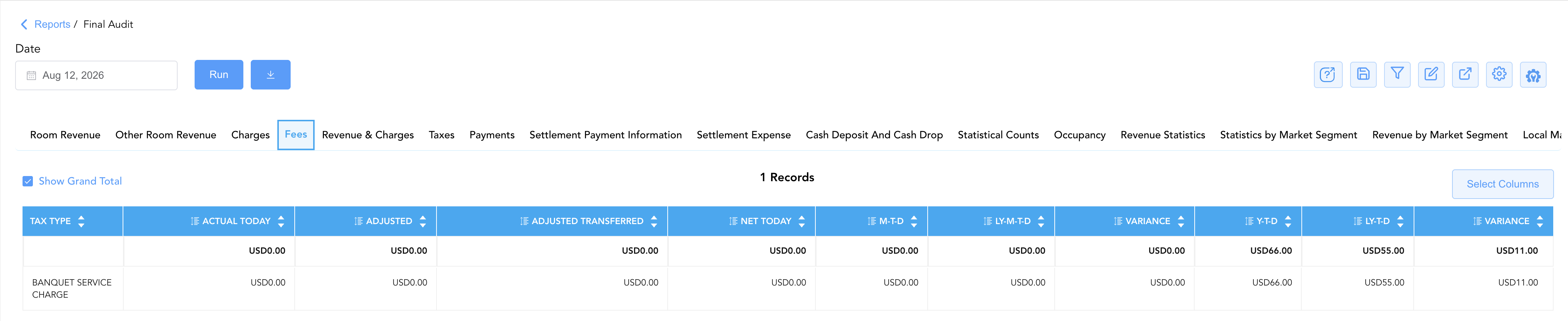
4. Fees
Itemizes specific departmental or statutory service fees levied across the property.
-
Key Metrics: Tax Type, Actual Today, Adjusted, Adjusted Transferred, Net Today, M-T-D, LY-M-T-D, Variance, Y-T-D, LY-T-D, Variance.
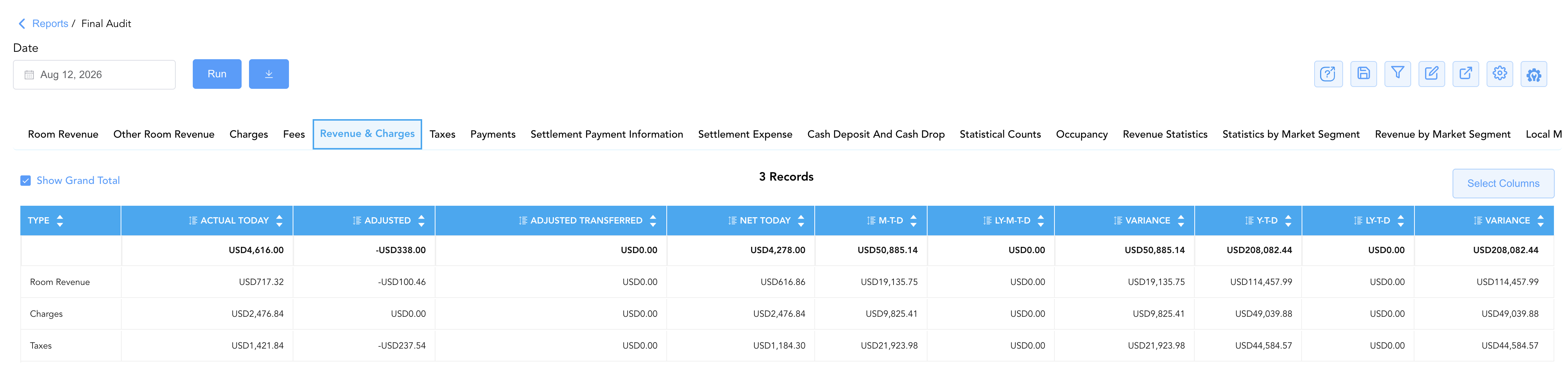
5. Revenue & Charges
Delivers an executive high-level summary rollup combining overall Room Revenue, Charges, and Taxes.
-
Key Metrics: Type (Room Revenue, Charges, Taxes), Actual Today, Adjusted, Adjusted Transferred, Net Today, M-T-D, LY-M-T-D, Variance, Y-T-D, LY-T-D, Variance.
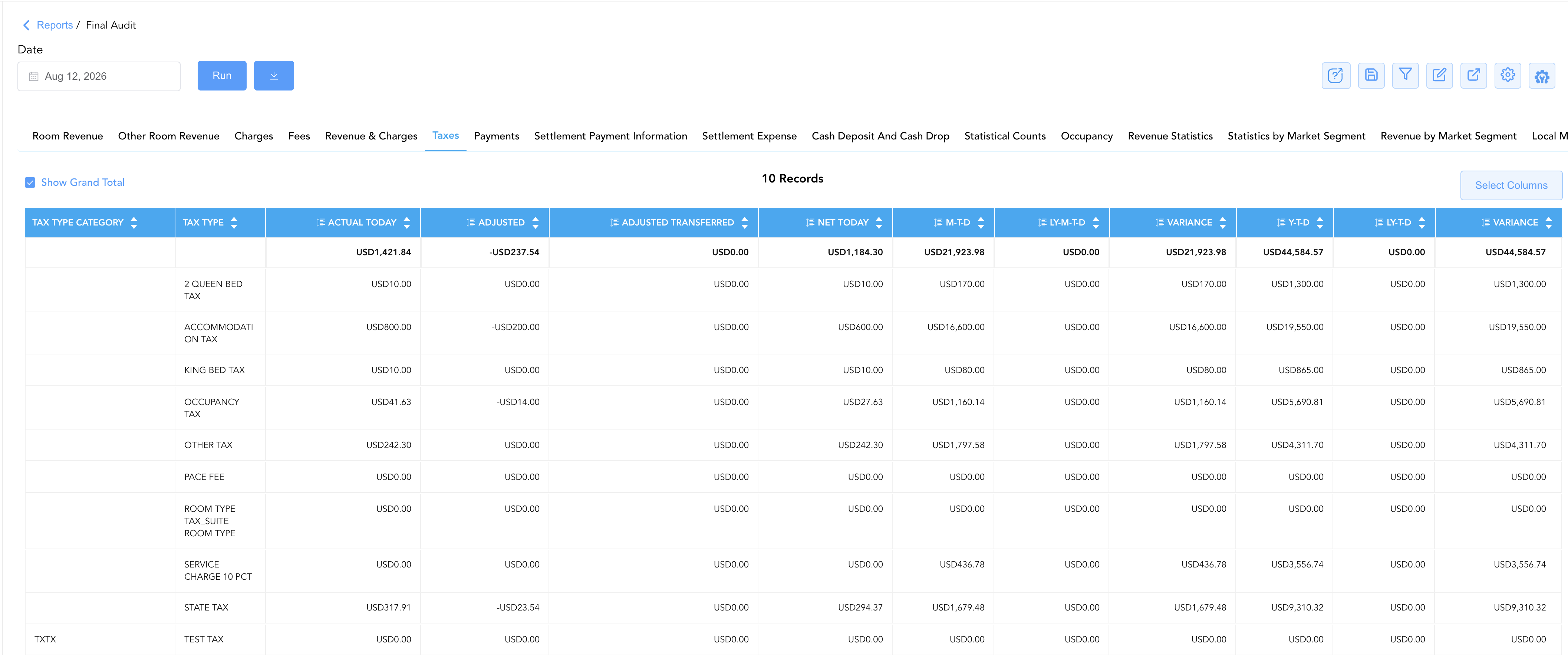
6. Taxes
Itemizes statutory tax collections across accommodation taxes, state sales taxes, city lodging assessments, bed taxes, and occupancy taxes.
-
Key Metrics: Tax Type, Tax Type Category, Actual Today, Adjusted, Adjusted Transferred, Net Today, M-T-D, LY-M-T-D, Variance, Y-T-D, LY-T-D, Variance.
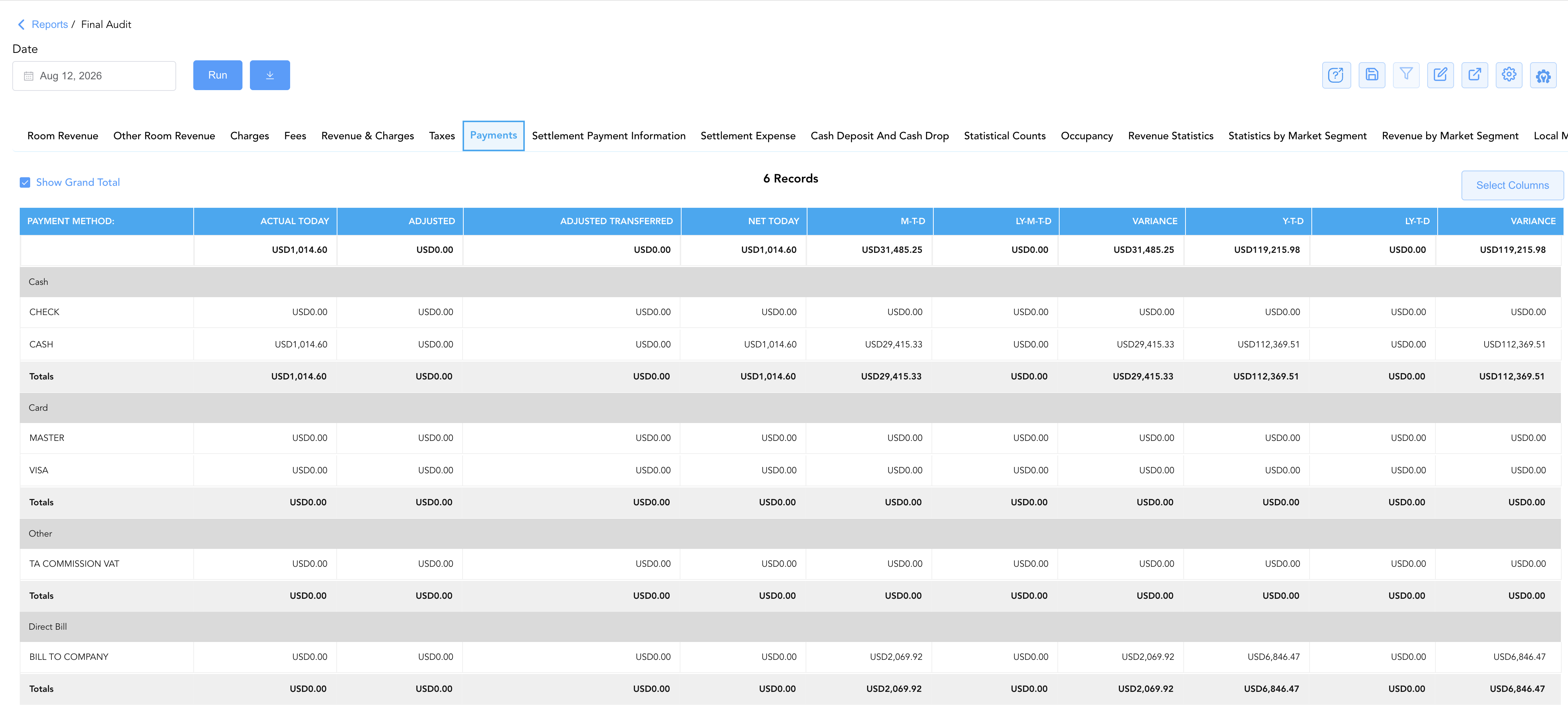
7. Payments
Tracks all payment tenders collected across active folios, categorized by Cash, Credit Cards (Visa, Mastercard, etc.), Travel Agency Commission VAT, and Direct Bill.
-
Key Metrics: Cash/Tender Category, Actual Today, Adjusted, Adjusted Transferred, Net Today, M-T-D, LY-M-T-D, Variance, Y-T-D, LY-T-D, Variance.
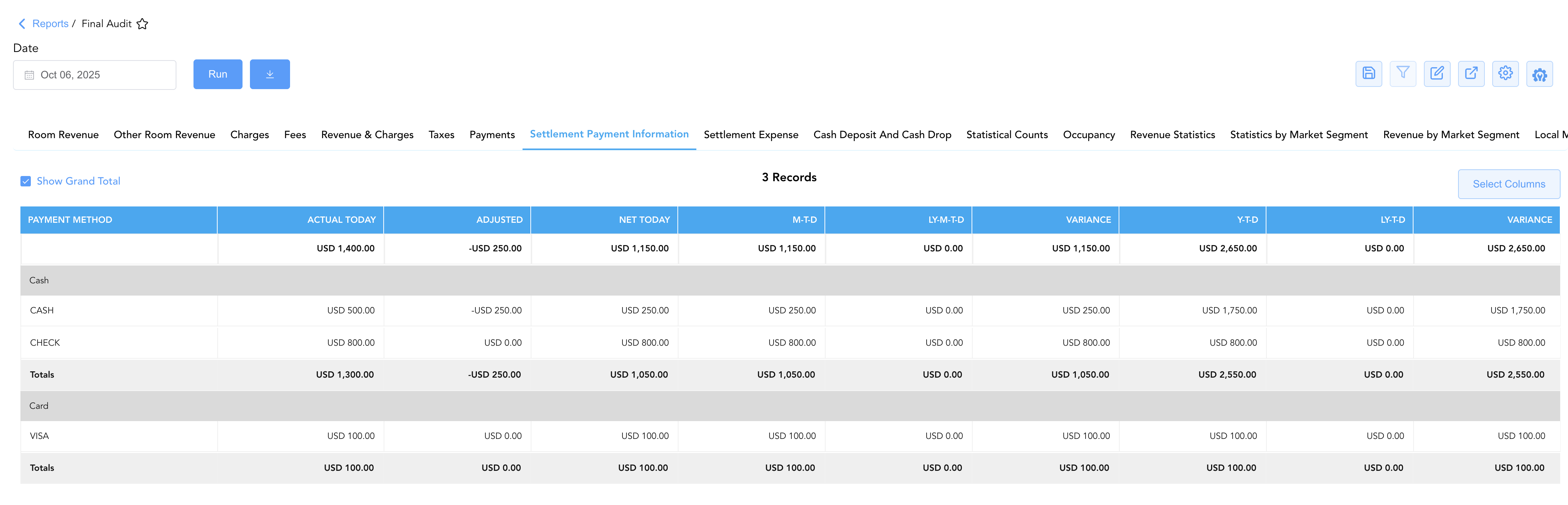
8. Settlement Payment Information
Itemizes post-checkout settlements and city ledger direct-bill payments applied to settled accounts.
-
Key Metrics: Cash/Tender Category, Actual Today, Adjusted, Net Today, M-T-D, LY-M-T-D, Variance, Y-T-D, LY-T-D, Variance.
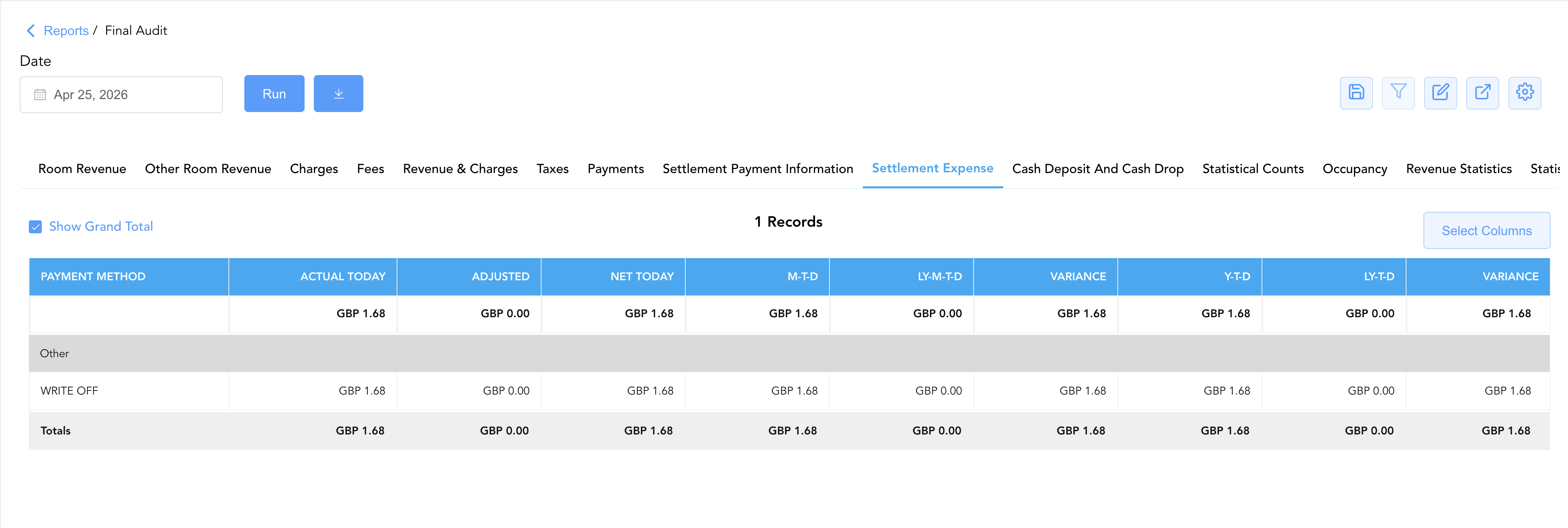
9. Settlement Expense
Captures processing fees, merchant gateway expenses, or commission costs tied to payment settlements.
-
Key Metrics: PAYMENT METHOD:, Actual Today, Adjusted, Net Today, M-T-D, LY-M-T-D, Variance, Y-T-D, LY-T-D, Variance.
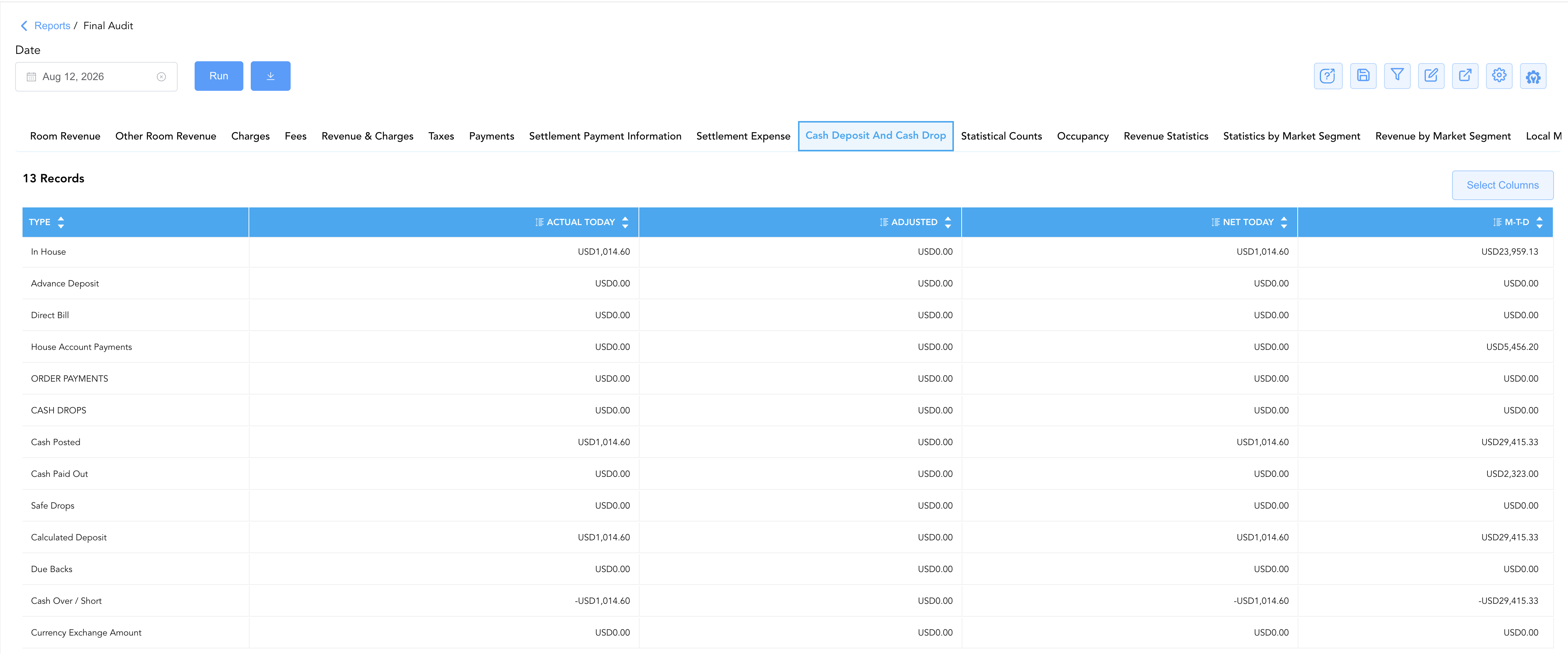
10. Cash Deposit And Cash Drop
Audits cashier shift drops, safe deposits, due backs, cash over/short variances, and float reconciliations.
-
Key Metrics: Type (In House, Advance Deposit, Direct Bill, CASH DROPS, Cash Over / Short, etc.), Actual Today, Adjusted, Net Today, M-T-D.
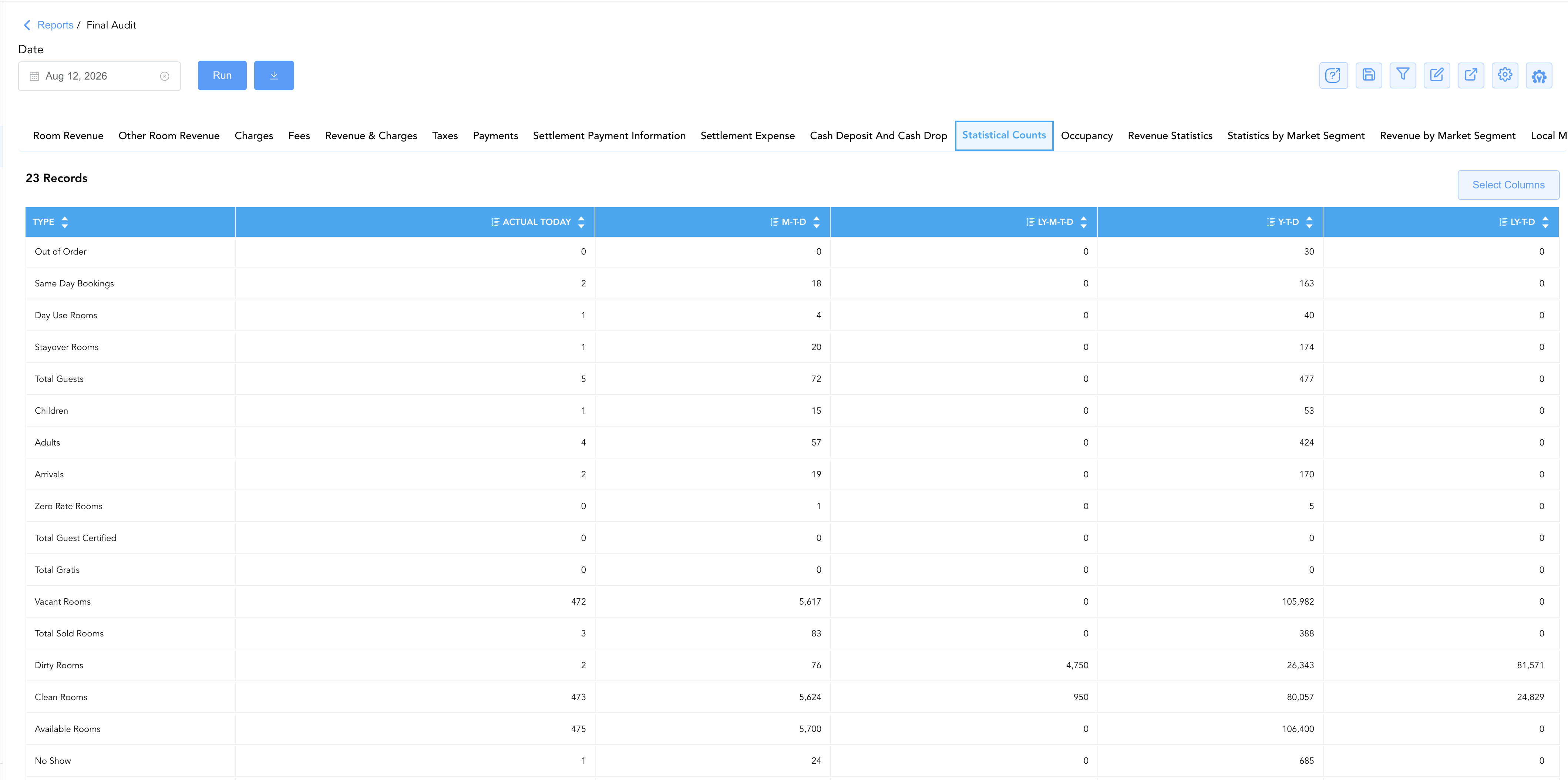
11. Statistical Counts
Tracks daily physical room inventory movement, guest demographics, and room condition states.
-
Key Metrics: Type (Total Guests, Adults, Children, Arrivals, Departed, Out of Order, Comp, House Use, Sold Rooms, Clean, Dirty), Actual Today, M-T-D, LY-M-T-D, Y-T-D, LY-T-D.
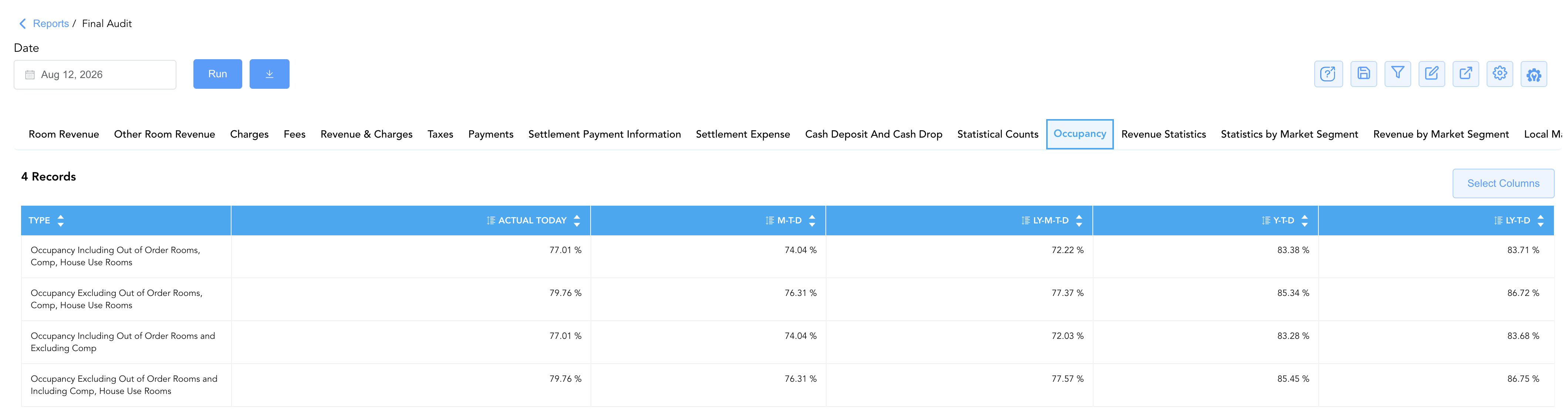
12. Occupancy
Calculates property occupancy percentage ratios across multiple standard industry formulas.
-
Key Metrics: Type (Occupancy Inc/Exc Out of Order, Comp, House Use), Actual Today, M-T-D, LY-M-T-D, Y-T-D, LY-T-D.
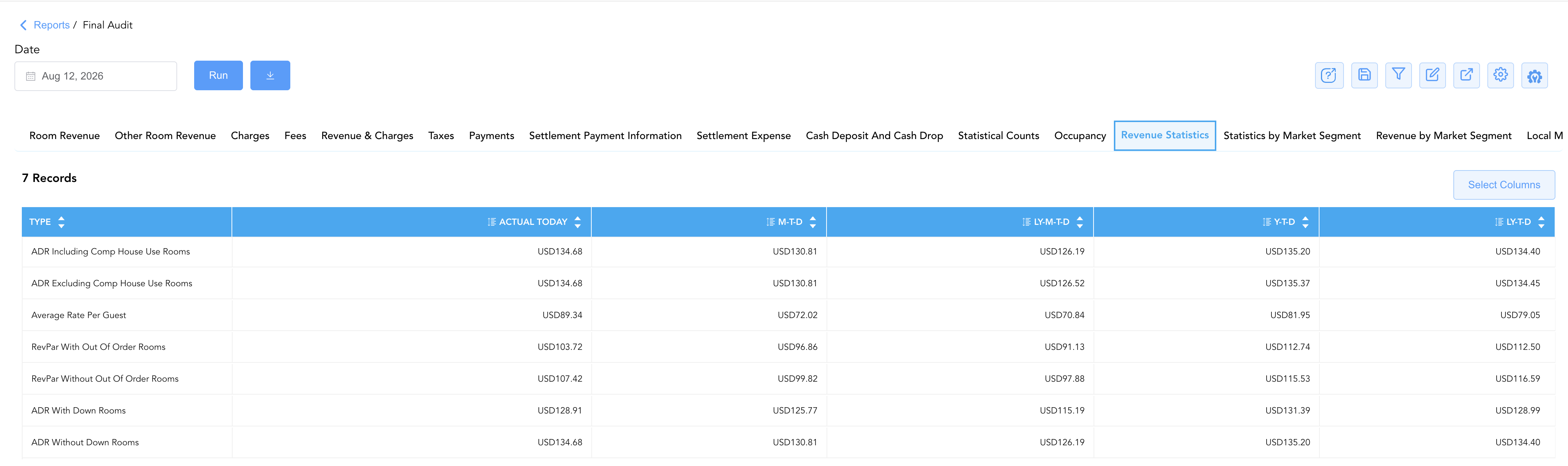
13. Revenue Statistics
Evaluates core hospitality key performance indicators (KPIs) contrasting rate yields.
-
Key Metrics: Type (ADR Including/Excluding Comp, RevPAR With/Without OOO, Average Rate Per Guest), Actual Today, M-T-D, LY-M-T-D, Y-T-D, LY-T-D.
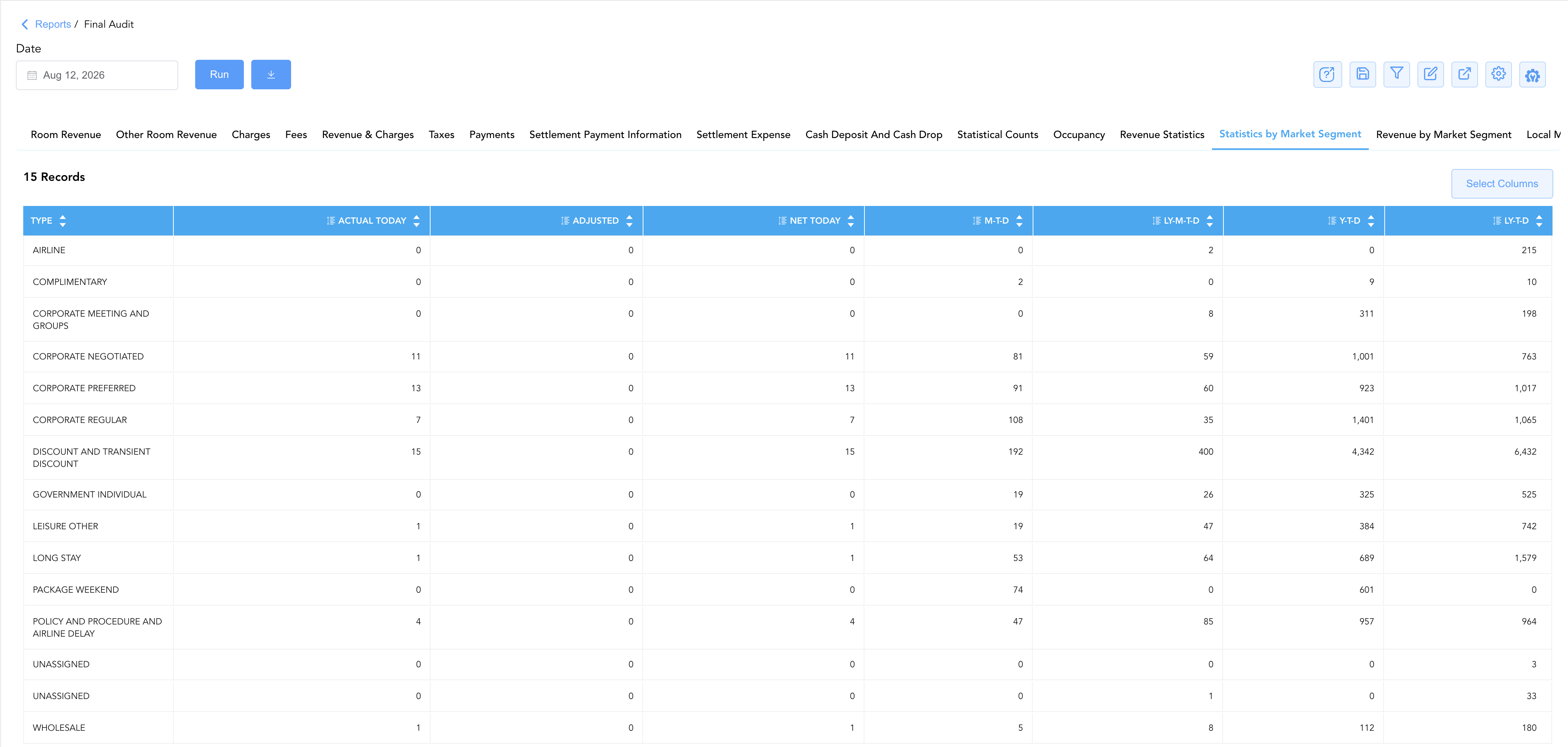
14. Statistics by Market Segment
Breaks down physical room night production and room counts across commercial market segments (Corporate, Airline, Leisure, Group, Wholesale).
-
Key Metrics: Type (Market Segment), Actual Today, Adjusted, Net Today, M-T-D, LY-M-T-D, Y-T-D, LY-T-D.
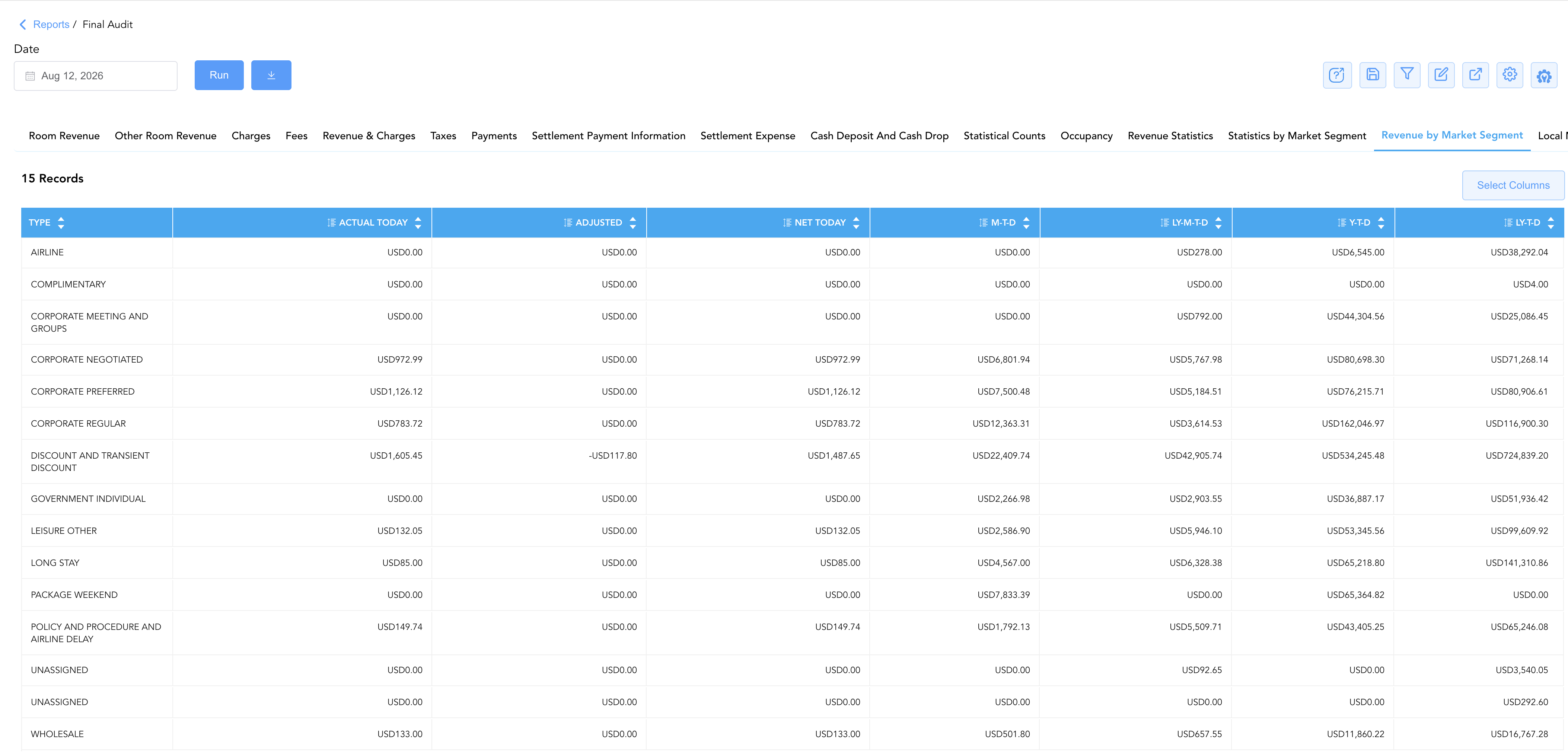
15. Revenue by Market Segment
Itemizes monetary room revenue generated per commercial market segment.
-
Key Metrics: Type (Market Segment), Actual Today, Adjusted, Net Today, M-T-D, LY-M-T-D, Y-T-D, LY-T-D.
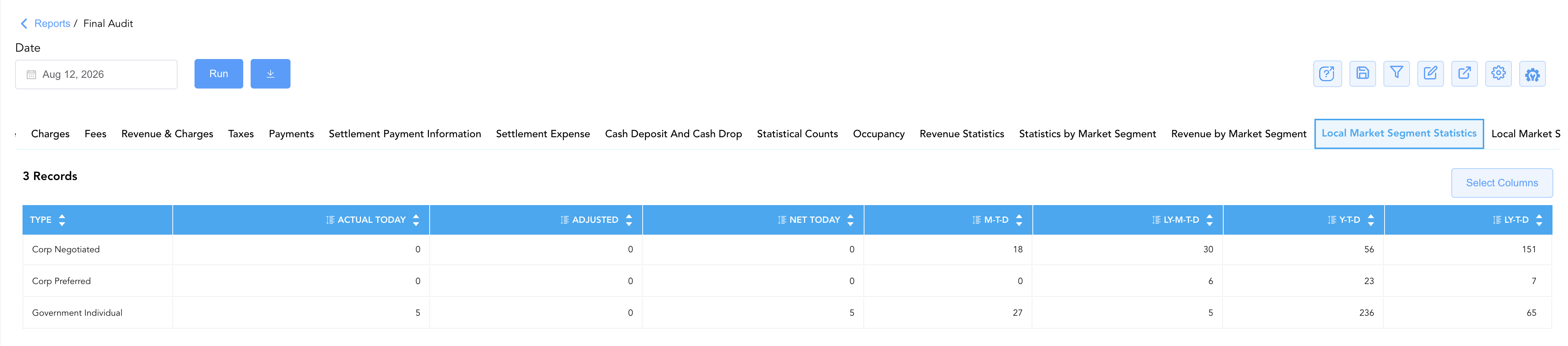
16. Local Market Segment Statistics
Tracks localized or customized market segment room night statistics configured for the property.
-
Key Metrics: Type (Local Market Segment), Actual Today, Adjusted, Net Today, M-T-D, LY-M-T-D, Y-T-D, LY-T-D.
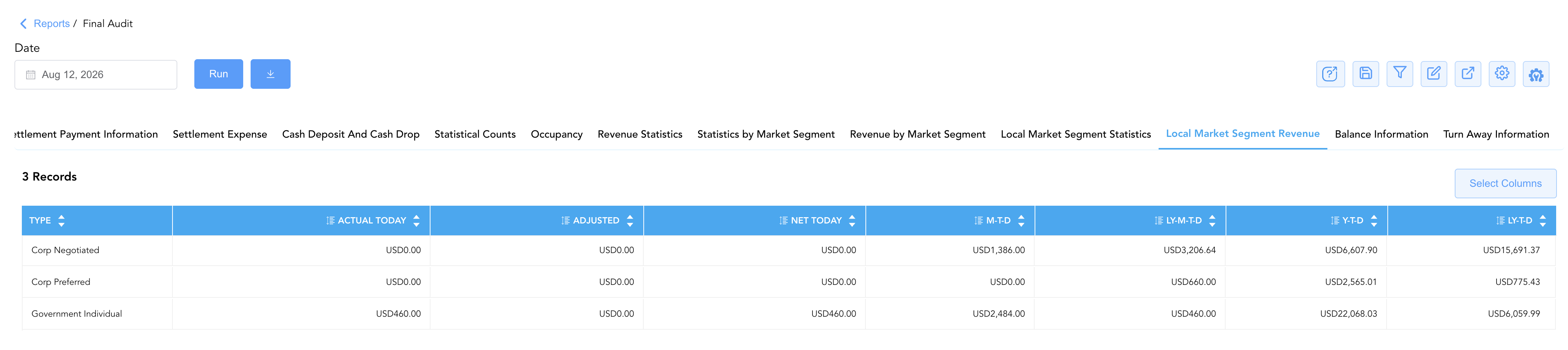
17. Local Market Segment Revenue
Tracks localized market segment monetary revenue earnings.
-
Key Metrics: Type (Local Market Segment), Actual Today, Adjusted, Net Today, M-T-D, LY-M-T-D, Y-T-D, LY-T-D.
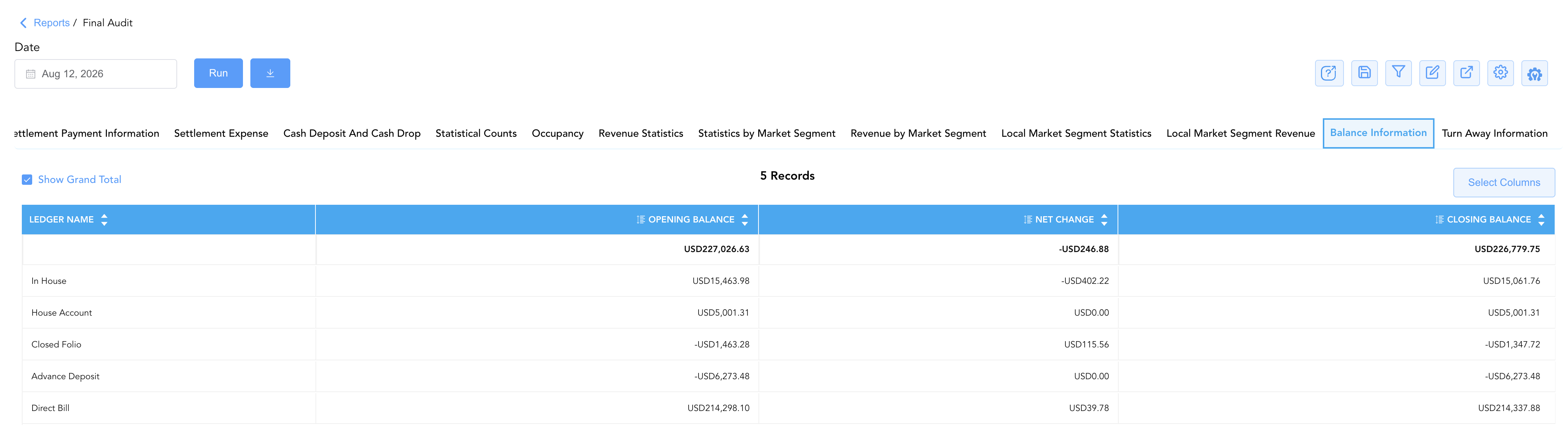
18. Balance Information
Delivers the master property trial balance roll-forward verifying absolute financial continuity across all core ledgers.
-
Key Metrics: Ledger Name (In House, Group Master, House Account, Closed Folio, Advance Deposit, Direct Bill), Opening Balance, Net Change, Closing Balance.
19. Turn Away Information
Logs unfulfilled reservation demand and lost business reasons.
-
Key Metrics: Name (Hotel Sold Out, Rate Not Available, Price Sensitive, Closed to Arrival, etc.), Today, M-T-D.

Data Dictionary (Comprehensive Column Mapping Across All 19 Sections)
Customize your default view using the Configure (⚙️) icon on the report page. Below is the full data dictionary representing every column across all 19 sections of this report:
💡 Tax Treatment Note: Revenue figures in financial sections (Room Revenue, Charges, Market Segment Revenue) represent Net Base Amounts (Exclusive of Taxes). Figures in Payments, Settlements, and Balance Information represent Gross Amounts (Includes Taxes & Fees).
|
Column Name |
Section(s) Where Column Appears |
Description |
Data Source / System Mapping |
Includes Taxes & Fees? |
|
Charge Type Name |
Sections 1, 2, 3 |
Human-readable description of the revenue charge code (e.g., GUEST ROOM, PARKING). |
Transaction Code Configuration |
❌ No |
|
Charge Type Code |
Sections 1, 2, 3 |
System transaction code used to post the charge (e.g., RR, 5302, 15200). |
Transaction Code Configuration |
❌ No |
|
Tax Type |
Sections 4, 6 |
Specific statutory tax classification (e.g., City Tax, Accommodation Tax, Sales Tax). |
Tax Engine Configuration |
N/A |
|
Tax Type Category |
Section 6 |
Macro tax classification or regulatory bucket. |
Tax Engine Configuration |
N/A |
|
Type |
Sections 5, 10–17 |
Category row identifier (Revenue type, Cash type, Stat count, Market Segment, KPI). |
System Dimension Tag |
N/A |
|
Cash / Tender Category |
Sections 7, 8 |
Payment tender method or settlement bucket (Cash, Credit Card, Direct Bill). |
Tender Configuration |
🟢 Yes |
|
PAYMENT METHOD: |
Section 9 |
Specific card processing or settlement expense channel. |
Settlement Gateway |
🟢 Yes |
|
Ledger Name |
Section 18 |
Primary PMS ledger account (In House, Advance Deposit, Direct Bill, Closed Folio, etc.). |
Master Ledger Engine |
🟢 Yes |
|
Name |
Section 19 |
Unfulfilled demand reason code (e.g., Hotel Sold Out, Price Sensitive). |
Turn Away Engine |
N/A |
|
Actual Today |
Sections 1–17 |
Gross posted charge, statistical count, or payment value before same-day adjustments. |
Ledger / Stat Engine |
Depends on Section |
|
Adjusted |
Sections 1–9, 14–17 |
Same-day financial reductions, voids, rate corrections, or stat adjustments applied. |
Adjustment Audit Log |
Depends on Section |
|
Adjusted Transferred |
Sections 1–7 |
Charges or credits transferred between guest folios or ledgers during the day. |
Ledger Transfer Engine |
Depends on Section |
|
Net Today |
Sections 1–9, 14–17 |
Calculated net financial posted value or room night count for the operational day ( |
|
Depends on Section |
|
Today |
Section 19 |
Count of turn-away or lost demand events logged during the current day. |
Turn Away Log |
N/A |
|
M-T-D |
Sections 1–17, 19 |
Cumulative month-to-date net financial value, room count, or turn-away total. |
|
Depends on Section |
|
LY-M-T-D |
Sections 1–9, 11–17 |
Last Year Month-to-Date net value or count for the equivalent calendar period. |
Historical Performance Log |
Depends on Section |
|
Variance (M-T-D) |
Sections 1–9 |
Calculated variance between current M-T-D and last year's M-T-D ( |
|
Depends on Section |
|
Y-T-D |
Sections 1–9, 11–17 |
Cumulative year-to-date net financial value or room count through current business date. |
|
Depends on Section |
|
LY-T-D |
Sections 1–9, 11–17 |
Last Year Year-to-Date net value or count for the equivalent calendar period. |
Historical Performance Log |
Depends on Section |
|
Variance (Y-T-D) |
Sections 1–9 |
Calculated variance between current Y-T-D and last year's Y-T-D ( |
|
Depends on Section |
|
Opening Balance |
Section 18 |
Master ledger balance at the start of the operational business day. |
Prior Day Closing Balance |
🟢 Yes |
|
Net Change |
Section 18 |
Net financial activity applied to the master ledger during the business day. |
|
🟢 Yes |
|
Closing Balance |
Section 18 |
Calculated master ledger balance at business date close ( |
|
🟢 Yes |
Customization & Platform Features
User & Property Preferences
-
Personal Preference: Tailor your individual view by hiding or dragging columns. Your preference saves automatically for future sessions.
-
Property Defaults: System Admins can configure standard default layouts across all property users to streamline operational reporting. To maximize audit efficiency, group the columns into the below logical blocks:
-
Section 1: Room Revenue
-
Charge Identifiers (Cols 1–2):
Charge Type Code|Charge Type Name -
Daily Activity & Adjustments (Cols 3–6):
Actual Today|Adjusted|Adjusted Transferred|Net Today -
Cumulative & Prior Year Metrics (Cols 7–12):
M-T-D|LY-M-T-D|Variance|Y-T-D|LY-T-D|Variance
-
-
Section 2: Other Revenue
-
Section 3: Charges
-
Charge Identifiers (Cols 1–2):
Charge Type Code|Charge Type Name -
Daily Activity & Adjustments (Cols 3–6):
Actual Today|Adjusted|Adjusted Transferred|Net Today -
Cumulative & Prior Year Metrics (Cols 7–11):
M-T-D|LY-M-T-D|Variance|Y-T-D|LY-T-D|Variance
-
-
Section 4: Fees
-
Fee Category (Col 1):
Tax TypeDaily Activity & Adjustments (Cols 2–5):
Actual Today|Adjusted|Adjusted Transferred|Net TodayCumulative & Prior Year Metrics (Cols 6–10):
M-T-D|LY-M-T-D|Variance|Y-T-D|LY-T-D|Variance
-
-
Section 5: Revenue & Charges:
-
Revenue Tier (Col 1):
Type -
Daily Activity & Adjustments (Cols 2–5):
Actual Today|Adjusted|Adjusted Transferred|Net Today -
Cumulative & Prior Year Metrics (Cols 6–10):
M-T-D|LY-M-T-D|Variance|Y-T-D|LY-T-D|Variance
-
-
Section 6: Taxes
-
Tax Classification (Cols 1–2):
Tax Type Category|Tax Type -
Daily Activity & Adjustments (Cols 3–6):
Actual Today|Adjusted|Adjusted Transferred|Net Today -
Cumulative & Prior Year Metrics (Cols 7–11):
M-T-D|LY-M-T-D|Variance|Y-T-D|LY-T-D|Variance
-
-
Section 7: Payments
-
Tender Method (Col 1):
Payment Method -
Daily Collections & Adjustments (Cols 2–5):
Actual Today|Adjusted|Adjusted Transferred|Net Today -
Cumulative & Prior Year Metrics (Cols 6–10):
M-T-D|LY-M-T-D|Variance|Y-T-D|LY-T-D|Variance
-
-
Section 8: Settlement Payments
-
Tender Method (Col 1):
Payment Method -
Daily Settlements & Adjustments (Cols 2–4):
Actual Today|Adjusted|Net Today -
Cumulative & Prior Year Metrics (Cols 5–9):
M-T-D|LY-M-T-D|Variance|Y-T-D|LY-T-D|Variance
-
-
Section 9: Settlement Expense
-
Section 10: Cash Deposits and Cash Drops:
-
Deposit Classification (Col 1):
Type -
Shift Activity & Adjustments (Cols 2–4):
Actual Today|Adjusted|Net Today -
Cumulative Rollup (Col 5):
M-T-D
-
-
Section 11: Statistical Counts
-
Metric Description (Col 1):
Type -
Volume & Performance Metrics (Cols 2–6):
Actual Today|M-T-D|LY-M-T-D|Y-T-D|LY-T-D
-
-
Section 12: Occupancy
-
KPI Description (Col 1):
Type -
Occupancy Percentages (Cols 2–6):
Actual Today|M-T-D|LY-M-T-D|Y-T-D|LY-T-D
-
-
Section 13: Revenue Statistics
-
Financial KPI (Col 1):
TypeYield & Rate Metrics (Cols 2–6):
Actual Today|M-T-D|LY-M-T-D|Y-T-D|LY-T-D
-
-
Section 14: Statistics by Market Segment
-
Market Segment (Col 1):
Type -
Daily Room Production (Cols 2–4):
Actual Today|Adjusted|Net Today -
Cumulative Segment Production (Cols 5–8):
M-T-D|LY-M-T-D|Y-T-D|LY-T-D
-
-
Section 15: Revenue by Market Segment
-
Market Segment (Col 1):
Type -
Daily Segment Revenue (Cols 2–4):
Actual Today|Adjusted|Net Today -
Cumulative Segment Revenue (Cols 5–8):
M-T-D|LY-M-T-D|Y-T-D|LY-T-D
-
-
Section 16: Local Market Segment Statistics
-
Local Segment (Col 1):
Type -
Daily Local Room Production (Cols 2–4):
Actual Today|Adjusted|Net Today -
Cumulative Production (Cols 5–8):
M-T-D|LY-M-T-D|Y-T-D|LY-T-D
-
-
Section 17: Local Market Segment Revenue:
-
Local Segment (Col 1):
Type -
Daily Local Segment Revenue (Cols 2–4):
Actual Today|Adjusted|Net Today -
Cumulative Revenue (Cols 5–8):
M-T-D|LY-M-T-D|Y-T-D|LY-T-D
-
-
Section 18: Balance Information
-
Ledger Category (Col 1):
Ledger Name -
Ledger Roll-Forward Flow (Cols 2–4):
Opening Balance|Net Change|Closing Balance
-
-
Section 19: Turn Away Information
-
Denial Reason (Col 1):
NameTurn Away Counts (Cols 2–3):
Today|M-T-D
-
-
Report Toolbar & Quick Actions
Use the top-right toolbar icons on the report page to manage and export your data view:
|
Icon |
Action / Feature |
Description |

|
Knowledge Article |
Opens the knowledge base article to learn how to interpret this report. |

|
Saved Views |
Saves your column filtering, sorting, and highlight preferences so you can easily reload your custom view later without reconfiguring the report. |

|
Filter |
Opens filter controls to isolate specific data within a column based on your selected criteria. |

|
Highlight |
Highlights column values in a designated color based on selected conditions. |

|
Export |
Exports and downloads the report in various formats (Excel, PDF, CSV) for offline analysis or printing. |

|
Configure |
Opens column selection controls to toggle visibility, reorder columns, or hide rows with all zeros. |

|
Additional Configuration |
Provides advanced report configuration and display formatting options to customize data presentation. |
Advanced Controls
-
Exporting & Executive Distribution: Download in Excel or PDF format to attach to daily night audit packs, executive morning reports, or general ledger journal entry imports.
-
Filtering: Filter data by specific Charge Type, Market Segment, or date ranges.
-
Highlighting (Conditional Formatting): Apply custom rules to automatically highlight negative charge adjustments (
Adjusted < $0.00), high-value rate variances, or out-of-balance ledger indicators.
🔗 Related Reports & Next Steps
Within ⚖️ Ledgers & Trial Balance:
-
Day End Summary – Review consolidated daily revenue, tax, payment, and deposit blueprints at business day close.
-
Trial Balance – Translate daily property activity into strict General Ledger asset, liability, income, and expense accounts.
-
Balance Details – Detailed roll-forward tracking starting balances, credits, debits, and ending balances per category.
-
Closed Folio Balances – Track post-settlement charges, payments, and net changes on closed guest accounts.
Cross-Pillar Deep Dives:
-
📈 Forward Revenue & Analytics: To analyze forward-looking pickup, RevPAR trends, and ADR performance, visit the [📈 Revenue & Analytics] reporting hub.
-
💳 Payments & Transactions: To inspect cashier shift drawer drops or tokenized credit card processing logs, cross-reference Control Report or Payment Activity.
-
📬 Billing & Receivables (AR): To audit outstanding corporate direct-bill balances and aging invoices, review AR Invoice Aging or Direct Bill Ledger Details.