
General Manager Report Overview
Parent Hub: 📈 Revenue & Analytics
Category: 📊 Performance Summaries
Target Roles: General Managers, Managing Directors, Regional Vice Presidents, Directors of Finance & Controllers, Asset Managers
Key Value: Drive executive operational governance and daily property performance benchmarking by evaluating property inventory physical counts, revenue yields, key performance indicators (ADR, RevPAR), and forward-looking occupancy projections across three comparative timeframes.
Executive Summary
The General Manager Report is the primary executive dashboard and operational summary document within the 📊 Performance Summaries category of the 📈 Revenue & Analytics hub. Designed for C-suite executive briefings, daily morning management stand-ups, and regional asset reviews, it aggregates property-wide operational statistics, financial performance metrics, and forward-looking occupancy projections into a single high-level report.
By structuring executive metrics across three explicit operational sections (Statistics, Revenue Statistics, and Occupancy), this report evaluates current daily activity alongside cumulative Month-to-Date (M-T-D) and Year-to-Date (Y-T-D) performance. Crucially, every metric is benchmarked against prior-year historical equivalents (Last Year Actual Today, LY-M-T-D, LY-T-D), providing leadership with an immediate Year-over-Year (YoY) variance blueprint across room physical counts, rate yields (ADR), room revenues (RevPAR), and forward 7-day to 31-day booking pace.
Key Capabilities
-
Three-Pillar Executive Governance: Consolidates room inventory movement (Statistics), monetary yield metrics (Revenue Statistics), and current/forward booking levels (Occupancy) into one unified briefing document.
-
Multi-Period Comparative Benchmarking: Tracks live daily performance (Actual Today) alongside Month-to-Date (M-T-D) and Year-to-Date (Y-T-D) figures, comparing each directly against historical prior-year benchmarks (Last Year Actual Today, LY-M-T-D, LY-T-D).
-
Core KPI & Rate Yield Auditing: Monitors key industry performance indicators including Average Daily Rate (ADR), Revenue Per Available Room (RevPAR), and RevPAR adjusted for Out-of-Order inventory (RevPAR Excluding OOO Rooms).
-
Forward Occupancy & Pace Projection: Evaluates upcoming arrival demand across future stay windows (Occupancy Tomorrow, Occupancy For Next 7 Days, Next 14 Days, Next 31 Days).
Report Views & Functional Breakdown (All 3 Sections)
The General Manager Report presents executive operational performance across three structured operational sections:
┌────────────────────────────────────────────────────────────────────────┐
│                      GENERAL MANAGER REPORT                            │
├────────────────────────────────────────────────────────────────────────┤
│ 1. Statistics Section                                                  │
│    (Physical Room Counts, Guest Demographics & Operational Activity)    │
├────────────────────────────────────────────────────────────────────────┤
│ 2. Revenue Statistics Section                                          │
│    (Financial Revenue Yields, ADR, RevPAR & Tax/Fee Collections)       │
├────────────────────────────────────────────────────────────────────────┤
│ 3. Occupancy Section                                                   │
│    (Historical, Current, and Forward-Looking Occupancy Percentages)   │
└────────────────────────────────────────────────────────────────────────┘
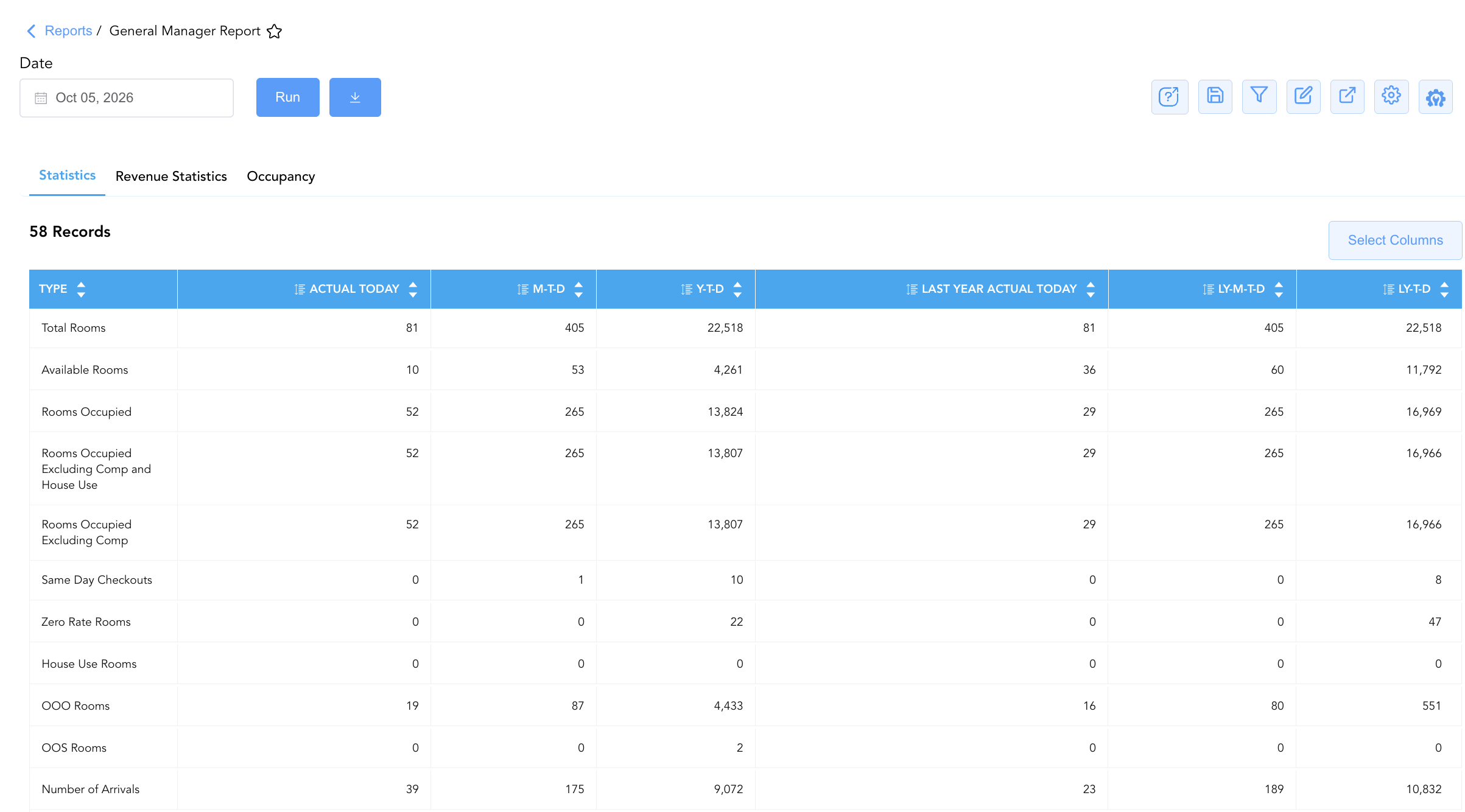
1. Statistics
Itemizes room inventory allocations, guest occupant headcounts, reservation movements, and front desk operational activity.
-
Primary Use: Monitoring physical room availability, out-of-order room counts (OOO Rooms), guest arrival/departure volumes (Number of Arrivals, Number Of Departures), turnaways, and housekeeping room cleaning statuses (Dirty Rooms, Clean Rooms, Ready Rooms).
-
Key Metrics: Total Rooms, Available Rooms, Rooms Occupied, OOO Rooms, Number of Arrivals, Number of Arrival Guests, Number Of Departures, No Show Reservations, Total In House Guests, Adults/Children In House, Transient/Group In House Guests, Cancelled Reservations, Booked Today Reservations, Dirty/Clean/Ready Rooms.
2. Revenue Statistics
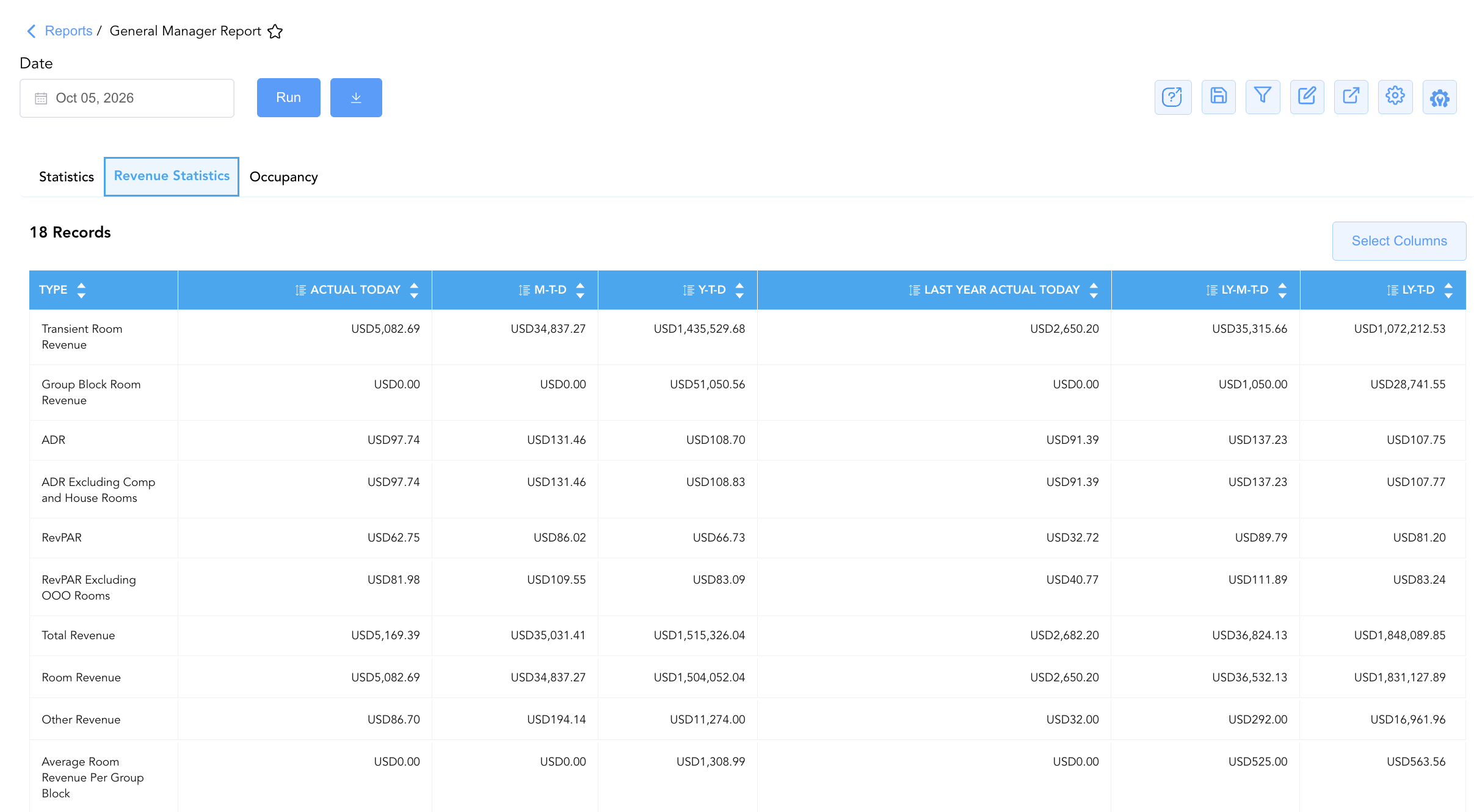
Details monetary revenue generation, rate yields, fee/tax collections, and average rate performance metrics.
-
Primary Use: Evaluating financial performance against historical budgets, auditing room revenue splits (Transient Room Revenue vs. Group Block Room Revenue), and monitoring rate yield efficiency (ADR, RevPAR).
-
Key Metrics: Transient Room Revenue, Group Block Room Revenue, ADR, ADR Excluding Comp and House Rooms, RevPAR, RevPAR Excluding OOO Rooms, Total Revenue, Room Revenue, Other Revenue, Average Room Revenue Per Group Room, Collected Taxes, Collected Fees.
3. Occupancy
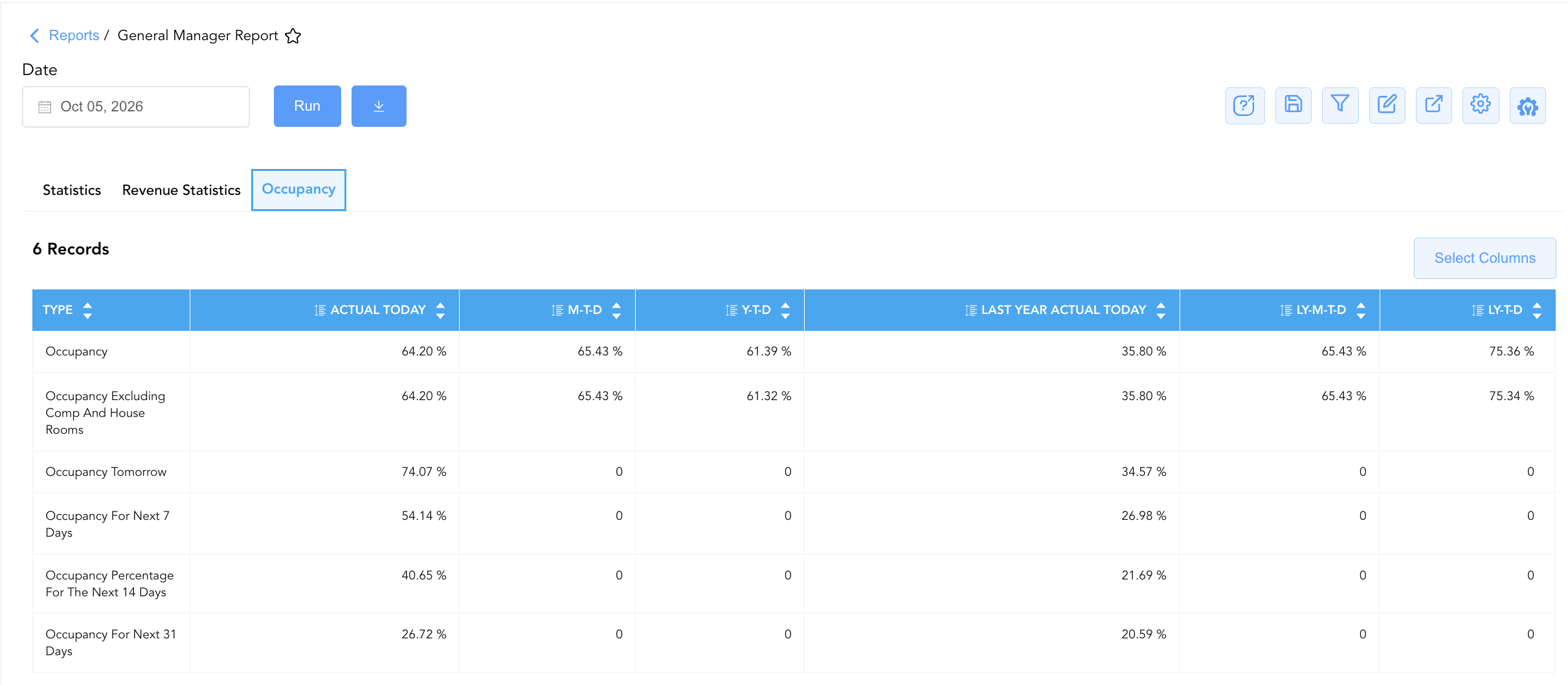
Displays current property occupancy ratios alongside forward-looking demand projections across future calendar windows.
-
Primary Use: Measuring property capacity utilization, comparing current occupancy against prior-year levels, and evaluating short-to-medium-term booking pace for revenue management strategy adjustments.
-
Key Metrics: Occupancy, Occupancy Excluding Comp And House Rooms, Occupancy Tomorrow, Occupancy For Next 7 Days, Occupancy Percentage For The Next 14 Days, Occupancy For Next 31 Days.
Data Dictionary (Dynamic View Columns Across All 3 Sections)
Customize your default view using the Configure (⚙️) icon on the report page. Below is the full data dictionary representing every column available across all three sections of this report:
💡 Monetary & Rate Calculation Note: Revenue metrics (Total Revenue, Room Revenue, Transient Room Revenue) represent Gross Base Financial Values (Excludes Taxes & Fees) unless explicitly noted (such as Collected Taxes and Collected Fees). Occupancy percentages are rendered as decimal ratios (e.g.,
0.642= 64.2%).
|
Column Name |
Section(s) Where Column Appears |
Description |
Data Source / System Mapping |
Includes Taxes & Fees? |
|---|---|---|---|---|
|
Type |
Statistics, Revenue Statistics, Occupancy |
Specific operational metric, financial KPI, or occupancy parameter title (e.g., Total Rooms, ADR, Occupancy). |
System Metric Master |
N/A |
|
Actual Today |
All Sections |
Live operational value or financial yield recorded for the current business date. |
Real-Time Ledger Engine |
❌ No (Base Revenue) |
|
M-T-D |
All Sections |
Cumulative Month-to-Date total or weighted average for the active month. |
M-T-D Ledger Engine |
❌ No (Base Revenue) |
|
Y-T-D |
All Sections |
Cumulative Year-to-Date total or weighted average for the current calendar year. |
Y-T-D Ledger Engine |
❌ No (Base Revenue) |
|
Last Year Actual Today |
All Sections |
Historical operational value recorded on the exact equivalent business date last year. |
Historical Ledger Engine |
❌ No (Base Revenue) |
|
LY-M-T-D |
All Sections |
Historical cumulative Month-to-Date total recorded during the same month last year. |
Historical Ledger Engine |
❌ No (Base Revenue) |
|
LY-T-D |
All Sections |
Historical cumulative Year-to-Date total recorded during the same timeframe last year. |
Historical Ledger Engine |
❌ No (Base Revenue) |
Customization & Platform Features
User & Property Preferences
-
Personal Preference: Tailor your individual view by hiding or dragging columns. Your preferences save automatically for future sessions.
-
Property Defaults: System Admins can configure standard default layouts across all property users to streamline operational reporting. To maximize audit efficiency, group the columns into the below logical blocks:
-
All Sections
-
(Statistics, Revenue Statistics, Occupancy):
Metric Description|Actual Today|M-T-D|Y-T-D|Last Year Actual Today|LY-M-T-D | LY-T-D
-
-
Report Toolbar & Quick Actions
Use the top-right toolbar icons on the report page to manage and export your data view:
|
Icon |
Action / Feature |
Description |

|
Knowledge Article |
Opens the knowledge base article to learn how to interpret this report. |

|
Saved Views |
Saves your column filtering, sorting, and highlight preferences so you can easily reload your custom view later without reconfiguring the report. |

|
Filter |
Opens filter controls to isolate specific data within a column based on your selected criteria. |

|
Highlight |
Highlights column values in a designated color based on selected conditions. |

|
Export |
Exports and downloads the report in various formats (Excel, PDF, CSV) for offline analysis or printing. |

|
Configure |
Opens column selection controls to toggle visibility, reorder columns, or hide rows with all zeros. |

|
Additional Configuration |
Provides advanced report configuration and display formatting options to customize data presentation. |
Advanced Controls
-
Exporting & Executive Briefings: Download in Excel or PDF format to support morning operational stand-ups, owner board meetings, and regional management reporting.
-
Filtering: Filter data by specific date ranges or operational sub-categories.
-
Highlighting (Conditional Formatting): Apply custom rules to automatically highlight negative YoY revenue growth or high out-of-order room inventory flags.
🔗 Related Reports & Next Steps
Within 📈 Revenue & Analytics & 📊 Performance Summaries:
-
Daily Revenue Summary – Deep dive into daily line-item room, tax, fee, and outlet revenue breakdowns.
-
Market Segment Summary – Analyze how room revenue and ADR performance vary across retail, corporate, group, and OTA segments.
Cross-Pillar Deep Dives:
-
⚖️️ Ledgers & Trial Balance: To reconcile total room and extra revenues against General Ledger control accounts, review Trial Balance or Day End Summary.
-
🧹 Rooms & Facilities: Cross-reference out-of-order and room maintenance counts with All Rooms.