
Guest Opt In Preferences Report Overview
Parent Hub: 🛎️ Front Desk & Guest Services
Category: ⭐ Guest Insights & Relations
Target Roles: Marketing Directors, Guest Relations Managers, CRM Supervisors, Front Office Managers, Data Privacy & Compliance Officers, General Managers
Key Value: Monitor guest communication and marketing consent selections, track email subscription and loyalty auto-enrollment preferences, enforce privacy compliance (GDPR, CCPA), audit guest contact details, and optimize targeted guest engagement strategies.
Executive Summary
The Guest Opt In Preferences Report is a primary privacy compliance, guest communication consent, and CRM audit document within the ⭐ Guest Insights & Relations category of the 🛎️ Front Desk & Guest Services hub. Designed to deliver complete operational visibility over guest marketing consent choices, it itemizes every guest profile interaction where communication or loyalty program enrollment choices were recorded in the Property Management System (PMS).
-
By mapping preference modification events (
Date) to guest contact profiles (Guest Name,First Name,Last Name,Phone,Email,City,State,Country,ZIP Code) and specific consent parameters (Action Type,Value), this report enables marketing teams, guest relations managers, and privacy officers to audit marketing consent lists, maintain compliant email dispatch logs, verify loyalty auto-enrollment choices, and respect guest communication boundaries.
Key Capabilities
-
Communication & Marketing Consent Audit: Tracks explicit guest decisions regarding non-stay promotional emails (e.g., promotional newsletters vs. transactional confirmation letters).
-
Loyalty Program Auto-Enrollment Tracking: Logs guest choices regarding automatic enrollment into hotel loyalty programs (
Action Type, e.g., "I want to be auto enrolled in any Loyalty Programs"). -
Explicit Consent Value Logging: Captures the exact selection made by the guest (
Value, e.g.,Opted Invs.Opted Out) to support legal privacy and marketing consent compliance. -
Complete Contact Profile Visibility: Displays full guest contact details (
Phone,Email,City,State,Country,ZIP Code) for verified CRM database synchronizations. -
Chronological Consent History: Records the exact calendar date (
Date) of consent selection to maintain an audit trail for data protection compliance (e.g., GDPR, CCPA).
Report Views & Functional Breakdown
The Guest Opt In Preferences Report presents guest consent data in a unified single-table ledger that supports three key analytical perspectives:
┌────────────────────────────────────────────────────────────────────────┐
│                 GUEST OPT IN PREFERENCES REPORT                        │
├────────────────────────────────────────────────────────────────────────┤
│                         Unified Matrix View                            │
├──────────────────────────┬──────────────────────────┬──────────────────┤
│ 1. Consent Action &      │ 2. Guest Contact &       │ 3. Geographic &  │
│    Preference Value      │    Profile Register      │    Demographic   │
└──────────────────────────┴──────────────────────────┴──────────────────┘
1. Consent Action & Preference Value
Monitors specific consent prompts and recorded guest choices.
-
Primary Use: Filtering marketing distribution lists, verifying promotional email opt-ins, and confirming loyalty auto-enrollment preferences.
-
Key Metrics: Date, Action Type, Value, Email, Guest Name.
2. Guest Contact & Profile Register
Correlates recorded preferences directly with primary guest communication channels.
-
Primary Use: Validating email addresses and phone numbers before executing marketing campaigns, and verifying profile contact records.
-
Key Metrics: Guest Name, First Name, Last Name, Phone, Email, Action Type, Value.
3. Geographic & Demographic Analysis
Analyzes consent trends and opt-in/opt-out ratios across geographic regions.
-
Primary Use: Evaluating marketing consent compliance across different states and countries, and analyzing regional guest engagement patterns.
-
Key Metrics: City, State, Country, ZIP Code, Action Type, Value.
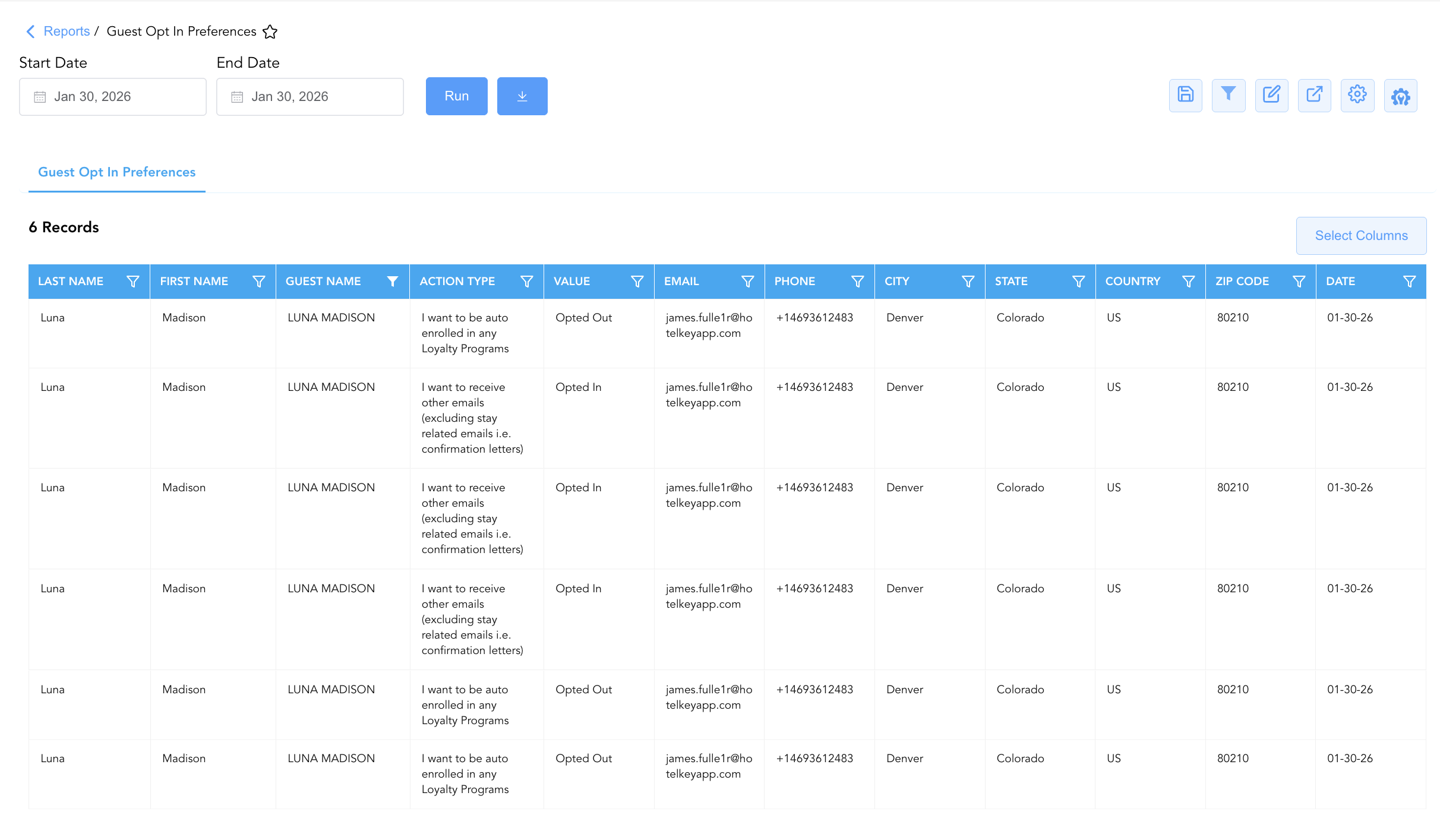
Data Dictionary (Dynamic View Columns)
Customize your default view using the Configure (⚙️) icon on the report page. Below is the full data dictionary representing all 12 columns available in this report:
💡 Consent Value Note:
Valueindicates the explicit preference recorded by the guest:Opted In(consent granted for marketing/communications) orOpted Out(consent declined/withdrawn).
|
Column Name |
Description |
Data Source / System Mapping |
Includes Taxes & Fees? |
|
Date |
Calendar date on which the consent preference was recorded or updated. |
PMS Guest Profile > Preference Timestamp |
N/A |
|
Guest Name |
Combined full name of the registered guest. |
Guest Profile > Full Name |
N/A |
|
First Name |
First name of the registered guest. |
Guest Profile > First Name |
N/A |
|
Last Name |
Last name of the registered guest. |
Guest Profile > Last Name |
N/A |
|
Phone |
Primary contact phone number linked to the guest profile. |
Guest Profile > Phone Number |
N/A |
|
|
Primary email address linked to the guest profile. |
Guest Profile > Email Address |
N/A |
|
City |
City of residence associated with the guest profile. |
Guest Profile > City |
N/A |
|
State |
State or province of residence. |
Guest Profile > State |
N/A |
|
Country |
Country of residence (e.g., US). |
Guest Profile > Country Code |
N/A |
|
ZIP Code |
Postal or ZIP code of the guest address. |
Guest Profile > Postal Code |
N/A |
|
Action Type |
Specific consent prompt or policy statement presented to the guest (e.g., promotional email consent, loyalty auto-enrollment). |
PMS Opt-In Setup > Policy Statement |
N/A |
|
Value |
Recorded guest preference selection ( |
PMS Opt-In Setup > Selection State |
N/A |
Customization & Platform Features
User & Property Preferences
-
Personal Preference: Tailor your individual view by hiding or dragging columns. Your preferences save automatically for future sessions.
-
Property Defaults: System Admins can configure standard default layouts across all property users to streamline operational reporting. To maximize audit efficiency, group the columns into the below logical blocks:
-
Guest Identification (Cols 1–3):
Last Name|First Name|Guest Name -
Opt-In Action & Consent Value (Cols 4–5):
Action Type|Value -
Contact Details (Cols 6–7):
Email|Phone -
Geographic Profile (Cols 8–11):
City|State|Country|ZIP Code -
Consent Timestamp (Col 12):
Date
-
Report Toolbar & Quick Actions
Use the top-right toolbar icons on the report page to manage and export your data view:
|
Icon |
Action / Feature |
Description |

|
Knowledge Article |
Opens the knowledge base article to learn how to interpret this report. |

|
Saved Views |
Saves your column filtering, sorting, and highlight preferences so you can easily reload your custom view later without reconfiguring the report. |

|
Filter |
Opens filter controls to isolate specific data within a column based on your selected criteria. |

|
Highlight |
Highlights column values in a designated color based on selected conditions. |

|
Export |
Exports and downloads the report in various formats (Excel, PDF, CSV) for offline analysis or printing. |

|
Configure |
Opens column selection controls to toggle visibility, reorder columns, or hide rows with all zeros. |

|
Additional Configuration |
Provides advanced report configuration and display formatting options to customize data presentation. |
Advanced Controls
-
Exporting & CRM Integration: Download in Excel or PDF format to synchronize consent flags with external marketing automation tools, email distribution platforms, and CRM engines.
-
Filtering: Filter data by
Value = Opted Into compile promotional email lists, or isolate loyalty auto-enrollment opt-outs (Action Type = Loyalty ProgramsandValue = Opted Out). -
Highlighting (Conditional Formatting): Apply custom rules to automatically highlight new opt-in registrations or recent opt-out consent changes.
🔗 Related Reports & Next Steps
Within 🛎️ Front Desk & Guest Services & ⭐ Guest Insights & Relations:
-
In House List – Real-time guest register detailing active room occupants, contact info, and stay dates.
-
Recently Viewed Reservations – Audit log tracking recently accessed reservation records and user activity.
-
Do Not Rent – Security governance report tracking blacklisted guest profiles and restriction codes.
Cross-Pillar Deep Dives:
-
📈 Revenue & Analytics: Cross-reference opt-in guest profiles with Rate Plan Summaryand Local Market Segment Overview to evaluate marketing campaign conversion rates.
-
⚖️ Privacy & Compliance: Reconcile opt-out records against central data privacy engine logs to ensure full legal compliance across all guest communication touchpoints.