
Housekeeping Sheet Overview
Parent Hub: 🧹 Rooms & Facilities
Category: 🛏️ Room Status
Target Roles: Executive Housekeepers, Housekeeping Supervisors, Floor Operations Leads, Houseperson Coordinators, Front Office Managers, General Managers
Key Value: Serves as the primary operational daily housekeeping board and workload dispatch matrix to assign room attendant cleaning tasks, prioritize rush/VIP arrivals, verify ready room inventory, audit staff cleaning credits, and monitor department productivity.
Executive Summary
The Housekeeping Sheet is a comprehensive daily operational board, task assignment matrix, and workload management document within the 🛏️ Room Status category of the 🧹 Rooms & Facilities hub. Designed to deliver complete operational oversight over daily room attendant assignments, cleaning priorities, and floor readiness, it consolidates all physical guest room cleaning requirements across the property into a structured daily master board.
-
By organizing daily housekeeping operations into 5 defined report sections: Housekeeping Sheet, Priority, Ready Rooms, Summary by Assignment, and Summary by Service Type, this report enables executive housekeepers, supervisors, and floor leads to manage general cleaning boards (
Housekeeping Sheet), escalate rush arrival rooms (Priority), verify inspected check-in ready inventory (Ready Rooms), balance attendant room loads (Summary by Assignment), and audit department-wide cleaning credit values (Summary by Service Type). It correlates room parameters (Room Number,Room Type,Room Size,Zone,Floor,Occupancy Status,Room Status) with service classifications (Service Type,Cleaning Value,Priority), staff assignments (Housekeeping Team,Assigned To), guest profiles (Loyalty Tier,Guests,Adults,Children,VIP Guest,Upcoming VIP Guest,Pets), stay timeframes (Arrival Date,Arrival Time,Departure Date,Departure time,Current Stay,Upcoming Stay), physical room configurations (Composite Room,Component Rooms,Connected Rooms), and operational notes (Room Service Request,Preferences,Comments,Remarks,Housekeeping Remarks).
Key Capabilities
-
Five-Section Housekeeping Board Structure: Distinguishes general cleaning tasks (
Housekeeping Sheet) from urgent rush arrivals (Priority), inspectable check-in ready rooms (Ready Rooms), staff workload balances (Summary by Assignment), and department cleaning credits (Summary by Service Type). -
Workload & Attendant Task Allocation: Assigns specific room attendant names (
Assigned To) and team zones (Housekeeping Team,Zone,Floor) to manage daily floor cleaning boards. -
Cleaning Credit & Points Weighting: Calculates specific cleaning credit weights (
Cleaning Value) per service type (e.g., Checkout Service = 20–40 points vs. Towel and Trash Service = 10–50 points) to ensure equitable staff labor distribution. -
Rush Arrival & VIP Priority Escalation: Flags expedited room cleaning requirements (
Priority, e.g.,Yes,Normal,Urgent) and VIP guest stays (VIP Guest,Upcoming VIP Guest) to accelerate room turnover for incoming arrivals. -
Ready Room Inspection & Verification: Filters fully cleaned and inspected rooms (
Ready Rooms) to communicate live check-in inventory directly to the Front Desk. -
Executive Staff & Service Summaries: Aggregates attendant workloads (
Total Room,Vacant,Occupied,Clean,Dirty,Ready,Adults,Children) and total credits earned (Total Cleaning Value,Total Rooms Assigned).
Report Views & Functional Breakdown
The Housekeeping Sheet presents room cleaning and staff assignment data across 5 defined sections:
┌────────────────────────────────────────────────────────────────────────┐
│                        HOUSEKEEPING SHEET                              │
├────────────────────────────────────────────────────────────────────────┤
│                       5 Defined Report Sections                        │
├──────────────────────────┬──────────────────────────┬──────────────────┤
│ 1. Housekeeping Sheet    │ 2. Priority Section      │ 3. Ready Rooms   │
│    (General Task Board)  │    (Rush & VIP Rooms)    │    (Inspected)   │
├──────────────────────────┴──────────────────────────┴──────────────────┤
│ 4. Summary by Assignment (Staff Workload)                              │
├────────────────────────────────────────────────────────────────────────┤
│ 5. Summary by Service Type (Department Cleaning Credit Totals)         │
└────────────────────────────────────────────────────────────────────────┘
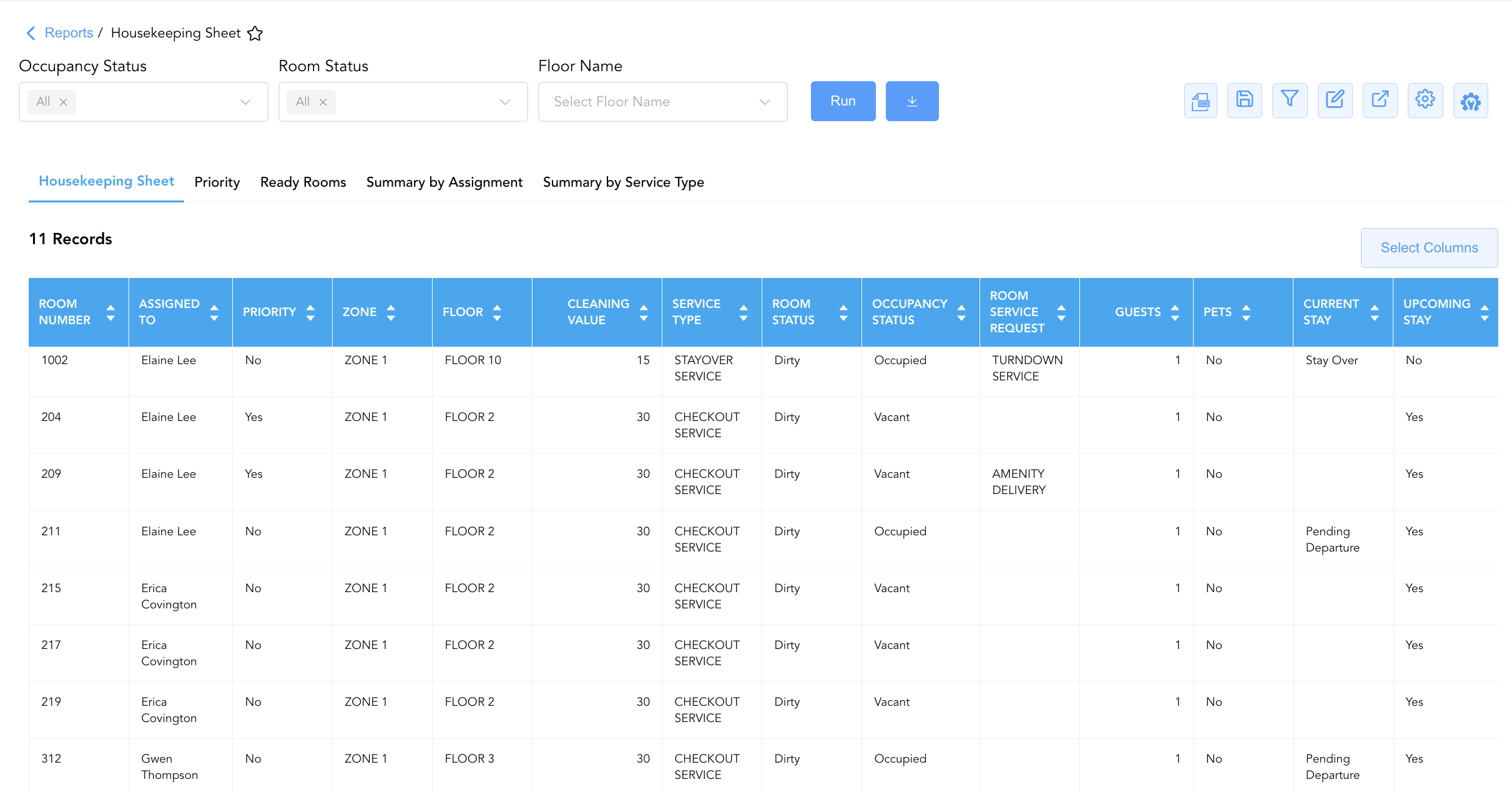
1. Housekeeping Sheet Section
Monitors all property guest rooms requiring daily housekeeping services, detailing assigned attendants, cleaning values, and stay timeframes.
-
Primary Use: Printing and distributing daily cleaning assignment boards to room attendants and housepersons.
-
Key Metrics: Service Type, Room Number, Room Type, Zone, Floor, Occupancy Status, Room Status, Assigned To, Cleaning Value, Arrival Date, Departure Date.
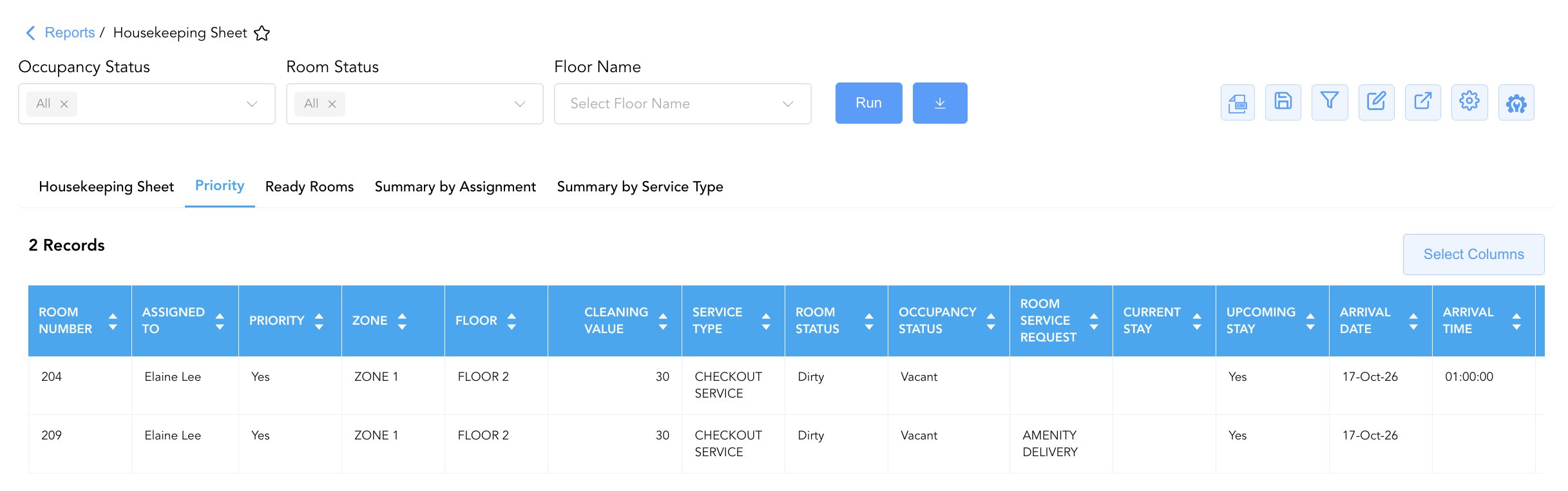
2. Priority Section
Isolates high-priority rush rooms, early check-in requests, and upcoming VIP arrival rooms requiring expedited turnover.
-
Primary Use: Guiding floor supervisors to dispatch attendants for immediate room cleaning to prevent lobby check-in delays.
-
Key Metrics: Priority, Service Type, Room Number, Room Type, Assigned To, Upcoming VIP Guest, Cleaning Value, Arrival Date, Departure Date.
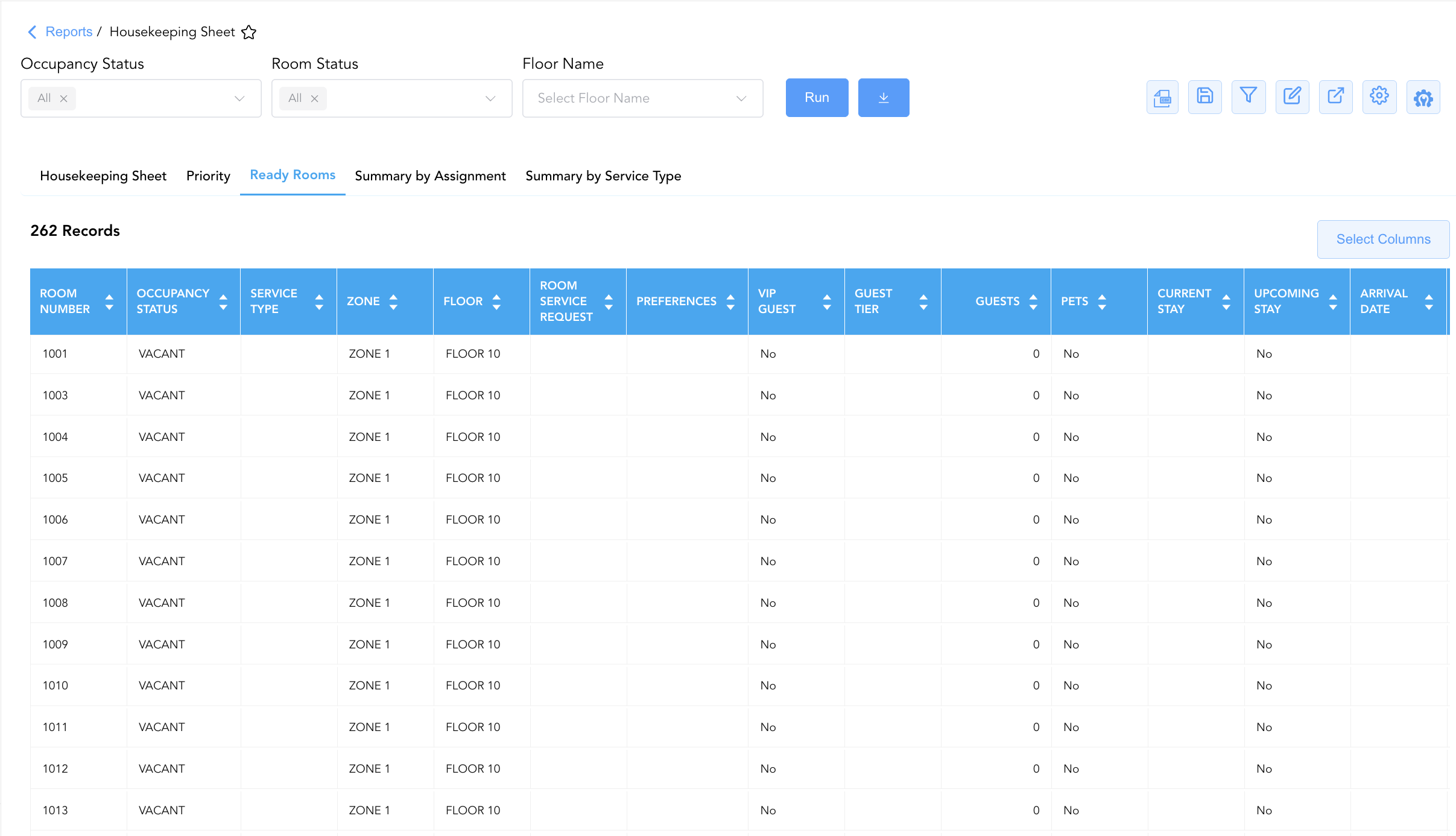
3. Ready Rooms Section
Itemizes vacant or stayover rooms that have been cleaned, inspected, and verified as ready for guest occupancy.
-
Primary Use: Confirming available check-in room inventory for front desk agents and verifying floor inspection completion.
-
Key Metrics: Room Number, Room Type, Zone, Floor, Occupancy Status, Service Type, Arrival Date, Departure Date, Current Stay, Upcoming Stay, Housekeeping Remarks.
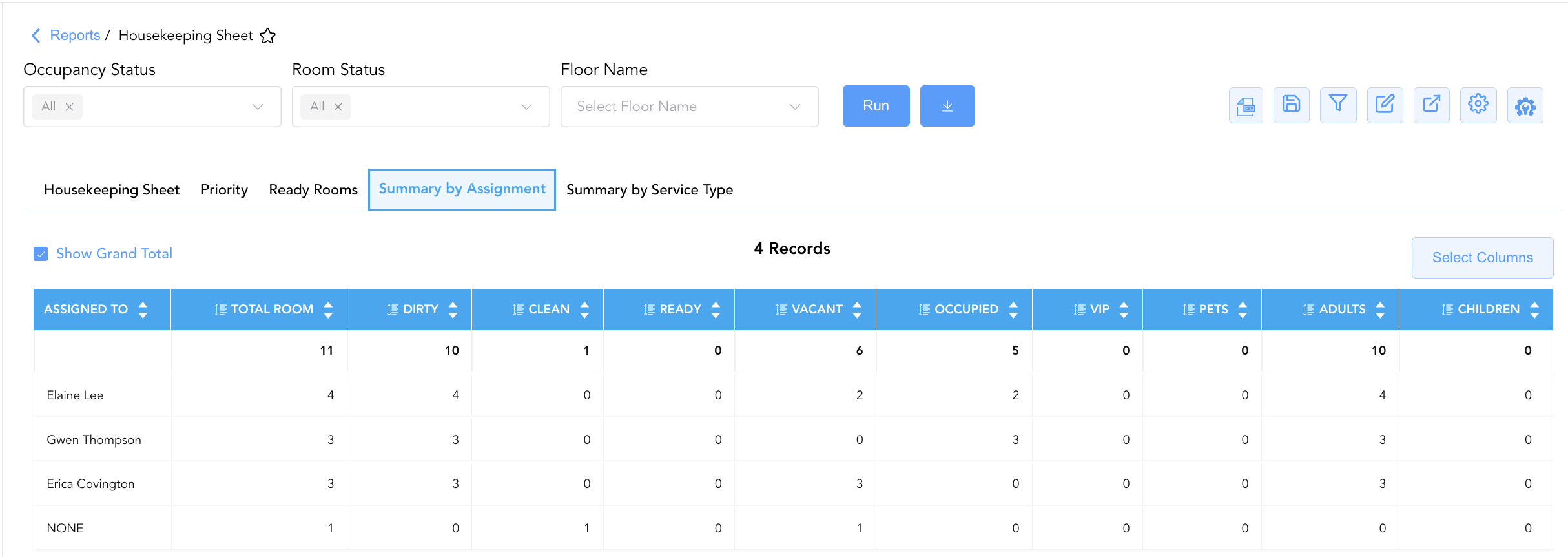
4. Summary by Assignment Section
Aggregates total assigned room counts, occupancy states, cleanliness breakdown, and guest demographics by assigned staff member.
-
Primary Use: Balancing attendant room counts during morning line-up and auditing individual staff cleaning progress throughout the shift.
-
Key Metrics: Assigned To, Total Room, Vacant, Occupied, Clean, Dirty, Ready, Pets, VIP, Adults, Children.
5. Summary by Service Type Section
Summarizes cumulative cleaning credit points earned and total rooms assigned across each service category.
-
Primary Use: Auditing department-wide labor production, credit point distribution, and daily service type volume (Checkout vs. Towel & Trash).
-
Key Metrics: Service Type, Total Cleaning Value, Total Rooms Assigned.
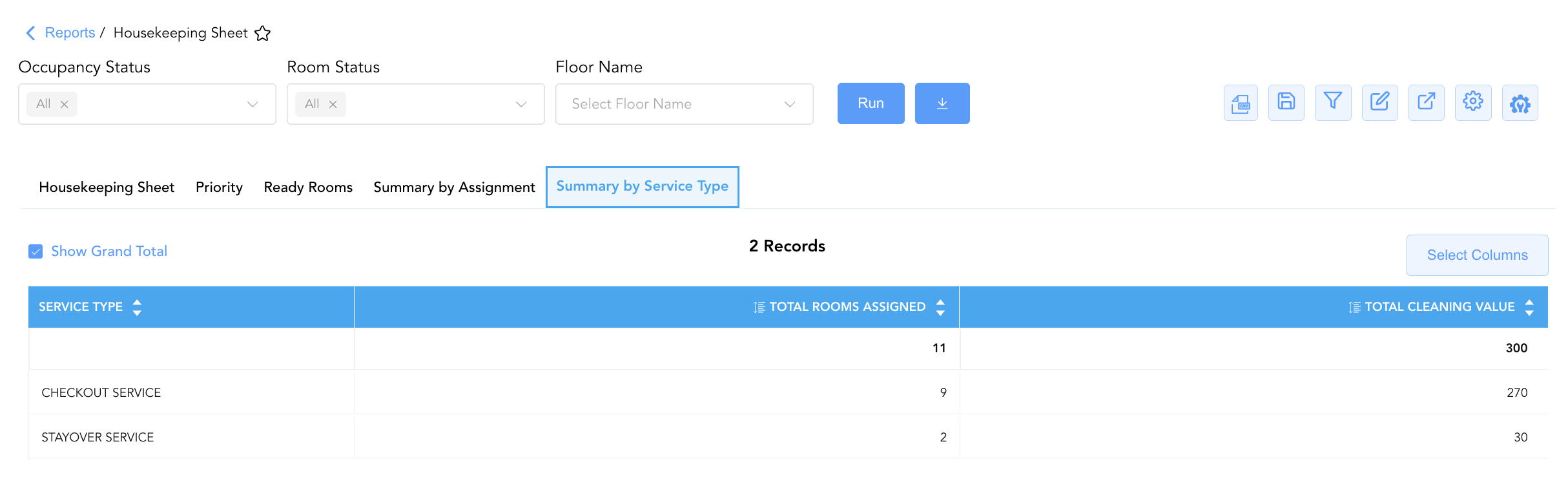
Data Dictionary (Dynamic View Columns)
Customize your default view using the Configure (⚙️) icon on the report page. Below is the full data dictionary representing all 44 unique columns available across the 5 report sections:
|
Column Name |
Section Applicability |
Description |
Data Source / System Mapping |
Includes Taxes & Fees? |
|---|---|---|---|---|
|
Service Type |
Sections 1, 2, 3, 5 |
Classification of housekeeping service required (e.g., |
Housekeeping Engine > Service Type |
N/A |
|
Room Number |
Sections 1, 2, 3 |
Physical guest room number assigned on property. |
PMS > Physical Room ID |
N/A |
|
Room Service Request |
Sections 1, 2, 3 |
Specific guest room amenity or service request notes (e.g., |
Guest Preferences > Room Request |
N/A |
|
Room Type |
Sections 1, 2, 3 |
Alphanumeric code or category description (e.g., |
PMS > Room Category Code |
N/A |
|
Room Size |
Sections 1, 2, 3 |
Physical room area or room size designation. |
PMS Room Setup > Room Size |
N/A |
|
Rate Plan |
Sections 1, 2, 3 |
Active rate plan code attached to the room reservation (e.g., |
Reservation System > Rate Code |
N/A |
|
Zone |
Sections 1, 2, 3 |
Property building section or floor zone designation (e.g., |
PMS Setup > Housekeeping Zone |
N/A |
|
Floor |
Sections 1, 2, 3 |
Building floor level location (e.g., |
PMS Setup > Building Floor |
N/A |
|
Occupancy Status |
Sections 1, 2, 3 |
Real-time physical occupancy state (e.g., |
PMS Inventory Engine > Occupancy Flag |
N/A |
|
Room Status |
Sections 1, 2, 3 |
Real-time cleanliness status (e.g., |
Housekeeping Engine > Clean Status |
N/A |
|
Housekeeping Team |
Sections 1, 2 |
Designated housekeeping shift or team assignment. |
Housekeeping Setup > Team Name |
N/A |
|
Assigned To |
Sections 1, 2, 4 |
Full name of the room attendant assigned to clean the room (e.g., |
Housekeeping Engine > Attendant Name |
N/A |
|
Upcoming VIP Guest |
Sections 1, 2 |
Indicator flag denoting an incoming VIP check-in reservation (e.g., |
Guest Profile > VIP Arrival Flag |
N/A |
|
Cleaning Value |
Sections 1, 2 |
Workload credit point value assigned to the cleaning task (e.g., |
Housekeeping Setup > Task Credit Value |
N/A |
|
Arrival Date |
Sections 1, 2, 3 |
Scheduled check-in date for current or upcoming guest. |
Reservation System > Arrival Date |
N/A |
|
Arrival Time |
Sections 1, 2, 3 |
Anticipated or scheduled check-in time. |
Reservation System > Expected ETA |
N/A |
|
Departure Date |
Sections 1, 2, 3 |
Scheduled check-out date for current guest stay. |
Reservation System > Departure Date |
N/A |
|
Departure time |
Sections 1, 2, 3 |
Anticipated or scheduled check-out time. |
Reservation System > Departure Time |
N/A |
|
Current Stay |
Sections 1, 2, 3 |
Operational stay classification for active occupant (e.g., |
Reservation System > Stay Status |
N/A |
|
Upcoming Stay |
Sections 1, 2, 3 |
Indicator flag denoting a scheduled back-to-back arrival for the room. |
Reservation System > Next Stay Flag |
N/A |
|
Loyalty Tier |
Sections 1, 2, 3 |
Brand loyalty program membership level (e.g., |
Loyalty Engine > Membership Tier |
N/A |
|
Guests |
Sections 1, 2, 3 |
Registered total guest headcount in the room. |
Reservation System > Guest Count |
N/A |
|
Pets |
Sections 1, 2, 3, 4 |
Indicator flag denoting pet presence in room (e.g., |
Reservation System > Pet Flag |
N/A |
|
Preferences |
Sections 1, 2, 3 |
Stored guest housekeeping or room amenity preferences. |
Guest Preferences > HK Notes |
N/A |
|
Comments |
Sections 1, 2, 3 |
General operational or floor attendant notes. |
Housekeeping Engine > Comments |
N/A |
|
Remarks |
Sections 1, 2 |
Supplemental reservation or handling instructions. |
Reservation Notes > Remarks |
N/A |
|
Composite Room |
Sections 1, 2, 3 |
Indicator flag denoting a suite constructed from multiple sub-rooms. |
PMS Room Setup > Composite Flag |
N/A |
|
Component Rooms |
Sections 1, 2, 3 |
Sub-room numbers forming part of a composite suite. |
PMS Room Setup > Component Room IDs |
N/A |
|
Connected Rooms |
Sections 1, 2, 3 |
Physical adjoining room numbers linked by connecting doors. |
PMS Room Setup > Connected Room IDs |
N/A |
|
VIP Guest |
Sections 1, 2, 3, 4 |
Indicator flag denoting current in-house VIP status (e.g., |
Guest Profile > VIP Status |
N/A |
|
Guest Tier |
Sections 1, 2, 3 |
Property or brand-defined VIP tier standing. |
Guest Profile > Tier Standing |
N/A |
|
Priority |
Sections 1, 2 |
Task urgency indicator denoting rush cleaning requirement (e.g., |
Housekeeping Dispatch > Priority Code |
N/A |
|
Housekeeping Remarks |
Section 3 |
Specific inspection notes recorded by floor supervisors. |
Housekeeping Engine > Inspection Notes |
N/A |
|
Total Room |
Section 4 |
Total room count assigned to the staff member. |
SUM(Assigned Rooms) |
N/A |
|
Vacant |
Section 4 |
Count of assigned rooms that are physically vacant. |
SUM(Vacant Assigned Rooms) |
N/A |
|
Occupied |
Section 4 |
Count of assigned rooms that are physically occupied. |
SUM(Occupied Assigned Rooms) |
N/A |
|
Clean |
Section 4 |
Count of assigned rooms marked clean. |
SUM(Clean Assigned Rooms) |
N/A |
|
Dirty |
Section 4 |
Count of assigned rooms requiring cleaning. |
SUM(Dirty Assigned Rooms) |
N/A |
|
Ready |
Section 4 |
Count of assigned rooms inspected and ready for check-in. |
SUM(Ready Assigned Rooms) |
N/A |
|
VIP |
Section 4 |
Count of assigned rooms holding VIP occupants. |
SUM(VIP Assigned Rooms) |
N/A |
|
Adults |
Section 4 |
Total adult headcount across assigned rooms. |
SUM(Adult Occupants) |
N/A |
|
Children |
Section 4 |
Total child headcount across assigned rooms. |
SUM(Child Occupants) |
N/A |
|
Total Cleaning Value |
Section 5 |
Cumulative workload credit points earned across the service category. |
SUM(Cleaning Value Points) |
N/A |
|
Total Rooms Assigned |
Section 5 |
Total room count categorized under the specific service type. |
COUNT(Rooms per Service Type) |
N/A |
Customization & Platform Features
User & Property Preferences
-
Personal Preference: Tailor your individual view by hiding or dragging columns. Your preferences save automatically for future sessions.
-
Property Defaults: System Admins can configure standard default layouts across all property users to streamline operational reporting. To maximize audit efficiency, group the columns into the below logical blocks:
-
Section 1 & Section 2: Housekeeping Sheet & Priority
-
Physical Locators & Staff Assignment (Cols 1–7):
Room Number|Assigned To|Priority|Zone|Floor|Housekeeping Team|Cleaning Value -
Cleaning & Room Status (Cols 8–12):
Service Type|Room Status|Occupancy Status|Room Service Request|Preferences -
Guest Profile & VIP Recognition (Cols 13–18):
VIP Guest|Guest Tier|Upcoming VIP Guest|Loyalty Tier|Guests|Pets -
Stay Context & Schedule (Cols 19–24):
Current Stay|Upcoming Stay|Arrival Date|Arrival Time|Departure Date|Departure time -
Physical Room Setup & Rate Details (Cols 25–29):
Room Type|Room Size|Rate Plan|Composite Room|Component Rooms -
Operational Notes & Attributes (Cols 30–32):
Connected Rooms|Remarks|Comments
-
-
Section 3: Ready Rooms
-
Physical Locators & Status (Cols 1–5):
Room Number|Occupancy Status|Service Type|Zone|Floor -
Requests & Guest Attributes (Cols 6–11):
Room Service Request|Preferences|VIP Guest|Guest Tier|Guests|Pets -
Stay Context & Schedule (Cols 12–17):
Current Stay|Upcoming Stay|Arrival Date|Arrival Time|Departure Date|Departure time -
Room Setup & Rate Metadata (Cols 18–22):
Room Type|Room Size|Rate Plan|Loyalty Tier|Housekeeping Remarks -
Structure & Notes (Cols 23–26):
Composite Room|Component Rooms|Connected Rooms|Comments
-
-
Section 4: Summary by Assignment
-
Attendant Identity & Workload Totals (Cols 1–2):
Assigned To|Total Room -
Cleaning Condition Breakdown (Cols 3–6):
Dirty|Clean|Ready|Vacant -
Occupancy & Special Flags (Cols 7–11):
Occupied|VIP|Pets|Adults|Children
-
-
Section 5: Summary by Service Type
-
Service Classification & Workload Metrics (Cols 1–3):
Service Type|Total Rooms Assigned|Total Cleaning Value
-
-
Report Toolbar & Quick Actions
Use the top-right toolbar icons on the report page to manage and export your data view:
|
Icon |
Action / Feature |
Description |

|
Knowledge Article |
Opens the knowledge base article to learn how to interpret this report. |

|
Background Export |
Allows users to download up to 365 days of data directly to their computer in CSV format. |

|
Saved Views |
Saves your column filtering, sorting, and highlight preferences so you can easily reload your custom view later without reconfiguring the report. |

|
Filter |
Opens filter controls to isolate specific data within a column based on your selected criteria. |

|
Highlight |
Highlights column values in a designated color based on selected conditions. |

|
Export |
Exports and downloads the report in various formats (Excel, PDF, CSV) for offline analysis or printing. |

|
Configure |
Opens column selection controls to toggle visibility, reorder columns, or hide rows with all zeros. |

|
Additional Configuration |
Provides advanced report configuration and display formatting options to customize data presentation. |
Advanced Controls
-
Daily Housekeeping Board Exporting: Automatically schedule a daily morning export (e.g., 07:00) to generate printed attendant boards and supervisor inspection lists.
-
Filtering: Filter Section 1 by
Assigned To = NONEto identify unassigned rooms requiring allocation, or filter Section 2 byPriority = Yesfor rush room dispatch. -
Highlighting (Conditional Formatting): Apply custom rules to automatically highlight rush rooms (
Priority = Yes), unassigned rooms (Assigned To = NONE), or high credit point rooms (Cleaning Value > 30).
🔗 Related Reports & Next Steps
Within 🧹 Rooms & Facilities & 🛏️ Room Status:
-
All Rooms – Master physical room inventory, cleanliness state, and housekeeping schedule manifest.
-
Housekeeping Room Log – Immutable audit trail tracking all room status changes and attendant cleaning actions.
-
Room Detail – Master room-by-room physical status, housekeeping, and maintenance audit matrix.
-
Discrepant Rooms – Dual-section audit tracking physical occupancy mismatches between Housekeeping and Front Desk.
Cross-Pillar Deep Dives:
-
🛎️ Front Desk & Guest Services: Reconcile inspected ready rooms (
Ready Roomssection) with Arrivals List to accelerate guest check-ins.