
Housekeeping Summary Report Overview
Parent Hub: 🧹 Rooms & Facilities
Category: 🛏️ Room Status
Target Roles: Executive Housekeepers, Housekeeping Supervisors, Floor Operations Leads, Houseperson Coordinators, Front Office Managers, General Managers
Key Value: Serves as a streamlined operational summary of daily room attendant assignments, room cleanliness states, physical occupancy, service refusals, Do Not Disturb (DND) flags, and supervisor operational remarks across property guest rooms.
Executive Summary
The Housekeeping Summary Report is an essential daily operational dashboard, room attendant assignment audit, and floor management document within the 🛏️ Room Status category of the 🧹 Rooms & Facilities hub. Designed to provide clear, high-level operational visibility over daily room attendant workloads and real-time room cleanliness states, it itemizes active cleaning requirements, attendant assignments, and service exceptions across property guest rooms.
-
By mapping physical room allocations (
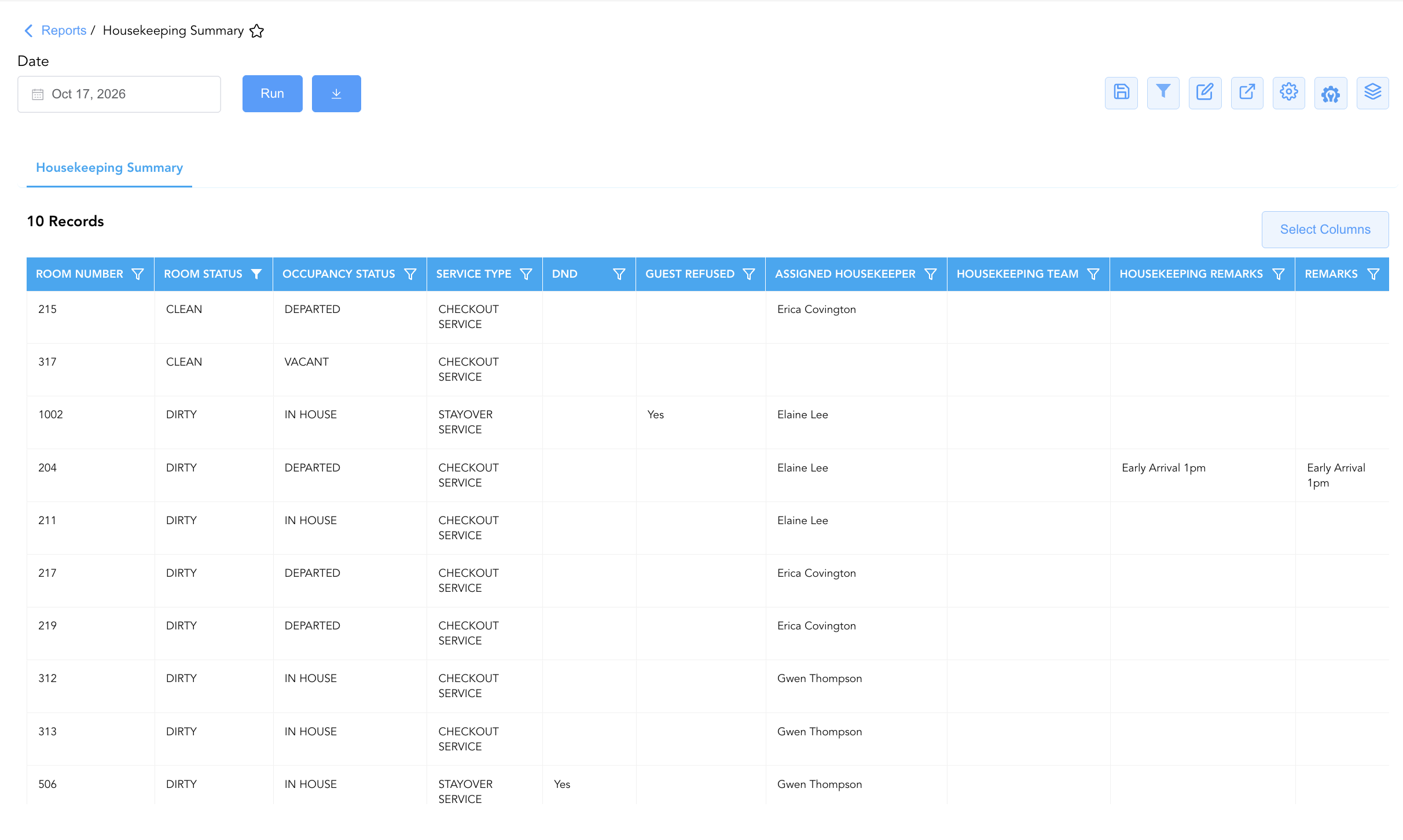
Room Number) to required service categories (Service Type), cleanliness states (Room Status), physical occupancy conditions (Occupancy Status), attendant task assignments (Assigned Housekeeper,Housekeeping Team), service exception flags (DND,Guest Refused), and operational notes (Housekeeping Remarks,Remarks), this report enables executive housekeepers, floor supervisors, and front office agents to monitor daily room turnover, track attendant coverage, verify guest service refusals or DND statuses, and coordinate prompt room releases for incoming arrivals.
Key Capabilities
-
Single-Table Operational Board: Consolidates daily room attendant cleaning tasks, room readiness, and occupancy states into a unified master summary view.
-
Attendant & Team Coverage Audit: Identifies the specific assigned room attendant (
Assigned Housekeeper) and team unit (Housekeeping Team) responsible for servicing each guest room. -
Service Exception & Refusal Tracking: Captures active Do Not Disturb flags (
DND) and recorded guest service rejections (Guest Refused) to protect guest privacy and document skipped cleaning cycles. -
Service Type & Cleanliness Synchronization: Aligns required service tasks (
Service Type, e.g.,CHECKOUT SERVICE,STAYOVER SERVICE) with real-time room cleanliness (Room Status, e.g.,DIRTY,CLEAN) and physical occupancy (Occupancy Status, e.g.,DEPARTED,IN HOUSE,VACANT). -
Operational Remark & Priority Coordination: Captures floor instructions and priority arrival notes (
Housekeeping Remarks,Remarks, e.g., "Early Arrival 1pm") to ensure expedited turnover for rush check-ins.
Report Views & Functional Breakdown
The Housekeeping Summary Report presents daily room cleaning and attendant assignment data in a unified single-table master matrix supporting three primary operational perspectives:
┌────────────────────────────────────────────────────────────────────────┐
│                     HOUSEKEEPING SUMMARY REPORT                        │
├────────────────────────────────────────────────────────────────────────┤
│                         Unified Matrix View                            │
├──────────────────────────┬──────────────────────────┬──────────────────┤
│ 1. Room Identity &       │ 2. Attendant Assignment &│ 3. Service       │
│    Cleanliness Matrix    │    Coverage Trace        │    Exceptions &  │
│                          │                          │    Remarks       │
└──────────────────────────┴──────────────────────────┴──────────────────┘
1. Room Identity & Cleanliness Matrix
Monitors physical room numbers, required service categories, real-time room cleanliness states, and physical occupancy conditions.
-
Primary Use: Scanning room readiness during shift briefings to prioritize turnover for departing and arriving rooms.
-
Key Metrics: Room Number, Service Type, Room Status, Occupancy Status.
2. Attendant Assignment & Coverage Trace
Tracks individual staff assignments and team zone coverage across assigned rooms.
-
Primary Use: Balancing daily attendant room loads and auditing floor attendant room coverage throughout the operational shift.
-
Key Metrics: Assigned Housekeeper, Housekeeping Team, Room Number, Service Type.
3. Service Exceptions & Remarks
Highlights active Do Not Disturb flags, guest service refusals, and special floor handling notes.
-
Primary Use: Documenting unserviced rooms due to guest refusal or DND placement, and executing priority room cleaning notes (e.g., early arrivals).
-
Key Metrics: DND, Guest Refused, Housekeeping Remarks, Remarks, Room Number.
Data Dictionary (Dynamic View Columns)
Customize your default view using the Configure (⚙️) icon on the report page. Below is the full data dictionary representing all 10 columns available in this report:
|
Column Name |
Description |
Data Source / System Mapping |
Includes Taxes & Fees? |
|
Room Number |
Physical guest room number assigned on property (e.g., |
PMS > Physical Room ID |
N/A |
|
Service Type |
Classification of housekeeping service required (e.g., |
Housekeeping Engine > Service Type |
N/A |
|
Room Status |
Real-time physical cleanliness state (e.g., |
Housekeeping Engine > Clean Status |
N/A |
|
Occupancy Status |
Real-time physical occupancy condition (e.g., |
PMS Inventory Engine > Occupancy Flag |
N/A |
|
DND |
Indicator flag denoting active Do Not Disturb status placed on the room (e.g., |
Housekeeping Mobile App > DND Flag |
N/A |
|
Guest Refused |
Indicator flag denoting guest explicitly declined housekeeping service (e.g., |
Housekeeping Mobile App > Refusal Flag |
N/A |
|
Assigned Housekeeper |
Full name of the room attendant assigned to service the room (e.g., |
Housekeeping Engine > Attendant Name |
N/A |
|
Housekeeping Team |
Designated housekeeping shift or floor team unit assignment. |
Housekeeping Setup > Team Name |
N/A |
|
Housekeeping Remarks |
Free-text operational notes entered by housekeeping attendants or floor supervisors. |
Housekeeping Engine > HK Notes |
N/A |
|
Remarks |
Free-text handling instructions or priority arrival notes (e.g., "Early Arrival 1pm"). |
Reservation System > Remarks |
N/A |
Customization & Platform Features
User & Property Preferences
-
Personal Preference: Tailor your individual view by hiding or dragging columns. Your preferences save automatically for future sessions.
-
Property Defaults: System Admins can configure standard default layouts across all property users to streamline operational reporting. To maximize audit efficiency, group the columns into the below logical blocks:
-
Physical Locators & Core Room Status (Cols 1–4):
Room Number|Room Status|Occupancy Status|Service Type -
Service Access & Refusal Flags (Cols 5–6):
DND|Guest Refused -
Staff Accountability & Assignments (Cols 7–8):
Assigned Housekeeper|Housekeeping Team -
Operational Remarks & Notes (Cols 9–10):
Housekeeping Remarks|Remarks
-
Report Toolbar & Quick Actions
Use the top-right toolbar icons on the report page to manage and export your data view:
|
Icon |
Action / Feature |
Description |

|
Knowledge Article |
Opens the knowledge base article to learn how to interpret this report. |

|
Saved Views |
Saves your column filtering, sorting, and highlight preferences so you can easily reload your custom view later without reconfiguring the report. |

|
Filter |
Opens filter controls to isolate specific data within a column based on your selected criteria. |

|
Highlight |
Highlights column values in a designated color based on selected conditions. |

|
Export |
Exports and downloads the report in various formats (Excel, PDF, CSV) for offline analysis or printing. |

|
Configure |
Opens column selection controls to toggle visibility, reorder columns, or hide rows with all zeros. |

|
Additional Configuration |
Provides advanced report configuration and display formatting options to customize data presentation. |

|
Group By |
Summarize and group report data dynamically in real time. |
Interactive Visualizations & Grouping Controls
-
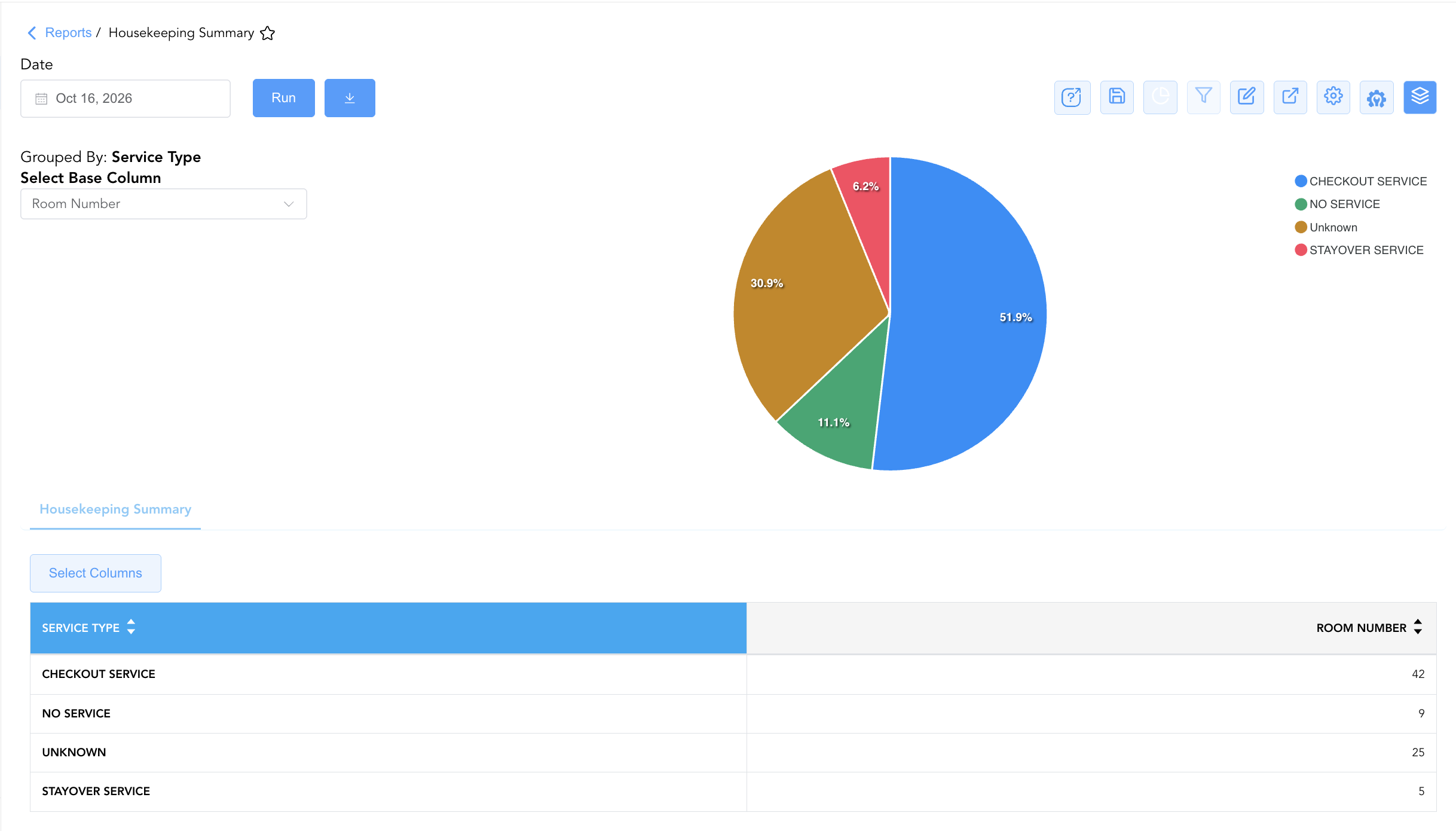
Group By & Pie Chart Visualization: The Housekeeping Summary report features an interactive pie chart to help analyze room service task allocations and housekeeping workload distributions. Users can group housekeeping summary entries on the fly by Assigned Housekeeper, Service Type, Room Status, or Occupancy Status to evaluate attendant workloads and floor turnover progress. By selecting Room Number from the Select Base Column dropdown menu, the chart dynamically renders percentage share breakdowns accompanied by an interactive color-coded legend.
Advanced Controls
-
Shift Board Exporting: Schedule an automated morning export (e.g., 08:00) to generate printed attendant boards and supervisor floor inspection sheets.
-
Filtering: Filter data by
Assigned Housekeeper = Blankto identify unassigned rooms requiring allocation, or isolate service exceptions (Guest Refused = YesorDND = Yes). -
Highlighting (Conditional Formatting): Apply custom rules to automatically highlight priority arrival notes (
Remarks != Blank), guest refusals, or dirty departed rooms requiring immediate checkout cleaning.
🔗 Related Reports & Next Steps
Within 🧹 Rooms & Facilities & 🛏️ Room Status:
-
Housekeeping Sheet – Comprehensive multi-section daily housekeeping board, priority dispatch, and ready room matrix.
-
All Rooms – Master physical room inventory, cleanliness state, and housekeeping schedule manifest.
-
Housekeeping Room Log – Immutable audit trail tracking all room status changes and attendant cleaning actions.
-
Room Detail – Master room-by-room physical status, housekeeping, and maintenance audit matrix.
Cross-Pillar Deep Dives:
-
🛎️ Front Desk & Guest Services: Reconcile cleaned checkout rooms (
Service Type = CHECKOUT SERVICE&Room Status = CLEAN) with Arrivals List to accelerate guest check-ins.