
In House Guest Balances Report Overview
Parent Hub: 🛎️ Front Desk & Guest Services
Category: 🚨 Downtime & Contingency
Target Roles: Hotel Controllers, Finance Managers, Night Auditors, Credit Managers, Front Office Managers, Accounting Supervisors, General Managers
Key Value: Serves as a vital credit risk audit, guest ledger control, and emergency downtime register to monitor real-time in-house guest room balances, evaluate payment method security and credit limits, enforce interim folio settlements, and prevent uncollected bad debt write-offs.
Executive Summary
The In House Guest Balances Report is a primary credit risk management, guest ledger audit, and emergency downtime control document within the 🚨 Downtime & Contingency category of the 🛎️ Front Desk & Guest Services hub. Designed to provide complete financial oversight over active in-house room liabilities, it itemizes occupied room folios carrying an uncollected balance or active credit exposure on the current business date.
💡 Core Inclusion Rule: The report only displays In House Guests who have an active, unresolved balance on their folio. Stays will not appear on this report if:
The folio has been settled in full with a $0.00 balance, OR
The guest folio has an active credit card authorization that is equal to or higher than the current folio balance.
-
By mapping physical room allocations (
Room Number) to guest identity attributes (Guest Name,First Name,Last Name,Guest Tier), stay timeframes (Arrival Date,Departure Date), rate structures (Room Rate), target folio buckets (Folio Name), and financial ledger metrics (Folio Balance,Credit Balance,Outstanding Balance,PAYMENT METHOD:,Available Credit Limit,Auto Top Off Status), this report enables hotel controllers, night auditors, and front office managers to review active guest credit limits, enforce high-balance settlement policies, verify corporate bill-to-company authorizations, and maintain complete guest ledger accounting integrity during both routine operations and PMS network downtime events.
Key Capabilities
-
In-House Guest Balance Audit: Isolates active in-house guest room folios with uncollateralized or uncollected balances, filtering out fully settled $0.00 folios and fully authorized credit card accounts.
-
Downtime Credit Control Contingency Register: Serves as an essential physical or PDF fallback document during network disconnections or system outages, allowing front desk staff to verify guest balances and process manual check-out settlements.
-
Folio Liability & Credit Balance Disaggregation: Breaks down total accumulated charges (
Folio Balance) alongside applied prepayments or deposit credits (Credit Balance) to calculate net uncollected liabilities (Outstanding Balance). -
Corporate Direct Bill / AR Credit Governance: Audits Accounts Receivable (AR) direct bill credit margins (
Available Credit Limit), which apply specifically to companies with active AR/Direct Bill setups when the payment method is assigned to the company account name. -
Automated Night Audit Top-Off Monitoring: Displays the status of the automated credit card top-off configuration (
Auto Top Off Status), which automatically increases credit card authorizations during Night Audit to resolve balance discrepancies (column remains blank if the feature is not activated). -
Target Folio Bucket Traceability: Identifies specific sub-folios (
Folio Name, e.g.,1,CLC,IHG Rewards,hEMMINGFORD PUBLIC SCHOOLS) to ensure charges are allocated correctly between individual guest and corporate master folios.
Report Views & Functional Breakdown
The In House Guest Balances Report presents active guest ledger data in a unified single-table master manifest supporting three primary operational perspectives:
┌────────────────────────────────────────────────────────────────────────┐
│                   IN HOUSE GUEST BALANCES REPORT                       │
├────────────────────────────────────────────────────────────────────────┤
│                         Unified Matrix View                            │
├──────────────────────────┬──────────────────────────┬──────────────────┤
│ 1. Guest Identity &      │ 2. Folio Bucket &        │ 3. Credit Limit  │
│    Stay Timeframe Trace  │    Ledger Balance Audit  │    & Payment Audit│
└──────────────────────────┴──────────────────────────┴──────────────────┘
1. Guest Identity & Stay Timeframe Trace
Monitors room assignments, guest names, VIP/guest tier standings, daily room rates, and stay durations for all active in-house occupants.
-
Primary Use: Scanning active in-house rooms to verify occupancy states, room rates, and expected check-out dates during front desk shift handovers or system downtime.
-
Key Metrics: Room Number, Guest Name, First Name, Last Name, Guest Tier, Arrival Date, Departure Date, Room Rate.
2. Folio Bucket & Ledger Balance Audit
Tracks specific target folio names, accumulated charges, applied payment credits, and net outstanding room balances.
-
Primary Use: Identifying high-balance guest rooms, verifying corporate sub-folio splits, and auditing guest ledger receivables prior to night audit balancing.
-
Key Metrics: Folio Name, Folio Balance, Credit Balance, Outstanding Balance, Room Number, Guest Name.
3. Credit Limit & Payment Audit
Audits payment guarantee classifications, corporate AR credit limits, and automated credit card top-off mechanisms.
-
Primary Use: Enforcing hotel credit limit thresholds, auditing corporate direct-bill authorizations, and confirming Night Audit authorization top-off settings.
-
Key Metrics: PAYMENT METHOD:, Available Credit Limit, Auto Top Off Status, Outstanding Balance, Room Number.
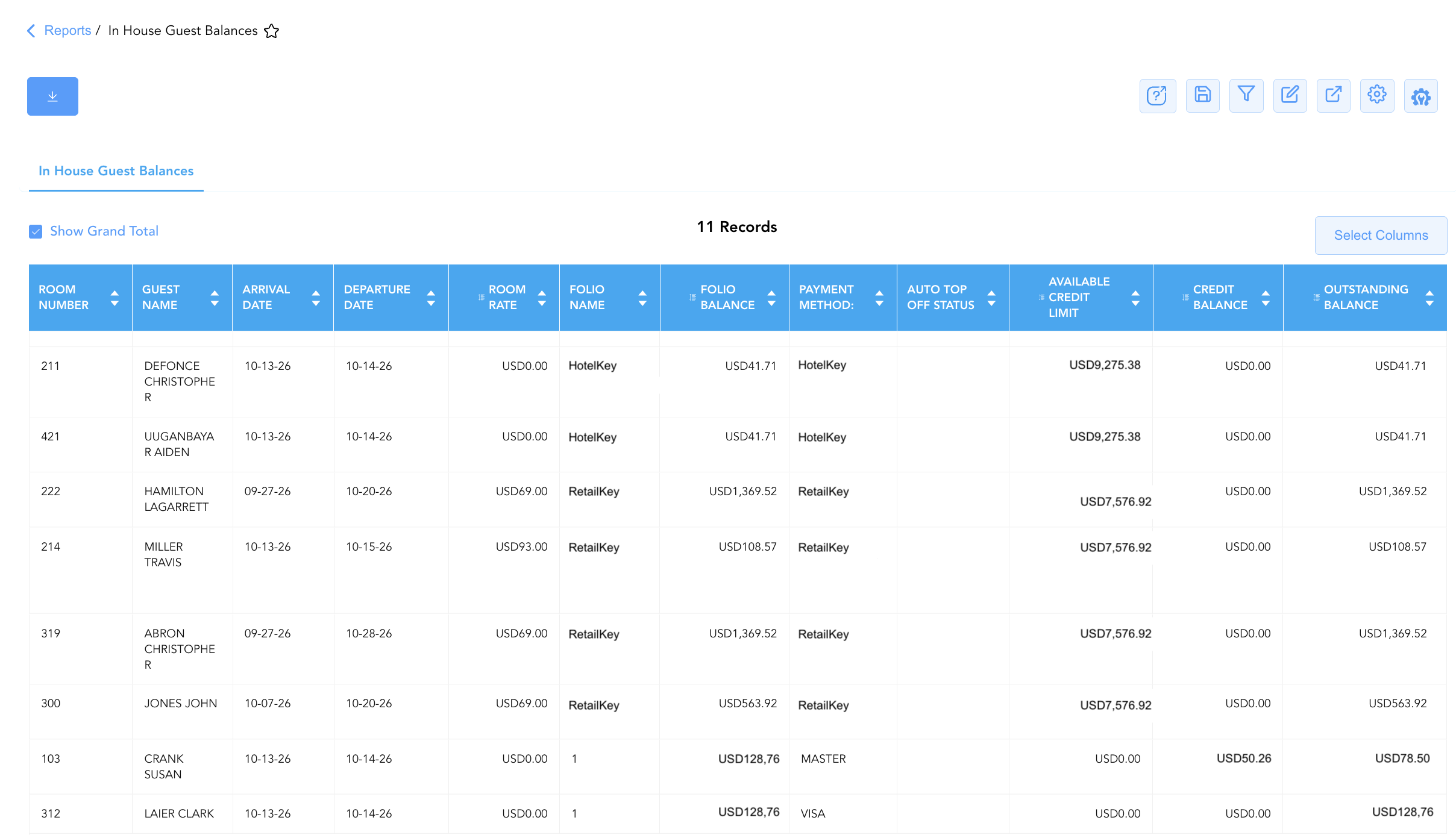
Data Dictionary (Dynamic View Columns)
Customize your default view using the Configure (⚙️) icon on the report page. Below is the full data dictionary representing all 15 columns available in this report:
💡 Coupled Financial Posting Note: Numerical monetary values in this report (
Folio Balance,Credit Balance,Outstanding Balance,Available Credit Limit) reflect gross ledger postings. They are marked Yes under "Includes Taxes & Fees?" because taxes and fees are coupled directly with room and incidental charges on guest folios.
|
Column Name |
Description |
Data Source / System Mapping |
Includes Taxes & Fees? |
|
Room Number |
Physical guest room assigned to the active in-house reservation. |
PMS > Assigned Room Number |
N/A |
|
Guest Name |
Combined full name of the primary registered guest. |
Guest Profile > Full Name |
N/A |
|
First Name |
First name of the primary registered guest. |
Guest Profile > First Name |
N/A |
|
Last Name |
Last name of the primary registered guest. |
Guest Profile > Last Name |
N/A |
|
Guest Tier |
Property-defined VIP or loyalty tier standing. |
Guest Profile > Tier Standing |
N/A |
|
Arrival Date |
Actual check-in date of the in-house reservation. |
Reservation System > Check-In Date |
N/A |
|
Departure Date |
Scheduled check-out date for the in-house reservation. |
Reservation System > Check-Out Date |
N/A |
|
Room Rate |
Daily base room rate charged for the accommodation. |
Folio Posting > Base Room Rate |
❌ No |
|
Folio Name |
Specific folio bucket or sub-account name where the charge/tender was recorded (e.g., |
PMS Billing > Folio Bucket Name |
N/A |
|
Folio Balance |
Cumulative gross dollar amount charged to the specific folio bucket. |
Folio Posting > Gross Charges |
🟢 Yes |
|
Credit Balance |
Cumulative total payments, prepayments, and credits applied to the folio. |
Folio Posting > Total Applied Payments |
🟢 Yes |
|
Outstanding Balance |
Remaining uncollected dollar liability on the folio bucket ($\text{Folio Balance} - \text{Credit Balance}$). |
PMS Folio > Net Outstanding Balance |
🟢 Yes |
|
PAYMENT METHOD: |
Specific payment guarantee or tender type on file (e.g., |
PMS Billing > Guarantee Method |
N/A |
|
Available Credit Limit |
Remaining credit limit for companies with an active AR/Direct Bill setup (requires Payment Method set to Company Name). |
Accounts Receivable > AR Credit Limit |
🟢 Yes |
|
Auto Top Off Status |
Status indicator for system automated credit card authorization top-off rules during Night Audit. Displays blank if configuration is not activated. |
|
|
Important Operational Notes
-
Guest Inclusion & Exclusion Criteria:
-
Included: In-house guests carrying an outstanding folio balance that exceeds any active credit card authorization on file.
-
Excluded: Guests whose folios have been settled to $0.00, and guests whose credit card pre-authorizations are equal to or greater than their current folio balance.
-
-
Available Credit Limit & Corporate AR Accounts:
-
The
Available Credit Limitcolumn applies exclusively to corporate clients and group accounts that have an established Accounts Receivable (AR) / Direct Bill facility. -
To populate credit limit data, the reservation's
PAYMENT METHOD:must be assigned to the specific AR Account / Company Name. If not assigned, system will use following formula to calculate the available credit limit (AR Transactions + Open Invoice - Unsettled Payments)
-
-
Auto Top Off Configuration:
-
Auto Top Off Statusis a system configuration feature that must be explicitly activated in property settings. -
When activated, the PMS automatically calculates balance discrepancies during Night Audit (NA) and re-authorizes (tops up) the guest's credit card to cover outstanding charges.
-
If this feature is disabled or not configured for the property, the column will appear blank.
-
Customization & Platform Features
User & Property Preferences
-
Personal Preference: Tailor your individual view by hiding or dragging columns. Your preferences save automatically for future sessions.
-
Property Defaults: System Admins can configure standard default layouts across all property users to streamline operational reporting. To maximize audit efficiency, group the columns into the below logical blocks:
-
Guest Identity & Stay Locators (Cols 1–5):
Room Number|Guest Name|First Name|Last Name|Guest Tier -
Stay Window & Daily Rate (Cols 6–8):
Arrival Date|Departure Date|Room Rate -
Account Setup & Payment Controls (Cols 9–12):
Folio Name|PAYMENT METHOD:|Auto Top Off Status|Available Credit Limit -
Financial Ledger Balances (Cols 13–15):
Folio Balance|Credit Balance|Outstanding Balance
-
Report Toolbar & Quick Actions
Use the top-right toolbar icons on the report page to manage and export your data view:
|
Icon |
Action / Feature |
Description |

|
Knowledge Article |
Opens the knowledge base article to learn how to interpret this report. |

|
Saved Views |
Saves your column filtering, sorting, and highlight preferences so you can easily reload your custom view later without reconfiguring the report. |

|
Filter |
Opens filter controls to isolate specific data within a column based on your selected criteria. |

|
Highlight |
Highlights column values in a designated color based on selected conditions. |

|
Export |
Exports and downloads the report in various formats (Excel, PDF, CSV) for offline analysis or printing. |

|
Configure |
Opens column selection controls to toggle visibility, reorder columns, or hide rows with all zeros. |

|
Additional Configuration |
Provides advanced report configuration and display formatting options to customize data presentation. |
Advanced Controls
-
Downtime Contingency Printing & Exporting: Automatically schedule periodic PDF/Excel exports prior to shift handovers (e.g., 06:00, 14:00, 22:00) to maintain an updated physical guest balance ledger at the front desk.
-
Filtering: Filter data by
Outstanding Balance > $500to generate high-balance credit call lists, or isolate corporate bill-to-company accounts (PAYMENT METHOD: = COMPANY). -
Highlighting (Conditional Formatting): Apply custom rules to automatically highlight high-risk accounts (
Outstanding Balance > $1,000), zero credit limits, or upcoming departure dates.
🔗 Related Reports & Next Steps
Within 🛎️ Front Desk & Guest Services & 🚨 Downtime & Contingency:
-
Stay Over and Balance Due – Focused credit audit report isolating active stayover room balances.
-
Cash Guests List – Emergency downtime register auditing cash and check tender settlements.
-
In House List – Core downtime contingency manifest detailing active room occupants, rate plans, and room assignments.
-
Departures List – Downtime contingency manifest tracking daily expected check-outs and folio settlement states.
Cross-Pillar Deep Dives:
-
⚖️ Ledgers & Trial Balance: Reconcile total in-house outstanding balances (
Outstanding Balance) against the active Guest Ledger control account in Trial Balance and Balance Details. -
💳 Payments & Transactions: Verify credit card pre-authorizations and automated top-off rules in Authorized Payments.