
Invoice Details Report Overview
Parent Hub: 💰 Finance & Accounting Reports
Category: 📬 Billing & Receivables (AR)
Target Roles: Directors of Finance & Controllers, Accounting Managers & Clerks, AR Specialists
Key Value: Provide complete financial transparency into the lifecycle of every generated city ledger invoice, isolating base revenues, taxes, settled amounts, and unsettled balances to facilitate payment reconciliation and account auditing.
Executive Summary
The Invoice Details Report is a core financial auditing tool within the 📬 Billing & Receivables (AR) module. Designed for line-item invoice governance, it provides an itemized breakdown of every generated corporate invoice, tracking its progression from initial billing through partial settlements to final closure.
By isolating specific revenue and tax streams (Room Revenue, Room Tax / Other Fees, Other Charges, Other Tax / Other Fees) and pairing them with key metadata like PO Number, Confirmation No, Invoice Age, and Settled vs. Unsettled Amounts, this report equips accounting teams to reconcile partial client payments, investigate outstanding city ledger balances, and execute precise account audits.
Key Capabilities
-
Full Lifecycle Settlement Tracking: Tracks real-time payment progression by isolating Total Payments, Settled Amount, and remaining Unsettled Amount alongside Last Settled Date.
-
Isolated Revenue & Tax Categories: Separates room rent charges from ancillary charges and isolates their respective tax liabilities for accurate GL posting.
-
PO & Confirmation Matching: Pairs generated city ledger invoice numbers directly with client PO Numbers, reservation confirmation codes, and stay billing dates for fast client query resolution.
Report Views & Functional Breakdown
The Invoice Details Report organizes invoice transaction data across three structured operational perspectives:
┌────────────────────────────────────────────────────────────────────────┐
│                         INVOICE DETAILS REPORT                         │
├──────────────────────────┬──────────────────────────┬──────────────────┤
│ 1. Invoice Lifecycle &   │ 2. Payment & Settlement  │ 3. Charge & Tax  │
│    Aging Audit           │    Reconciliation        │    Itemization   │
└──────────────────────────┴──────────────────────────┴──────────────────┘
1. Invoice Lifecycle & Aging Audit
Tracks invoice issuance dates, aging days, due dates, and active lifecycle states across contracted corporate accounts.
-
Primary Use: Monitoring invoice aging velocity, identifying overdue accounts, and tracking client payment term compliance.
-
Key Metrics: Company Name, Invoice Number, Invoice Date, Invoice Age, Due Date, Invoice Status (
OPEN,SETTLED,VOID).
2. Payment & Settlement Reconciliation
Audits client payments applied to city ledger invoices, contrasting settled funds against outstanding balances.
-
Primary Use: Reconciling partial client checks or wire transfers, identifying unsettled balances, and verifying payment application dates.
-
Key Metrics: Invoice Number, Total Payments, Settled Amount, Unsettled Amount, Last Settled Date, PO Number, Confirmation No.
3. Charge & Tax Itemization
Isolates base revenue categories and associated municipal, state, and sales tax accruals included within each invoice.
-
Primary Use: Validating line-item revenue distribution and verifying tax accrual accuracy prior to general ledger postings.
-
Key Metrics: Room Revenue, Room Tax / Other Fees, Other Charges, Other Tax / Other Fees.
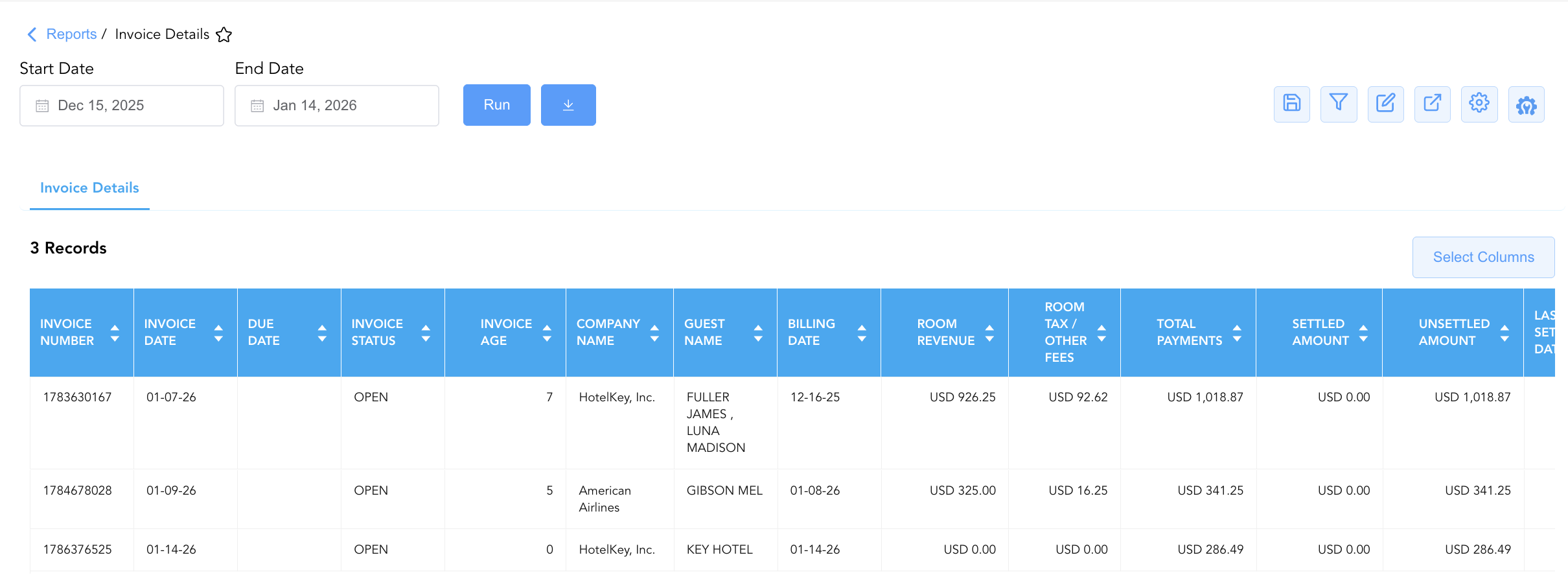
Data Dictionary (Dynamic View Columns)
Customize your default view using the Configure (⚙️) icon on the report page. Below is the full data dictionary available for this report:
💡 Tax Treatment Note: Total Payments, Settled Amount, and Unsettled Amount represent Gross Amounts (Includes Taxes & Fees). Base charge fields (Room Revenue, Other Charges) represent net revenue exclusive of taxes.
|
Column Name |
Description |
Data Source / System Mapping |
Includes Taxes & Fees? |
|
Company Name |
Name of the contracted corporate entity or direct-bill client. |
|
N/A |
|
Invoice Date |
Date the city ledger invoice was generated and issued. |
Invoice Generation Timestamp |
N/A |
|
Invoice Age |
Calculated number of calendar days elapsed since invoice generation. |
|
N/A |
|
Invoice Number |
Unique reference code assigned to the city ledger invoice. |
System Invoice Engine |
N/A |
|
Due Date |
Contractual payment deadline based on agreed payment terms. |
|
N/A |
|
Invoice Status |
Current state of the invoice ( |
System Invoice State |
N/A |
|
Confirmation No |
Reservation confirmation code(s) included on the invoice. |
System Reference ID |
N/A |
|
PO Number |
Client Purchase Order reference number linked to the invoice. |
|
N/A |
|
Guest Name |
Full guest name(s) associated with the invoiced stay(s). |
|
N/A |
|
First Name |
First name(s) of the primary guest(s). |
|
N/A |
|
Last Name |
Last name(s) of the primary guest(s). |
|
N/A |
|
Billing Date |
Date the individual charges were transferred/billed to the invoice. |
Charge Posting Timestamp |
N/A |
|
Total Payments |
Cumulative gross charges billed on the invoice. |
|
🟢 Yes |
|
Settled Amount |
Cumulative gross payments applied and settled against the invoice. |
|
🟢 Yes |
|
Unsettled Amount |
Remaining gross unpaid balance outstanding on the invoice. |
|
🟢 Yes |
|
Last Settled Date |
Date of the most recent payment applied to the invoice. |
Payment Processing Timestamp |
N/A |
|
Room Revenue |
Net room rent revenue billed on the invoice. |
|
❌ No |
|
Room Tax / Other Fees |
City, state, and sales tax levied on room rent charges. |
Tax Engine Calculation |
❌ No |
|
Other Charges |
Net non-room ancillary charges (e.g., parking, food, F&B). |
|
❌ No |
|
Other Tax / Other Fees |
Taxes and service fees levied on ancillary non-room charges. |
Tax Engine Calculation |
❌ No |
Customization & Platform Features
User & Property Preferences
-
Personal Preference: Tailor your individual view by hiding or dragging columns. Your preference saves automatically for future sessions.
-
Property Defaults: System Admins can configure standard default layouts across all property users to streamline operational reporting. To maximize audit efficiency, group the columns into 5 logical blocks:
-
Invoice Identifiers & Status (Cols 1–5):
Invoice Number|Invoice Date|Due Date|Invoice Status|Invoice AgeAccount Context & PO (Cols 6–7):
Company Name|PO NumberGuest & Reservation Context (Cols 8–11):
Guest Name|First Name|Last Name|Confirmation NoFinancial & Revenue Breakdown (Cols 12–17):
Billing Date|Room Revenue|Room Tax / Other Fee|Other Charges|Other Taxes / Fees|Total PaymentsAR Settlement & Balance Audit (Cols 18–20):
Settled Amount|UnSettled Amount|Last Settled Date
-
Report Toolbar & Quick Actions
Use the top-right toolbar icons on the report page to manage and export your data view:
|
Icon |
Action / Feature |
Description |

|
Knowledge Article |
Opens the knowledge base article to learn how to interpret this report. |

|
Saved Views |
Saves your column filtering, sorting, and highlight preferences so you can easily reload your custom view later without reconfiguring the report. |

|
Filter |
Opens filter controls to isolate specific data within a column based on your selected criteria. |

|
Highlight |
Highlights column values in a designated color based on selected conditions. |

|
Export |
Exports and downloads the report in various formats (Excel, PDF, CSV) for offline analysis or printing. |

|
Configure |
Opens column selection controls to toggle visibility, reorder columns, or hide rows with all zeros. |

|
Additional Configuration |
Provides advanced report configuration and display formatting options to customize data presentation. |
Advanced Controls
-
Exporting & Report Distribution: Download in Excel or PDF format to attach supporting invoice audit schedules to outgoing client statements or collection notices.
-
Filtering: Filter data by specific Company Name, Invoice Status, or PO Number.
-
Highlighting (Conditional Formatting): Apply custom rules to automatically highlight overdue invoices (
Invoice Age > 30) or partially settled bills with remaining unsettled balances.
🔗 Related Reports & Next Steps
Within 📬 Billing & Receivables (AR):
-
Accounts Receivable Activity – Audit line-item transaction entries hitting the direct-bill ledger.
-
AR Invoice Aging – Categorize open invoice balances across 30-day time bands.
-
Invoice Summary – Review macro-level corporate billing totals and open vs. voided invoice counts.
-
Statement of Invoice – Audit corporate billing lifecycles broken down into Open and Closed invoice sections.
-
Direct Bill Reconciliation – Identify payment gaps and verify guarantee statuses for corporate invoicing.
Cross-Pillar Deep Dives:
-
⚖️ Ledgers & Trial Balance: To reconcile city ledger invoice totals against general ledger balances, review Direct Bill Ledger Details.
-
💳 Payments & Transactions: To inspect corporate checks, wire receipts, or credit card settlements applied to these invoices, cross-reference Payment Activity.
-
📈 Forward Revenue & Analytics: Looking for forward-facing revenue projections or macro performance metrics (like RevPAR or ADR)? Please visit the 📈 Revenue & Analytics reporting hub.