
Length of Stay Statistics Report Overview
Parent Hub: 📈 Revenue & Analytics
Category: 📊 Performance Summaries
Target Roles: Directors of Revenue Management, General Managers, Directors of Sales, Extended Stay Operations Managers, Revenue Analysts
Key Value: Optimize guest length-of-stay (LOS) tier mix, evaluate extended stay rate performance, analyze room night volume and revenue contributions across stay duration tiers, and refine LOS restriction policies.
Executive Summary
The Length of Stay Statistics Report is a primary revenue management and operational analytics document within the 📊 Performance Summaries category of the 📈 Revenue & Analytics hub. Designed to provide comprehensive post-stay duration analysis, it aggregates property performance across standardized length-of-stay tiers to evaluate how short-term transient vs. extended stay guests contribute to overall occupancy and revenue performance.
By categorizing operational metrics across four standardized length-of-stay tiers (1-6 nights, 7-14 nights, 15-29 nights, and 30+ nights), this report tracks daily room night sales (Room Sold), occupancy contribution (Occupancy), cumulative volume (Room Sold MTD, Room Sold YTD), monetary revenue generation (Revenue, Revenue MTD, Revenue YTD), and key rate performance yield indicators (ADR, RevPAR). This enables revenue managers and leadership teams to evaluate pricing tier efficiency, measure extended stay displacement, and optimize minimum/maximum length-of-stay (LOS) controls across distribution channels.
Key Capabilities
-
LOS Tier Mix Segmentation: Breaks down operational performance across four standardized stay duration tiers: Short Transient (1-6 nights), Extended Stay Tier 1 (7-14 nights), Extended Stay Tier 2 (15-29 nights), and Long-Term Extended Stay (30+ nights).
-
Multi-Period Revenue & Volume Tracking: Monitors daily performance (Room Sold, Revenue, ADR, RevPAR) alongside Month-to-Date (MTD) and Year-to-Date (YTD) cumulative figures.
-
Yield & Displacement Optimization: Evaluates rate yield variance between short-term transient stays and discounted extended-stay rate plans to maximize RevPAR and base inventory occupancy.
Report Views & Functional Breakdown
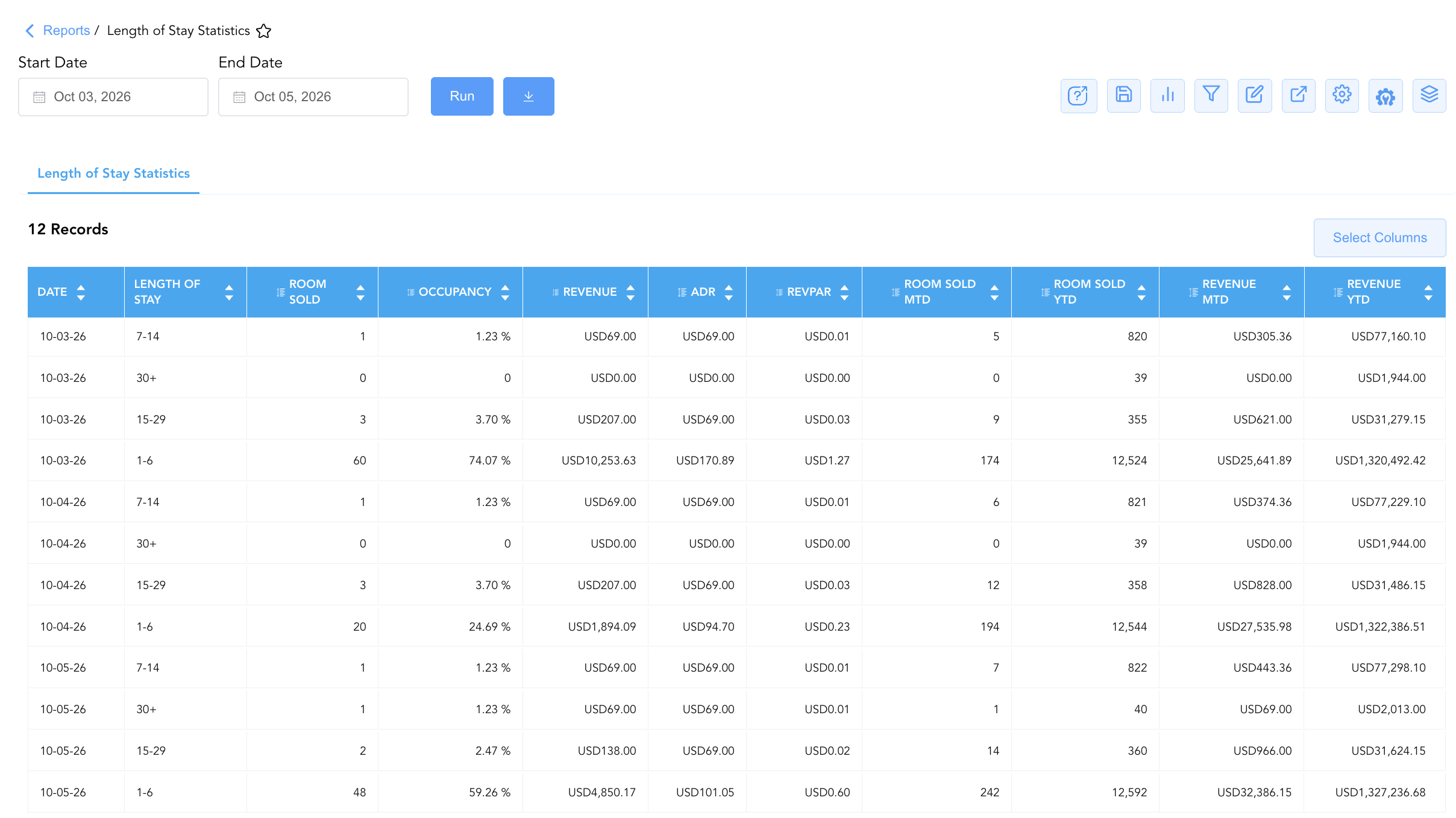
The Length of Stay Statistics Report presents stay duration performance in a unified single-table matrix that supports three key analytical perspectives:
┌────────────────────────────────────────────────────────────────────────┐
│                   LENGTH OF STAY STATISTICS REPORT                     │
├────────────────────────────────────────────────────────────────────────┤
│                         Unified Matrix View                            │
├──────────────────────────┬──────────────────────────┬──────────────────┤
│ 1. Transient vs. Extended│ 2. Yield & Rate Performance│ 3. Cumulative     │
│    Stay Volume Mix       │    By LOS Tier           │    MTD / YTD Pace│
└──────────────────────────┴──────────────────────────┴──────────────────┘
1. Transient vs. Extended Stay Volume Mix
Monitors daily room night production and occupancy contribution across length-of-stay tiers.
-
Primary Use: Evaluating property base business stability provided by extended stay tiers (7-14, 15-29, 30+ nights) compared to short-stay transient volume (1-6 nights).
-
Key Metrics: Date, Length of Stay, Room Sold, Occupancy.
2. Yield & Rate Performance By LOS Tier
Measures financial yield, average daily rates, and revenue contributions for each stay duration bracket.
-
Primary Use: Analyzing rate dilution across extended stay brackets, verifying that long-term tier discounts (ADR) maintain property RevPAR goals, and optimizing minimum stay restriction rules.
-
Key Metrics: Date, Length of Stay, Revenue, ADR, RevPAR.
3. Cumulative MTD / YTD Pace
Tracks Month-to-Date and Year-to-Date room night and revenue accumulation per stay duration tier.
-
Primary Use: Assessing long-term extended stay trends over annual and monthly accounting cycles to support corporate and extended-stay sales strategies.
-
Key Metrics: Length of Stay, Room Sold MTD, Room Sold YTD, Revenue MTD, Revenue YTD.
Data Dictionary (Dynamic View Columns)
Customize your default view using the Configure (⚙️) icon on the report page. Below is the full data dictionary representing every column available in this report:
💡 Monetary & Rate Treatment Note: Revenue, Revenue MTD, and Revenue YTD represent Gross Base Room Revenue (Excludes Taxes & Fees). Occupancy is rendered as a decimal ratio (e.g.,
0.7407= 74.07%).
|
Column Name |
Description |
Data Source / System Mapping |
Includes Taxes & Fees? |
|
Date |
Official business date for which length-of-stay performance is summarized. |
System Business Date |
N/A |
|
Length of Stay |
Standardized stay duration bracket ( |
Stay Duration Classification |
N/A |
|
Room Sold |
Total physical room nights sold and occupied on the business date for the specific LOS tier. |
|
N/A |
|
Occupancy |
Proportion of total available property rooms occupied by the specific LOS tier ( |
|
N/A |
|
Room Sold MTD |
Cumulative Month-to-Date room nights sold within the specific LOS tier. |
M-T-D Room Ledger Engine |
N/A |
|
Room Sold YTD |
Cumulative Year-to-Date room nights sold within the specific LOS tier. |
Y-T-D Room Ledger Engine |
N/A |
|
Revenue |
Gross base room revenue generated on the business date for the specific LOS tier. |
|
❌ No |
|
ADR |
Realized Average Daily Rate earned per occupied room in the LOS tier ( |
|
❌ No |
|
RevPAR |
Revenue Per Available Room generated by the specific LOS tier ( |
|
❌ No |
|
Revenue MTD |
Cumulative Month-to-Date base room revenue generated within the specific LOS tier. |
M-T-D Revenue Ledger Engine |
❌ No |
|
Revenue YTD |
Cumulative Year-to-Date base room revenue generated within the specific LOS tier. |
Y-T-D Revenue Ledger Engine |
❌ No |
Customization & Platform Features
User & Property Preferences
-
Personal Preference: Tailor your individual view by hiding or dragging columns. Your preferences save automatically for future sessions.
-
Property Defaults: System Admins can configure standard default layouts across all property users to streamline operational reporting. To maximize audit efficiency, group the columns into the below logical blocks:
-
Audit Timeline & Stay Bucket (Cols 1–2):
Date|Length of Stay -
Volume & Occupancy Yield Metrics (Cols 3–4):
Room Sold|Occupancy -
Financial Revenue & Rate Yields (Cols 5–7):
Revenue|ADR|RevPAR -
Cumulative Volume & Revenue Rollups (Cols 8–11):
Room Sold MTD|Room Sold YTD|Revenue MTD|Revenue YTD
-
Report Toolbar & Quick Actions
Use the top-right toolbar icons on the report page to manage and export your data view:
|
Icon |
Action / Feature |
Description |

|
Knowledge Article |
Opens the knowledge base article to learn how to interpret this report. |

|
Saved Views |
Saves your column filtering, sorting, and highlight preferences so you can easily reload your custom view later without reconfiguring the report. |

|
Bar Chart |
Displays report data in a visual bar chart format. |

|
Filter |
Opens filter controls to isolate specific data within a column based on your selected criteria. |

|
Highlight |
Highlights column values in a designated color based on selected conditions. |

|
Export |
Exports and downloads the report in various formats (Excel, PDF, CSV) for offline analysis or printing. |

|
Configure |
Opens column selection controls to toggle visibility, reorder columns, or hide rows with all zeros. |

|
Additional Configuration |
Provides advanced report configuration and display formatting options to customize data presentation. |

|
Group By |
Summarize and group report data dynamically in real time. |
Interactive Visualizations & Grouping Controls
-
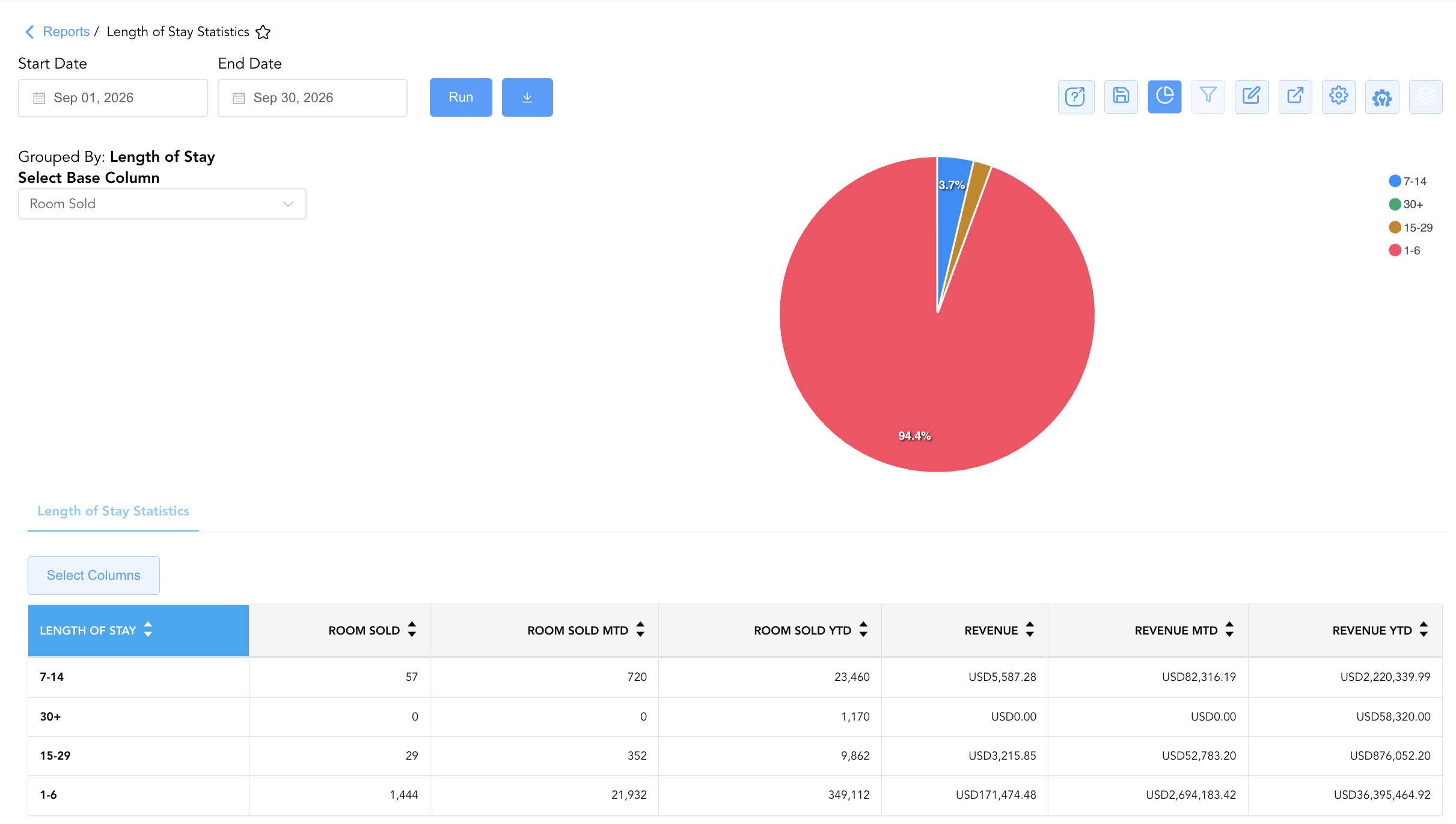
Group By & Pie Chart Visualization: The Length of Stay Statistics report features an interactive pie chart to help analyze guest duration patterns and revenue share. Users can group metrics on the fly by Length of Stay tier or Date to analyze stay duration performance trends over time. By selecting a metric from the Select Base Column dropdown menu—such as Room Sold, Revenue, or cumulative MTD/YTD totals—the chart dynamically displays percentage share breakdowns alongside an interactive color-coded legend.
-
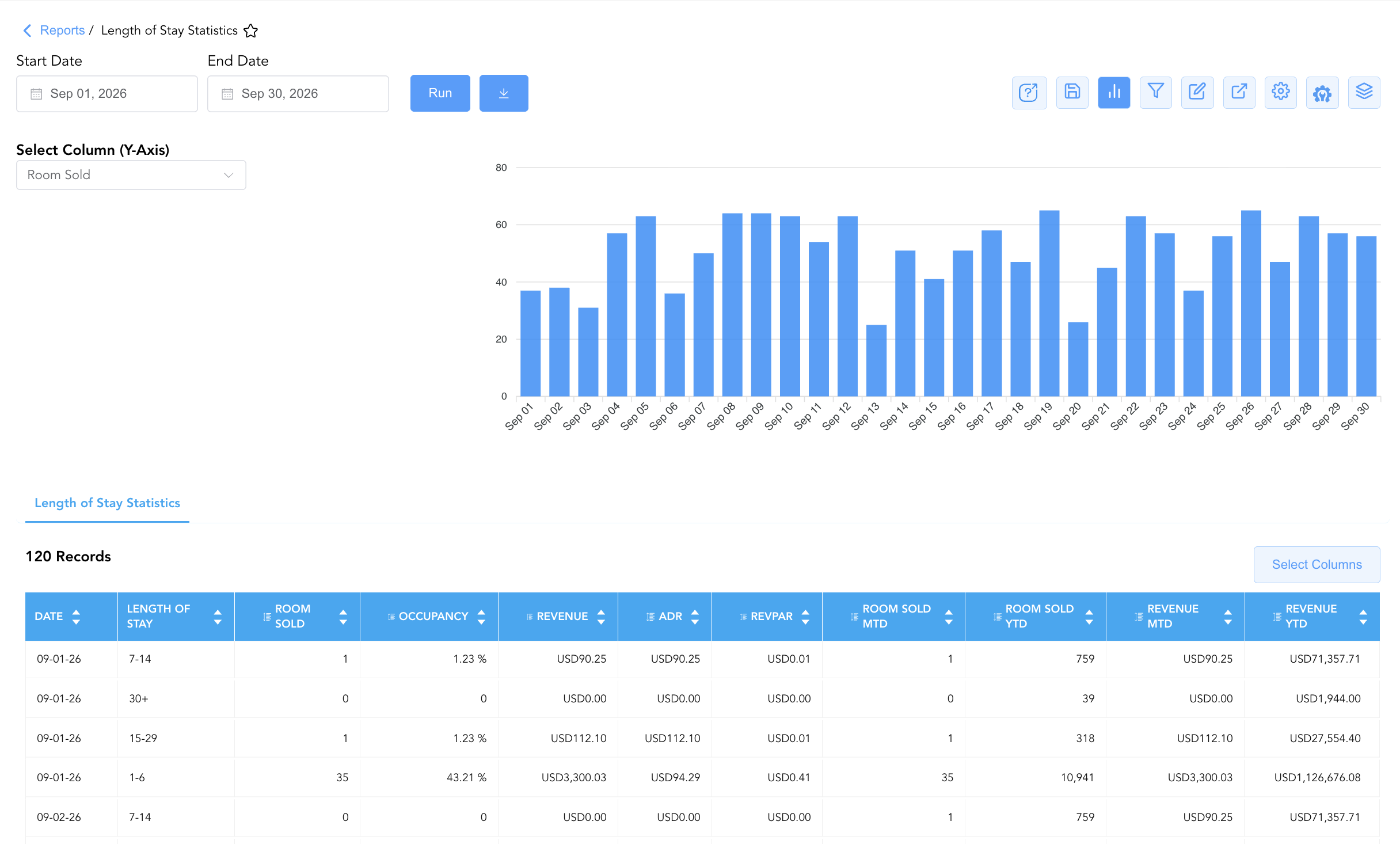
Bar Chart Visualizer: The Length of Stay Statistics report features an interactive bar chart to help analyze property volume and revenue trends over time. By adjusting the Select Column (Y-Axis) dropdown menu, users can dynamically switch the chart view to plot room volume (Room Sold, Room Sold MTD/YTD) or financial performance (Revenue, Revenue MTD/YTD) alongside the detailed statistics table.
Advanced Controls
-
Exporting & Yield Analysis: Download in Excel or PDF format to support monthly revenue strategy meetings, extended stay sales contract reviews, and displacement analysis.
-
Filtering: Filter data by specific date ranges or length-of-stay brackets (e.g., isolate
15-29and30+tiers for extended-stay audits). -
Highlighting (Conditional Formatting): Apply custom rules to automatically highlight high-occupancy days or tiers experiencing significant ADR rate drops.
🔗 Related Reports & Next Steps
Within 📈 Revenue & Analytics & 📊 Performance Summaries:
-
General Manager Report – Review property-wide macro statistics, total room revenues, ADR, and RevPAR performance.
-
Hotel Statistics – Complete 360-degree operational overview including room counts, occupancy, taxes, payments, and booking activity.
-
Market Segment Summary – Analyze how room revenue and ADR performance vary across retail, corporate, group, and OTA segments.
Cross-Pillar Deep Dives:
-
🛎️ Front Desk & Guest Services: Cross-reference active long-stay guest profiles in In-House Guest List.
-
💳 Payments & Transactions: To inspect specific room charges and long-term folio settlements, review All Transactions.