
Maintenance Activity Report Overview
Parent Hub: 🧹 Rooms & Facilities
Category: 🛠️ Facilities Maintenance
Target Roles: Chief Engineers, Maintenance Supervisors, Facilities Technicians, Executive Housekeepers, Front Office Managers, General Managers
Key Value: Monitor work order execution, track work order lifecycles from creation to resolution, audit overdue repair requests, evaluate technician labor time vs. estimated durations, and maintain complete facility asset maintenance records.
Date Parameter: Date Range Selector (Start & End) | Past & Future | Maximum Window: None
Executive Summary
The Maintenance Activity Report is an essential facilities engineering, work order audit, and asset management document within the 🛠️ Facilities Maintenance category of the 🧹 Rooms & Facilities hub. Designed to provide complete operational and technical visibility over work order dispatches, engineering tasks, and facility repairs, it itemizes all active, completed, and delayed work orders logged across property guest rooms and public areas.
-
By organizing work order records into 2 defined report sections: Maintenance Activity and Overdue Issue, this report enables chief engineers, maintenance leads, and hotel controllers to review general engineering tasks (
Maintenance Activity) separately from escalated or delayed repairs exceeding expected completion SLAs (Overdue Issue). It correlates location parameters (Room Number,Floor,Building) with task classifications (Maintenance Type,Reason,Origin Type), work order lifecycle metrics (Start Date,End Date,Number of days,Time,Status,Estimated Duration,Actual Duration,Variance), assigned personnel credentials (Maintenance Engineer,Created By,Closed By), timestamps (Created At,Closed At), and operational details (Remarks).
Key Capabilities
-
Two-Section Engineering Audit Structure: Separates general engineering activity (
Maintenance Activity) from SLA-breached tasks (Overdue Issue) to prioritize urgent repair dispatches. -
Work Order Lifecycle & Timestamp Tracking: Captures creation and closure timestamps (
Created At,Closed At), creation authors (Created By), and closing managers (Closed By) for security audit compliance. -
Labor Duration & Variance Analysis: Measures estimated task labor time (
Estimated Duration) against actual completion time (Actual Duration) to calculate operational duration variance (Variance) and evaluate technician efficiency. -
Origin & Source Classification: Distinguishes manually logged work orders (
MANUAL) from automated system-generated tasks (ROOM_AGING) based on room turnover or preventive maintenance schedules (Origin Type). -
Property Location Mapping: Identifies physical task locations across specific building wings (
Building), floor levels (Floor), and guest rooms or public zones (Room Number) to optimize engineering labor routing.
Report Views & Functional Breakdown
The Maintenance Activity Report presents work order data across 2 defined sections:
┌────────────────────────────────────────────────────────────────────────┐
│                     MAINTENANCE ACTIVITY REPORT                        │
├────────────────────────────────────────────────────────────────────────┤
│                       2 Defined Report Sections                        │
├──────────────────────────┬──────────────────────────┬──────────────────┤
│ 1. Maintenance Activity  │ 2. Overdue Issue         │                  │
│    Section (General)     │    Section (SLA Breach)   │                  │
└──────────────────────────┴──────────────────────────┴──────────────────┘
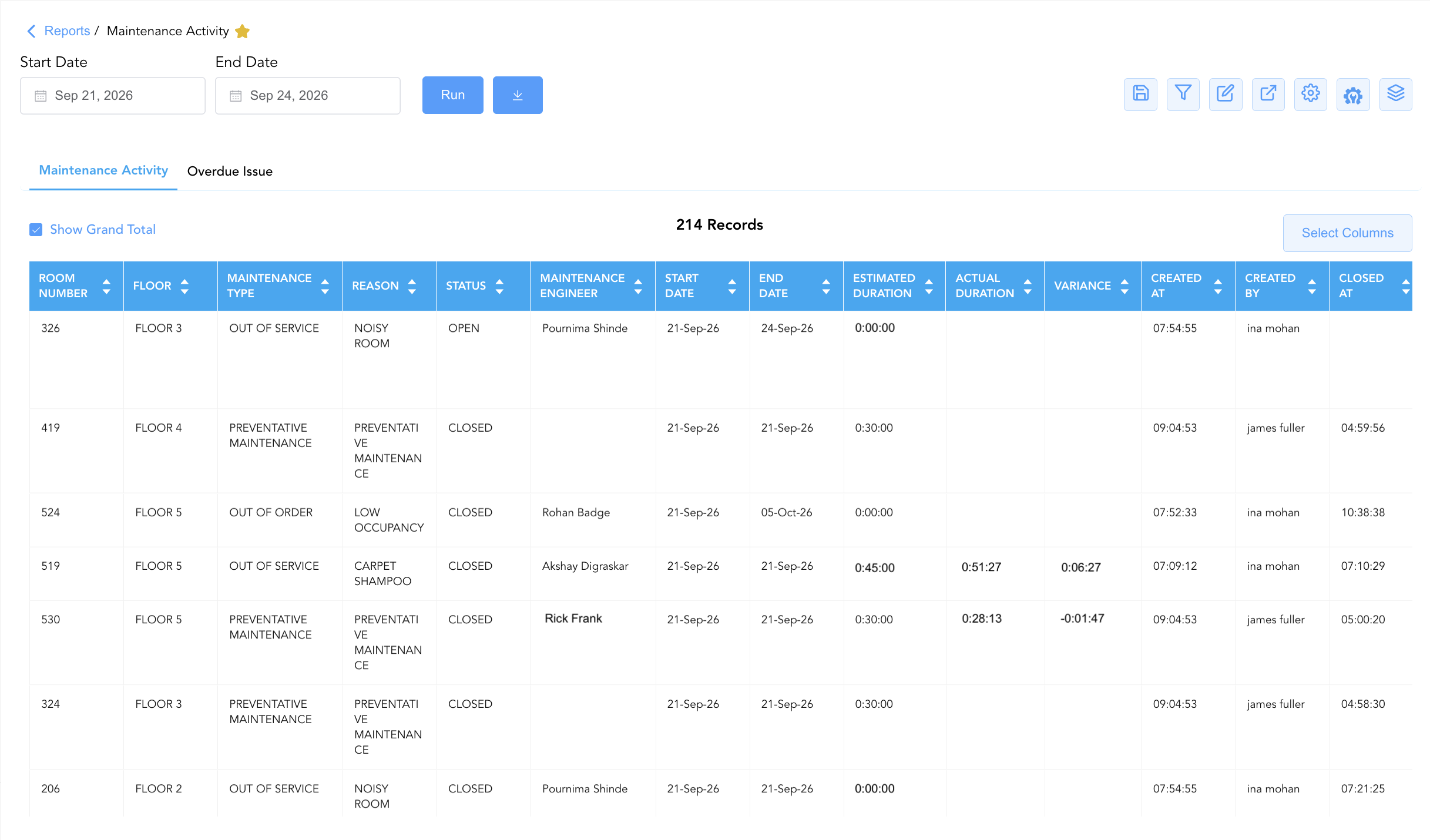
1. Maintenance Activity Section
Monitors all general, preventive, and corrective maintenance work orders executed or logged across property facilities over the reporting window.
-
Primary Use: Reviewing overall engineering workload, auditing closed repair tickets, and evaluating technician labor productivity.
-
Key Metrics: Room Number, Maintenance Type, Reason, Start Date, End Date, Status, Maintenance Engineer, Estimated Duration, Actual Duration, Variance, Floor, Building.
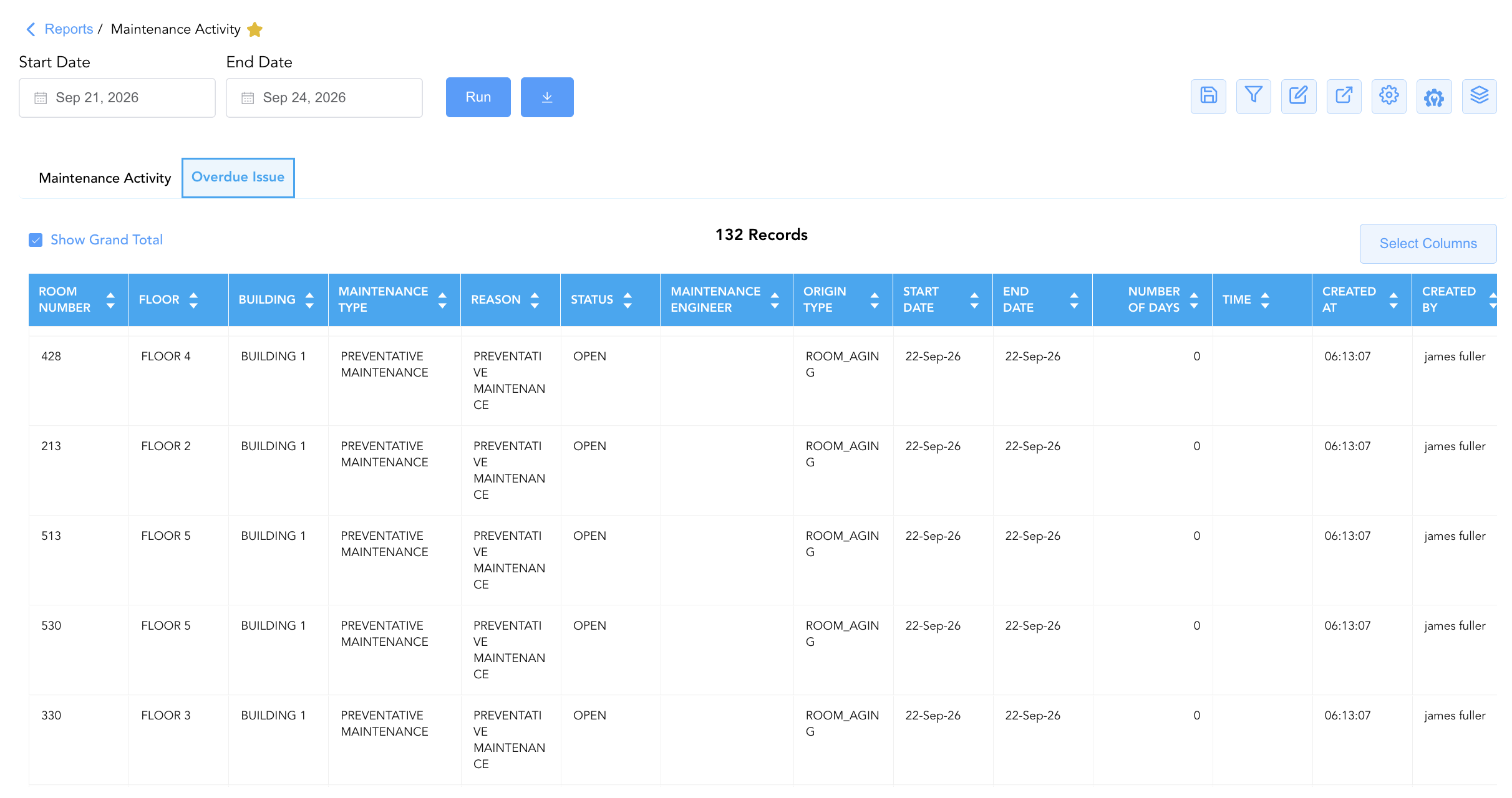
2. Overdue Issue Section
Isolates unresolved work orders that have exceeded their target completion timeframes or designated Service Level Agreements (SLAs).
-
Primary Use: Escalating delayed repairs, reassigning critical tasks to available technicians, and identifying recurring facility bottlenecks.
-
Key Metrics: Room Number, Maintenance Type, Reason, Start Date, End Date, Number of days, Status, Maintenance Engineer, Remarks, Floor, Building, Origin Type.
Data Dictionary (Dynamic View Columns)
Customize your default view using the Configure (⚙️) icon on the report page. Below is the full data dictionary representing all 20 unique columns available across the 2 report sections:
|
Column Name |
Section Applicability |
Description |
Data Source / System Mapping |
Includes Taxes & Fees? |
|---|---|---|---|---|
|
Actual Duration |
Section 1 |
Actual recorded labor duration taken by the technician to finish the work. |
Work Order Timer > Recorded Time |
N/A |
|
Building |
Both Sections |
Building structure or wing designation (e.g., |
PMS Setup > Building Structure |
N/A |
|
Closed At |
Both Sections |
Timestamp recording when the work order was formally closed. |
Audit Log > Closure Timestamp |
N/A |
|
Closed By |
Both Sections |
Username or full name of the supervisor/engineer who closed the ticket. |
Audit Log > Closing Username |
N/A |
|
Created At |
Both Sections |
Timestamp recording when the work order was created in the system. |
Audit Log > Creation Timestamp |
N/A |
|
Created By |
Both Sections |
Username or full name of the staff member who logged the work order. |
Audit Log > Author Username |
N/A |
|
End Date |
Both Sections |
Calendar date when the maintenance task was scheduled to end or completed. |
Work Order System > End Date |
N/A |
|
Estimated Duration |
Section 1 |
Target labor duration expected for task completion (e.g., |
Maintenance Benchmark > Target Time |
N/A |
|
Floor |
Both Sections |
Building floor designation (e.g., |
PMS Setup > Floor Level |
N/A |
|
Maintenance Engineer |
Both Sections |
Full name of the engineering technician assigned to execute the repair (e.g., |
Maintenance Engine > Technician ID |
N/A |
|
Maintenance Type |
Both Sections |
Classification of maintenance required (e.g., |
Work Order System > Task Type |
N/A |
|
Number of days |
Both Sections |
Total elapsed days spanned by the maintenance ticket (End Date−Start Date). |
Calculated: Duration in Days |
N/A |
|
Origin Type |
Both Sections |
Source mechanism generating the ticket (e.g., |
Work Order Engine > Trigger Source |
N/A |
|
Reason |
Both Sections |
Primary cause or trigger for the maintenance ticket (e.g., |
Work Order System > Reason Code |
N/A |
|
Remarks |
Both Sections |
Detailed operational notes, diagnostic findings, or handling instructions (e.g., "Assign last as these rooms are facing the highway"). |
Work Order Log > Remarks |
N/A |
|
Room Number |
Both Sections |
Physical guest room number or public area location code (e.g., |
PMS / Maintenance > Location ID |
N/A |
|
Start Date |
Both Sections |
Calendar date when the maintenance task was scheduled or initiated. |
Work Order System > Start Date |
N/A |
|
Status |
Both Sections |
Operational status of the work order (e.g., |
Work Order System > Lifecycle Status |
N/A |
|
Time |
Both Sections |
Specific time of day associated with task logging or scheduling. |
Work Order System > Scheduled Time |
N/A |
|
Variance |
Section 1 |
Time difference between estimated and actual labor duration (Actual Duration−Estimated Duration). |
Calculated: Labor Time Variance |
N/A |
Customization & Platform Features
User & Property Preferences
-
Personal Preference: Tailor your individual view by hiding or dragging columns. Your preferences save automatically for future sessions.
-
Property Defaults: System Admins can configure standard default layouts across all property users to streamline operational reporting. To maximize audit efficiency, group the columns into the below logical blocks:
-
Section 1: Maintenance Activity
-
Physical Locators & Issue Description (Cols 1–5):
Room Number|Floor|Building|Maintenance Type|Reason -
Lifecycle Status & Assigned Technician (Cols 6–8):
Status|Maintenance Engineer|Origin Type -
Schedule Window & Duration Metrics (Cols 9–13):
Start Date|End Date|Number of Days|Time|Estimated Duration -
Task Performance Variance (Cols 14–15):
Actual Duration|Variance -
Creation Audit Trail (Cols 16–17):
Created At|Created By -
Closure Audit Trail (Cols 18–19):
Closed At|Closed By -
Operational Remarks (Col 20):
Remarks
-
-
Section 2: Overdue Issue
-
Physical Locators & Issue Description (Cols 1–5):
Room Number|Floor|Building|Maintenance Type|Reason -
Lifecycle Status & Assigned Technician (Cols 6–8):
Status|Maintenance Engineer|Origin Type -
Schedule Window & Time Context (Cols 9–12):
Start Date|End Date|Number of Days|Time -
Creation Audit Trail (Cols 13–14):
Created At|Created By -
Closure Audit Trail (Cols 15–16):
Closed At|Closed By -
Operational Remarks (Col 17):
Remarks
-
-
Report Toolbar & Quick Actions
Use the top-right toolbar icons on the report page to manage and export your data view:
|
Icon |
Action / Feature |
Description |

|
Knowledge Article |
Opens the knowledge base article to learn how to interpret this report. |

|
Saved Views |
Saves your column filtering, sorting, and highlight preferences so you can easily reload your custom view later without reconfiguring the report. |

|
Filter |
Opens filter controls to isolate specific data within a column based on your selected criteria. |

|
Highlight |
Highlights column values in a designated color based on selected conditions. |

|
Export |
Exports and downloads the report in various formats (Excel, PDF, CSV) for offline analysis or printing. |

|
Configure |
Opens column selection controls to toggle visibility, reorder columns, or hide rows with all zeros. |

|
Additional Configuration |
Provides advanced report configuration and display formatting options to customize data presentation. |

|
Group By |
Summarize and group report data dynamically in real time. |
Interactive Visualizations & Grouping Controls
-
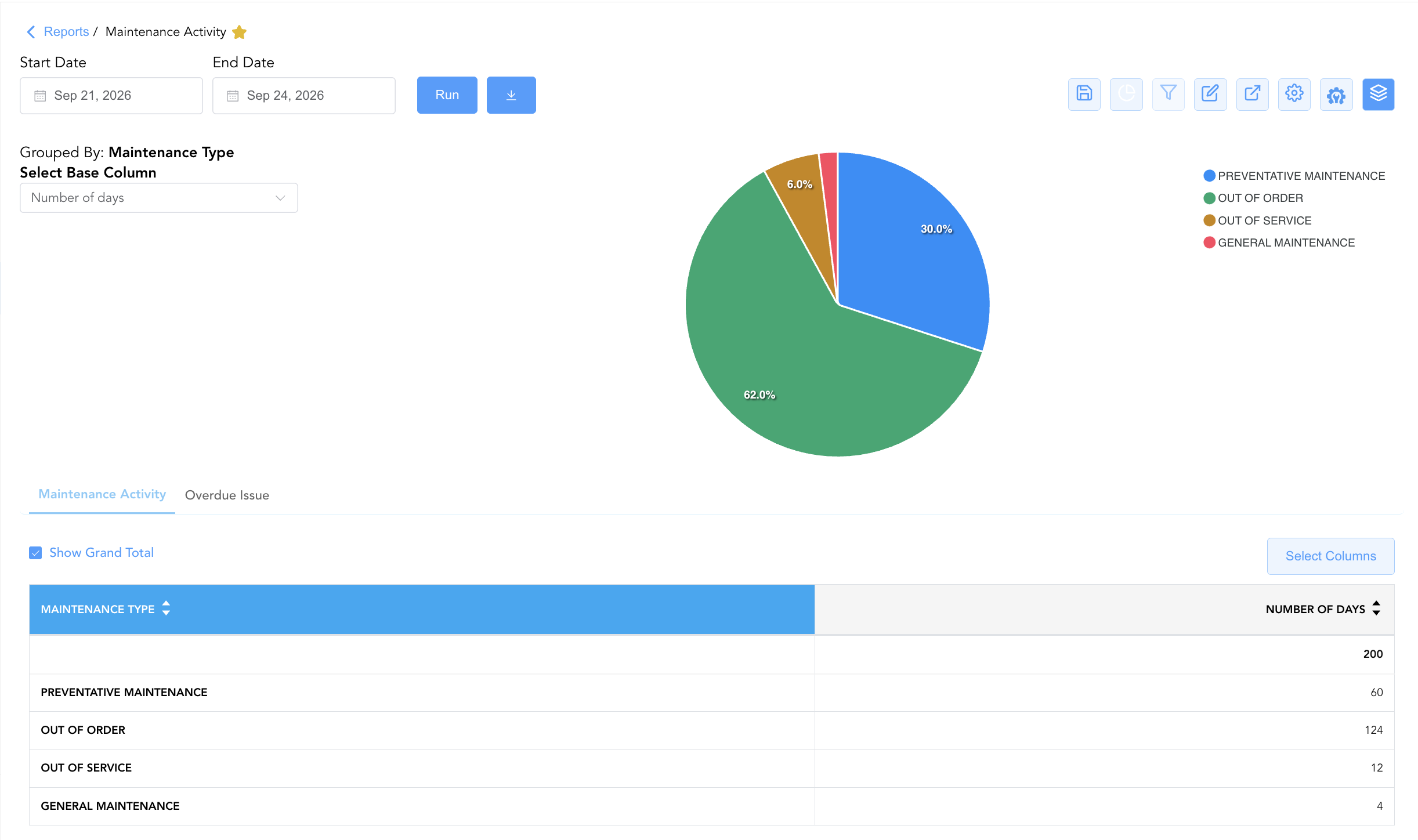
Group By & Pie Chart Visualization: The Maintenance Activity report features an interactive pie chart to help analyze maintenance task distribution and out-of-service duration metrics. Users can toggle or expand/collapse the Room Number, Maintenance Type, Reason, Status, or User Name sections to analyze general tasks or SLA breaches independently. By selecting Number of days from the Select Base Column dropdown menu, the chart dynamically renders percentage share breakdowns accompanied by an interactive color-coded legend.
Advanced Controls
-
Exporting & Work Order Dispatch: Download Section 1 or Section 2 in Excel or PDF format to generate daily task lists for engineering technicians.
-
Filtering: Filter Section 2 by
Status = OPENto generate an immediate priority escalation list for chief engineers. -
Highlighting (Conditional Formatting): Apply custom rules to automatically highlight overdue tickets (
Overdue Issuesection), out-of-order rooms (Maintenance Type = OUT OF ORDER), or high labor time variances.
🔗 Related Reports & Next Steps
Within 🧹 Rooms & Facilities & 🛠️ Facilities Maintenance:
-
Lock Error Report – Hardware diagnostic report tracking door lock defects and connectivity failures.
-
Stay Request Details Report – Task dispatch report tracking guest housekeeping and maintenance amenity requests.
Cross-Pillar Deep Dives:
-
🛎️ Front Desk & Guest Services: Reconcile out-of-order room tickets (
Maintenance Type = OUT OF ORDER) with Room Availability Report and Arrivals List Report to prevent assigning rooms under repair.