
Here is the full Maintenance Summary Report Overview KBA with the Data Dictionary section sorted in alphabetical order by column name:
Maintenance Summary Report Overview
Parent Hub: 🧹 Rooms & Facilities
Category: 🛠️ Facilities Maintenance
Target Roles: Chief Engineers, Maintenance Directors, Facilities Managers, Hotel Controllers, Operations Directors, General Managers
Key Value: Monitor daily engineering work order volume, evaluate maintenance category trends, track ticket resolution lifecycle counts, audit department productivity, and analyze recurring facility repair reasons across property operations.
Executive Summary
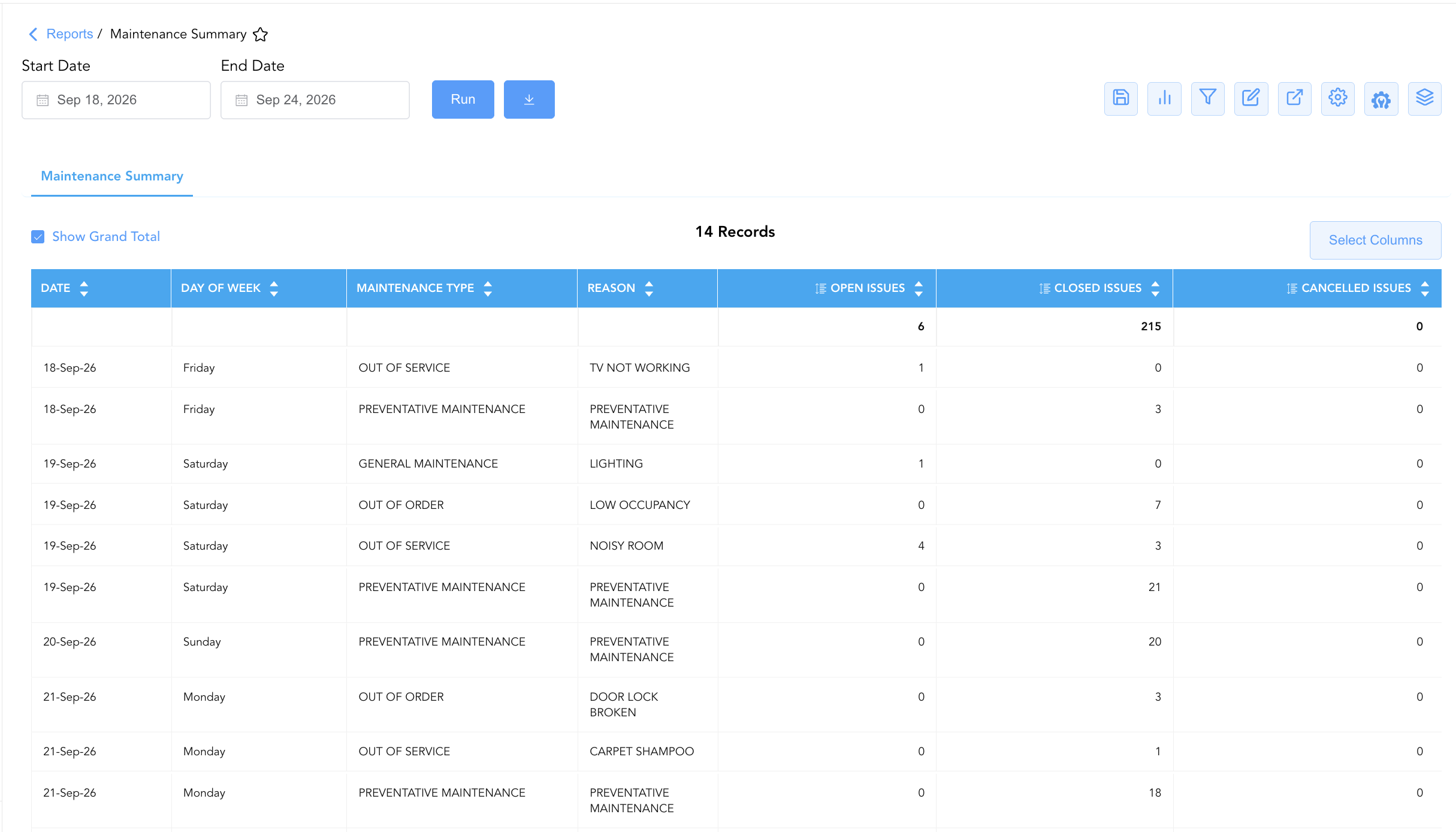
The Maintenance Summary Report is an essential executive engineering dashboard, trend analysis tool, and work order volume audit document within the 🛠️ Facilities Maintenance category of the 🧹 Rooms & Facilities hub. Designed to provide macro-level operational oversight over facility engineering workloads, it aggregates work order tickets by date, day of week, maintenance category, and root cause reason.
-
By grouping work order statistics by calendar date (
Date), day of the week (Day of week), maintenance classification (Maintenance Type, e.g.,PREVENTATIVE MAINTENANCE,OUT OF ORDER,OUT OF SERVICE,GENERAL MAINTENANCE), and specific trigger descriptions (Reason, e.g.,PREVENTATIVE MAINTENANCE,TV NOT WORKING,LIGHTING,LOW OCCUPANCY,NOISY ROOM,DOOR LOCK BROKEN,CARPET SHAMPOO,CHANGING ROOM), this report summarizes ticket lifecycle counts (Open Issues,Closed Issues,Cancelled Issues). This enables chief engineers, facilities supervisors, and property leadership to monitor daily department throughput, identify recurring equipment failure trends, audit open work order backlogs, and optimize engineering labor allocation across property wings.
Key Capabilities
-
Daily Work Order Volume Aggregation: Summarizes daily work order activity across all operational maintenance categories over specified date ranges.
-
Ticket Lifecycle State Tracking: Itemizes work order volume by status buckets (
Open Issues,Closed Issues,Cancelled Issues) to monitor active backlogs versus completed repairs. -
Maintenance Category & Reason Categorization: Groups ticket volume by high-level classification (
Maintenance Type) and specific root cause (Reason) to identify systemic facility defects (e.g., HVAC, plumbing, lighting, lock defects). -
Day-of-Week Trend Analysis: Tracks work order generation patterns across days of the week (
Day of week) to align engineering staffing levels with peak maintenance request days. -
Preventive vs. Corrective Workload Balance: Evaluates the proportion of scheduled preventive maintenance tasks (
PREVENTATIVE MAINTENANCE) relative to reactive guestroom or public area repair requests.
Report Views & Functional Breakdown
The Maintenance Summary Report presents aggregated work order data in a unified single-table master matrix supporting three primary operational perspectives:
┌────────────────────────────────────────────────────────────────────────┐
│                      MAINTENANCE SUMMARY REPORT                        │
├──────────────────────────┬──────────────────────────┬──────────────────┤
│                         Unified Matrix View                            │
├──────────────────────────┼──────────────────────────┼──────────────────┤
│ 1. Timeframe & Category  │ 2. Root Cause & Trigger  │ 3. Ticket Status │
│    Classification        │    Analysis              │    & Volume Audit│
└──────────────────────────┴──────────────────────────┴──────────────────┘
1. Timeframe & Category Classification
Monitors calendar dates, day of week designations, and high-level maintenance classifications.
-
Primary Use: Evaluating daily work order generation and analyzing category-level engineering demand across property facilities.
-
Key Metrics: Date, Day of week, Maintenance Type.
2. Root Cause & Trigger Analysis
Tracks specific repair reasons and trigger descriptions associated with work order volume.
-
Primary Use: Identifying recurring facility issues (e.g., broken door locks, noisy rooms, lighting defects) to plan capital replacements or targeted preventive maintenance.
-
Key Metrics: Reason, Maintenance Type, Date.
3. Ticket Status & Volume Audit
Aggregates numerical counts of open, closed, and cancelled work order issues for each date and reason.
-
Primary Use: Auditing department throughput, ensuring open work orders (
Open Issues) are resolved promptly, and monitoring cancelled tickets. -
Key Metrics: Open Issues, Closed Issues, Cancelled Issues, Date, Maintenance Type.
Data Dictionary (Dynamic View Columns)
Customize your default view using the Configure (⚙️) icon on the report page. Below is the full data dictionary sorted in alphabetical order by column name:
|
Column Name |
Description |
Data Source / System Mapping |
Includes Taxes & Fees? |
|
Cancelled Issues |
Numerical count of work order tickets voided or cancelled prior to completion. |
SUM(Cancelled Work Orders) |
N/A |
|
Closed Issues |
Numerical count of work order tickets successfully completed and resolved. |
SUM(Closed Work Orders) |
N/A |
|
Date |
Calendar date on which the maintenance work orders were logged or processed. |
Work Order System > Start Date |
N/A |
|
Day of week |
Day of the week corresponding to the report date (e.g., |
Calculated: Calendar Day of Week |
N/A |
|
Maintenance Type |
High-level classification of the maintenance task (e.g., |
Work Order Engine > Task Type |
N/A |
|
Open Issues |
Numerical count of work order tickets currently in open or pending status. |
SUM(Open Work Orders) |
N/A |
|
Reason |
Specific root cause or trigger description for the work order (e.g., |
Work Order Engine > Reason Code |
N/A |
Customization & Platform Features
User & Property Preferences
-
Personal Preference: Tailor your individual view by hiding or dragging columns. Your preferences save automatically for future sessions.
-
Property Defaults: System Admins can configure standard default layouts across all property users to streamline operational reporting. To maximize audit efficiency, group the columns into the below logical blocks:
-
Calendar Date & Day Context (Cols 1–2):
Date|Day of week -
Maintenance Type & Reason (Cols 3–4):
Maintenance Type|Reason -
Work Order Volume KPIs (Cols 5–7):
Open Issues|Closed Issues|Cancelled Issues
-
Report Toolbar & Quick Actions
Use the top-right toolbar icons on the report page to manage and export your data view:
|
Icon |
Action / Feature |
Description |

|
Knowledge Article |
Opens the knowledge base article to learn how to interpret this report. |

|
Saved Views |
Saves your column filtering, sorting, and highlight preferences so you can easily reload your custom view later without reconfiguring the report. |

|
Bar Chart |
Displays report data in a visual bar chart format. |

|
Filter |
Opens filter controls to isolate specific data within a column based on your selected criteria. |

|
Highlight |
Highlights column values in a designated color based on selected conditions. |

|
Export |
Exports and downloads the report in various formats (Excel, PDF, CSV) for offline analysis or printing. |

|
Configure |
Opens column selection controls to toggle visibility, reorder columns, or hide rows with all zeros. |

|
Additional Configuration |
Provides advanced report configuration and display formatting options to customize data presentation. |

|
Group By |
Summarize and group report data dynamically in real time. |
Interactive Visualizations & Grouping Controls
-
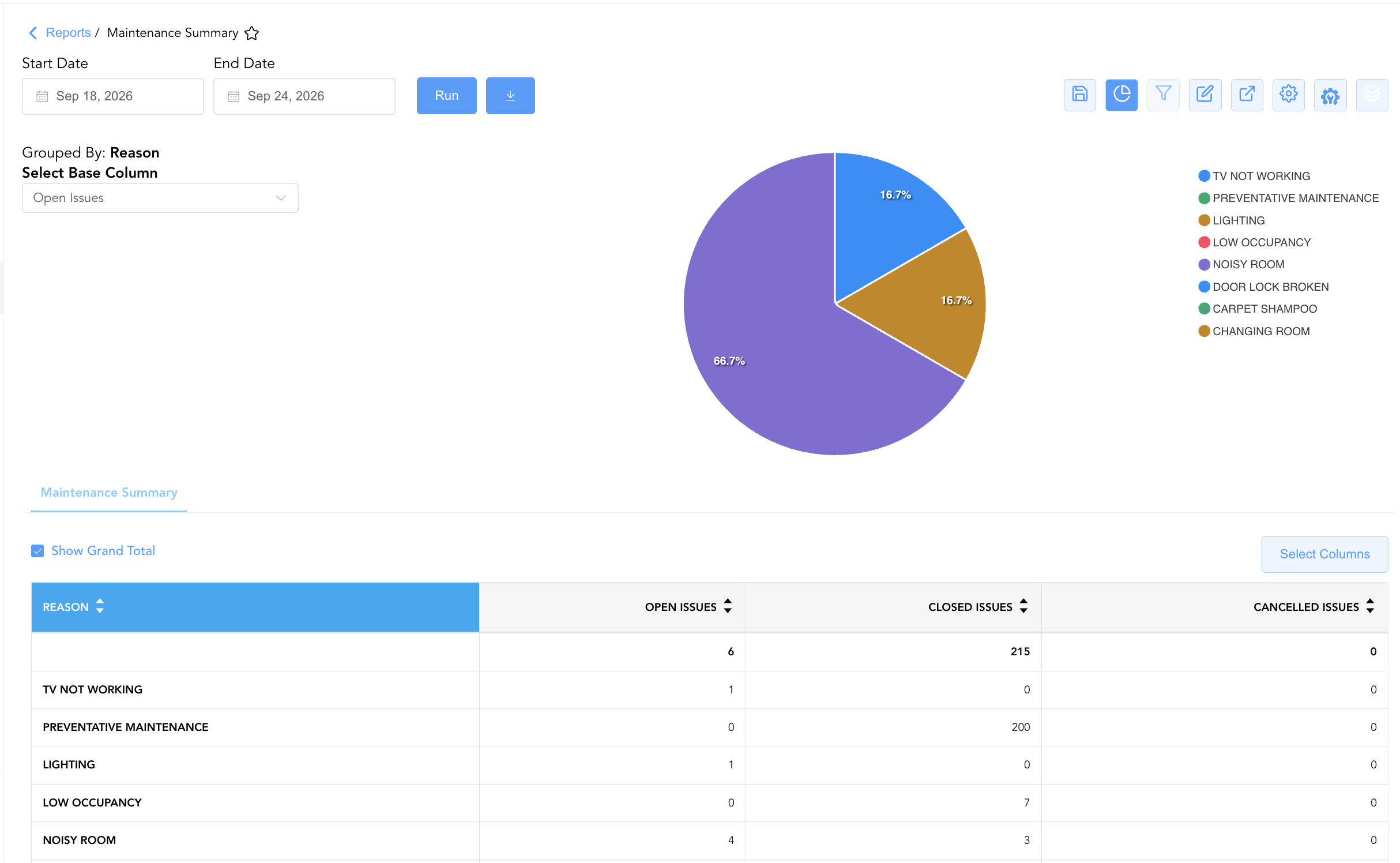
Group By & Pie Chart Visualization: The Maintenance Summary report features an interactive pie chart to help analyze maintenance issue resolution tracking and work order volume distributions. Users can group summary entries on the fly by Maintenance Type or Reason to evaluate work order distribution across categories or weekday trends. By selecting a metric from the Select Base Column dropdown menu—such as Open Issues, Closed Issues, or Cancelled Issues—the chart dynamically renders percentage share breakdowns accompanied by an interactive color-coded legend.
-
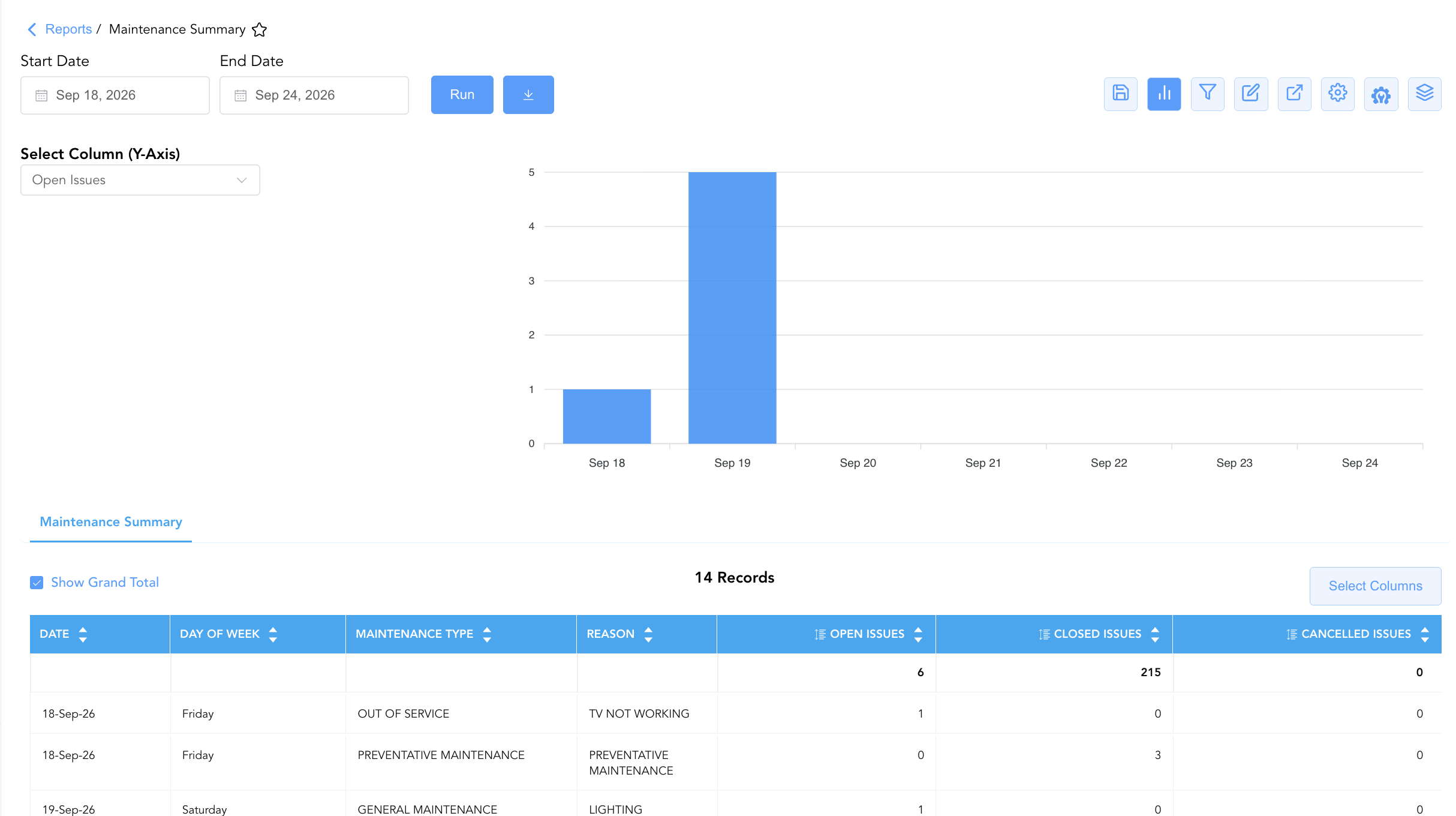
Bar Chart Visualizer: The Maintenance Summary report includes an interactive bar chart to help analyze engineering work order volume and resolution trends over time. By adjusting the Select Column (Y-Axis) dropdown menu, users can dynamically toggle the chart view to plot metrics such as Open Issues, Closed Issues, or Cancelled Issues chronologically alongside the detailed maintenance summary data grid.
Advanced Controls
-
Executive Summary Exporting: Schedule automated weekly or monthly exports to review engineering performance trends and evaluate preventive maintenance compliance.
-
Filtering: Filter data by
Open Issues > 0to generate an immediate executive report of unresolved engineering backlogs. -
Highlighting (Conditional Formatting): Apply custom rules to automatically highlight open issue backlogs (
Open Issues > 0), high closed issue volumes, or high cancellation rates.
🔗 Related Reports & Next Steps
Within 🧹 Rooms & Facilities & 🛠️ Facilities Maintenance:
-
Maintenance Activity – Detailed two-section log tracking individual work order lifecycles and overdue issues.
-
Maintenance Checklist Summary – High-level dashboard tracking room inspection checklist completion percentages.
-
Maintenance Checklist Details – Itemized line-item audit tracking individual inspection task pass/fail states.
-
Lock Error – Diagnostic report tracking door lock defects and connectivity failures.
Cross-Pillar Deep Dives:
-
🛏️ Room Status: Reconcile closed out-of-order work orders (
Closed IssuesunderOUT OF ORDER) with All Rooms and Room Detail to release rooms back to clean/inspected status.