
No Show and Late Cancel Report Overview
Parent Hub: 🛎️ Front Desk & Guest Services
Category: 🧳 Arrivals & Departures
Target Roles: Front Office Managers, Night Auditors, Hotel Controllers, Revenue Managers, General Managers, Guest Services Supervisors
Key Value: Monitor unfulfilled expected arrivals and late cancelled reservations, track no-show penalty fee collection and payment statuses, audit waived charges, inspect stay remarks and special requests, and enforce property cancellation policy compliance.
Executive Summary
The No Show and Late Cancel Report is a primary front office operational audit and revenue protection document within the 🧳 Arrivals & Departures category of the 🛎️ Front Desk & Guest Services hub. Designed to deliver complete visibility over unaccommodated expected arrivals and late reservation cancellations, it itemizes every reservation processed as a no-show or late cancellation across specified arrival date windows.
-
By mapping operational reservation parameters (Confirmation No, Guest Name, First Name, Last Name, Company, Arrival, Departure, Nights) to financial billing metrics (Amount, Payment Status, Reservation Status, Reservation Sub Status) and administrative audit details (User, Waive Remarks, Stay Remarks), this report enables front desk agents, night auditors, and hotel controllers to verify no-show processing accuracy, track penalty billing collection (
Paidvs. unpaid), evaluate fee waiver justifications (Waive Remarks), and release unassigned room inventory back to bookable inventory.
Key Capabilities
-
No-Show & Late Cancellation Tracking: Itemizes all expected arriving reservations that failed to check in (
No Show) or were cancelled past the policy deadline (Cancelled). -
Penalty Billing & Settlement Audit: Captures assessed no-show penalty fee amounts (
Amount) alongside live collection statuses (Payment Status, e.g.,Paid). -
Corporate & Group Block Identification: Highlights corporate affiliations and group block master attachments (
Company, e.g., Delta Airlines Crew Block, HotelKey Inc). -
Fee Waiver & Administrative Controls: Logs specific staff credentials (
User) and documented explanations (Waive Remarks) when penalty fees are adjusted or waived. -
Guest Preference & Stay Remark Inspection: Displays special requests, arrival notes, and VIP handling instructions (
Stay Remarks) linked to the unfulfilled arrival.
Report Views & Functional Breakdown
The No Show and Late Cancel Report presents unfulfilled arrival data in a unified single-table ledger that supports three key analytical perspectives:
┌────────────────────────────────────────────────────────────────────────┐
│                   NO SHOW & LATE CANCEL REPORT                         │
├────────────────────────────────────────────────────────────────────────┤
│                         Unified Matrix View                            │
├──────────────────────────┬──────────────────────────┬──────────────────┤
│ 1. Unfulfilled Arrival   │ 2. Penalty Fee &         │ 3. User Audit &  │
│    & Stay Ledger         │    Payment Audit         │    Remark Trace  │
└──────────────────────────┴──────────────────────────┴──────────────────┘
1. Unfulfilled Arrival & Stay Ledger
Monitors expected guest arrivals, corporate account affiliations, and stay timeframes.
-
Primary Use: Verifying night audit no-show processing, releasing unassigned rooms back to available house inventory, and checking group block no-show occurrences.
-
Key Metrics: Confirmation No, Guest Name, Company, Arrival, Departure, Nights, Reservation Status.
2. Penalty Fee & Payment Audit
Audits assessed no-show penalty charges, payment collection statuses, and fee waiver records.
-
Primary Use: Ensuring late cancellation and no-show penalty fees are billed correctly to guest credit cards or direct bill accounts, and tracking outstanding balances.
-
Key Metrics: Confirmation No, Guest Name, Amount, Payment Status, Reservation Status, Reservation Sub Status.
3. User Audit & Remark Trace
Correlates no-show transactions with staff user credentials and documented stay remarks.
-
Primary Use: Auditing staff compliance with no-show posting rules, reviewing fee waiver justifications, and inspecting special arrival requests.
-
Key Metrics: Confirmation No, User, Waive Remarks, Stay Remarks.
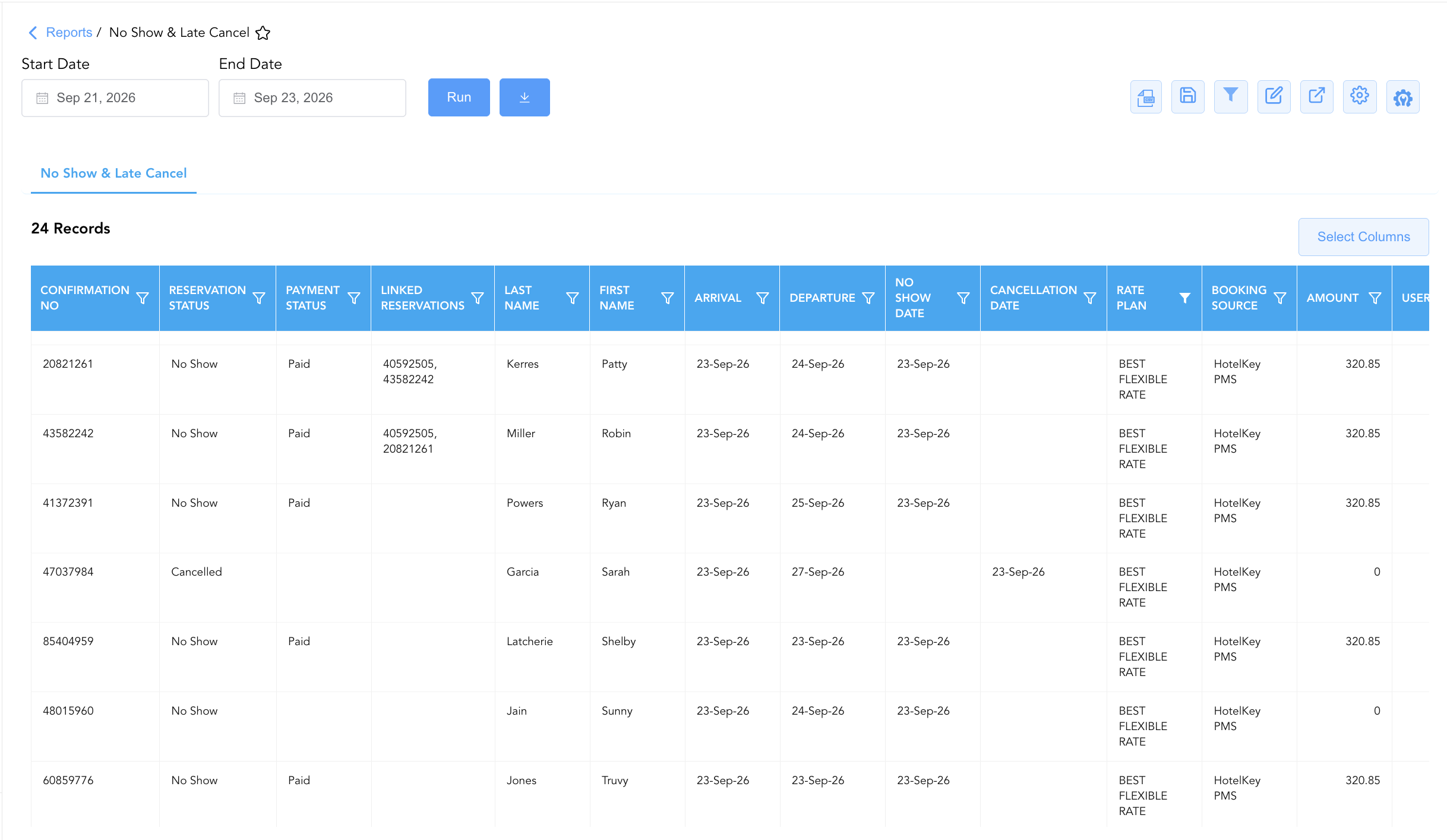
Data Dictionary (Dynamic View Columns)
Customize your default view using the Configure (⚙️) icon on the report page. Below is the full data dictionary representing every column available in this report:
💡 Penalty Billing Note: Amount reflects the base room penalty charge assessed for the no-show or late cancellation. Payment Status indicates whether the penalty charge has been successfully settled (
Paid) or remains pending.
|
Column Name |
Description |
Data Source / System Mapping |
Includes Taxes & Fees? |
|
Confirmation No |
Primary unique alphanumeric reservation identifier. |
Reservation System > Confirmation ID |
N/A |
|
Last Name |
Last name of the primary registered guest. |
Guest Profile > Last Name |
N/A |
|
First Name |
First name of the primary registered guest. |
Guest Profile > First Name |
N/A |
|
Company |
Corporate account or group block name attached to the reservation (e.g., Delta Airlines Crew Block, HotelKey Inc). |
Reservation System > Company / Group Name |
N/A |
|
Arrival |
Scheduled arrival date of the reservation. |
Reservation System > Check-In Date |
N/A |
|
Departure |
Scheduled departure date of the reservation. |
Reservation System > Check-Out Date |
N/A |
|
Nights |
Total physical room nights spanned by the original booking. |
Reservation System > Total Nights |
N/A |
|
Amount |
Total monetary penalty fee assessed for the no-show or late cancellation. |
Folio Posting > Penalty Fee Amount |
❌ No |
|
Reservation Status |
Operational status of the reservation (e.g., |
Reservation System > Operational Status |
N/A |
|
Payment Status |
Settlement status of the assessed penalty fee (e.g., |
Folio Ledger > Payment Settlement Status |
N/A |
|
Reservation Sub Status |
Secondary operational or billing classification code. |
Reservation System > Sub-Status Code |
N/A |
|
User |
User login ID or staff name of the employee who processed the status change or waiver. |
Security Audit Trail > User ID |
N/A |
|
Waive Remarks |
Documented manager justification explaining why a no-show fee was waived or reduced. |
PMS Waiver Prompt > Free-Text Remarks |
N/A |
|
Stay Remarks |
Operational notes, guest requests, or VIP instructions attached to the reservation. |
Reservation Profile > Stay Remarks |
N/A |
Customization & Platform Features
User & Property Preferences
-
Personal Preference: Tailor your individual view by hiding or dragging columns. Your preferences save automatically for future sessions.
-
Property Defaults: System Admins can configure standard default layouts across all property users to streamline operational reporting. To maximize audit efficiency, group the columns into the below logical blocks:
-
Reservation Identification & Status Audit (Cols 1–5):
Confirmation No|Reservation Status|Payment Status|Reservation Sub Status|Linked Reservations -
Guest Profile & Account Identification (Cols 6–8):
Last Name|First Name|Company -
Stay Itinerary & Timestamps (Cols 9–13):
Arrival|Departure|Nights|No Show Date|Cancellation Date -
Rate Plan & Channel Origin (Cols 14–17):
Rate Plan|Booking Source|Source Code|Amount -
Operational Remarks & Audit Accountability (Cols 18–21):
User|Waive Remarks|Stay Remarks|Purpose Of Visit
-
Report Toolbar & Quick Actions
Use the top-right toolbar icons on the report page to manage and export your data view:
|
Icon |
Action / Feature |
Description |

|
Knowledge Article |
Opens the knowledge base article to learn how to interpret this report. |

|
Background Export |
Allows users to download up to 365 days of data directly to their computer in CSV format. |

|
Saved Views |
Saves your column filtering, sorting, and highlight preferences so you can easily reload your custom view later without reconfiguring the report. |

|
Filter |
Opens filter controls to isolate specific data within a column based on your selected criteria. |

|
Highlight |
Highlights column values in a designated color based on selected conditions. |

|
Export |
Exports and downloads the report in various formats (Excel, PDF, CSV) for offline analysis or printing. |

|
Configure |
Opens column selection controls to toggle visibility, reorder columns, or hide rows with all zeros. |

|
Additional Configuration |
Provides advanced report configuration and display formatting options to customize data presentation. |
Advanced Controls
-
Exporting & Night Audit Reconciliations: Download in Excel or PDF format to support daily night audit handovers, monthly controller reviews, and credit card chargeback defenses.
-
Filtering: Filter data by
Payment Status = Paidto verify collected revenue, or isolate corporate crew block no-shows (Company = Delta Airlines Crew Block). -
Highlighting (Conditional Formatting): Apply custom rules to automatically highlight high-dollar no-show fees, unpaid penalty balances, or waived fee entries.
🔗 Related Reports & Next Steps
Within 🛎️ Front Desk & Guest Services & 🧳 Arrivals & Departures:
-
Arrivals List – Detailed daily manifest of expected arriving guests, check-in statuses, and room assignments.
-
Cancelled Reservation Report – Two-section audit report tracking individual and group cancellations, penalties, and release timestamps.
-
Booked Reservations – Audit log tracking newly created and modified reservation entries.
-
In House Guest List – Real-time roster of registered guests currently occupying physical hotel rooms.
Cross-Pillar Deep Dives:
-
📈 Revenue & Analytics: Reconcile unfulfilled arrival volume against Booking Pace, Turn Away Reason Code, and Occupancy Forecast and History.
-
⚖️ Ledgers & Trial Balance: Reconcile collected no-show penalty revenue against General Ledger control accounts in Trial Balance.