
Package Revenue Activity Report Overview
Parent Hub: 📈 Revenue & Analytics
Category: 📊 Performance Summaries
Target Roles: Directors of Revenue Management, General Managers, Directors of Finance & Controllers, Front Office Managers, Food & Beverage Supervisors
Key Value: Audit package element revenue splits, evaluate bundled rate plan performance, verify add-on package fulfillment, and ensure accurate financial separation between core room revenue and non-room package inclusions.
Executive Summary
The Package Revenue Activity Report is a primary financial audit and package performance document within the 📊 Performance Summaries category of the 📈 Revenue & Analytics hub. Designed to provide complete visibility into bundled rate plans and add-on package purchases, it itemizes guest reservations configured with package components to audit revenue allocations between room night charges and non-room package elements.
By pairing stay parameters (Room Number, Room Type, Confirmation Number, Guest Name, Check In Date, Check Out Date, Adults / Children, Reservation Status, Loyalty Tier) with package rate structures (Rate Code / Rate Plan, Group Number / Code, Package Code, Package Elements, Add On Package Quantity), and financial breakdown metrics (Room Revenue, Package Element Revenue, Package Revenue), this report enables revenue managers, controllers, and department heads to verify package element pricing, track guest add-on sales, and ensure general ledger revenue posting accuracy across accommodation, dining, and amenity outlets.
Key Capabilities
-
Package Component Revenue Unbundling: Clearly separates base accommodation earnings (Room Revenue) from non-room package component realizations (Package Element Revenue, Package Revenue).
-
Rate Plan & Add-On Tracking: Itemizes both inclusive rate-plan packages (e.g., BEST FLEX WITH BKFST, Bed and Breakfast Included) and separate guest add-on purchases (e.g., Champagne and Dozen Roses, Breakfast Add On Purchase).
-
Fulfillment & Quantity Verification: Tracks sold package quantities (Add On Package Quantity) and component descriptions (Package Elements) to ensure operational departments fulfill contracted guest amenities.
-
Loyalty & Group Segmentation: Links package revenue activity to guest membership tiers (Loyalty Tier like Diamond Elite) and contracted group blocks (Group Number, Group Code).
Report Views & Functional Breakdown
The Package Revenue Activity Report presents bundled package and add-on transactions in a unified operational ledger that supports three key analytical perspectives:
┌────────────────────────────────────────────────────────────────────────┐
│                   PACKAGE REVENUE ACTIVITY REPORT                      │
├────────────────────────────────────────────────────────────────────────┤
│                       Unified Operational Ledger                       │
├──────────────────────────┬──────────────────────────┬──────────────────┤
│ 1. Package Fulfillment & │ 2. Revenue Allocation &  │ 3. Rate Plan &   │
│    Stay Audit            │    Element Unbundling    │    Channel Source│
└──────────────────────────┴──────────────────────────┴──────────────────┘
1. Package Fulfillment & Stay Audit
Monitors guest stay timelines, room assignments, and operational reservation states for package-inclusive bookings.
-
Primary Use: Verifying stay dates (
Check In Date,Check Out Date), confirming physical room assignments (Room Number), and ensuring operational outlets deliver required package elements (Package Elements) to active or checked-out guests (Reservation Status = CHECKED_OUT). -
Key Metrics: Room Number, Room Type, Confirmation Number, Guest Name, Check In Date, Check Out Date, Reservation Status, Package Elements.
2. Revenue Allocation & Element Unbundling
Evaluates the monetary distribution between accommodation revenue and package element charges.
-
Primary Use: Reconciling general ledger revenue routing between room revenue control accounts (
Room Revenue) and outlet income accounts (Package Element Revenue,Package Revenue), and auditing add-on purchase quantities (Add On Package Quantity). -
Key Metrics: Confirmation Number, Guest Name, Package Code, Room Revenue, Package Element Revenue, Package Revenue, Add On Package Quantity.
3. Rate Plan & Channel Source
Tracks rate plan codes, group block links, and loyalty program affiliations.
-
Primary Use: Auditing package rate plan performance (
Rate Plan), measuring group block package contributions (Group Code), and analyzing package uptake among VIP/Loyalty members (Loyalty Tier). -
Key Metrics: Confirmation Number, Rate Plan, Group Number, Group Code, Loyalty Tier.
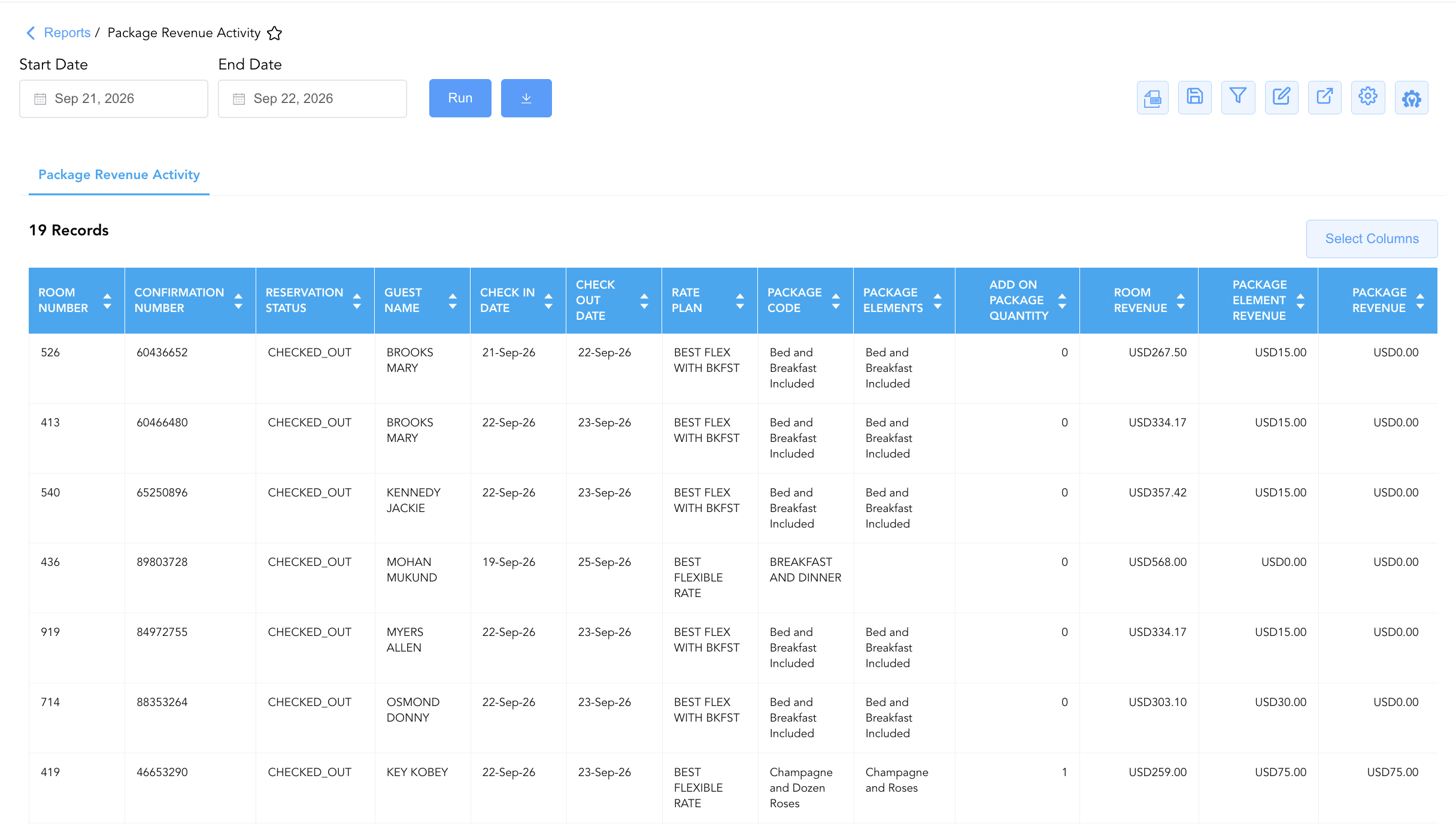
Data Dictionary (Dynamic View Columns)
Customize your default view using the Configure (⚙️) icon on the report page. Below is the full data dictionary representing every column available in this report:
💡 Monetary & Revenue Treatment Note: Room Revenue, Package Element Revenue, and Package Revenue represent Gross Financial Amounts (Includes Taxes & Fees) unless configured as net base revenue items. Room Revenue reflects the accommodation portion of the stay, while Package Element Revenue / Package Revenue reflects the non-room component value (e.g., $15.00 for breakfast, $75.00 for champagne/roses).
|
Column Name |
Description |
Data Source / System Mapping |
Includes Taxes & Fees? |
|
Room Number |
Physical guest room number assigned to the package stay (e.g., |
|
N/A |
|
Room Type |
Physical room category description (e.g., 1 King Standard, 1 King Premium City view, 2 Single Standard). |
Room Type Configuration |
N/A |
|
Confirmation Number |
Unique reference identifier assigned to the guest reservation. |
System Reservation ID |
N/A |
|
Guest Name |
Combined full primary guest name ( |
|
N/A |
|
First Name / Last Name |
Individual guest first name and last name registered on the folio. |
|
N/A |
|
Check In Date |
Official arrival date of the package reservation. |
|
N/A |
|
Check Out Date |
Official departure date of the package reservation. |
|
N/A |
|
Adults / Children |
Registered adult and child occupant headcounts (e.g., |
|
N/A |
|
Rate Plan |
Rate code governing the booking (e.g., BEST FLEX WITH BKFST, BEST FLEXIBLE RATE). |
Rate Code Configuration |
N/A |
|
Group Number / Group Code |
Master identifier code and number for linked group blocks ( |
|
N/A |
|
Package Code |
Title or code of the inclusive rate package or add-on (e.g., Bed and Breakfast Included, Champagne and Dozen Roses, Breakfast Add On Purchase). |
Package Setup Engine |
N/A |
|
Reservation Status |
Operational state of the reservation (e.g., |
System Reservation Engine |
N/A |
|
Package Elements |
Detailed list of individual inclusions bundled within the package (e.g., Bed and Breakfast Included, Champagne and Roses). |
Package Component Setup |
N/A |
|
Room Revenue |
Monetary revenue allocated to the room night accommodation portion. |
|
🟢 Yes |
|
Package Element Revenue |
Financial value allocated to the specific non-room package inclusion. |
|
🟢 Yes |
|
Loyalty Tier |
Membership level or loyalty status of the primary guest (e.g., Diamond Elite). |
|
N/A |
|
Package Revenue |
Total non-room package revenue recognized for the transaction. |
|
🟢 Yes |
|
Add On Package Quantity |
Total number of individual add-on package units purchased ( |
Package Engine Counter |
N/A |
Customization & Platform Features
User & Property Preferences
-
Personal Preference: Tailor your individual view by hiding or dragging columns. Your preferences save automatically for future sessions.
-
Property Defaults: System Admins can configure standard default layouts across all property users to streamline operational reporting. To maximize audit efficiency, group the columns into the below logical blocks:
-
Room & Reservation Anchors (Cols 1–3):
Room Number|Confirmation Number|Reservation Status -
Guest Profile & Group Context (Cols 4–9):
Guest Name|First Name|Last Name|Loyalty Tier|Group Code|Group Number -
Stay Window & Occupancy Parameters (Cols 10–13):
Check In Date|Check Out Date|Room Type|Adults / Children -
Package Component & Rate Metadata (Cols 14–17):
Rate Plan|Package Code|Package Elements|Add On Package Quantity -
Financial Revenue Allocation (Cols 18–20):
Room Revenue|Package Element Revenue|Package Revenue
-
Report Toolbar & Quick Actions
Use the top-right toolbar icons on the report page to manage and export your data view:
|
Icon |
Action / Feature |
Description |

|
Knowledge Article |
Opens the knowledge base article to learn how to interpret this report. |

|
Background Export |
Allows users to download up to 365 days of data directly to their computer in CSV format. |

|
Saved Views |
Saves your column filtering, sorting, and highlight preferences so you can easily reload your custom view later without reconfiguring the report. |

|
Filter |
Opens filter controls to isolate specific data within a column based on your selected criteria. |

|
Highlight |
Highlights column values in a designated color based on selected conditions. |

|
Export |
Exports and downloads the report in various formats (Excel, PDF, CSV) for offline analysis or printing. |

|
Configure |
Opens column selection controls to toggle visibility, reorder columns, or hide rows with all zeros. |

|
Additional Configuration |
Provides advanced report configuration and display formatting options to customize data presentation. |
Advanced Controls
-
Exporting & Outlet Auditing: Download in Excel or PDF format to support departmental food & beverage credit reconciliations, amenity fulfillment audits, and month-end general ledger revenue splits.
-
Filtering: Filter data by specific Package Code (Champagne and Dozen Roses, Breakfast Add On Purchase), Rate Plan, or non-zero Add On Package Quantity (
Quantity > 0). -
Highlighting (Conditional Formatting): Apply custom rules to automatically highlight high-value package add-ons or reservations with multiple package elements.
🔗 Related Reports & Next Steps
Within 📈 Revenue & Analytics & 📊 Performance Summaries:
-
Add-On Revenue – Review itemized non-room add-on product sales, purchase touchpoints (Booking Time vs. On Demand), and fulfillment dates.
-
General Manager Report – Review property-wide macro statistics, room revenues, ADR, and RevPAR performance.
-
Daily Revenue Summary – Deep dive into daily line-item room, tax, fee, and outlet revenue breakdowns.
Cross-Pillar Deep Dives:
-
💳 Payments & Transactions: To inspect specific folio charge entries and guest payments for package bookings, review All Transactions.
-
🛎️ Front Desk & Guest Services: Cross-reference package amenity fulfillment notes with In-House Guest List.