
Payments Summary Report Overview
Parent Hub: 💰 Finance & Accounting Reports
Category: 💳 Payments & Transactions
Target Roles: Directors of Finance & Controllers, Night Auditors, General Cashiers, Accounting Managers & Supervisors
Key Value: Maintain complete high-level tender reconciliation and payment collection oversight by auditing daily multi-tender collection totals, credit card network receipts, cash drops, direct-bill transfers, and loyalty reward adjustments across a matrix view.
Executive Summary
The Payments Summary Report is a primary financial matrix and tender collection audit tool within the 💳 Payments & Transactions category of the 💰 Finance & Accounting Reports suite. Designed for daily cashier reconciliation and night audit balancing, it aggregates all property payment receipts, credits, adjustments, and refunds into a clean date-by-date matrix organized by payment tender type.
By mapping business dates (Date, Day of Week) across all active system tender types—including cash collections (CASH), check payments (CHECK), corporate transfers (BILL TO COMPANY), bank wires (Bank Transfer), credit card processing networks (AMEX, MASTER, VISA), bad debt write-offs (Bad Debt Write Off), and loyalty program adjustments (Loyalty Reward, Loyalty Reward Adjustment, Loyalty Reward Manual Adjustment, Loyalty Reward Reconciliation Adjustment)—this report enables controllers and night auditors to verify total daily payment receipts (Total), reconcile cashier shift drops, and tie out merchant processing batch totals with zero variance.
Key Capabilities
-
Matrix-Based Multi-Tender Summary: Summarizes daily payment receipts into a cross-tabulated date grid broken down by every configured tender type.
-
Credit Card Network Reconciliation: Isolates daily collection totals for major credit card brands (AMEX, MASTER, VISA) to support merchant gateway batch tie-outs.
-
AR & Non-Cash Settlement Oversight: Tracks direct-bill corporate transfers (BILL TO COMPANY), bank wire deposits (Bank Transfer), guest refunds (GUEST REFUND), and bad debt write-off entries.
-
Loyalty Reward Audit: Itemizes loyalty points redemption adjustments and manual reward balances across dedicated loyalty tracking columns.
Report Views & Functional Breakdown
The Payments Summary Report presents tender collection activity in a unified daily matrix structure that supports three distinct analytical perspectives:
┌────────────────────────────────────────────────────────────────────────┐
│                        PAYMENTS SUMMARY REPORT                         │
├────────────────────────────────────────────────────────────────────────┤
│                         Daily Matrix View                              │
├──────────────────────────┬──────────────────────────┬──────────────────┤
│ 1. Cash & Direct Tender  │ 2. Credit Card Network   │ 3. AR Transfers & │
│    Collections           │    Batch Settlements     │    Loyalty Adjustments│
└──────────────────────────┴──────────────────────────┴──────────────────┘
1. Cash & Direct Tender Collections
Monitors liquid cash receipts, check deposits, and direct guest refund transactions across daily operational shifts.
-
Primary Use: Balancing daily general cashier drawer drops, verifying bank check deposit slips, and auditing cash refund activity.
-
Key Metrics: Date, Day of Week, CASH, CHECK, GUEST REFUND, Total.
2. Credit Card Network Batch Settlements
Aggregates settled credit card transactions by payment processing network.
-
Primary Use: Tying out daily merchant gateway processor batches against property sub-ledger records and investigating credit card collection variances.
-
Key Metrics: Date, Day of Week, AMEX, MASTER, VISA, Total.
3. AR Transfers & Loyalty Adjustments
Tracks non-cash settlements, corporate city ledger transfers, bank wires, and loyalty program point adjustments.
-
Primary Use: Auditing accounts receivable direct-bill postings before city ledger transfer, verifying wire transfers, and reviewing loyalty program reconciliation adjustments.
-
Key Metrics: BILL TO COMPANY, Bank Transfer, Bad Debt Write Off, Loyalty Reward, Loyalty Reward Adjustment, Total.
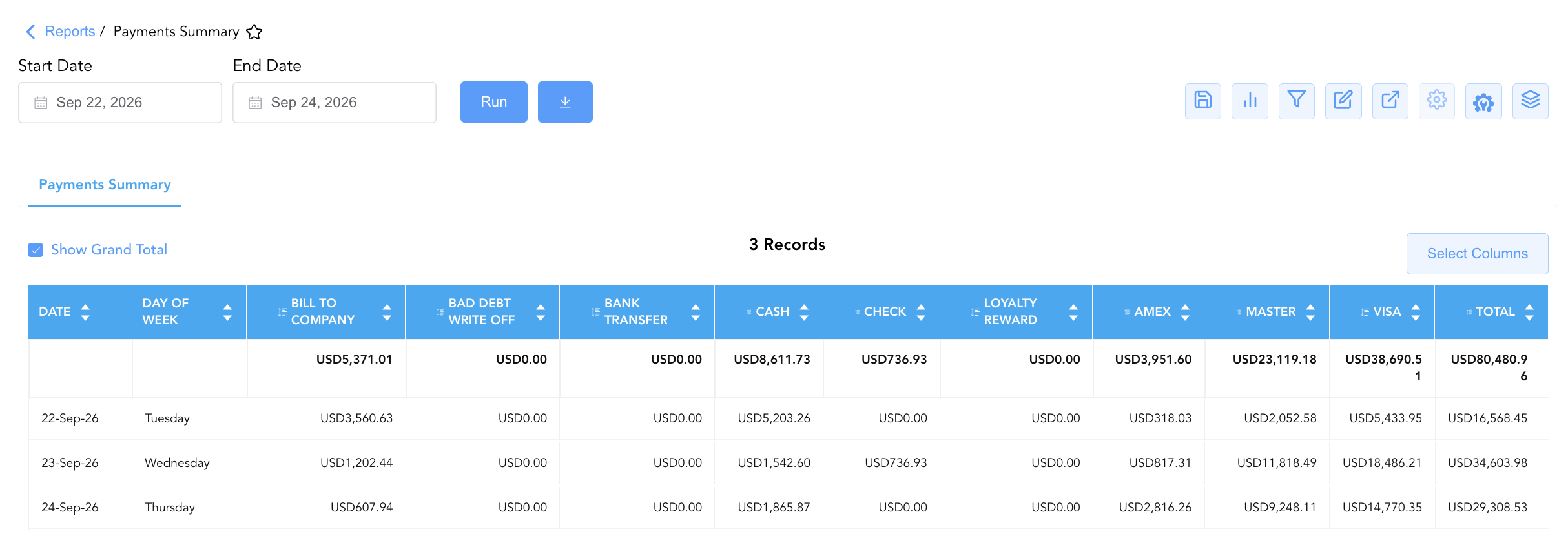
Data Dictionary (Dynamic View Columns)
Customize your default view using the Configure (⚙️) icon on the report page. Below is the full data dictionary representing every column available in this report:
💡 Monetary Treatment Note: All monetary values across tender columns and the Total column represent Gross Financial Amounts (Includes Taxes & Fees). Positive values indicate incoming payment collections or credits, while negative values indicate refund reversals or debit adjustments.
|
Column Name |
Description |
Data Source / System Mapping |
Includes Taxes & Fees? |
|
Date |
Official business date for which payment collections and adjustments are summarized. |
System Business Date |
N/A |
|
Day of Week |
Calendar day of the week corresponding to the business date (e.g., Tuesday, Wednesday). |
System Calendar Engine |
N/A |
|
BALANCE FORWARD |
Prior period balance carried forward in payment ledger tracking. |
System Sub-Ledger Engine |
🟢 Yes |
|
BILL TO COMPANY |
Total payments transferred to corporate direct-bill accounts receivable. |
AR Direct-Bill Engine |
🟢 Yes |
|
Bad Debt Write OFF / Write Off |
Total uncollectible balance write-offs posted to the ledger. |
Financial Adjustment Engine |
🟢 Yes |
|
Bank Transfer |
Total direct bank wire transfers and electronic fund receipts. |
Payment Gateway / Wire Engine |
🟢 Yes |
|
CASH |
Gross currency collections received in front desk cash drawers. |
Cashier Drawer Engine |
🟢 Yes |
|
CHECK |
Total physical paper check payments accepted for folios. |
Cashier Drawer Engine |
🟢 Yes |
|
GUEST REFUND |
Total cash or credit refunds issued directly to guests. |
Refund Engine |
🟢 Yes |
|
Loyalty Reward |
Standard points redemption credits applied against folios. |
Loyalty Engine Interface |
🟢 Yes |
|
Loyalty Reward Adjustment |
Automated system adjustments to loyalty reward redemptions. |
Loyalty Engine Interface |
🟢 Yes |
|
Loyalty Reward Manual Adjustment |
Manual staff overrides applied to guest loyalty point balances. |
Loyalty Engine Interface |
🟢 Yes |
|
Loyalty Reward Reconciliation Adjustment |
Period-end accounting adjustments for loyalty point clearing. |
Loyalty Engine Interface |
🟢 Yes |
|
AMEX |
Total payments settled through the American Express network. |
Payment Gateway Processor |
🟢 Yes |
|
MASTER |
Total payments settled through the Mastercard network. |
Payment Gateway Processor |
🟢 Yes |
|
VISA |
Total payments settled through the Visa network. |
Payment Gateway Processor |
🟢 Yes |
|
Total |
Consolidated gross payment collections and adjustments for the business date. |
|
🟢 Yes |
Customization & Platform Features
User & Property Preferences
-
Personal Preference: Tailor your individual view by hiding or dragging columns. Your preferences save automatically for future sessions.
-
Property Defaults: System Admins can configure standard default layouts across all property users to streamline operational reporting. To maximize audit efficiency, group the columns into the below logical blocks. 💡 Note: This report uses a standardized layout. Available payment types are determined by your property's configuration and will appear in alphabetical order.
-
Audit Timeline (Cols 1–2):
Date|Day of Week -
Payment Tenders (Cols 3–17):
Balance Forward|Bill to Company|Bad Debt Write Off|Bank Transfer|Cash|Check|Guest Refund|Loyalty Reward|Loyalty Reward Adjustment|Loyalty Reward Manual Adjustment|Loyalty Reward Reconciliation Adjustment|Amex|Mastercard|Visa -
Total Settlement (Col 18):
Total
-
Report Toolbar & Quick Actions
Use the top-right toolbar icons on the report page to manage and export your data view:
|
Icon |
Action / Feature |
Description |

|
Knowledge Article |
Opens the knowledge base article to learn how to interpret this report. |

|
Saved Views |
Saves your column filtering, sorting, and highlight preferences so you can easily reload your custom view later without reconfiguring the report. |

|
Bar Chart |
Displays report data in a visual bar chart format. |

|
Filter |
Opens filter controls to isolate specific data within a column based on your selected criteria. |

|
Highlight |
Highlights column values in a designated color based on selected conditions. |

|
Export |
Exports and downloads the report in various formats (Excel, PDF, CSV) for offline analysis or printing. |

|
Configure |
Opens column selection controls to toggle visibility, reorder columns, or hide rows with all zeros. |

|
Additional Configuration |
Provides advanced report configuration and display formatting options to customize data presentation. |

|
Group By |
Summarize and group report data dynamically in real time. |
Interactive Visualizations & Grouping Controls
-
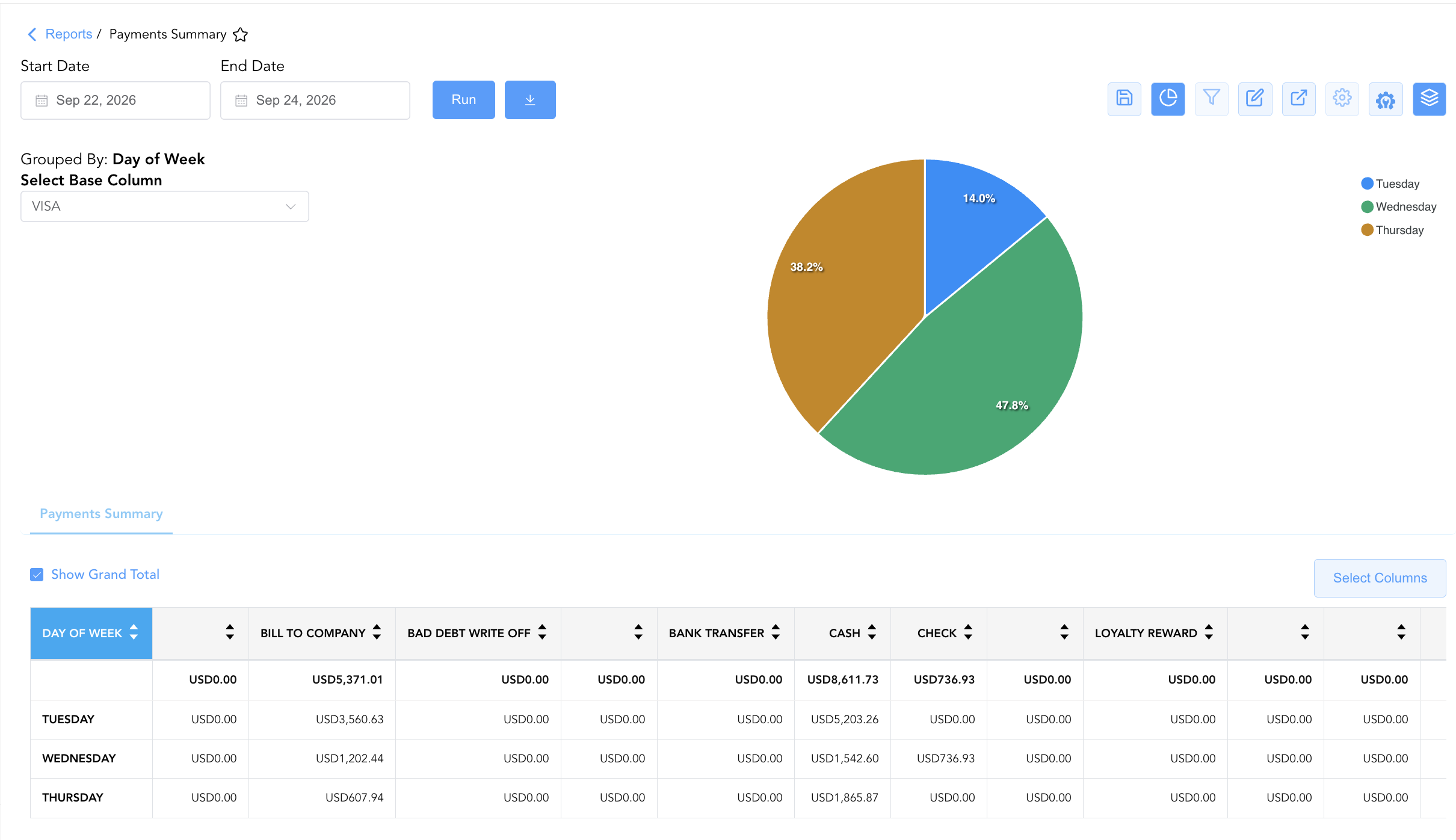
Group By & Pie Chart Visualization: The Payments Summary report features an interactive pie chart to help analyze payment collection distributions across the week. Users can group matrix entries on the fly by Day of Week to evaluate day-of-week payment collection trends. By selecting a tender type from the Select Base Column dropdown menu—such as BILL TO COMPANY, CASH, CHECK, or AMEX—the chart dynamically displays percentage contribution share alongside an interactive color-coded legend.
-
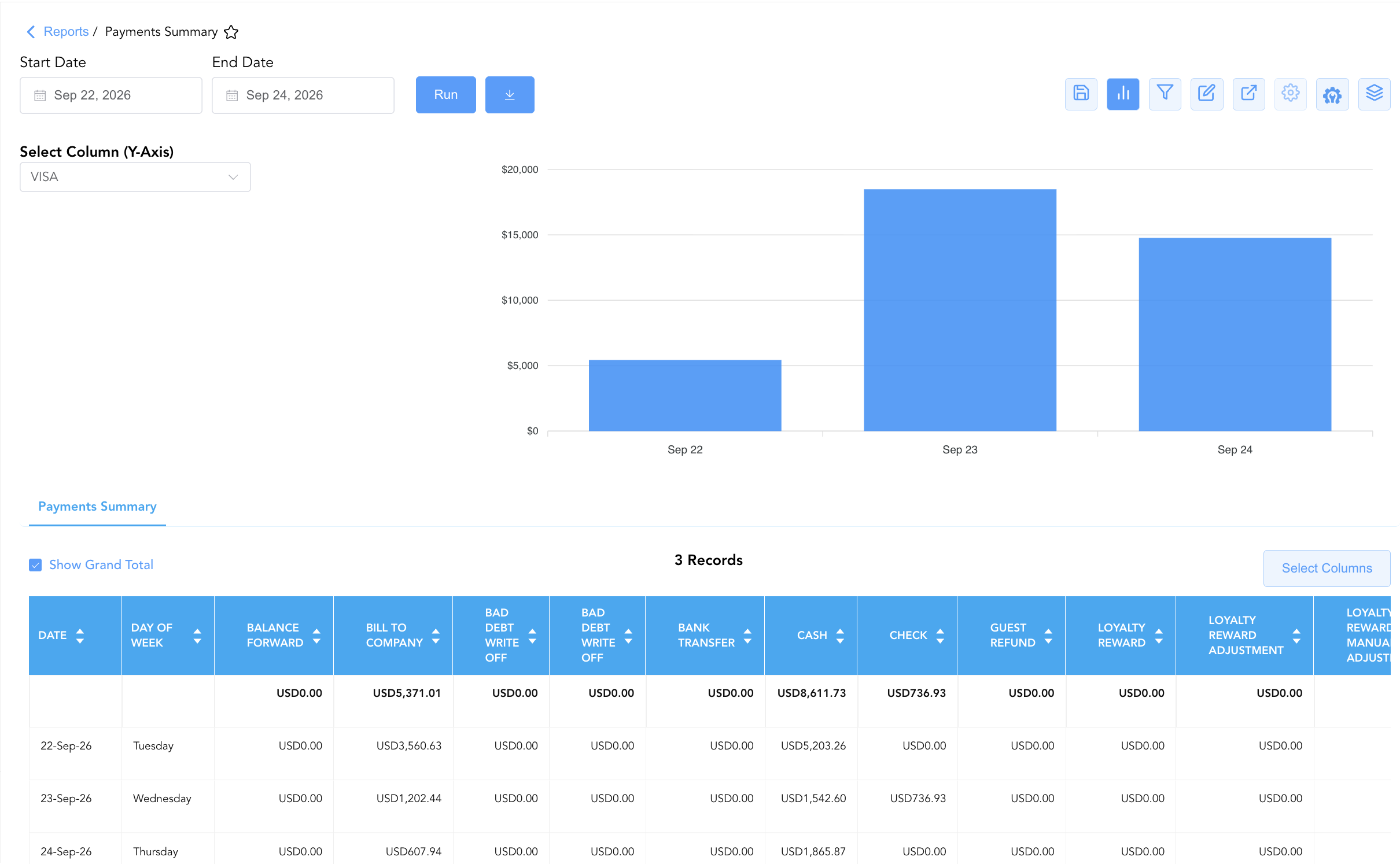
Bar Chart Visualizer: The Payments Summary report includes an interactive bar chart to help visualize daily payment intake and collection trends by payment type over time. By adjusting the Select Column (Y-Axis) dropdown menu, users can dynamically toggle the chart view to plot specific payment channels—such as BILL TO COMPANY, CASH, CHECK, or AMEX—chronologically alongside the detailed daily summary grid.
Advanced Controls
-
Exporting & Gateway Reconciliation: Download in Excel or PDF format to support general cashier shift drop audits, merchant gateway batch tie-outs, or end-of-month general ledger balancing.
-
Filtering: Filter data by specific date ranges or non-zero collection values.
-
Highlighting (Conditional Formatting): Apply custom rules to automatically highlight days with high cash receipts or significant refund/adjustment entries.
🔗 Related Reports & Next Steps
Within 💳 Payments & Transactions & ⚖️ Ledgers & Trial Balance:
-
All Payments – Complete transaction ledger logging all cash, check, credit card, and direct-bill payment receipts.
-
Authorized Payments – Audit credit card authorization holds, capture approvals, and card refund processing.
-
Payment Activity – Line-item transaction audit capturing token details and gateway approvals for all payments.
-
Control Report – Audit cashier shift drops, cash drawers, paid-outs, and credit card processing gateway batches.
-
Day End Summary – Review consolidated daily revenue, tax, payment, and deposit blueprints at business date close.
Cross-Pillar Deep Dives:
-
🏛️ Taxes & Expenses: To audit statutory taxes calculated on charges settled via payment summary tenders, review Tax Summary.
-
📬 Billing & Receivables (AR): To inspect corporate accounts receivable direct-bill settlements transferred from
BILL TO COMPANYsummary totals, review Direct Bill Ledger Details.