
Rate Code Configuration Report Overview
Parent Hub: 📈 Revenue & Analytics
Category: 🏷️ Rate Management
Target Roles: Directors of Revenue Management, Revenue Analysts, General Managers, Hotel Controllers, Central Reservations System (CRS) Administrators, System Administrators
Key Value: Audit rate code setups and configuration parameters, verify rate lifecycle dates and market segment mappings, monitor rate visibility and suppression flags, and ensure tax-exempt and surcharge rule compliance across all distribution channels.
Executive Summary
The Rate Code Configuration Report is a master system configuration and rate plan governance document within the 🏷️ Rate Management category of the 📈 Revenue & Analytics hub. Designed to provide complete administrative oversight of all active and inactive rate plans configured in the property management system (PMS) and Central Reservations System (CRS), it itemizes operational rules, market mapping, restrictions, and tax flags for every rate code.
-
By mapping rate plan parameters (Rate Code, Rate Name, Start/End Dates, Active Status, Min/Max Length of Stay) to market segment structures (Corporate Market Segment, Local Market Segment), distribution flags (Suppress Rates, Group Enabled, Default Rate, Day Use), and financial rules (Currency Code, Tax Exempt Code, Credit Card Surcharge), this report enables revenue managers, controllers, and system administrators to maintain pricing integrity, audit channel distribution rules, prevent rate leakage, and streamline corporate rate audits.
Key Capabilities
-
Master Rate Code Inventory Audit: Itemizes all property rate codes (
Code) and full descriptive titles (Name) alongside operational activation flags (Active). -
Lifecycle & Validity Window Tracking: Monitors effective start dates (
Start Date) and expiration dates (End Date) to identify sunsetted corporate contracts, expiring promotions, or upcoming rate plan activations. -
Market Segment Hierarchy Alignment: Verifies rate code mapping to Corporate Market Segments (
Corporate Market Segment Code,Corporate Market Segment Name) and Local Market Segments (Local Market Segment Code,Local Market Segment) for accurate revenue segmentation. -
Distribution & Rate Privacy Controls: Audits rate suppression flags (
Suppress Rates), length-of-stay controls (Min LOS,Max LOS), and special booking rules (Group Enabled, Day Use) to enforce contract confidentiality and distribution policy compliance. -
Tax & Surcharge Rule Compliance: Identifies tax exemption mappings (
Tax Exempt Code) and credit card fee flags (Enable Credit Card Surcharge) across all configured rate plans.
Report Views & Functional Breakdown
The Rate Code Configuration Report presents master rate plan parameters in a unified single-table ledger that supports three key analytical perspectives:
┌────────────────────────────────────────────────────────────────────────┐
│               RATE CODE CONFIGURATION REPORT                           │
├────────────────────────────────────────────────────────────────────────┤
│                         Unified Matrix View                            │
├──────────────────────────┬──────────────────────────┬──────────────────┤
│ 1. Rate Plan Lifecycle & │ 2. Market Mapping &      │ 3. Financial &   │
│    Operational Rules     │    Distribution Rules    │    Tax Governance│
└──────────────────────────┴──────────────────────────┴──────────────────┘
1. Rate Plan Lifecycle & Operational Rules
Monitors core rate plan identification, activation statuses, validity timeframes, and stay length restrictions.
-
Primary Use: Verifying active versus inactive rate plan statuses, auditing rate contract expiration dates, and confirming minimum/maximum length-of-stay controls.
-
Key Metrics: Code, Name, Start Date, End Date, Active, Min LOS, Max LOS.
2. Market Mapping & Distribution Rules
Tracks hierarchical market segment alignments, associated room types, package attachments, and special booking flags.
-
Primary Use: Ensuring rate plans post to correct corporate and local market segment buckets, checking group/day-use configuration flags, and auditing room/package attachments.
-
Key Metrics: Code, Name, Corporate Market Segment Name, Local Market Segment, Associated Room Type Codes, Associated Package Codes, Group Enabled, Suppress Rates, Day Use.
3. Financial & Tax Governance
Audits billing currencies, rate suppression rules, credit card surcharge configurations, and tax-exempt mappings.
-
Primary Use: Verifying opaque and package rate suppression compliance (hiding rates on guest folios), auditing tax exemption flags (e.g., OTA Tax Exempt, Federal Tax Exempt), and confirming posting currency configurations.
-
Key Metrics: Code, Currency Code, Suppress Rates, Enable Credit Card Surcharge, Tax Exempt Code, Housekeeping Schedule Config.
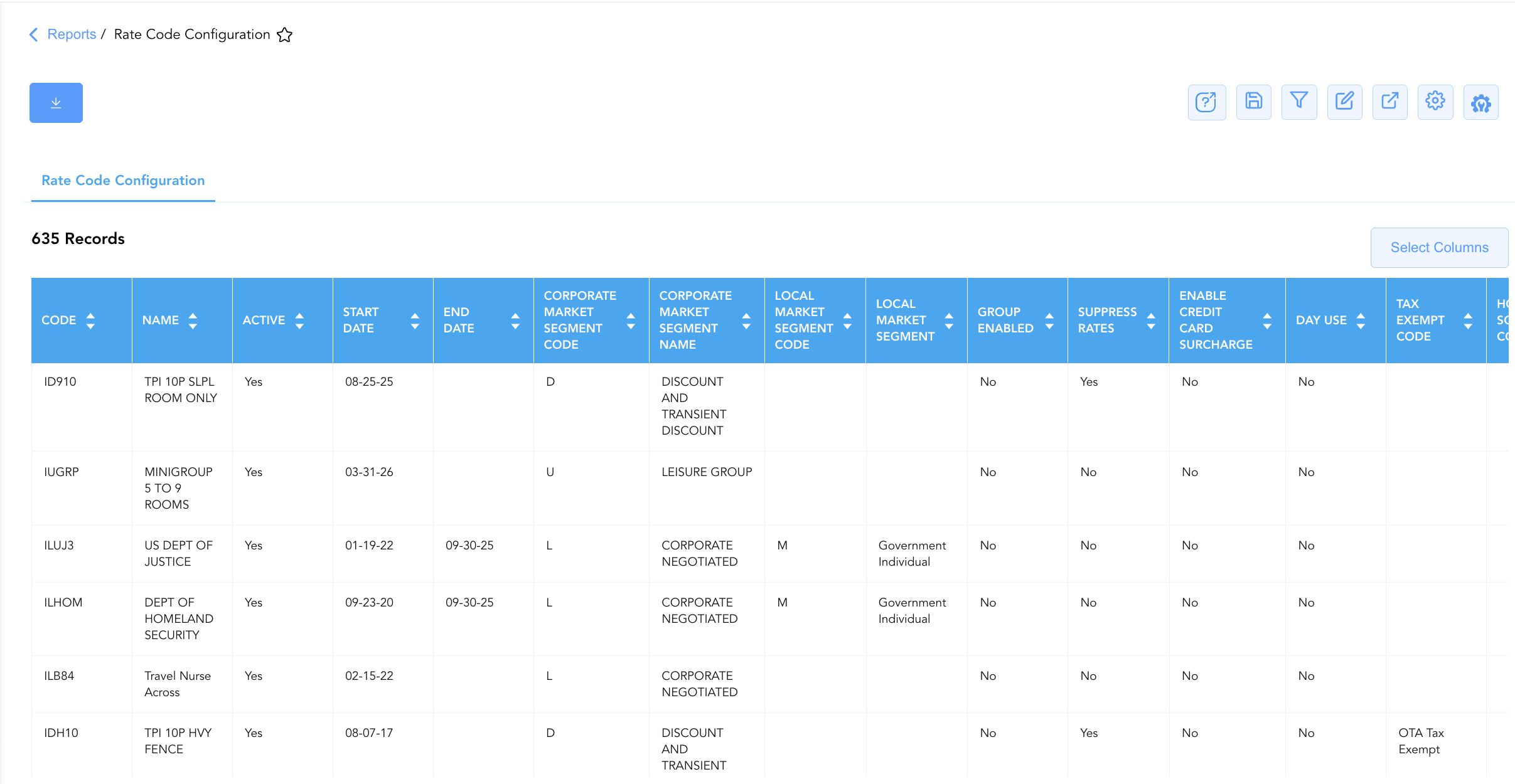
Data Dictionary (Dynamic View Columns)
Customize your default view using the Configure (⚙️) icon on the report page. Below is the full data dictionary representing every column available in this report:
💡 Configuration Note: The Rate Code Configuration Report displays system setup parameters rather than transactional monetary postings. Date fields reflect contract validity windows.
|
Column Name |
Description |
Data Source / System Mapping |
Includes Taxes & Fees? |
|---|---|---|---|
|
Code |
Unique alphanumeric code identifying the rate plan (e.g., IDAAA, IGMAX, IL4DU). |
CRS / PMS > Master Rate Code |
N/A |
|
Name |
Full descriptive title of the rate plan or corporate contract (e.g., AAA Membership Rate, US Air Force). |
CRS / PMS > Rate Code Title |
N/A |
|
Start Date |
Effective start date from which the rate plan becomes bookable. |
Rate Plan Setup > Effective Start |
N/A |
|
End Date |
Expiration date after which the rate plan is no longer valid or bookable. |
Rate Plan Setup > Effective End |
N/A |
|
Active |
Flag indicating whether the rate code is currently active in the system ( |
Rate Plan Setup > Active Status |
N/A |
|
Min LOS |
Minimum length of stay (in nights) required to book the rate plan. |
Rate Plan Rules > Minimum Stay |
N/A |
|
Max LOS |
Maximum length of stay (in nights) permitted for the rate plan. |
Rate Plan Rules > Maximum Stay |
N/A |
|
Distribution Channel |
Specific channel distribution restrictions associated with the rate plan. |
CRS > Channel Mapping |
N/A |
|
Corporate Market Segment Code |
Single-letter master corporate market segment category code (e.g., D, L, P, M, V, W). |
PMS > Corporate Market Code |
N/A |
|
Corporate Market Segment Name |
Full name of the master corporate market segment (e.g., Corporate Negotiated, Discount and Transient Discount). |
PMS > Corporate Market Title |
N/A |
|
Local Market Segment Code |
Property-specific local market segment category code. |
PMS > Local Market Code |
N/A |
|
Local Market Segment |
Property-specific local market segment name (e.g., Government Individual, Corp Negotiated). |
PMS > Local Market Title |
N/A |
|
Associated Room Type Codes |
Specific room type codes linked to the rate plan. |
Rate Plan Mapping > Room Types |
N/A |
|
Associated Package Codes |
Package add-on codes configured to post automatically with the rate. |
Rate Plan Mapping > Package Codes |
N/A |
|
Default |
Indicates if this rate plan serves as the property's primary default rate ( |
Rate Plan Setup > Property Default |
N/A |
|
Group Enabled |
Flag indicating if the rate code can be attached to group blocks ( |
Rate Plan Setup > Group Flag |
N/A |
|
Suppress Rates |
Flag indicating if rate amounts are hidden on guest folios and confirmations for package/opaque stays ( |
Rate Plan Setup > Rate Suppression |
N/A |
|
Enable Credit Card Surcharge |
Flag determining whether credit card processing surcharges apply to this rate ( |
Billing Setup > Surcharge Flag |
N/A |
|
Rate Display Order |
Numerical display priority order used when presenting rates in booking engines. |
CRS Setup > Display Sequence |
N/A |
|
Currency Code |
ISO currency code in which the rate is priced and posted (e.g., USD). |
System Currency > Currency Code |
N/A |
|
Housekeeping Schedule Config |
Custom housekeeping frequency schedule mapped to the rate code. |
PMS > Housekeeping Schedule |
N/A |
|
Tax Exempt Code |
Tax exemption classification assigned to the rate code (e.g., OTA Tax Exempt, Federal Tax Exempt). |
Tax Rules > Tax Exempt Code |
N/A |
|
Day Use |
Flag identifying whether the rate code is configured for non-overnight day-use reservations ( |
Reservation Setup > Day Use Flag |
N/A |
Customization & Platform Features
User & Property Preferences
-
Personal Preference: Tailor your individual view by hiding or dragging columns. Your preferences save automatically for future sessions.
-
Property Defaults: System Admins can configure standard default layouts across all property users to streamline operational reporting. To maximize audit efficiency, group the columns into the below logical blocks.
-
Rate Code Identity (Cols 1–3):
Code|Name|Active -
Validity & Stays (Cols 4–7):
Start Date|End Date|Min LOS|Max LOS -
Market & Distribution Segmentation (Cols 8–11):
Corporate Market Segment Code|Corporate Market Segment Name|Local Market Segment Code|Local Market Segment -
Distribution & Inventory Mapping (Cols 12–14):
Distribution Channel|Associated Room Type Codes|Associated Package Codes -
System Flags & Rules (Cols 15–21):
Default|Group Enabled|Suppress Rates|Enable Credit Card Surcharge|Day Use|Tax Exempt Code|Housekeeping Schedule Config -
Display & Currency (Cols 22–23):
Rate Display Order|Currency Code
-
Report Toolbar & Quick Actions
Use the top-right toolbar icons on the report page to manage and export your data view:
|
Icon |
Action / Feature |
Description |

|
Knowledge Article |
Opens the knowledge base article to learn how to interpret this report. |

|
Saved Views |
Saves your column filtering, sorting, and highlight preferences so you can easily reload your custom view later without reconfiguring the report. |

|
Filter |
Opens filter controls to isolate specific data within a column based on your selected criteria. |

|
Highlight |
Highlights column values in a designated color based on selected conditions. |

|
Export |
Exports and downloads the report in various formats (Excel, PDF, CSV) for offline analysis or printing. |

|
Configure |
Opens column selection controls to toggle visibility, reorder columns, or hide rows with all zeros. |

|
Additional Configuration |
Provides advanced report configuration and display formatting options to customize data presentation. |
Advanced Controls
-
Exporting & System Audit Analysis: Download in Excel or PDF format to support annual corporate rate audits, revenue strategy reviews, and tax exemption compliance checks.
-
Filtering: Filter data by specific
Corporate Market Segment Code, isolate expired rate plans (End Date < Today), or filter for suppressed rate codes (Suppress Rates = Yes). -
Highlighting (Conditional Formatting): Apply custom rules to automatically highlight expired active rates, tax-exempt rate plans, or misconfigured market segment mappings.
🔗 Related Reports & Next Steps
Within 📈 Revenue & Analytics & 🏷️ Rate Management:
-
Discrepant Rates – Audit log tracking variances between system-quoted rates and actual charged rates on guest folios.
-
Rate Plan Summary – High-level overview of active rate code production, room nights, revenue, and average daily rate (ADR) yield.
-
Rate Override – Detailed operational log tracking manual price overrides, rate adjustments, and staff authorization credentials.
Cross-Pillar Deep Dives:
-
🥧 Market & Segmentation: Reconcile rate code market mappings against Market Segment Overview and Local Market Segment.
-
🏛️ Taxes & Expensese: Verify tax-exempt rate postings against General Ledger tax exemption accounts in Tax Report.