
Rate Override Report Overview
Parent Hub: 📈 Revenue & Analytics
Category: 🏷️ Rate Management
Target Roles: Directors of Revenue Management, General Managers, Hotel Controllers, Front Office Managers, Night Auditors, Revenue Analysts
Key Value: Audit manual price changes and rate plan modifications, track original versus adjusted room rates, monitor staff-level override reasons, analyze adjustment codes, and enforce pricing compliance and internal revenue controls.
Executive Summary
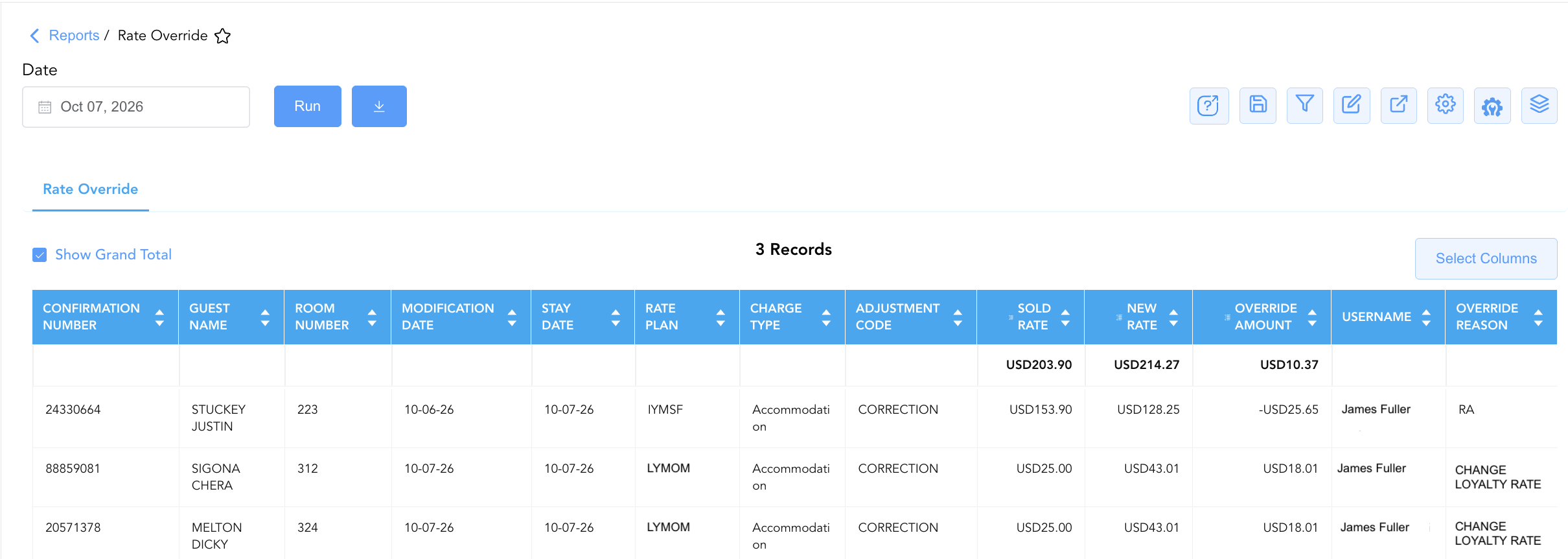
The Rate Override Report is a critical operational audit and revenue protection document within the 🏷️ Rate Management category of the 📈 Revenue & Analytics hub. Designed to deliver complete administrative visibility over manual price adjustments, it logs every reservation transaction where a user manually overrides or adjusts the room rate away from the system's pre-configured rate plan price.
-
By mapping modification metadata (Modification Date, Stay Date, Time, Confirmation Number, Username, Override Reason) to reservation details (Check In Date, Check Out Date, Guest Name, Room Number, Room Type, Market Segment) and monetary parameters (Adjustment Code, Sold Rate, New Rate, Override Amount), this report enables revenue managers, hotel controllers, and general managers to detect unapproved manual discounts, audit staff rate adjustment compliance, investigate rate corrections, and prevent internal revenue leakage.
Key Capabilities
-
Manual Rate Modification Tracking: Itemizes all instances where a room rate was manually altered, displaying the pre-adjustment rate (
Sold Rate) alongside the post-adjustment rate (New Rate). -
Override Variance Calculation: Automatically quantifies the exact financial impact of each price adjustment (
Override Amount), tracking both rate discounts (negative amounts) and rate increases (positive amounts). -
Staff Accountability & Auditability: Captures the full name/ID of the staff member who authorized the change (
Username) along with the exact system modification date and timestamp (Modification DateandTime). -
Reason & Adjustment Code Classification: Logs the staff-entered justification (
Override Reason) and system classification code (Adjustment Code, e.g.,CORRECTION) to evaluate adjustment trends and staff training needs. -
Stay & Segment Contextual Alignment: Correlates rate adjustments with reservation dates, occupied room numbers, room types, active rate plans, and market segments to evaluate the operational context of the override.
Report Views & Functional Breakdown
The Rate Override Report presents manual price adjustments in a unified single-table ledger that supports three key analytical perspectives:
┌────────────────────────────────────────────────────────────────────────┐
│                     RATE OVERRIDE REPORT                               │
├────────────────────────────────────────────────────────────────────────┤
│                         Unified Matrix View                            │
├──────────────────────────┬──────────────────────────┬──────────────────┤
│ 1. Rate Adjustment &     │ 2. Reservation & Stay    │ 3. User Audit &  │
│    Variance Ledger       │    Context               │    Reason Trace  │
└──────────────────────────┴──────────────────────────┴──────────────────┘
1. Rate Adjustment & Variance Ledger
Monitors the financial impact of manual rate changes by comparing the original rate against the newly applied rate.
-
Primary Use: Quantifying total revenue impact from manual discounts or surcharges, auditing high-dollar price adjustments, and verifying folio rate corrections.
-
Key Metrics: Confirmation Number, Guest Name, Adjustment Code, Sold Rate, New Rate, Override Amount.
2. Reservation & Stay Context
Provides complete stay and room details associated with the modified rate transaction.
-
Primary Use: Evaluating rate overrides against room categories, occupied room numbers, length of stay, rate plans, and market segments.
-
Key Metrics: Confirmation Number, Stay Date, Check In Date, Check Out Date, Room Number, Room Type, Rate Plan, Market Segment.
3. User Audit & Reason Trace
Correlates price overrides directly with individual staff credentials and documented justifications.
-
Primary Use: Monitoring front desk discounting authorization compliance, reviewing night audit rate adjustments, enforcing management approval rules, and identifying training gaps.
-
Key Metrics: Modification Date, Time, Username, Override Reason, Adjustment Code, Override Amount.
Data Dictionary (Dynamic View Columns)
Customize your default view using the Configure (⚙️) icon on the report page. Below is the full data dictionary representing every column available in this report:
💡 Rate & Override Calculation Note: Sold Rate and New Rate represent base room rates prior to taxes and fees. Override Amount is calculated as Override Amount=New Rate−Sold Rate. A negative Override Amount indicates a rate reduction/discount, whereas a positive Override Amount indicates an upward rate adjustment.
|
Column Name |
Description |
Data Source / System Mapping |
Includes Taxes & Fees? |
|---|---|---|---|
|
Modification Date |
Calendar date on which the rate override was executed in the system. |
PMS Audit Trail > Modification Date |
N/A |
|
Stay Date |
Specific calendar stay date to which the rate override applies. |
Reservation System > Stay Date |
N/A |
|
Time |
System timestamp recording the exact time of the rate override execution. |
PMS Audit Trail > Modification Time |
N/A |
|
Confirmation Number |
Unique alphanumeric reservation identifier. |
Reservation System > Confirmation Number |
N/A |
|
Check In Date |
Arrival date of the guest reservation. |
Reservation System > Check-In Date |
N/A |
|
Check Out Date |
Departure date of the guest reservation. |
Reservation System > Check-Out Date |
N/A |
|
Guest Name |
Full name of the primary registered guest. |
Guest Profile > Full Name |
N/A |
|
First Name |
First name of the primary registered guest. |
Guest Profile > First Name |
N/A |
|
Last Name |
Last name of the primary registered guest. |
Guest Profile > Last Name |
N/A |
|
Adults |
Registered adult occupant headcount on the reservation. |
Reservation System > Adult Count |
N/A |
|
Children |
Registered child occupant headcount on the reservation. |
Reservation System > Child Count |
N/A |
|
Room Nights |
Total physical room nights spanned by the reservation stay. |
Reservation System > Room Nights |
N/A |
|
Room Number |
Physical guest room assigned to the reservation. |
PMS > Room Number |
N/A |
|
Room Type |
Full description of the room category assigned to the reservation. |
PMS > Room Type Description |
N/A |
|
Charge Type |
Financial charge classification associated with the rate modification (e.g., |
Financial Ledger > Charge Type |
N/A |
|
Adjustment Code |
System code categorizing the financial adjustment (e.g., |
PMS Adjustment Setup > Code |
N/A |
|
Sold Rate |
Original rate plan base room rate prior to the manual override. |
Rate Plan Engine > Original Base Rate |
❌ No |
|
New Rate |
Adjusted base room rate applied to the guest folio following the manual override. |
Folio Posting > Actual Base Rate |
❌ No |
|
Rate Plan |
Rate code attached to the reservation (e.g., |
Reservation System > Active Rate Plan |
N/A |
|
Market Segment |
Market segment category mapped to the reservation stay. |
Reservation System > Market Segment |
N/A |
|
Override Amount |
Monetary difference resulting from the rate modification (New Rate−Sold Rate). |
New Rate - Sold Rate |
❌ No |
|
Username |
Name or user login ID of the staff member who executed the rate override. |
Security Audit Trail > User Name |
N/A |
|
Override Reason |
Free-text or selected justification explaining why the rate was overridden. |
PMS Override Prompt > Reason Text |
N/A |
Customization & Platform Features
User & Property Preferences
-
Personal Preference: Tailor your individual view by hiding or dragging columns. Your preferences save automatically for future sessions.
-
Property Defaults: System Admins can configure standard default layouts across all property users to streamline operational reporting. To maximize audit efficiency, group the columns into the below logical blocks.
-
Reservation & Guest Audit (Cols 1–5):
Confirmation Number|Guest Name|First Name|Last Name|Room Number -
Temporal Audit & Dates (Cols 6–10):
Modification Date|Time|Stay Date|Check In Date|Check Out Date -
Stay & Room Details (Cols 11–14):
Room Type|Room Nights|Adults|Children -
Rate Plan & Market Mapping (Cols 15–17):
Rate Plan|Market Segment|Charge Type -
Override & Financial Variance Metrics (Cols 18–21):
Adjustment Code|Sold Rate|New Rate|Override Amount -
Staff Accountability & Compliance (Cols 22–23):
Username|Override Reason
-
Report Toolbar & Quick Actions
Use the top-right toolbar icons on the report page to manage and export your data view:
|
Icon |
Action / Feature |
Description |

|
Knowledge Article |
Opens the knowledge base article to learn how to interpret this report. |

|
Saved Views |
Saves your column filtering, sorting, and highlight preferences so you can easily reload your custom view later without reconfiguring the report. |

|
Filter |
Opens filter controls to isolate specific data within a column based on your selected criteria. |

|
Highlight |
Highlights column values in a designated color based on selected conditions. |

|
Export |
Exports and downloads the report in various formats (Excel, PDF, CSV) for offline analysis or printing. |

|
Configure |
Opens column selection controls to toggle visibility, reorder columns, or hide rows with all zeros. |

|
Additional Configuration |
Provides advanced report configuration and display formatting options to customize data presentation. |

|
Group By |
Summarize and group report data dynamically in real time. |
Interactive Visualizations & Grouping Controls
-
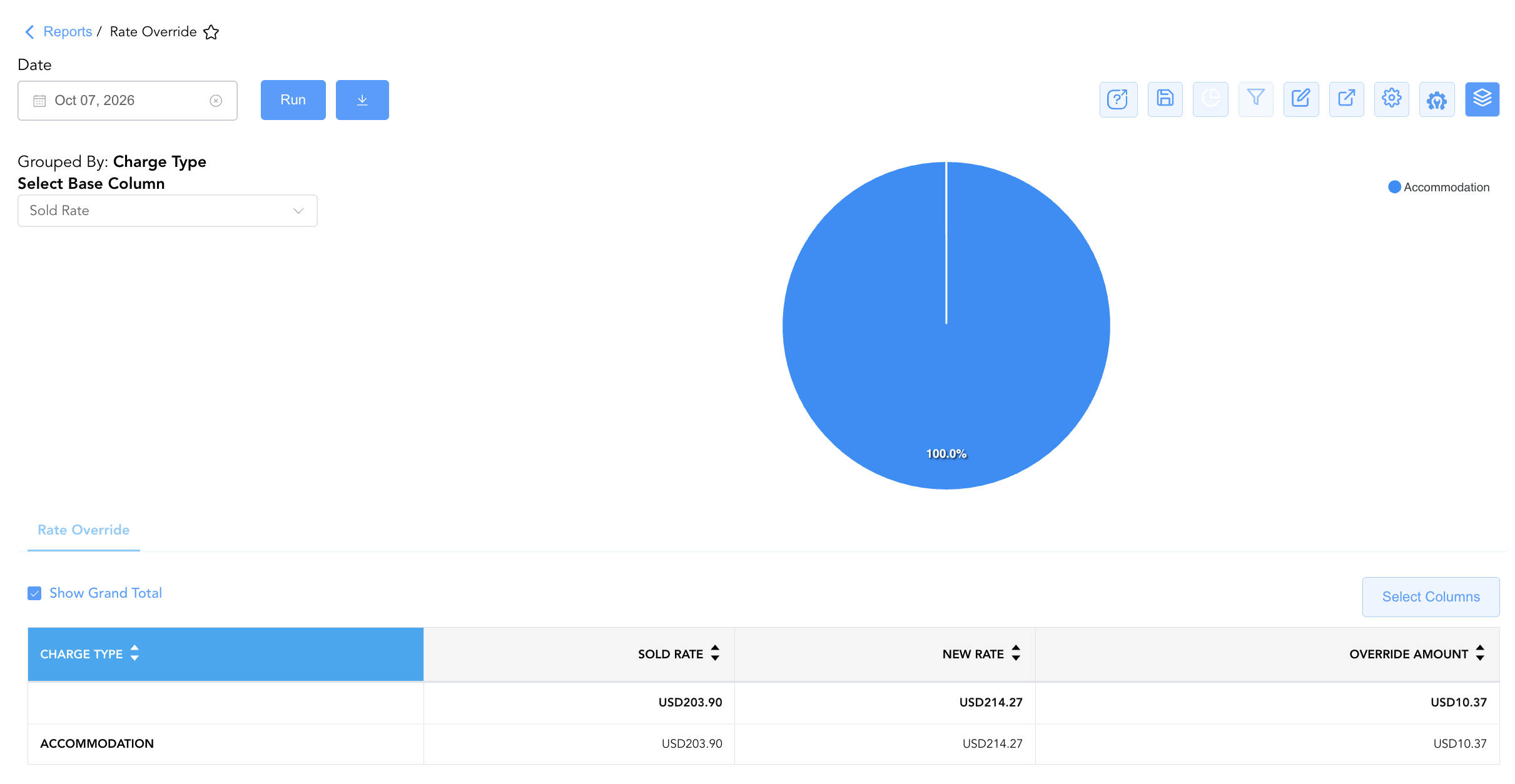
Group By & Pie Chart Visualization: The Rate Override report features an interactive pie chart to help audit rate adjustments and evaluate staff discounting behavior. Users can group override transactions on the fly by Username, Adjustment code, Confirmation Code, or Charge Type to evaluate staff discounting patterns and frequent override justifications. By selecting a metric from the Select Base Column dropdown menu—such as Sold Rate, New Rate, or Override Amount—the chart dynamically renders percentage share breakdowns accompanied by an interactive color-coded legend.
Advanced Controls
-
Exporting & Audit Analysis: Download in Excel or PDF format to support daily night audit reconciliations, monthly financial controller reviews, and internal control compliance checks.
-
Filtering: Filter data by specific
Username, isolate large negative overrides (e.g., Override Amount < -$20), or filter byAdjustment Code = CORRECTION. -
Highlighting (Conditional Formatting): Apply custom rules to automatically highlight high-dollar rate discounts, zero-rate overrides, or specific staff login accounts.
🔗 Related Reports & Next Steps
Within 📈 Revenue & Analytics & 🏷️ Rate Management:
-
Discrepant Rates – Audit log comparing system-quoted benchmark rates against actual charged rates across all reservations.
-
Rate Code Configuration– Master system setup report detailing rate code parameters, lifecycle dates, and market mappings.
-
Rate Group Summary – High-level overview evaluating daily and cumulative revenue performance across HotelKey rate group buckets.
Cross-Pillar Deep Dives:
-
⚖️ Ledgers & Trial Balance: Reconcile manual rate adjustment allowances against General Ledger control accounts in Day End Summary.
-
💳 Payments & Transactions: Inspect individual folio transaction postings, rate overrides, and allowance transactions in All Transactions.