
Rate Plan Summary Report Overview
Parent Hub: 📈 Revenue & Analytics
Category: 🏷️ Rate Management
Target Roles: Directors of Revenue Management, Revenue Analysts, General Managers, Hotel Controllers, Sales Managers
Key Value: Evaluate daily and period-to-date revenue performance across individual rate plans, monitor rate plan stay volume and Average Daily Rates (ADR), track rate code status and market segment alignments, and optimize pricing yield strategies.
Executive Summary
The Rate Plan Summary Report is a primary rate performance and revenue yield document within the 🏷️ Rate Management category of the 📈 Revenue & Analytics hub. Designed to deliver granular financial intelligence on specific rate structures, it aggregates daily room stays, base room revenue, Average Daily Rate (ADR), occupancy contribution, and RevPAR contribution for every active and inactive rate plan code.
-
By mapping rate plan parameters (Date, Day Of Week, Rate Plan Name, Rate Plan Code, Rate Code Status) to market segment classifications (Market Segment, Market Segment Code, Local Market Segment Code, Local Market Segment) and monetary performance metrics (Revenue, Stays, ADR, Occupancy Contribution, RevPAR Contribution), this report enables revenue managers, sales directors, and controllers to evaluate rate plan profitability, monitor corporate contract production, track promotional rate uptake, and align rate yield strategies.
Key Capabilities
-
Individual Rate Plan Yield Audit: Itemizes daily room stay volume (Stays), gross room revenue (Revenue), and Average Daily Rate (ADR) across every configured rate plan code (
Rate Plan Code). -
Active vs. Inactive Rate Status Tracking: Displays operational activation statuses (
Rate Code Status) to evaluate performance across active public rates alongside sunsetted or inactive promotional codes. -
Hierarchical Market Mapping Alignment: Correlates individual rate codes with master market segments (
Market Segment,Market Segment Code) and property local market buckets (Local Market Segment Code,Local Market Segment) for complete revenue attribution. -
Occupancy & RevPAR Impact Evaluation: Measures the exact contribution of each rate plan toward total hotel room capacity (Occupancy Contribution) and overall property RevPAR (RevPAR Contribution).
-
Time-Series Performance Benchmarking: Tracks day-by-day production across specified date ranges to analyze weekday versus weekend rate plan performance and seasonal demand shifts.
Report Views & Functional Breakdown
The Rate Plan Summary Report presents rate plan financial performance in a unified single-table ledger that supports three key analytical perspectives:
┌────────────────────────────────────────────────────────────────────────┐
│                    RATE PLAN SUMMARY REPORT                            │
├────────────────────────────────────────────────────────────────────────┤
│                         Unified Matrix View                            │
├──────────────────────────┬──────────────────────────┬──────────────────┤
│ 1. Rate Plan Revenue &   │ 2. Market Segment &      │ 3. Daily Stay &  │
│    Yield Ledger          │    Code Alignment        │    Contribution  │
└──────────────────────────┴──────────────────────────┴──────────────────┘
1. Rate Plan Revenue & Yield Ledger
Monitors base room revenue generation and Average Daily Rates across individual rate plan codes.
-
Primary Use: Evaluating which rate plans generate the highest total accommodation revenue (Revenue), auditing rate yield premiums (ADR), and ranking top promotional and corporate rate codes.
-
Key Metrics: Rate Plan Code, Rate Plan Name, Rate Code Status, Revenue, Stays, ADR.
2. Market Segment & Code Alignment
Tracks how individual rate codes map into corporate and local market segment hierarchies.
-
Primary Use: Verifying corporate agreement mapping, auditing discount rate plan segmentation, and ensuring correct revenue bucketing across transient, corporate, and leisure categories.
-
Key Metrics: Rate Plan Code, Rate Plan Name, Market Segment, Market Segment Code, Local Market Segment Code, Local Market Segment.
3. Daily Stay & Contribution Analysis
Tracks daily room night production and calculates rate plan contribution to overall hotel capacity and RevPAR.
-
Primary Use: Measuring daily stay volume (Stays), analyzing day-of-week demand patterns, and evaluating rate plan contribution to occupancy (Occupancy Contribution) and property yield (RevPAR Contribution).
-
Key Metrics: Date, Day Of Week, Rate Plan Code, Stays, Occupancy Contribution, RevPAR Contribution, Revenue.
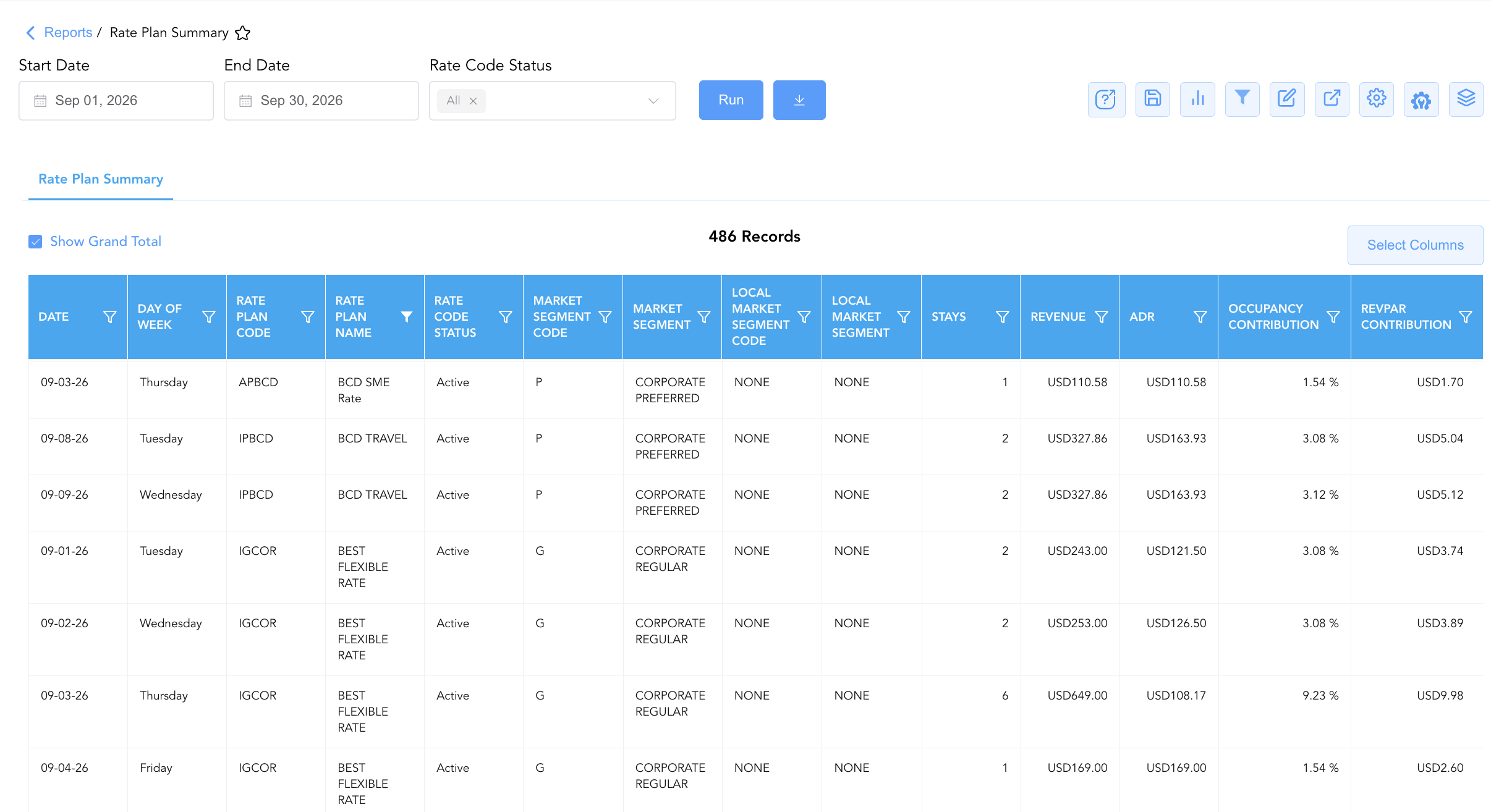
Data Dictionary (Dynamic View Columns)
Customize your default view using the Configure (⚙️) icon on the report page. Below is the full data dictionary representing every column available in this report:
💡 Monetary & Rate Calculation Note: Revenue and ADR represent Base Room Revenue (Excludes Taxes & Non-Room Charges). ADR is calculated as ADR = Revenue ÷ Stays.
|
Column Name |
Description |
Data Source / System Mapping |
Includes Taxes & Fees? |
|
Date |
Calendar date of the reported stay production (e.g., 2026-09-01). |
Reservation System > Stay Date |
N/A |
|
Day Of Week |
Corresponding day of the week for the stay date (e.g., Tuesday, Wednesday). |
System Calendar > Day Of Week |
N/A |
|
Rate Plan Name |
Full descriptive title of the rate plan or corporate contract (e.g., AAA Membership Rate, Best Flexible Rate). |
Rate Plan Setup > Rate Name |
N/A |
|
Rate Plan Code |
Official alphanumeric code assigned to the rate plan (e.g., IDAAA, IGMAX, IPABC). |
CRS / PMS > Rate Code |
N/A |
|
Rate Code Status |
Operational status of the rate plan at the time of reporting ( |
Rate Plan Setup > Status Flag |
N/A |
|
Market Segment |
Full name of the master market segment mapped to the rate plan (e.g., Discount and Transient Discount). |
PMS > Market Segment Title |
N/A |
|
Market Segment Code |
Master market segment category code (e.g., D, P, G, V, L). |
PMS > Market Segment Code |
N/A |
|
Local Market Segment Code |
Property-specific local market segment category code. |
PMS > Local Market Code |
N/A |
|
Local Market Segment |
Property-specific local market segment title (e.g., Government Individual, Corp Negotiated, NONE). |
PMS > Local Market Title |
N/A |
|
Revenue |
Gross base room revenue generated by stays on the rate plan on the date. |
SUM(Rate Plan Base Room Revenue) |
❌ No |
|
Stays |
Total physical room nights / stays produced by the rate plan on the date. |
SUM(Occupied Stays by Rate Plan) |
N/A |
|
ADR |
Average Daily Rate earned per room stay for the rate plan ($\text{Revenue} \div \text{Stays}$). |
Revenue / Stays |
❌ No |
|
Occupancy Contribution |
Proportion of total available room capacity contributed by the rate plan on the date. |
Stays / Total Available Rooms |
N/A |
|
RevPAR Contribution |
Revenue Per Available Room contributed by the rate plan on the date. |
Revenue / Total Available Rooms |
❌ No |
Customization & Platform Features
User & Property Preferences
-
Personal Preference: Tailor your individual view by hiding or dragging columns. Your preferences save automatically for future sessions.
-
Property Defaults: System Admins can configure standard default layouts across all property users to streamline operational reporting. To maximize audit efficiency, group the columns into the below logical blocks:
-
Time & Date Tracking (Cols 1–2):
Date|Day Of Week -
Rate Plan Identification (Cols 3–5):
Rate Plan Code|Rate Plan Name|Rate Code Status -
Market Segmentation Mapping (Cols 6–9):
Market Segment Code|Market Segment|Local Market Segment Code|Local Market Segment -
Volume & Revenue Production (Cols 10–11):
Stays|Revenue -
Yield & Performance Metrics (Cols 12–14):
ADR|Occupancy Contribution|RevPAR Contribution
-
Report Toolbar & Quick Actions
Use the top-right toolbar icons on the report page to manage and export your data view:
|
Icon |
Action / Feature |
Description |

|
Knowledge Article |
Opens the knowledge base article to learn how to interpret this report. |

|
Saved Views |
Saves your column filtering, sorting, and highlight preferences so you can easily reload your custom view later without reconfiguring the report. |

|
Bar Chart |
Displays report data in a visual bar chart format. |

|
Filter |
Opens filter controls to isolate specific data within a column based on your selected criteria. |

|
Highlight |
Highlights column values in a designated color based on selected conditions. |

|
Export |
Exports and downloads the report in various formats (Excel, PDF, CSV) for offline analysis or printing. |

|
Configure |
Opens column selection controls to toggle visibility, reorder columns, or hide rows with all zeros. |

|
Additional Configuration |
Provides advanced report configuration and display formatting options to customize data presentation. |

|
Group By |
Summarize and group report data dynamically in real time. |
Interactive Visualizations & Grouping Controls
-
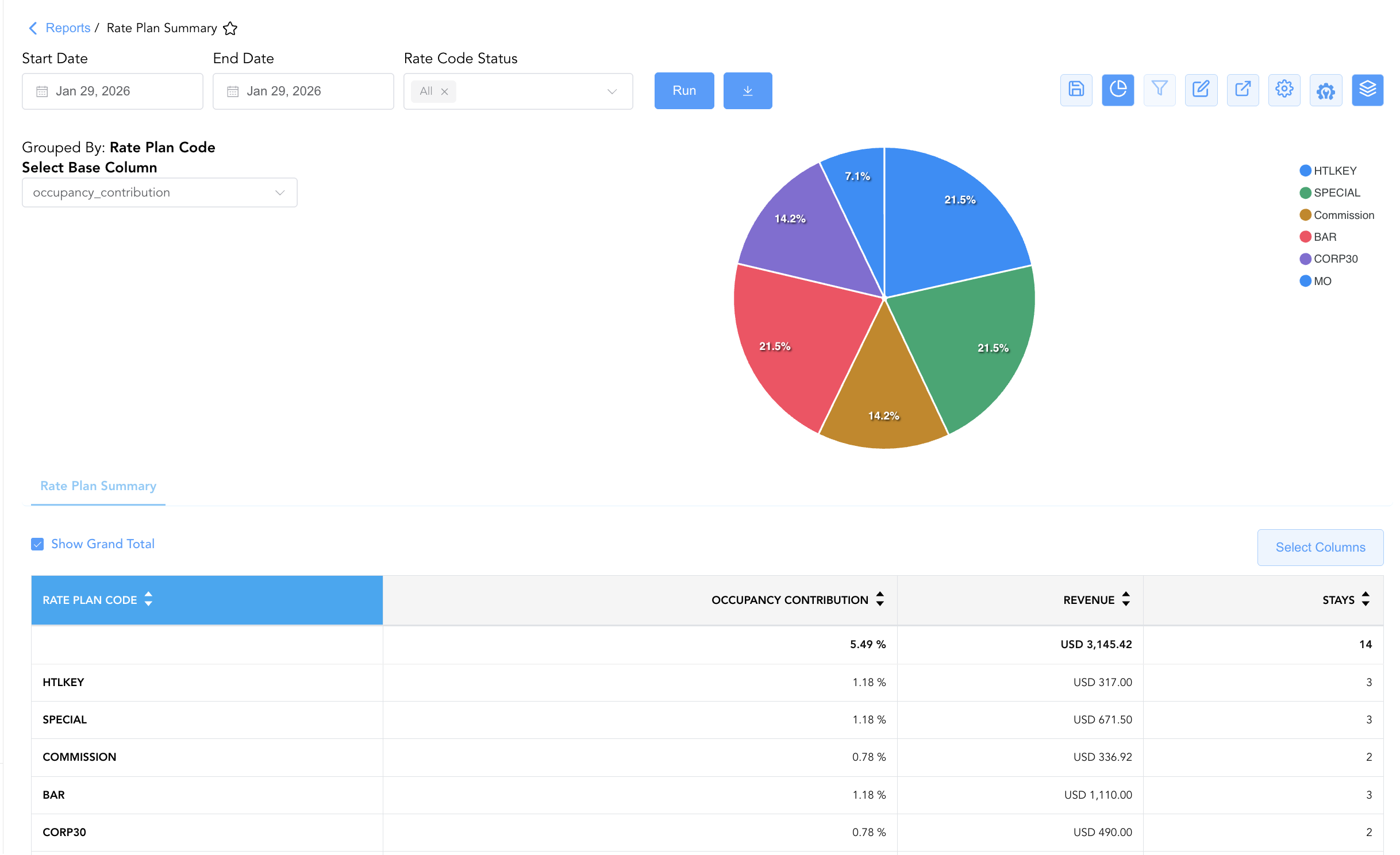
Group By & Pie Chart Visualization: The Rate Plan Summary report features an interactive pie chart to help analyze rate plan production and volume distributions. Users can group rate performance entries on the fly by Rate Plan Code, Market Segment, Rate Code Name, Local Market Segment, or Day of Week to evaluate rate plan performance over weekly or monthly periods. By selecting a metric from the Select Base Column dropdown menu—such as occupancy_contribution, REVENUE, or STAYS—the chart dynamically renders percentage share breakdowns accompanied by an interactive color-coded legend.
-
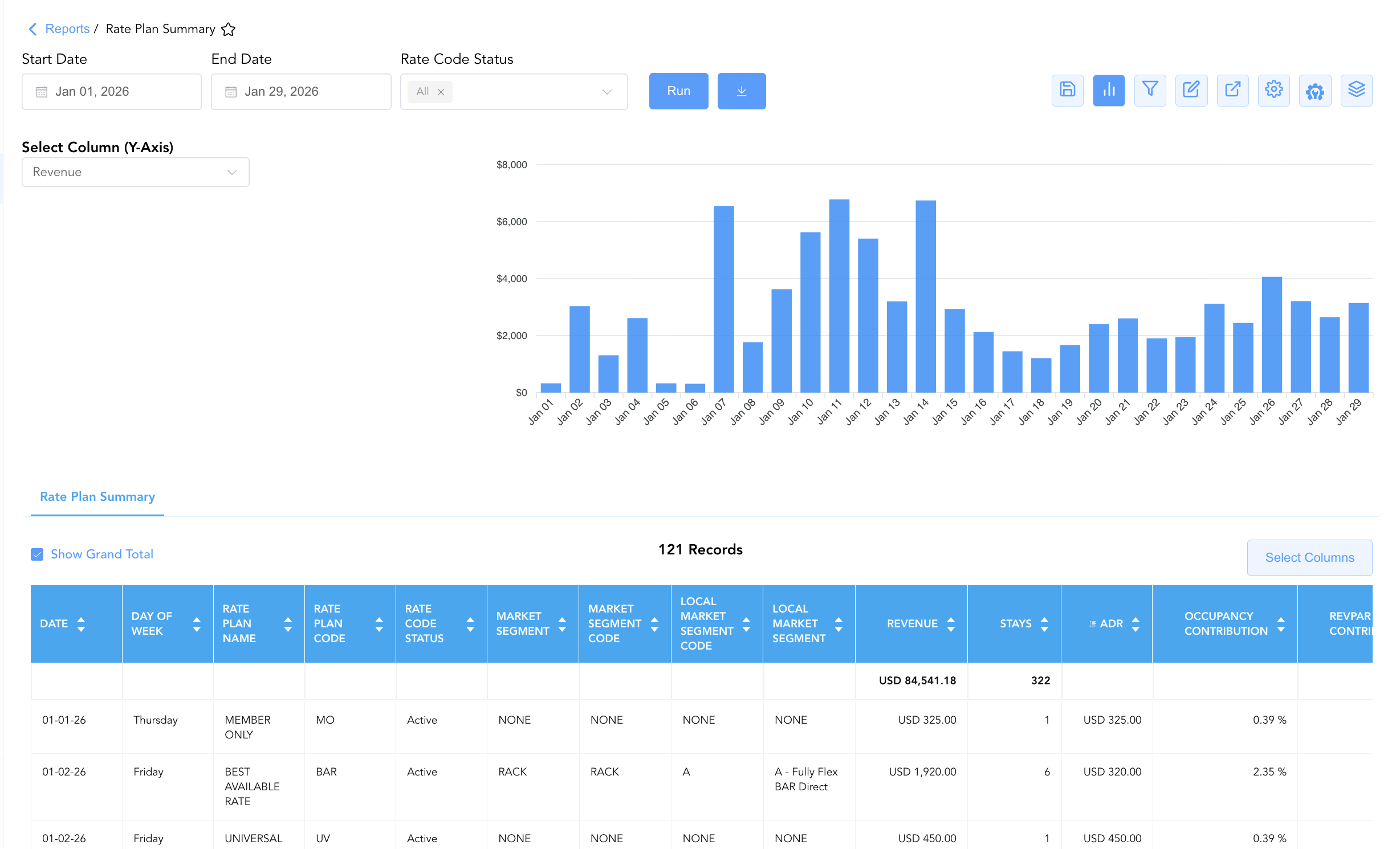
Bar Chart Visualizer: The Rate Plan Summary report includes an interactive bar chart to help analyze rate plan production and revenue performance over time. By adjusting the Select Column (Y-Axis) dropdown menu, users can dynamically toggle the chart view to plot metrics such as Occupancy Contribution, Revenue, or Stays chronologically alongside the detailed summary data grid.
Advanced Controls
-
Exporting & Rate Strategy Analysis: Download in Excel or PDF format to support weekly revenue strategy meetings, corporate contract performance audits, and promotional rate reviews.
-
Filtering: Filter data by specific
Rate Plan Code, isolate inactive rate codes (Rate Code Status = Inactive), or filter for high-revenue rate plans. -
Highlighting (Conditional Formatting): Apply custom rules to automatically highlight top revenue rate codes, zero-stay postings, or low-ADR performance days.
🔗 Related Reports & Next Steps
Within 📈 Revenue & Analytics & 🏷️ Rate Management:
-
Rate Code Configuration – Master system setup report detailing rate code parameters, lifecycle dates, and market mappings.
-
Rate Group Summary – High-level overview evaluating daily and cumulative revenue performance across HotelKey rate group buckets.
-
Discrepant Rates – Audit log comparing system-quoted benchmark rates against actual charged rates across all reservations.
-
Rate Override – Operational log tracking manual price overrides, rate adjustments, and staff authorization credentials.
Cross-Pillar Deep Dives:
-
🥧 Market & Segmentation: Reconcile rate plan production against Market Segment Overview and Local Market Segment.
-
⚖️ Ledgers & Trial Balance: Reconcile daily room revenue postings by rate plan against General Ledger control accounts in Trial Balance.