
Reminders
Report Description: Report provides a list of confirmation numbers with reminders assigned. Includes the action required and description and current status and the department the reminder is assigned to.
Date Range: This report can render the data for up to 365 days
Available Report Columns for Following Sections:
|
Column Name |
Column Description |
Amount Includes Taxes and Fees |
Calculation |
|
Time |
Time the reminder is due (ex - 3:00 PM) |
Not Applicable |
Not Applicable |
|
Department |
The department the reminder is assigned to for fulfillment of the request |
Not Applicable |
Not Applicable |
|
Title |
Summarizes the reminder request |
Not Applicable |
Not Applicable |
|
Description |
Full details of the reminder request |
Not Applicable |
Not Applicable |
|
Confirmation Number |
Reservation the reminder is associated with |
Not Applicable |
Not Applicable |
|
Guest Name |
Primary guest name on the reservation |
Not Applicable |
Not Applicable |
|
Room Number |
Room number on the reservation (if assigned) |
Not Applicable |
Not Applicable |
|
Status |
Current status (Open, Completed, Archived) |
Not Applicable |
Not Applicable |
|
Username |
Username who created the reminder |
Not Applicable |
Not Applicable |
|
Date and Time of Action Performed |
Date and time the reminder was actioned |
Not Applicable |
Not Applicable |
|
Reminder Due Date |
Date the reminder is due (ex - July 1, 2024) |
Not Applicable |
Not Applicable |
|
Date Created |
Date the reminder was created |
Not Applicable |
Not Applicable |
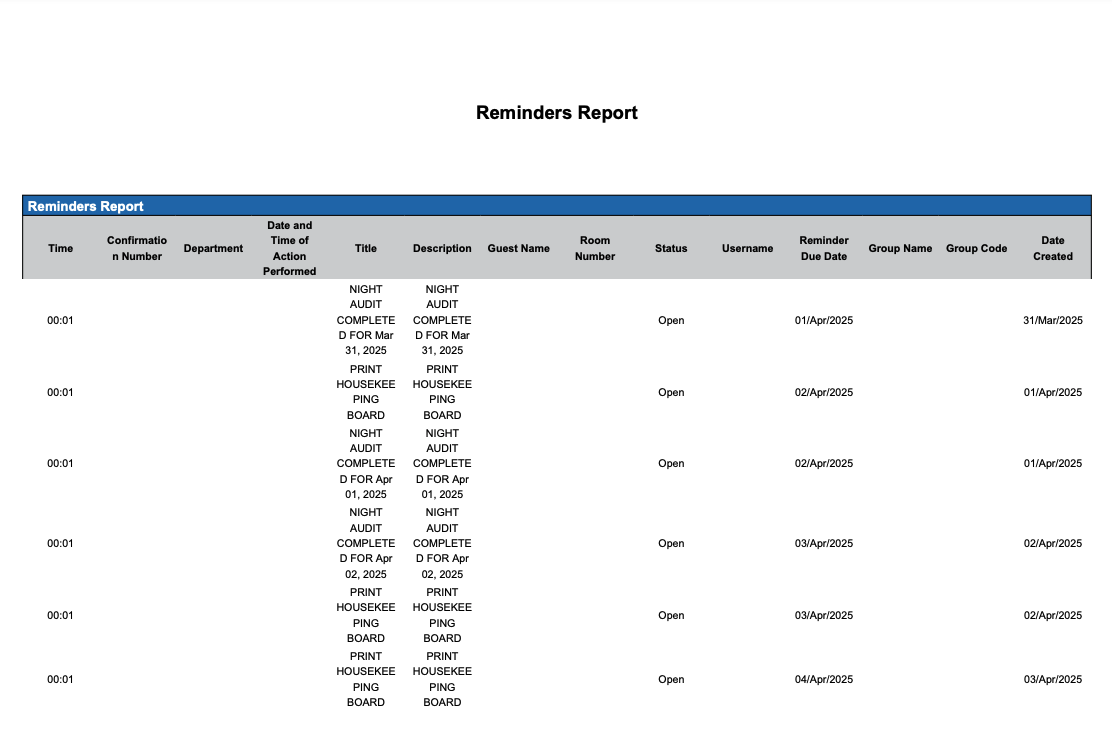
Misc Report Information:
Available Features:
-
Export: ability to download and save the file into an alternate format.
-
Filter: filter a range of data based on criteria defined by the user.
-
Highlight: also known as conditional formatting is the ability to highlight certain values making them easier to identify.
Available Configuration:
-
User Preferences: allows the user to customize their report view by repositioning or removing columns.
-
Property Preferences: allows the property to customize the report view for all users by repositioning or removing columns.
Baseline Configuration:
-
Property Preferences Settings:
-
Following columns to be disabled for initial deployment:
-
None
-
-