
Settlement By Payment Type Report Overview
Parent Hub: 💰 Finance & Accounting Reports
Category: 💳 Payments & Transactions
Target Roles: Directors of Finance & Controllers, Night Auditors, General Cashiers, Accounting Managers & Supervisors
Key Value: Ensure total tender collection auditability, bank deposit reconciliation, and cashier shift balancing by reviewing itemized payment transactions grouped by payment tender type alongside a high-level summary breakdown.
Executive Summary
The Settlement By Payment Type Report is a primary financial audit and tender settlement reconciliation tool within the 💳 Payments & Transactions category of the 💰 Finance & Accounting Reports suite. Designed for general cashier balancing, credit card processing batch tie-outs, and shift drop auditing, it provides a comprehensive accounting log of all settlement payments processed across the property, organized explicitly by payment method.
By combining detailed transaction metadata (Account Category, Date, Time, Transaction Number, Folio Number, Guest Name, Account Name, Room Number, Payment Description, Amount, Username, Remarks) with a consolidated tender summary section (Payment Type, Amount, Count), this report enables controllers, night auditors, and general cashiers to verify individual payment receipts, audit credit card batch totals by card brand (AMEX, VISA, MASTER), reconcile cash drops (CASH), verify physical checks (CHECK), and validate corporate accounts receivable settlements (BILL TO COMPANY).
Key Capabilities
-
Dual-Level Tender Audit: Combines an itemized, tender-grouped line-item ledger (Details) with an executive reconciliation roll-up (Summary).
-
Cross-Category Payment Coverage: Itemizes settlement postings across all operational accounts, including transient guest stays (Reservation), convention group blocks (Group Block), internal administrative folios (House Account), and corporate billing transfers.
-
Merchant Batch & Deposit Tie-Out: Groups transaction subtotals and counts directly by tender instrument (AMEX, VISA, MASTER, CASH, CHECK, BILL TO COMPANY) to streamline daily banking drops and gateway settlements.
Report Views & Functional Breakdown
The Settlement By Payment Type Report presents transaction activity across two core operational sections:
┌────────────────────────────────────────────────────────────────────────┐
│               SETTLEMENT BY PAYMENT TYPE REPORT                        │
├────────────────────────────────────────────────────────────────────────┤
│ 1. Details Section                                                     │
│    (Itemized Line-Item Ledger Grouped by Payment Type)                 │
├────────────────────────────────────────────────────────────────────────┤
│ 2. Summary Section                                                     │
│    (Executive Roll-Up of Amounts & Transaction Counts by Payment Type) │
└────────────────────────────────────────────────────────────────────────┘
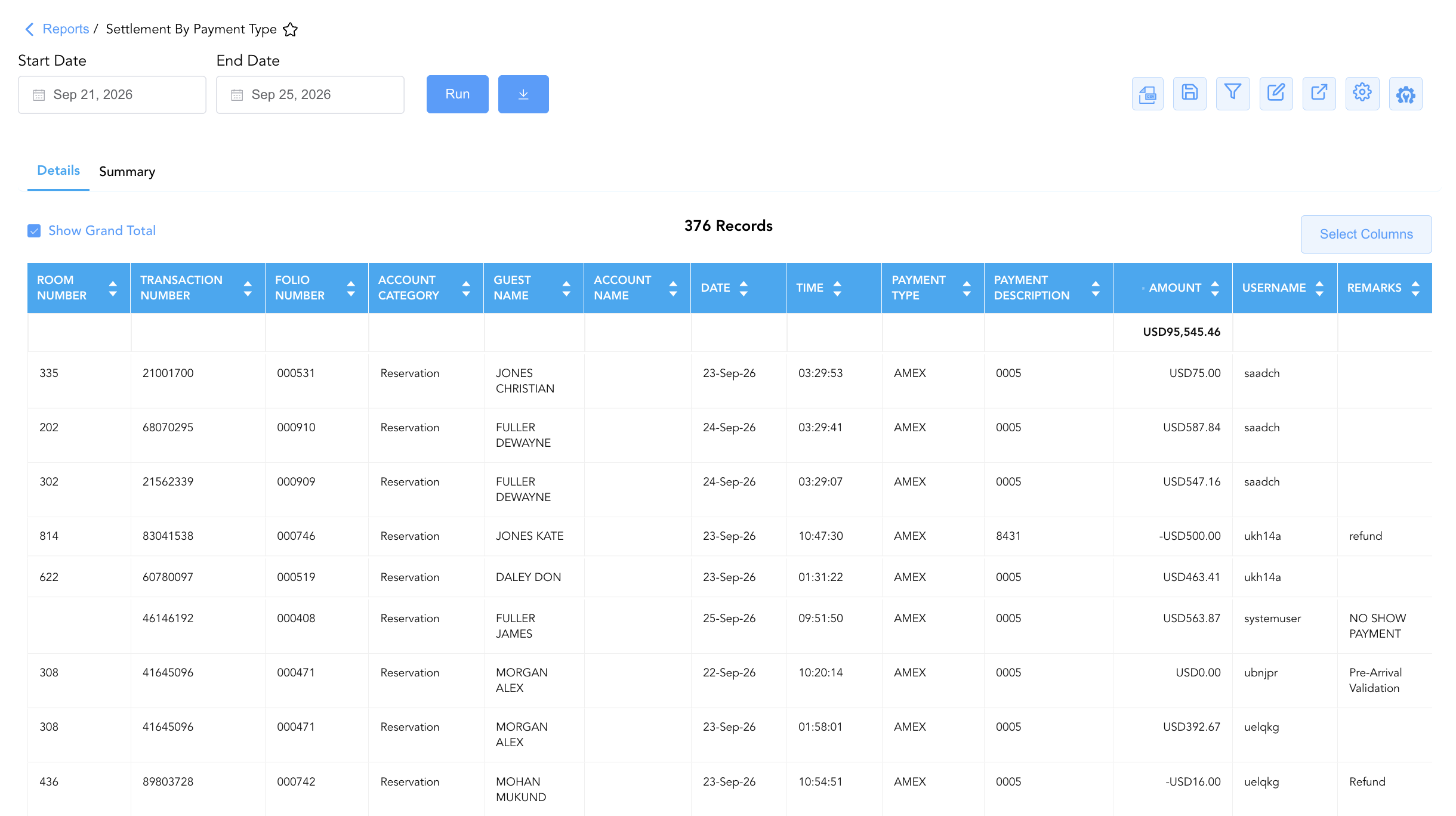
1. Details Section
Presents a complete, line-item transaction ledger sorted and subtotaled by payment tender type.
-
Primary Use: Reconciling specific cashier transactions, auditing payment card tokens/last 4 digits (Payment Description), reviewing pre-arrival validation holds (
Amount = $0.00), and investigating refund entries or cashier notes (Remarks). -
Key Metrics: Account Category, Date, Time, Transaction Number, Folio Number, Guest Name, First Name, Last Name, Account Name, Room Number, Payment Type, Payment Description, Amount, Username, Remarks.
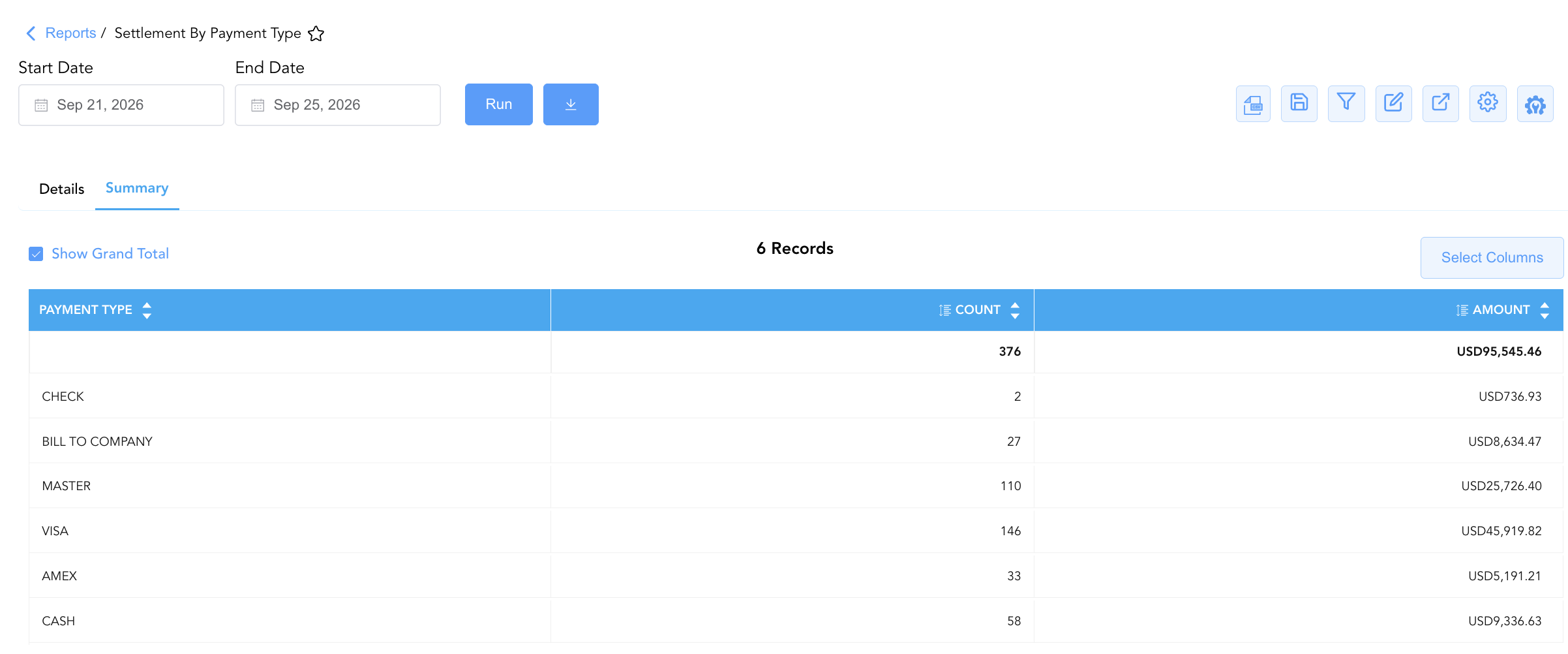
2. Summary Section
Delivers an executive-level reconciliation table at the bottom of the report aggregating gross collection amounts and transaction counts per payment method.
-
Primary Use: Tying out daily merchant credit card processing batches, verifying total cash drawer drops against physical currency counts, and balancing accounts receivable transfer logs during night audit close.
-
Key Metrics: Payment Type, Amount, Count.
Data Dictionary (Dynamic View Columns)
Customize your default view using the Configure (⚙️) icon on the report page. Below is the full data dictionary representing every column available across both sections of this report:
💡 Monetary Treatment Note: The Amount field represents Gross Monetary Values (Includes Taxes & Fees). Positive values indicate incoming payment collections or pre-authorizations, while negative values indicate refund reversals or credit adjustments. Entries displaying
$0.00represent automated pre-arrival card validation checks.
|
Column Name |
Section(s) Where Column Appears |
Description |
Data Source / System Mapping |
Includes Taxes & Fees? |
|
Account Category |
Details |
Operational account classification receiving the settlement (Reservation, Group Block, House Account). |
System Account Engine |
N/A |
|
Date |
Details |
Official business date when the settlement payment or refund was posted. |
Transaction Timestamp |
N/A |
|
Time |
Details |
Exact system time when the transaction entry was executed. |
Transaction Timestamp |
N/A |
|
Transaction Number |
Details |
Unique system reference identifier assigned to the reservation, group block, or house account. |
System Master ID |
N/A |
|
Folio Number |
Details |
Specific PMS folio number receiving the payment posting (e.g., |
Folio Engine ID |
N/A |
|
Guest Name |
Details |
Combined full primary guest name ( |
|
N/A |
|
First Name / Last Name |
Details |
Individual guest first name and last name. |
|
N/A |
|
Account Name |
Details |
Name of the corporate profile, company, or house account attached to the payment. |
|
N/A |
|
Room Number |
Details |
Physical guest room number assigned to the stay. |
|
N/A |
|
Payment Type |
Details, Summary |
Payment tender brand or settlement instrument (AMEX, VISA, MASTER, CASH, CHECK, BILL TO COMPANY). |
Payment Gateway / Tender Engine |
N/A |
|
Payment Description |
Details |
Masked credit card digits/last 4 digits (e.g., |
Payment Gateway Token |
N/A |
|
Amount |
Details, Summary |
Gross monetary value collected, validated, or refunded (subtotaled per tender and grand-totaled). |
Settlement Ledger Engine |
🟢 Yes |
|
Username |
Details |
System user ID or staff email of the employee who processed the settlement. |
System Audit Log |
N/A |
|
Remarks |
Details |
Operational comments, transfer explanations, pre-arrival validation notes, or refund justifications. |
Transaction Notes Field |
N/A |
|
Count |
Summary |
Total number of individual transactions processed for the specific payment type. |
Transaction Counter |
N/A |
Customization & Platform Features
User & Property Preferences
-
Personal Preference: Tailor your individual view by hiding or dragging columns. Your preferences save automatically for future sessions.
-
Property Defaults: System Admins can configure standard default layouts across all property users to streamline operational reporting. To maximize audit efficiency, group the columns into the below logical blocks:
-
Section 1: Details
-
Room & Account Anchors (Cols 1–4):
Room Number|Transaction Number|Folio Number|Account Category -
Guest & Account Context (Cols 5–8):
Guest Name|First Name|Last Name|Account Name -
Audit Timestamps & Tender Details (Cols 9–12):
Date|Time|Payment Type|Payment Description -
Financial Settlement Amount (Col 13):
Amount -
Staff Attribution & Remarks (Cols 14–15):
Username|Remarks
-
-
Section 2: Summary
-
Tender Method & Transaction Volume (Cols 1–2):
Payment Type|Count -
Financial Settlement Total (Col 3):
Amount
-
-
Report Toolbar & Quick Actions
Use the top-right toolbar icons on the report page to manage and export your data view:
|
Icon |
Action / Feature |
Description |

|
Knowledge Article |
Opens the knowledge base article to learn how to interpret this report. |

|
Background Export |
Allows users to download up to 365 days of data directly to their computer in CSV format. |

|
Saved Views |
Saves your column filtering, sorting, and highlight preferences so you can easily reload your custom view later without reconfiguring the report. |

|
Filter |
Opens filter controls to isolate specific data within a column based on your selected criteria. |

|
Highlight |
Highlights column values in a designated color based on selected conditions. |

|
Export |
Exports and downloads the report in various formats (Excel, PDF, CSV) for offline analysis or printing. |

|
Configure |
Opens column selection controls to toggle visibility, reorder columns, or hide rows with all zeros. |

|
Additional Configuration |
Provides advanced report configuration and display formatting options to customize data presentation. |
Advanced Controls
-
Exporting & Gateway Reconciliation: Download in Excel or PDF format to support daily general cashier drop envelope auditing, merchant gateway batch tie-outs, or night audit documentation.
-
Filtering: Filter data by specific Payment Type (AMEX, VISA, MASTER, CASH, CHECK, BILL TO COMPANY), Account Category, or non-zero Amount values (
Amount != $0.00). -
Highlighting (Conditional Formatting): Apply custom rules to automatically highlight refund entries (
Amount < $0.00), high-value card settlements, or pre-arrival validation checks (Amount = $0.00).
🔗 Related Reports & Next Steps
Within 💳 Payments & Transactions & ⚖️ Ledgers & Trial Balance:
-
Payments Summary – Review daily cross-tabulated payment collection totals across a date matrix.
-
All Payments – Complete transaction ledger logging all cash, check, credit card, and direct-bill payment receipts.
-
Payment Activity – Line-item transaction audit capturing payment tokens, entry modes, and gateway approvals.
-
Authorized Payments – Audit credit card authorization holds, capture approvals, and card refund processing.
-
Day End Summary – Review consolidated daily revenue, tax, payment, and deposit blueprints at business date close.
Cross-Pillar Deep Dives:
-
🏛️ Taxes & Expenses: To audit statutory taxes calculated on charges settled via these payment methods, review Tax Summary.
-
📬 Billing & Receivables (AR): To inspect corporate accounts receivable direct-bill settlements transferred from
BILL TO COMPANYtotals, review Direct Bill Ledger Details.