
Special Assistance Report Overview
Parent Hub: 🛎️ Front Desk & Guest Services
Category: 🚨 Downtime & Contingency
Target Roles: Front Office Managers, Front Desk Agents, Guest Relations Leads, Concierge Leads, Executive Housekeepers, Life Safety & Emergency Coordinators, General Managers
Key Value: Serves as a vital accessibility, guest care, and life safety emergency manifest to identify guests requiring mobility assistance or special medical accommodations, track room allocations, coordinate luggage and arrival/departure support, and ensure immediate first-responder evacuation priority during property emergencies or PMS system downtime.
Executive Summary
The Special Assistance Report is an essential guest accessibility, personalized care, and life safety emergency manifest within the 🚨 Downtime & Contingency category of the 🛎️ Front Desk & Guest Services hub. Designed to deliver complete operational and life-safety visibility over guests with specific physical, medical, mobility, or accessibility requirements, it itemizes all active in-house reservations and expected arrivals designated for high-touch care or emergency evacuation assistance.
-
By mapping core reservation identifiers (
Confirmation Number,Status,Room Number) to guest identity attributes (Guest Name,First Name,Last Name,Additional Guest,Guest Count), stay timeframes (Check In Date,Check Out Date,Estimated Arrival Time,Estimated Departure Time), and operational notes (Booking Remarks,Stay Remarks,Other Remarks), this report enables hotel management, front desk agents, guest service leads, and emergency response teams to pre-block accessible rooms, arrange luggage assistance, fulfill mobility requests, and provide local fire and emergency services with an accurate evacuation list during property emergencies or cloud system outages.
Key Capabilities
-
Life Safety & Emergency Evacuation Priority: Provides an immediate physical or PDF emergency fallback list for fire departments and first responders, detailing exactly which occupied rooms require mobility or medical evacuation assistance during emergencies.
-
Accessibility & Special Request Coordination: Consolidates profile notes and stay instructions (
Stay Remarks, e.g., "Guest is a wheelchair user and will require assistance with luggage upon arrival and departure.") to prepare front office, bell staff, and housekeeping teams. -
Arrival & Departure Support Planning: Tracks expected arrival and departure times (
Estimated Arrival Time,Estimated Departure Time) to schedule dedicated staff for luggage handling, wheelchair assistance, or curbside greetings. -
Multi-Status Guest Coverage: Tracks special assistance requirements across both expected check-in arrivals (
Status = Arrival) and active room occupants (Status = In House). -
Occupant & Additional Guest Accountability: Records total occupant headcounts (
Guest Count) alongside accompanying guest names (Additional Guest) to ensure all room occupants are accounted for during emergency evacuations or service delivery.
Report Views & Functional Breakdown
The Special Assistance Report presents accessibility and guest care data in a unified single-table master manifest supporting three primary operational perspectives:
┌────────────────────────────────────────────────────────────────────────┐
│                     SPECIAL ASSISTANCE REPORT                          │
├────────────────────────────────────────────────────────────────────────┤
│                         Unified Matrix View                            │
├──────────────────────────┬──────────────────────────┬──────────────────┤
│ 1. Guest Identity &      │ 2. Room Assignment &     │ 3. Accessibility │
│    Stay Timeframe Trace  │    Status Alignment      │    Remarks & Care│
└──────────────────────────┴──────────────────────────┴──────────────────┘
1. Guest Identity & Stay Timeframe Trace
Monitors guest names, additional accompanying occupants, total guest counts, and stay timeframes.
-
Primary Use: Verifying guest identity and occupant counts during check-in or emergency roll-call procedures.
-
Key Metrics: Confirmation Number, Guest Name, First Name, Last Name, Additional Guest, Guest Count, Check In Date, Check Out Date.
2. Room Assignment & Status Alignment
Tracks assigned physical room numbers, operational reservation status, and estimated arrival/departure times.
-
Primary Use: Locating occupied accessible rooms for first responders during evacuations and coordinating front desk/bell staff coverage for arriving or departing guests.
-
Key Metrics: Room Number, Status, Estimated Arrival Time, Estimated Departure Time, Confirmation Number.
3. Accessibility Remarks & Care
Consolidates multi-departmental notes detailing specific mobility requirements, equipment needs, or medical assistance instructions.
-
Primary Use: Reviewing detailed guest care instructions (e.g., wheelchair assistance, luggage support) to deliver high-touch service and brief shift teams.
-
Key Metrics: Booking Remarks, Stay Remarks, Other Remarks, Guest Name, Room Number.
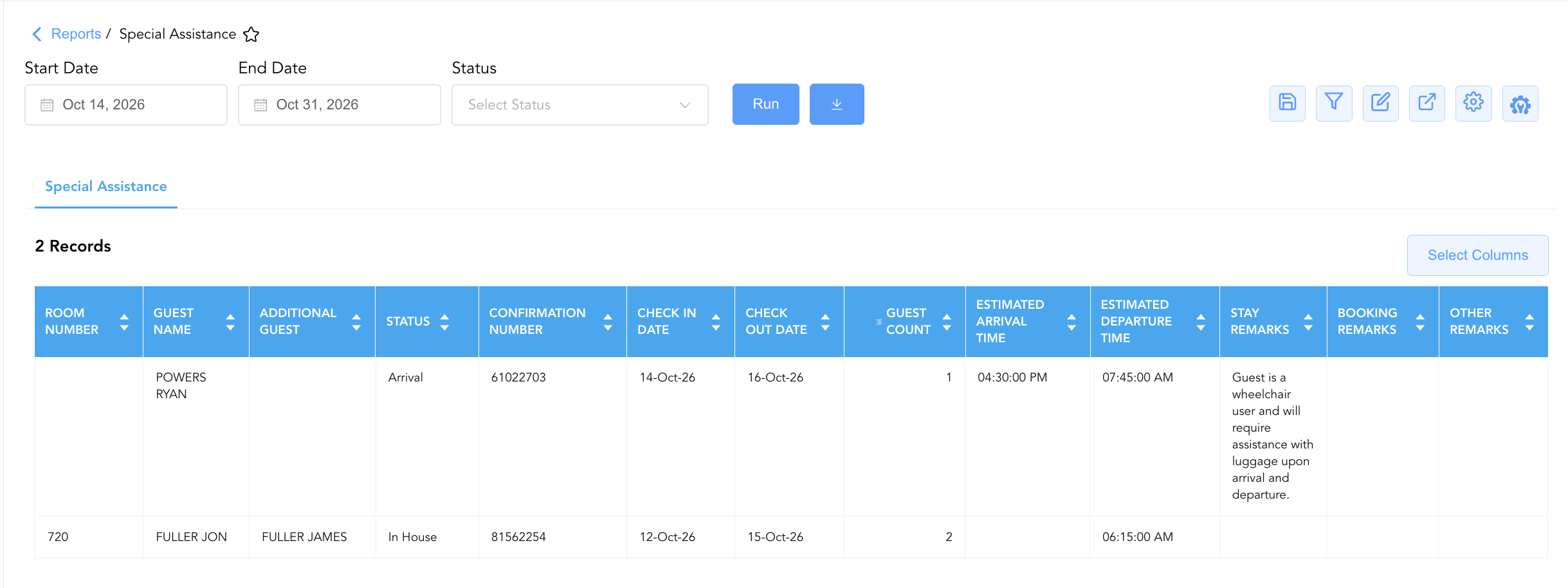
Data Dictionary (Dynamic View Columns)
Customize your default view using the Configure (⚙️) icon on the report page. Below is the full data dictionary representing all 15 columns available in this report:
|
Column Name |
Description |
Data Source / System Mapping |
Includes Taxes & Fees? |
|
Room Number |
Physical guest room assigned to the reservation (Blank if unassigned). |
PMS > Assigned Room ID |
N/A |
|
Confirmation Number |
Primary unique alphanumeric reservation identifier. |
Reservation System > Confirmation ID |
N/A |
|
Status |
Operational reservation status (e.g., |
Reservation System > Main Status |
N/A |
|
Guest Name |
Combined full name of the primary registered guest. |
Guest Profile > Full Name |
N/A |
|
First Name |
First name of the primary registered guest. |
Guest Profile > First Name |
N/A |
|
Last Name |
Last name of the primary registered guest. |
Guest Profile > Last Name |
N/A |
|
Additional Guest |
Names of accompanying secondary occupants sharing the room. |
Reservation System > Additional Guests |
N/A |
|
Guest Count |
Total physical headcount of occupants in the room. |
Reservation System > Total Occupants |
N/A |
|
Check In Date |
Scheduled or actual check-in date. |
Reservation System > Arrival Date |
N/A |
|
Check Out Date |
Scheduled check-out date. |
Reservation System > Departure Date |
N/A |
|
Estimated Arrival Time |
Anticipated or scheduled time of guest arrival. |
Reservation System > Expected ETA |
N/A |
|
Estimated Departure Time |
Anticipated or scheduled time of guest check-out. |
Reservation System > Expected Departure Time |
N/A |
|
Booking Remarks |
Operational notes recorded during reservation creation. |
Reservation Notes > Booking Remarks |
N/A |
|
Stay Remarks |
Operational handling instructions regarding guest accessibility or assistance. |
Reservation Notes > Stay Remarks |
N/A |
|
Other Remarks |
Supplemental guest profile or special request notes. |
PMS Guest Profile > Other Remarks |
N/A |
Customization & Platform Features
User & Property Preferences
-
Personal Preference: Tailor your individual view by hiding or dragging columns. Your preferences save automatically for future sessions.
-
Property Defaults: System Admins can configure standard default layouts across all property users to streamline operational reporting. To maximize audit efficiency, group the columns into the below logical blocks:
-
Physical Locators & Consolidated Guest Identity (Cols 1–5):
Room Number|Guest Name|Additional Guest|First Name|Last Name -
Operational Status & Stay Logistics (Cols 6–10):
Status|Confirmation Number|Check In Date|Check Out Date|Guest Count -
Arrival & Departure Timings (Cols 11–12):
Estimated Arrival Time|Estimated Departure Time -
Special Assistance & Operational Remarks (Cols 13–15):
Stay Remarks|Booking Remarks|Other Remarks
-
Report Toolbar & Quick Actions
Use the top-right toolbar icons on the report page to manage and export your data view:
|
Icon |
Action / Feature |
Description |

|
Knowledge Article |
Opens the knowledge base article to learn how to interpret this report. |

|
Saved Views |
Saves your column filtering, sorting, and highlight preferences so you can easily reload your custom view later without reconfiguring the report. |

|
Filter |
Opens filter controls to isolate specific data within a column based on your selected criteria. |

|
Highlight |
Highlights column values in a designated color based on selected conditions. |

|
Export |
Exports and downloads the report in various formats (Excel, PDF, CSV) for offline analysis or printing. |

|
Configure |
Opens column selection controls to toggle visibility, reorder columns, or hide rows with all zeros. |

|
Additional Configuration |
Provides advanced report configuration and display formatting options to customize data presentation. |
Advanced Controls
-
Downtime & Emergency Printing: Automatically schedule a daily PDF/Excel export prior to shift changes (e.g., 06:00, 14:00, 22:00) to maintain an updated physical emergency evacuation list in the front desk emergency binder.
-
Filtering: Filter data by
Status = In Houseto generate instant emergency evacuation lists for local fire and rescue teams. -
Highlighting (Conditional Formatting): Apply custom rules to automatically highlight unassigned room numbers, wheelchair assistance requests, or immediate arrivals.
🔗 Related Reports & Next Steps
Within 🛎️ Front Desk & Guest Services & 🚨 Downtime & Contingency:
-
In House List – Core downtime contingency manifest detailing active room occupants, rate plans, and room assignments.
-
Arrivals List – Downtime contingency manifest tracking expected check-in arrivals, room pre-blocking, and payment guarantees.
-
Departures List – Downtime contingency manifest tracking daily expected check-outs and folio settlement states.
-
Room Detail – Master room-by-room physical status and housekeeping audit matrix.
Cross-Pillar Deep Dives:
-
🧹 Housekeeping & Facilities: Cross-reference special assistance room numbers (
Room Number) with Housekeeping Sheet and Room Service Requests to ensure accessible rooms and roll-in showers are fully prepped prior to arrival. -
🛡️ Life Safety & Security: Share physical printed copies of the Special Assistance Report with property safety teams and local first responders during fire drills or actual emergency evacuations.