
Stay Request Details Report Overview
Parent Hub: 🛎️ Front Desk & Guest Services
Category: 🏨 In-House & Occupancy
Target Roles: Front Office Managers, Front Desk Agents, Guest Services Supervisors, Executive Housekeepers, Housekeeping Supervisors, Concierge & Guest Experience Leads
Key Value: Itemize individual guest stay preferences by request type and operational category, track request fulfillment across active and upcoming stays, audit VIP tier perks and ADA accessibility requirements, and streamline room pre-blocking and housekeeping task execution.
Executive Summary
The Stay Request Details Report is a granular preference itemization, operational task dispatch, and room assignment document within the 🏨 In-House & Occupancy category of the 🛎️ Front Desk & Guest Services hub. Designed to break down guest preference selections into distinct operational categories (such as ROOM or HOUSEKEEPING), it itemizes every specific request entry recorded across active, booked, and past reservations.
-
By mapping specific preference items (
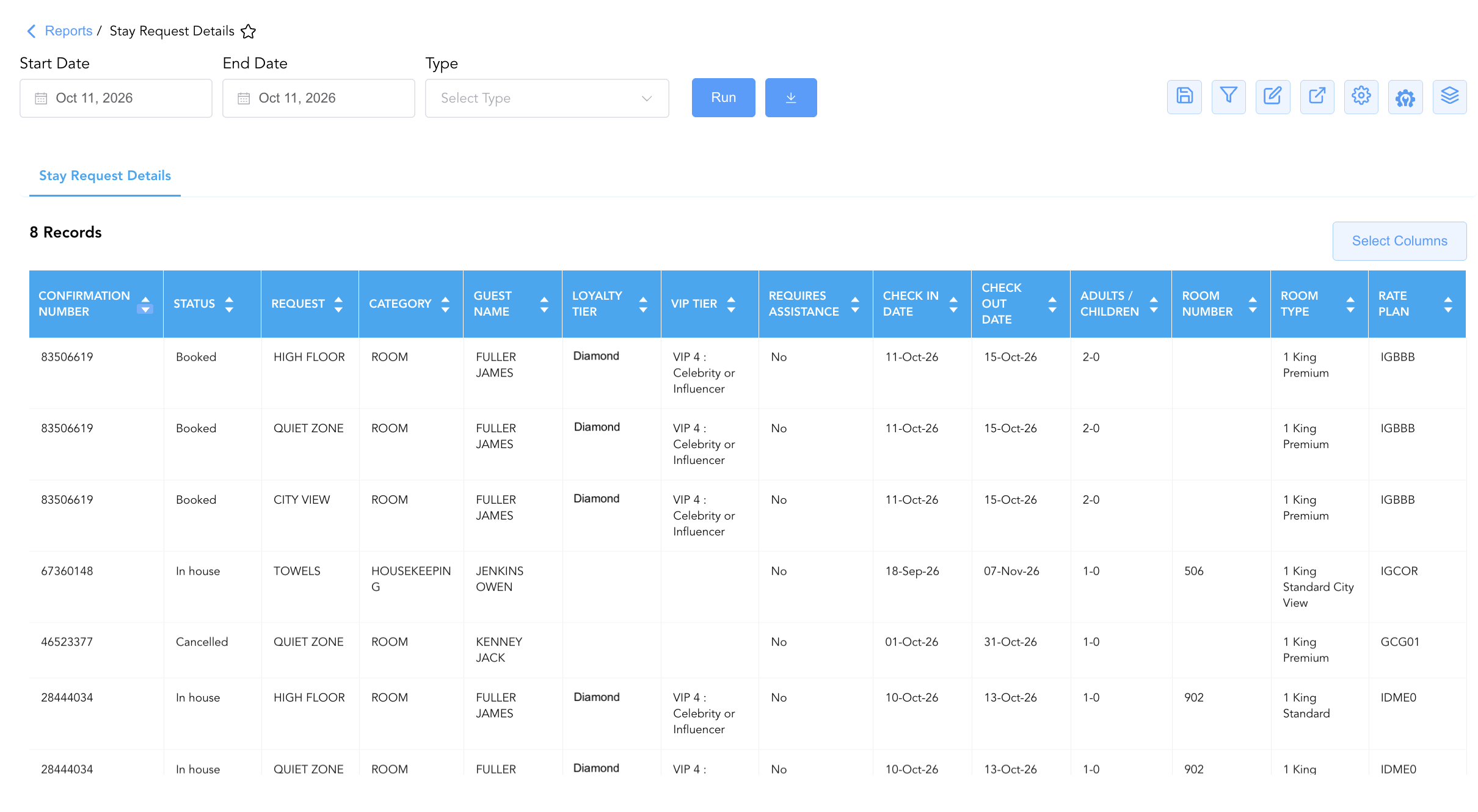
Request, e.g.,HIGH FLOOR,QUIET ZONE,CITY VIEW,TOWELS) to operational groupings (Category, e.g.,ROOM,HOUSEKEEPING) alongside reservation identifiers (Confirmation Number,Status), guest identity profiles (Guest Name,First Name,Last Name,Loyalty Tier,VIP Tier,Adults / Children), stay windows (Check In Date,Check Out Date), and room/rate structures (Room Type,Room Number,Rate Plan,Requires Assistance), this report enables front desk agents, guest service leads, and housekeeping supervisors to fulfill individual guest preferences, prioritize room blocking, and ensure complete ADA compliance.
Key Capabilities
-
Itemized Preference & Category Breakdown: Disaggregates multi-preference reservations into individual line items (
Request, e.g.,HIGH FLOOR,QUIET ZONE,CITY VIEW,TOWELS) classified by operational department (Category, e.g.,ROOM,HOUSEKEEPING). -
Pre-Arrival Room Blocking Optimization: Itemizes physical feature requests for unassigned booked stays (
Status = Booked) to guide front desk agents in pre-assigning optimal physical rooms prior to guest arrival. -
Housekeeping Task Dispatch: Directly routes amenity and room preparation requests (e.g.,
Category = HOUSEKEEPING,Request = TOWELS) to housekeeping supervisors for timely room setups. -
VIP & Loyalty Tier Alignment: Highlights VIP classifications (
VIP Tier, e.g.,VIP 4 : Celebrity or Influencer) and loyalty membership standings (Loyalty Tier) to ensure high-value guest preferences are prioritized. -
ADA Accessibility Governance: Tracks special accessibility requirements (
Requires Assistance, e.g.,Yes/No) to verify ADA-compliant room assignments and guest care.
Report Views & Functional Breakdown
The Stay Request Details Report presents itemized preference data in a unified single-table ledger that supports three key analytical perspectives:
┌────────────────────────────────────────────────────────────────────────┐
│                   STAY REQUEST DETAILS REPORT                          │
├────────────────────────────────────────────────────────────────────────┤
│                         Unified Matrix View                            │
├──────────────────────────┬──────────────────────────┬──────────────────┤
│ 1. Request Item &        │ 2. Guest Profile, VIP &  │ 3. Room & Stay   │
│    Department Category   │    Accessibility Trace   │    Timeframe     │
└──────────────────────────┴──────────────────────────┴──────────────────┘
1. Request Item & Department Category
Monitors specific guest preference entries disaggregated by operational request title and departmental category.
-
Primary Use: Filtering and routing specific task dispatches to responsible departments (e.g., routing
ROOMrequests to Front Desk andHOUSEKEEPINGrequests to Housekeeping). -
Key Metrics: Request, Category, Confirmation Number, Guest Name, Status.
2. Guest Profile, VIP & Accessibility Trace
Correlates specific request items with guest identity profiles, loyalty standings, VIP tiers, and ADA accessibility needs.
-
Primary Use: Auditing ADA accessibility compliance, ensuring VIP guest preferences receive executive attention, and recognizing returning loyalty members.
-
Key Metrics: Guest Name, Loyalty Tier, VIP Tier, Requires Assistance, Request, Confirmation Number.
3. Room & Stay Timeframe
Tracks physical room assignments, room categories, rate plans, guest headcounts, and check-in/check-out dates for each requested item.
-
Primary Use: Verifying physical room eligibility against requested features, coordinating pre-arrival room blocking, and managing in-house guest requests.
-
Key Metrics: Room Number, Room Type, Rate Plan, Adults / Children, Check In Date, Check Out Date, Status.
Data Dictionary (Dynamic View Columns)
Customize your default view using the Configure (⚙️) icon on the report page. Below is the full data dictionary representing all 16 columns available in this report:
💡 Disaggregation Note: Unlike summary request reports, each row in this report represents a single, disaggregated preference item (
Request). Reservations with multiple requests will appear across multiple rows.
|
Column Name |
Description |
Data Source / System Mapping |
Includes Taxes & Fees? |
|
Request |
Specific guest-requested feature or amenity item (e.g., |
PMS Guest Preferences > Request Item |
N/A |
|
Category |
Operational department classification for the request (e.g., |
PMS Guest Preferences > Category Code |
N/A |
|
Confirmation Number |
Primary unique alphanumeric reservation identifier. |
Reservation System > Confirmation ID |
N/A |
|
Guest Name |
Combined full name of the registered guest. |
Guest Profile > Full Name |
N/A |
|
First Name |
First name of the primary registered guest. |
Guest Profile > First Name |
N/A |
|
Last Name |
Last name of the primary registered guest. |
Guest Profile > Last Name |
N/A |
|
Room Type |
Code or description representing the allocated room category (e.g., |
PMS > Room Type Name |
N/A |
|
Room Number |
Physical guest room assigned to the reservation (Blank if unassigned). |
PMS > Assigned Room Number |
N/A |
|
Check In Date |
Scheduled or actual check-in date of the reservation. |
Reservation System > Check-In Date |
N/A |
|
Check Out Date |
Scheduled or actual check-out date of the reservation. |
Reservation System > Check-Out Date |
N/A |
|
Loyalty Tier |
Guest loyalty program membership level. |
Loyalty Engine > Membership Tier |
N/A |
|
Rate Plan |
Active rate plan code attached to the reservation (e.g., |
Reservation System > Active Rate Code |
N/A |
|
Adults / Children |
Registered headcount ratio of adult occupants to child occupants (e.g., |
Reservation System > Guest Headcount |
N/A |
|
Status |
Operational reservation status (e.g., |
Reservation System > Main Status |
N/A |
|
Requires Assistance |
Indicator flag identifying ADA accessibility or special medical/physical assistance requirements ( |
Guest Profile > ADA Assistance Flag |
N/A |
|
VIP Tier |
Property-defined VIP classification tier (e.g., |
Guest Profile > VIP Tier |
N/A |
Customization & Platform Features
User & Property Preferences
-
Personal Preference: Tailor your individual view by hiding or dragging columns. Your preferences save automatically for future sessions.
-
Property Defaults: System Admins can configure standard default layouts across all property users to streamline operational reporting. To maximize audit efficiency, group the columns into the below logical blocks:
-
Reservation Identification & Status (Cols 1–2):
Confirmation Number|Status -
Request Classification & Fulfillment Category (Cols 3–4):
Request|Category -
Guest Profile & Loyalty Tiering (Cols 5–10):
Guest Name|First Name|Last Name|Loyalty Tier|VIP Tier|Requires Assistance -
Stay Itinerary & Occupancy Demographics (Cols 11–13):
Check In Date|Check Out Date|Adults / Children -
Room Assignment & Rate Plan (Cols 14–16):
Room Number|Room Type|Rate Plan
-
Report Toolbar & Quick Actions
Use the top-right toolbar icons on the report page to manage and export your data view:
|
Icon |
Action / Feature |
Description |

|
Knowledge Article |
Opens the knowledge base article to learn how to interpret this report. |

|
Saved Views |
Saves your column filtering, sorting, and highlight preferences so you can easily reload your custom view later without reconfiguring the report. |

|
Filter |
Opens filter controls to isolate specific data within a column based on your selected criteria. |

|
Highlight |
Highlights column values in a designated color based on selected conditions. |

|
Export |
Exports and downloads the report in various formats (Excel, PDF, CSV) for offline analysis or printing. |

|
Configure |
Opens column selection controls to toggle visibility, reorder columns, or hide rows with all zeros. |

|
Additional Configuration |
Provides advanced report configuration and display formatting options to customize data presentation. |

|
Group By |
Summarize and group report data dynamically in real time. |
Interactive Visualizations & Grouping Controls
-
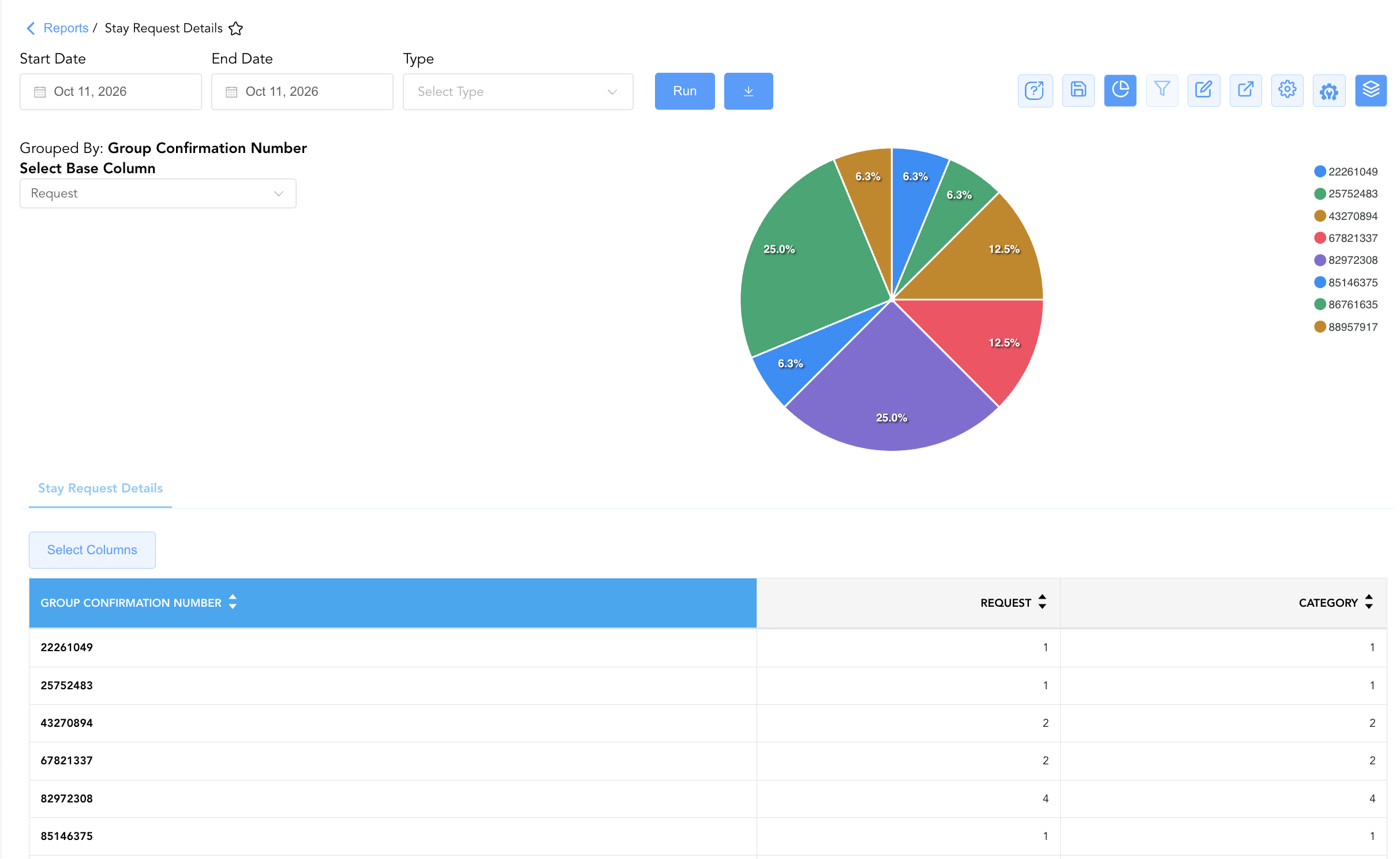
Group By & Pie Chart Visualization: The Stay Request Details report features an interactive pie chart to help analyze group request volume and preference distributions. Users can group request details on the fly by Group Confirmation Number to analyze primary preference trends and departmental workloads. By selecting either Request or Category from the Select Base Column dropdown menu, the chart dynamically renders percentage share breakdowns accompanied by an interactive color-coded legend.
Advanced Controls
-
Exporting & Departmental Task Lists: Download in Excel or PDF format to generate targeted task lists for housekeeping inspectors or pre-blocking checklists for front desk agents.
-
Filtering: Filter data by
Category = HOUSEKEEPINGto route amenity dispatches, or isolate unassigned booked arrivals (Status = BookedandRoom Number = Blank). -
Highlighting (Conditional Formatting): Apply custom rules to automatically highlight high-tier VIP requests (
VIP Tier = VIP 4 : Celebrity or Influencer), ADA accessibility needs (Requires Assistance = Yes), or unassigned room requests.
🔗 Related Reports & Next Steps
Within 🛎️ Front Desk & Guest Services & 🏨 In-House & Occupancy:
-
Stay Requests – Summary reservation view grouping all stay preferences, remarks, and connecting room requests.
-
In House List – Real-time guest register detailing active room occupants, rate plans, and vehicle details.
-
Reminders Report – Operational task, amenity delivery, and shift incident tracking log.
-
Arrivals List – Detailed daily manifest of expected arriving guests, check-in statuses, and room assignments.
Cross-Pillar Deep Dives:
-
🧹 Housekeeping & Facilities: Cross-reference housekeeping requests (
Category = HOUSEKEEPING) with Housekeeping Sheet to verify room preparation prior to check-in. -
📈 Revenue & Operations: Review VIP tier distributions and room feature requests (
HIGH FLOOR,CITY VIEW) against Rate Plan Summary and Booking Pace.