
Tax Report Overview
Parent Hub: 💰 Finance & Accounting Reports
Category: 🏛️ Taxes & Expenses
Target Roles: Directors of Finance & Controllers, Night Auditors, Tax Compliance Officers, General Ledger Accountants
Key Value: Maintain complete tax compliance and revenue auditability by tracking statutory tax liabilities, tax-exempt revenue write-offs, non-exempt taxable base revenues, transaction-level folio postings, and posting charge code tax breakdowns across four detailed analytical sections.
Executive Summary
The Tax Report is the primary, master tax compliance and revenue auditing document within the 🏛️ Taxes & Expenses section of the 💰 Finance & Accounting Reports hub. Designed to support monthly statutory tax filings, municipal remittance tie-outs, and general ledger tax account balancing, it delivers a complete 360-degree audit trail of all property tax accruals, revenue exemptions, and taxable revenue bases.
By structuring tax data across four explicit operational sections (Summary, Exempted Tax Details, Non Exempted Tax Details, and Charge Type Summary), this report bridges macro-level tax liability totals with granular guest-folio line items and charge code configurations. Controllers and tax officers can evaluate tax obligations by tax rule name (e.g., CITY TAX, STATE TAX, Lodging Tax, Sales Tax), audit guest-level tax exemption categories (e.g., OTA Tax Exempt, Federal Tax Exempt), verify fiscal invoice numbers, and confirm charge code taxability mappings (e.g., RR, NSRR, 1304, 5901) with complete mathematical integrity.
Key Capabilities
-
Four-Section Master Tax Governance: Integrates high-level tax liability summaries (Summary), line-item tax-exempt folio audits (Exempted Tax Details), taxable revenue transaction logs (Non Exempted Tax Details), and posting code breakdown matrices (Charge Type Summary).
-
Revenue Base & Exemption Reconciliation: Clearly separates gross revenue into taxable bases (Taxable Payable) and verified tax-exempt write-offs (Exempted Revenue).
-
Transaction & Fiscal Invoice Traceability: Maps tax accruals directly to guest folio numbers, room assignments, credit card tokens (Last 4 Digits Credit Card Number), and legally required fiscal reference numbers (Fiscal Invoice Number).
-
Posting Charge Code Breakdown: Cross-tabulates revenue postings by PMS charge codes (RR, NSRR, 1304, 5901, 7607) to verify taxability rules across every active statutory tax jurisdiction.
Report Views & Functional Breakdown (All 4 Sections)
The Tax Report organizes property tax liabilities and revenue bases across four structured operational sections:
┌────────────────────────────────────────────────────────────────────────┐
│                              TAX REPORT                                │
├────────────────────────────────────────────────────────────────────────┤
│ 1. Summary Section                                                     │
│    (Macro-Level Tax Liabilities & Revenue Totals by Tax Name)           │
├────────────────────────────────────────────────────────────────────────┤
│ 2. Exempted Tax Details Section                                        │
│    (Itemized Folio Transactions with Verified Tax Exemptions)           │
├────────────────────────────────────────────────────────────────────────┤
│ 3. Non Exempted Tax Details Section                                    │
│    (Itemized Folio Transactions Subject to Statutory Taxes)            │
├────────────────────────────────────────────────────────────────────────┤
│ 4. Charge Type Summary Section                                         │
│    (Matrix Breakdown of Revenue & Taxability by PMS Charge Code)       │
└────────────────────────────────────────────────────────────────────────┘
1. Summary
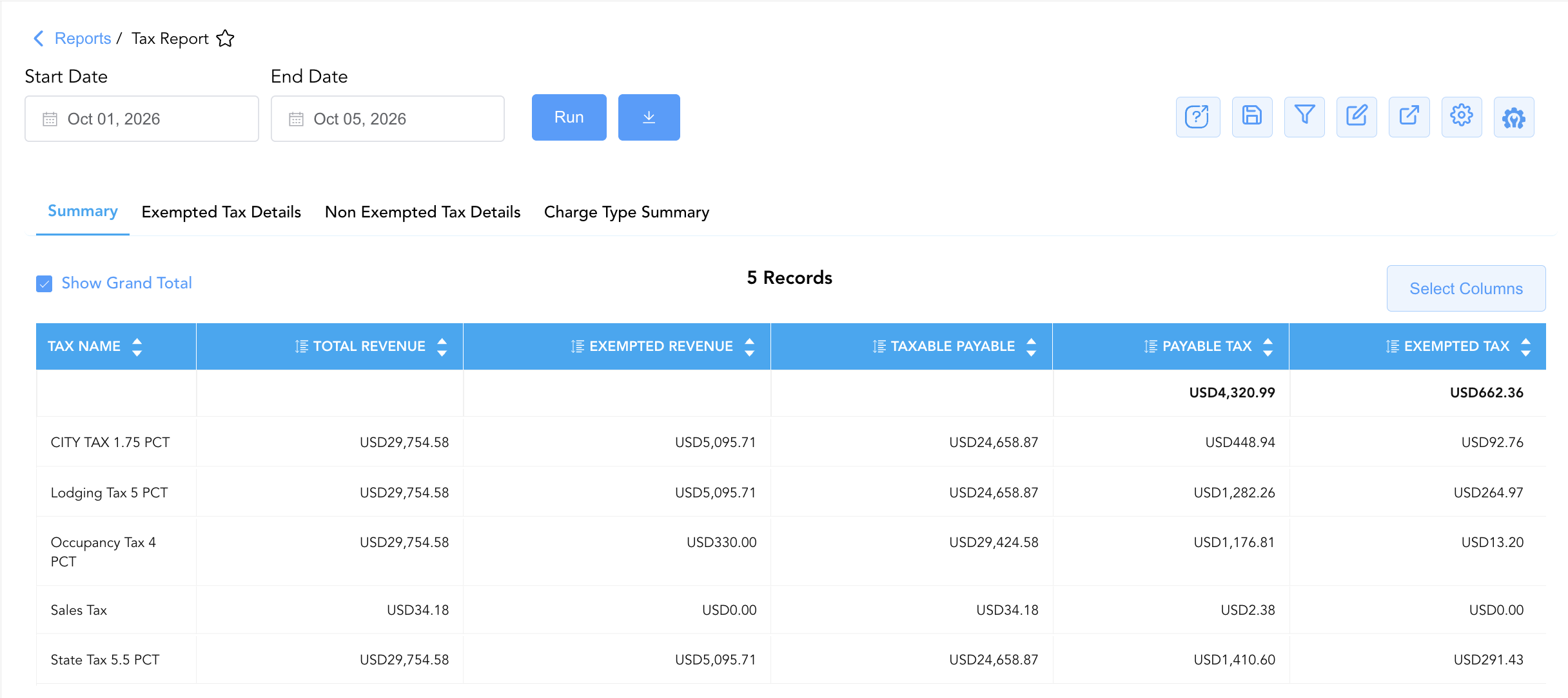
Delivers an executive-level summary table aggregating revenue bases and tax liabilities for every active tax code configured at the property. 💡 Note: Available tax names are determined by your property's configuration. The below uses example tax names.
-
Primary Use: Preparing monthly statutory tax return filings, verifying net tax payable totals (Payable Tax), and auditing total tax-exempt write-offs (Exempted Tax).
-
Key Metrics: Tax Name, Total Revenue, Exempted Revenue, Taxable Payable, Payable Tax, Exempted Tax.
2. Exempted Tax Details
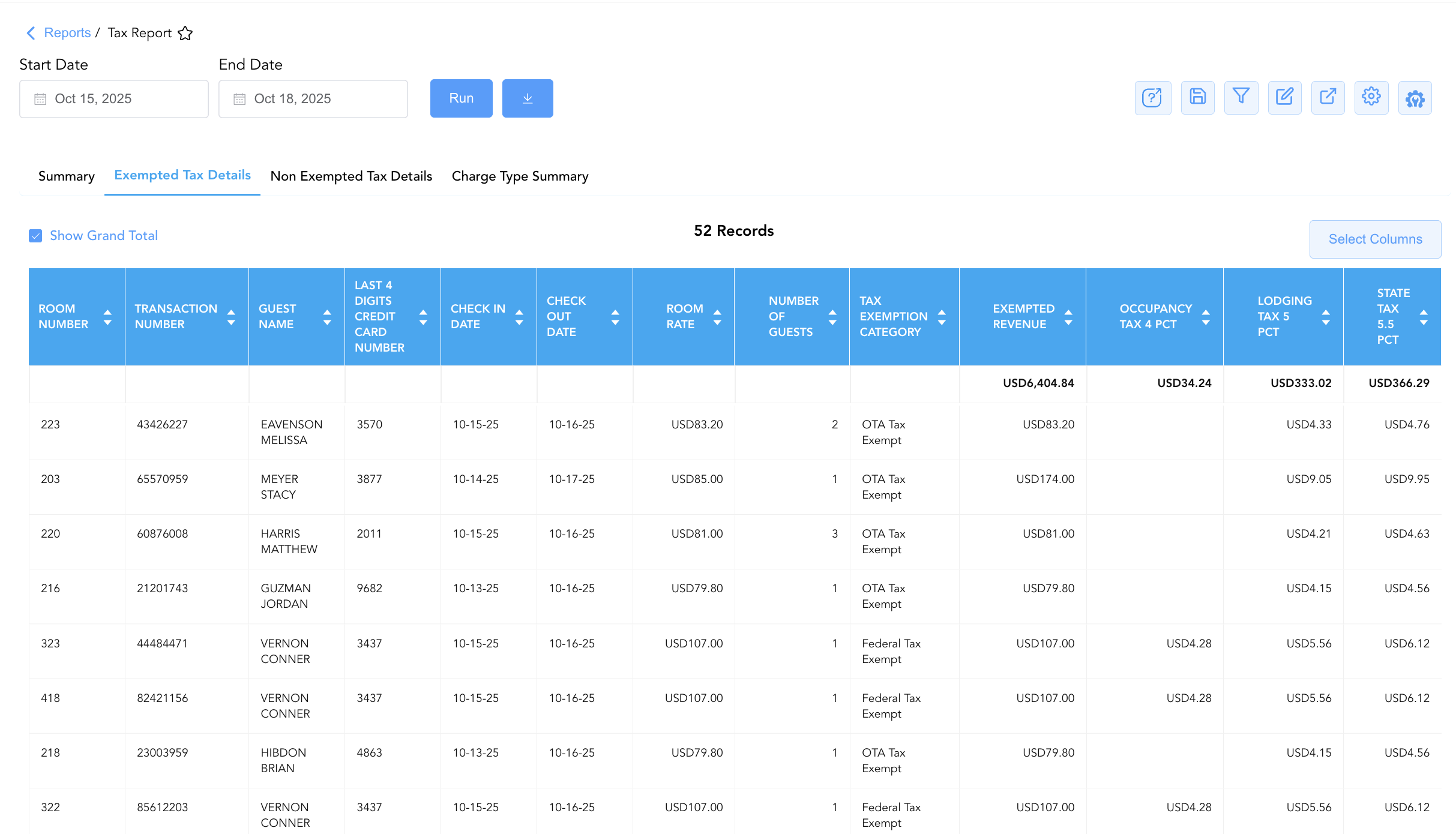
Provides a line-item transaction log of all guest folios and charges that received partial or full tax exemptions. 💡 Note: Available exempted tax categories and tax names are determined by your property's configuration. The below uses example tax types.
-
Primary Use: Auditing tax-exempt guest reservations, validating exemption categories (OTA Tax Exempt, Federal Tax Exempt), inspecting supporting fiscal invoices, and preparing tax authority exemption backup schedules.
-
Key Metrics: Transaction Number, Folio Number, Transaction Type, Room Number, Guest Name, First Name, Last Name, Company Name, Last 4 Digits Credit Card Number, Prefix of Credit Card Number, Number Of Nights, Number of Guests, Adults, Children, Room Rate, Tax Exemption Category, Check In Date, Check Out Date, Exempted Revenue, Fiscal Invoice Number, itemized tax columns (Sales Tax, Occupancy Tax 4 PCT, Lodging Tax 5 PCT, Food Tax, Food N Beverage Tax, State Tax 5.5 PCT, CITY TAX 1.75 PCT).
3. Non Exempted Tax Details
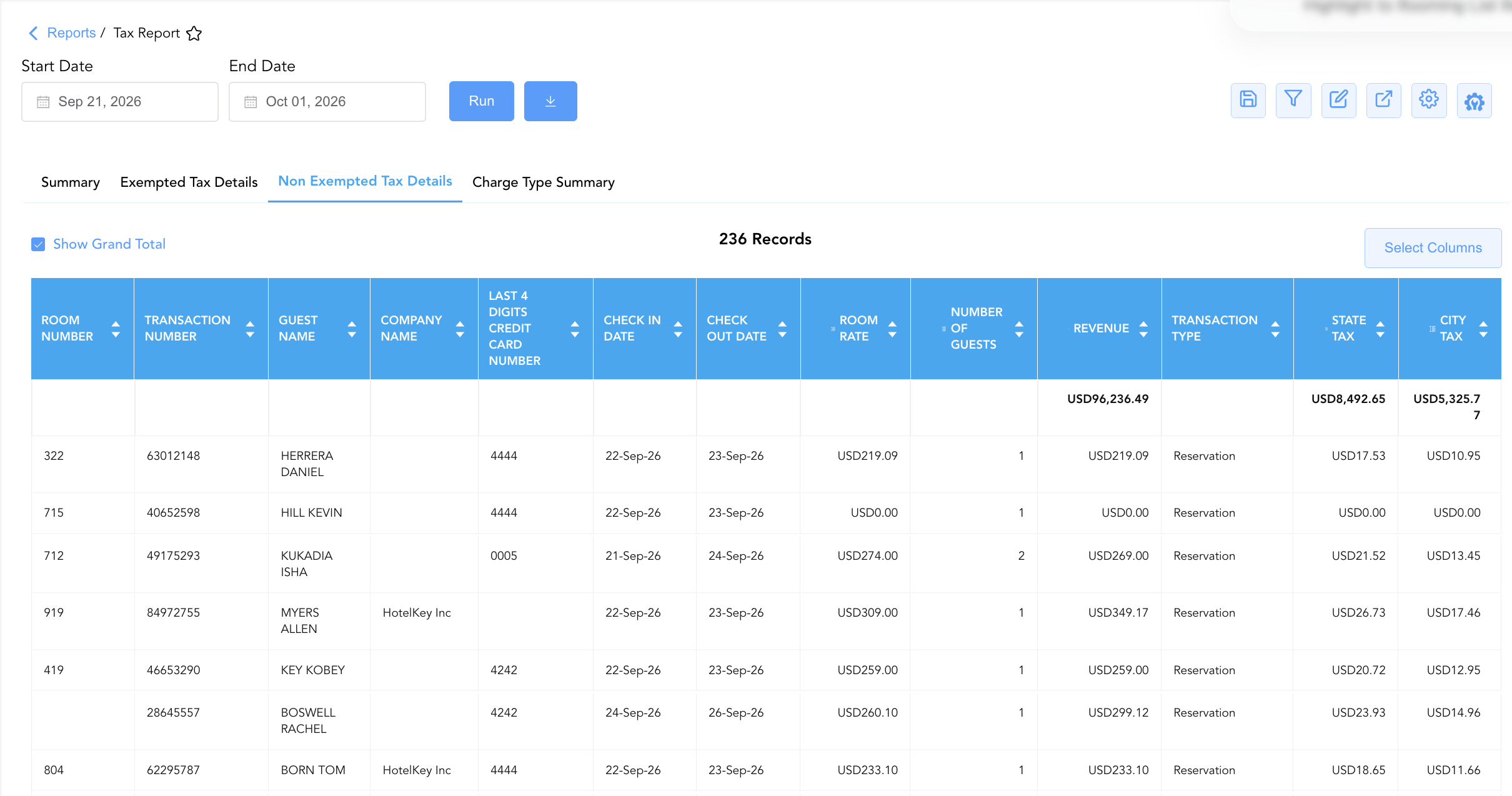
Itemizes all taxable folio transactions that generated statutory tax liabilities during the reporting period. 💡 Note: Available tax names are determined by your property's configuration. The below uses example tax types.
-
Primary Use: Reconciling taxable guest revenue against room night postings, verifying folio tax calculations, and inspecting transaction-level fiscal invoice numbers.
-
Key Metrics: Transaction Number, Folio Number, Transaction Type, Room Number, Guest Name, First Name, Last Name, Company Name, Last 4 Digits Credit Card Number, Prefix of Credit Card Number, Number Of Nights, Number of Guests, Adults, Children, Room Rate, Check In Date, Check Out Date, Revenue, Fiscal Invoice Number, itemized tax columns (e.g., Sales Tax, Occupancy Tax 4 PCT, Lodging Tax 5 PCT, Food Tax, Food N Beverage Tax, State Tax 5.5 PCT, CITY TAX 1.75 PCT).
4. Charge Type Summary
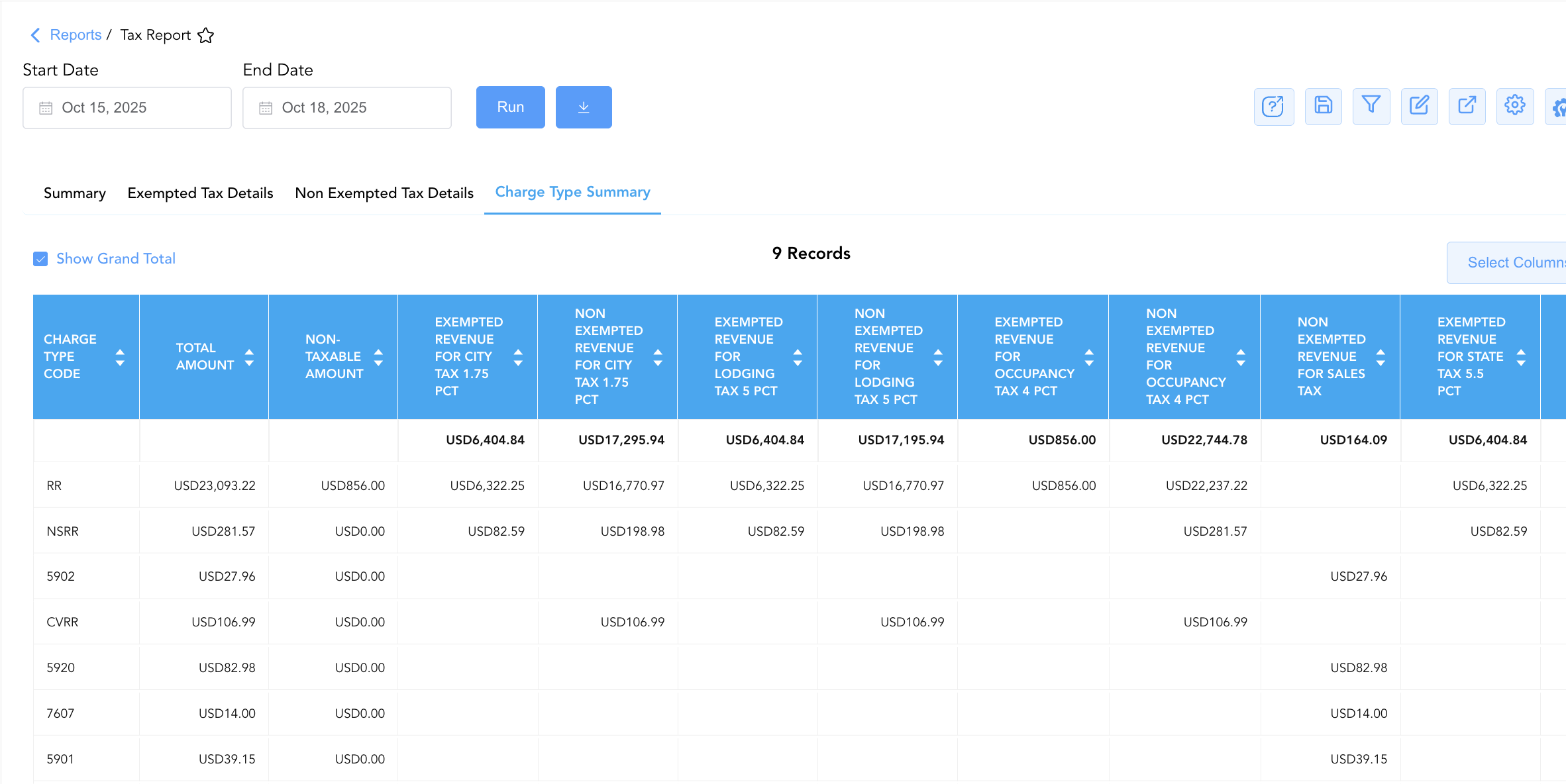
Presents a cross-tabulated matrix breaking down total revenue postings by PMS charge codes and displaying exempt vs. non-exempt revenue totals for each specific tax jurisdiction. 💡 Note: Available exempted tax categories and tax names are determined by your property's configuration. The below uses example tax types.
-
Primary Use: Auditing PMS charge code tax configurations (RR - Accommodation, NSRR - No Show, 1304 - Early Departure, 5901 - Sundry Food, 7607 - Sundry Other), ensuring proper GL revenue routing, and verifying non-taxable revenue items.
-
Key Metrics: Charge Type Code, Total Amount, Exempted/Non-Exempted Revenue for each active tax type (CITY TAX, Food N Beverage Tax, Food Tax, Lodging Tax, Occupancy Tax, Sales Tax, State Tax), Non-Taxable Amount.
Data Dictionary (Dynamic View Columns Across All 4 Sections)
Customize your default view using the Configure (⚙️) icon on the report page. Below is the full data dictionary representing every column available across all four sections of this report:
💡 Tax Calculation Note: In the Summary section, Taxable Payable is calculated as Taxable Payable = Total Revenue - Exempted Revenue. In the detail sections, individual tax columns (State Tax, City Tax, Lodging Tax) represent the exact tax dollar amounts calculated or exempted for that line item.
|
Column Name |
Section(s) Where Column Appears |
Description |
Data Source / System Mapping |
Includes Taxes & Fees? |
|
Tax Name |
Summary |
Human-readable title of the active statutory or local tax definition (e.g., State Tax 5.5 PCT, Lodging Tax 5 PCT). |
Tax Engine Configuration |
N/A |
|
Total Revenue |
Summary |
Gross revenue base subject to or evaluated for the specific tax code. |
|
❌ No |
|
Exempted Revenue |
Summary, Exempted Tax Details |
Revenue base qualifying for tax exemption write-offs. |
|
❌ No |
|
Taxable Payable |
Summary |
Net revenue base subject to statutory tax calculation ( |
|
❌ No |
|
Payable Tax |
Summary |
Final net tax liability dollar amount generated and owed to the tax authority. |
|
🟢 Yes |
|
Exempted Tax |
Summary |
Dollar value of tax liability written off due to guest or group tax exemptions. |
|
🟢 Yes |
|
Transaction Number |
Exempted Tax Details, Non Exempted Tax Details |
Unique system reference identifier assigned to the reservation or charge transaction. |
System Transaction ID |
N/A |
|
Folio Number |
Exempted Tax Details, Non Exempted Tax Details |
Specific PMS folio reference number receiving the revenue and tax posting. |
Folio Engine ID |
N/A |
|
Transaction Type |
Exempted Tax Details, Non Exempted Tax Details |
System reservation or account classification category (e.g., Reservation, House Account). |
System Account Engine |
N/A |
|
Room Number |
Exempted Tax Details, Non Exempted Tax Details |
Physical guest room number assigned to the stay. |
|
N/A |
|
Guest Name |
Exempted Tax Details, Non Exempted Tax Details |
Combined full primary guest name ( |
|
N/A |
|
First Name / Last Name |
Exempted Tax Details, Non Exempted Tax Details |
Individual guest registered first name and last name. |
|
N/A |
|
Company Name |
Exempted Tax Details, Non Exempted Tax Details |
Corporate account, OTA, or direct-bill company associated with the booking (e.g., FEDROOMS, CLC Direct Bill). |
|
N/A |
|
Last 4 Digits Credit Card Number |
Exempted Tax Details, Non Exempted Tax Details |
Masked payment card account digits attached to the folio for audit verification. |
Payment Gateway Token |
N/A |
|
Prefix of Credit Card Number |
Exempted Tax Details, Non Exempted Tax Details |
Card BIN/prefix digits logged during card processing. |
Payment Gateway Token |
N/A |
|
Number Of Nights |
Exempted Tax Details, Non Exempted Tax Details |
Total stay duration in nights associated with the folio. |
|
N/A |
|
Number of Guests / Adults / Children |
Exempted Tax Details, Non Exempted Tax Details |
Registered occupant headcount breakdown for the stay. |
|
N/A |
|
Room Rate |
Exempted Tax Details, Non Exempted Tax Details |
Daily base room rate posted to the folio. |
|
❌ No |
|
Tax Exemption Category |
Exempted Tax Details |
Approved exemption reason classification (e.g., OTA Tax Exempt, Federal Tax Exempt). |
Tax Exemption Config |
N/A |
|
Check In Date / Check Out Date |
Exempted Tax Details, Non Exempted Tax Details |
Registered arrival and departure dates for the reservation. |
|
N/A |
|
Revenue |
Non Exempted Tax Details |
Base net revenue amount subject to tax postings for the transaction. |
Transaction Ledger Engine |
❌ No |
|
Fiscal Invoice Number |
Exempted Tax Details, Non Exempted Tax Details |
Official legal fiscal invoice number generated for tax authority compliance. |
Fiscal Integration Engine |
N/A |
|
Sales Tax / Occupancy Tax / Lodging Tax / Food Tax / Food N Beverage Tax / State Tax / CITY TAX |
Exempted Tax Details, Non Exempted Tax Details |
Specific tax dollar amounts accrued or exempted for each statutory tax code column. |
Tax Calculation Engine |
🟢 Yes |
|
Charge Type Code |
Charge Type Summary |
Unique transaction code used when posting charges to folios (e.g., |
Transaction Code Setup |
N/A |
|
Total Amount |
Charge Type Summary |
Gross cumulative revenue posted under the specific charge code. |
|
❌ No |
|
Exempted / Non Exempted Revenue (by Tax Code) |
Charge Type Summary |
Cross-tabulated revenue totals showing tax-exempt vs. taxable portions for each tax rule. |
Tax Engine Mapping |
❌ No |
|
Non-Taxable Amount |
Charge Type Summary |
Revenue portion posted under charge codes that are fully non-taxable. |
Tax Engine Mapping |
❌ No |
Customization & Platform Features
User & Property Preferences
-
Personal Preference: Tailor your individual view by hiding or dragging columns. Your preferences save automatically for future sessions.
-
Property Defaults: System Admins can configure standard default layouts across all property users to streamline operational reporting. To maximize audit efficiency, group the columns into the below logical blocks:
-
Section 1: Summary
-
💡 Note: Available tax names are determined by your property's configuration. The below uses example tax types.
-
Tax Classification (Col 1):
Tax Name -
Revenue Base Breakdown (Cols 2–4):
Total Revenue|Exempted Revenue|Taxable Payable -
Tax Settlement & Liabilities (Cols 5–6):
Payable Tax|Exempted Tax
-
-
-
Section 2: Exempted Tax Details:
-
💡 Note: Available exempted tax categories and tax names are determined by your property's configuration. The below uses example tax types.
-
Room & Account Anchors (Cols 1–4):
Room Number|Transaction Number|Folio Number|Fiscal Invoice Number -
Guest & Corporate Context (Cols 5–10):
Guest Name|First Name|Last Name|Company Name|Last 4 Digits Credit Card Number|Prefix of Credit Card Number -
Stay Window & Occupancy Parameters (Cols 11–17):
Check In Date|Check Out Date|Number Of Nights|Room Rate|Number of Guests|Adults|Children -
Tax Exemption Classification & Revenue (Cols 18–19):
Tax Exemption Category|Exempted Revenue -
Exempted Tax Jurisdiction Breakdown (Cols 20–27):
CITY TAX 1.75 PCT|Occupancy Tax 4 PCT|Lodging Tax 5 PCT|State Tax 5.5 PCT|Sales Tax|Food Tax|Food N Beverage Tax|Transaction Type
-
-
-
Section 3: Non Exempted Tax Details:
-
💡 Note: Available tax names are determined by your property's configuration. The below uses example tax types.
-
Room & Account Anchors (Cols 1–4):
Room Number|Transaction Number|Folio Number|Fiscal Invoice Number -
Guest & Corporate Context (Cols 5–10):
Guest Name|First Name|Last Name|Company Name|Last 4 Digits Credit Card Number|Prefix of Credit Card Number -
Stay Window & Occupancy Parameters (Cols 11–17):
Check In Date|Check Out Date|Number Of Nights|Room Rate|Number of Guests|Adults|Children -
Taxable Revenue Anchor (Col 18):
Revenue -
Assessed Tax Jurisdiction Breakdown (Cols 19–26):
CITY TAX 1.75 PCT|Occupancy Tax 4 PCT|Lodging Tax 5 PCT|State Tax 5.5 PCT|Sales Tax|Food Tax|Food N Beverage Tax|Transaction Type
-
-
-
Section 4: Charge Type Summary:
-
💡 Note: Available tax names are determined by your property's configuration. The below uses example tax types.
-
GL Charge Identifier & Total Gross Amount (Cols 1–2):
Charge Type Code|Total Amount -
Non-Taxable Revenue Bucket (Col 3):
Non-Taxable AmountJurisdiction Revenue Applicability Breakdown (Cols 4–17):
-
CITY TAX 1.75 PCT:
Exempted Revenue|Non Exempted Revenue -
Occupancy Tax 4 PCT:
Exempted Revenue|Non Exempted Revenue -
Lodging Tax 5 PCT:
Exempted Revenue|Non Exempted Revenue -
State Tax 5.5 PCT:
Exempted Revenue|Non Exempted Revenue -
Sales Tax:
Exempted Revenue|Non Exempted Revenue -
Food Tax:
Exempted Revenue|Non Exempted Revenue -
Food N Beverage Tax:
Exempted Revenue|Non Exempted Revenue
-
-
-
Report Toolbar & Quick Actions
Use the top-right toolbar icons on the report page to manage and export your data view:
|
Icon |
Action / Feature |
Description |

|
Knowledge Article |
Opens the knowledge base article to learn how to interpret this report. |

|
Saved Views |
Saves your column filtering, sorting, and highlight preferences so you can easily reload your custom view later without reconfiguring the report. |

|
Filter |
Opens filter controls to isolate specific data within a column based on your selected criteria. |

|
Highlight |
Highlights column values in a designated color based on selected conditions. |

|
Export |
Exports and downloads the report in various formats (Excel, PDF, CSV) for offline analysis or printing. |

|
Configure |
Opens column selection controls to toggle visibility, reorder columns, or hide rows with all zeros. |

|
Additional Configuration |
Provides advanced report configuration and display formatting options to customize data presentation. |
Advanced Controls
-
Exporting & Tax Authority Filings: Download in Excel or PDF format to support monthly state/city tax remittance filings, external auditor reviews, and general ledger tax account balancing.
-
Filtering: Filter data by specific Tax Exemption Category, Company Name, or non-zero tax amounts.
-
Highlighting (Conditional Formatting): Apply custom rules to automatically highlight high-value tax exemption write-offs or non-exempt revenue transactions.
🔗 Related Reports & Next Steps
Within 🏛️ Taxes & Expenses:
-
Active Taxes & Charge Types – Audit master tax definitions, percentage rates, flat fee rules, and charge code tax-inclusivity settings.
-
Tax Summary – Review daily date-by-date gross tax accruals, adjustments, exemptions, and net tax liabilities.
Cross-Pillar Deep Dives:
-
⚖️ Ledgers & Trial Balance: To verify how net tax liabilities post into general ledger tax control accounts during night audit close, review Trial Balance or Day End Summary.
-
💳 Payments & Transactions: To inspect specific line-item folio charges and payments that generated statutory taxes, cross-reference All Transactions or Payment Activity.