
Top Accounts Report Overview
Parent Hub: 🤝 Sales, Groups & Events Reports
Category: 🏢 Corporate Accounts
Target Roles: Directors of Sales, Corporate Account Managers, Revenue Managers, General Managers, Hotel Controllers, Regional Sales Leads
Key Value: Evaluate top-producing corporate account profiles, analyze volume and financial yields across primary and local market segments, measure account ADR performance, and audit account-driven revenue generation.
Executive Summary
The Top Accounts Report is an essential corporate sales dashboard, revenue performance matrix, and key account ranking document within the 🏢 Corporate Accounts category of the 🤝 Sales, Groups & Events Reports hub. Designed to deliver comprehensive multi-dimensional visibility over top-producing B2B accounts, it ranks and evaluates corporate client performance across reservation volumes, stay metrics, market segmentation, and financial yield.
-
By organizing commercial production data into 3 defined report sections: Top Accounts, Top Accounts by Market Segment, and Top Accounts By Local Market Segment, this report enables sales directors, corporate account managers, and revenue leaders to evaluate master account performance (
Top Accounts), analyze channel distribution across major market classifications (Top Accounts by Market Segment), and drill down into granular property-defined sub-segments (Top Accounts By Local Market Segment). It correlates corporate client profiles (Company Name,Company Type) and market classifications (Market Segment Name,Market Segment Code,Local Market Segment,Local Market Segment Code) with physical booking volumes (Reservations,In House,Checked Out,No Show,Cancelled,Room Nights,Guests), rate performance (Average Room Rate,Average Gross Room Rate), monetary revenues (Gross Room Revenue,Room Revenue,F&B Revenue,Other Revenue,Total Revenue), and authorized credit lines (Credit Limit).
Key Capabilities
-
Three-Section Multi-Dimensional Ranking Structure: Evaluates master account totals (
Top Accounts) alongside primary market segment breakdowns (Top Accounts by Market Segment) and local market sub-segment distribution (Top Accounts By Local Market Segment). -
Comprehensive Volume & Reservation Life-Cycle Audit: Itemizes total reservations (
Reservations) by status—in-house (In House), departures (Checked Out), unfulfilled stays (No Show), and cancellations (Cancelled)—plus total room night volume (Room Nights). -
Multi-Category Revenue Analysis: Captures gross accommodation revenue (
Gross Room Revenue), net room revenue (Room Revenue), food & beverage charges (F&B Revenue), and incidental spend (Other Revenue) to calculate total financial yield (Total Revenue). -
Rate Yield & ADR Benchmarking: Computes net Average Room Rate (
Average Room Rate) and gross Average Gross Room Rate (Average Gross Room Rate) to audit rate integrity across key accounts. -
Credit Limit Alignment: Integrates authorized direct-bill thresholds (
Credit Limit) in Section 1 to align account production volume with credit risk management.
Report Views & Functional Breakdown
The Top Accounts Report presents key account performance data across 3 defined sections:
┌────────────────────────────────────────────────────────────────────────┐
│                         TOP ACCOUNTS REPORT                            │
├────────────────────────────────────────────────────────────────────────┤
│                       3 Defined Report Sections                        │
├──────────────────────────┬──────────────────────────┬──────────────────┤
│ 1. Top Accounts          │ 2. Top Accounts by       │ 3. Top Accounts  │
│    (Master Performance)  │    Market Segment        │    By Local Seg. │
└──────────────────────────┴──────────────────────────┴──────────────────┘
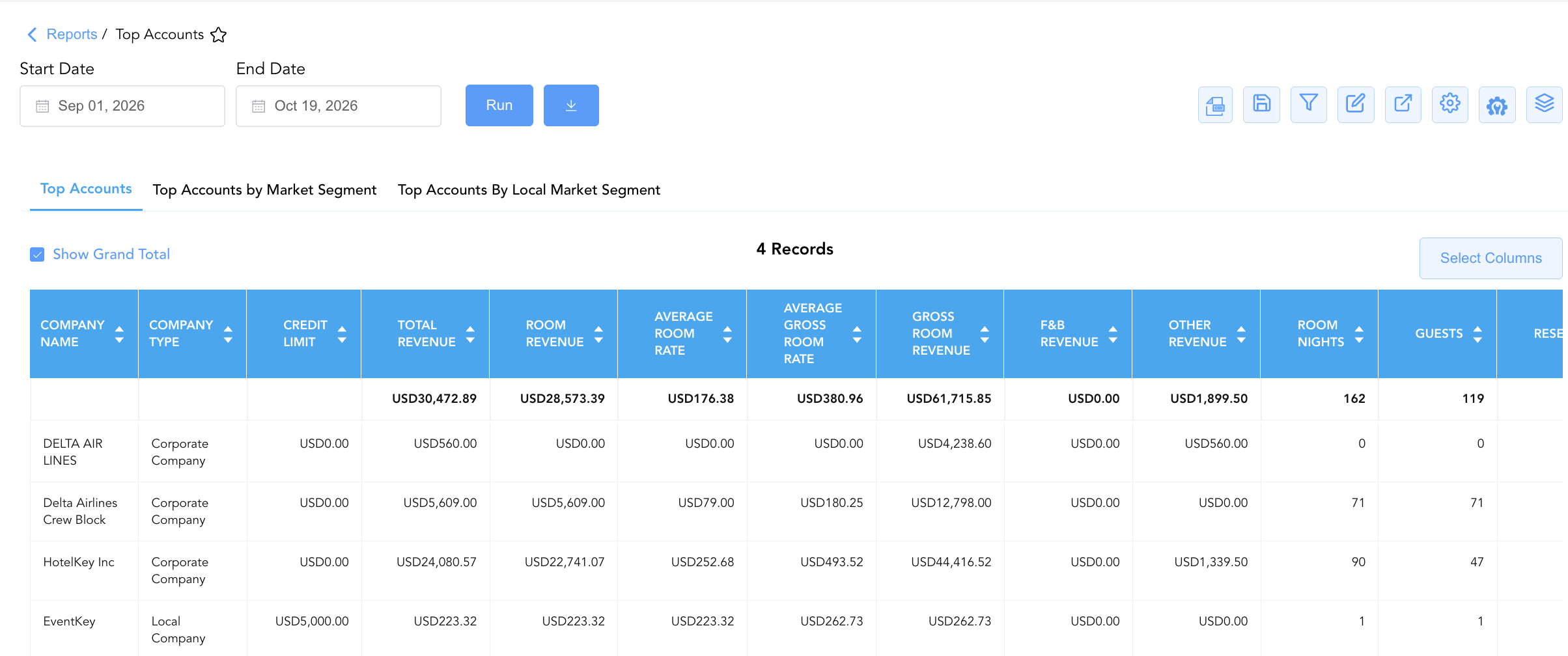
1. Top Accounts Section (Master Performance)
Monitors overall production, stay metrics, total revenue yield, and direct-bill credit thresholds for top corporate client accounts.
-
Primary Use: Identifying top-revenue corporate accounts, evaluating overall client production during contract renewal negotiations, and auditing direct-bill credit limits.
-
Key Metrics: Company Name, Company Type, Reservations, Room Nights, Average Room Rate, Gross Room Revenue, Room Revenue, Total Revenue, Credit Limit.
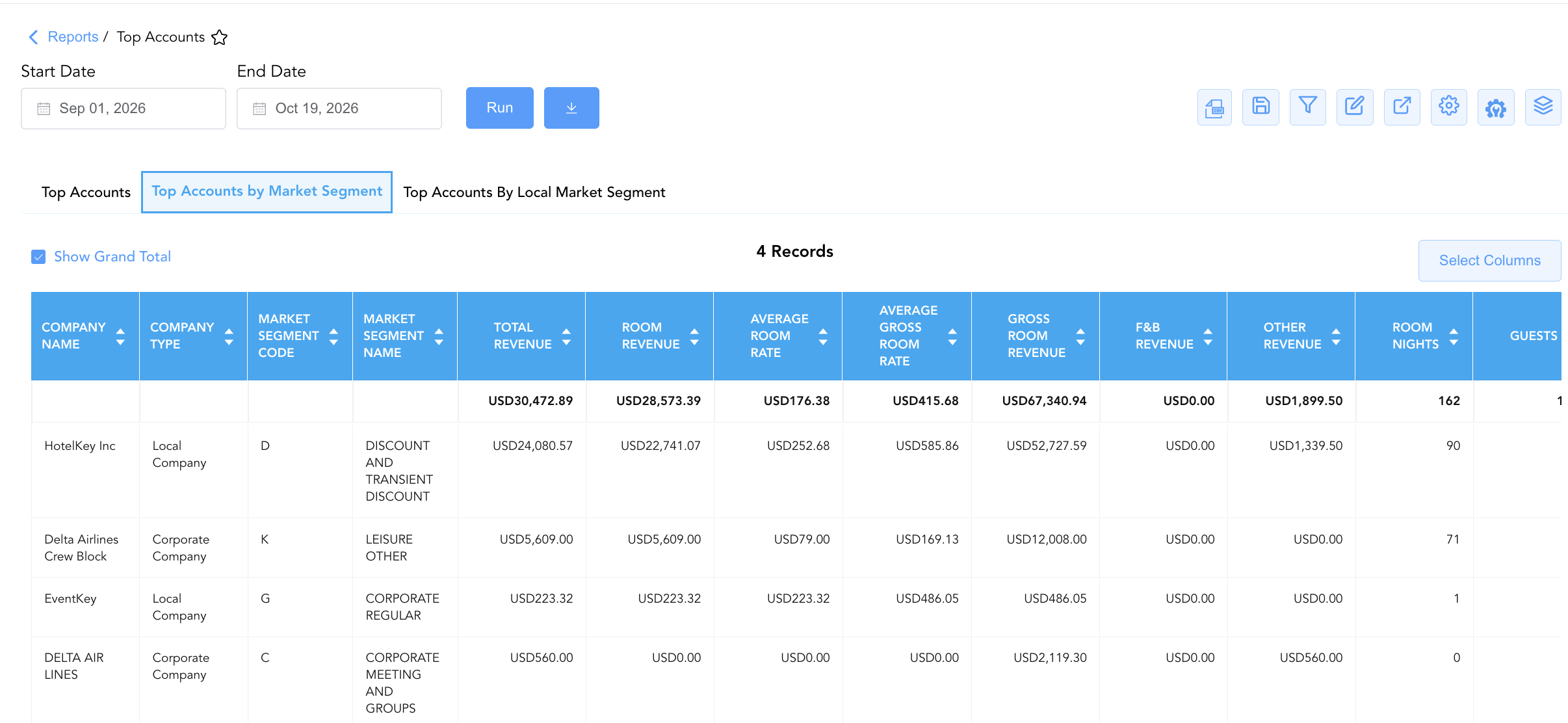
2. Top Accounts by Market Segment Section
Tracks corporate account production disaggregated by primary brand/property market segment classifications.
-
Primary Use: Analyzing corporate client volume distribution across major market channels (e.g., Corporate Regular, Corporate Meeting, Transient Discount).
-
Key Metrics: Company Name, Company Type, Market Segment Name, Market Segment Code, Reservations, Room Nights, Average Room Rate, Room Revenue, Total Revenue.
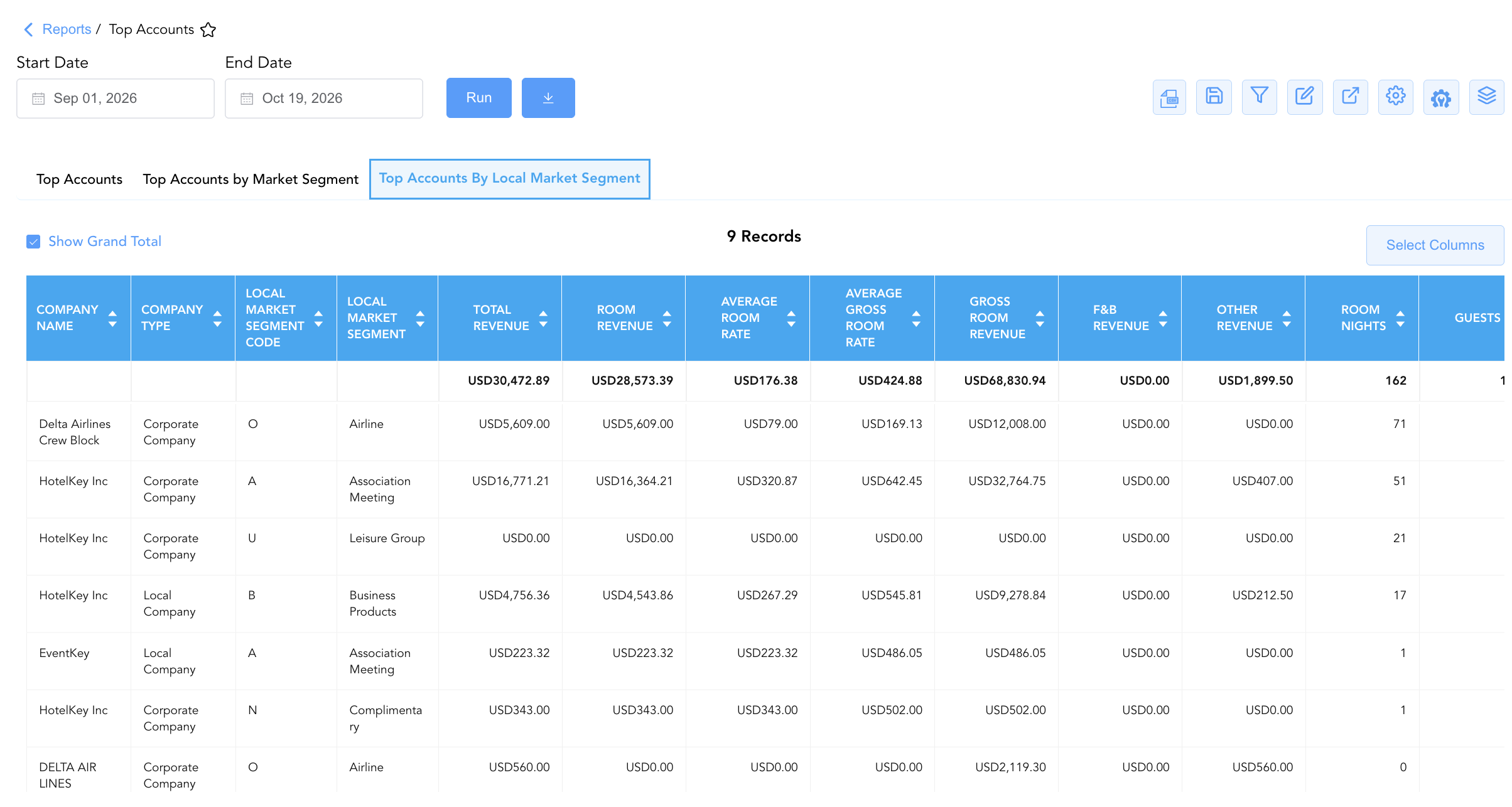
3. Top Accounts By Local Market Segment Section
Breaks down corporate account production disaggregated by custom property-defined local market sub-segments.
-
Primary Use: Drilling down into niche local market sub-channels (e.g., Airline, Association Meeting, Business Products, Leisure Group) to evaluate targeted sales strategies.
-
Key Metrics: Company Name, Company Type, Local Market Segment, Local Market Segment Code, Reservations, Room Nights, Average Room Rate, Room Revenue, Total Revenue.
Data Dictionary (Dynamic View Columns)
Customize your default view using the Configure (⚙️) icon on the report page. Below is the full data dictionary representing all 21 unique columns available across the 3 report sections, sorted in alphabetical order by column name:
💰 Financial Posting Logic: Figures in
Room Revenue,F&B Revenue,Other Revenue, andTotal Revenuereflect net charges posted for reservations associated with the corporate account profile.Average Room Rateis dynamically calculated as Room Revenue ÷ Room Nights.
|
Column Name |
Section Applicability |
Description |
Data Source / System Mapping |
Includes Taxes & Fees? |
|
Average Gross Room Rate |
All Sections |
Calculated average gross room rate prior to tax adjustments (Gross Room Revenue ÷ div Room Nights). |
Calculated: Gross Yield |
🟢 Yes |
|
Average Room Rate |
All Sections |
Calculated average net room rate yield per night (Room Revenue ÷ Room Nights. |
Calculated: Net Yield |
🟢 Yes |
|
Cancelled |
All Sections |
Numerical count of cancelled reservations linked to the corporate account profile. |
Reservation System > Cancellations |
N/A |
|
Checked Out |
All Sections |
Numerical count of completed guest departure reservations. |
Reservation System > Departures |
N/A |
|
Company Name |
All Sections |
Official business name of the corporate account profile. |
Account Master > Profile Name |
N/A |
|
Company Type |
All Sections |
Classification category of the corporate profile (e.g., |
Account Master > Account Type |
N/A |
|
Credit Limit |
Section 1 |
Authorized direct-bill credit limit threshold configured for the account. |
Corporate Profile > Credit Line |
❌ No |
|
F&B Revenue |
All Sections |
Total net Food & Beverage charges posted for reservations under the corporate profile. |
Sales Ledger > F&B Charges |
🟢 Yes |
|
Gross Room Revenue |
All Sections |
Total gross accommodation charges generated prior to net adjustments. |
Sales Ledger > Gross Room Charges |
🟢 Yes |
|
Guests |
All Sections |
Total registered guest headcount across account reservations. |
Reservation System > Guest Count |
N/A |
|
In House |
All Sections |
Numerical count of currently active in-house guest reservations. |
Reservation System > Active Stays |
N/A |
|
Local Market Segment |
Section 3 |
Descriptive name of the local market segment code assigned to the reservation. |
PMS Setup > Local Segment Name |
N/A |
|
Local Market Segment Code |
Section 3 |
Alphanumeric code representing the local market sub-segment. |
PMS Setup > Local Segment Code |
N/A |
|
Market Segment Code |
Section 2 |
Alphanumeric code representing the primary market segment. |
PMS Setup > Market Segment Code |
N/A |
|
Market Segment Name |
Section 2 |
Descriptive name of the primary market segment classification. |
PMS Setup > Market Segment Name |
N/A |
|
No Show |
All Sections |
Numerical count of unfulfilled no-show reservations linked to the account. |
Reservation System > No-Shows |
N/A |
|
Other Revenue |
All Sections |
Total net ancillary and incidental revenue posted for account reservations. |
Sales Ledger > Ancillary Charges |
🟢 Yes |
|
Reservations |
All Sections |
Total numerical count of reservations generated by the corporate account. |
Reservation System > Total Bookings |
N/A |
|
Room Nights |
All Sections |
Total cumulative room nights occupied or reserved by the account. |
Reservation System > Occupied Nights |
N/A |
|
Room Revenue |
All Sections |
Total net room revenue generated by the account profile. |
Sales Ledger > Net Room Revenue |
🟢 Yes |
|
Total Revenue |
All Sections |
Total cumulative financial yield generated across all posting categories (Room Revenue + F&B Revenue + Other Revenue). |
Calculated: Net Total Spend |
🟢 Yes |
Customization & Platform Features
User & Property Preferences
-
Personal Preference: Tailor your individual view by hiding or dragging columns. Your preferences save automatically for future sessions.
-
Property Defaults: System Admins can configure standard default layouts across all property users to streamline operational reporting. To maximize audit efficiency, group the columns into the below logical blocks:
-
Section 1: Top Accounts
-
Corporate Identification & Credit Limits (Cols 1–3):
Company Name|Company Type|Credit Limit -
Revenue Summary & Rates (Cols 4–7):
Total Revenue|Room Revenue|Average Room Rate|Average Gross Room Rate -
Revenue Stream Breakdown (Cols 8–10):
Gross Room Revenue|F&B Revenue|Other Revenue -
Stay Volume & Occupancy Metrics (Cols 11–13):
Room Nights|Guests|Reservations -
Booking Status Lifecycle Breakdown (Cols 14–17):
Checked Out|In House|Cancelled|No Show
-
-
Section 2: Top Accounts by Market Segment
-
Corporate & Market Segment Identification (Cols 1–4):
Company Name|Company Type|Market Segment Code|Market Segment Name -
Revenue Summary & Rates (Cols 5–8):
Total Revenue|Room Revenue|Average Room Rate|Average Gross Room Rate -
Revenue Stream Breakdown (Cols 9–11):
Gross Room Revenue|F&B Revenue|Other Revenue -
Stay Volume & Occupancy Metrics (Cols 12–14):
Room Nights|Guests|Reservations -
Booking Status Lifecycle Breakdown (Cols 15–18):
Checked Out|In House|Cancelled|No Show
-
-
Section 3: Top Accounts By Local Market Segment
-
Corporate & Local Segment Identification (Cols 1–4):
Company Name|Company Type|Local Market Segment Code|Local Market Segment -
Revenue Summary & Rates (Cols 5–8):
Total Revenue|Room Revenue|Average Room Rate|Average Gross Room Rate -
Revenue Stream Breakdown (Cols 9–11):
Gross Room Revenue|F&B Revenue|Other Revenue -
Stay Volume & Occupancy Metrics (Cols 12–14):
Room Nights|Guests|Reservations -
Booking Status Lifecycle Breakdown (Cols 15–18):
Checked Out|In House|Cancelled|No Show
-
-
Report Toolbar & Quick Actions
Use the top-right toolbar icons on the report page to manage and export your data view:
|
Icon |
Action / Feature |
Description |

|
Knowledge Article |
Opens the knowledge base article to learn how to interpret this report. |

|
Background Export |
Allows users to download up to 365 days of data directly to their computer in CSV format. |

|
Saved Views |
Saves your column filtering, sorting, and highlight preferences so you can easily reload your custom view later without reconfiguring the report. |

|
Filter |
Opens filter controls to isolate specific data within a column based on your selected criteria. |

|
Highlight |
Highlights column values in a designated color based on selected conditions. |

|
Export |
Exports and downloads the report in various formats (Excel, PDF, CSV) for offline analysis or printing. |

|
Configure |
Opens column selection controls to toggle visibility, reorder columns, or hide rows with all zeros. |

|
Additional Configuration |
Provides advanced report configuration and display formatting options to customize data presentation. |

|
Group By |
Summarize and group report data dynamically in real time. |
Interactive Visualizations & Grouping Controls
-
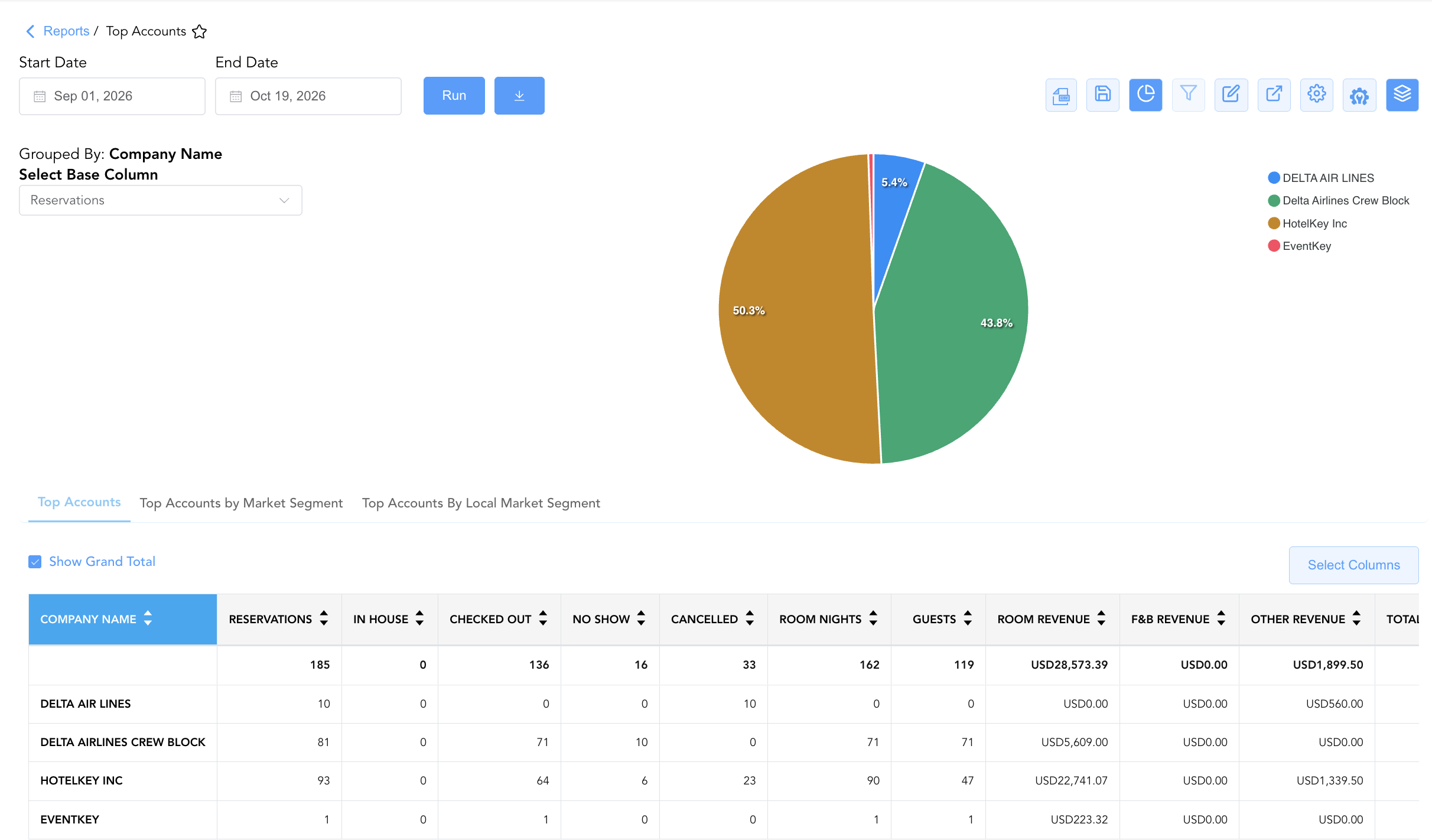
Group By & Pie Chart Visualization: The Top Accounts report features an interactive pie chart to help analyze corporate account contributions and market segment production distributions. Users can toggle or expand/collapse the Company Name or Company type sections to analyze macro account totals or segment-level breakdowns independently. By selecting a metric from the Select Base Column dropdown menu—such as Reservations, In House, Checked Out, No Show, Cancelled, Room Nights, Guests, or Average Room Rate—the chart dynamically renders percentage share breakdowns accompanied by an interactive color-coded legend.
Advanced Controls
-
Contract Renewal Reviews: Run the report at year-end or contract expiration to evaluate if top accounts fulfilled negotiated room night commitments (
Room Nights) and rate expectations (Average Room Rate). -
Filtering: Filter Section 2 or Section 3 by specific market codes to evaluate corporate account performance within specific sales channels.
-
Highlighting (Conditional Formatting): Apply custom rules to automatically highlight high-yield accounts (
Total Revenue > $10,000), accounts with high cancellation ratios (Cancelled > 10), or low ADR clients.
🔗 Related Reports & Next Steps
Within 🤝 Sales, Groups & Events Reports & 🏢 Corporate Accounts:
-
Company Analysis – Monthly and annual corporate account revenue and stay statistics breakdown.
-
Company And Travel Agent Reservations – Volume, revenue, and ADR production matrix across corporate clients and travel agencies.
-
Company Details – Master direct-bill account setups, credit limits, and contact information.
Cross-Pillar Deep Dives:
-
🛎️ Front Desk & Guest Services: Reconcile top account arrivals (
In House) with In House Guest Balances to monitor active direct-bill balances. -
📊 Financial & Revenue Management: Cross-reference top account room revenues (
Room Revenue) with monthly financial trial balances and booking pace.