
Travel Agent Checkout
Travel Agent Checkout Report Overview
Parent Hub: 🤝 Sales, Groups & Events Reports
Category: 🏢 Corporate Accounts
Target Roles: Travel Agency Commission Managers, Accounts Payable Supervisors, Hotel Controllers, Directors of Sales, Revenue Managers, General Managers
Key Value: Monitor checked-out travel agency reservations, audit commissionable room and package revenues, calculate estimated agency commission payouts, verify IATA account details, and reconcile travel agency commission status codes across property operations.
Executive Summary
The Travel Agent Checkout Report is a vital travel agency commission audit, accounts payable reconciliation, and agency production document within the 🏢 Corporate Accounts category of the 🤝 Sales, Groups & Events Reports hub. Designed to deliver complete financial transparency over checked-out reservations booked through third-party travel agencies and Global Distribution System (GDS) intermediaries, it itemizes guest stay details, revenue breakdowns, rate plan codes, and calculated commission liabilities across specified departure windows.
-
By organizing commercial checkout data into 3 defined report sections: Details, Summary, and Summary By Status, this report enables finance teams, travel agency managers, and hotel controllers to evaluate individual guest reservation folios (
Details), review aggregated agency-level commission totals (Summary), and audit total commission liabilities by settlement status (Summary By Status). It correlates agency profile identifiers (IATA Number,Travel Agent Company Name,Address) with guest reservation data (Guest Name,First Name,Last Name,Confirmation No,Arrival Date,Nights,Departure Date,Rate Plan,Reservation Status), monetary revenue postings (Package Elements,Average Room Rate,Total Room And Package Revenue,Room Revenue,Package Revenue,Tax), and commission settlement fields (Commission Rate,Estimated Commission,Status).
Key Capabilities
-
Three-Section Multi-Tier Audit Structure: Evaluates individual reservation checkouts (
Details) alongside agency-level totals (Summary) and status-based commission summaries (Summary By Status). -
Granular IATA & Agency Profile Audit: Maps every checked-out reservation to its registered agency name (
Travel Agent Company Name), mailing address (Address), and unique IATA/ARC identifier (IATA Number). -
Revenue & Package Component Breakdown: Disaggregates gross room and package revenue (
Total Room And Package Revenue) into net lodging charges (Room Revenue), bundled package elements (Package Elements,Package Revenue), and applied lodging taxes (Tax). -
Commission Calculation & Rate Verification: Applies contracted commission percentage rates (
Commission Rate, e.g., 10%, 0%) to eligible room revenue to calculate accurate commission payouts (Estimated Commission). -
Reconciliation Status Tracking: Categorizes payouts by commission settlement status (
Status, e.g.,NCfor Not Commissioned / Non-Commissionable,NOfor Non-Onyx,Cfor Commissioned) to streamline monthly clearinghouse processing.
Report Views & Functional Breakdown
The Travel Agent Checkout Report presents agency checkout and commission data across 3 defined sections:
┌────────────────────────────────────────────────────────────────────────┐
│                   TRAVEL AGENT CHECKOUT REPORT                         │
├────────────────────────────────────────────────────────────────────────┤
│                       3 Defined Report Sections                        │
├──────────────────────────┬──────────────────────────┬──────────────────┤
│ 1. Details Section       │ 2. Summary Section       │ 3. Summary By    │
│    (Individual Folios)   │    (Agency Totals)       │    Status Section│
└──────────────────────────┴──────────────────────────┴──────────────────┘
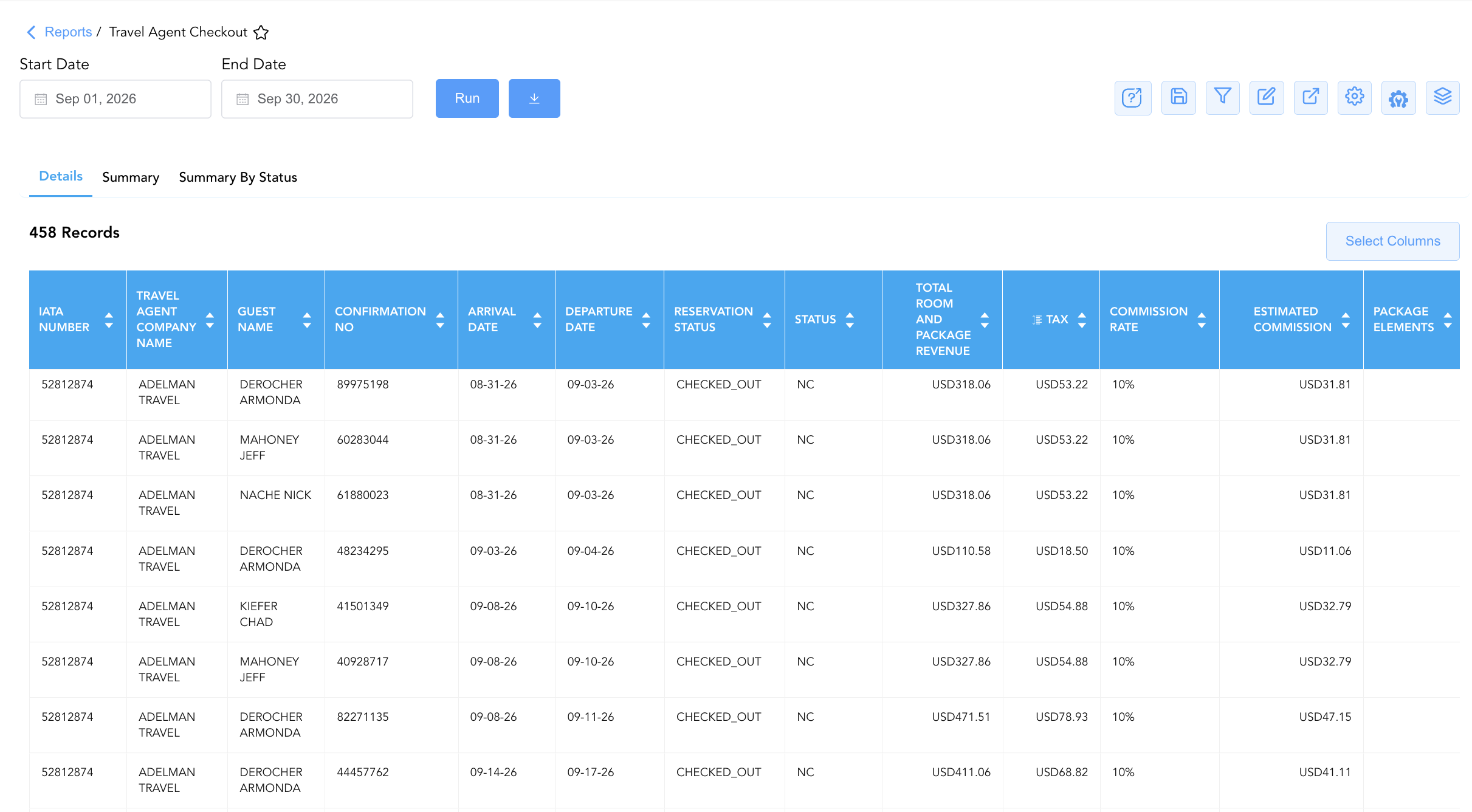
1. Details Section (Individual Folios)
Monitors individual checked-out guest reservations booked via travel agencies, detailing guest names, confirmation numbers, stay dates, attached rate plans, room/package revenue postings, taxes, and calculated commission amounts.
-
Primary Use: Auditing specific guest stay folios, verifying rate code commissionability, and resolving individual agency commission inquiries.
-
Key Metrics: IATA Number, Travel Agent Company Name, Guest Name, Confirmation No, Arrival Date, Nights, Departure Date, Rate Plan, Average Room Rate, Total Room And Package Revenue, Room Revenue, Package Revenue, Tax, Commission Rate, Estimated Commission, Status.
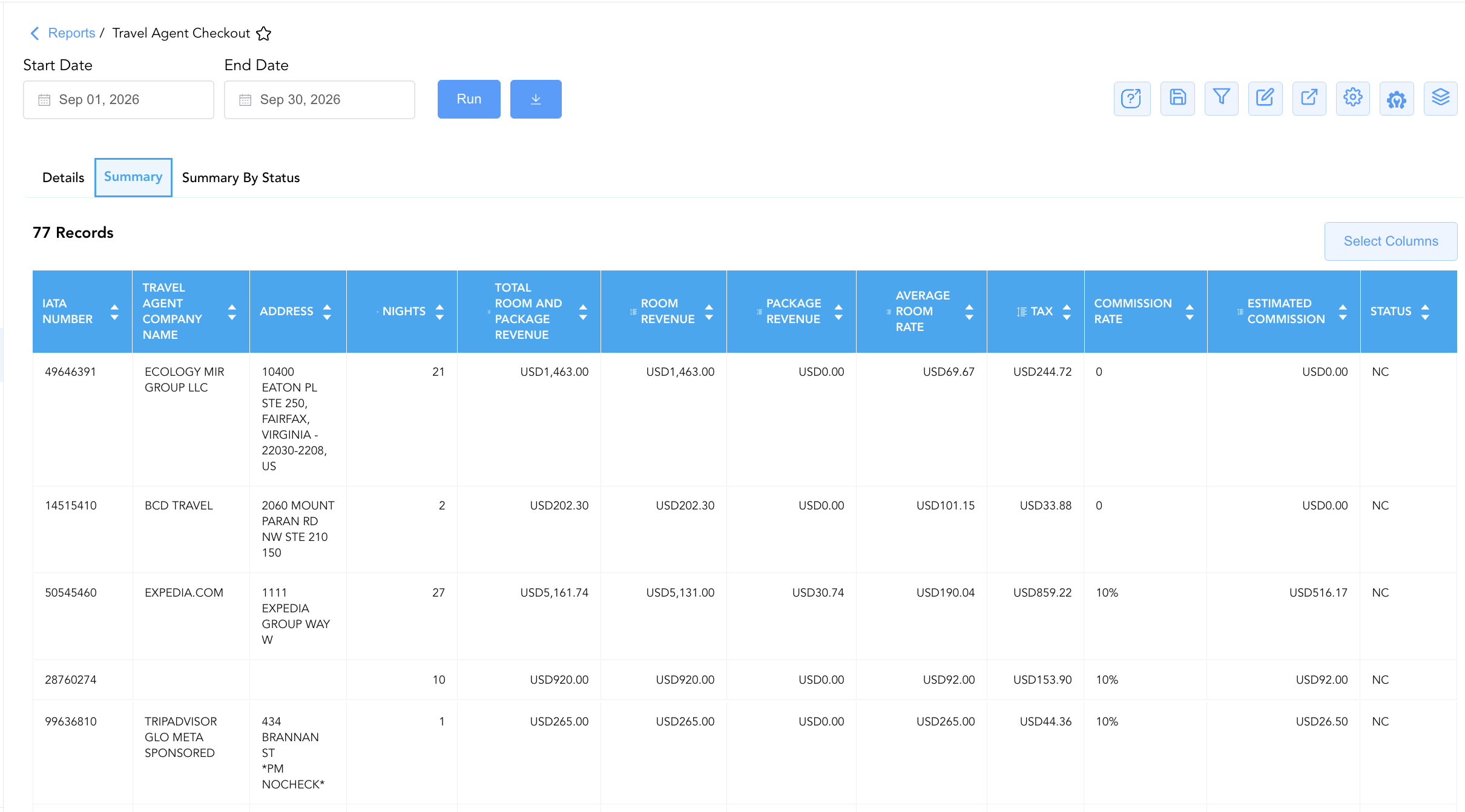
2. Summary Section (Agency Totals)
Aggregates total checked-out room nights, revenue postings, tax amounts, and cumulative estimated commission liabilities grouped by travel agency profile.
-
Primary Use: Reviewing total commission liabilities per agency, preparing monthly commission payout files, and auditing top-producing travel agencies.
-
Key Metrics: IATA Number, Travel Agent Company Name, Address, Total Room And Package Revenue, Room Revenue, Package Revenue, Average Room Rate, Nights, Tax, Commission Rate, Estimated Commission, Status.
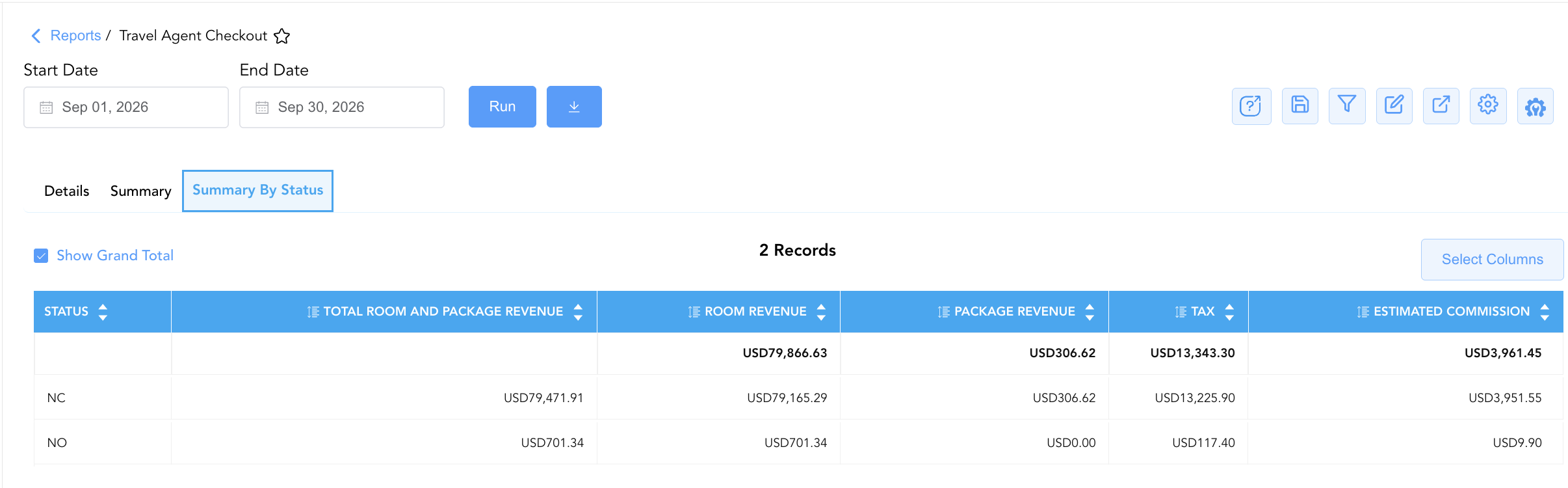
3. Summary By Status Section
Summarizes total room and package revenue, net room revenue, package revenue, taxes, and estimated commission amounts categorized by commission settlement status codes.
-
Primary Use: Auditing total property commission liabilities across settlement categories (e.g., Onyx clearinghouse vs. direct payout vs. non-commissionable rates) prior to financial period close.
-
Key Metrics: Status, Total Room And Package Revenue, Room Revenue, Package Revenue, Tax, Estimated Commission.
Data Dictionary (Dynamic View Columns)
Customize your default view using the Configure (⚙️) icon on the report page. Below is the full data dictionary representing all 21 unique columns available across the 3 report sections, sorted in alphabetical order by column name:
💰 Financial Posting Logic: Figures in
Room Revenue,Package Revenue,Tax, andTotal Room And Package Revenuereflect net posted charges for checked-out reservations.Estimated Commissionis dynamically calculated as Eligible Room Revenue x Commission Rate.
|
Column Name |
Section Applicability |
Description |
Data Source / System Mapping |
Includes Taxes & Fees? |
|
Address |
Sections 1, 2 |
Physical street address of the travel agency office or corporate travel department. |
Travel Agency Profile > Address |
N/A |
|
Arrival Date |
Section 1 |
Scheduled or actual arrival date of the checked-out reservation. |
Reservation System > Arrival Date |
N/A |
|
Average Room Rate |
Sections 1, 2 |
Calculated average net room rate yield per night (Room Revenue ÷ Nights). |
Calculated: Net Rate Yield |
❌ No |
|
Commission Rate |
Sections 1, 2 |
Contracted commission percentage rate applicable to eligible room revenue (e.g., 10%, 0%). |
Agency Profile > Commission % |
N/A |
|
Confirmation No |
Section 1 |
Primary unique alphanumeric reservation confirmation identifier. |
Reservation System > Confirmation ID |
N/A |
|
Departure Date |
Section 1 |
Scheduled or actual departure date of the checked-out reservation. |
Reservation System > Departure Date |
N/A |
|
Estimated Commission |
All Sections |
Calculated monetary commission amount payable to the travel agency (Eligible Room Revenue x Commission Rate). |
Calculated: Net Commission Due |
|
|
First Name |
Section 1 |
First name of the primary registered guest occupant. |
Guest Profile > First Name |
N/A |
|
Guest Name |
Section 1 |
Combined full name of the primary registered guest occupant (e.g., |
Guest Profile > Full Name |
N/A |
|
IATA Number |
Sections 1, 2 |
Unique International Air Transport Association (IATA) or ARC registration number identifying the travel agency. |
Travel Agency Profile > IATA Code |
N/A |
|
Last Name |
Section 1 |
Last name of the primary registered guest occupant. |
Guest Profile > Last Name |
N/A |
|
Nights |
Sections 1, 2 |
Total physical room nights occupied during the stay. |
Reservation System > Total Nights |
N/A |
|
Package Elements |
Section 1 |
Inbuilt rate package inclusions or bundled amenity charges linked to the rate plan. |
Rate Engine > Package Code |
N/A |
|
Package Revenue |
All Sections |
Total monetary revenue generated from bundled package elements. |
Folio Ledger > Package Revenue |
❌ No |
|
Rate Plan |
Section 1 |
Alphanumeric rate code attached to the reservation (e.g., |
Reservation System > Rate Code |
N/A |
|
Reservation Status |
Section 1 |
Operational stay status of the reservation (e.g., |
Reservation System > Stay Status |
N/A |
|
Room Revenue |
All Sections |
Net lodging room revenue generated by the reservation prior to taxes and packages. |
Folio Ledger > Room Charges |
❌ No |
|
Status |
All Sections |
Commission reconciliation status code for the travel agency payout (e.g., |
Commission Engine > Status Code |
N/A |
|
Tax |
All Sections |
Total sales, occupancy, and lodging taxes posted to the room folio. |
Folio Ledger > Applied Taxes |
🟢 Yes |
|
Total Room And Package Revenue |
All Sections |
Total gross revenue generated combining lodging room revenue and bundled package elements (Room Revenue + Package Revenue). |
Calculated: Gross Stay Revenue |
🟢 Yes |
|
Travel Agent Company Name |
Sections 1, 2 |
Official business name of the travel agency profile (e.g., |
Travel Agency Profile > Company Name |
N/A |
Customization & Platform Features
User & Property Preferences
-
Personal Preference: Tailor your individual view by hiding or dragging columns. Your preferences save automatically for future sessions.
-
Property Defaults: System Admins can configure standard default layouts across all property users to streamline operational reporting. To maximize audit efficiency, group the columns into the below logical blocks:
-
Section 1: Details
-
Agency Identification & Guest Profile (Cols 1–6):
IATA Number|Travel Agent Company Name|Address|Guest Name|First Name|Last Name -
Reservation Keys & Stay Schedule (Cols 7–10):
Confirmation No|Arrival Date|Departure Date|Nights -
Reservation Status & Rate Terms (Cols 11–13):
Reservation Status|Status|Rate Plan -
Financial Revenue & Tax Breakdown (Cols 14–18):
Total Room And Package Revenue|Room Revenue|Package Revenue|Average Room Rate|Tax -
Commission Rate & Calculations (Cols 19–21):
Commission Rate|Estimated Commission|Package Elements
-
-
Section 2: Summary
-
Agency Identification & Stay Volume (Cols 1–4):
IATA Number|Travel Agent Company Name|Address|Nights -
Aggregated Revenue & Rates (Cols 5–8):
Total Room And Package Revenue|Room Revenue|Package Revenue|Average Room Rate -
Tax & Commission Totals (Cols 9–12):
Tax|Commission Rate|Estimated Commission|Status
-
-
Section 3: Summary By Status
-
Commission Category & Financial Summary (Cols 1–6):
Status|Total Room And Package Revenue|Room Revenue|Package Revenue|Tax|Estimated Commission
-
-
Report Toolbar & Quick Actions
Use the top-right toolbar icons on the report page to manage and export your data view:
|
Icon |
Action / Feature |
Description |

|
Knowledge Article |
Opens the knowledge base article to learn how to interpret this report. |

|
Saved Views |
Saves your column filtering, sorting, and highlight preferences so you can easily reload your custom view later without reconfiguring the report. |

|
Filter |
Opens filter controls to isolate specific data within a column based on your selected criteria. |

|
Highlight |
Highlights column values in a designated color based on selected conditions. |

|
Export |
Exports and downloads the report in various formats (Excel, PDF, CSV) for offline analysis or printing. |

|
Configure |
Opens column selection controls to toggle visibility, reorder columns, or hide rows with all zeros. |

|
Additional Configuration |
Provides advanced report configuration and display formatting options to customize data presentation. |

|
Group By |
Summarize and group report data dynamically in real time. |
Interactive Visualizations & Grouping Controls
-
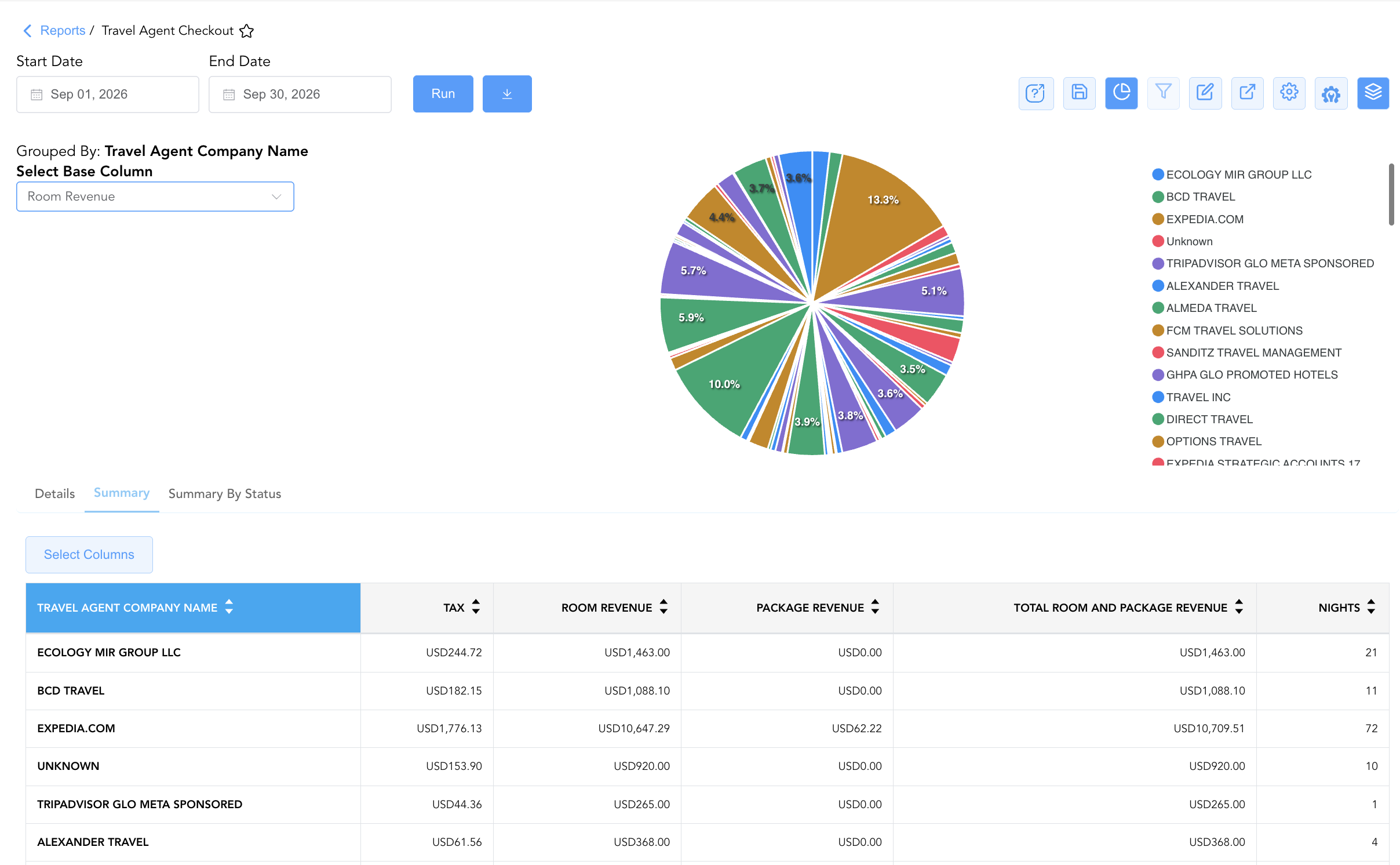
Group By & Pie Chart Visualization: The Travel Agent Checkout report features an interactive pie chart to help analyze agency revenue performance, commissionable totals, and room night volume distributions. Users can toggle or expand/collapse the Travel Agent Company Name, Rate Plan, and Arrival Date on the Details section and Travel Agent Company Name on the Summary section to analyze individual checkout folios, agency totals, or commission status distribution independently. By selecting a metric from the Select Base Column dropdown menu—such as Tax, Room Revenue, Package Revenue, Total Room And Package Revenue, or Nights—the chart dynamically renders percentage share breakdowns accompanied by an interactive color-coded legend.
Advanced Controls
-
Monthly Commission Clearinghouse Processing: Export Section 2 (
Summary) at month-end to upload approved commission payout files to Onyx CenterSource or direct accounts payable systems. -
Filtering: Filter Section 1 by
Commission Rate > 0%to generate an immediate payout list for commissionable agencies, or isolate non-commissionable corporate rates (Commission Rate = 0%). -
Highlighting (Conditional Formatting): Apply custom rules to automatically highlight high-commission payouts (
Estimated Commission > $100), uncommissioned stays (Status = NC), or missing IATA numbers.
🔗 Related Reports & Next Steps
Within 🤝 Sales, Groups & Events Reports & 🏢 Corporate Accounts:
-
Company And Travel Agent Reservations – Volume, revenue, and ADR production matrix across corporate clients and travel agencies.
-
Company Analysis – Monthly and annual corporate account revenue and stay statistics breakdown.
-
Company Details – Master direct-bill account setups, credit limits, and contact information.
-
Top Accounts – Three-section master ranking board evaluating top corporate accounts and market segments.
Cross-Pillar Deep Dives:
-
🛎️ Front Desk & Guest Services: Reconcile checked-out travel agency folios (
Confirmation No) with Closed Folio Balance to verify payment settlement.