
Trial Balance Report Overview
Parent Hub: 💰 Finance & Accounting Reports
Category: ⚖️ Ledgers & Trial Balance
Target Roles: Directors of Finance & Controllers, Accounting Managers & Clerks
Key Value: Provide a comprehensive, double-entry financial accounting ledger that maps daily property activity into strict General Ledger (GL) Asset, Liability, Income, and Expense accounts to facilitate exact month-end closures and accounting system imports.
Executive Summary
The Trial Balance Report is the foundational accounting control document within the ⚖️ Ledgers & Trial Balance module. Designed to translate property-level operational transactions into formal accounting standards, it maps every charge, tax, payment, and adjustment posted in the PMS directly to its designated General Ledger (GL) control account.
By classifying accounts by financial Type (ASSET, LIABILITY, INCOME, EXPENSE) and displaying the exact mathematical roll-forward (Opening Balance, Debit, Credit, Closing Balance) for every transaction code, this report equips controllers and finance teams to identify accounting discrepancies, balance debit/credit entries, and export accurate, zero-variance trial balance summaries for import into third-party corporate accounting systems (e.g., QuickBooks, M3, Sage, Oracle).
Key Capabilities
-
Strict Double-Entry Governance: Categorizes all property financial activity into standard accounting classifications (Asset, Liability, Income, Expense).
-
Granular GL Mapping: Cross-references human-readable account names with specific alphanumeric Transaction Codes to align PMS revenue codes directly with external General Ledger charts of accounts.
-
Mathematical Roll-Forward: Audits absolute financial continuity per GL account: (Opening Balance + Debit) - Credit = Closing Balance (or vice versa, depending on the account's normal balance).
Report Views & Functional Breakdown
The Trial Balance Report organizes financial activity into a singular, highly structured accounting view:
┌────────────────────────────────────────────────────────────────────────┐
│                        TRIAL BALANCE REPORT                            │
├────────────────────────────────────────────────────────────────────────┤
│ 1. Trial Balance Ledger (Mapped by Asset, Liability, Income, Expense)  │
└────────────────────────────────────────────────────────────────────────┘
1. Trial Balance Ledger
Itemizes every active general ledger account mapped within the PMS, calculating total debits and credits posted during the current operational period to establish an ending financial position.
-
Primary Use: Tying out property revenues against liabilities (taxes) and assets (payments/ledgers), investigating out-of-balance entries, and preparing the definitive end-of-period financial extract for external accounting software.
-
Key Metrics: Type (ASSET, LIABILITY, INCOME), Account Name, Transaction Code, Opening Balance, Debit, Credit, Net Change, Closing Balance.
Typical Account Type Classifications:
-
ASSETS: Cash equivalents, credit card gateway drops, and core property sub-ledgers (Direct Bill, Closed Folio, In House, Advance Deposit).
-
LIABILITIES: Collected statutory taxes awaiting government remittance (City Tax, State Tax, Sales Tax) or unearned revenue deposits.
-
INCOME (REVENUE): Base departmental earnings generated by the property (ROOM RENT, FOOD, PARKING FEE, CANCELLATION CHARGE).
-
EXPENSE: Outlays, paid-outs, internal consumption, or maintenance expenses.
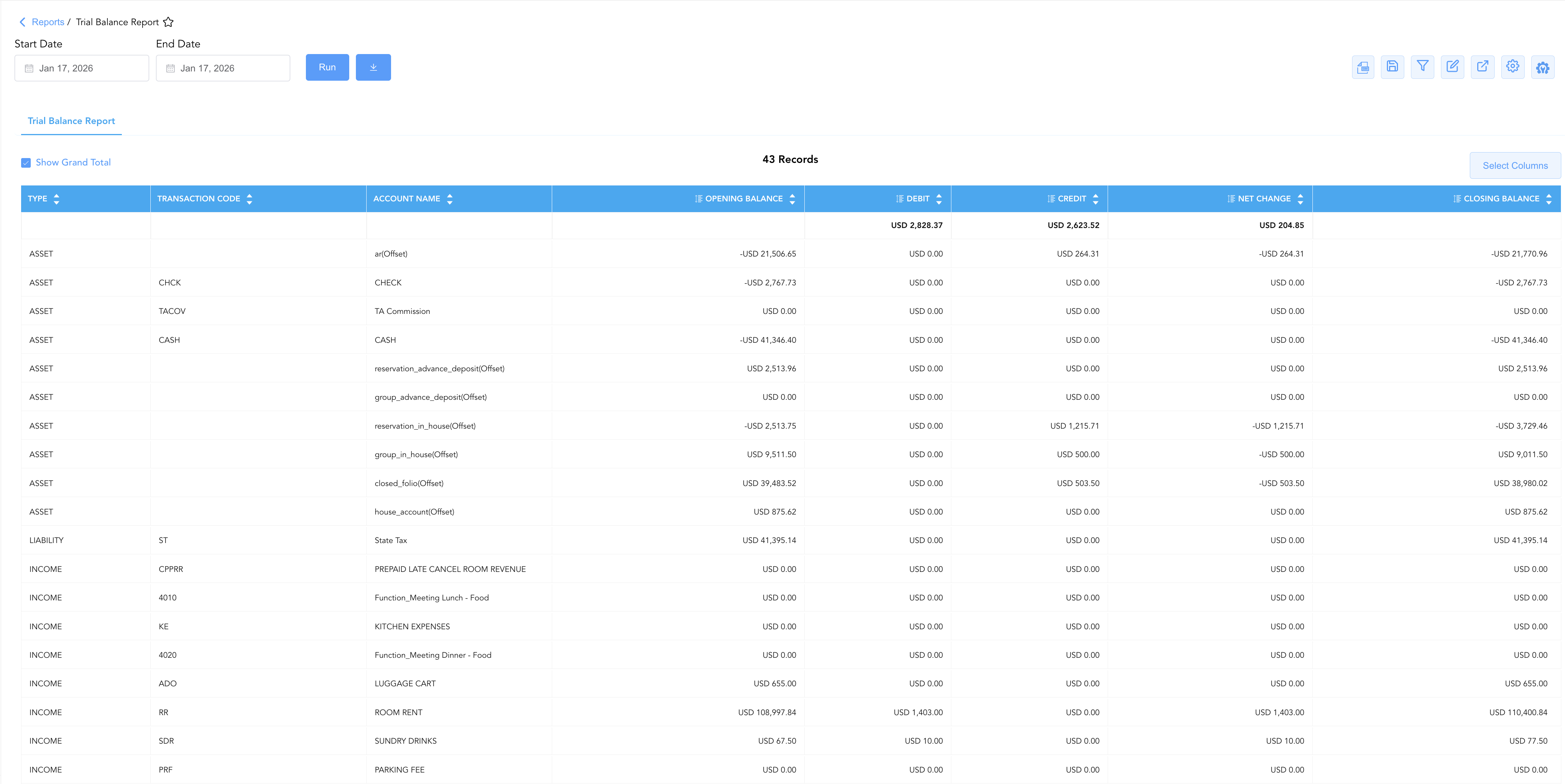
Data Dictionary (Dynamic View Columns)
Customize your default view using the Configure (⚙️) icon on the report page. Below is the full data dictionary available for this report:
💡 Financial Treatment Note: The impact of Debits and Credits on the Closing Balance depends on the normal balance of the Type (e.g., Debits increase Assets/Expenses; Credits increase Liabilities/Income).
|
Column Name |
Description |
Data Source / System Mapping |
Includes Taxes & Fees? |
Modifiable? |
|
Type |
The standard financial accounting classification ( |
System GL Chart of Accounts |
N/A |
Yes |
|
Account Name |
Human-readable name of the general ledger account, sub-ledger, or transaction category. |
|
N/A |
Yes |
|
Transaction Code |
Unique alphanumeric mapping code aligning PMS transactions to external GL codes (e.g., |
|
N/A |
Yes |
|
Opening Balance |
Cumulated ledger balance carried forward at the beginning of the operational period. |
Prior Period Closing Balance |
Depends on GL |
Yes |
|
Debit |
Total value of debit entries (increases to Assets/Expenses; decreases to Liabilities/Income) posted. |
PMS Transaction Engine |
Depends on GL |
Yes |
|
Credit |
Total value of credit entries (increases to Liabilities/Income; decreases to Assets/Expenses) posted. |
PMS Transaction Engine |
Depends on GL |
Yes |
|
Net Change |
Net calculated financial movement occurring during the period ( |
|
Depends on GL |
Yes |
|
Closing Balance |
Final calculated balance of the general ledger account at period close. |
|
Depends on GL |
Yes |
Customization & Platform Features
User & Property Preferences
-
Personal Preference: Tailor your individual view by hiding or dragging columns. Your preference saves automatically for future sessions.
-
Property Defaults: System Admins can configure standard default layouts across all property users to streamline operational reporting. To maximize audit efficiency, group the columns into 2 logical blocks:
-
Account & Classification Identifiers (Cols 1–3):
Type|Transaction Code|Account Name -
Ledger Roll-Forward & Activity Flow (Cols 4–8):
Opening Balance|Debit|Credit|Net Change|Closing Balance
-
Report Toolbar & Quick Actions
Use the top-right toolbar icons on the report page to manage and export your data view:
|
Icon |
Action / Feature |
Description |

|
Knowledge Article |
Opens the knowledge base article to learn how to interpret this report. |

|
Background Export |
Allows users to download up to 365 days of data directly to their computer in CSV format. |

|
Saved Views |
Saves your column filtering, sorting, and highlight preferences so you can easily reload your custom view later without reconfiguring the report. |

|
Filter |
Opens filter controls to isolate specific data within a column based on your selected criteria. |

|
Highlight |
Highlights column values in a designated color based on selected conditions. |

|
Export |
Exports and downloads the report in various formats (Excel, PDF, CSV) for offline analysis or printing. |

|
Configure |
Opens column selection controls to toggle visibility, reorder columns, or hide rows with all zeros. |

|
Additional Configuration |
Provides advanced report configuration and display formatting options to customize data presentation. |
Advanced Controls
-
Exporting & GL Imports: Download in Excel or CSV format. This report is commonly mapped and exported specifically for direct ingestion into third-party corporate accounting and ERP platforms.
-
Highlighting (Conditional Formatting): Apply custom rules to automatically highlight accounts with unexpected negative balances or irregular debit/credit postings.
🔗 Related Reports & Next Steps
Within ⚖️ Ledgers & Trial Balance:
-
Balance Details – Detailed sub-ledger roll-forward tracking starting balances, credits, debits, and ending balances per transaction category.
-
Day End Summary – Review consolidated daily revenue, tax, payment, and deposit blueprints at business day close.
-
Final Audit – The definitive end-of-day financial certificate synthesizing daily revenues, tax liabilities, payments, market segments, and operational statistics.
-
Closed Folio Balances – Track post-settlement charges, payments, and net changes on closed guest accounts.
Cross-Pillar Deep Dives:
-
🏛️ Taxes & Expenses: To audit the precise calculations feeding your LIABILITY accounts, review the Tax Summary or Active Taxes and Charge Types.
-
💳 Payments & Transactions: To inspect the itemized token details and cashier shifts feeding your ASSET accounts, cross-reference Control Report or Payment Activity.