
Event Contact Summary Report Overview
Parent Hub: 🤝 Sales, Groups & Events Reports
Category: 🥂 Event Management (EventKey)
Target Roles: Catering & Event Directors, Directors of Sales, Corporate Account Managers, Sales Operations Leads, Hotel Controllers, General Managers
Key Value: Monitor client contact production and lead conversion, audit total events and financial revenue generated per account contact, evaluate inquiry source channel effectiveness, track account owner performance, and manage B2B client relationship profiles.
Date Parameter: Date Range Selector (Start & End) | Past & Future | Maximum Window: 731 Days
Executive Summary
The Event Contact Summary Report is an essential catering sales audit, client relationship management (CRM), and lead channel performance document within the 🥂 Event Management (EventKey) category of the 🤝 Sales, Groups & Events Reports hub. Designed to provide complete transparency over client contact production, corporate account relationships, and booking inquiry sources, it itemizes client profile details, event volumes, financial yields, and conversion metrics across specified reporting windows.
-
By organizing contact and inquiry data into 2 defined report sections: Event Contact Summary (Client Profile Level) and Event Contact Details (Inquiry Source Channel Level), this report enables sales directors, account managers, and hotel controllers to evaluate individual client decision-makers (
Event Contact Summary) alongside booking source channel yields (Event Contact Details). It correlates client contact information (Contact Name,Company Name,Parent Company,City,State,Country,Phone,Email), internal account management roles (Account Owner), lead origin channels (Inquiry Source), attached travel agencies (Travel Agency Name,IATA Number), event timeframes (Event Start Date,Event End Date), conversion indicators (Converted Status,Closed Status), and commercial production totals (Total Events,Total Revenue).
Key Capabilities
-
Two-Section Client & Lead Channel Structure: Evaluates individual client contact production (
Event Contact Summary) alongside booking channel performance (Event Contact Details). -
Client Account & Contact Production Audit: Tracks total events booked (
Total Events) and net financial yield generated (Total Revenue) per client contact and corporate account. -
Lead Source Channel Yield Analysis: Disaggregates event production across lead channels (
Inquiry Source, e.g.,3rd Party Booking,Email & Online Inquiries,Internal,Meeting Broker,Phone calls,Walk-in Clients) to optimize sales marketing spend. -
Sales Manager & Account Ownership Oversight: Identifies assigned sales managers (
Account Owner) responsible for managing client accounts and driving lead conversions. -
Conversion & Pipeline Workflow Tracking: Itemizes lead conversion indicators (
Converted Status) and account closure workflow states (Closed Status) to audit lead-to-booking efficiency.
Report Views & Functional Breakdown
The Event Contact Summary Report presents client contact and lead source data across 2 defined sections:
┌────────────────────────────────────────────────────────────────────────┐
│                     EVENT CONTACT SUMMARY REPORT                       │
├────────────────────────────────────────────────────────────────────────┤
│                       2 Defined Report Sections                        │
├──────────────────────────┬──────────────────────────┬──────────────────┤
│ 1. Event Contact Summary │ 2. Event Contact Details │                  │
│    (Client Profile Level)│    (Inquiry Source Level)│                  │
└──────────────────────────┴──────────────────────────┴──────────────────┘
1. Event Contact Summary Section (Client Profile Level)
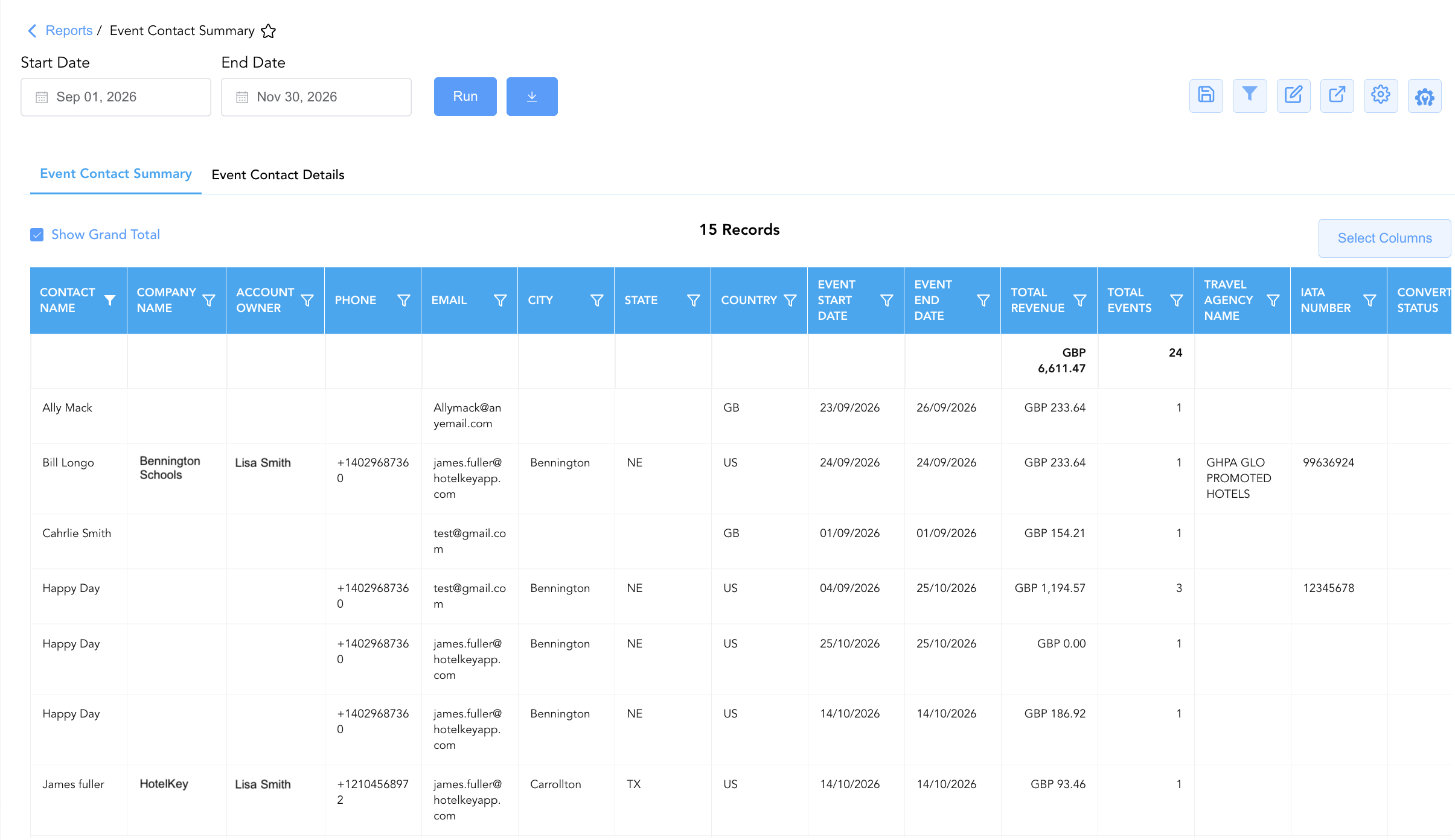
Monitors individual client decision-makers, detailing account owners, contact names, company affiliations, geographic locations, contact phone/email details, event stay windows, conversion statuses, total events booked, and total revenue yields.
-
Primary Use: Evaluating top-producing client decision-makers, reviewing account manager sales performance, and auditing B2B client contact details.
-
Key Metrics: Account Owner, Contact Name, Company Name, Parent Company, City, State, Country, Phone, Email, Total Events, Total Revenue, Event Start Date, Event End Date, Travel Agency Name, IATA Number, Converted Status, Closed Status.
2. Event Contact Details Section (Inquiry Source Channel Level)
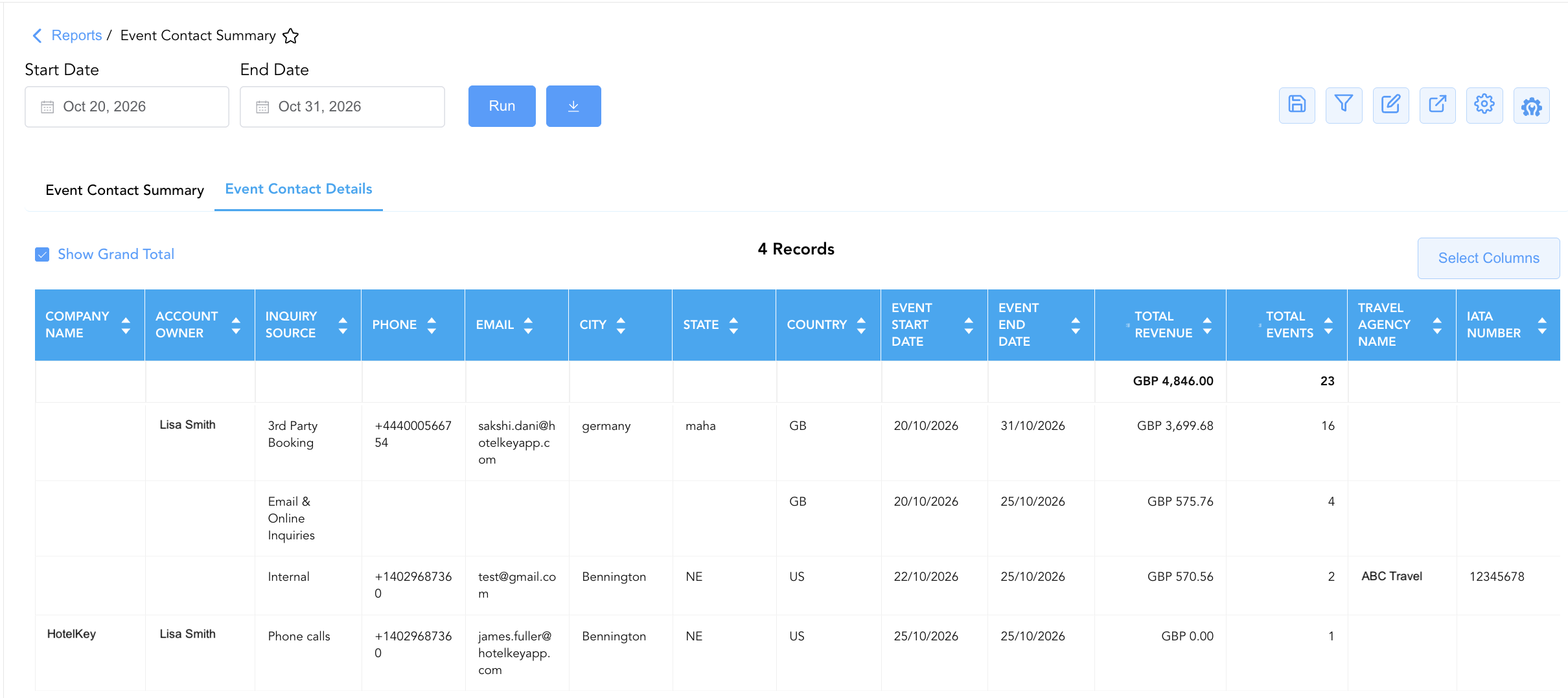
Tracks event production disaggregated by lead generation channels, detailing inquiry sources, company affiliations, geographical locations, total events booked, and cumulative financial revenue yields.
-
Primary Use: Analyzing booking lead channel effectiveness, measuring marketing channel ROI, and evaluating inquiry source volume distribution.
-
Key Metrics: Account Owner, Company Name, Parent Company, Inquiry Source, City, State, Country, Phone, Email, Total Events, Total Revenue, Event Start Date, Event End Date, Travel Agency Name, IATA Number.
Data Dictionary (Dynamic View Columns)
Customize your default view using the Configure (⚙️) icon on the report page. Below is the full data dictionary representing all 18 exact dynamic columns available across the 2 report sections, sorted in alphabetical order by column name:
💰 Financial Posting Logic: Figures in
Total Revenuereflect net posted revenue generated across all catering, function space, package, and room block charges associated with the client contact or inquiry source.
|
Column Name |
Section Applicability |
Description |
Data Source / System Mapping |
Includes Taxes & Fees? |
|
Account Owner |
Both Sections |
Full name of the sales manager or account owner assigned to manage the client relationship. |
Event Master > Account Owner |
N/A |
|
City |
Both Sections |
Municipality or city location associated with the client contact or company address. |
Profile Master > City |
N/A |
|
Closed Status |
Section 1 |
Operational workflow status indicating whether associated event accounts or inquiries are closed. |
Event Master > Closed Status |
N/A |
|
Company Name |
Both Sections |
Official business name of the corporate account or company profile linked to the event contact. |
Account Master > Profile Name |
N/A |
|
Contact Name |
Section 1 |
Full name of the primary client contact person or decision-maker. |
Profile Master > Contact Name |
N/A |
|
Converted Status |
Section 1 |
Lead conversion indicator showing whether the event contact or lead successfully converted into a confirmed event booking. |
Event Engine > Conversion Flag |
N/A |
|
Country |
Both Sections |
Country code or country name associated with the client billing or corporate address (e.g., |
Profile Master > Country |
N/A |
|
|
Both Sections |
Primary email contact address for client invoicing, event proposals, and BEO correspondence. |
Profile Master > Email Address |
N/A |
|
Event End Date |
Both Sections |
Latest ending date across events booked by the client contact within the reporting window. |
Event Master > End Date |
N/A |
|
Event Start Date |
Both Sections |
Earliest starting date across events booked by the client contact within the reporting window. |
Event Master > Start Date |
N/A |
|
IATA Number |
Both Sections |
Unique International Air Transport Association (IATA) registration number identifying the attached travel agency. |
Travel Agency Profile > IATA Code |
N/A |
|
Inquiry Source |
Section 2 |
Lead origin or booking channel source through which the event contact or inquiry was generated (e.g., |
Event Master > Source Channel |
N/A |
|
Parent Company |
Both Sections |
Name of the parent corporate entity or umbrella organization associated with the client company. |
Account Master > Parent Entity |
N/A |
|
Phone |
Both Sections |
Primary contact telephone number for the client contact or corporate office. |
Profile Master > Phone Number |
N/A |
|
State |
Both Sections |
State, province, or region code associated with the client address (e.g., |
Profile Master > State Code |
N/A |
|
Total Events |
Both Sections |
Aggregated numerical count of events booked by or associated with the client contact or inquiry source. |
Event Engine > Booked Count |
N/A |
|
Total Revenue |
Both Sections |
Total cumulative financial yield generated across all events linked to the client contact or inquiry source. |
Sales Ledger > Net Total Revenue |
❌ No |
|
Travel Agency Name |
Both Sections |
Official business name of the travel agency or intermediary profile linked to the event contact (e.g., |
Profile Master > Travel Agency Name |
N/A |
Customization & Platform Features
User & Property Preferences
-
Personal Preference: Tailor your individual view by hiding or dragging columns. Your preferences save automatically for future sessions.
-
Property Defaults: System Admins can configure standard default layouts across all property users to streamline operational reporting. To maximize audit efficiency, group the columns into the below logical blocks:
-
Section 1: Event Contact Summary
-
-
Client & Company Contact Anchors (Cols 1–4):
Contact Name|Company Name|Parent Company|Account Owner -
Communication & Geographic Locators (Cols 5–9):
Phone|Email|City|State|Country -
Event Execution Schedule Window (Cols 10–11):
Event Start Date|Event End Date -
Production Volume & Revenue Financial KPIs (Cols 12–13):
Total Revenue|Total Events -
Travel Agency Account Metadata (Cols 14–15):
Travel Agency Name|IATA Number -
Opportunity Conversion Pipeline Flags (Cols 16–17):
Converted Status|Closed Status
-
-
Section 2: Event Contact Details
-
-
Company Account & Lead Source Anchors (Cols 1–4):
Company Name|Parent Company|Account Owner|Inquiry Source -
Communication & Geographic Locators (Cols 5–9):
Phone|Email|City|State|Country -
Event Execution Schedule Window (Cols 10–11):
Event Start Date|Event End Date -
Production Volume & Revenue Financial KPIs (Cols 12–13):
Total Revenue|Total Events -
Travel Agency Account Metadata (Cols 14–15):
Travel Agency Name|IATA Number
-
-
-
-
Report Toolbar & Quick Actions
Use the top-right toolbar icons on the report page to manage and export your data view:
|
Icon |
Action / Feature |
Description |

|
Knowledge Article |
Opens the knowledge base article to learn how to interpret this report. |

|
Saved Views |
Saves your column filtering, sorting, and highlight preferences so you can easily reload your custom view later without reconfiguring the report. |

|
Filter |
Opens filter controls to isolate specific data within a column based on your selected criteria. |

|
Highlight |
Highlights column values in a designated color based on selected conditions. |

|
Export |
Exports and downloads the report in various formats (Excel, PDF, CSV) for offline analysis or printing. |

|
Configure |
Opens column selection controls to toggle visibility, reorder columns, or hide rows with all zeros. |

|
Additional Configuration |
Provides advanced report configuration and display formatting options to customize data presentation. |
Advanced Controls
-
Key Client Account Reviews: Run Section 1 (
Event Contact Summary) quarterly to evaluate top client spending (Total Revenue) and total event frequency (Total Events) prior to annual contract renewals. -
Lead Channel ROI Analysis: Review Section 2 (
Event Contact Details) to compare revenue yields generated from digital inquiries (Email & Online Inquiries), direct sales (Phone calls), and third-party brokers (Meeting Broker). -
Highlighting (Conditional Formatting): Apply custom rules to automatically highlight high-value contacts (
Total Revenue > $5,000), active repeat accounts (Total Events > 3), or contacts with missing phone numbers.
🔗 Related Reports & Next Steps
Within 🤝 Sales, Groups & Events Reports & 🥂 Event Management (EventKey):
-
All Events Report – Two-section master event summary and sub-event execution log.
-
Event Books Report – Three-section catering sales audit tracking status-based yields, sub-event revenues, and attached room blocks.
-
Event Cancellation Reason Code Report – Two-section audit tracking root causes and staff logs for cancelled catering events.
-
Event Commission Report – Travel agency commission audit tracking commissionable event revenues and payouts.
Cross-Pillar Deep Dives:
-
🏢 Corporate Accounts: Cross-reference corporate client contacts (
Company Name) with Company Details Report, Top Accounts Report, and Company Analysis Report to evaluate total B2B production across catering and lodging. -
👥 Group Block: Reconcile client contacts hosting catering functions with Group Reservations Report and Group Activity Report to align event schedules with room block commitments.