
Event Contracts Report Overview
Parent Hub: 🤝 Sales, Groups & Events Reports
Category: 🥂 Event Management (EventKey)
Target Roles: Catering & Event Directors, Banquet Sales Managers, Directors of Sales, Contract Administrators, Hotel Controllers, General Managers
Key Value: Monitor event contract and Banquet Event Order (BEO) execution timelines, audit document signature statuses, track contract due dates, evaluate event manager account ownership, and ensure legal and financial compliance across catering agreements.
Date Parameter: Date Range Selector (Start & End) | Past & Future | Maximum Window: 731 Days
Executive Summary
The Event Contracts Report is an essential catering sales audit, legal compliance, and contract lifecycle tracking document within the 🥂 Event Management (EventKey) category of the 🤝 Sales, Groups & Events Reports hub. Designed to provide complete operational visibility over agreement documents, BEO versions, and signature workflows, it itemizes event timeframes, contract titles, signature due dates, document execution statuses, assigned sales managers, and client contact profiles across specified reporting periods.
-
By mapping master event identifiers (
Event Name,Event Start Date,Event End Date,Event Status) and document parameters (Contract Name,Contract Due Date,Contract Status) to internal sales leads (Event Manager) and client profile details (Name,Email,Phone,Company Name), this report enables catering directors, contract administrators, and sales leads to audit unreturned agreements, manage contract deadline risks, enforce signature workflows prior to function execution, and prevent unauthorized service delivery.
Key Capabilities
-
Legal Contract & BEO Lifecycle Audit: Consolidates all active event contracts, proposal documents, and Banquet Event Order (BEO) agreement forms into a single master tracking board.
-
Signature Workflow & Status Tracking: Real-time visibility into document execution states (
Contract Status, e.g.,Not Signed,IN_PROGRESS,SIGNED) to identify pending client signatures. -
Contract Due Date & Deadline Management: Displays contractual execution deadlines (
Contract Due Date) to prevent deadline slippage and manage space hold cutoffs. -
Event Lifecycle State Correlation: Aligns contract signature progress with operational event states (
Event Status, e.g.,TENTATIVE,STARTED,ENDED) to ensure contracts are fully executed before function commencement. -
Client & Sales Ownership Verification: Links every agreement directly to the assigned account lead (
Event Manager) and client contact decision-maker (Name,Email,Phone,Company Name) for prompt follow-up.
Report Views & Functional Breakdown
The Event Contracts Report presents contract execution and event status data in a unified single-table master matrix supporting three primary operational perspectives:
┌────────────────────────────────────────────────────────────────────────┐
│                      EVENT CONTRACTS REPORT                            │
├────────────────────────────────────────────────────────────────────────┤
│                         Unified Matrix View                            │
├──────────────────────────┬──────────────────────────┬──────────────────┤
│ 1. Event Identity &      │ 2. Document Details &    │ 3. Client & Manager│
│    Stay Timeframe Trace  │    Signature Status      │    Contact Profile
└──────────────────────────┴──────────────────────────┴──────────────────┘
1. Event Identity & Stay Timeframe Trace
Monitors master event titles, contractual function dates, and operational event lifecycle states.
-
Primary Use: Scanning active property events and cross-referencing event timeframes with agreement schedules.
-
Key Metrics: Event Name, Event Start Date, Event End Date, Event Status.
2. Document Details & Signature Status
Tracks specific contract or BEO document titles, required return deadlines, and real-time signature execution states.
-
Primary Use: Auditing unreturned contracts, identifying overdue agreements, and managing BEO version signature holds.
-
Key Metrics: Contract Name, Contract Due Date, Contract Status.
3. Client & Manager Contact Profile
Audits assigned sales manager leads, primary client contact names, phone/email contact details, and corporate company affiliations.
-
Primary Use: Retrieving client contact details for contract follow-up calls and holding sales managers accountable for document collection.
-
Key Metrics: Event Manager, Name, Email, Phone, Company Name.
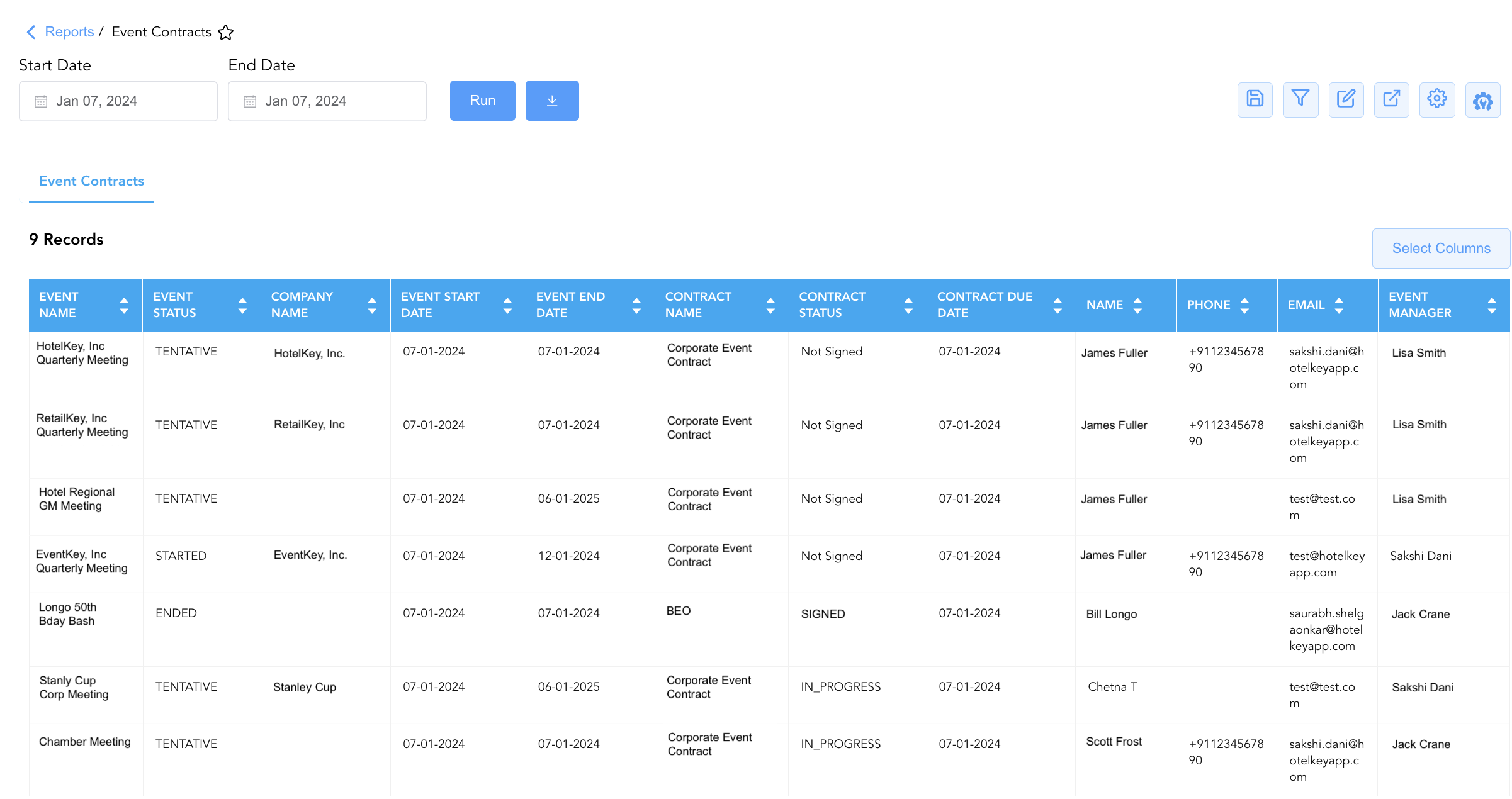
Data Dictionary (Dynamic View Columns)
Customize your default view using the Configure (⚙️) icon on the report page. Below is the full data dictionary representing all 12 exact dynamic columns available in this report, sorted in alphabetical order by column name:
|
Column Name |
Description |
Data Source / System Mapping |
Includes Taxes & Fees? |
|
Company Name |
Official business name of the corporate account or company profile hosting the event (e.g., |
Account Master > Profile Name |
N/A |
|
Contract Due Date |
Calendar date by which the signed event contract or BEO document must be executed and returned. |
Event Contract > Due Date |
N/A |
|
Contract Name |
Title or description assigned to the event contract or BEO agreement document (e.g., |
Event Contract > Document Title |
N/A |
|
Contract Status |
Current execution and signature status of the event contract document (e.g., |
Event Contract > Signature Status |
N/A |
|
|
Primary email contact address for the designated event client contact person. |
Profile Master > Email Address |
N/A |
|
Event End Date |
Calendar date on which the catering or function event officially concludes. |
Event Master > End Date |
N/A |
|
Event Manager |
Full name of the primary sales or event manager responsible for managing the account (e.g., |
Event Master > Account Owner |
N/A |
|
Event Name |
Official title or descriptive name of the catering event or function (e.g., |
Event Master > Event Title |
N/A |
|
Event Start Date |
Calendar date on which the catering or function event officially commences. |
Event Master > Start Date |
N/A |
|
Event Status |
Operational lifecycle state of the master event (e.g., |
Event Master > Lifecycle Status |
N/A |
|
Name |
Full name of the primary client contact person or decision-maker (e.g., |
Profile Master > Contact Name |
N/A |
|
Phone |
Primary contact telephone number for the event organizer or client representative. |
Profile Master > Phone Number |
N/A |
Customization & Platform Features
User & Property Preferences
-
Personal Preference: Tailor your individual view by hiding or dragging columns. Your preferences save automatically for future sessions.
-
Property Defaults: System Admins can configure standard default layouts across all property users to streamline operational reporting. To maximize audit efficiency, group the columns into the below logical blocks:
-
-
Master Event & Lifecycle Status (Cols 1–3):
Event Name|Event Status|Company Name -
Event Execution Schedule Window (Cols 4–5):
Event Start Date|Event End Date -
Contract Document & Approval Tracking (Cols 6–8):
Contract Name|Contract Status|Contract Due Date -
Client Contact Profile (Cols 9–11):
Name|Phone|Email -
Internal Catering Staff Assignment (Col 12):
Event Manager
-
-
Report Toolbar & Quick Actions
Use the top-right toolbar icons on the report page to manage and export your data view:
|
Icon |
Action / Feature |
Description |

|
Knowledge Article |
Opens the knowledge base article to learn how to interpret this report. |

|
Saved Views |
Saves your column filtering, sorting, and highlight preferences so you can easily reload your custom view later without reconfiguring the report. |

|
Filter |
Opens filter controls to isolate specific data within a column based on your selected criteria. |

|
Highlight |
Highlights column values in a designated color based on selected conditions. |

|
Export |
Exports and downloads the report in various formats (Excel, PDF, CSV) for offline analysis or printing. |

|
Configure |
Opens column selection controls to toggle visibility, reorder columns, or hide rows with all zeros. |

|
Additional Configuration |
Provides advanced report configuration and display formatting options to customize data presentation. |
Advanced Controls
-
Unsigned Contract Risk Audits: Filter data by
Contract Status = Not SignedandEvent Start Date <= Today + 7to generate an immediate escalation list of upcoming functions lacking signed agreements. -
Manager Account Follow-Up: Group entries by
Event Managerto review outstanding contract collection progress across sales representatives. -
Highlighting (Conditional Formatting): Apply custom rules to automatically highlight overdue contracts (
Contract Due Date < Today), unsigned tentative events, or missing client email addresses.
🔗 Related Reports & Next Steps
Within 🤝 Sales, Groups & Events Reports & 🥂 Event Management (EventKey):
-
All Events Report – Two-section master event summary and sub-event execution log.
-
Event Books Report – Three-section catering sales audit tracking status-based yields, sub-event revenues, and attached room blocks.
-
Event Cancellation Reason Code Report – Two-section audit tracking root causes and staff logs for cancelled catering events.
-
Event Commission Report – Travel agency commission audit tracking commissionable event revenues and payouts.
-
Event Contact Summary Report – Two-section client contact summary and lead inquiry channel performance report.
Cross-Pillar Deep Dives:
-
🏢 Corporate Accounts: Cross-reference corporate clients (
Company Name) with Company Details Report, Top Accounts Report, and Company Analysis Report to evaluate total commercial production. -
👥 Group Block: Reconcile event contracts with Group Reservations Report, Group Activity Report, and Group Pickup Details Report to ensure aligned room block and catering contract terms.