
Event Details Report Overview
Parent Hub: 🤝 Sales, Groups & Events Reports
Category: 🥂 Event Management (EventKey)
Target Roles: Catering & Event Directors, Banquet Operations Managers, Convention Services Coordinators, Executive Chefs, Revenue Managers, General Managers
Key Value: Monitor granular event and sub-event execution schedules, track function space setups and teardowns, audit catering package items and menu quantities, evaluate expected versus guaranteed and actual attendance, and analyze space, package, and total event revenue generation.
Date Parameter: Date Range Selector (Start & End) | Past & Future | Maximum Window: None
Executive Summary
The Event Details Report is a comprehensive operational planning, banquet logistics, and catering sales audit document within the 🥂 Event Management (EventKey) category of the 🤝 Sales, Groups & Events Reports hub. Designed to deliver 360-degree visibility over event programming, it correlates master event contract terms, sub-event session timing, room physical layout configurations, and bundled catering package deliverables across specified reporting periods.
-
By organizing operational and financial data into 4 defined report sections: All Details, Sub Event Details, Package Details, and Event Details, this report enables banquet leads, convention coordinators, and culinary teams to audit full comprehensive event schedules (
All Details), line-item sub-event function parameters (Sub Event Details), food and beverage package components and headcounts (Package Details), and master event-to-space assignments (Event Details). It aligns master booking parameters (Event Name,Event Confirmation Number,Event Start Date,Event End Date,Event Classification,Status) and function space setups (Space Name,Space Arrangement,Sub Event Setup Time,Sub Event Teardown Time) with function schedules (Sub Event Start Time,Sub Event End Time,Package Start Time,Package End Time), catering deliverables (Package,Package Name,Package Category,Package Classification,Package Items,Package Item Details,Package Description,Package Remarks), operational headcount tracking (Sub Event Expected Quantity,Sub Event Guaranteed Quantity,Sub Event Actual Quantity,Package Expected Quantity,Package Guaranteed Quantity,Package Actual Quantity), and itemized revenue yields (Space Revenue,Package Revenue,Total Revenue).
Key Capabilities
-
Four-Section Multi-Level Operational Structure: Delivers comprehensive combined scheduling (
All Details), granular function session logs (Sub Event Details), catering menu and package breakdowns (Package Details), and high-level event space mappings (Event Details). -
Comprehensive Session Schedule & Turnaround Audit: Itemizes function commencement and conclusion timestamps (
Sub Event Start Time,Sub Event End Time) alongside required setup buffers (Sub Event Setup Time) and teardown intervals (Sub Event Teardown Time) to prevent room turnover delays. -
Physical Room Layout & Arrangement Tracking: Captures assigned function rooms (
Space Name) and specific room setup configurations (Space Arrangement, e.g., Banquet, Theater, Classroom, U-Shape, Hollow Square). -
Catering Menu & Package Deliverable Control: Tracks package categories (
Package Category), menu titles (Package Name), itemized food and beverage inclusions (Package Items,Package Item Details), and service timelines (Package Start Time,Package End Time). -
Three-Tier Attendance & Cover Reconciliation: Compares operational planning headcounts (
Sub Event Expected Quantity,Package Expected Quantity), contractual billing minimums (Sub Event Guaranteed Quantity,Package Guaranteed Quantity), and actual served attendance (Sub Event Actual Quantity,Package Actual Quantity). -
Granular Financial Yield Disaggregation: Evaluates function space rental earnings (
Space Revenue), catering package earnings (Package Revenue), and net event financial yields (Total Revenue).
Report Views & Functional Breakdown
The Event Details Report presents operational catering and scheduling data across 4 defined sections:
┌────────────────────────────────────────────────────────────────────────┐
│                        EVENT DETAILS REPORT                            │
├────────────────────────────────────────────────────────────────────────┤
│                       4 Defined Report Sections                        │
├──────────────────────────┬─────────────────────────────────────────────┤
│ 1. All Details           │ 2. Sub Event Details                        │
│    (Complete Log)        │    (Function Sessions & Room Layouts)       │
├──────────────────────────┼─────────────────────────────────────────────┤
│ 3. Package Details       │ 4. Event Details                            │
│    (Catering & Menus)    │    (Master Event-to-Space Assignments)      │
└──────────────────────────┴─────────────────────────────────────────────┘
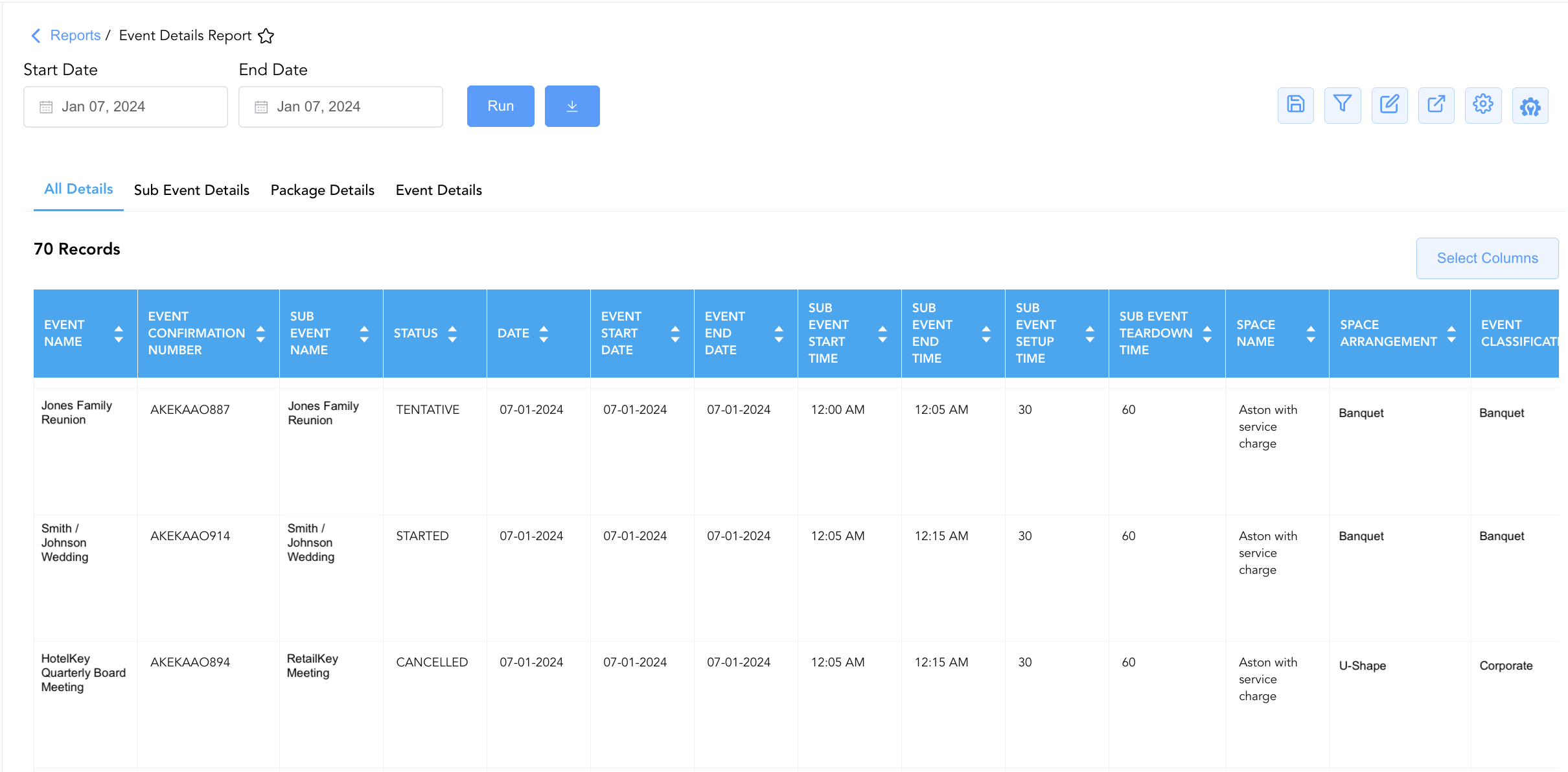
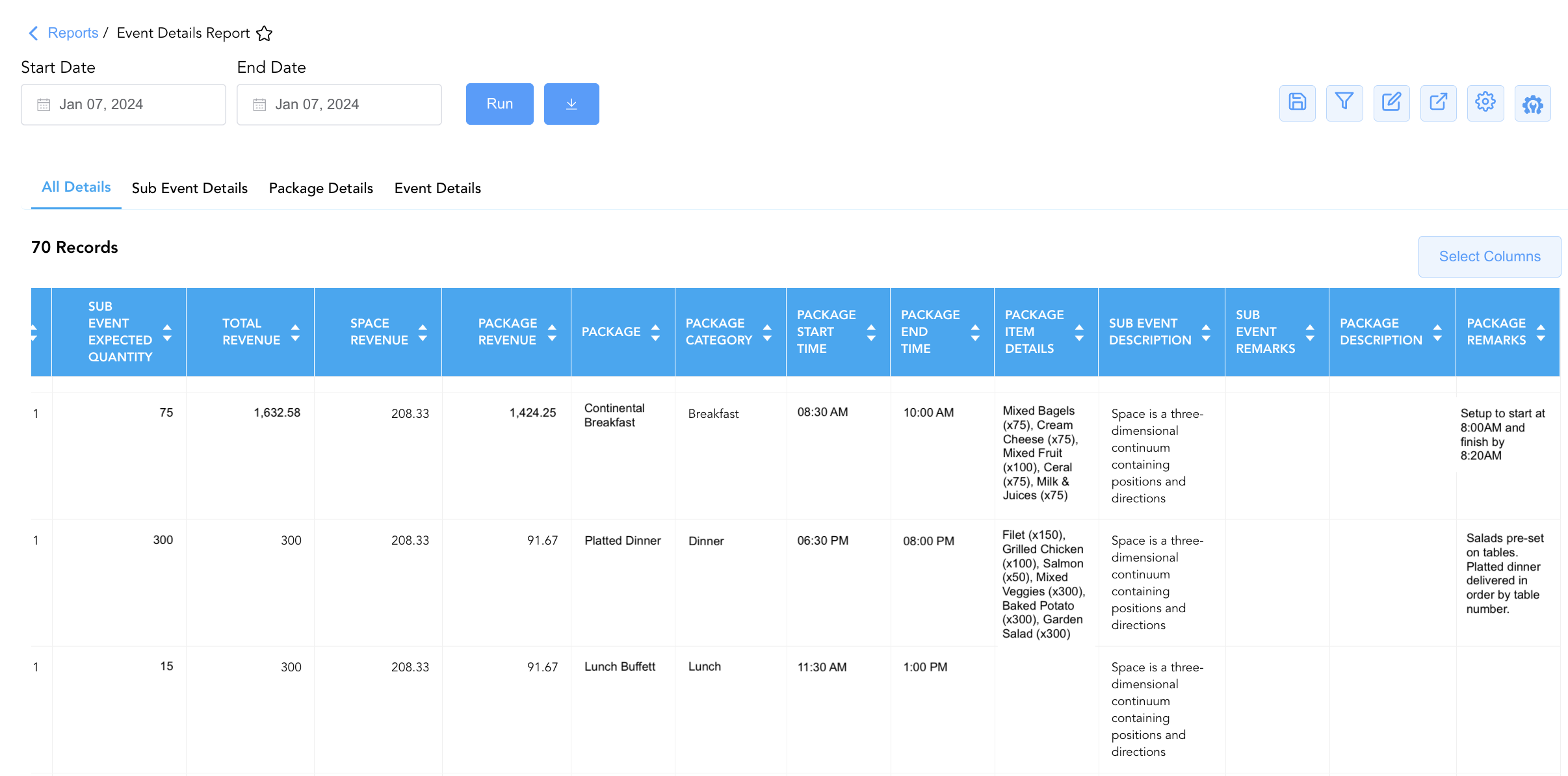
1. All Details Section (Complete Master Schedule)
Consolidates master event parameters, sub-event timing, space arrangements, package deliverables, headcounts, operational notes, and financial revenues into an exhaustive operational log.
-
Primary Use: Providing banquet and catering leadership with an end-to-end master operational schedule for comprehensive pre-event operational briefings.
-
Key Metrics: Date, Sub Event Start Time, Sub Event End Time, Sub Event Name, Space Revenue, Package Revenue, Total Revenue, Event Name, Event Confirmation Number, Event Start Date, Event End Date, Status, Space Name, Package Category, Package, Sub Event Expected Quantity, Sub Event Guaranteed Quantity, Sub Event Actual Quantity, Package Item Details, Package Description, Package Remarks, Event Classification, Space Arrangement, Sub Event Description, Sub Event Remarks, Sub Event Setup Time, Sub Event Teardown Time, Package Start Time, Package End Time.
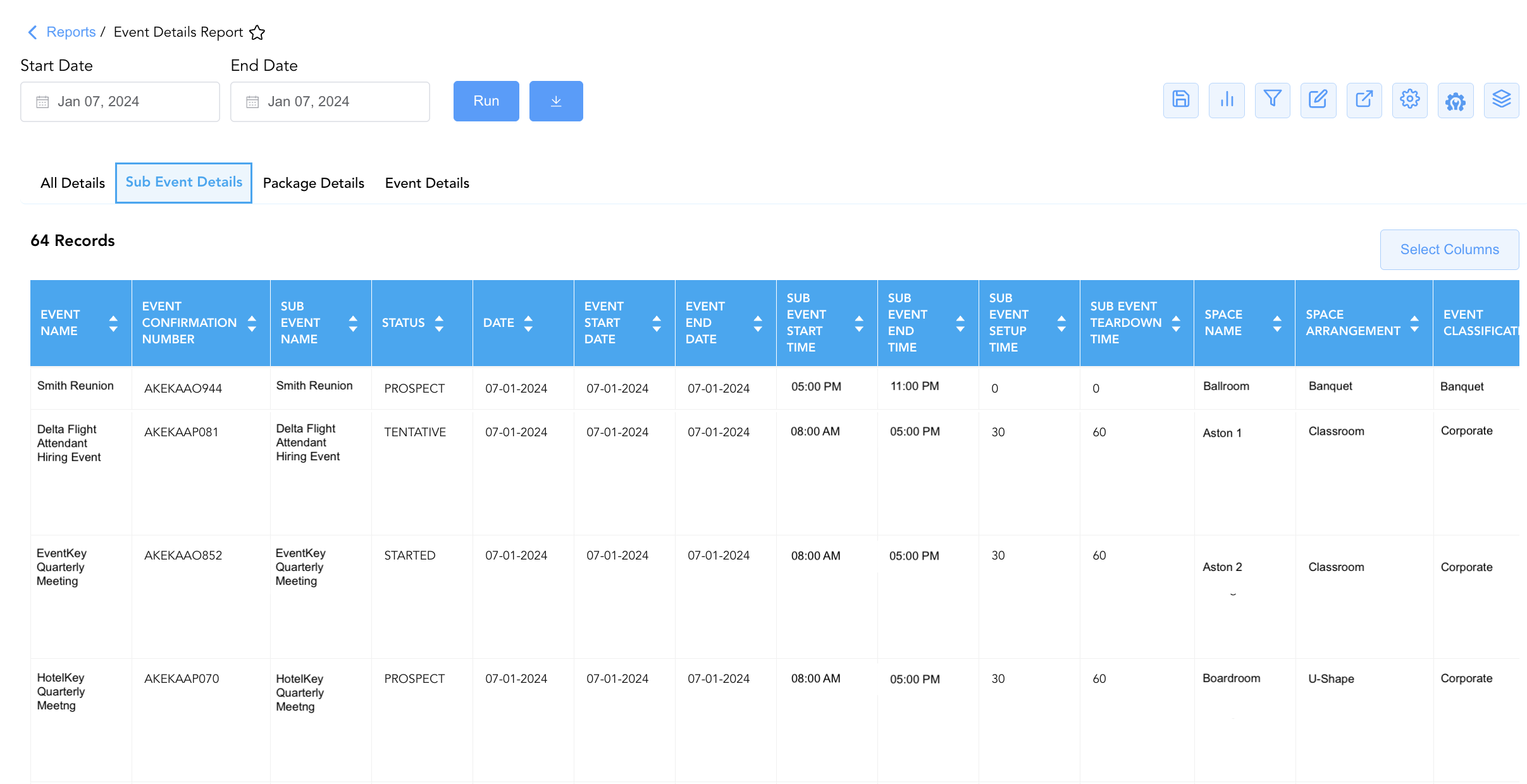
2. Sub Event Details Section (Function Sessions & Room Layouts)
Focuses specifically on session logistics, function space assignments, room setup styles, buffer times, attendance quantities, and rental revenues.
-
Primary Use: Guiding banquet setup crews, housemen, and audio-visual technicians on exact room configurations, setup/teardown turnaround windows, and session schedules.
-
Key Metrics: Date, Sub Event Name, Space Revenue, Event Name, Event Confirmation Number, Event Start Date, Event End Date, Space Name, Event Classification, Sub Event Expected Quantity, Sub Event Guaranteed Quantity, Sub Event Actual Quantity, Sub Event Start Time, Sub Event End Time, Space Arrangement, Sub Event Description, Sub Event Remarks, Sub Event Setup Time, Sub Event Teardown Time, Status.
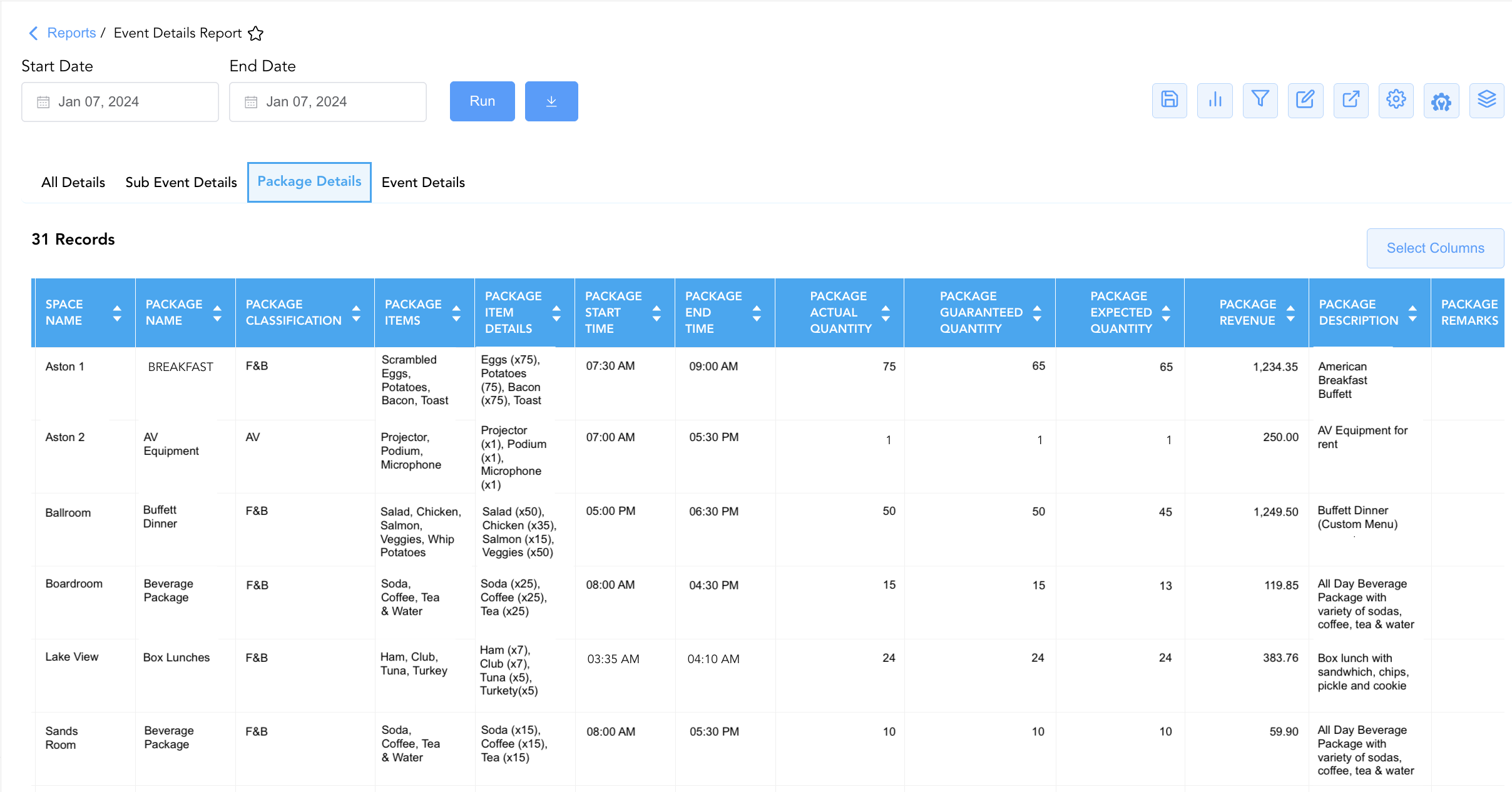
3. Package Details Section (Catering & Food/Beverage Menus)
Details catering package components, menu item inclusions, meal period service windows, package headcounts, culinary descriptions, and package revenues.
-
Primary Use: Directing kitchen food production, banquet captain service timing, dietary requirements, and culinary cover reconciliations.
-
Key Metrics: Package Revenue, Date, Sub Event Name, Event Name, Event Confirmation Number, Event Start Date, Event End Date, Space Name, Package Classification, Package Name, Package Items, Package Item Details, Package Expected Quantity, Package Guaranteed Quantity, Package Actual Quantity, Package Start Time, Package End Time, Package Description, Package Remarks.
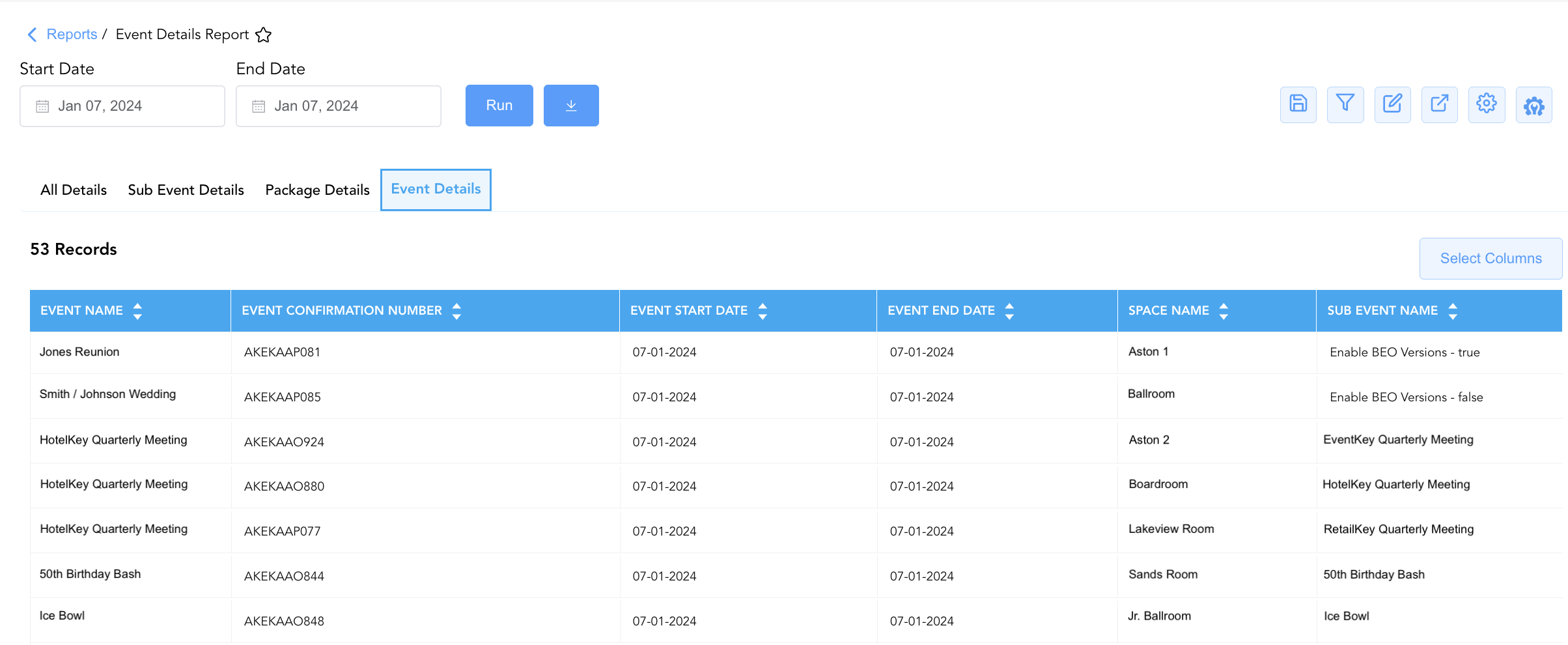
4. Event Details Section (Master Event-to-Space Assignments)
Provides a streamlined mapping connecting master event names, confirmation numbers, stay windows, and assigned function spaces to sub-event sessions.
-
Primary Use: Providing front desk, concierge, and executive management with an executive overview of property event allocations.
-
Key Metrics: Event Name, Event Confirmation Number, Event Start Date, Event End Date, Space Name, Sub Event Name.
Data Dictionary (Dynamic View Columns)
Customize your default view using the Configure (⚙️) icon on the report page. Below is the full data dictionary representing all 35 exact dynamic columns available across the 4 report sections, sorted in alphabetical order by column name:
💰 Financial Posting Logic: Figures in
Space Revenue,Package Revenue, andTotal Revenuereflect net charges posted or contracted for event functions.Total Revenueis dynamically calculated as Space Revenue + Package Revenue.
|
Column Name |
Section Applicability |
Description |
Data Source / System Mapping |
Includes Taxes & Fees? |
|
Date |
Sections 1, 2, 3 |
Calendar date on which the event function or catering service occurs. |
Event Calendar > Execution Date |
N/A |
|
Event Classification |
Sections 1, 2 |
Standardized classification or business category assigned to the event. |
Event Master > Classification Code |
N/A |
|
Event Confirmation Number |
All Sections |
Primary unique alphanumeric confirmation ID assigned to the master event in EventKey. |
Event Master > Confirmation ID |
N/A |
|
Event End Date |
All Sections |
Contractual departure date (concluding date) of the master event stay window. |
Event Master > End Date |
N/A |
|
Event Name |
All Sections |
Official descriptive title or commercial name of the catering event or conference. |
Event Master > Event Title |
N/A |
|
Event Start Date |
All Sections |
Contractual arrival date (commencement date) of the master event stay window. |
Event Master > Start Date |
N/A |
|
Package |
Section 1 |
General title or classification of the catering package assigned to the sub-event. |
Product Master > Package Category |
N/A |
|
Package Actual Quantity |
Section 3 |
Physical count of package covers or menu portions actually served during the event. |
Event Engine > Actual Package Quantity |
N/A |
|
Package Category |
Section 1 |
Meal period or service category of the catering package (e.g., Breakfast, Lunch, Dinner). |
Product Master > Meal Period Code |
N/A |
|
Package Classification |
Section 3 |
Specific internal business grouping or tier classification of the package. |
Product Master > Classification Code |
N/A |
|
Package Description |
Sections 1, 3 |
Descriptive operational details or culinary summary of the catering package. |
Product Master > Package Description |
N/A |
|
Package End Time |
Sections 1, 3 |
Scheduled concluding timestamp for the catering meal period or package service. |
Sub-Event Schedule > Package End Time |
N/A |
|
Package Expected Quantity |
Section 3 |
Anticipated package headcount planned for kitchen prep and culinary ordering. |
Sub-Event Schedule > Expected Covers |
N/A |
|
Package Guaranteed Quantity |
Section 3 |
Final minimum package headcount guaranteed by the client for billing purposes. |
Sub-Event Schedule > Guaranteed Covers |
N/A |
|
Package Item Details |
Sections 1, 3 |
Specific itemized menu courses and dishes included in the package with multipliers. |
BEO Menu Setup > Itemized Recipe Lines |
N/A |
|
Package Items |
Section 3 |
General component group included within the package (e.g., Food, Dessert, Tables, Chairs). |
Product Master > Component Group |
N/A |
|
Package Name |
Section 3 |
Commercial name or descriptive title of the catering package. |
Product Master > Package Name |
N/A |
|
Package Remarks |
Sections 1, 3 |
Operational notes, special dietary requirements, or chef instructions for the package. |
BEO Menu Setup > Package Remarks |
N/A |
|
Package Revenue |
Sections 1, 3 |
Total net revenue generated from bundled catering packages and food/beverage menus. |
Event Ledger > Package Revenue |
❌ No |
|
Package Start Time |
Sections 1, 3 |
Scheduled commencement timestamp for the catering meal period or package service. |
Sub-Event Schedule > Package Start Time |
N/A |
|
Space Arrangement |
Sections 1, 2 |
Physical room seating layout style configured for the function space. |
Facility Setup > Room Setup Style |
N/A |
|
Space Name |
All Sections |
Official descriptive name of the function room, ballroom, or meeting space. |
Facility Master > Space Description |
N/A |
|
Space Revenue |
Sections 1, 2 |
Total net rental revenue generated from function room and meeting space rentals. |
Event Ledger > Space Rental |
❌ No |
|
Status |
Sections 1, 2 |
Operational lifecycle state of the event (e.g., |
Event Master > Status Code |
N/A |
|
Sub Event Actual Quantity |
Sections 1, 2 |
Physical count of attendees who actually attended the sub-event function session. |
Event Engine > Actual Headcount |
N/A |
|
Sub Event Description |
Sections 1, 2 |
Narrative operational description of the sub-event session purpose and theme. |
Sub-Event Schedule > Session Description |
N/A |
|
Sub Event End Time |
Sections 1, 2 |
Scheduled completion timestamp for the sub-event function session. |
Sub-Event Schedule > End Time |
N/A |
|
Sub Event Expected Quantity |
Sections 1, 2 |
Anticipated attendee headcount planned for session seating and space setup. |
Sub-Event Schedule > Expected Quantity |
N/A |
|
Sub Event Guaranteed Quantity |
Sections 1, 2 |
Contractual minimum attendee headcount guaranteed by the client for the session. |
Sub-Event Schedule > Guaranteed Quantity |
N/A |
|
Sub Event Name |
All Sections |
Official descriptive name or session title of the sub-event function. |
Sub-Event Schedule > Function Title |
N/A |
|
Sub Event Remarks |
Sections 1, 2 |
Operational notes, client instructions, or setup details for the sub-event. |
Sub-Event Schedule > Session Remarks |
N/A |
|
Sub Event Setup Time |
Sections 1, 2 |
Operational setup buffer duration (in minutes) required prior to session start. |
Sub-Event Schedule > Setup Minutes |
N/A |
|
Sub Event Start Time |
Sections 1, 2 |
Scheduled commencement timestamp for the sub-event function session. |
Sub-Event Schedule > Start Time |
N/A |
|
Sub Event Teardown Time |
Sections 1, 2 |
Operational teardown buffer duration (in minutes) required following session end. |
Sub-Event Schedule > Teardown Minutes |
N/A |
|
Total Revenue |
Section 1 |
Total net revenue generated combining function space rental and package revenues (Space Revenue + Package Revenue). |
Calculated: Combined Event Yield |
❌ No |
Customization & Platform Features
User & Property Preferences
-
Personal Preference: Tailor your individual view by hiding or dragging columns. Your preferences save automatically for future sessions.
-
Property Defaults: System Admins can configure standard default layouts across all property users to streamline operational reporting. To maximize audit efficiency, group the columns into the below logical blocks:
-
Section 1: All Details
-
Master Event & Sub-Event Identifiers (Cols 1–4):
Event Name|Event Confirmation Number|Sub Event Name|Status -
Master & Sub-Event Execution Timelines (Cols 5–9):
Date|Event Start Date|Event End Date|Sub Event Start Time|Sub Event End Time -
Operational Setup, Teardown & Room Layout (Cols 10–14):
Sub Event Setup Time|Sub Event Teardown Time|Space Name|Space Arrangement|Event Classification -
Attendance & Headcount Volume KPIs (Cols 15–17):
Sub Event Actual Quantity|Sub Event Guaranteed Quantity|Sub Event Expected Quantity -
Financial Revenue Stream Breakdown (Cols 18–20):
Total Revenue|Space Revenue|Package Revenue -
Catering Package Specifications & Timing (Cols 21–25):
Package|Package Category|Package Start Time|Package End Time|Package Item Details -
Descriptions & Operational Remarks (Cols 26–29):
Sub Event Description|Sub Event Remarks|Package Description|Package Remarks
-
-
Section 2: Sub Event Details
-
Master Event & Sub-Event Identifiers (Cols 1–4):
Event Name|Event Confirmation Number|Sub Event Name|Status -
Schedule Timelines & Window (Cols 5–9):
Date|Event Start Date|Event End Date|Sub Event Start Time|Sub Event End Time -
Operational Setup, Teardown & Room Layout (Cols 10–14):
Sub Event Setup Time|Sub Event Teardown Time|Space Name|Space Arrangement|Event Classification -
Attendance Headcount KPIs (Cols 15–17):
Sub Event Actual Quantity|Sub Event Guaranteed Quantity|Sub Event Expected Quantity -
Financial Space Revenue (Col 18):
Space Revenue -
Operational Notes & Logistics Remarks (Cols 19–20):
Sub Event Description|Sub Event Remarks
-
-
Section 3: Package Details
-
Master Event & Sub-Event Identifiers (Cols 1–3):
Event Name|Event Confirmation Number|Sub Event Name -
Calendar Dates & Room Assignment (Cols 4–7):
Date|Event Start Date|Event End Date|Space Name -
Catering Package & Item Master Setup (Cols 8–11):
Package Name|Package Classification|Package Items|Package Item Details -
Service Schedule Timing (Cols 12–13):
Package Start Time|Package End Time -
Package Headcount & Volume KPIs (Cols 14–16):
Package Actual Quantity|Package Guaranteed Quantity|Package Expected Quantity -
Financial Package Revenue (Col 17):
Package Revenue -
Culinary Notes & Service Remarks (Cols 18–19):
Package Description|Package Remarks
-
-
Section 4: Event Details
-
Master Event Identifiers (Cols 1–2):
Event Name|Event Confirmation Number -
Schedule Window (Cols 3–4):
Event Start Date|Event End Date -
Space Locator & Linked Session (Cols 5–6):
Space Name|Sub Event Name
-
-
Report Toolbar & Quick Actions
Use the top-right toolbar icons on the report page to manage and export your data view:
|
Icon |
Action / Feature |
Description |

|
Knowledge Article |
Opens the knowledge base article to learn how to interpret this report. |

|
Saved Views |
Saves your column filtering, sorting, and highlight preferences so you can easily reload your custom view later without reconfiguring the report. |

|
Bar Chart |
Displays report data in a visual bar chart format. |

|
Filter |
Opens filter controls to isolate specific data within a column based on your selected criteria. |

|
Highlight |
Highlights column values in a designated color based on selected conditions. |

|
Export |
Exports and downloads the report in various formats (Excel, PDF, CSV) for offline analysis or printing. |

|
Configure |
Opens column selection controls to toggle visibility, reorder columns, or hide rows with all zeros. |

|
Additional Configuration |
Provides advanced report configuration and display formatting options to customize data presentation. |

|
Group By |
Summarize and group report data dynamically in real time. |
Interactive Visualizations & Grouping Controls
-
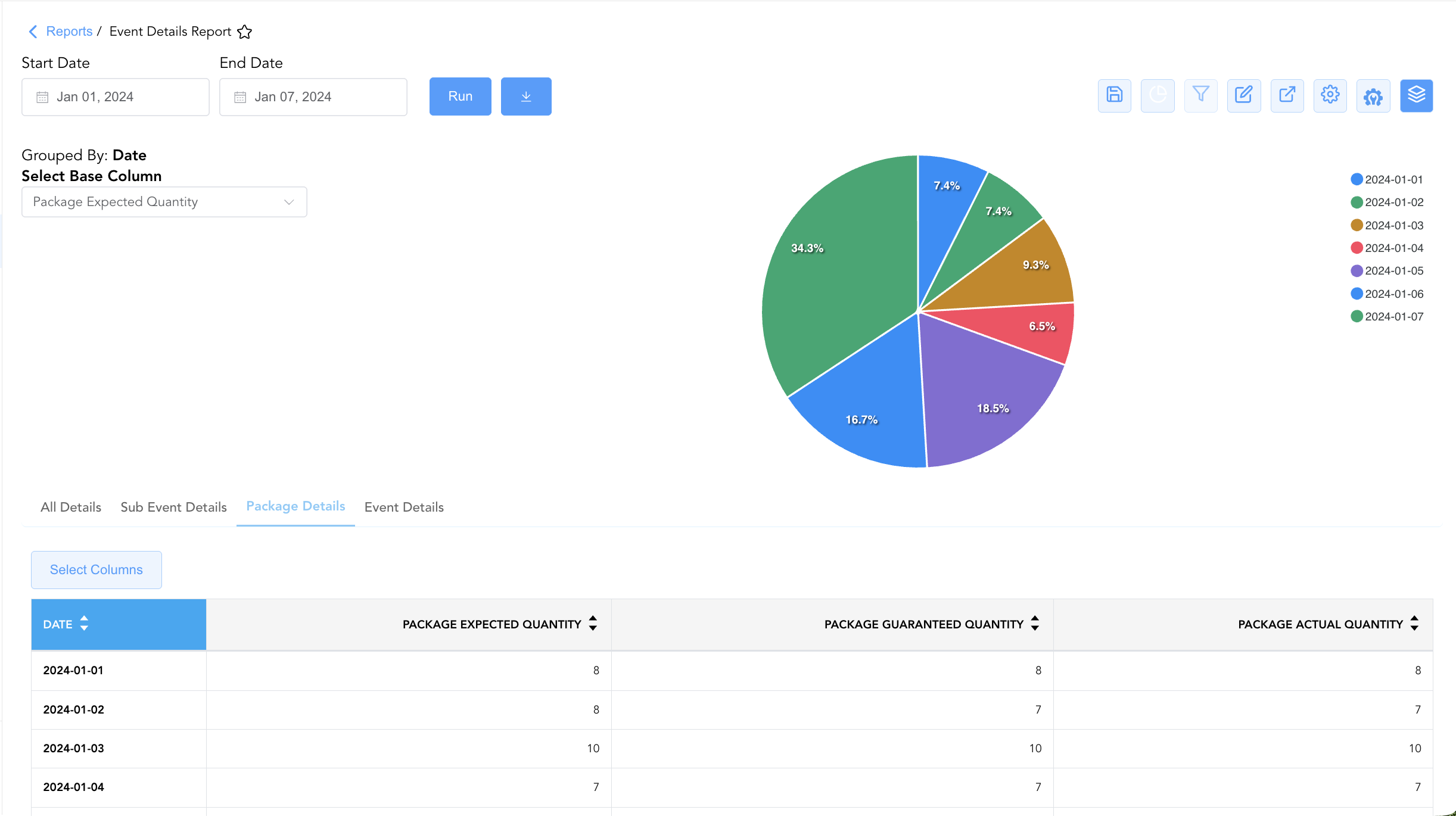
Group By & Pie Chart Visualization: The Event Details Report features an interactive pie chart to help analyze banquet package distribution, guest counts, and catering fulfillment trends over time. Users can toggle or expand/collapse on the Sub Event Details and Package Details sections and group data on the fly by Date across report tabs to analyze complete master schedules, room setup logistics, culinary package deliverables, or space mappings independently. By selecting a metric from the Select Base Column dropdown menu—such as Package Expected Quantity, Package Guaranteed Quantity, or Package Actual Quantity—the chart dynamically renders percentage share breakdowns accompanied by an interactive color-coded legend.
-
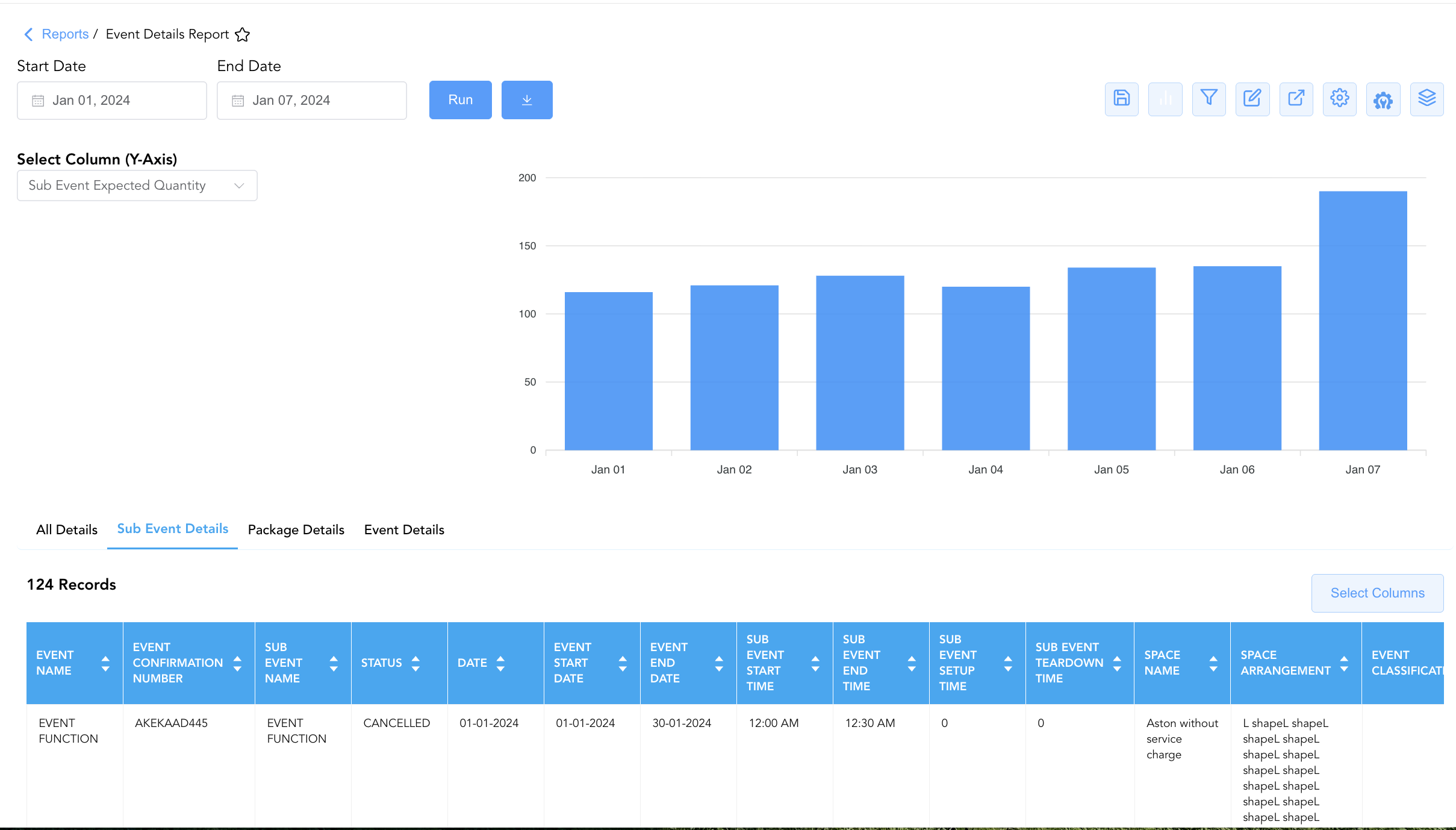
Bar Chart Visualizer: The Event Details Report includes an interactive bar chart to track attendee counts and package quantities chronologically over time. The Bar Chart feature is available exclusively on two sections: Sub Event Details and Package Details. Depending on the active tab, users can select from the Select Column (Y-Axis) dropdown menu to dynamically plot expected, guaranteed, or actual quantities across sub-events and packages alongside the detailed event data grid.
Advanced Controls
-
Room Turnaround & Teardown Audits: Review
Sub Event Setup TimeandSub Event Teardown Timein Section 2 between back-to-back room allocations to prevent scheduling overlaps and ensure housekeeping turnover readiness. -
Culinary Headcount Variance Reconciliation: Compare
Package Guaranteed QuantityagainstPackage Actual Quantityin Section 3 to ensure billing accuracy for extra covers served beyond client guarantees. -
Highlighting (Conditional Formatting): Apply custom rules to automatically highlight high-yield catering functions (
Total Revenue > $1,000), short room turnover intervals (Sub Event Setup Time < 30), or headcounts exceeding room capacity.
🔗 Related Reports & Next Steps
Within 🤝 Sales, Groups & Events Reports & 🥂 Event Management (EventKey):
-
All Events Report – Two-section master event summary and sub-event execution log.
-
Event Books Report – Three-section catering sales audit tracking status-based yields, sub-event revenues, and attached room blocks.
-
Event Cancellation Reason Code Report – Two-section audit tracking root causes and staff logs for cancelled catering events.
-
Event Covers Report – Three-section catering attendance and cover revenue audit report.
-
Event Deposit Schedules Report – Advance deposit schedule and payment compliance report.
-
Event Group Blocks Report – Master event and attached PMS group room block integration report.
-
Event Product Stock Report – Two-section equipment rental and perishable inventory tracking report.
Cross-Pillar Deep Dives:
-
👥 Group Block: Coordinate event session timing and space requirements with Group Activity Report and Group Reservation Details Report to ensure banquet functions seamlessly align with group attendee lodging flows.