
Event Space Availability Report Overview
Parent Hub: 🤝 Sales, Groups & Events Reports
Category: 🥂 Event Management (EventKey)
Target Roles: Catering & Event Directors, Banquet Sales Managers, Event Coordinators, Space Planners, Hotel Controllers, General Managers
Key Value: Monitor real-time function room and ballroom availability, verify space overbooking configuration rules, audit tentative and confirmed space reservation holds, and prevent double-booking across meeting facilities.
Date Parameter: Date Range Selector (Start & End) | Future | Maximum Window: 30 Days
Executive Summary
The Event Space Availability Report is an essential function space inventory control, booking feasibility audit, and facility scheduling document within the 🥂 Event Management (EventKey) category of the 🤝 Sales, Groups & Events Reports hub. Designed to provide clear date-by-date visibility into property meeting rooms, banquet ballrooms, lounges, and outdoor spaces, it itemizes real-time availability states, overbooking permissions, and active reservation hold statuses across target dates.
-
By mapping physical function spaces (
Space Name) and calendar dates (Date) to operational booking availability (Available), facility configuration rules (Overbooking Allowed), and current reservation statuses (Status, e.g.,TENTATIVE,CONFIRMED, etc., this report enables catering sales managers, conference coordinators, and banquet directors to evaluate space inventory before issuing proposals, manage tentative hold releases, enforce concurrent scheduling policies, and eliminate scheduling conflicts.
Key Capabilities
-
Daily Function Space Inventory Audit: Delivers complete date-by-date visibility into whether specific function rooms, ballrooms, or breakout suites are open for client bookings (
Available). -
Overbooking Policy Enforcement: Displays space-level configuration rules (
Overbooking Allowed, e.g.,Yes,No) to govern whether a facility permits concurrent multi-event scheduling (such as cocktail lounges, pools, or dining verandas) or strictly enforces dedicated single-event exclusivity. -
Reservation Hold & Status Monitoring: Captures active booking workflow stages (
Status, e.g.,TENTATIVE, or unassigned/open) to track pending holds and identify impending space release cutoffs. -
Combined & Partitioned Space Oversight: Tracks modular and combination meeting spaces (e.g.,
Meeting Room A + Meeting Room B + Meeting Room C) to ensure individual salon bookings automatically reflect partitioned ballroom availability. -
Space Contention & Double-Booking Prevention: Provides front-line sales teams with instant booking conflict detection to eliminate double-booking risks during contracting.
Report Views & Functional Breakdown
The Event Space Availability Report presents facility availability and scheduling parameters in a unified single-table master matrix supporting three primary operational perspectives:
┌────────────────────────────────────────────────────────────────────────┐
│                   EVENT SPACE AVAILABILITY REPORT                      │
├────────────────────────────────────────────────────────────────────────┤
│                         Unified Matrix View                            │
├──────────────────────────┬──────────────────────────┬──────────────────┤
│ 1. Facility & Date       │ 2. Availability &        │ 3. Reservation   │
│    Identification        │    Overbooking Rules     │    Hold Status   │
└──────────────────────────┴──────────────────────────┴──────────────────┘
1. Facility & Date Identification
Monitors descriptive function room names, ballrooms, pre-function areas, combination suites, and the evaluated calendar date.
-
Primary Use: Scanning property function spaces across specific dates to identify facility allocation options for prospective clients.
-
Key Metrics: Space Name, Date.
2. Availability & Overbooking Rules
Tracks baseline booking availability flags and system-configured overbooking permissions per space.
-
Primary Use: Verifying whether spaces can accept new bookings and ensuring non-overbookable spaces are protected from concurrent events.
-
Key Metrics: Available, Overbooking Allowed.
3. Reservation Hold Status
Audits the operational lifecycle stage of any existing booking tied to the space on the evaluated date.
-
Primary Use: Identifying spaces held under tentative agreements that could be challenged or released for higher-value business.
-
Key Metrics: Status, Space Name, Date.
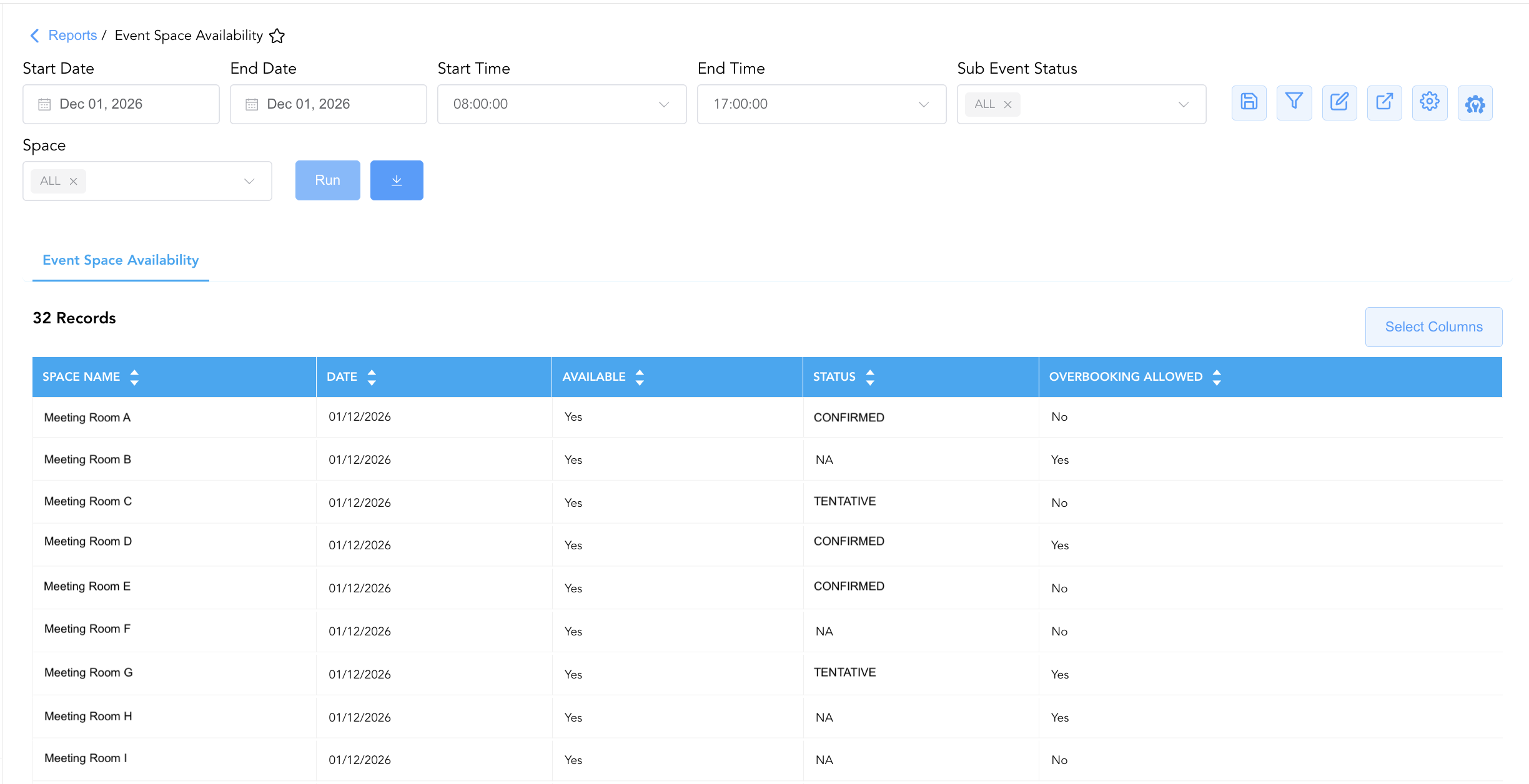
Data Dictionary (Dynamic View Columns)
Customize your default view using the Configure (⚙️) icon on the report page. Below is the full data dictionary representing all 5 exact dynamic columns available in this report, sorted in alphabetical order by column name:
|
Column Name |
Description |
Data Source / System Mapping |
Includes Taxes & Fees? |
|
Available |
Operational flag indicating whether the function space is available for booking on the target date (e.g., |
Event Space Engine > Availability Status |
N/A |
|
Date |
Calendar date for which function space availability and booking status are evaluated. |
Event Calendar > Target Date |
N/A |
|
Overbooking Allowed |
Configuration setting indicating whether the function space permits simultaneous overbooking or concurrent event scheduling (e.g., |
Facility Master > Overbooking Rule |
N/A |
|
Space Name |
Official descriptive name or identifier of the function room, ballroom, lounge, or outdoor event space (e.g., |
Facility Master > Space Description |
N/A |
|
Status |
Operational booking status or reservation hold state linked to the function space on the target date (e.g., |
Event Master > Lifecycle Status |
N/A |
Customization & Platform Features
User & Property Preferences
-
Personal Preference: Tailor your individual view by hiding or dragging columns. Your preferences save automatically for future sessions.
-
Property Defaults: System Admins can configure standard default layouts across all property users to streamline operational reporting. To maximize audit efficiency, group the columns into the below logical blocks:
-
Space Locator & Calendar Anchor (Cols 1–2):
Space Name|Date -
Inventory Availability & Hold Status (Cols 3–4):
Available|Status -
Operational Overbooking Policy (Col 5):
Overbooking Allowed
-
Report Toolbar & Quick Actions
Use the top-right toolbar icons on the report page to manage and export your data view:
|
Icon |
Action / Feature |
Description |

|
Knowledge Article |
Opens the knowledge base article to learn how to interpret this report. |

|
Saved Views |
Saves your column filtering, sorting, and highlight preferences so you can easily reload your custom view later without reconfiguring the report. |

|
Filter |
Opens filter controls to isolate specific data within a column based on your selected criteria. |

|
Highlight |
Highlights column values in a designated color based on selected conditions. |

|
Export |
Exports and downloads the report in various formats (Excel, PDF, CSV) for offline analysis or printing. |

|
Configure |
Opens column selection controls to toggle visibility, reorder columns, or hide rows with all zeros. |

|
Additional Configuration |
Provides advanced report configuration and display formatting options to customize data presentation. |
Advanced Controls
-
Tentative Hold Release Audits: Filter by
Status = TENTATIVEto audit uncontracted holds nearing cutoff dates and initiate client decision deadlines. -
Combination Space Audits: Review composite space entries (e.g.,
DIA + FLO + MIN) alongside individual breakout rooms to ensure partition walls and room divides reflect accurate physical constraints. -
Highlighting (Conditional Formatting): Apply custom rules to automatically highlight spaces with tentative holds (
Status = TENTATIVE), spaces prohibiting overbooking (Overbooking Allowed = No), or open high-capacity ballrooms.
🔗 Related Reports & Next Steps
Within 🤝 Sales, Groups & Events Reports & 🥂 Event Management (EventKey):
-
All Events Report – Two-section master event summary and sub-event execution log.
-
Event Books Report – Three-section catering sales audit tracking status-based yields, sub-event revenues, and attached room blocks.
-
Event Inquiry Source Report – Inbound lead inquiry source channel performance and conversion audit report.
-
Event Pace Report – Two-section commercial pace and pickup tracking report.
Cross-Pillar Deep Dives:
-
🧹 Rooms & Facilities: Cross-reference function space availability with Facilities Maintenance logs to coordinate scheduled room refurbishments and AV maintenance during unbooked windows.
-
👥 Group Block: Align function room availability (
Space Name,Date) with Group Activity Report and Group Reservation Details Report to ensure banquet space aligns with group block arrival patterns.