
Enterprise Booked Reservations Report
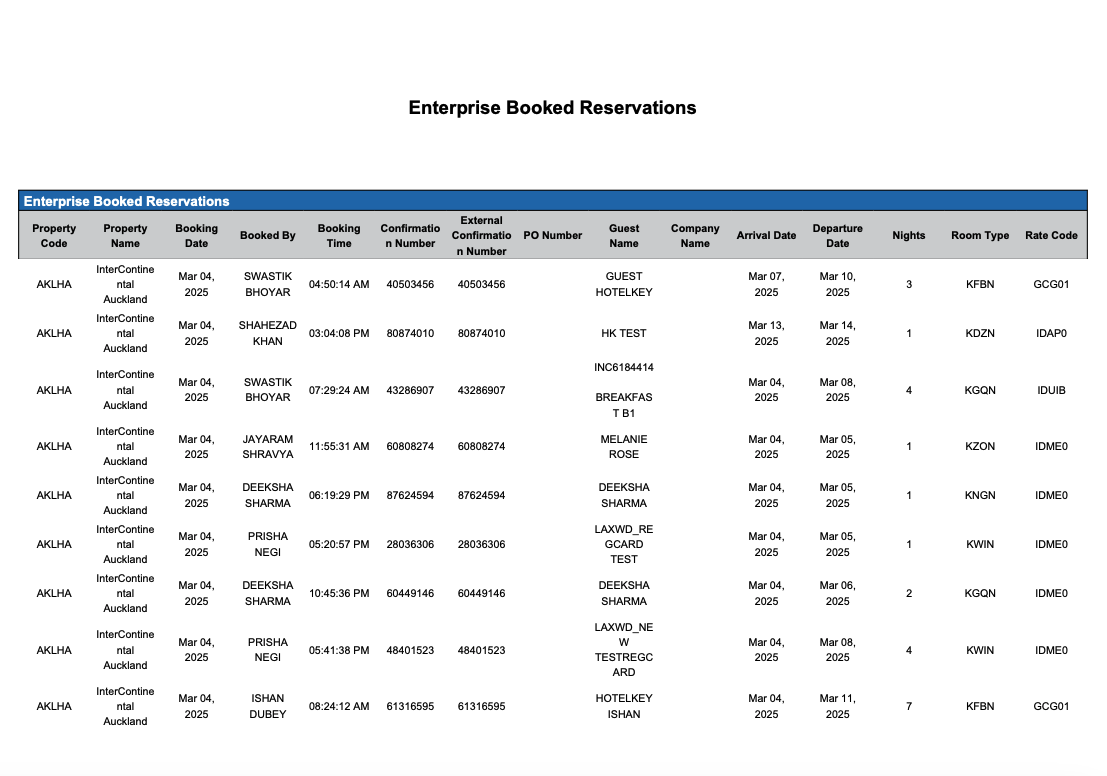
Report Description: The Enterprise Booked Reservations Report provides a comprehensive overview of all property reservations within a specific date range, enabling property staff to identify trends and improve their reservation process to improve overall guest experience on various reservation statuses including reservations, arrivals, in-house guests, checked-out guests, no shows, and canceled reservations.
Date Range: Historical - 90 days in the past
Booked Reservations Section: provides an overview of revenue and occupancy for the defined dates for all properties in the region.
Available Report Columns for Following Sections:
|
Column Name |
Column Description |
Amount Includes Taxes and Fees |
Calculation |
|
Property Code |
Identifies the hotel code |
Not Applicable |
Not Applicable |
|
Property Name |
Identifies the name of the hotel |
Not Applicable |
Not Applicable |
|
Booking Date |
Date of the booking (ex - March 25, 2024) |
Not Applicable |
Not Applicable |
|
Booked By |
The user ID, user name or system that made the reservation |
Not Applicable |
Not Applicable |
|
Booking Time |
Time of the booking (ex - 05:39:49 AM) |
Not Applicable |
Not Applicable |
|
Confirmation Number |
Reservation confirmation number |
Not Applicable |
Not Applicable |
|
External Confirmation Number |
Information on reservations made through external booking channels other than Online Travel Agencies (OTAs); important for tracking and analyzing reservation sources |
Not Applicable |
Not Applicable |
|
PO Number |
Purchase order number |
Not Applicable |
Not Applicable |
|
Guest Name |
Name of the primary guest associated with the reservation |
Not Applicable |
Not Applicable |
|
Company Name |
Name of the company the guest is affiliated with |
Not Applicable |
Not Applicable |
|
Arrival Date |
Date the guest is scheduled to arrive |
Not Applicable |
Not Applicable |
|
Departure Date |
Date the guest is scheduled to depart |
Not Applicable |
Not Applicable |
|
Nights |
Number of nights in the reservation |
Not Applicable |
Not Applicable |
|
Room Type |
Room type associated with the reservation |
Not Applicable |
Not Applicable |
|
Rate Code |
Rate plan code on the reservation |
Not Applicable |
Not Applicable |
|
Source |
The booking source or channel through which reservations are made (e.g., phone, online, direct bookings). |
Not Applicable |
Not Applicable |
|
Total Room Rate |
Total room rate amount on the reservation based on consumed nights
(example: 2-nights consumed, night 1 posted $135 and night two posted $148 the report would display $283) |
NO |
=sum(consumed room rate) |
|
ADR |
Average daily rate for all occupied rooms |
NO |
ADR = (revenue / rooms sold) |
|
Current Booking Status |
Current status of the booking (Canceled, Arrival, In House, etc) |
Not Applicable |
Not Applicable |
|
Cancellation Date |
Date when the reservation was canceled |
Not Applicable |
Not Applicable |
|
Cancellation Time |
Time when the reservation was canceled |
Not Applicable |
Not Applicable |
|
Average Room Rate |
The average price paid for a room over a specific period of time |
Not Applicable |
=sum (Total Room Revenue / Number of Rooms Sold) |
|
Market Segment |
Market segment of the guest |
Not Applicable |
Not Applicable |
|
Local Market Segment |
Local market segment associated with the reservation |
Not Applicable |
Not Applicable |
|
Adults |
Number of adult guests associated with the reservation |
Not Applicable |
=sum(adults) |
|
Children |
Number of child guests associated with the reservation |
Not Applicable |
=sum(children) |
|
Local First Name |
Guest first name in local language |
Not Applicable |
Not Applicable |
|
Local Last Name |
Guest last name in local language |
Not Applicable |
Not Applicable |
|
Booking Remarks |
Remarks added to the reservation at the time of booking |
Not Applicable |
Not Applicable |
|
Stay Remarks |
Remarks added to the reservation during the guest's stay |
Not Applicable |
Not Applicable |
|
Currency |
Currency used at the local hotel level |
Not Applicable |
Not Applicable |
Misc Report Information:
Available Features:
-
Export: ability to download and save the file into an alternate format.
-
Filter: filter a range of data based on criteria defined by the user.
-
Highlight: also known as conditional formatting is the ability to highlight certain values making them easier to identify.
-
Group By: ability to group data All, Room Type, Source Rate Plan, Status, Company Name
Available Configuration:
-
User Preferences: allows the user to customize their report view by repositioning or removing columns.
-
Property Preferences: allows the property to customize the report view for all users by repositioning or removing columns.