
Revised Date:
Direct Bill Aging
Report Description: The Direct Bill Aging report provides a list of companies current balance and if the company has 30, 60, 90, 120 or 150+ past due balance.
Date Range: Current day and up to 365 days in the past
Available Report Columns for Following Sections:
|
Column Name |
Column Description |
Amount Includes Taxes and Fees |
Calculation |
|
Company Name |
Direct bill company name (ex - Jen’s Bakery) |
Not Applicable |
Not Applicable |
|
Company Code |
Direct bill company code (ex - 5010) |
Not Applicable |
Not Applicable |
|
Current |
Current outstanding Accounts Receivable balance (0-30 days) |
YES |
=sum(0:7) |
|
Over 7 |
Current outstanding Accounts Receivable balance (31-60 days) |
YES |
=sum(8:14) |
|
Over 14 |
Current outstanding Accounts Receivable balance (31-60 days) |
YES |
=sum(15:30) |
|
Over 30 |
Current outstanding Accounts Receivable balance (31-60 days) |
YES |
=sum(31:60) |
|
Over 60 |
Current outstanding Accounts Receivable balance (61-90 days) |
YES |
=sum(61:90) |
|
Over 90 |
Current outstanding Accounts Receivable balance (91-120 days) |
YES |
=sum(91:120) |
|
Over 120 |
Current outstanding Accounts Receivable balance (121-150 days) |
YES |
=sum(121:150) |
|
Over 150 |
Current outstanding Accounts Receivable balance (over 151) |
YES |
=sum(over 151) |
|
Total |
Total outstanding Accounts Receivable balance across all dates |
YES |
=sum(current:over 150) |
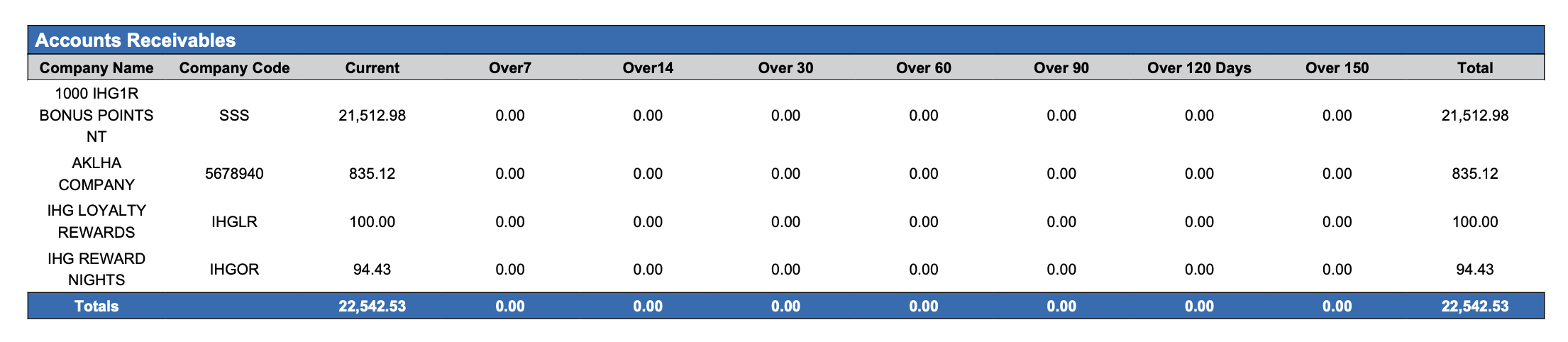
Accounts Receivable : Total amount due from accounts yet to be invoiced by aging period.
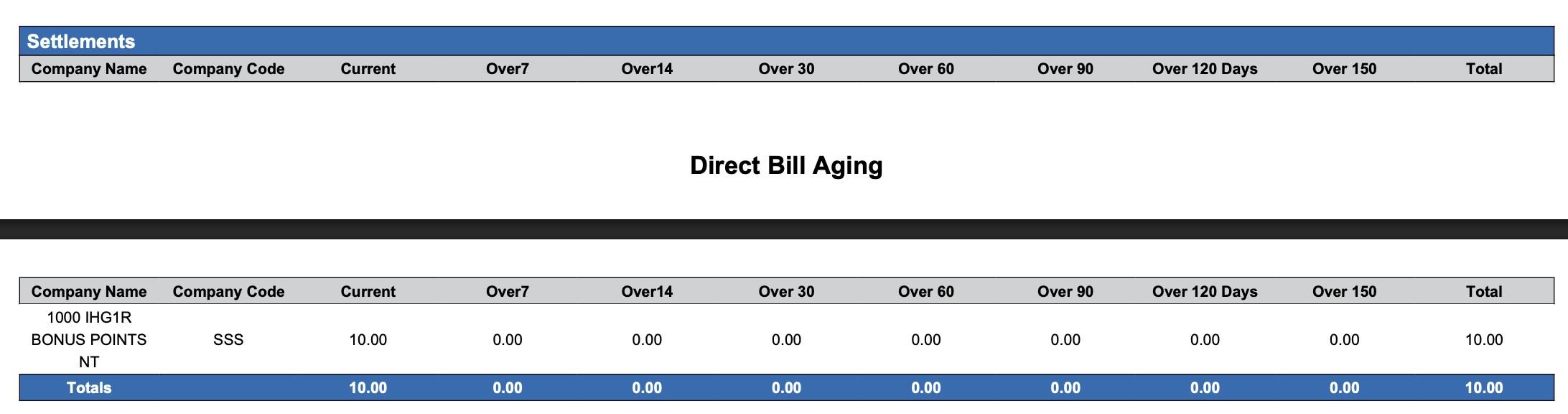
Invoices : The total amount invoiced but not settled to accounts by aging period.

Settlement : The total amount settled to accounts by aging period.
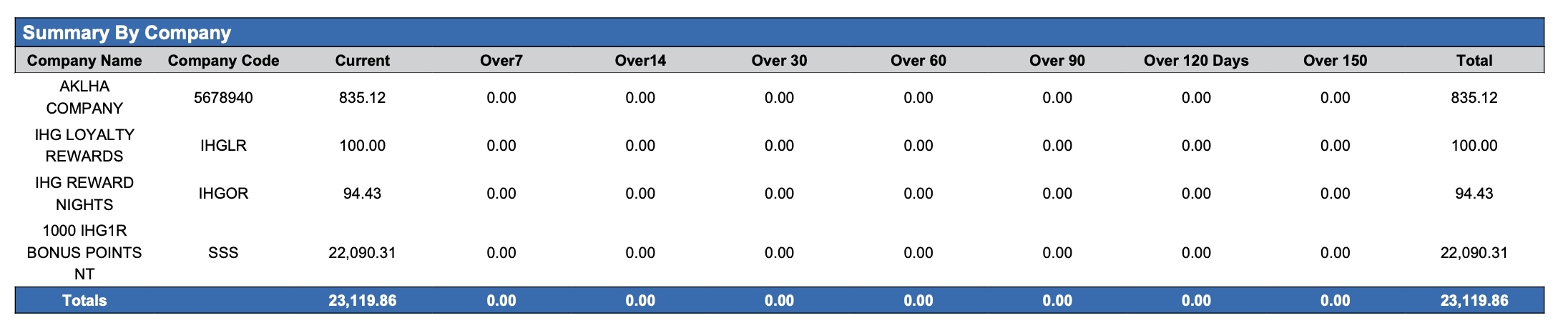
Summary By Company: Summary of accounts by Company.
Totals : Summary of total amounts for Accounts Receivables, Invoices and Settlements by aging period.

Misc Report Information:
Available Features:
-
Export: ability to download and save the file into an alternate format.
-
Filter: filter a range of data based on criteria defined by the user.
-
Highlight: also known as conditional formatting is the ability to highlight certain values making them easier to identify.
Available Configuration:
-
User Preferences: allows the user to customize their report view by repositioning or removing columns.
-
Property Preferences: allows the property to customize the report view for all users by repositioning or removing columns.
Baseline Configuration:
-
Property Preferences Settings:
-
Following columns to be disabled for initial deployment:
-
Not Applicable
-
-