
Direct Bill Ledger Details Report Overview
Parent Hub: 💰 Finance & Accounting Reports
Category: ⚖️ Ledgers & Trial Balance / 📬 Billing & Receivables (AR)
Target Roles: Directors of Finance & Controllers, Accounting Managers & Clerks, AR Specialists
Key Value: Provide complete line-item transaction evidence across unbilled guest folios, generated city ledger invoices, and applied settlement tenders across granular aging buckets to facilitate direct-bill auditability and match client payments against outstanding debt.
Executive Summary
The Direct Bill Ledger Details Report is a specialized financial auditing tool within the ⚖️ Ledgers & Trial Balance and 📬 Billing & Receivables (AR) modules. Designed for deep-dive account reconciliation, it provides line-item transaction evidence across every stage of the corporate direct-bill lifecycle.
By segmenting city ledger transactions into three explicit operational sections—unbilled guest folio transfers (Accounts Receivables), generated city ledger bills (Invoices), and applied payment instruments (Settlements)—and mapping individual entries across 8 distinct aging intervals (Current, Over 7, Over 14, Over 30, Over 60, Over 90, Over 120 Days, and Over 150 Days), this report enables controllers and AR managers to audit individual guest stay line items, verify invoice numbers, and match specific payment tenders against outstanding corporate liabilities.
Key Capabilities
-
Three Lifecycle Audit Perspectives: Itemizes unbilled guest stay transfers (Accounts Receivables), generated city ledger bills (Invoices), and applied payment tenders (Settlements).
-
Line-Item Guest & Invoice Tracking: Captures guest names, confirmation numbers, stay dates, invoice numbers, and specific payment method types (
CHECK,CREDIT CARD,CASH). -
Granular Aging Bands: Tracks collection velocity across 8 distinct time bands (from Current through Over 150 Days).
Report Views & Functional Breakdown
The Direct Bill Ledger Details Report organizes city ledger activity across three structured operational sections:
┌────────────────────────────────────────────────────────────────────────┐
│                   DIRECT BILL LEDGER DETAILS REPORT                    │
├──────────────────────────┬──────────────────────────┬──────────────────┤
│ 1. Accounts Receivables  │ 2. Invoices              │ 3. Settlements   │
│    (Unbilled Folio       │    (Generated City       │    (Applied      │
│     Line Items)          │     Ledger Bills)        │     Tenders)     │
└──────────────────────────┴──────────────────────────┴──────────────────┘
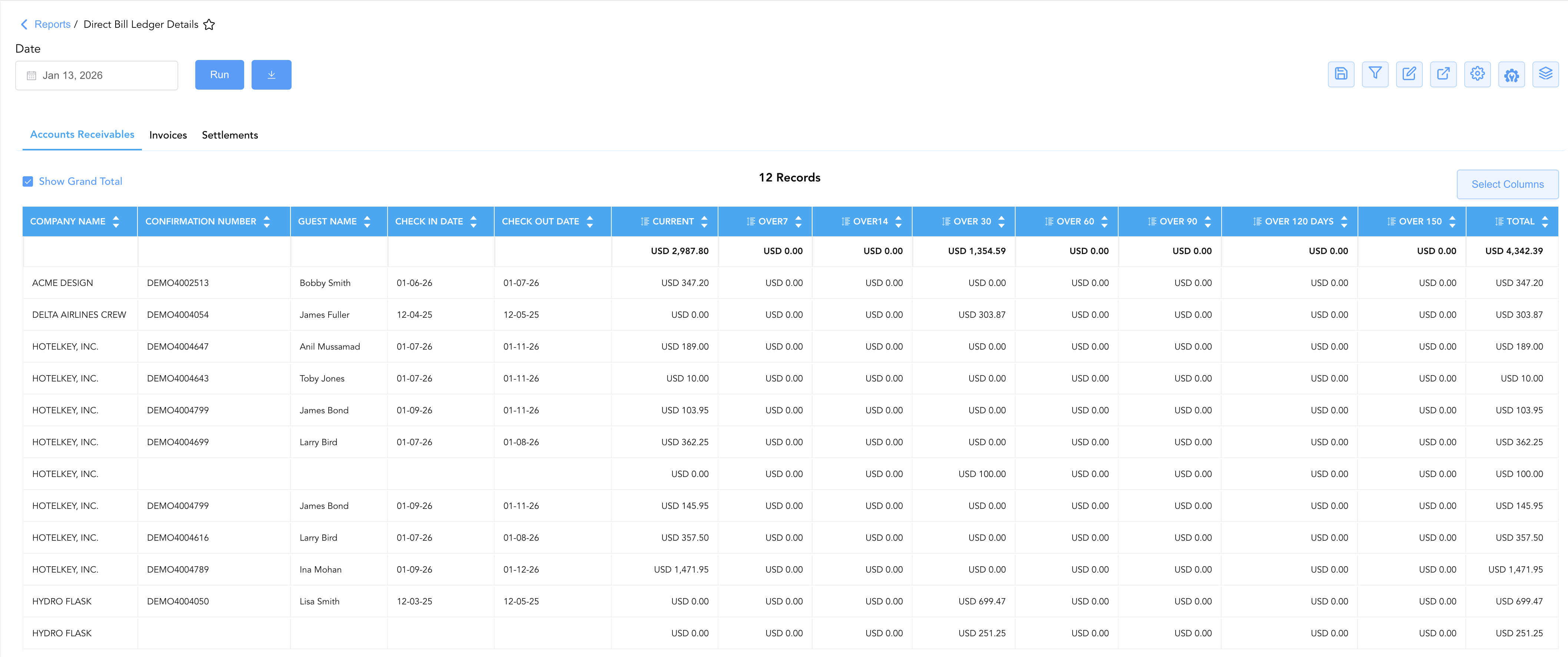
1. Accounts Receivables
Itemizes unbilled direct-bill charges transferred from checked-out guest folios, capturing reservation confirmation numbers and stay dates.
-
Primary Use: Reconciling unbilled guest stay transfers, verifying guest names against corporate rooming lists, and preparing batch invoice runs.
-
Key Metrics: Company Name, Confirmation Number, Guest Name, Check In Date, Check Out Date, Current, Over 7–150+ Days, Total.
2. Invoices
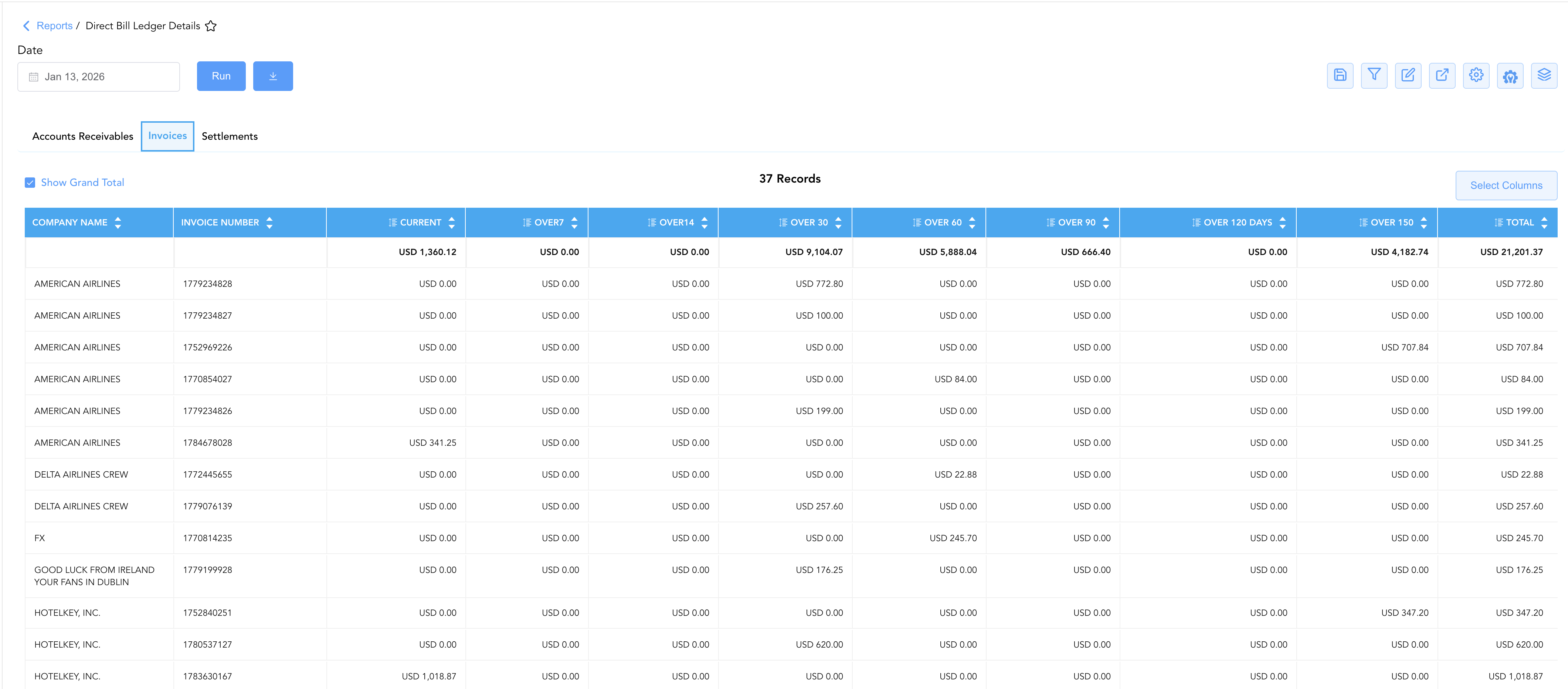
Itemizes generated city ledger invoices currently awaiting client settlement across 30-day aging buckets.
-
Primary Use: Auditing individual invoice numbers, verifying invoice issuance dates, and prioritizing collection outreach for overdue bills.
-
Key Metrics: Company Name, Invoice Number, Current, Over 7–150+ Days, Total.
3. Settlements
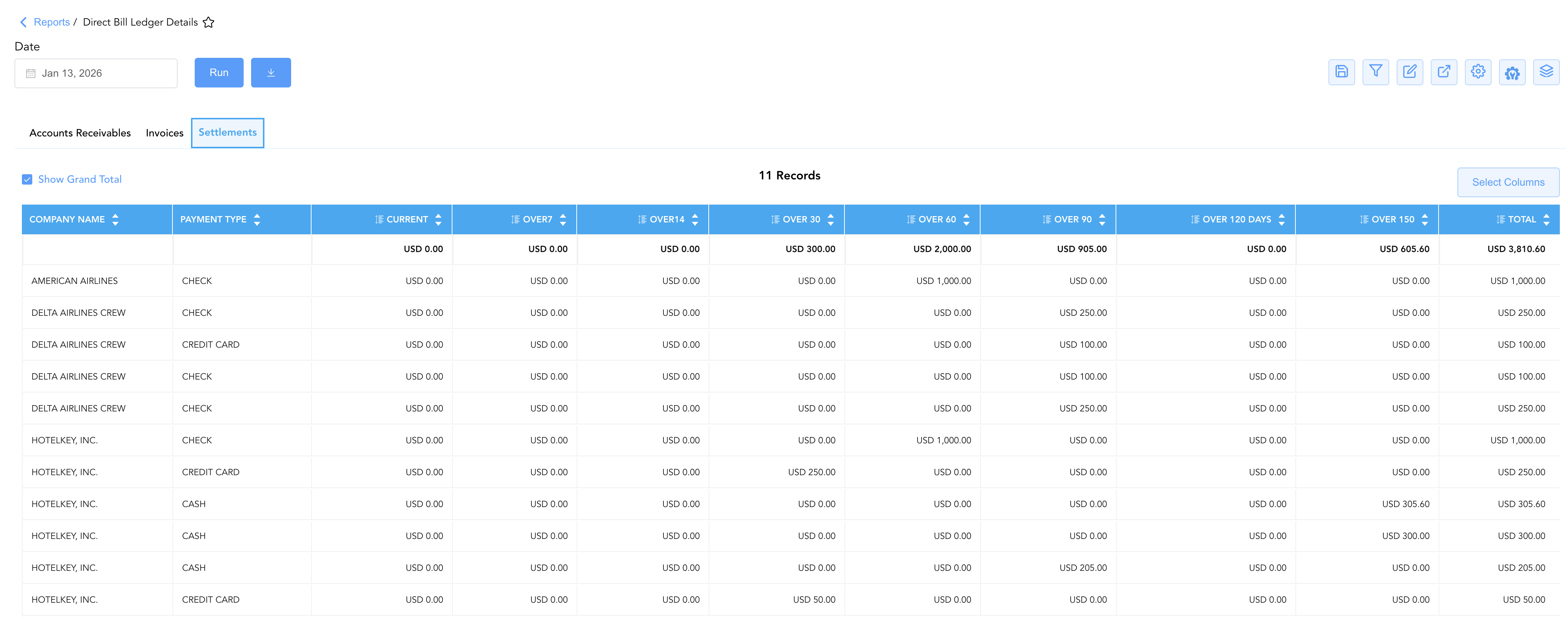
Details individual client payment tenders applied to corporate direct-bill accounts, capturing the specific payment instrument used.
-
Primary Use: Matching applied checks, electronic wire transfers, and credit card payments against outstanding city ledger invoices.
-
Key Metrics: Company Name, Payment Type (
CHECK,CREDIT CARD,CASH), Current, Over 7–150+ Days, Total.
Data Dictionary (Dynamic View Columns)
Customize your default view using the Configure (⚙️) icon on the report page. Below is the full data dictionary available across all sections of this report:
💡 Tax Treatment Note: All aging bucket values (Current through Over 150) and Total balance fields represent Gross Amounts (Includes Taxes & Fees).
|
Column Name |
Description |
Data Source / System Mapping |
Includes Taxes & Fees? |
|
Company Name |
Official contracted corporate account name receiving the direct bill. |
|
N/A |
|
Confirmation Number |
Unique system confirmation code assigned to the individual reservation. |
System Reservation ID |
N/A |
|
Guest Name |
Full guest name assigned to the unbilled reservation charge. |
|
N/A |
|
Invoice Number |
Unique reference code assigned to the generated city ledger invoice. |
System Invoice Engine |
N/A |
|
Payment Type |
Tender method applied for account settlement ( |
Settlement Processing Log |
N/A |
|
Check In Date |
Scheduled or actual arrival date for the unbilled reservation stay. |
|
N/A |
|
Check Out Date |
Scheduled or actual departure date for the unbilled reservation stay. |
|
N/A |
|
Current |
Outstanding balance within the active 0–6 day billing window. |
System Aging Calculation (0–6 Days) |
🟢 Yes |
|
Over 7 |
Outstanding balance between 7 and 13 days past posting. |
System Aging Calculation (7–13 Days) |
🟢 Yes |
|
Over 14 |
Outstanding balance between 14 and 29 days past posting. |
System Aging Calculation (14–29 Days) |
🟢 Yes |
|
Over 30 |
Outstanding balance between 30 and 59 days past posting. |
System Aging Calculation (30–59 Days) |
🟢 Yes |
|
Over 60 |
Outstanding balance between 60 and 89 days past posting. |
System Aging Calculation (60–89 Days) |
🟢 Yes |
|
Over 90 |
Outstanding balance between 90 and 119 days past posting. |
System Aging Calculation (90–119 Days) |
🟢 Yes |
|
Over 120 Days |
Outstanding balance between 120 and 149 days past posting. |
System Aging Calculation (120–149 Days) |
🟢 Yes |
|
Over 150 |
Outstanding balance exceeding 150 days (high risk / delinquent). |
System Aging Calculation (≥ 150 Days) |
🟢 Yes |
|
Total |
Net cumulative gross balance for the transaction line item. |
|
🟢 Yes |
Customization & Platform Features
User & Property Preferences
-
Personal Preference: Tailor your individual view by hiding or dragging columns. Your preference saves automatically for future sessions.
-
Property Defaults: System Admins can configure standard default layouts across all property users to streamline operational reporting. To maximize audit efficiency, group the columns into the below logical blocks:
-
Section 1: Accounts Receivables
-
Account & Stay Context (Cols 1–5):
Company Name|Confirmation Number|Guest Name|Check In Date|Check Out Date -
Aging Breakdown & Balances (Cols 6–14):
Current|Over 7|Over 14|Over 30|Over 60|Over 90|Over 120 Days|Over 150|Total
-
-
Section 2: Invoices
-
Invoice Identifiers (Cols 1–2):
Company Name|Invoice Number -
Aging Breakdown & Balances (Cols 3–11):
Current|Over 7|Over 14|Over 30|Over 60|Over 90|Over 120 Days|Over 150|Total
-
-
Section 3: Settlements
-
Settlement Identifiers (Cols 1–2):
Company Name|Payment Type -
Aging & Payment Credit Allocation (Cols 3–11):
Current|Over 7|Over 14|Over 30|Over 60|Over 90|Over 120 Days|Over 150|Total
-
-
Report Toolbar & Quick Actions
Use the top-right toolbar icons on the report page to manage and export your data view:
|
Icon |
Action / Feature |
Description |

|
Knowledge Article |
Opens the knowledge base article to learn how to interpret this report. |

|
Saved Views |
Saves your column filtering, sorting, and highlight preferences so you can easily reload your custom view later without reconfiguring the report. |

|
Filter |
Opens filter controls to isolate specific data within a column based on your selected criteria. |

|
Highlight |
Highlights column values in a designated color based on selected conditions. |

|
Export |
Exports and downloads the report in various formats (Excel, PDF, CSV) for offline analysis or printing. |

|
Configure |
Opens column selection controls to toggle visibility, reorder columns, or hide rows with all zeros. |

|
Additional Configuration |
Provides advanced report configuration and display formatting options to customize data presentation. |

|
Group By |
Summarize and group report data dynamically in real time. |
Interactive Visualizations & Grouping Controls
-
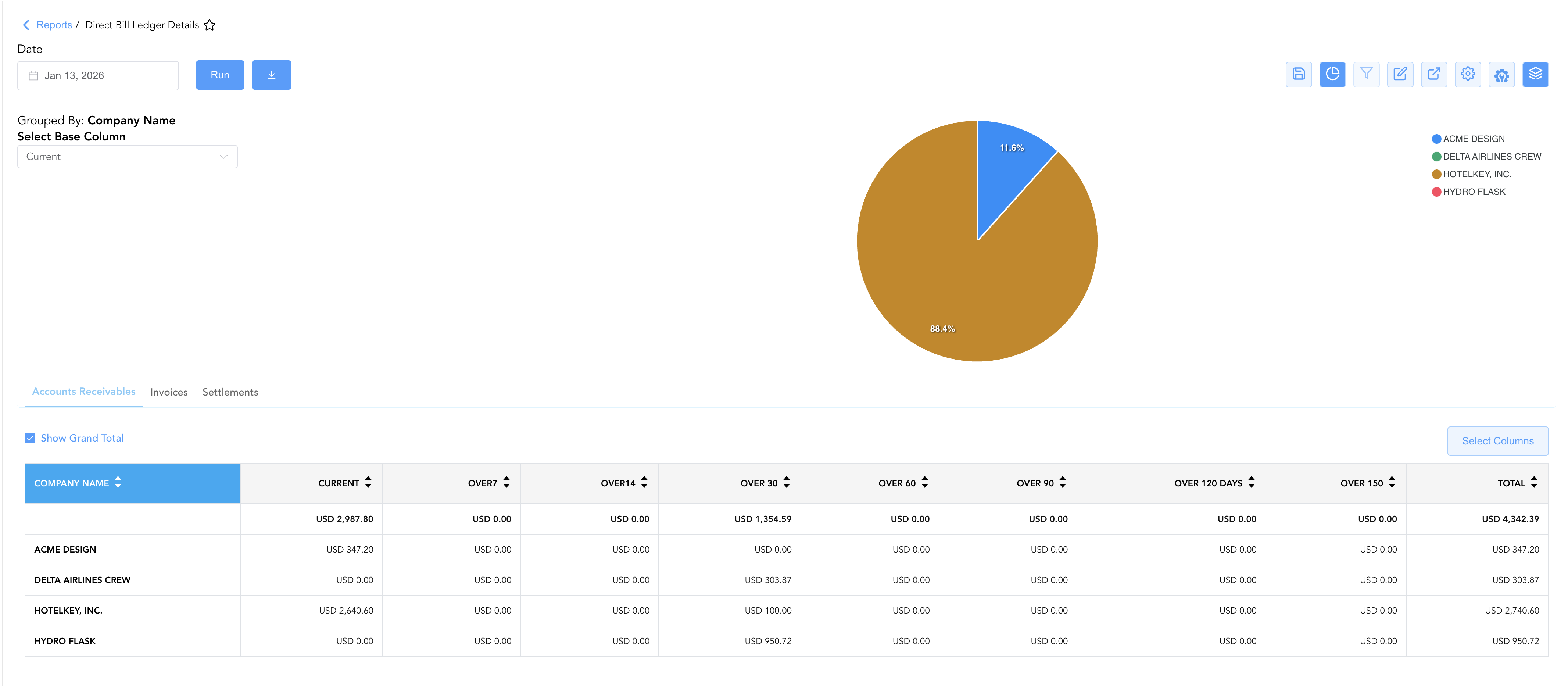
Group By & Pie Chart Visualization: The Direct Bill Ledger Details report features an interactive pie chart to analyze direct bill balances and aging distributions across corporate accounts. Users can group line items on the fly by Company Name (across Accounts Receivables, Invoices, Settlements) to review aggregate balances. By selecting a metric from the Select Base Column dropdown menu—such as Current balances or aging thresholds like Over 30, Over 60, or Over 120 Days—the chart dynamically displays percentage share breakdowns accompanied by a color-coded company legend.
Advanced Controls
-
Exporting & Audit Delivery: Download in Excel or PDF format to attach line-item stay proof to outgoing corporate statements or collection notices.
-
Filtering: Filter data by specific Company Name, Payment Type, or Invoice Number.
-
Highlighting (Conditional Formatting): Apply custom rules to automatically highlight overdue invoice line items (
Over 60 > $0.00) or high-value unbilled reservations.
🔗 Related Reports & Next Steps
Within ⚖️ Ledgers & Trial Balance & 📬 Billing & Receivables (AR):
-
Direct Bill Aging – Review company-level direct bill summaries across Accounts Receivables, Invoices, Settlements, and Totals.
-
Direct Bill Reconciliation – Compare total charges against total payments for corporate stays to spot payment gaps.
-
Accounts Receivable Activity – Audit every line-item transaction hitting the direct-bill ledger.
-
AR Invoice Aging – Categorize open invoice balances across 30-day time bands.
-
Customer Statement – Generate client-facing statements with invoice details and bank remittance info.
Cross-Pillar Deep Dives:
-
💳 Payments & Transactions: To inspect corporate checks, wire receipts, or credit card processing gateway logs, cross-reference Payment Activity.
-
🏛️ Taxes & Expenses: To verify tax calculation rules applied to direct-bill charges, review Active Taxes and Charge Types.
-
📈 Forward Revenue & Analytics: Looking for forward-facing revenue projections or macro performance metrics (like RevPAR or ADR)? Please visit the 📈 Revenue & Analytics reporting hub.