
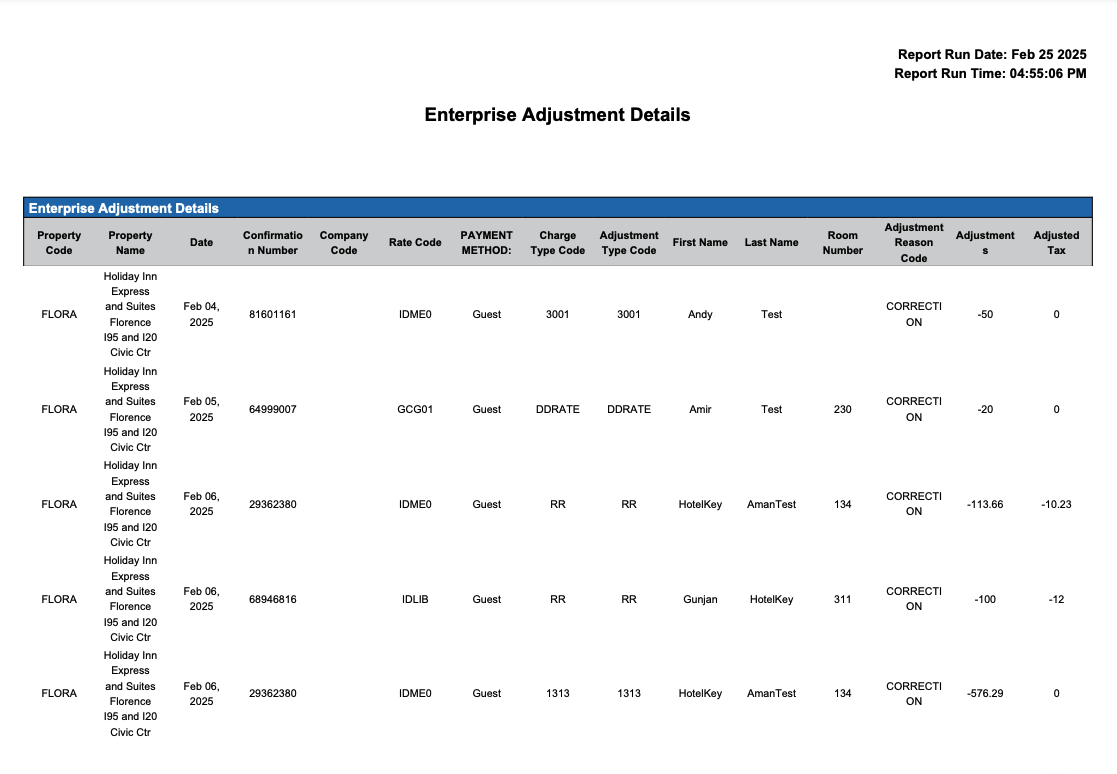
Enterprise Adjustment Details Report
Report Description: The Adjustment Details report offers a comprehensive list of rate adjustments transactions made within a specified period, showcasing transaction details such as date, time, type, number, amount, and property information, facilitating financial tracking and transaction reconciliation at the Enterprise level.
Date Range: This report can render the data for up to 30 days
Adjustments section: The adjustments section provides a detailed list of rate adjustments by transaction number and user.
Available Report Columns for Following Sections:
|
Column Name |
Column Description |
Amount Includes Taxes and Fees |
Calculation |
|
Property Code |
Identifies the hotel code |
Not Applicable |
Not Applicable |
|
Property Name |
Identifies the name of the hotel |
Not Applicable |
Not Applicable |
|
Property City |
Identifies the City the hotel is operating |
Not Applicable |
Not Applicable |
|
Property State |
Identifies the State the hotel is operating |
Not Applicable |
Not Applicable |
|
Date |
Date of the transaction (ex - March 25, 2024) |
Not Applicable |
Not Applicable |
|
Time |
Time of the transaction (ex - 05:39:49 AM) |
Not Applicable |
Not Applicable |
|
Confirmation Number |
Reservation confirmation number |
Not Applicable |
Not Applicable |
|
Company Code |
Local direct bill company code |
Not Applicable |
Not Applicable |
|
Rate Code |
Rate plan code on the reservation |
Not Applicable |
Not Applicable |
|
Payment Method |
Payment type on the reservation (example - Credit Card, Direct Bill, VCC) |
Not Applicable |
Not Applicable |
|
Charge Type Code |
Code of the charge type that is relevant for the reservation |
Not Applicable |
Not Applicable |
|
Adjustment Type Code |
Type of adjustment (example: charge type, reason code, etc.) |
Not Applicable |
Not Applicable |
|
Guest Name |
Primary guest name on the reservation |
Not Applicable |
Not Applicable |
|
First Name |
Guest first name in local language |
Not Applicable |
Not Applicable |
|
Last Name |
Guest last name in local language |
Not Applicable |
Not Applicable |
|
Room Number |
Room number associated with the reservation |
Not Applicable |
Not Applicable |
|
Adjustment Reason Code |
Code representing the reason for the adjustment |
Not Applicable |
Not Applicable |
|
Adjustments |
Total amount adjusted for the defined period by type |
NO |
=sum(Adjusted Amount) |
|
Adjusted Tax |
Total tax amount adjusted in the transaction |
YES |
=sum(Adjusted Tax) |
|
Username |
Username that processed that transaction |
Not Applicable |
Not Applicable |
|
Remarks |
Additional remarks regarding the adjustment |
Not Applicable |
Not Applicable |
|
Currency |
Local currency used on the property |
Not Applicable |
Not Applicable |
Misc Report Information:
Available Features:
-
Export: ability to download and save the file into an alternate format.
-
Filter: filter a range of data based on criteria defined by the user.
-
Highlight: also known as conditional formatting is the ability to highlight certain values making them easier to identify.
-
Bar Chart: ability to display data in a bar chart view.
-
Group By: ability to group data All, Transaction Code, Transaction Description or Transaction Type
Available Configuration:
-
Enterprise Preferences: allows the property to customize the report view for all users by repositioning or removing columns.