
Enterprise Refunds Log Report
Report Description: The Enterprise Refunds Log report offers a comprehensive list of rate adjustments and refunds transactions made within a specified period, showcasing transaction details such as date, time, type, number, reason code, amount, and user information, facilitating financial tracking and transaction reconciliation.
Date Range: This report can render the historical data for the last 94 days to date
Summary section: Provides an overview of adjustments by property. Selecting any one of the properties mentioned opens detailed logs of adjustments.
Available Report Columns for Following Section:
|
Column Name |
Column Description |
Amount Includes Taxes and Fees |
Calculation |
|
Property Code |
Hotel code |
Not Applicable |
Not Applicable |
|
Property Name |
Name of the hotel |
Not Applicable |
Not Applicable |
|
Property City |
City the property is located and operating |
Not Applicable |
Not Applicable |
|
Property State |
State the property is located and operating |
Not Applicable |
Not Applicable |
|
Number of Refunds |
Number of refunds made in the timeline selected |
Not Applicable |
Not Applicable |
|
Total Refunds |
Total amounts refunded in the timeline selected |
Not Applicable |
Not Applicable |
|
Currency |
Local currency used on the property |
Not Applicable |
Not Applicable |
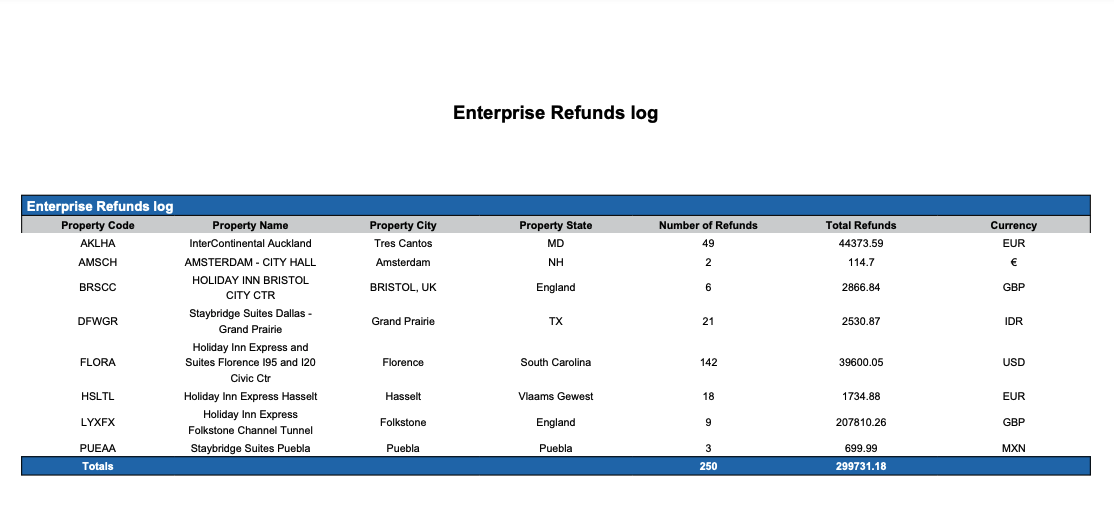
Adjustments section: The adjustments section provides a detailed list of rate adjustments by transaction number and user.
Available Report Columns for Following Sections:
|
Column Name |
Column Description |
Amount Includes Taxes and Fees |
Calculation |
|
Date |
Date of the transaction (ex - March 25, 2024) |
Not Applicable |
Not Applicable |
|
Time |
Time of the transaction (ex - 05:39:49 AM) |
Not Applicable |
Not Applicable |
|
Transaction Type |
Type of transaction (ex - Reservation, House Account, etc.) |
Not Applicable |
Not Applicable |
|
Charge Type |
Used to sort transactions involving income, different types of expenses, equipment purchases, etc. |
Not Applicable |
Not Applicable |
|
Transaction Name |
Name of the account the transaction is being made on; ie, House Account, Guest Room, etc |
Not Applicable |
Not Applicable |
|
Transaction Number |
Unique identifier for the adjustment transaction |
Not Applicable |
Not Applicable |
|
Room Number |
Identifier of the room associated with the transaction |
Not Applicable |
Not Applicable |
|
Adjustment Reason Code |
Code representing the reason for the adjustment |
Not Applicable |
Not Applicable |
|
Adjusted Amount |
Amount adjusted in the transaction |
NO |
=sum(adjusted) |
|
Adjusted Tax |
Tax amount adjusted in the transaction |
NO |
=sum(adjusted tax) |
|
Transferred Charge |
Charges that were transferred to a folio outside the reservation, House Account, Group Master, etc. |
NO |
Not Applicable |
|
Transferred Tax |
Taxes that were transferred to a folio outside the reservation, House Account, Group Master, etc. |
YES |
=sum(transferred tax) |
|
Username |
Username that processed that transaction |
Not Applicable |
Not Applicable |
|
Remarks |
Additional remarks regarding the adjustment |
Not Applicable |
Not Applicable |
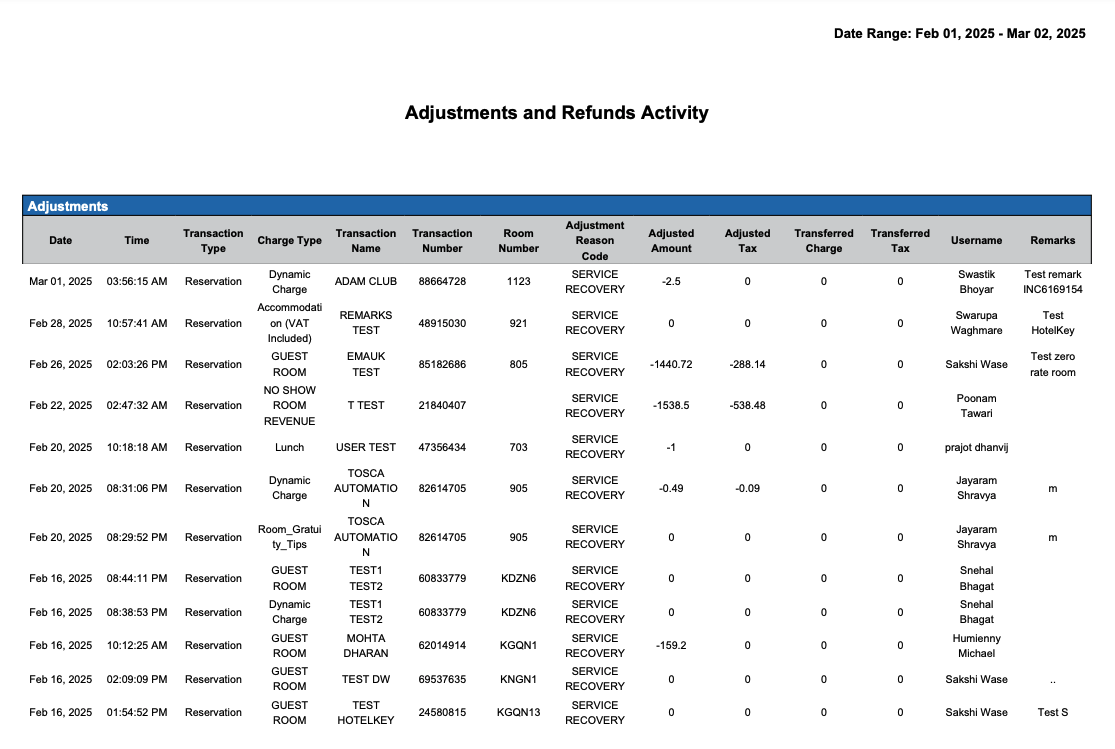
Refunds section: The Refunds section provides a detailed list of payment refunds by transaction number and user.
Available Report Columns for Following Sections:
|
Column Name |
Column Description |
Amount Includes Taxes and Fees |
Calculation |
|
Date |
Date of the transaction (ex - March 25, 2024) |
Not Applicable |
Not Applicable |
|
Time |
Time of the transaction (ex - 05:39:49 AM) |
Not Applicable |
Not Applicable |
|
Transaction Type |
Type of transaction (ex - Reservation, House Account, etc.) |
Not Applicable |
Not Applicable |
|
Transaction Name |
Name of the account the transaction is being made on; ie, House Account, Guest Room, etc |
Not Applicable |
Not Applicable |
|
Transaction Number |
Unique identifier for the adjustment transaction |
Not Applicable |
Not Applicable |
|
Room Number |
Identifier of the room associated with the transaction |
Not Applicable |
Not Applicable |
|
Payment Detail |
Shows method of payment (cash, credit card, direct bill, etc) |
Not Applicable |
Not Applicable |
|
Refund Code |
Code representing the reason for the refund |
Not Applicable |
Not Applicable |
|
Payment Type Refunded |
Payment type used for the refund |
Not Applicable |
Not Applicable |
|
Amount |
Amount refunded in the transaction |
YES |
Not Applicable |
|
Username |
Username that processed that transaction |
Not Applicable |
Not Applicable |
|
Remarks |
Additional remarks regarding the adjustment |
Not Applicable |
Not Applicable |
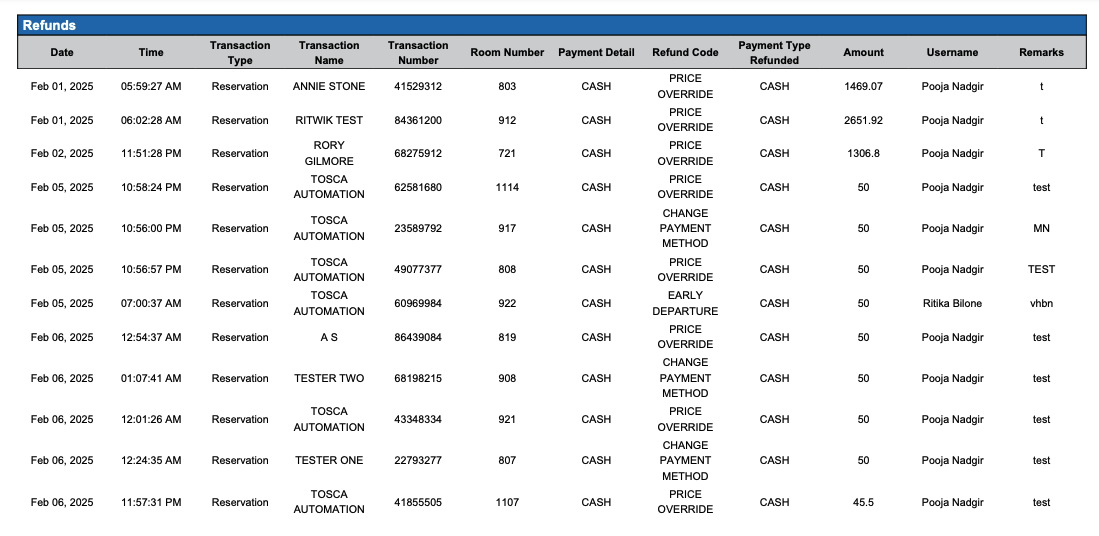
Refund Summary section: The Refund Summary section provides a total refund amount for the defined period by type.
Available Report Columns for Following Sections:
|
Column Name |
Column Description |
Amount Includes Taxes and Fees |
Calculation |
|
Type |
Type of refund (example: Payment Type, Reason Code, etc. |
Not Applicable |
Not Applicable |
|
Name |
The name of the type |
Not Applicable |
Not Applicable |
|
Refund Amount |
Total amount refunded for the defined period by type |
Not Applicable |
=sum(Refund Amount) |
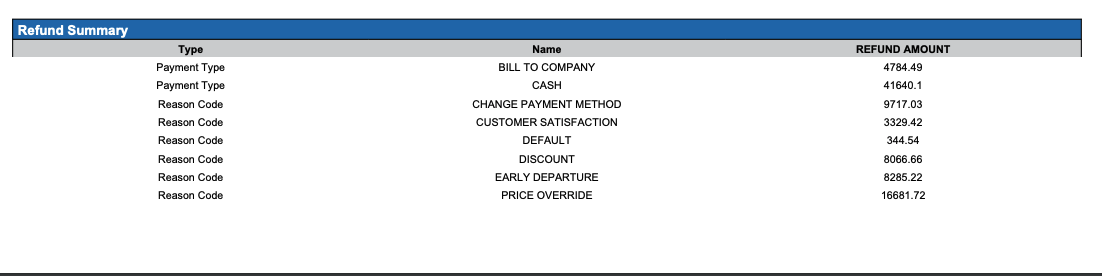
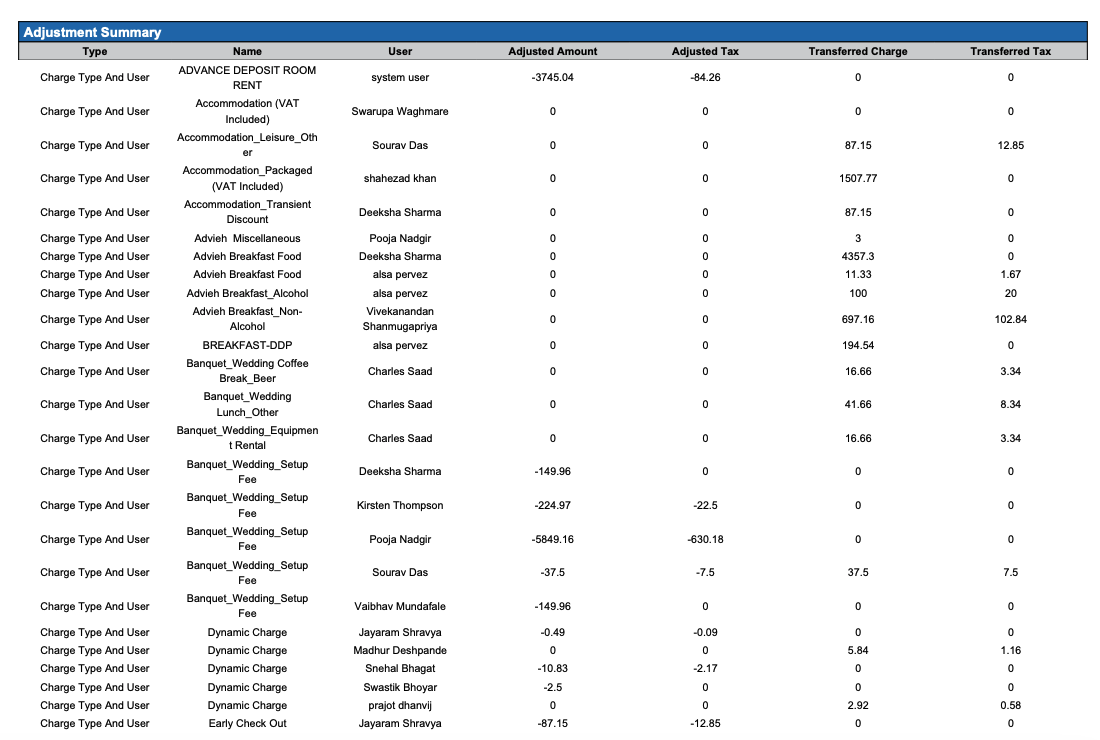
Adjustment Summary section: The Adjustment Summary section provides a total adjusted amount for the defined period by type.
Available Report Columns for Following Sections:
|
Column Name |
Column Description |
Amount Includes Taxes and Fees |
Calculation |
|
Type |
Type of adjustment (example: charge type, reason code, etc.) |
Not Applicable |
Not Applicable |
|
Name |
The name of the type |
Not Applicable |
Not Applicable |
|
User |
The user ID who made the adjustment |
Not Applicable |
Not Applicable |
|
Adjusted Amount |
Total amount adjusted for the defined period by type |
NO |
=sum(Adjusted Amount) |
|
Adjusted Tax |
Total tax amount adjusted in the transaction |
YES |
=sum(Adjusted Tax) |
|
Transferred Charge |
Room Revenue charges that were transferred to a folio outside the reservation, typically to a House Account. |
NO |
=sum(Transferred Charge) |
|
Transferred Tax |
Taxes that were transferred to a folio outside the reservation, typically to a House Account. |
NO |
=sum(Transferred Tax) |
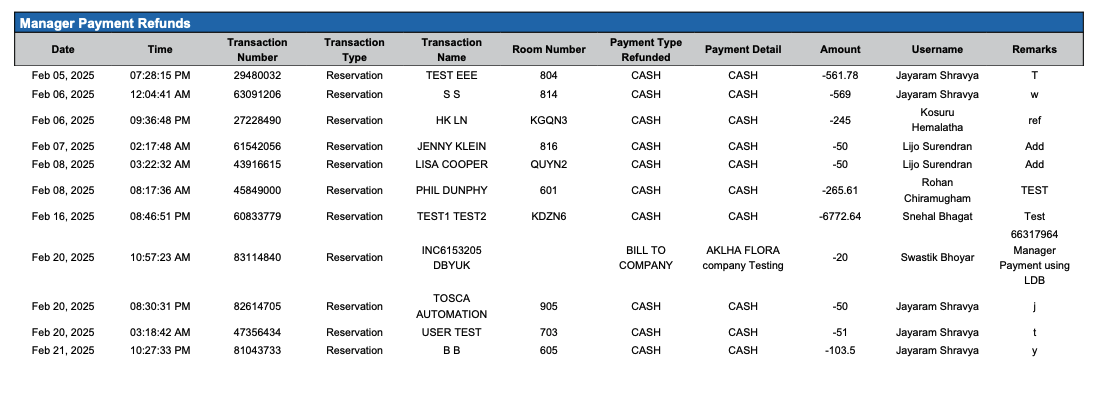
Manager Payment Refunds section: The Manager Payment Refunds section provides a total adjusted amount for the defined period by type.
Available Report Columns for Following Sections:
|
Column Name |
Column Description |
Amount Includes Taxes and Fees |
Calculation |
|
Date |
Date of the transaction (ex - March 25, 2024) |
Not Applicable |
Not Applicable |
|
Time |
Time of the transaction (ex - 05:39:49 AM) |
Not Applicable |
Not Applicable |
|
Transaction Number |
Unique identifier for the adjustment transaction |
Not Applicable |
Not Applicable |
|
Transaction Type |
Type of transaction (ex - Reservation, House Account, etc.) |
Not Applicable |
Not Applicable |
|
Transaction Name |
Name of the account the transaction is being made on; ie, House Account, Guest Room, etc |
Not Applicable |
Not Applicable |
|
Room Number |
Identifier of the room associated with the transaction |
Not Applicable |
Not Applicable |
|
Payment Type Refunded |
Payment type used for the refund |
Not Applicable |
Not Applicable |
|
Payment Detail |
Shows method of payment (cash, credit card, direct bill, etc) |
Not Applicable |
Not Applicable |
|
Amount |
Amount refunded in the transaction |
YES |
Not Applicable |
|
Username |
Username that processed that transaction |
Not Applicable |
Not Applicable |
|
Remarks |
Additional remarks regarding the adjustment |
Not Applicable |
Not Applicable |
Misc Report Information:
Available Features:
-
Export: ability to download and save the file into an alternate format.
-
Filter: filter a range of data based on criteria defined by the user.
-
Highlight: also known as conditional formatting is the ability to highlight certain values making them easier to identify.
-
Bar Chart: ability to display data in a bar chart view.
-
Group By: ability to group data All, Transaction Code, Transaction Description or Transaction Type
Available Configuration:
-
User Preferences: allows the user to customize their report view by repositioning or removing columns.
-
Property Preferences: allows the property to customize the report view for all users by repositioning or removing columns.