
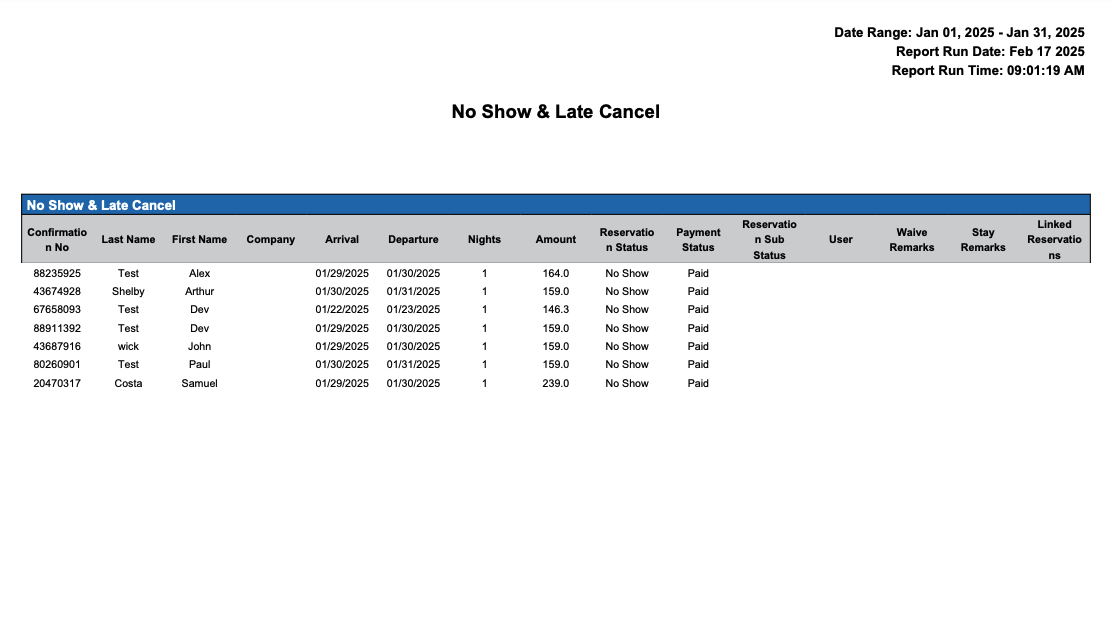
No Show & Late Cancel
Report Description: The No Show and Late Cancel Report provides a list of all reservations marked as no-show or canceled within the penalty period, including details such as confirmation number, last name, first name, company, arrival date, departure date, total nights, amount, reservation status, reservation sub-status, user who processed the reservation, and any remarks.
Date Range: This report can render the data for up to 94 days in the past
Available Report Columns for Following Sections:
|
Column Name |
Column Description |
Amount Includes Taxes and Fees |
Calculation |
|
Confirmation Number |
Unique identifier for the reservation confirmation |
Not Applicable |
Not Applicable |
|
Last Name |
Last name of the guest associated with the reservation |
Not Applicable |
Not Applicable |
|
First Name |
First name of the guest associated with the reservation |
Not Applicable |
Not Applicable |
|
Company |
Name of the company associated with the reservation, if applicable |
Not Applicable |
Not Applicable |
|
Arrival |
Date when the guest was scheduled to arrive |
Not Applicable |
Not Applicable |
|
Departure |
Date when the guest was scheduled to depart |
Not Applicable |
Not Applicable |
|
Nights |
Total number of nights for the reservation |
Not Applicable |
=sum(number of nights) |
|
Amount |
Total amount collected on the reservation for the No Show or Late Cancellation |
NO |
=sum(total amount) |
|
Reservation Status |
Current status of the reservation |
Not Applicable |
Not Applicable |
|
Reservation Sub Status |
Sub-status of the reservation, if applicable |
Not Applicable |
Not Applicable |
|
User |
User who processed or managed the reservation. Note: this column will be blank if cancellation was processed by Night Audit |
Not Applicable |
Not Applicable |
|
Remarks |
Any additional remarks or notes related to the reservation. Note: this column will be blank if cancellation was processed by Night Audit |
Not Applicable |
Not Applicable |
Misc Report Information:
Available Features:
-
Export: ability to download and save the file into an alternate format.
-
Filter: filter a range of data based on criteria defined by the user.
-
Highlight: also known as conditional formatting is the ability to highlight certain values making them easier to identify.
Available Configuration:
-
User Preferences: allows the user to customize their report view by repositioning or removing columns.
-
Property Preferences: allows the property to customize the report view for all users by repositioning or removing columns.
Baseline Configuration:
-
Property Preferences Settings:
-
Following columns to be disabled for initial deployment:
-
None
-
-