
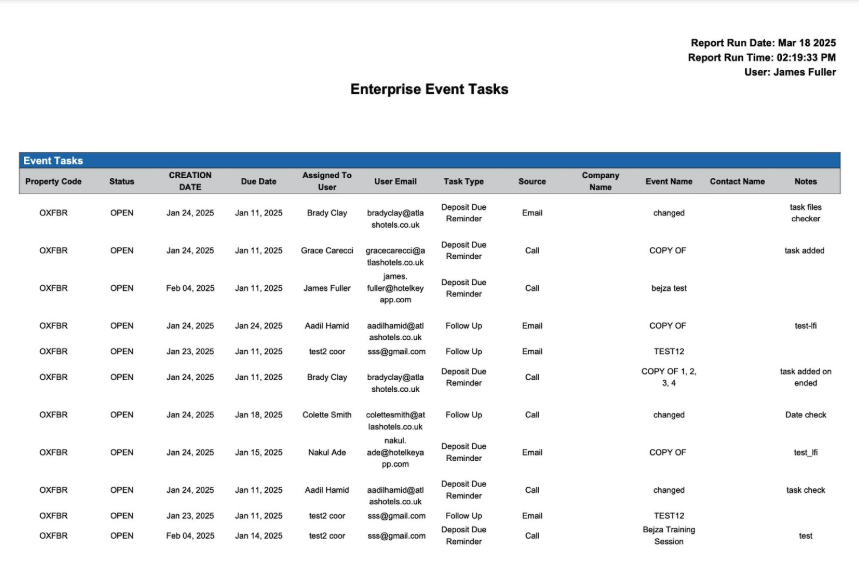
Report Description: The Enterprise Event Task Reports are comprehensive documents that detail the specific tasks and responsibilities assigned to a coordinator within the context of a particular event or company initiative. These reports serve as a centralized source of information, outlining the scope of the coordinator's work, which often includes critical deadlines and timeframes for completion.
Date Range: This report can render the data for up to 90 days in the past or future.
Available Report Columns for Following Sections:
|
Column Name |
Column Description |
Amount Includes Taxes and Fees |
Calculation |
|
Property Code |
Unique code to identify the property |
NO |
Not Applicable |
|
Status |
Task status (open or closed) |
NO |
Not Applicable |
|
Creation Date |
Date task was created |
NO |
Not Applicable |
|
Due Date |
Date task is due |
NO |
Not Applicable |
|
Assigned to User |
User task is assigned to |
NO |
Not Applicable |
|
User Email |
User email |
NO |
Not Applicable |
|
Task Type |
Specific category or classification of tasks |
NO |
Not Applicable |
|
Source |
How the task will be fulfilled |
NO |
Not Applicable |
|
Company Name |
Tasks associated to a company (client) |
NO |
Not Applicable |
|
Event Name |
Task associated to an event |
NO |
Not Applicable |
|
Contact Name |
The contact (booker) name |
NO |
Not Applicable |
|
Notes |
Notes regarding the task |
NO |
Not Applicable |
Misc Report Information:
Available Features:
-
Export: ability to download and save the file into an alternate format.
-
Filter: filter a range of data based on criteria defined by the user.
-
Highlight: also known as conditional formatting is the ability to highlight certain values making them easier to identify.
Available Configuration:
-
User Preferences: allows the user to customize their report view by repositioning or removing columns.
-
Property Preferences: allows the property to customize the report view for all users by repositioning or removing columns.
Baseline Configuration:
-
Property Preferences Settings:
-
Following columns to be disabled for initial deployment:
-
Not Applicable
-
-