
Event Details Report
Report Description: The Event Details report offers a comprehensive overview of event bookings, categorized into four distinct sections:
-
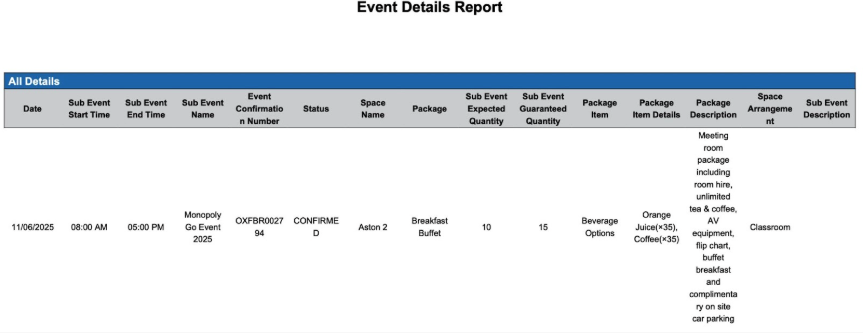
All Details: This section provides a complete and undifferentiated summary of all event bookings.
-
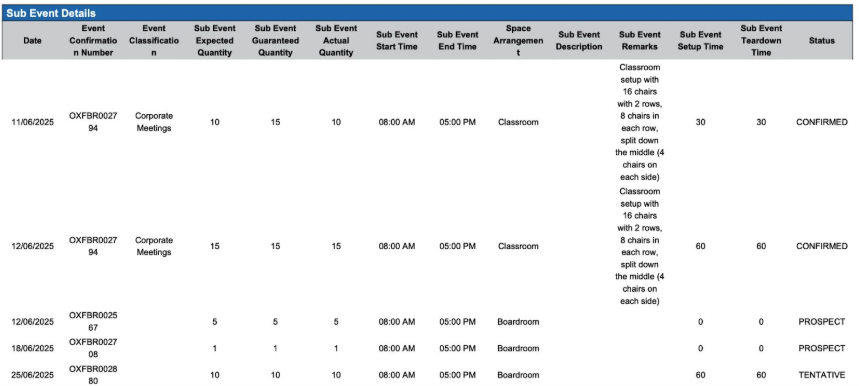
Subevent Details: This section focuses specifically on bookings associated with subevents, offering a more granular analysis of event components.
-
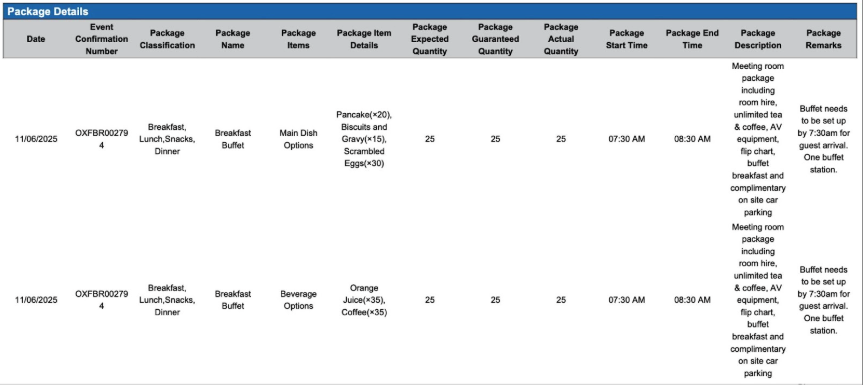
Package Details: This section provides insights into bookings that are part of event packages, highlighting bundled offerings.
-
Event Details: This section presents a detailed breakdown of individual event bookings, providing specific information about each event.
By organizing the data into these categories, the Event Details report allows for a multi-faceted analysis of event bookings, catering to various informational needs and levels of detail.
Date Range: This report can render the data for up to 365 days in the past or future.
All Details section: The All Details section provides a complete and undifferentiated summary of all event bookings
Available Report Columns for Following Sections:
|
Column Name |
Column Description |
Amount Includes Taxes and Fees |
Calculation |
|
Date |
The Date of the event |
Not Applicable |
Not Applicable |
|
Sub Event Start Time |
The time the sub event begins |
Not Applicable |
Not Applicable |
|
Sub Event End Time |
The time the sub event ends |
Not Applicable |
Not Applicable |
|
Sub Event Name |
The name of the sub event in the meeting space |
Not Applicable |
Not Applicable |
|
Event Confirmation Number |
Unique code to identify the event |
Not Applicable |
Not Applicable |
|
Status |
Status of the event (Cancelled, Prospect, Tentative, Confirmed, Started or Ended) |
Not Applicable |
Not Applicable |
|
Space Name |
The name of the meeting room |
Not Applicable |
Not Applicable |
|
Package Category |
Grouping name of packages |
Not Applicable |
Not Applicable |
|
Package |
The name of the package added to the event |
Not Applicable |
Not Applicable |
|
Sub Event Expected Quantity |
The anticipated number of attendees |
Not Applicable |
Not Applicable |
|
Sub Event Guaranteed Quantity |
The confirmed number of attendees for the event |
Not Applicable |
Not Applicable |
|
Sub Event Actual Quantity |
The number of people present at the event |
Not Applicable |
Not Applicable |
|
Package Item |
The item name within the package |
Not Applicable |
Not Applicable |
|
Package Item Details |
The items chosen from the package |
Not Applicable |
Not Applicable |
|
Package Description |
The description or details of the package |
Not Applicable |
Not Applicable |
|
Package Remarks |
Comments entered by the Event manager or coordinator |
Not Applicable |
Not Applicable |
|
Event Classification |
How the event is categorized |
Not Applicable |
Not Applicable |
|
Space Arrangement |
The setup of the meeting room (banquet, classroom, theatre, etc.) |
Not Applicable |
Not Applicable |
|
Sub Event Description |
Summary of the activity happening in the meeting room |
Not Applicable |
Not Applicable |
|
Sub Event Remarks |
Comments entered by the Event manager or coordinator |
Not Applicable |
Not Applicable |
|
Sub Event Setup Time |
The amount of time it will take to set up the meeting room |
Not Applicable |
Not Applicable |
|
Sub Event Tear Down Time |
The amount of time it will take to tear down the meeting room |
Not Applicable |
Not Applicable |
|
Package Start Time |
The deadline for package delivery. |
Not Applicable |
Not Applicable |
|
Package End Time |
The deadline for package pickup |
Not Applicable |
Not Applicable |
Subevent Details section: This section focuses specifically on bookings associated with subevents, offering a more granular analysis of event components.
Available Report Columns for Following Sections:
|
Column Name |
Column Description |
Amount Includes Taxes and Fees |
Calculation |
|
Date |
The Date of the sub event |
Not Applicable |
Not Applicable |
|
Event Confirmation Number |
Unique code to identify the event |
Not Applicable |
Not Applicable |
|
Event Classification |
How the event is categorized |
Not Applicable |
Not Applicable |
|
Sub Event Expected Quantity |
The anticipated number of attendees |
Not Applicable |
Not Applicable |
|
Sub Event Guaranteed Quantity |
The confirmed number of attendees for the event |
Not Applicable |
Not Applicable |
|
Sub Event Actual Quantity |
The number of people present at the event |
Not Applicable |
Not Applicable |
|
Sub Event Start Time |
The time the sub event begins |
Not Applicable |
Not Applicable |
|
Sub Event End Time |
The time the sub event ends |
Not Applicable |
Not Applicable |
|
Space Arrangement |
The setup of the meeting room (banquet, classroom, theatre, etc.) |
Not Applicable |
Not Applicable |
|
Sub Event Description |
Summary of the activity happening in the meeting room |
Not Applicable |
Not Applicable |
|
Sub Event Remarks |
Comments entered by the Event manager or coordinator |
Not Applicable |
Not Applicable |
|
Sub Event Setup Time |
The amount of time it will take to set up the meeting room |
Not Applicable |
Not Applicable |
|
Sub Event Tear Down Time |
The amount of time it will take to tear down the meeting room |
Not Applicable |
Not Applicable |
|
Status |
Status of the event (Cancelled, Prospect, Tentative, Confirmed, Started or Ended) |
Not Applicable |
Not Applicable |
Package Details section: This section provides insights into bookings that are part of event packages, highlighting bundled offerings.
Available Report Columns for Following Sections:
|
Column Name |
Column Description |
Amount Includes Taxes and Fees |
Calculation |
|
Date |
The Date of the sub event |
Not Applicable |
Not Applicable |
|
Event Confirmation Number |
Unique code to identify the event |
Not Applicable |
Not Applicable |
|
Package Classification |
How the package is categorized |
Not Applicable |
Not Applicable |
|
Package Name |
The name of the package |
Not Applicable |
Not Applicable |
|
Package Item |
The item name within the package |
Not Applicable |
Not Applicable |
|
Package Item Details |
The items chosen from the package |
Not Applicable |
Not Applicable |
|
Package Expected Quantity |
The anticipated number of package items |
Not Applicable |
Not Applicable |
|
Package Guaranteed Quantity |
The confirmed number of package items |
Not Applicable |
Not Applicable |
|
Package Actual Quantity |
The number of items consumed |
Not Applicable |
Not Applicable |
|
Package Start Time |
The deadline for package delivery. |
Not Applicable |
Not Applicable |
|
Package End Time |
The deadline for package pickup |
Not Applicable |
Not Applicable |
|
Package Description |
The description or details of the package |
Not Applicable |
Not Applicable |
|
Package Remarks |
Comments entered by the Event manager or coordinator |
Not Applicable |
Not Applicable |
Event Details section: This section presents a detailed breakdown of individual event bookings, providing specific information about each event.
|
Column Name |
Column Description |
Amount Includes Taxes and Fees |
Calculation |
|
Event Name |
The name of the event |
Not Applicable |
Not Applicable |
|
Start Time |
The time the event begins |
Not Applicable |
Not Applicable |
|
End Time |
The time the event ends |
Not Applicable |
Not Applicable |
|
Space Name |
The name of the meeting room |
Not Applicable |
Not Applicable |
|
Sub Event Name |
The name of the sub event in the meeting space |
Not Applicable |
Not Applicable |

Misc Report Information:
Available Features:
-
Export: ability to download and save the file into an alternate format.
-
Filter: filter a range of data based on criteria defined by the user.
-
Highlight: also known as conditional formatting is the ability to highlight certain values making them easier to identify.
Available Configuration:
-
User Preferences: allows the user to customize their report view by repositioning or removing columns.
-
Property Preferences: allows the property to customize the report view for all users by repositioning or removing columns.
Baseline Configuration:
-
Property Preferences Settings:
-
Following columns to be disabled for initial deployment:
-
Not Applicable
-
-