
EventKey 6.0.5 Release Notes
VERSION 6.0.5 NOVEMBER 2026 EVENTKEY
Enterprise Deployment & Feature Availability Notice
The enhancements and fixes detailed below are part of EventKey Version 6.0.5. Please note that enterprise clients and individual brand environments are updated on a phased deployment schedule.
-
Availability: New features and bug fixes will become accessible once Version 6.0.5 is deployed to your specific property or brand environment.
-
Permissions & Setup: Certain features also require administrative configuration or dedicated user permissions before they appear in your workspace.
-
Questions: If you have questions regarding your property’s scheduled upgrade window, please contact your Enterprise Account Manager or HotelKey Support.
Release at a Glance
|
Type |
Ticket & Feature |
Primary audience |
Admin configuration |
|---|---|---|---|
|
BUG FIX |
ENTEK-387: Multi-Line Event Remarks on BEO Letter PDF |
Banquet, Catering, Operations |
AUTOMATIC |
|
ENHANCEMENT |
ENTEK-342: Space-to-Arrangement Mapping |
Sales, Catering, Event Planning |
CONFIG REQUIRED |
|
ENHANCEMENT |
ENTEK-361: Daily Notes Property Bulletin Board |
Managers, Administrators, Property Staff |
CONFIG REQUIRED PERMISSION REQUIRED |
|
ENHANCEMENT |
ENTEK-359: Booker Profile with 360-Degree CRM Views |
Sales, Account Managers, Event Managers |
PERMISSION REQUIRED |
|
ENHANCEMENT |
ENTEK-147: Web-to-Inquiry RFP Online Form |
Inbound Sales, Web Leads |
SUPPORT SETUP |
|
ENHANCEMENT |
ENTEK-352: Rich Text Formatting for Sub-Event Remarks |
Catering Coordinators, Event Planners |
CONFIG REQUIRED |
|
ENHANCEMENT |
ENTEK-366: Dual-Track BEO Approval Workflow |
Operations Directors, Signers, Sales Teams |
PERMISSION REQUIRED |
Bug Fixes
ENTEK-387: Multi-Line Event Remarks Render as Merged Single Line on BEO Letter PDF
BUG FIX AUTOMATIC
-
What was happening: Multi-line text entered into Event Remarks lost line breaks and rendered as one continuous block on the BEO Letter PDF.
-
What changed: Generated BEO documents now preserve line breaks and whitespace exactly as entered in the event interface.
-
Operational impact: Setup instructions, dietary notes, and banquet details remain clear and easy to read for on-property teams.
Enhancements
ENTEK-342: Space-to-Arrangement Mapping
ENHANCEMENT CONFIG REQUIRED
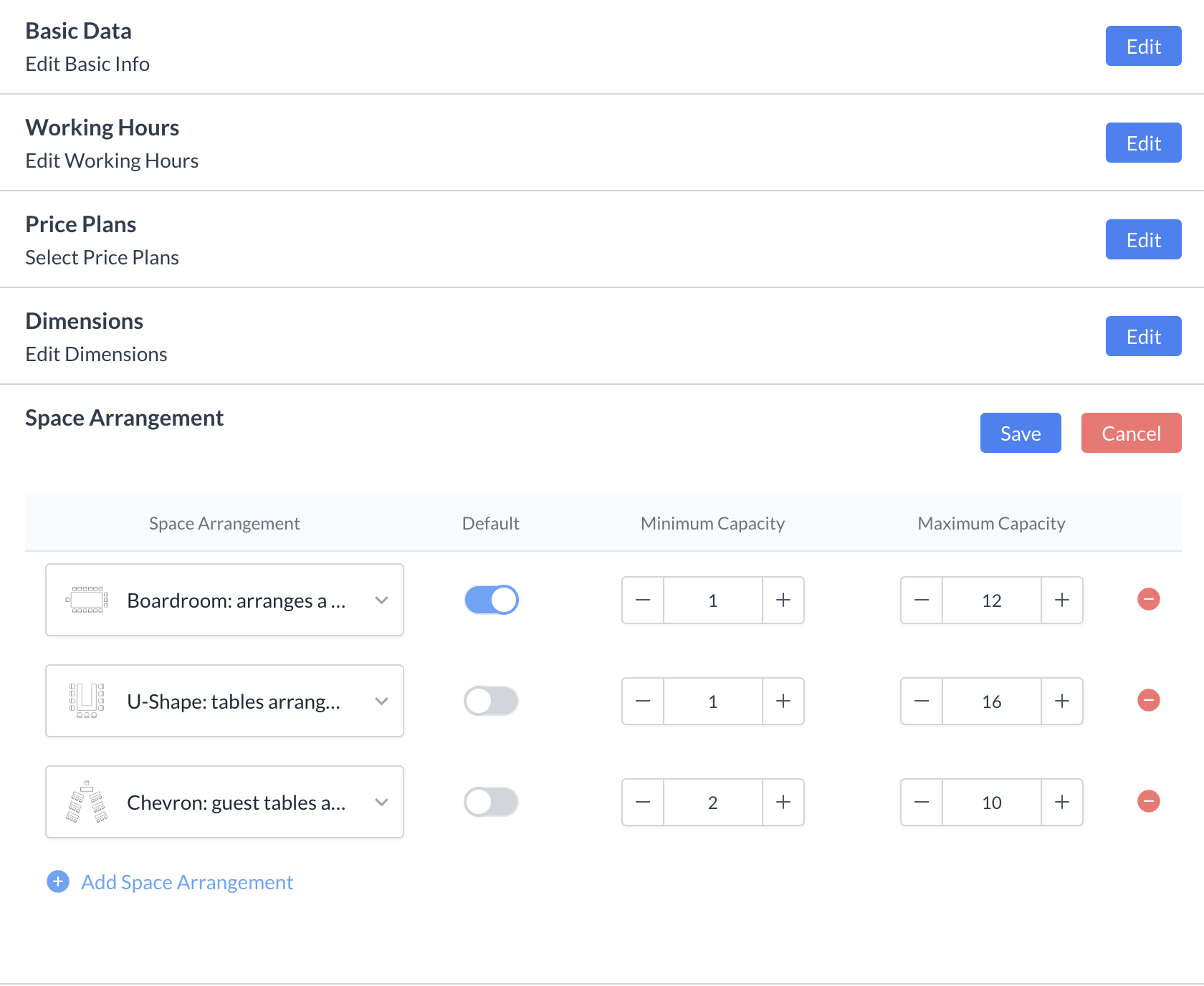
To streamline event planning and eliminate room configuration errors, EventKey now dynamically filters available setup styles based on the selected function space. When creating or editing sub-events, the Space Arrangement dropdown automatically displays only compatible layouts configured for that specific room, complete with predefined minimum and maximum capacity safeguards and optional default selections. If a function space is updated, the system re-validates the arrangement immediately to prevent incompatible setups—ensuring sales and event teams can book configurations quickly and confidently while aligning guest expectations with the physical capabilities of each venue.
Implementation & Setup
-
📚 Knowledge Base: Spaces (Meeting Rooms) KBA
-
🔐 Permissions: N/A
-
⚙️ Configuration: EK Admin > Spaces > Spaces > Select Space > Space Arrangement
-
👤 Who configures: Property EventKey Admin
ENTEK-361: Daily Notes Property Bulletin Board in EventKey
ENHANCEMENT CONFIG REQUIRED PERMISSION REQUIRED
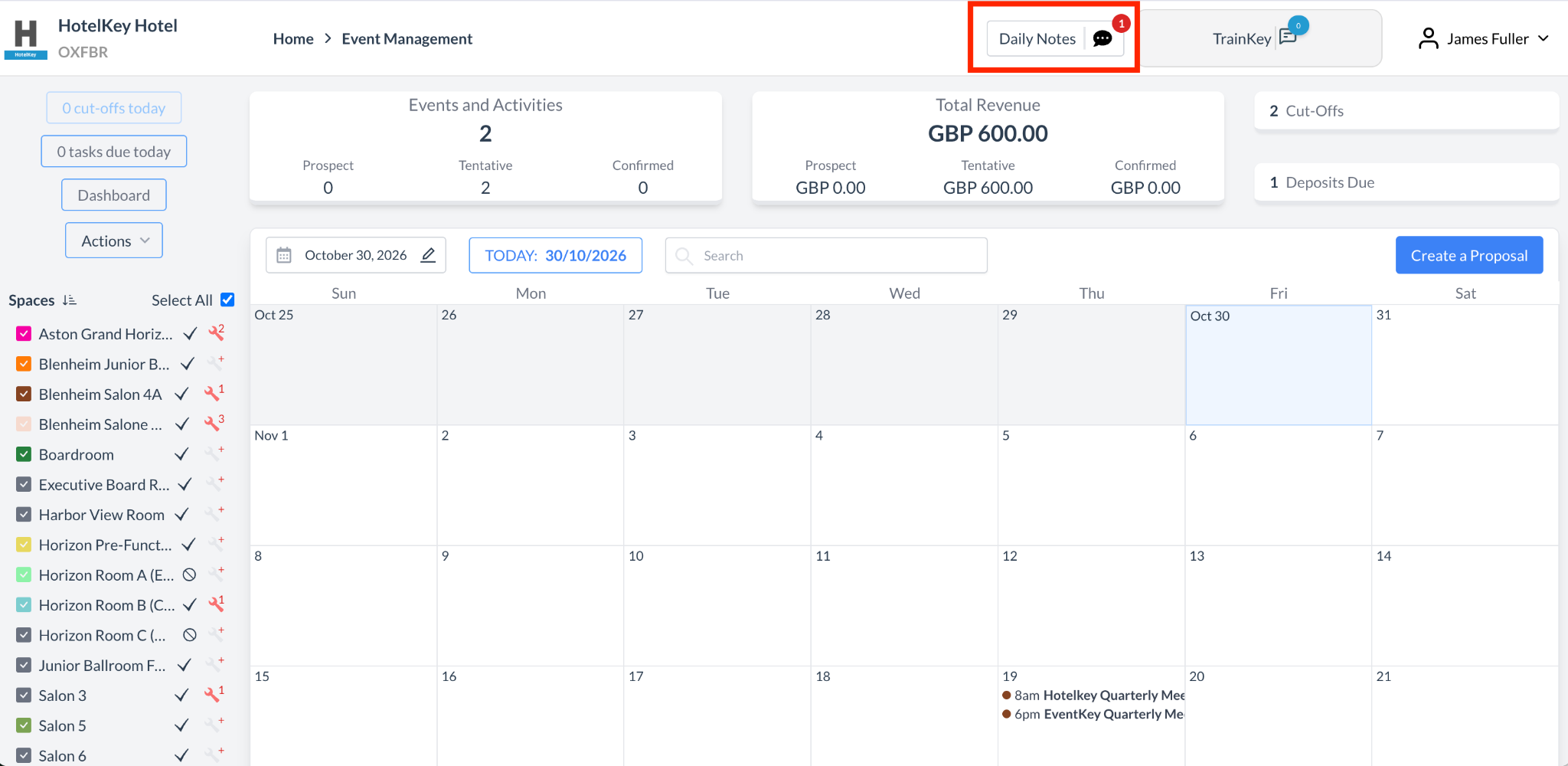
EventKey now features Daily Notes, a permission-based property bulletin board that enables managers and administrators to log and broadcast date-specific operational notices, alerts, and instructions across the property. Accessible via the Actions menu, authorized users can schedule notes through an intuitive calendar logbook and customize visibility across key touchpoints. Once published, active daily notes automatically surface in the header banner of the Availabilities View for real-time situational awareness during bookings, print directly onto Banquet Event Orders (BEOs) and Daily Event Reports, and display as dismissible alerts on the EventKey Dashboard when the Current Business Date matches the note's target date. This enhancement bridges the gap between sales, catering, and on-property operations, ensuring critical daily context is visible wherever teams work.
Implementation & Setup
-
📚 Knowledge Base: Daily Notes KBA
-
🔐 Permissions: SPL_ALLOW_EVENT_DAILY_NOTES
-
⚙️ Configuration: EK Admin > Event Setup > Event Task Type. Add Event Task Type called “DAILY_NOTES”
-
👤 Who configures: Required permissions & Config are automatically granted upon deployment
ENTEK-359: Booker Profile with 360-Degree CRM Account Views
ENHANCEMENT PERMISSION REQUIRED
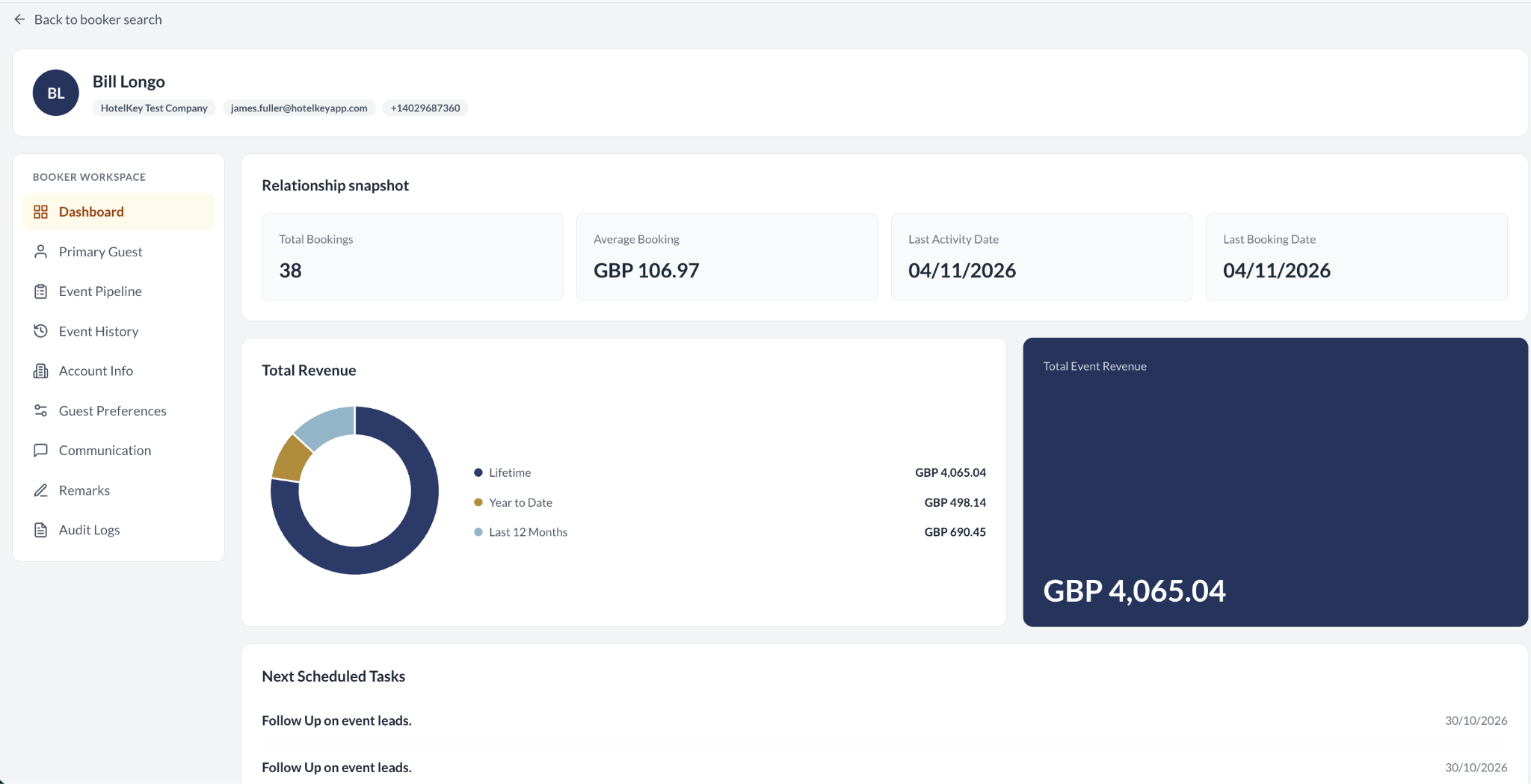
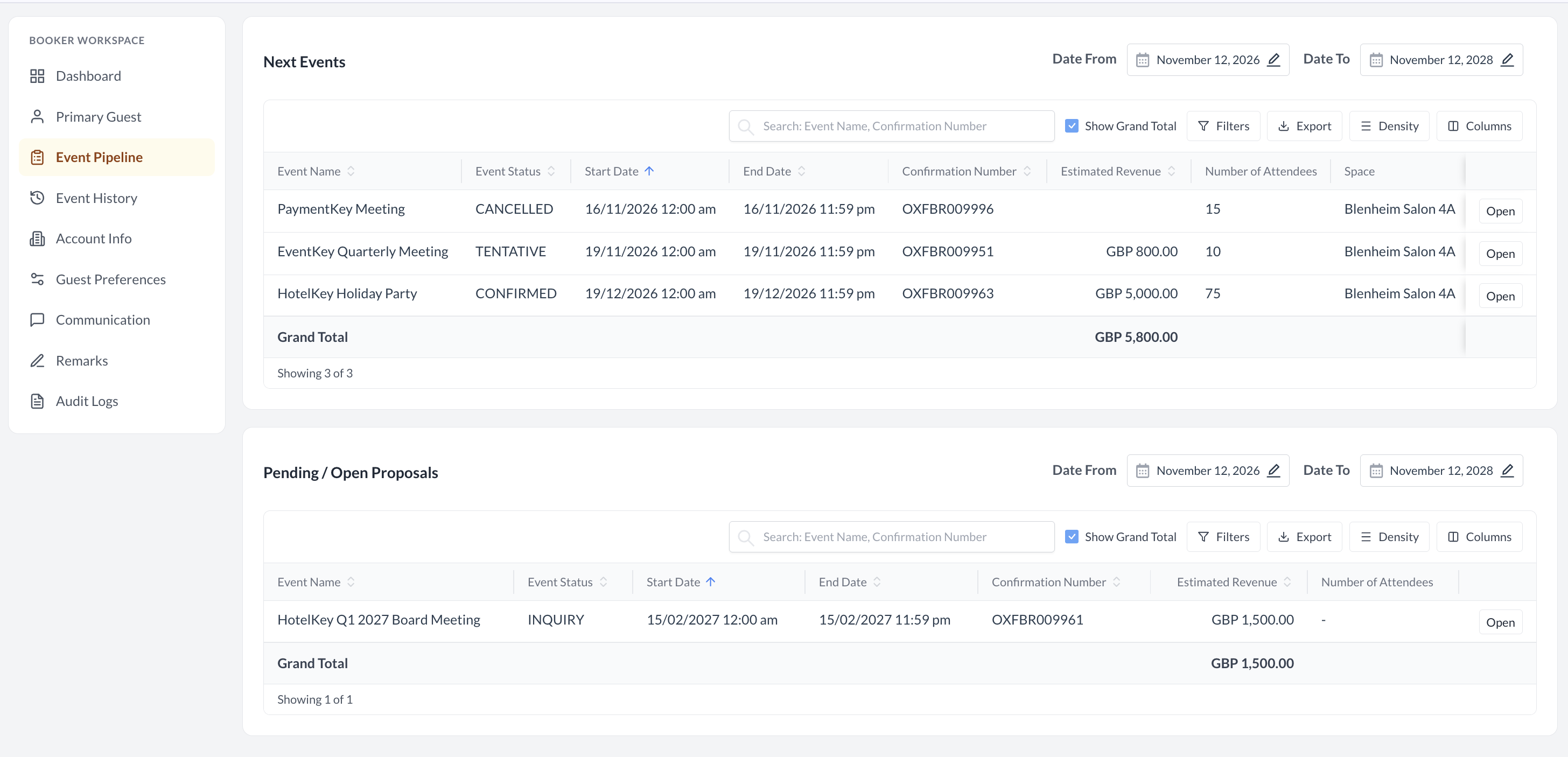
We are excited to introduce the enhanced Booker Profile, delivering a unified 360-degree CRM workspace directly within Event Management. This new view centralizes all critical client information into an intuitive, multi-tab hub, giving sales and event teams end-to-end visibility into client relationships. Users can easily access an interactive relationship snapshot and revenue dashboard, review event pipelines and historical bookings, manage primary guest details, and link parent company accounts. In addition, the workspace allows teams to configure detailed guest preferences (including preferred spaces, room layouts, and master billing options), set up communication channels with lead times and secondary contacts, document rich-text internal remarks, and maintain total transparency through a complete historical audit log.
Implementation & Setup
-
📚 Knowledge Base: Event Booker Profile
-
🔐 Permissions: EVENT_BOOKER_PROFILE
-
⚙️ Configuration: N/A
-
👤 Who configures: Required permissions are automatically granted upon deployment.
ENTEK-147: Web-to-Inquiry RFP Online Form
ENHANCEMENT SUPPORT SETUP
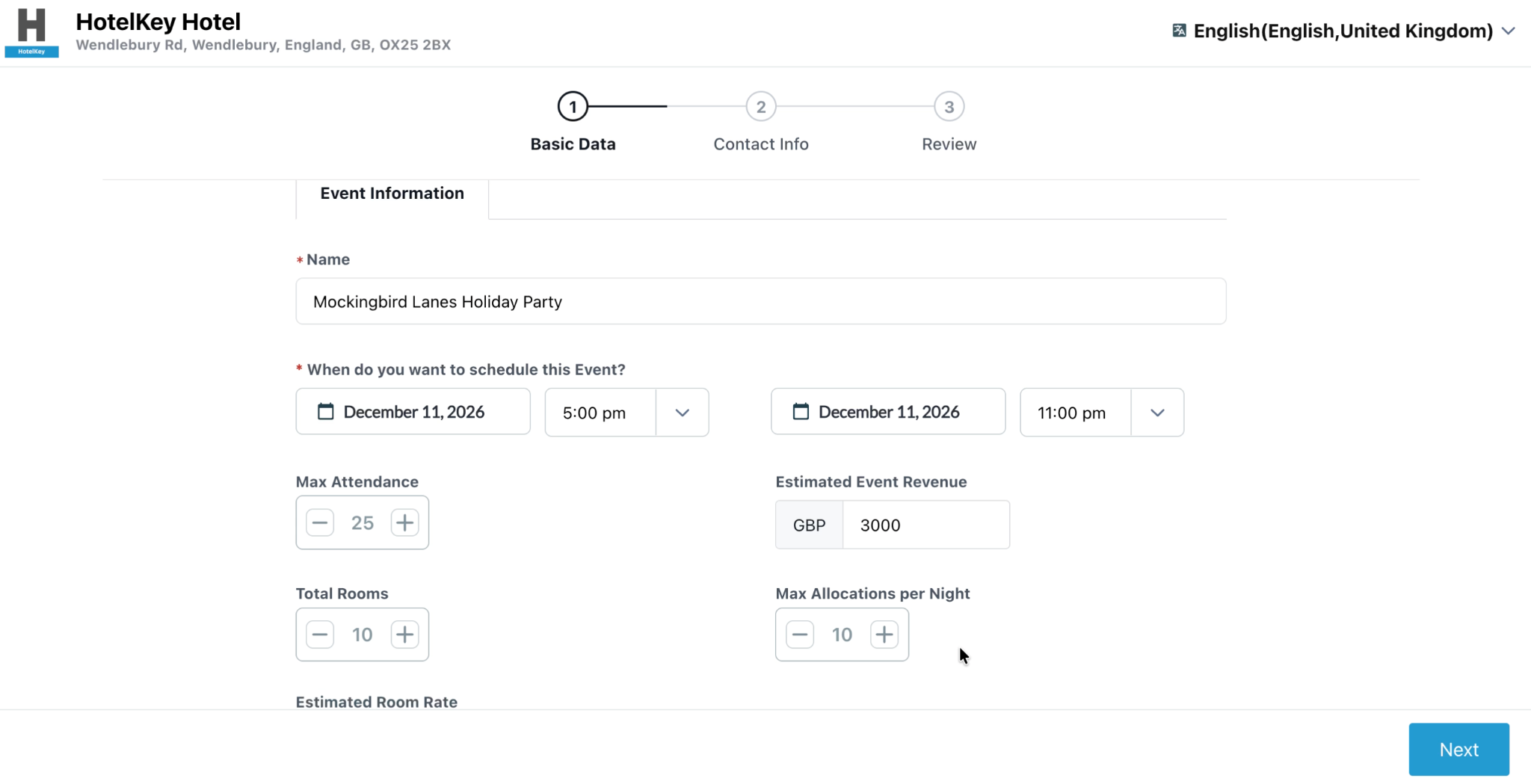
Properties can now capture inbound event business directly from their website with the new embedded EventKey RFP form. Meeting planners and clients complete a streamlined, 3-step submission flow covering event logistics, guest counts, room blocks, and budgets. Submissions generate instant client confirmation codes and route directly into the property’s EventKey Inquiries queue—eliminating manual intake, updating pipeline revenue metrics immediately, and triggering automated staff follow-up tasks for faster response times.
Implementation & Setup
-
📚 Knowledge Base: Online RFP Intake Form
-
🔐 Permissions: N/A
-
⚙️ Configuration: Request URL through HotelKey Support
-
👤 Who configures: HotelKey Support & Property Webmaster
ENTEK-352: Rich Text Formatting for Sub-Event Remarks
ENHANCEMENT CONFIG REQUIRED
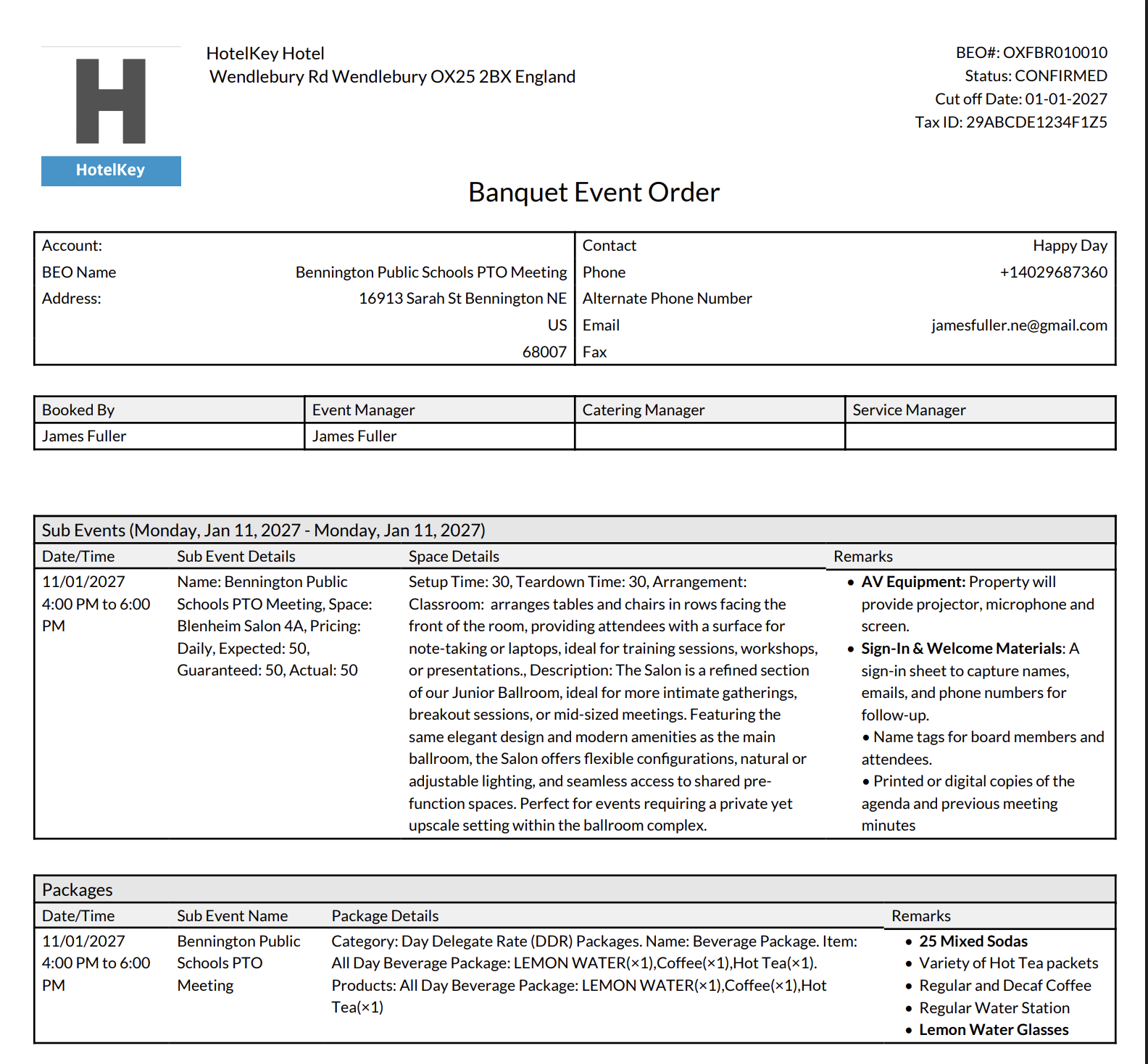
EventKey now features a built-in rich text editor for Sub-Event Remarks, giving event planners and catering managers greater precision when documenting operational instructions. Within any function space booking, users can now format setup directives, welcome materials, and audiovisual checklists using bold text, numbered and bulleted lists, nested indentation, and paragraph styling. Formatted remarks render directly within the Spaces panel on the main Event Record and automatically carry through to the Remarks column on generated Banquet Event Orders (BEOs) in both PDF and Excel formats.
Implementation & Setup
-
📚 Knowledge Base: Formatting Sub-Event Remarks with Rich Text
-
🔐 Permissions: N/A
-
⚙️ Configuration: EK Admin > Advance Setup > Application Configuration > Custom Report BEO = ON
-
👤 Who configures: Property EventKey Admin
ENTEK-366: Dual-Track BEO Approval Workflow
ENHANCEMENT PERMISSION REQUIRED
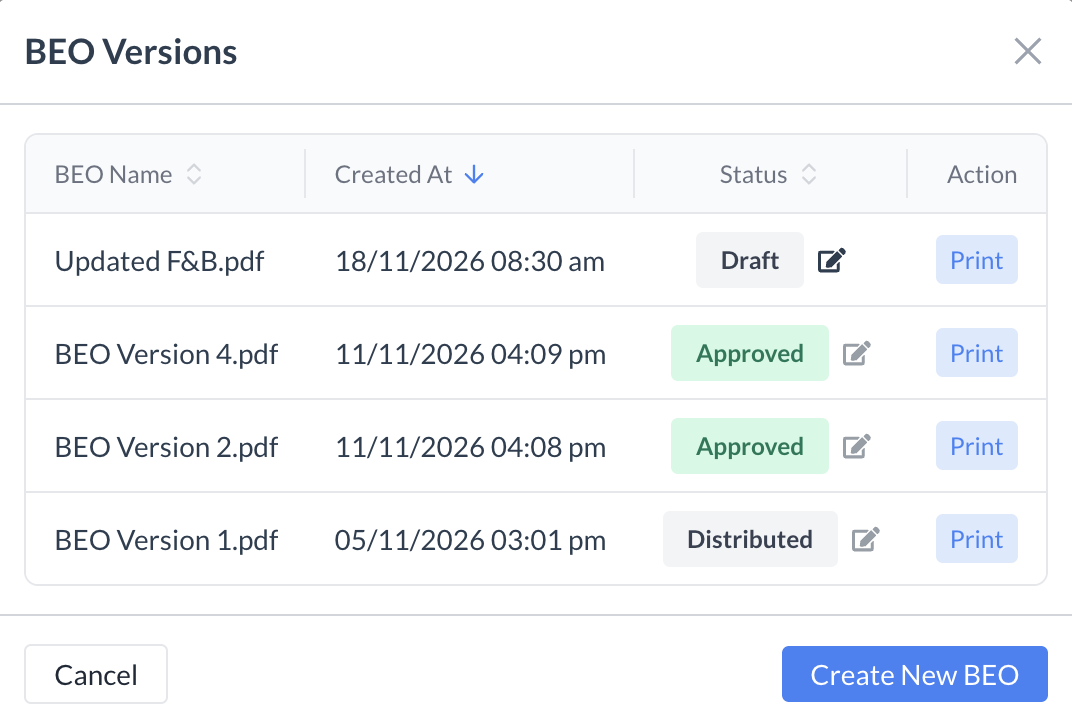
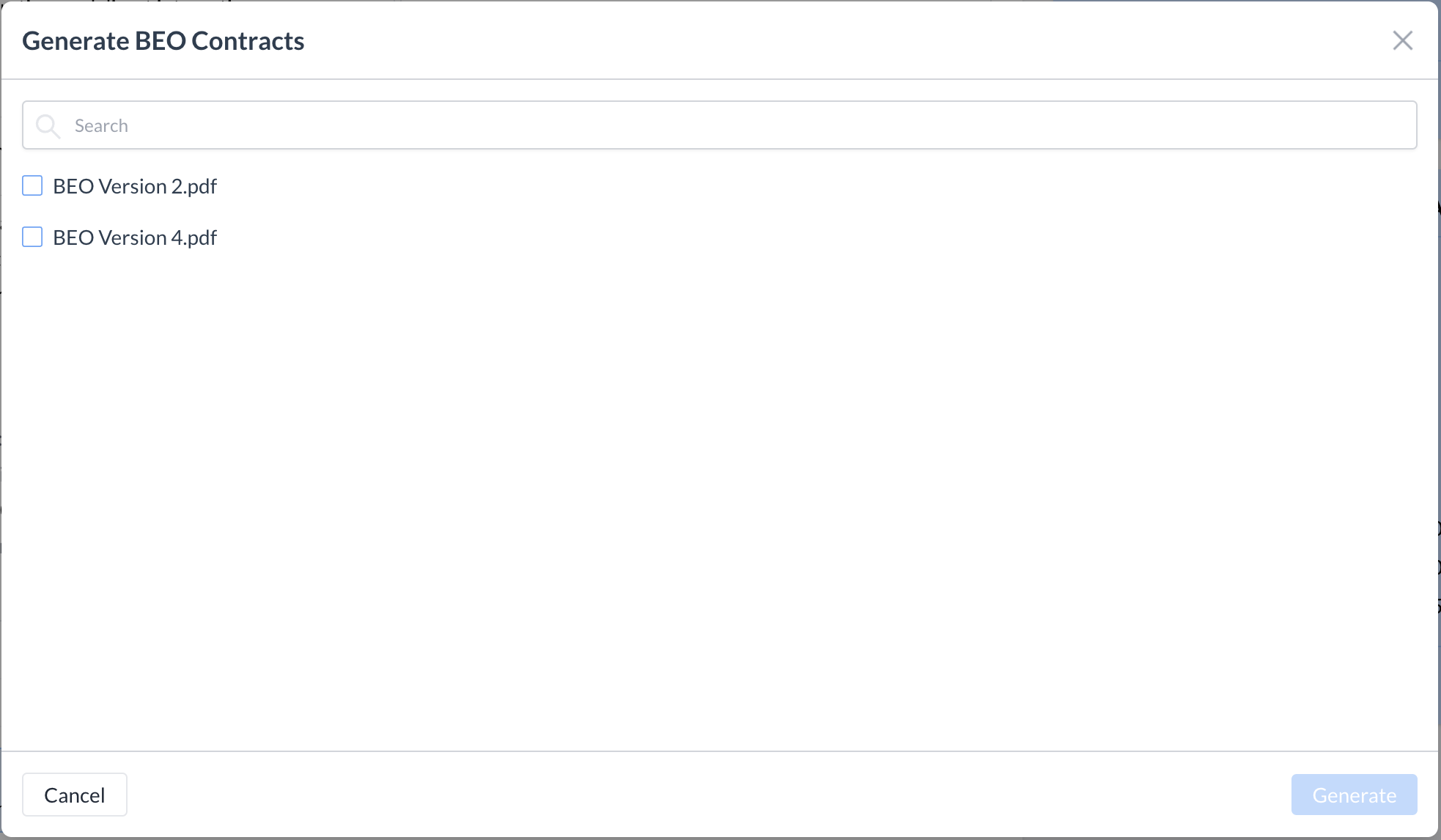
EventKey now introduces a dual-track BEO approval workflow that seamlessly bridges internal operational reviews with client e-signatures. Teams first progress BEOs through internal lifecycle stages (Draft → Pending Review → Approved), locking each version into an immutable audit trail. Only internally approved versions unlock in the Contracts tab (Generate BEO Contract) for client digital signature staging and dispatch—guaranteeing unverified operational drafts never reach the customer while providing real-time tracking, signer reminders, and complete revision control.
Implementation & Setup
-
📚 Knowledge Base: Print BEO & Sending BEO for Electronic Signature
-
🔐 Permissions: SPL_ALLOW_EVENT_BEO_CONTRACT_DECLINE
-
⚙️ Configuration: N/A
-
👤 Who configures: Required permissions are automatically granted upon deployment.
© 2026 HotelKey, Inc. All rights reserved. HotelKey™, EventKey™, ConnectKey™, and PaymentKey™ are trademarks of HotelKey, Inc.
Unauthorized reproduction, distribution, or disclosure is strictly prohibited.