
EventKey 6.0.4 Release Notes
VERSION 6.0.4 SEPTEMBER 2026 EVENTKEY
Enterprise Deployment & Feature Availability Notice
The enhancements and fixes detailed below are part of EventKey Version 6.0.4. Please note that enterprise clients and individual brand environments are updated on a phased deployment schedule.
-
Availability: New features and bug fixes will become accessible once Version 6.0.4 is deployed to your specific property or brand environment.
-
Permissions & Setup: Certain features also require administrative configuration or dedicated user permissions before they appear in your workspace.
-
Questions: If you have questions regarding your property’s scheduled upgrade window, please contact your Enterprise Account Manager or HotelKey Support.
Release at a Glance
|
Type |
Ticket & Feature |
Primary audience |
Admin configuration |
|---|---|---|---|
|
BUG FIX |
ENTEK-318: Decouple Package Element Logic from Charge Type |
Finance, Billing, Event Managers |
AUTOMATIC |
|
BUG FIX |
ENTEK-341: Ability to Extend Event End Times on Started Events |
Event Managers, Operations |
AUTOMATIC |
|
ENHANCEMENT |
ENTEK-157: Customer Account Dashboard |
Sales Managers, Account Managers, Leadership |
PERMISSION REQUIRED |
|
ENHANCEMENT |
ENTEK-235: Direct In-App Access to EventKey Reports via Dashboard |
Sales, Catering, Reporting Users |
AUTOMATIC |
|
ENHANCEMENT |
ENTEK-209: Display Meeting Room Photos in UI |
Sales, Catering, Event Planning |
CONFIG REQUIRED |
|
ENHANCEMENT |
ENTEK-292: Display Product Photos in Package Creation and Configuration |
Event Admins, Catering, Package Setup Users |
CONFIG REQUIRED |
|
ENHANCEMENT |
ENTEK-214: Ability to Configure Inventory Max Days |
Revenue, Sales, Event Managers |
AUTOMATIC |
|
ENHANCEMENT |
ENTEK-350: Long-Term Event Durations |
Sales, Event Managers, Long-Stay Teams |
AUTOMATIC |
|
ENHANCEMENT |
ENTEK-262: Ability to See BEO Versions in EventKey |
Banquet, Catering, Event Managers |
PERMISSION REQUIRED CONFIG REQUIRED |
|
ENHANCEMENT |
ENTEK-312: Enable Comments and Replies on Tasks |
Event Teams, Operations, Task Users |
PERMISSION REQUIRED |
|
ENHANCEMENT |
ENTEK-339: Capture Start & End Time on Inquiry Creation Flow |
Sales Managers, Inquiry Users |
AUTOMATIC |
|
ENHANCEMENT |
ENTEK-340: Direct Commission Deduction & Net Invoicing |
Finance, Sales, Billing |
CONFIG REQUIRED |
|
ENHANCEMENT |
ENTEK-347: Future-Date Charge Posting Logic on House Account |
Finance, Billing, Front Office |
AUTOMATIC |
Bug Fixes
ENTEK-318: Decouple Package Element Logic from Charge Type
BUG FIX AUTOMATIC
-
What was happening: Package elements that shared the same charge type could create billing conflicts, UI display issues, and Daily Distribution Report calculation errors.
-
What changed: EventKey now tracks and processes package elements by unique element ID and name instead of relying only on the broader charge type category.
-
Operational impact: Teams can bundle multiple items under the same charge type while maintaining clean invoices, accurate DDR calculations, and clearer itemized breakdowns.
ENTEK-341: Ability to Extend Event End Times on Started Events
BUG FIX AUTOMATIC
-
What was happening: Users could be blocked from modifying the end date for active events that started on the previous calendar day.
-
What changed: End-date updates no longer trigger incorrect start-date validation rules.
-
Operational impact: Managers can extend or adjust ongoing events without unnecessary validation errors or workaround steps.
Enhancements
ENTEK-157: Customer Account Dashboard
ENHANCEMENT PERMISSION REQUIRED
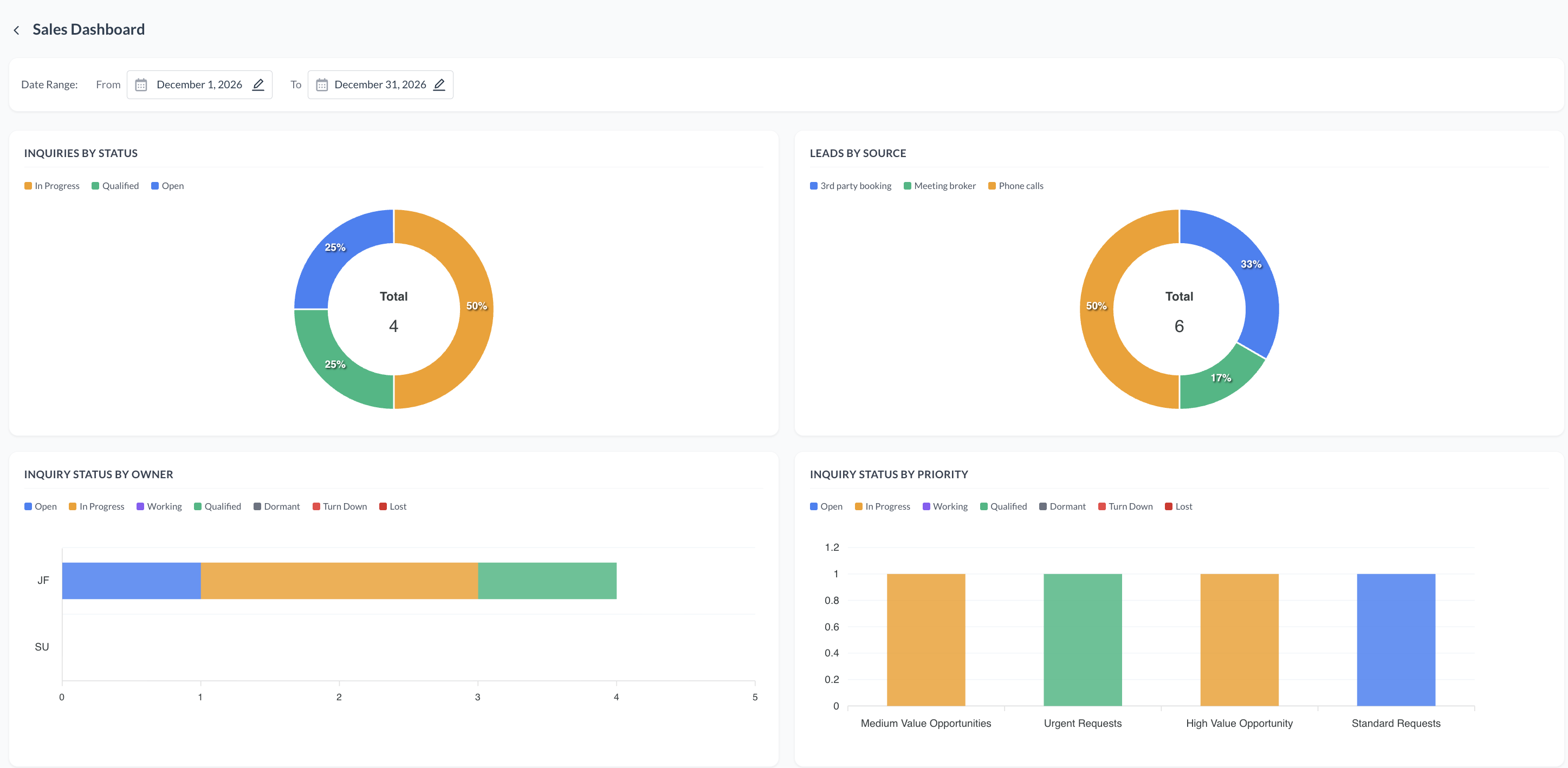
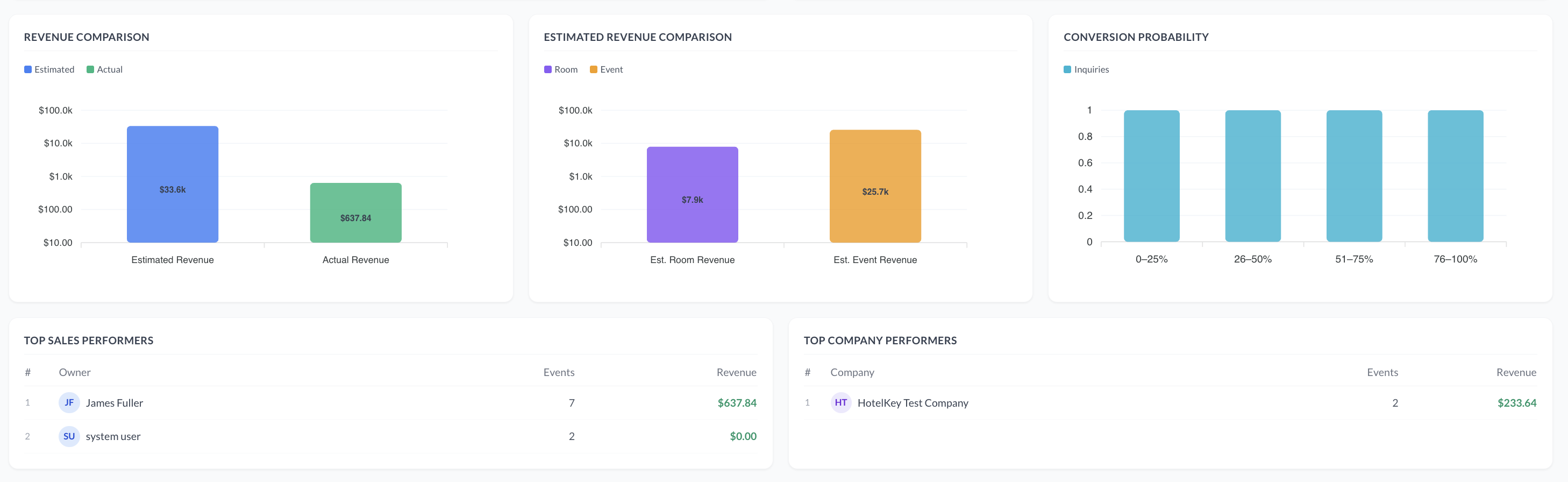
To empower sales teams with actionable insights and at-a-glance performance analytics, a new Sales Dashboard button has been added directly to the Event Management landing screen. Clicking this button opens a centralized analytics hub featuring dynamic date filtering, inquiry and lead visualizations, financial performance charts, and leaderboard tables for top sales and company performers.
Implementation & Setup
-
📚 Knowledge Base: Sales Dashboard KBA
-
🔐 Permissions: EVENT_SALES_DASHBOARD
-
⚙️ Configuration: N/A
-
👤 Who configures: Required permissions are automatically granted upon deployment.
ENTEK-235: Direct In-App Access to EventKey Reports via Dashboard
ENHANCEMENT AUTOMATIC
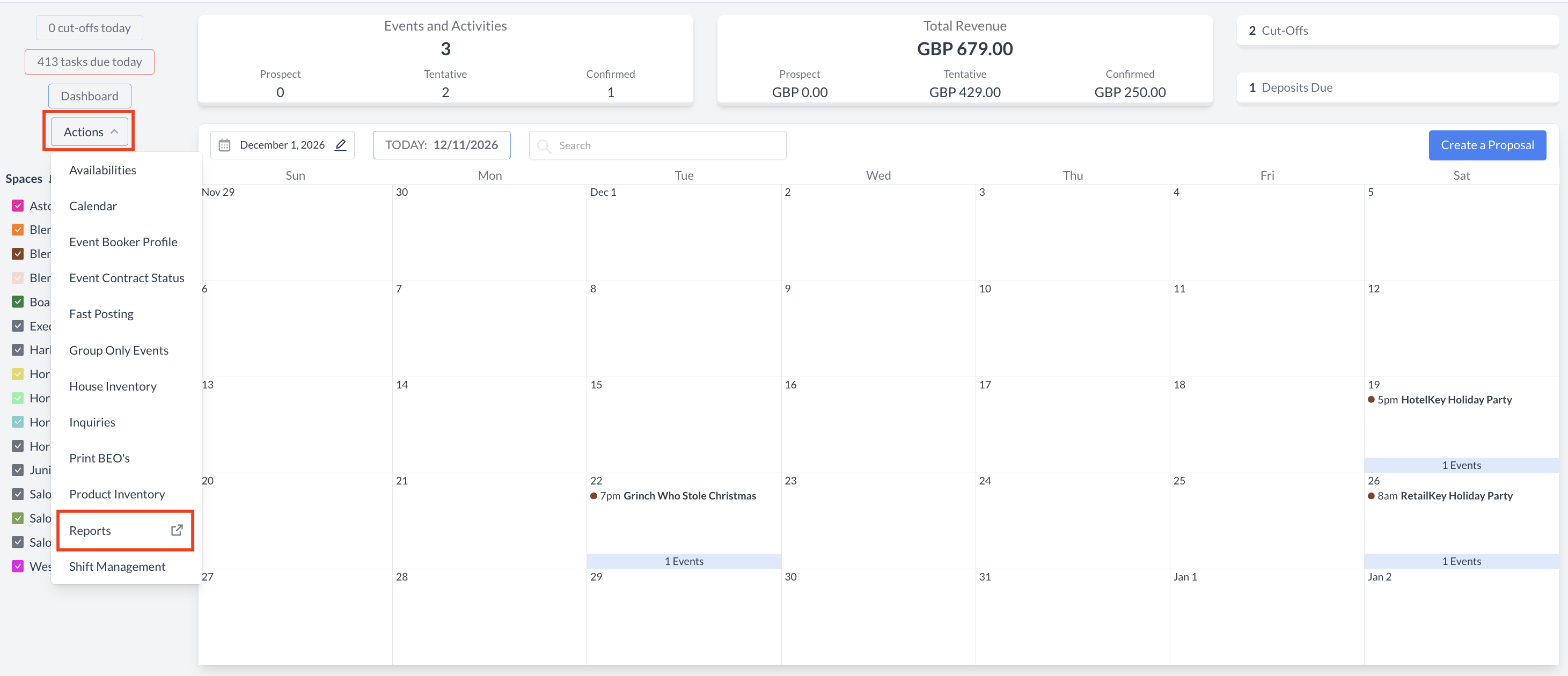
To maintain workflow continuity and save valuable time, users can now access EventKey Reports directly from the main EventKey Dashboard. A new EventKey Reports action item has been added to the dashboard Actions dropdown menu, opening the Dynamic Reports listing page in a new browser tab and bypassing the intermediate HK Home screen.
Implementation & Setup
-
📚 Knowledge Base: Action Menu Reports KBA
-
🔐 Permissions: N/A
-
⚙️ Configuration: N/A
-
👤 Who configures: Automatically available upon deployment.
ENTEK-209: Display Meeting Room Photos in UI
ENHANCEMENT CONFIG REQUIRED
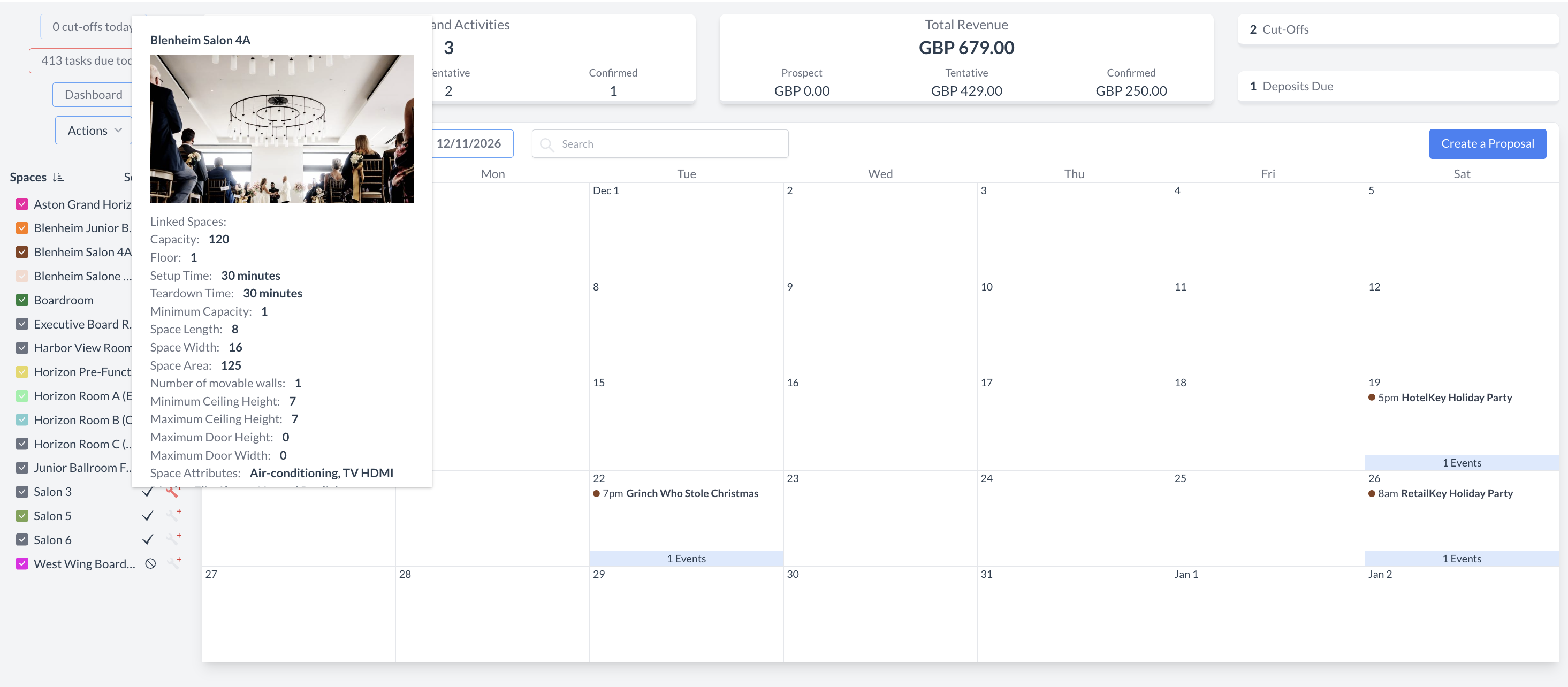
Hovering over a venue space on the Event Management Landing Calendar or the Sub-Event Selection Screen now displays a pop-up modal with space details and room imagery. The modal shows the primary space photo by default and includes navigation arrows so users can review attached photos without leaving the active workflow.
Implementation & Setup
-
📚 Knowledge Base: Dashboard Navigation KBA & Spaces (Meeting Rooms) KBA
-
🔐 Permissions: N/A
-
⚙️ Configuration: EK Admin > Spaces > Spaces > Select Space > Space Image
-
👤 Who configures: Property EventKey Admin
ENTEK-292: Display Product Photos in Package Creation and Configuration
ENHANCEMENT CONFIG REQUIRED
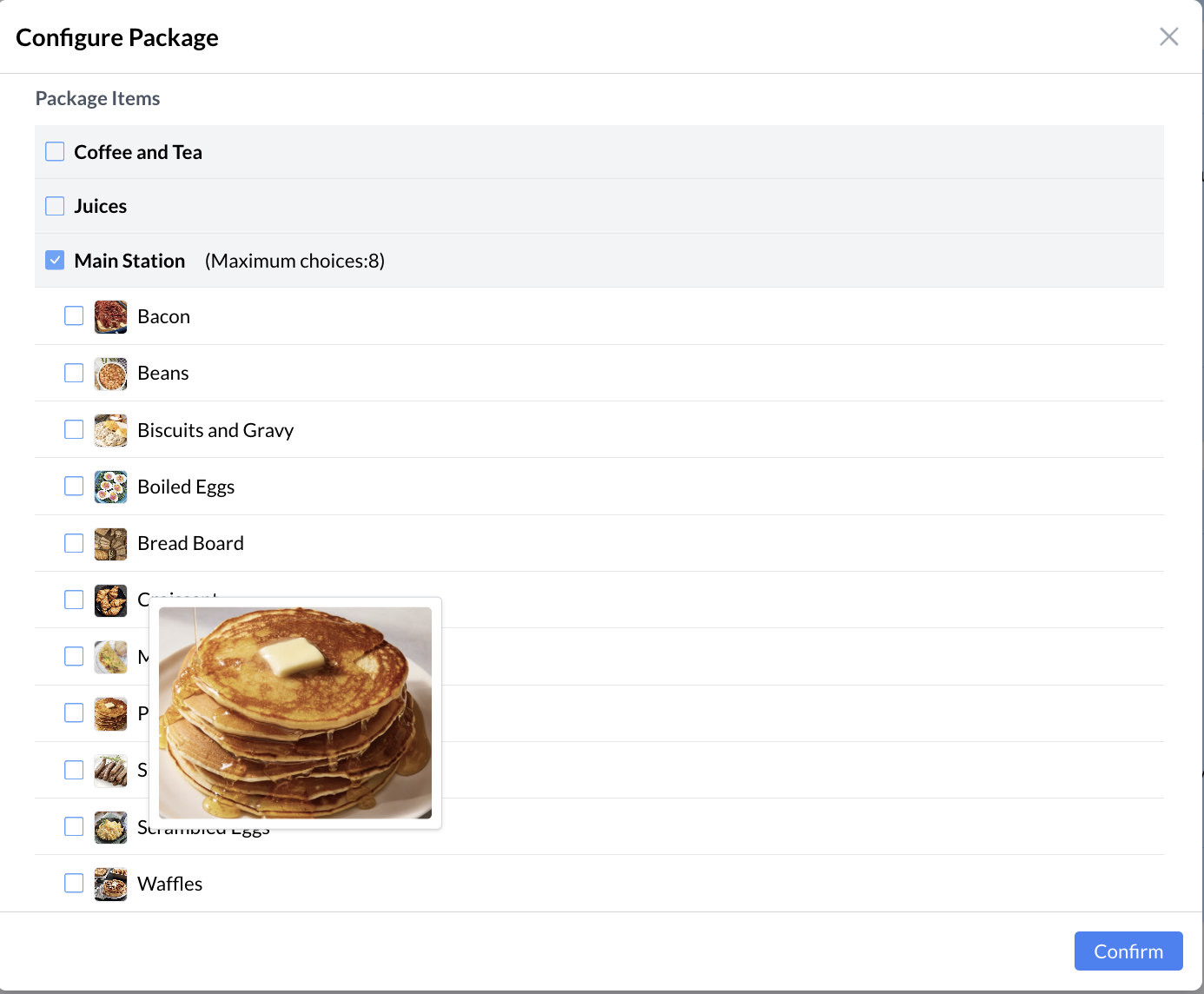
To streamline package assembly and provide visual clarity during setup, EventKey now displays product images throughout Package Setup and configuration workflows. Product images are visible in Package Details and on the Select Products screen, with hover previews available for enlarged image review.
Implementation & Setup
-
📚 Knowledge Base: Products KBA
-
🔐 Permissions: N/A
-
⚙️ Configuration: EK Admin > Packages > Products > Select Product > Cover Photo
-
👤 Who configures: Property EventKey Admin
ENTEK-214: Ability to Configure Inventory Max Days
ENHANCEMENT AUTOMATIC
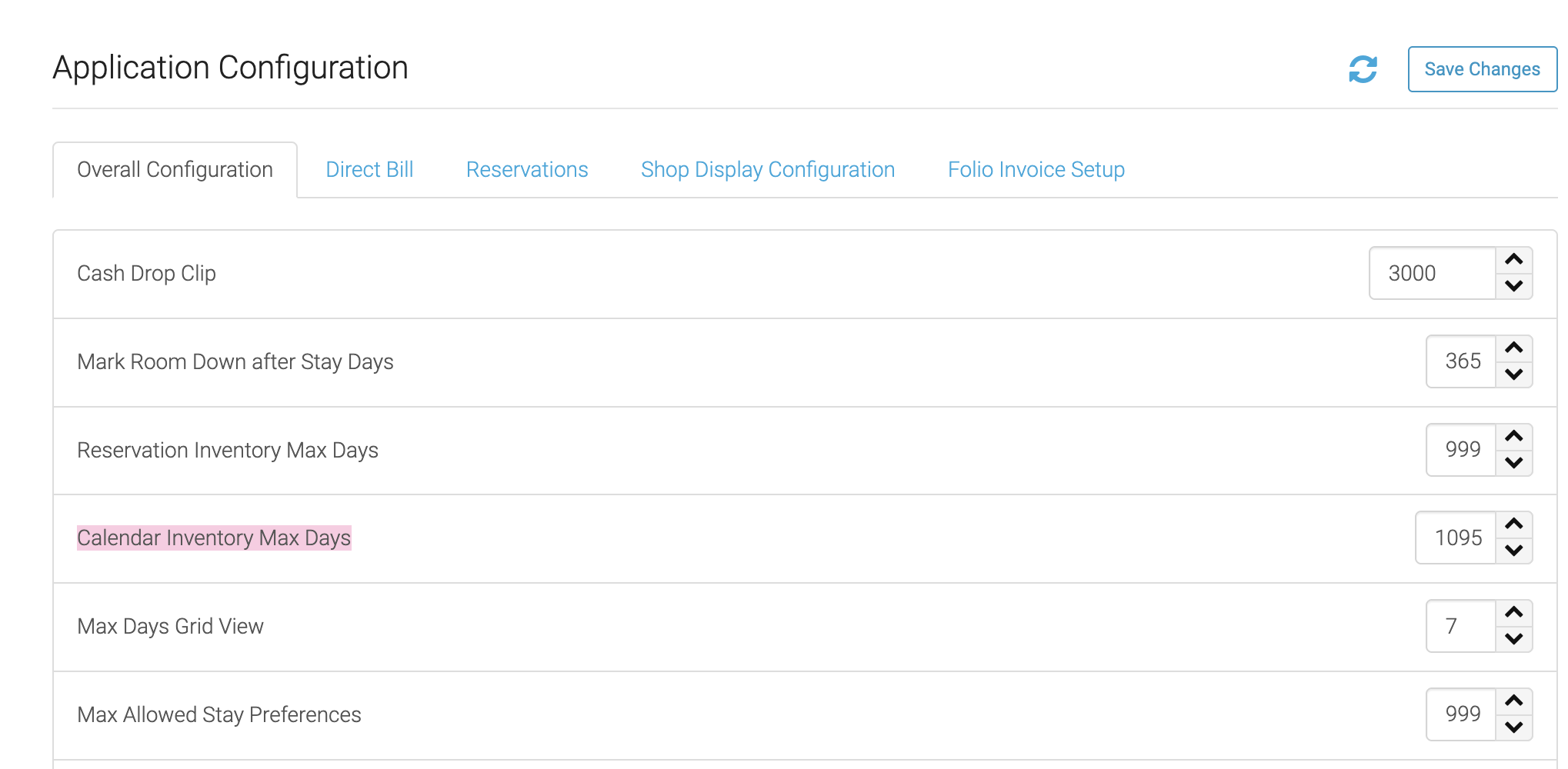
EventKey now directly integrates with the Calendar Inventory Max Days setting configured within PMS/HK Admin. This enhancement extends the availability calendar, sub-event and package rate calendars, and date selection ranges up to three years out, keeping long-term event planning aligned with PMS inventory settings.
Implementation & Setup
-
📚 Knowledge Base: N/A
-
🔐 Permissions: N/A
-
⚙️ Configuration: N/A
-
👤 Who configures: Automatically available based on configured inventory settings.
ENTEK-350: Long-Term Event Durations (Year-Long Bookings)
ENHANCEMENT AUTOMATIC
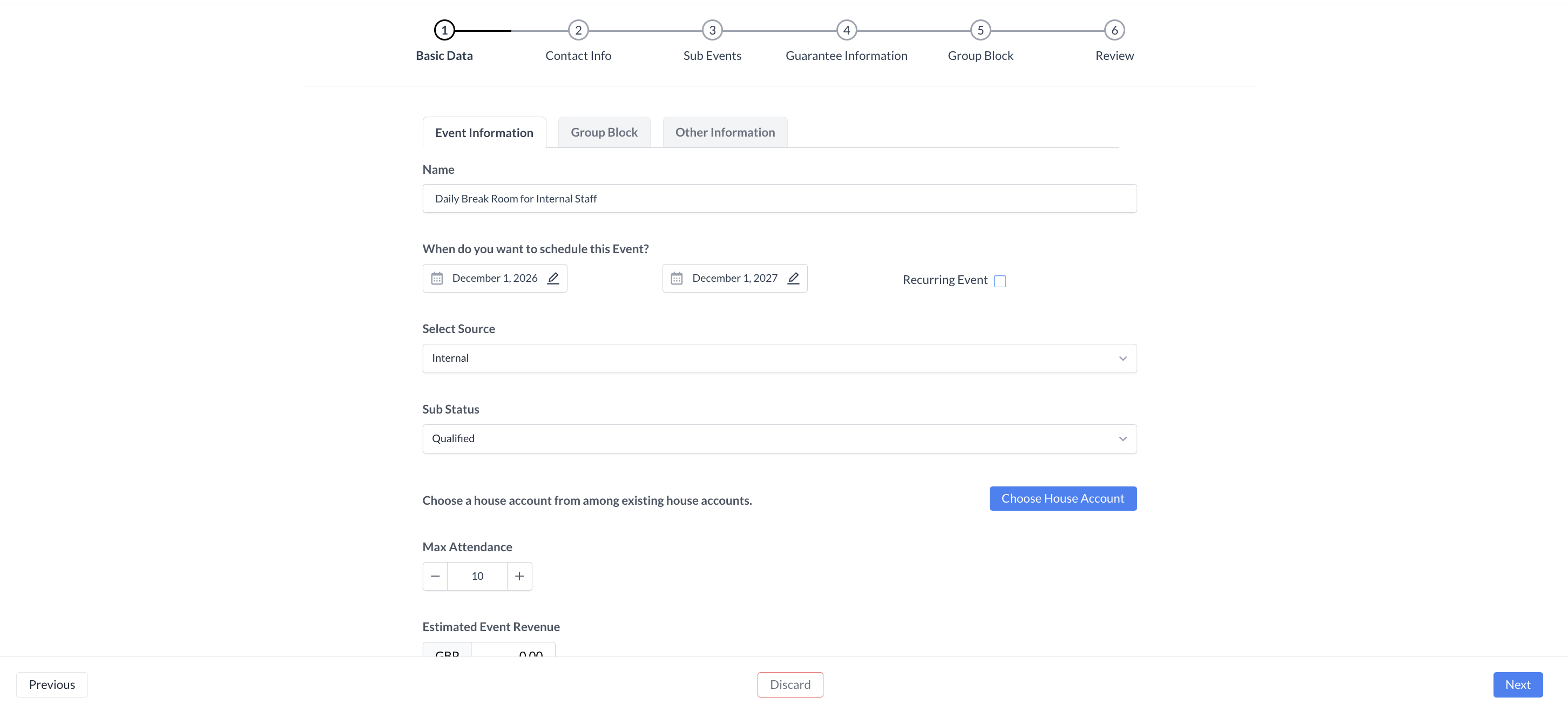
EventKey now supports creating a single, continuous event with a duration of up to 365 days. When start and end dates span up to a full year, the system generates a single event ID and attaches a unified contract, reducing the need for recurring sub-events or fragmented agreements.
Implementation & Setup
-
📚 Knowledge Base: Create Event Proposal Room Only
-
🔐 Permissions: N/A
-
⚙️ Configuration: N/A
-
👤 Who configures: Automatically available upon deployment.
ENTEK-262: Ability to See BEO Versions in EventKey
ENHANCEMENT CONFIG REQUIRED PERMISSION REQUIRED
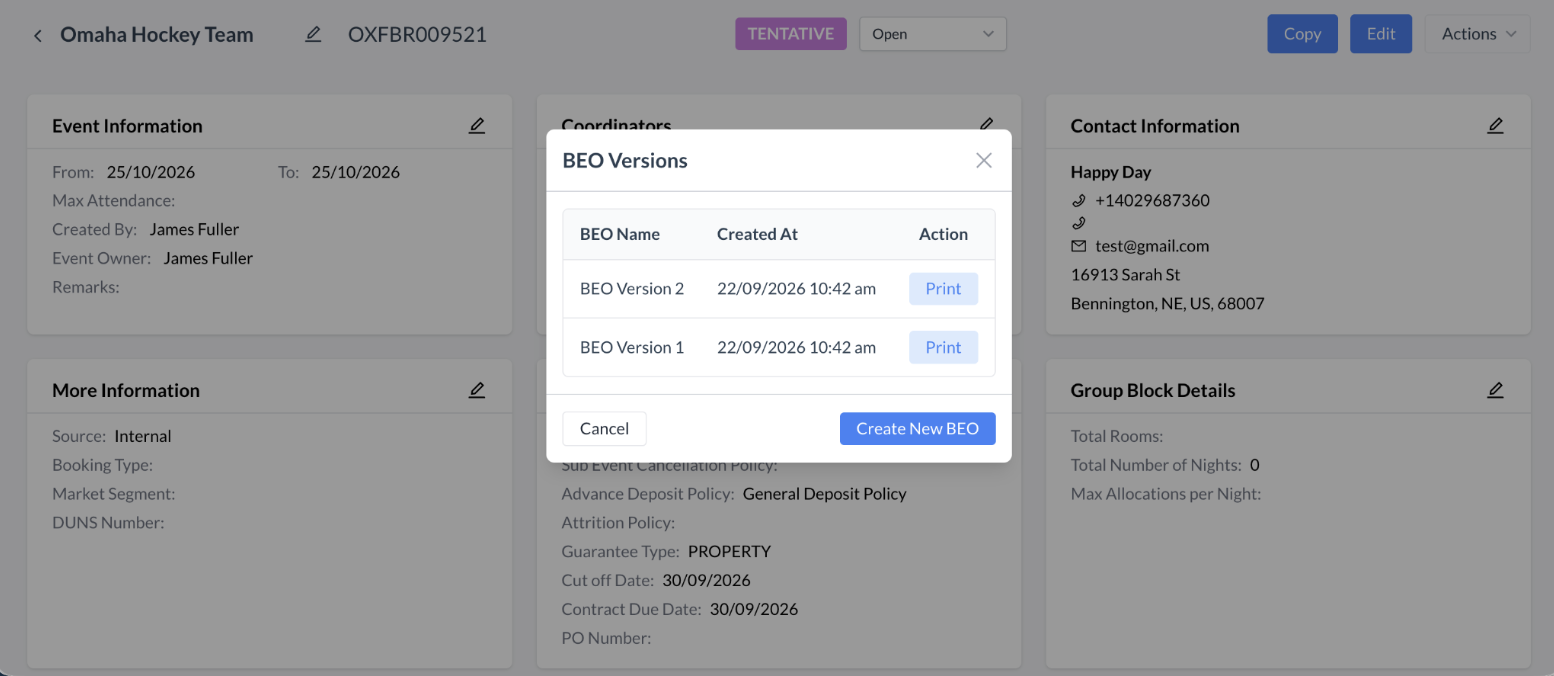
EventKey now supports versioning for Banquet Event Orders. From the Actions Menu, users can open BEO Versions, generate a new BEO, assign a custom name, and access a historical list of prior revisions for viewing, selection, or reprint without overwriting previous documents.
Implementation & Setup
-
📚 Knowledge Base: Print Banquet Event Orders (BEO)
-
🔐 Permissions: EVENT_MANAGEMENT
-
⚙️ Configuration: EK Admin > Advanced Setup > Application Configuration >
Enable BEO Versions = ON
-
👤 Who configures: Required permissions are automatically granted upon deployment. Configuration completed by property EventKey Admin.
ENTEK-312: Enable Comments and Replies on Tasks
ENHANCEMENT PERMISSION REQUIRED
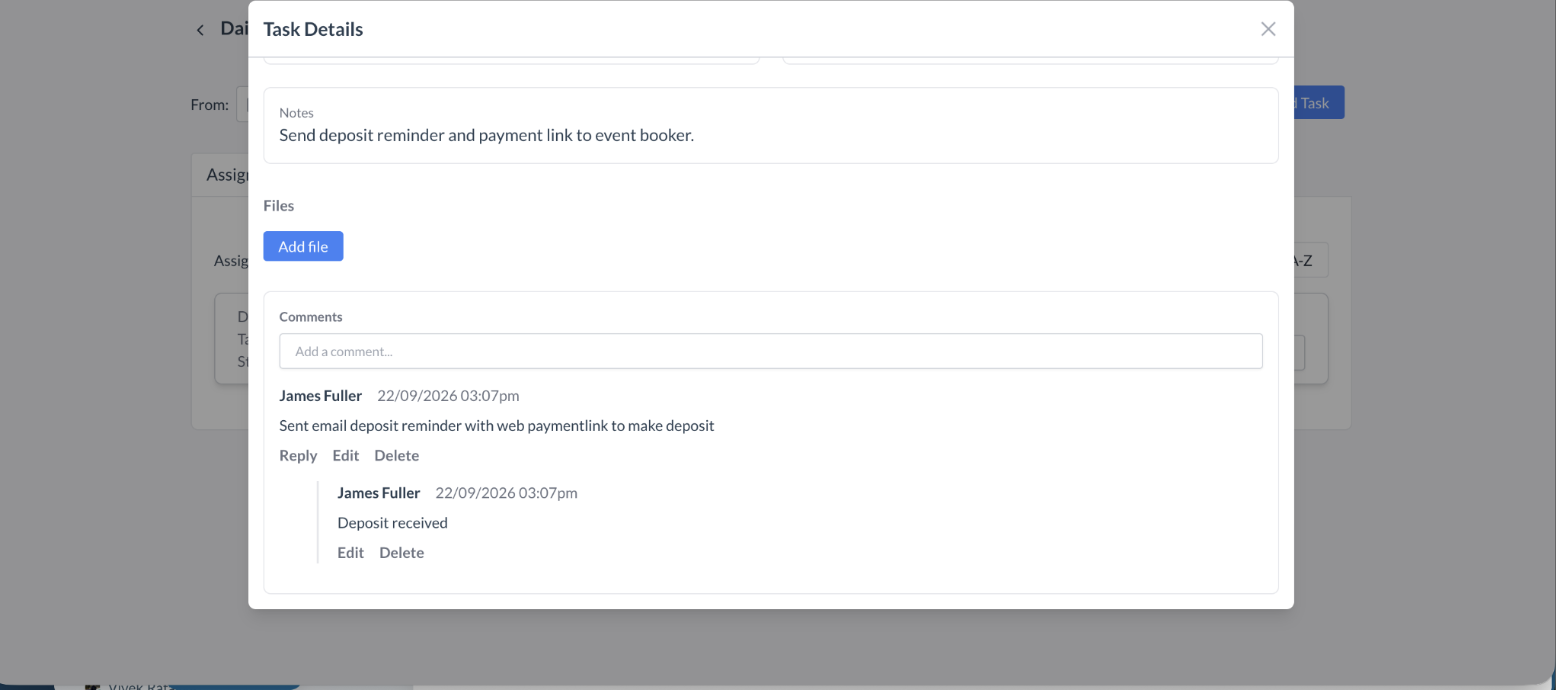
Users can now add comments and reply to existing notes on tasks. The commenting interface supports threaded conversations, author names, automatic timestamps, chronological organization, and edit or delete options for users managing their own comments.
Implementation & Setup
-
📚 Knowledge Base: Task Management KBA
-
🔐 Permissions: SPL_EVENT_TASK_COMMENT_EDIT; SPL_EVENT_TASK_COMMENT_DELETE
-
⚙️ Configuration: N/A
-
👤 Who configures: Required permissions are automatically granted upon deployment.
ENTEK-339: Capture Start & End Time on Inquiry Creation Flow
ENHANCEMENT AUTOMATIC
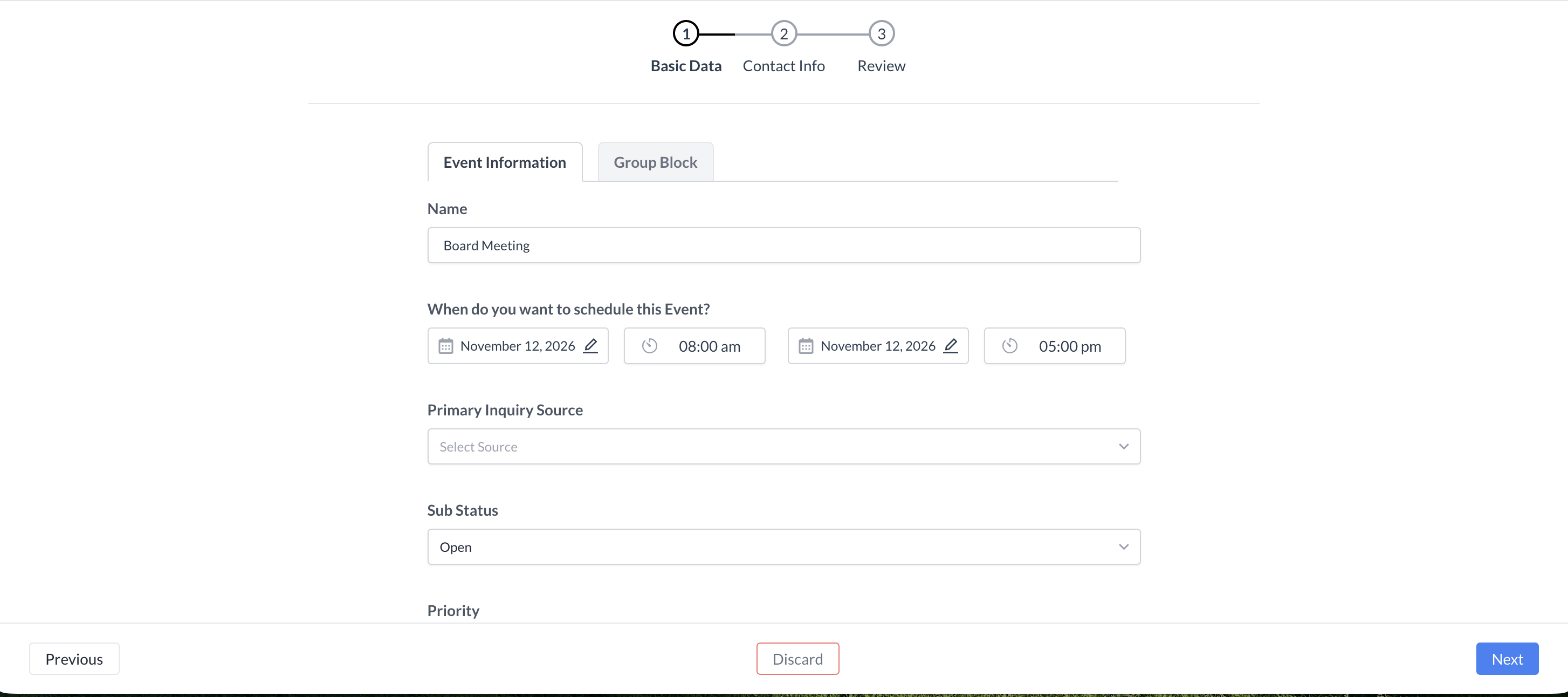
Dedicated event Start Time and End Time fields are now available directly on the main Inquiry form. These top-level fields help Sales Managers evaluate leads earlier, validate event timing, and provide default time settings when sub-events are created later in the workflow.
Implementation & Setup
-
📚 Knowledge Base: Action Menu: Inquiries KBA
-
🔐 Permissions: N/A
-
⚙️ Configuration: N/A
-
👤 Who configures: Automatically available upon deployment.
ENTEK-340: Direct Commission Deduction & Net Invoicing
ENHANCEMENT CONFIG REQUIRED
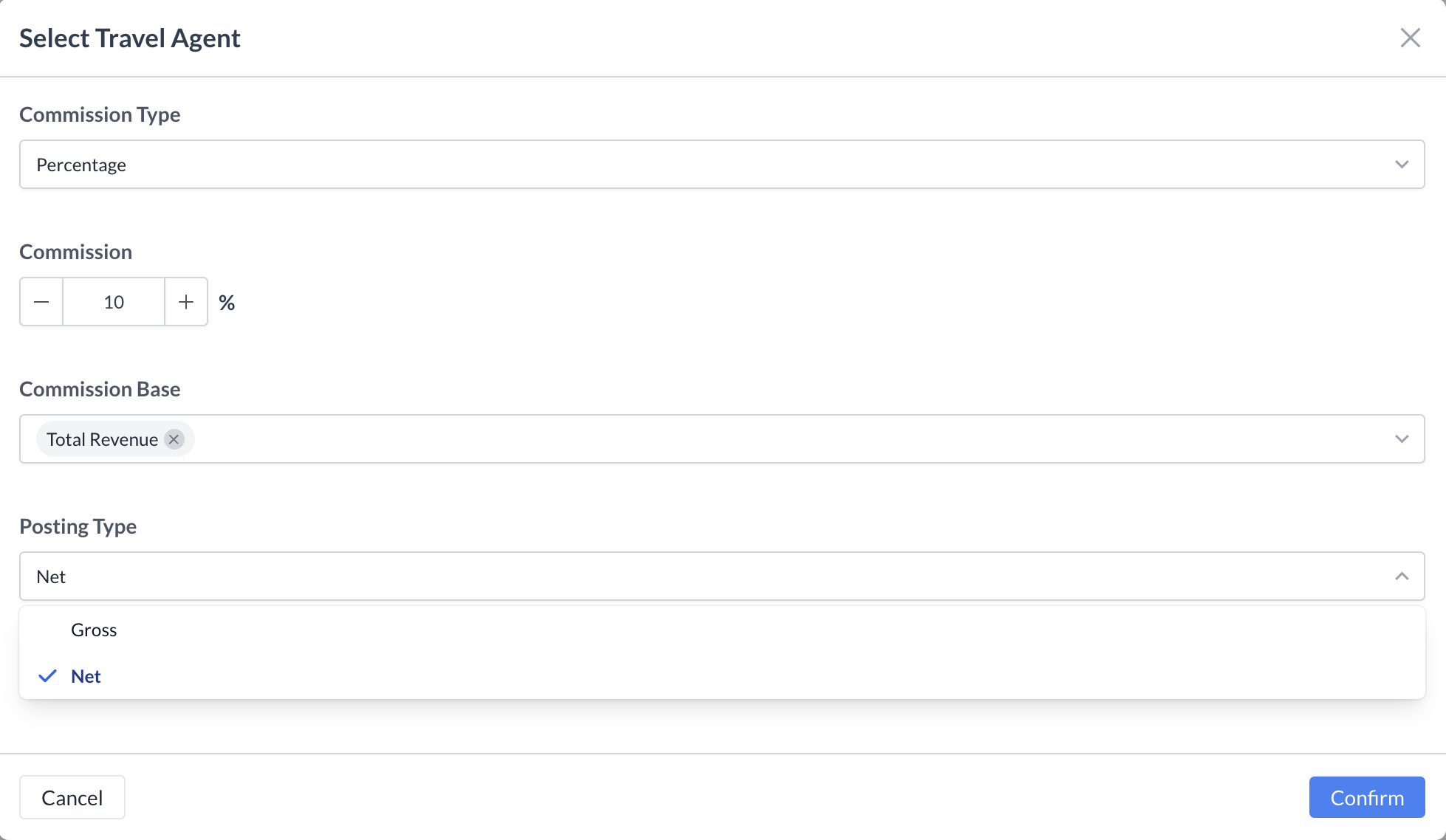
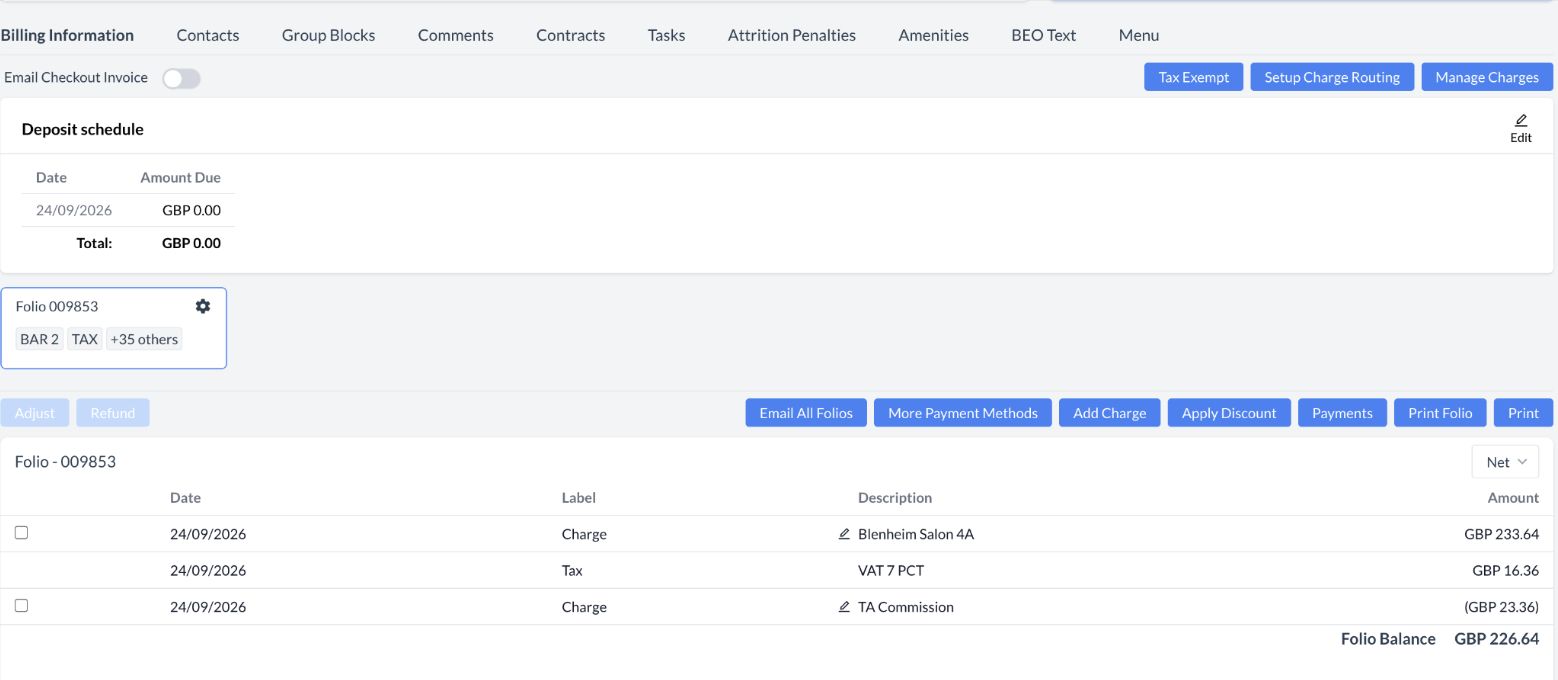
Finance teams can now deduct earned commissions directly from event invoices before finalization. A Commission Agent Posting Charge Type setting allows administrators to define the default charge type for agent payouts, while NET or GROSS posting type options determine whether commissions are deducted from the final invoice.
Implementation & Setup
-
📚 Knowledge Base: Application Configuration KBA & Direct Commission Deduction
-
🔐 Permissions: N/A
-
⚙️ Configuration: EK Admin > Advance Setup > Application Configuration > Commission Agent Posting Charge Type
-
👤 Who configures: Property EventKey Admin
ENTEK-347: Future-Date Charge Posting Logic on House Account
ENHANCEMENT AUTOMATIC
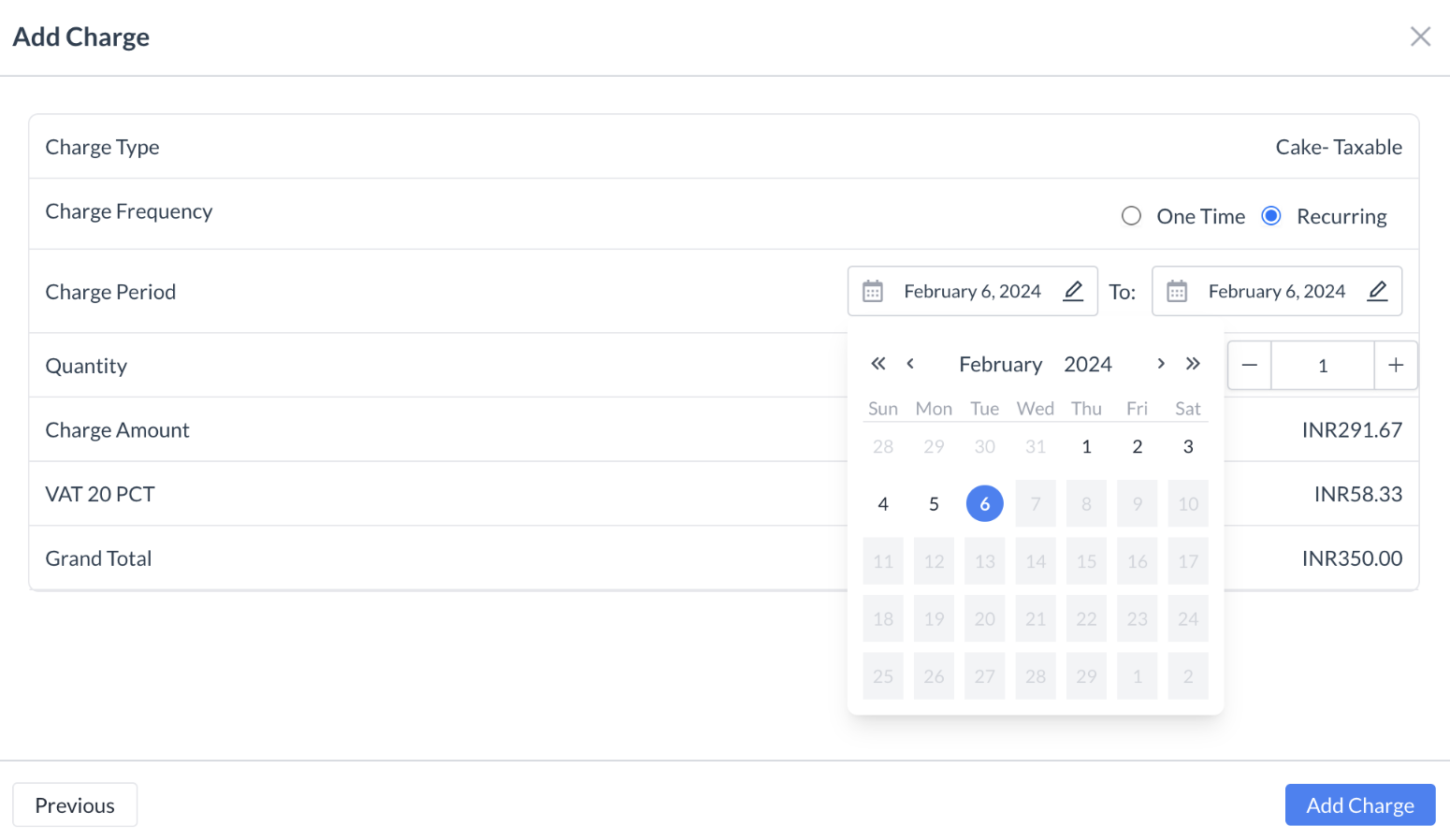
EventKey and House Account folios now support flexible date targeting for posted charges. Users can specify start and end dates for recurring charges, track both transaction date and posting date, and hold future-dated amounts as pending revenue until the specified posting date arrives.
Implementation & Setup
-
📚 Knowledge Base: Future-Date Charge Posting Logic KBA
-
🔐 Permissions: N/A
-
⚙️ Configuration: N/A
-
👤 Who configures: Automatically available upon deployment.
© 2026 HotelKey, Inc. All rights reserved. HotelKey™, EventKey™, ConnectKey™, and PaymentKey™ are trademarks of HotelKey, Inc.
Unauthorized reproduction, distribution, or disclosure is strictly prohibited.