Target Roles: Event Managers, Sales Teams, Front Desk Staff, System Administrators
Last Updated:
Executive Overview
The EventKey Dashboard serves as the central operational hub and primary landing page within EventKey. It provides real-time visibility into scheduled events, estimated revenue across booking pipelines (Prospect, Tentative, Confirmed), space housekeeping/maintenance readiness, cut-off dates, and pending operational tasks.
Configuration Guide: Navigating Dashboard Features
System Navigation Path
Home > Event Management
Step
Action
Platform Guidance & Operational Details
Access Landing Page
Navigate to Event Management from the Home screen.
Opens the main calendar and operational summary page.
Review Current Date
Observe the date highlighted in blue on the calendar grid.
Defaults automatically to your Property Management System (PMS) Current Business Day (CBD).
Navigate Calendar
Use the calendar date picker to the left of the CBD indicator.
Allows quick month-over-month view navigation.
Filter Event Status
Click Prospect, Tentative, or Confirmed in the top summary bar.
Filters the calendar view to display only events matching the selected status.
View Daily Detail
Click the "X Events" link at the bottom of any calendar day cell.
Launches a detailed pop-up displaying event start/end times and associated package schedules.
Manage Spaces
Review the left sidebar listing venue Spaces and check/uncheck room boxes.
Displays real-time housekeeping and maintenance readiness; unchecking a room removes it from the calendar view.
📷 VISUAL CALLOUT:
Dashboard Navigation Walkthrough
UI Visibility & Dashboard Modules
The EventKey Dashboard integrates key operational modules directly into the header and sidebars:
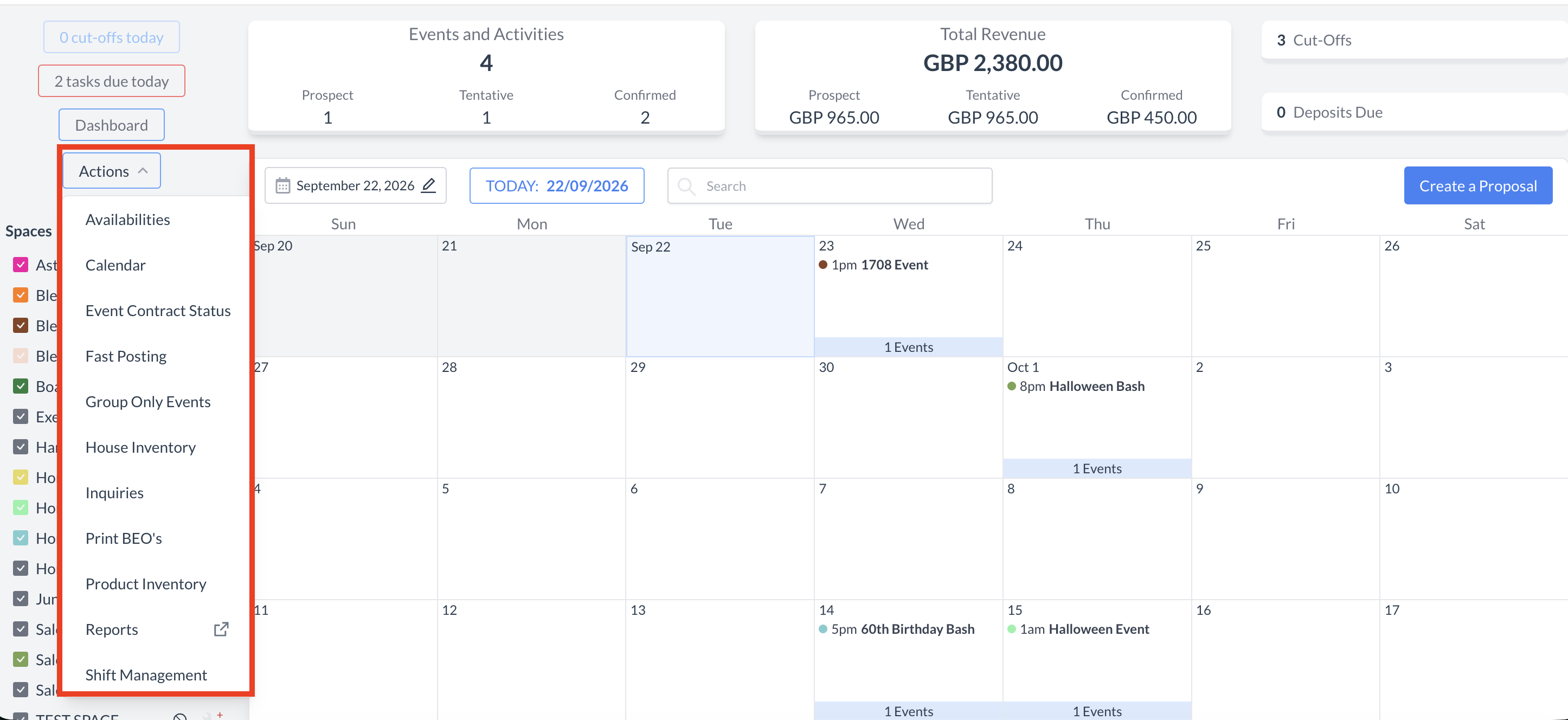
Actions Menu Dropdown: Located in the upper-left corner, offering rapid access to core workflows:
Availabilities: Displays visual space availability (booked, tentative, available) by day or week.
Calendar: Manage team appointments, events, and tasks.
Event Contract Status: Check signature statuses (signed vs. pending).
Fast Posting: Post rapid batch charges to events for accelerated billing.
Group Only Events: Book sleeping room-only events without assigned meeting spaces.
House Inventory: View live PMS sleeping room availability.
Inquiries: Track client leads and upcoming space/service requests.
Print BEOs: Batch-select and print multiple Banquet Event Orders simultaneously.
Product Inventory: Provides event and catering teams with real-time visibility into stock availability and consumption
Reports: Opens the Dynamic Reports listing page in a new browser tab.
Shift Management: Access shift tracking tools to start or end operational shifts.
Cut-Offs Counter: Displays a blue box in the upper-left corner showing events reaching cut-off dates today; click to view the full event list.
Tasks Counter: Displays active task counters in the upper-left corner; highlights in red with a number count when tasks are due today.
Sales Dashboard: Provides real-time visibility into sales pipeline performance, inquiry metrics, lead origins, and revenue generation.
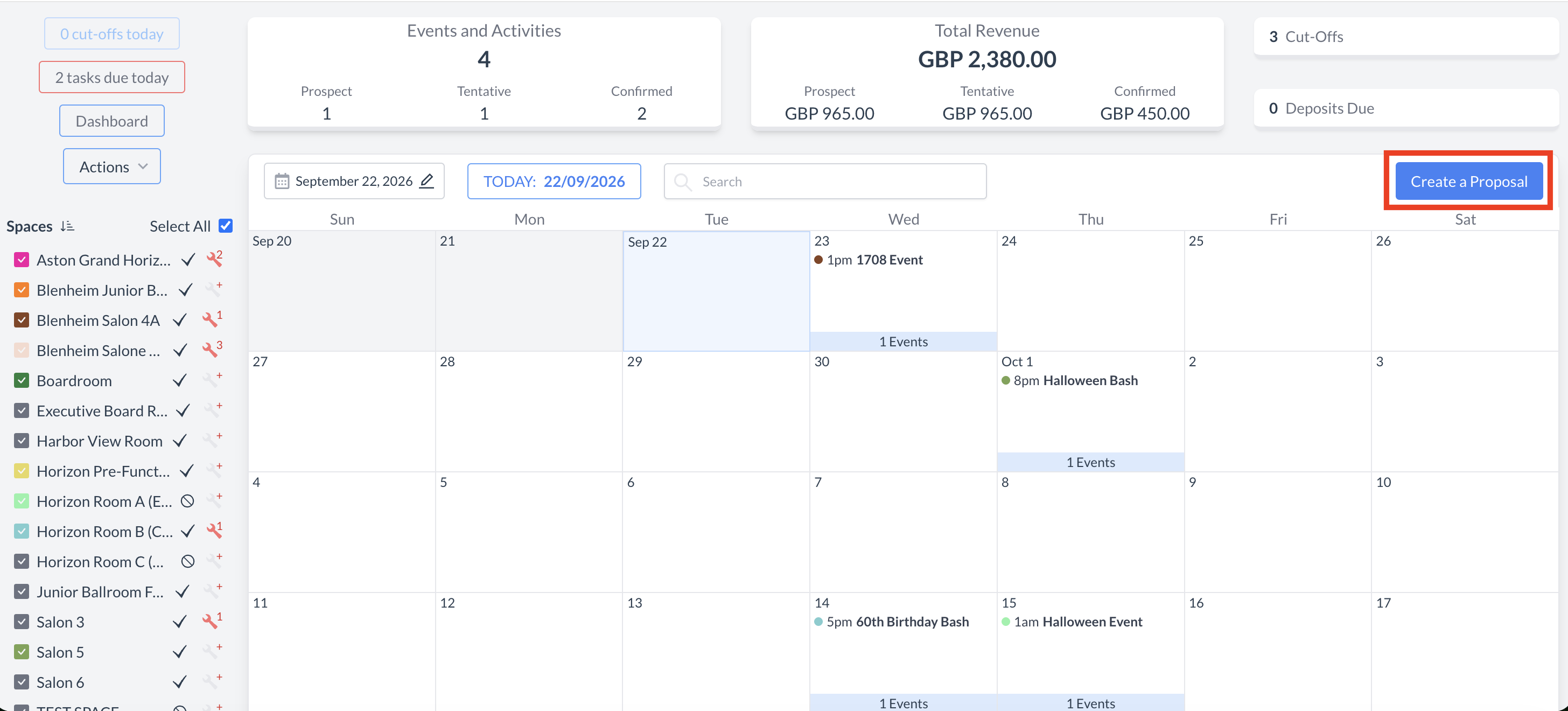
Create a Proposal Button: Prominent blue button in the upper-right header to immediately initiate new event proposals.
📷 VISUAL CALLOUT:
(Left) Actions Menu dropdown options; (Right) 'Create a Proposal' button location.