Target Roles: Event Sales Directors, Catering Sales Managers, Digital Marketing Managers, Web Administrators, Systems & IT Administrators
Last Updated:
Executive Overview
The EventKey Online RFP (Request for Proposal) Form (powered by the Event Public Engine) is a client-facing web application that embeds directly into a property's official website. This self-service intake portal allows meeting planners, corporate clients, and social event organizers to submit comprehensive event inquiries online 24/7 without requiring back-and-forth phone calls or manual email entry. Prospective clients input scheduling requirements, anticipated guest counts, catering budget parameters, sleeping room block commitments, and event specifications through a guided 3-step wizard. Upon submission, the engine generates an automated confirmation number, calculates estimated opportunity values, and injects the lead directly into the internal EventKey Inquiries queue, streamlining the sales intake pipeline and accelerating lead response times.
Step-by-Step Client Experience: Submitting an Online RFP
When embedded on the hotel's website via an iframe, web widget, or direct link, prospective bookers experience a streamlined, 3-step submission flow:
Step
Action
Client-Facing Interaction & Field Specifications
Select Event Type
From the initial landing prompt, the client selects the designated public profile (Event Public Engine) from the dropdown menu and clicks the blue Next button.
Initializes the guided RFP intake container, loading property branding and localized currency (e.g., GBP, USD).
Complete Step 1: Basic Data
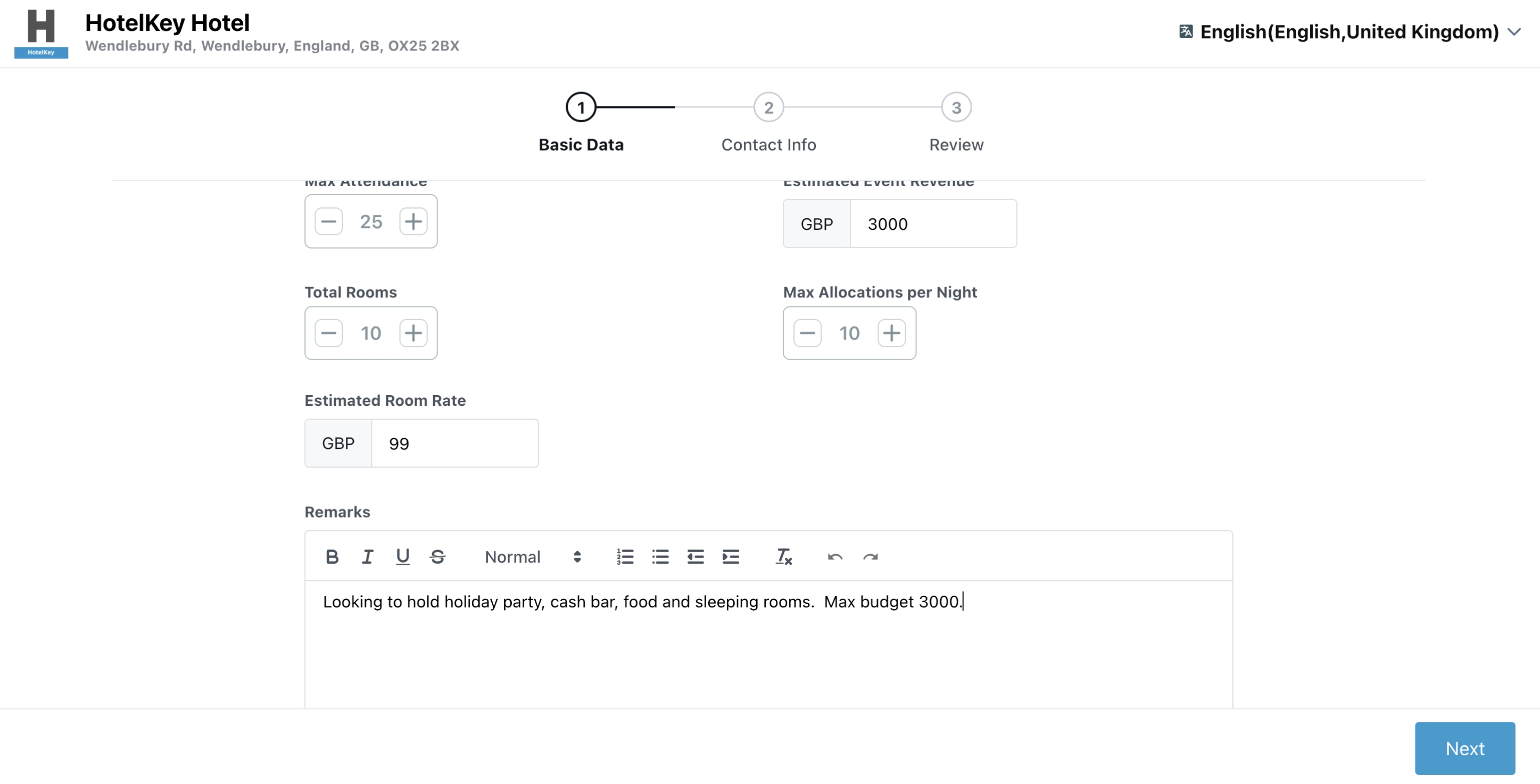
The client specifies core event requirements: Name, schedule date/time, Max Attendance, Estimated Event Revenue, sleeping room blocks (Total Rooms, Max Allocations Per Night, Estimated Room Rate), and detailed requirements in the Remarks field.
Collects logistical scope, catering budget, room block needs, and specific client preferences. Click Next.
Complete Step 2: Contact Info
The organizer enters primary identity details: First Name, Last Name, Email, physical street address, country, postal code, city, state, international dial code, direct Phone number, verifies Event Name, and optional procurement PO Number.
Creates the primary booker contact profile and validates phone number and email formatting. Click Next.
Step 3: Review & Submission
The client reviews the consolidated summary card displaying Basic Data, Estimated Revenue Summary, Contact Info, and Group Block Details. Click the blue Confirm button.
Validates all required inputs, submits the RFP to the property's PMS, and generates a real-time confirmation receipt.
Confirmation Receipt
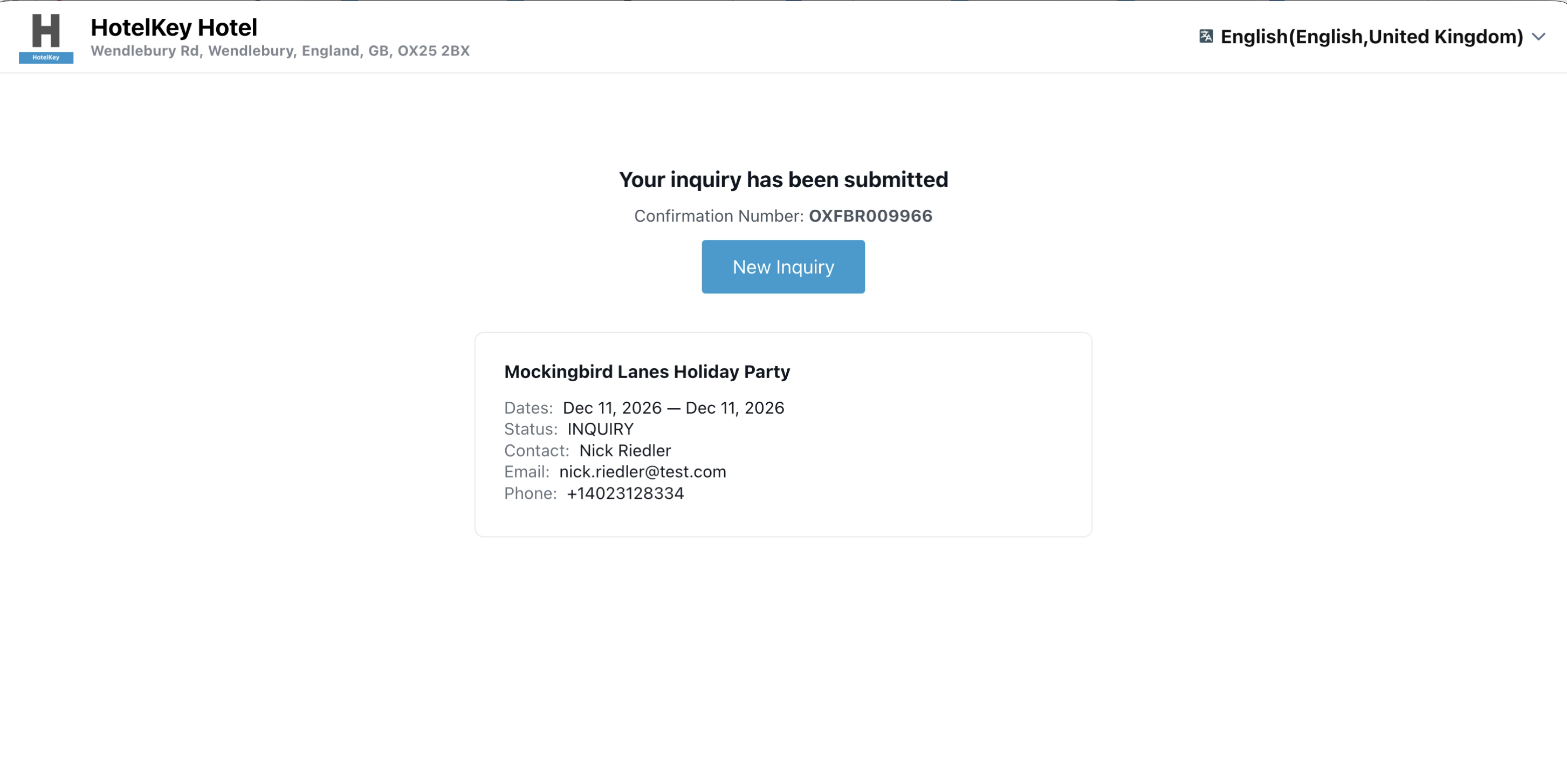
The client receives a confirmation screen stating: "Your inquiry has been submitted — Confirmation Number: [e.g., OXFBR001966]", displaying the dates, inquiry status (INQUIRY), contact details, and a New Inquiry button.
Confirms receipt to the customer and delivers an instant tracking reference code.
(Left) Step 1 of the web form showing event schedule (Dec 11, 2026, 5:00 PM – 11:00 PM), Max Attendance (25), Estimated Event Revenue (GBP 3000), Total Rooms (10), and formatted Remarks; (Right) The client confirmation receipt displaying the blue confirmation banner with Confirmation Number OXFBR001966 and status INQUIRY.
Step 1 (Basic Data) of RFP Portal
Client Confirmation Receipt
Detailed Web Form Field Breakdown
Step 1: Event Information & Logistics
Event Type Dropdown: Configured to Event Public Engine (automatically bound when embedded on the hotel's website).
Name*: Required text input for the event title (e.g., Mockingbird Lanes Holiday Party).
When do you want to schedule this Event?*: Paired interactive date and time pickers establishing the event timeline:
Start Date & Start Time: Calendar selector and 15-minute interval time dropdown (e.g., December 11, 2026, 5:00 pm).
End Date & End Time: Calendar selector and 15-minute interval time dropdown (e.g., December 11, 2026, 11:00 pm).
Max Attendance Stepper (- / +):* Numeric guest count field defining expected attendance (e.g., 25).
Estimated Event Revenue: Projected food, beverage, and room rental spend provided by the organizer (e.g., GBP 3000.00).
Total Rooms Stepper (- / +): Total cumulative sleeping room nights requested across the stay (e.g., 10).
Max Allocations Per Night Stepper (- / +): Peak sleeping rooms required on the highest single night of the block (e.g., 10).
Remarks (Rich Text Editor): Multi-line formatted text box allowing clients to provide context, dietary notes, audiovisual requirements, or budget constraints (e.g., "Looking to hold holiday party, cash bar, food and sleeping rooms. Max budget 3000."). Includes formatting tools: Bold (B), Italic (I), Underline (U), Strikethrough, Paragraph styling, and Lists.
Step 2: Booker & Contact Information
First Name* / Last Name*: Primary point of contact (e.g., Nick Rieder).
Email*: Direct contact email address validated by the form (e.g., nick.rieder@test.com).
Address Information: Freeform Street Address, Country dropdown (e.g., United Kingdom, United States), Postal/Zip Code, City, and State.
Phone*: Interactive international dialing code selector with country flag identification (e.g., US +1, GB +44) paired with direct telephone input (e.g., +1 (402) 312-8334).
Event Name*: Re-verifies the event title against basic data.
PO Number: Optional client reference number for enterprise or government procurement.
Remarks: Secondary notes field for logistical instructions.
Step 3: Review & Summary Panel
Consolidated Review Cards: Displays clear summaries for Basic Data, Contact Info, Group Block Details, and Estimated Revenue Summary (Estimated Event Revenue, Estimated Total Revenue).
Edit Button: Allows clients to jump back and adjust details before final transmission.
Confirm Button: Submits the RFP directly into the HotelKey PMS backend.
📷 VISUAL CALLOUT:
Embedded RFP Portal Client Walkthrough
Embedded RFP Portal Client Walkthrough
Automated Backend Ingestion into EventKey
Once the prospective client clicks Confirm on the website form, HotelKey PMS processes and injects the RFP in real time:
Automated Confirmation Generation: The system immediately issues a unique tracking ID (e.g., OXFBR001966) and marks the master status as INQUIRY.
Direct Pipeline Routing: The record bypasses manual entry and lands directly in the internal Inquiries Queue under Home > Event Management > Actions > Inquiries.
Lead Source Attribution: The lead is automatically tagged with Type of Lead / Primary Inquiry Source:3rd Party Booking or Web Inbound, ensuring precise marketing attribution.
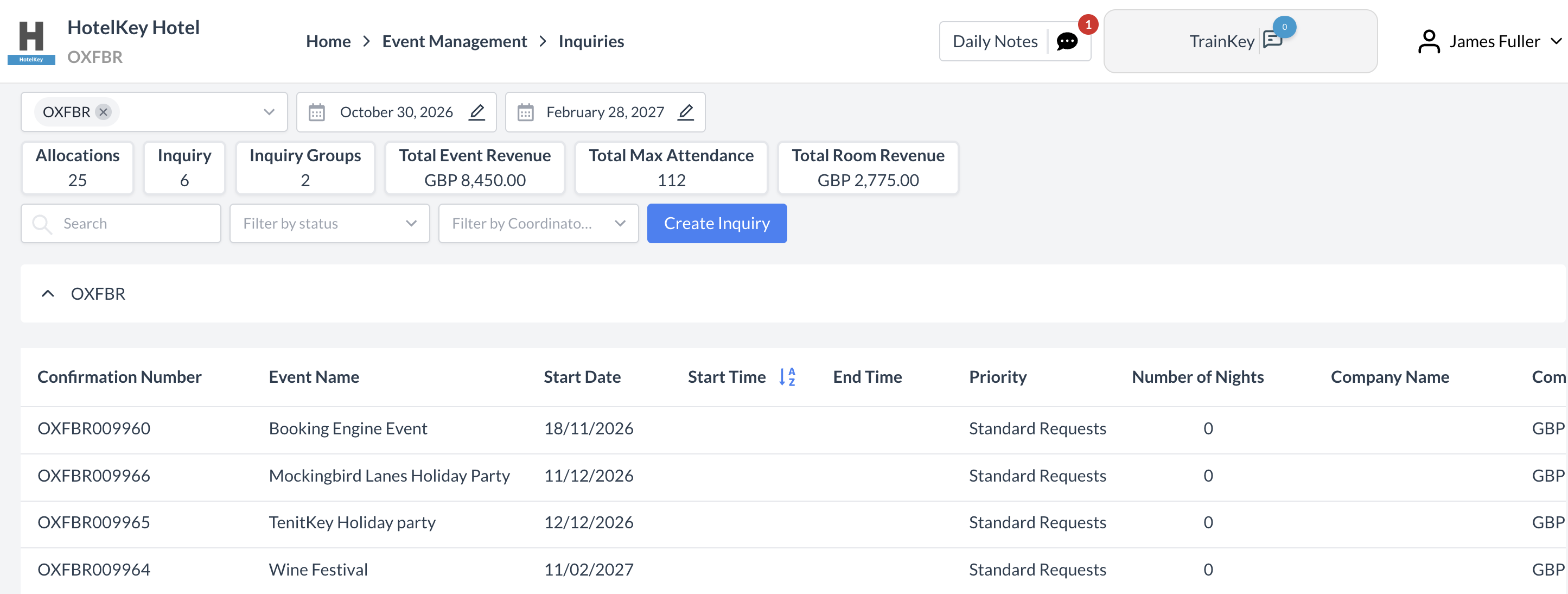
Pipeline KPI Updates: The property's top dashboard metrics—Allocations, Inquiry Groups, Total Event Revenue, Total Max Attendance, and Total Room Revenue—recalculate immediately to reflect the new pipeline opportunity.
Automated Task Triggers: If configured under Event Auto Actions, incoming web inquiries can immediately trigger automated follow-up tasks flagged with Task Type: AUTO_TASK, assigning sales managers to review and respond to the RFP within property SLA targets.
📷 VISUAL CALLOUT:
Inquiries Queue Dashboard: Automated Lead Ingestion
Internal EventKey Inquiries queue displaying newly ingested inquiry OXFBR001966 (Mockingbird Lanes Holiday Party) showing Start Date 11/12/2026, Priority Standard Requests, Opportunity Amount GBP 3,990.00, and Source 3rd Party Booking ready for sales triage.
EventKey Inquiries Dashboard with Ingested Inquiry