
EventKey 6.0.3 Release Notes
VERSION 6.0.3 JULY 2026 EVENTKEY
Enterprise Deployment & Feature Availability Notice
The enhancements detailed below are part of EventKey Version 6.0.3. Please note that enterprise clients and individual brand environments are updated on a phased deployment schedule.
-
Availability: New features become accessible once Version 6.0.3 is deployed to your specific property or brand environment.
-
Permissions & Setup: Certain features also require administrative configuration or dedicated user permissions before they appear in your workspace.
-
Questions: If you have questions regarding your property’s scheduled upgrade window, please contact your Enterprise Account Manager or HotelKey Support.
Release at a Glance
|
Type |
Ticket & Feature |
Primary audience |
Admin configuration |
|---|---|---|---|
|
ENHANCEMENT |
ENTEK-001: Event Counts and Daily Listing via the EventKey Dashboard |
Event Managers, Operations, Sales |
AUTOMATIC |
|
ENHANCEMENT |
ENTEK-338: Detailed Daily Event Overviews via the Calendar Dashboard |
Event Managers, Operations, Sales |
AUTOMATIC |
|
ENHANCEMENT |
ENTEK-73: TrainKey "Show Me" In-App Training Integration |
EventKey Users, Training, Operations |
PERMISSION REQUIRED |
|
ENHANCEMENT |
ENTEK-287: Direct Charge Routing Setup from EventKey |
Event Managers, Billing, Finance |
AUTOMATIC |
|
ENHANCEMENT |
ENTEK-314: Automated Task Generation for Group Blocks |
Event Managers, Operations, Sales |
AUTOMATIC |
|
ENHANCEMENT |
ENTEK-317: Intelligent Default Start Dates for Group Blocks |
Event Managers, Sales, Group Blocks |
AUTOMATIC |
|
ENHANCEMENT |
ENTEK-325: Extended Document Generation for Prospect Events |
Sales, Event Managers, Catering |
CONFIG REQUIRED |
|
ENHANCEMENT |
ENTEK-326: Advanced Commission Calculations for IATA Profiles |
Sales, Finance, Event Managers |
AUTOMATIC |
|
ENHANCEMENT |
ENTEK-327: Comprehensive Event Commission Report |
Finance, Sales, Reporting |
PERMISSION REQUIRED |
|
ENHANCEMENT |
ENTEK-328: Group Block Names Added to Group Events Listing |
Event Managers, Sales, Operations |
AUTOMATIC |
|
ENHANCEMENT |
ENTEK-334: Group Block Names Added to Group Events Listing |
Event Managers, Sales, Operations |
AUTOMATIC |
|
ENHANCEMENT |
ENTEK-274: Direct Space Editing Available for DDR Rate Plans |
Event Managers, Operations, Sales |
AUTOMATIC |
|
ENHANCEMENT |
ENTEK-275: Direct Packaging Editing Available for DDR Rate Plans |
Event Managers, Operations, Sales |
AUTOMATIC |
|
ENHANCEMENT |
ENTEK-304: Custom Banquet Event Order (BEO) Creation |
Event Managers, Catering, Property Admins |
STATIONERY |
|
ENHANCEMENT |
ENTEK-260: Embedded Web Payment Links in Event Contracts |
Sales, Event Managers, Finance |
PERMISSION REQUIRED |
Enhancements
ENTEK-001: Event Counts and Daily Listing via the EventKey Dashboard
ENHANCEMENT AUTOMATIC
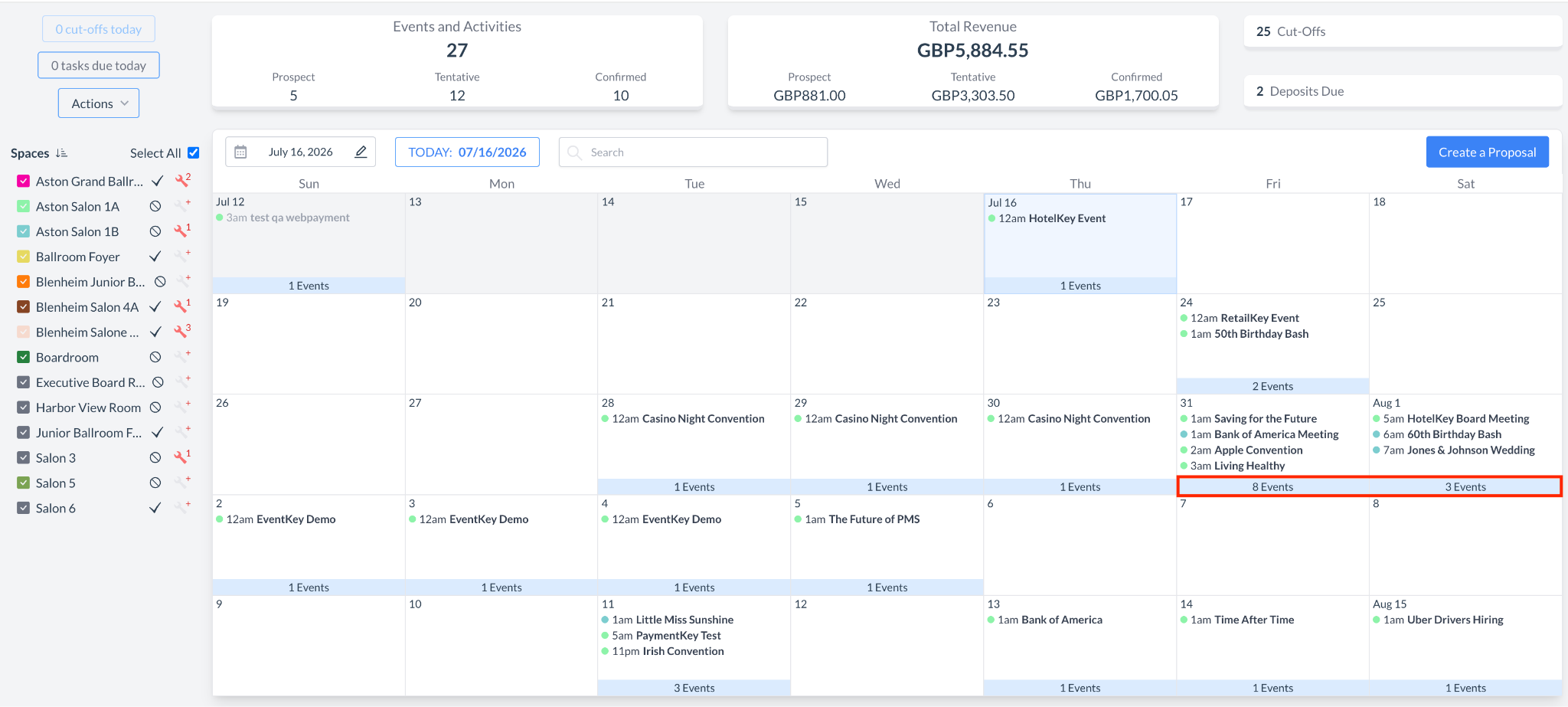
To provide users with immediate operational visibility, the EventKey Dashboard has been enhanced to display a live total count of events scheduled for each day. Users can now see a quick numerical summary of their daily volume directly on the main calendar interface. Furthermore, clicking on this daily event count dynamically launches a new dedicated listing screen, instantly displaying a detailed, filtered breakdown of all events scheduled for that specific day for faster navigation and tracking.
Implementation & Setup
-
📚 Knowledge Base: Reading the EventKey Dashboard
-
🔐 Permissions: N/A
-
⚙️ Configuration: N/A
-
👤 Who configures: Automatically available upon deployment.
ENTEK-338: Detailed Daily Event Overviews via the Calendar Dashboard
ENHANCEMENT AUTOMATIC
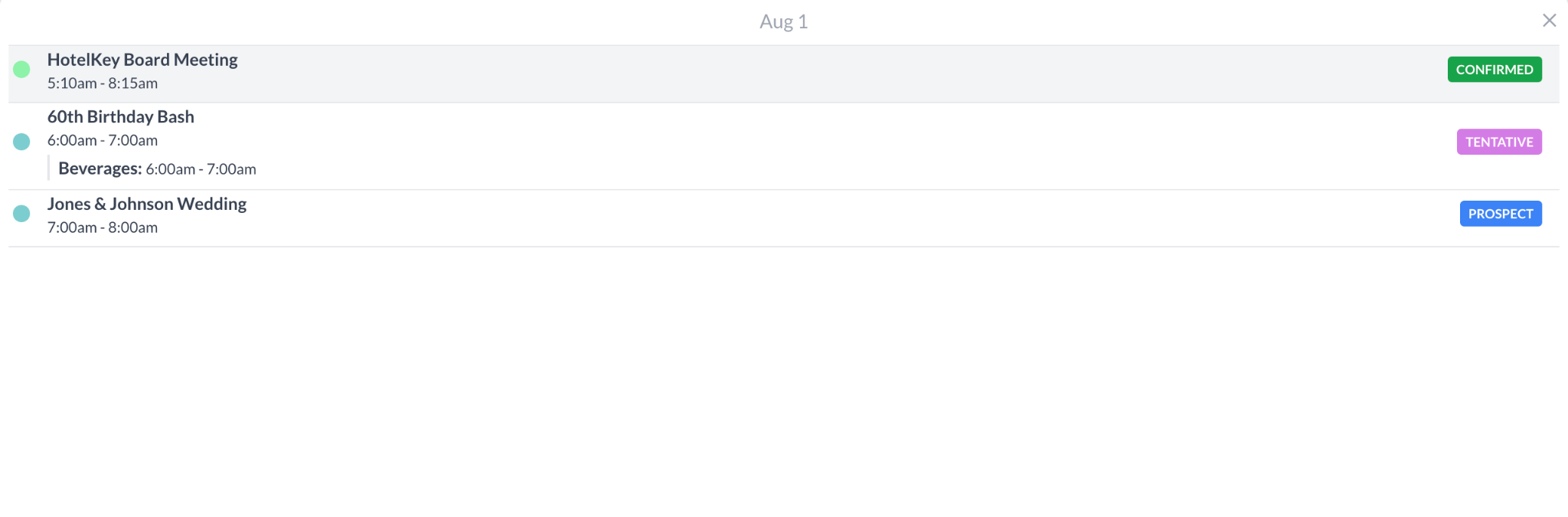
To provide managers with deeper operational insight directly from the calendar interface, clicking the "X Events" summary link (e.g., "3 Events") at the bottom of any calendar day will now launch a new, detailed window. Instead of a simple summary, this view now explicitly lists each scheduled event for that specific day along with its precise start and end times. Additionally, the window breaks down all packages associated with each event, displaying their respective package start and end times to give teams a clear, centralized timeline of the day's commitments without leaving the dashboard.
Implementation & Setup
-
📚 Knowledge Base: Reading the EventKey Dashboard
-
🔐 Permissions: N/A
-
⚙️ Configuration: N/A
-
👤 Who configures: Automatically available upon deployment.
ENTEK-73: TrainKey "Show Me" In-App Training Integration
ENHANCEMENT PERMISSION REQUIRED
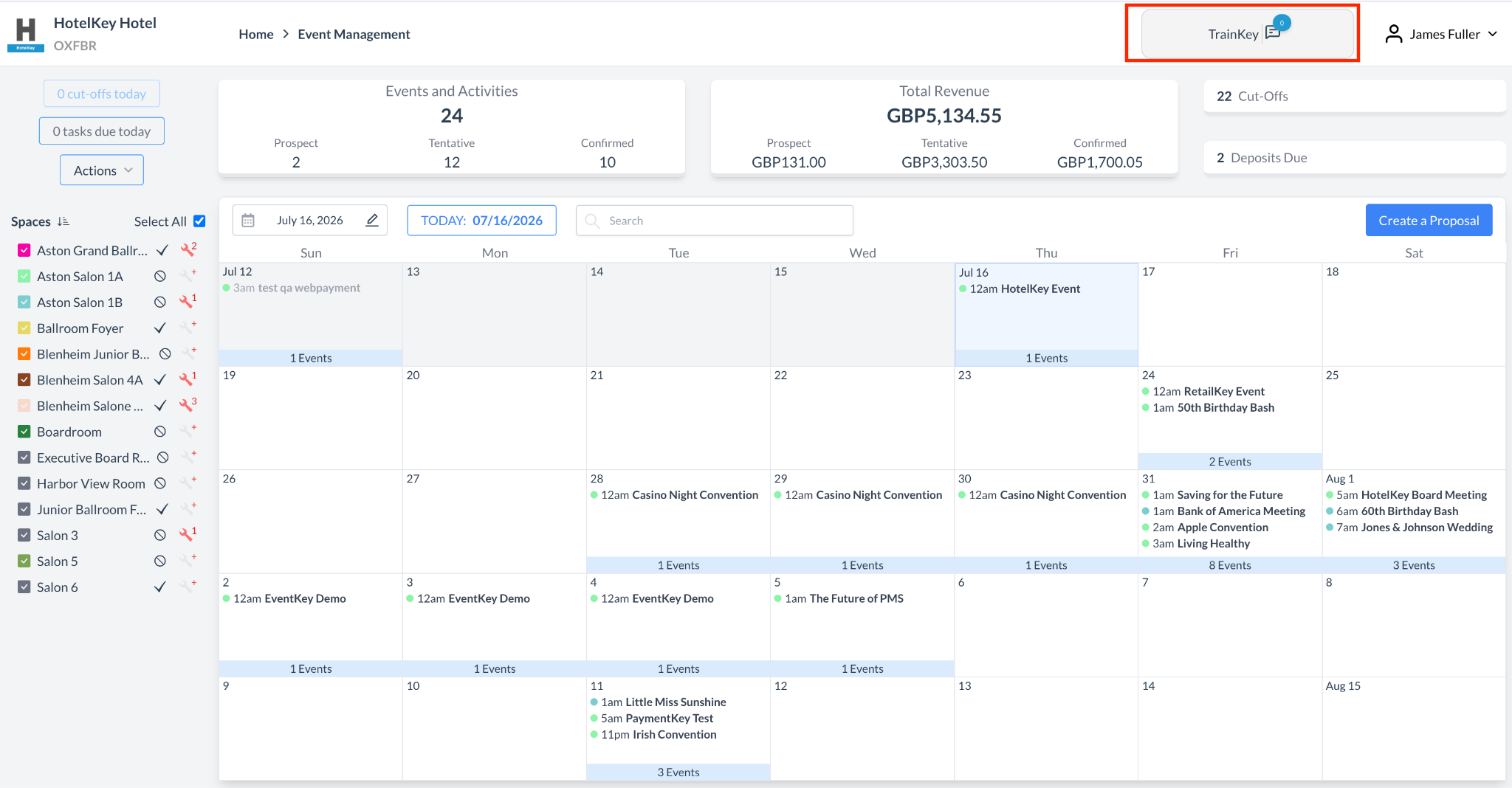
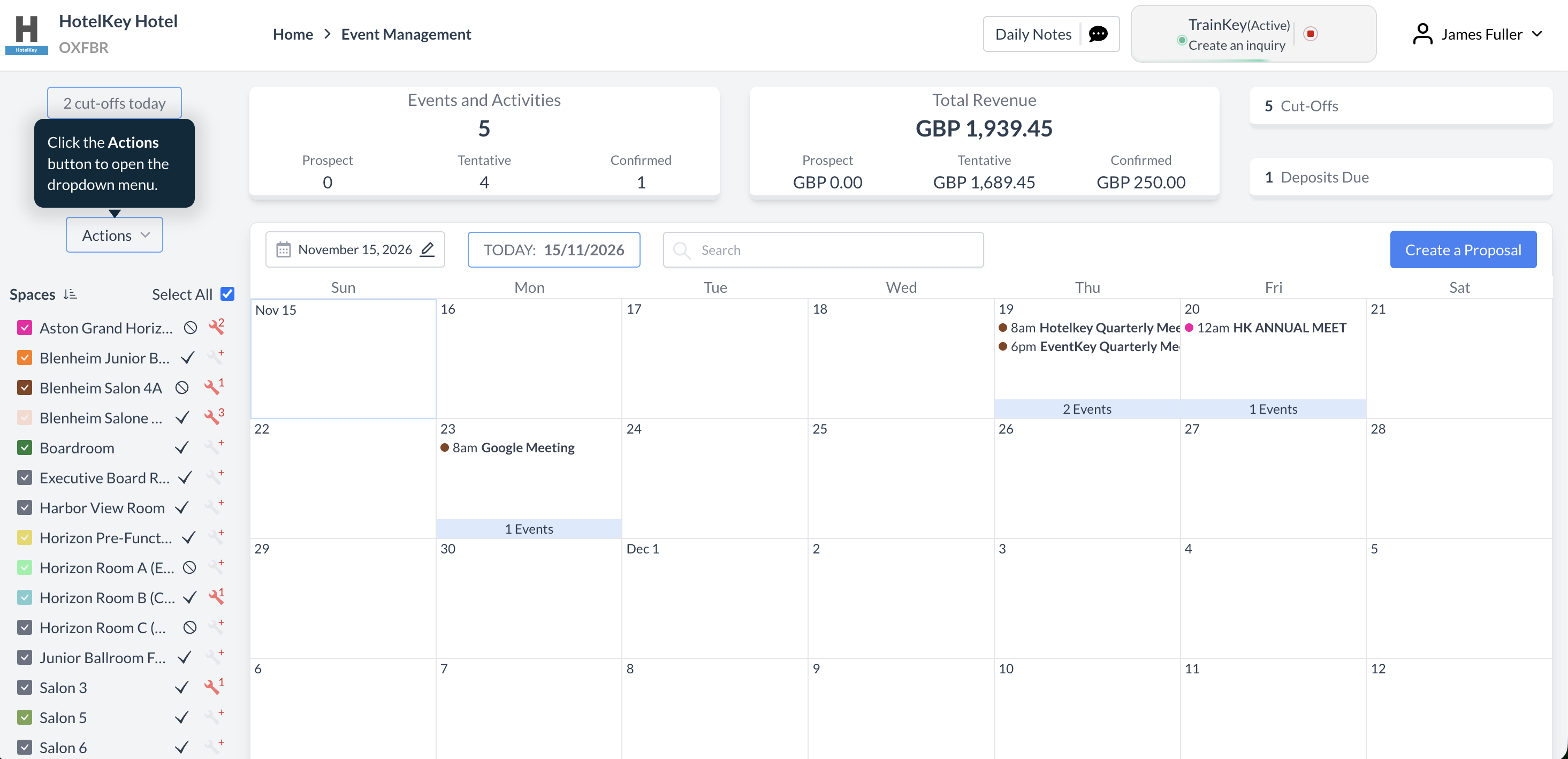
We are excited to announce that TrainKey, our interactive "Show Me" training system, is now directly available within EventKey! To assist users with onboarding and everyday navigation, we have launched the system with 36 comprehensive guided tracks that provide step-by-step, hands-on assistance throughout the platform. Please note that TrainKey is currently available exclusively in English. Over the course of the next few releases, we will be expanding this feature by adding more training tracks and introducing full multilingual support for French, Italian, German, Spanish, Japanese, and Arabic.
Implementation & Setup
-
📚 Knowledge Base: TrainKey Interactive Guided Training
-
🔐 Permissions: SPL_TRAINKEY_START
-
⚙️ Configuration: N/A
-
👤 Who configures: Automatically available upon deployment.
ENTEK-287: Direct Charge Routing Setup from EventKey
ENHANCEMENT AUTOMATIC
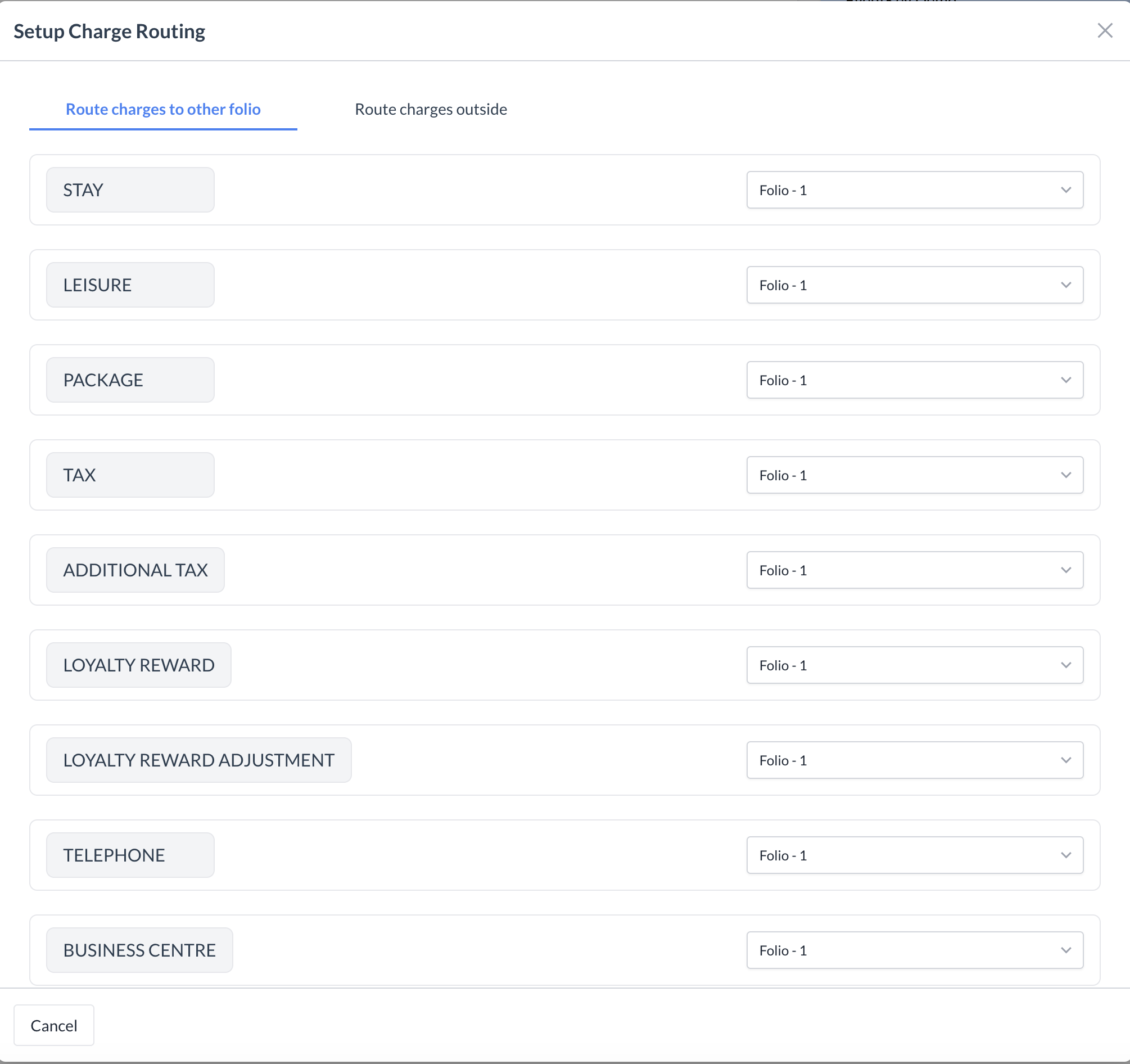
To streamline the billing workflow, the Setup Charge Routing button has been enhanced to open a fully functional configuration interface, allowing users to route charges to target folios both inside and outside the specific event. Users can now seamlessly select from any additional folios created across the system—including those outside the primary House Account—as valid routing destinations. Once saved, these routing rules persist automatically and apply to all incoming charges. Most importantly, this update eliminates the dependency on navigating into the House Account module, giving users the freedom to complete, edit, and enable charge routing directly from their active workspace.
Implementation & Setup
-
📚 Knowledge Base: Billing Information
-
🔐 Permissions: N/A
-
⚙️ Configuration: N/A
-
👤 Who configures: Automatically available upon deployment.
ENTEK-314: Automated Task Generation for Group Blocks
ENHANCEMENT AUTOMATIC
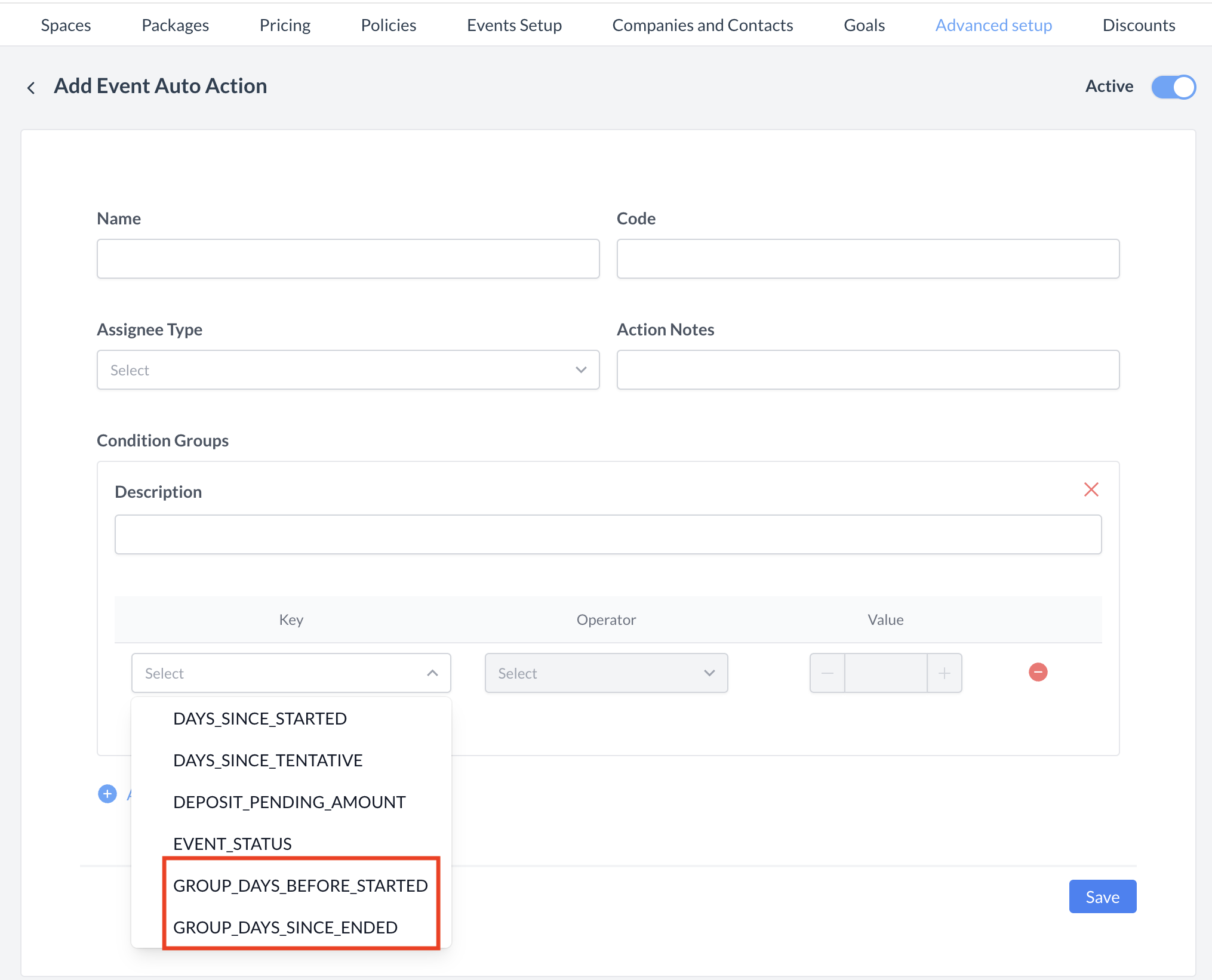
To further automate operational workflows, the Auto Tasks engine has been enhanced to support Group Blocks. Users are no longer limited to event-level triggers and can now define automated tasks tailored specifically to the lifecycle of a group booking. This update introduces two powerful new timing triggers: Group Days Before Start and Group Days Since Ended. These additions allow teams to automatically schedule critical pre-arrival preparations and post-departure follow-ups, ensuring no milestone is missed from the moment a block is secured until long after the group checks out..
Implementation & Setup
-
📚 Knowledge Base: Event Auto Actions
-
🔐 Permissions: N/A
-
⚙️ Configuration: N/A
-
👤 Who configures: Automatically available upon deployment.
ENTEK-317: Intelligent Default Start Dates for Group Blocks
ENHANCEMENT AUTOMATIC
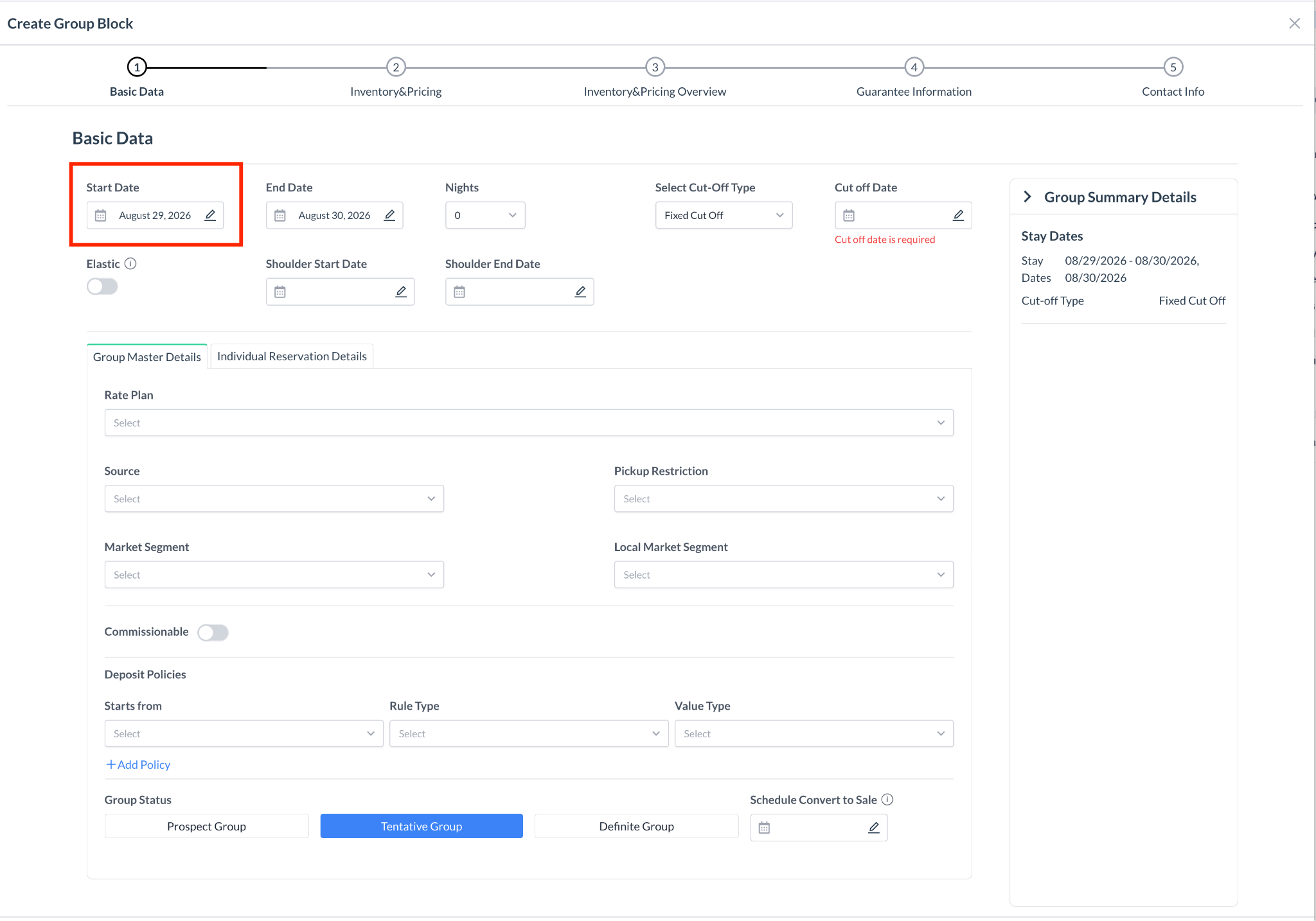
To accelerate the booking workflow and minimize manual data entry, the Group Block creation flow has been enhanced to automatically populate the Group Block start date. Moving forward, the system will pull the existing event's start date and set it as the default start date for the new block. While this smart default ensures immediate alignment between the event and its associated block, users still retain the full flexibility to manually edit and adjust the start date as needed during the creation process.
Implementation & Setup
-
📚 Knowledge Base: Create Event Proposal with Group Block or Create Group Block (V2 Groups) in EventKey
-
🔐 Permissions: N/A
-
⚙️ Configuration: N/A
-
👤 Who configures: Automatically available upon deployment.
ENTEK-325: Extended Document Generation for Prospect Events
ENHANCEMENT CONFIG REQUIRED
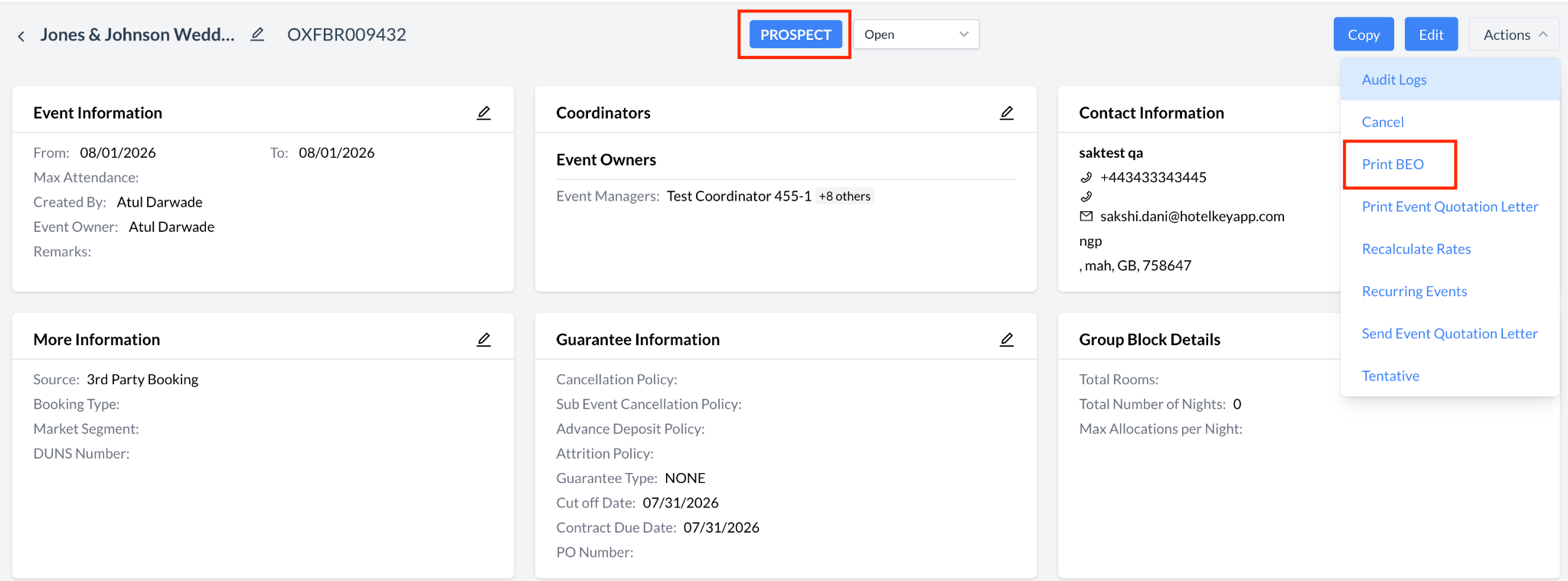
To accelerate early-stage sales cycles and reduce friction when engaging potential clients, users can now generate Banquet Event Orders (BEOs) and send Contracts while an event is still in a Prospect status. Previously, the system restricted these critical document actions until an event had progressed to a Tentative status. This update provides teams with greater operational agility, allowing them to deliver official documentation and contractual agreements much earlier in the booking process without being held back by rigid status requirements.

Implementation & Setup
-
📚 Knowledge Base: Sending and Signing BEOs & Contracts Electronically
-
🔐 Permissions: N/A
-
⚙️ Configuration: EK Admin > Advanced Setup > Application Configuration >
Allow Doc Generation On Prospect = ON
-
👤 Who configures: Property EventKey Admin
ENTEK-326: Advanced Commission Calculations for IATA Profiles
ENHANCEMENT AUTOMATIC
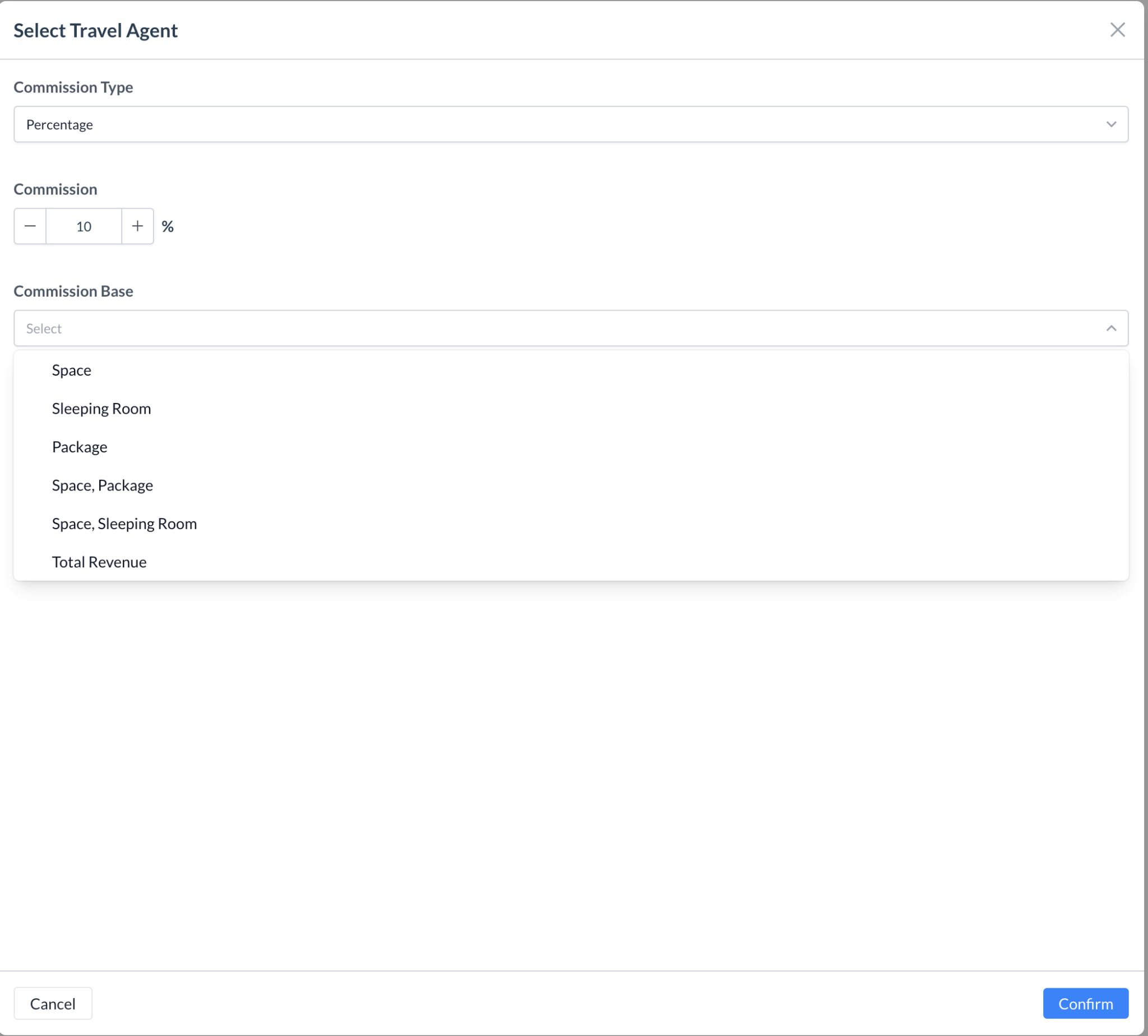
To provide greater flexibility and precision when handling travel agency bookings, the commission configuration workflow for IATA numbers attached to Event Profiles has been significantly enhanced. After defining a commission structure—whether using a flat amount, a percentage, or setting it to none along with a specific value—users can now explicitly select which revenue streams the commission should be calculated from. The system features a comprehensive set of target options, including Space, Sleeping Room, Package, Space & Package, Space & Sleeping Room, or Total Revenue (which encapsulates Space, Package, and Sleeping Room combined). Once configured, the system automatically calculates the total commission due and dynamically displays this value directly on the Event Reservation screen, positioned conveniently above the Revenue Summary for instant financial visibility.
Implementation & Setup
-
📚 Knowledge Base: Create Event Proposal with Group Block or Create Event Proposal Meeting Room Only
-
🔐 Permissions: N/A
-
⚙️ Configuration: N/A
-
👤 Who configures: Automatically available upon deployment.
ENTEK-327: Comprehensive Event Commission Report
ENHANCEMENT PERMISSION REQUIRED
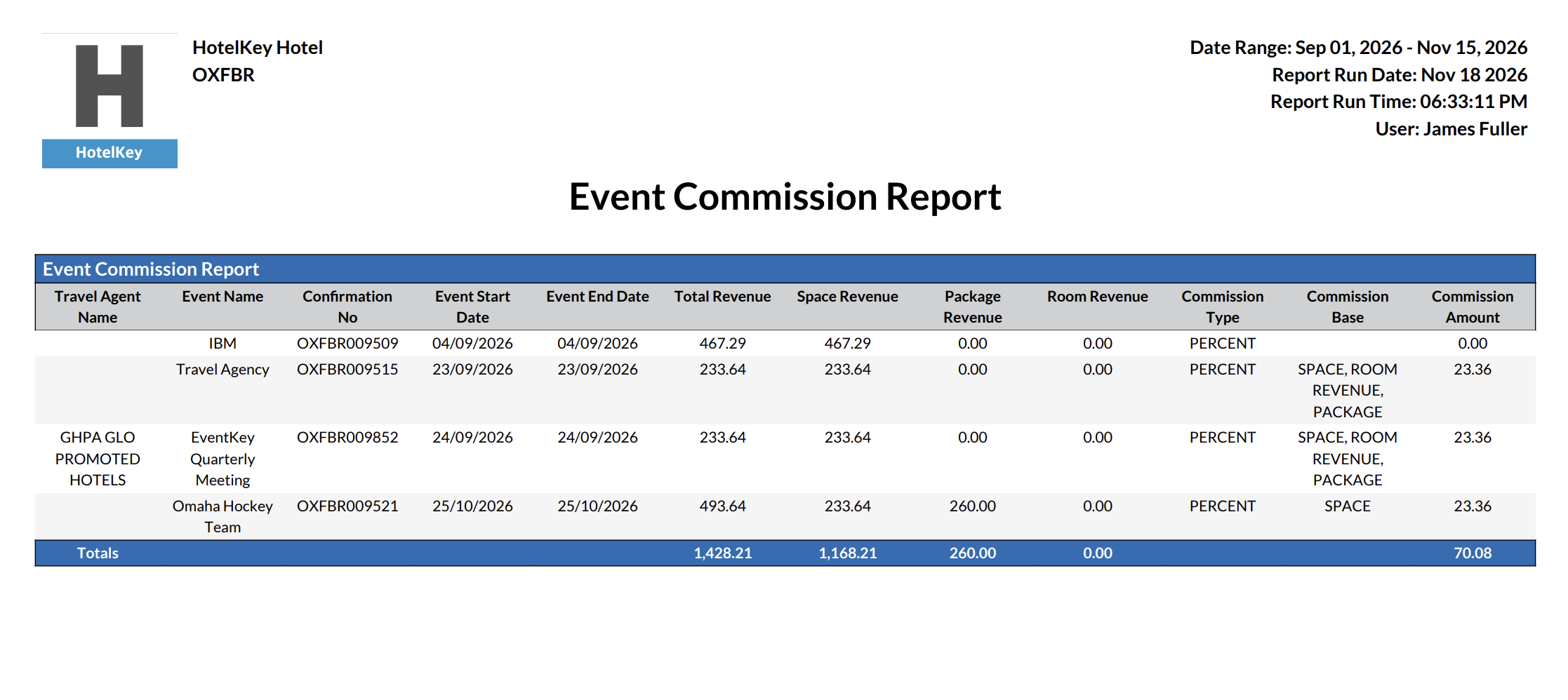
To complement our enhanced IATA profile capabilities, we have introduced a dedicated Event Commission Report designed to streamline financial reporting and agency payouts. This brand-new report aggregates all essential booking and revenue details into a single view, tracking the Travel Agency name, Event Name, Confirmation Number, and the Event Start and End Dates. To ensure full financial transparency, it breaks down earnings by individual revenue streams—including Space Revenue, Package Revenue, and Room Revenue—alongside the Total Revenue. The report clearly displays the configured Commission Type (Fixed or Percentage) and the specific Commission Base applied, ultimately calculating and presenting the final Commission Amount due based on those parameters.
Implementation & Setup
-
📚 Knowledge Base: Event Commission Report
-
🔐 Permissions: DYNAMIC_EVENT_COMMISSION_REPORT
-
⚙️ Configuration: N/A
-
👤 Who configures: Automatically available upon deployment.
ENTEK-328: Group Block Names Added to Group Only Listing Screen
ENHANCEMENT AUTOMATIC
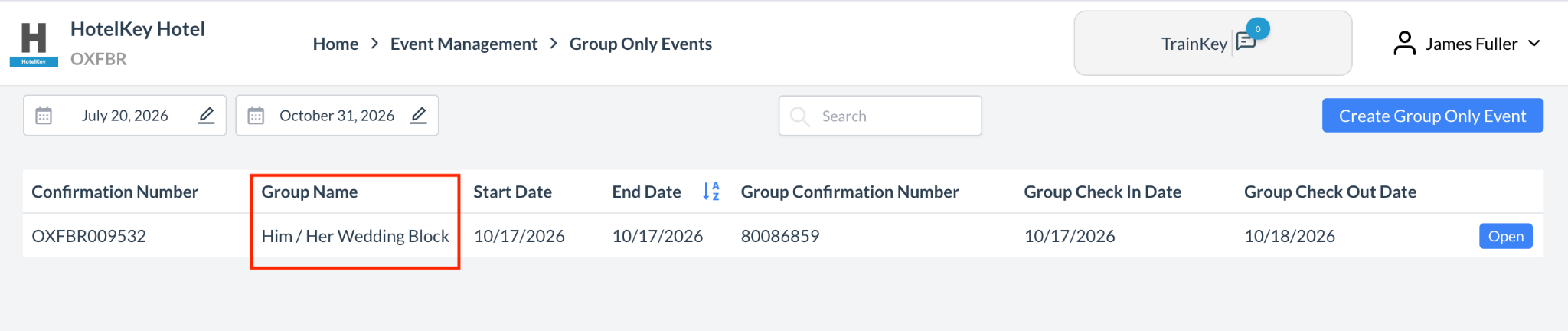
To improve operational efficiency and simplify daily tracking, Event and Sales Managers can now view the Group Block Name directly on the Group Only Events listing grid. A dedicated new "Group Name" column has been integrated seamlessly into the main display interface, providing immediate context at a glance. This update removes the need to manually click into individual records or cross-reference confirmation numbers, allowing teams to quickly identify, sort, and distinguish between different active groups within their pipeline.
Implementation & Setup
-
📚 Knowledge Base: Group Only Events
-
🔐 Permissions: N/A
-
⚙️ Configuration: N/A
-
👤 Who configures: Automatically available upon deployment.
ENTEK-334: Dynamic Translation of Day of Week (DOW) on BEO
ENHANCEMENT AUTOMATIC
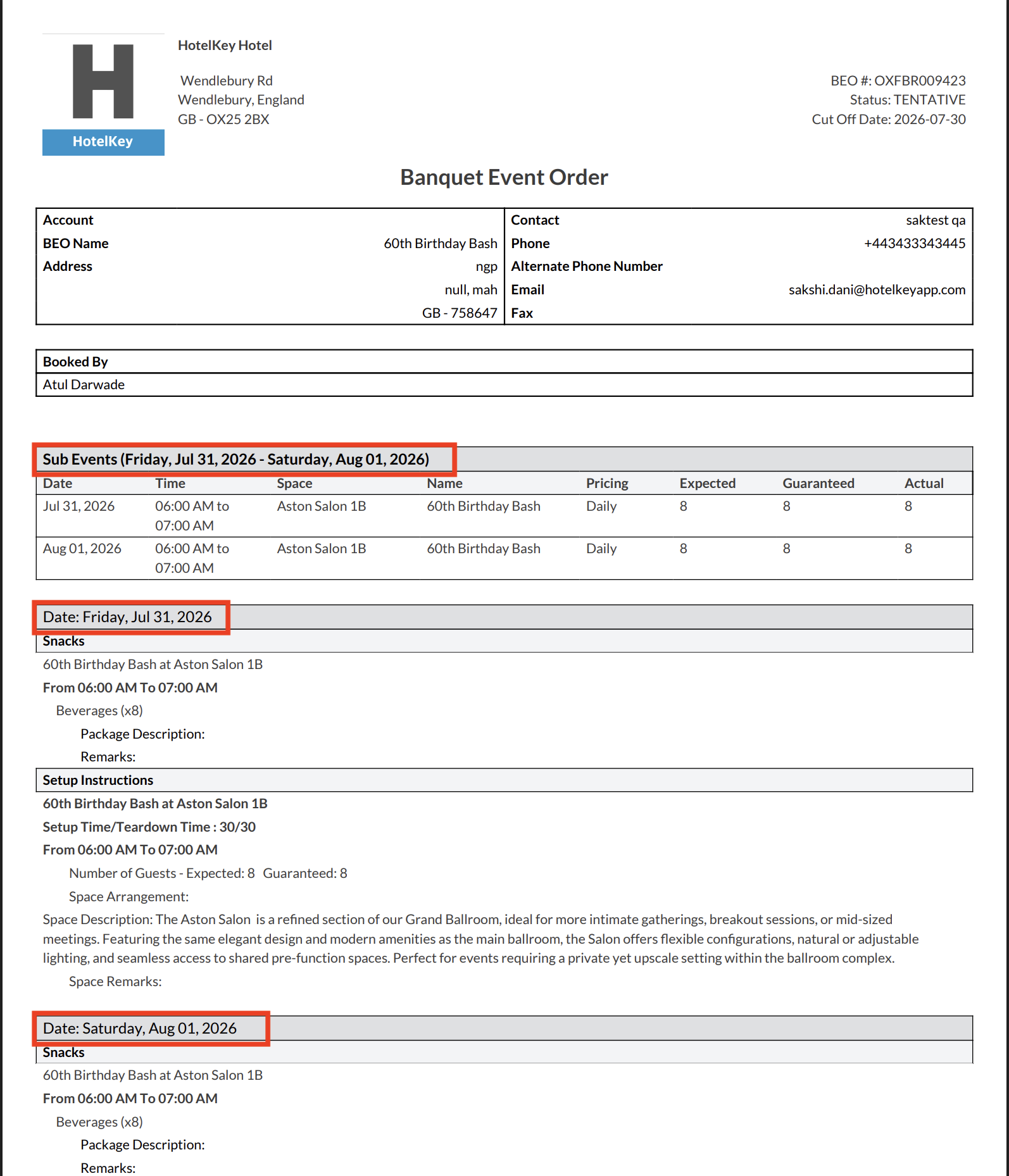
Banquet Event Orders (BEOs) now dynamically translate days of the week to match the document’s selected output language. When generating or printing a BEO in a localized language (such as German), weekday names—both full (e.g., Monday / Montag) and abbreviated (e.g., Mon. / Mo.)—are automatically localized while preserving the template's font formatting, styling, and casing. If a translation for a specific language is not available, the system smoothly falls back to English to prevent formatting errors or blank values. This eliminates the need for manual post-generation edits and ensures international clients and operational staff receive accurate, fully localized event documentation.
Implementation & Setup
-
📚 Knowledge Base: Print Banquet Event Orders
-
🔐 Permissions: N/A
-
⚙️ Configuration: N/A
-
👤 Who configures: Automatically available upon deployment.
ENTEK-274: Direct Space Editing Available for DDR Rate Plans
ENHANCEMENT AUTOMATIC
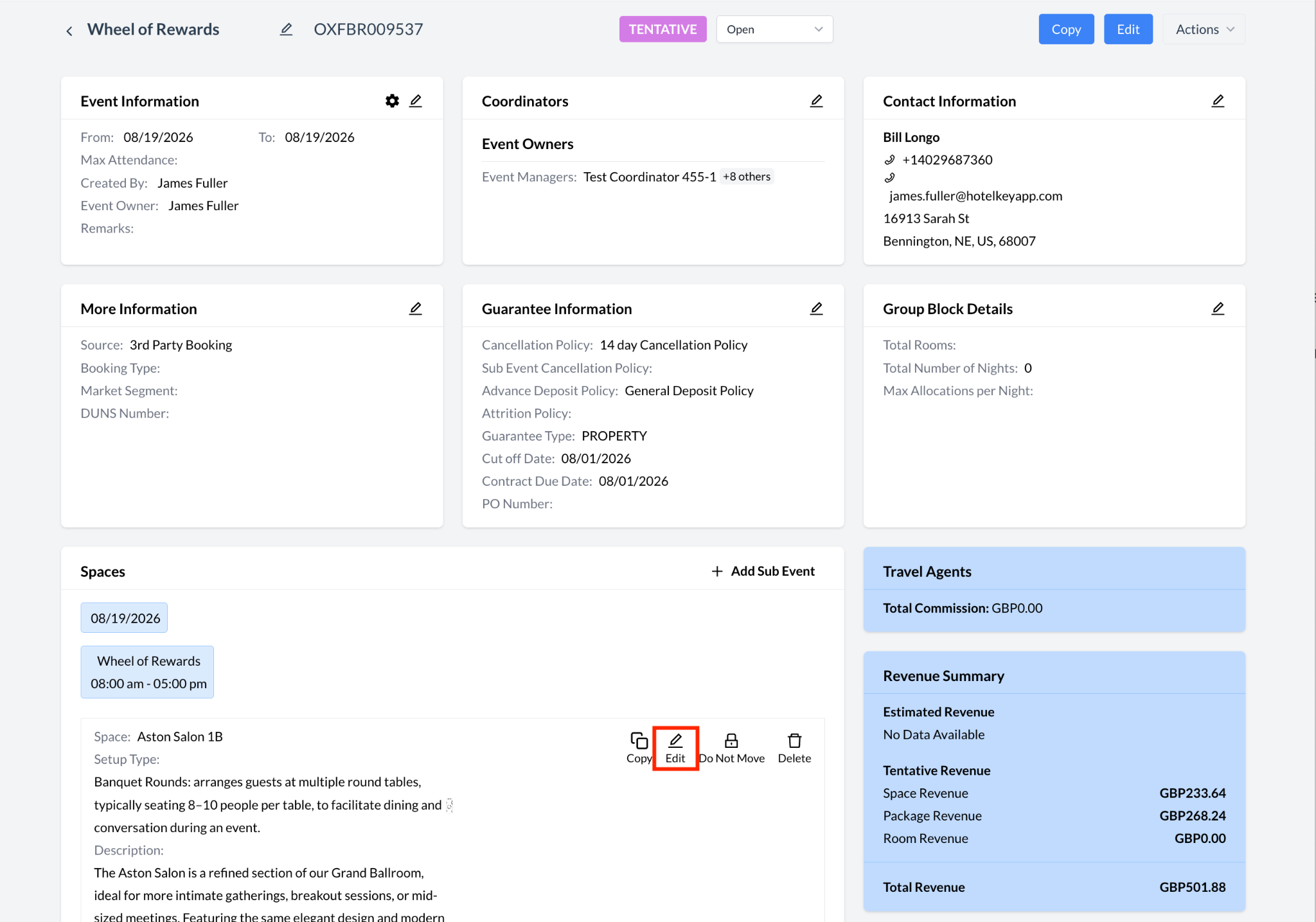
To increase operational flexibility and eliminate redundant clicks, EventKey users can now edit assigned spaces directly from the Event Management screen, even when utilizing a Day Delegate Rate (DDR) plan. Previously, the "Edit" button within the Space section was restricted and hidden under DDR configurations, forcing users to navigate through multiple screens to adjust sub-event locations. With this enhancement, the restriction has been lifted, enabling managers to instantly update space assignments and manage their event layouts on the fly, regardless of the active rate plan.
Implementation & Setup
-
📚 Knowledge Base: Edit Event Records (Reservations)
-
🔐 Permissions: N/A
-
⚙️ Configuration: N/A
-
👤 Who configures: Automatically available upon deployment.
ENTEK-275: Direct Packaging Editing Available for DDR Rate Plans
ENHANCEMENT AUTOMATIC
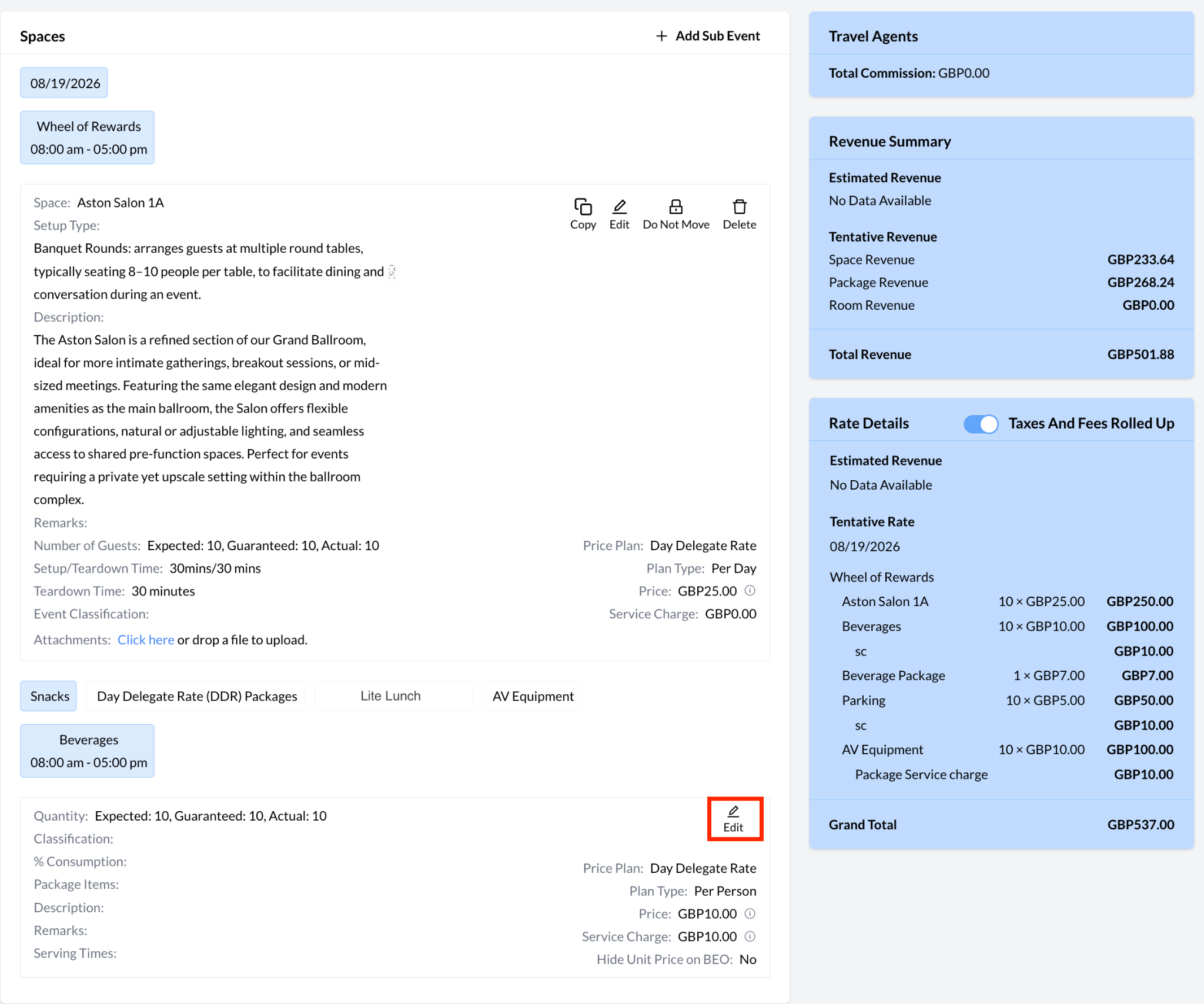
To increase operational flexibility and eliminate redundant clicks, EventKey users can now edit DDR packages directly from the Event Management screen, even when utilizing a Day Delegate Rate (DDR) plan. Previously, the "Edit" button within the Package section was restricted and hidden under DDR configurations, forcing users to navigate through multiple screens to adjust DDR packages.
Implementation & Setup
-
📚 Knowledge Base: Edit Event Records (Reservations)
-
🔐 Permissions: N/A
-
⚙️ Configuration: N/A
-
👤 Who configures: Automatically available upon deployment.
ENTEK-304: Custom Banquet Event Order (BEO) Creation
ENHANCEMENT STATIONERY
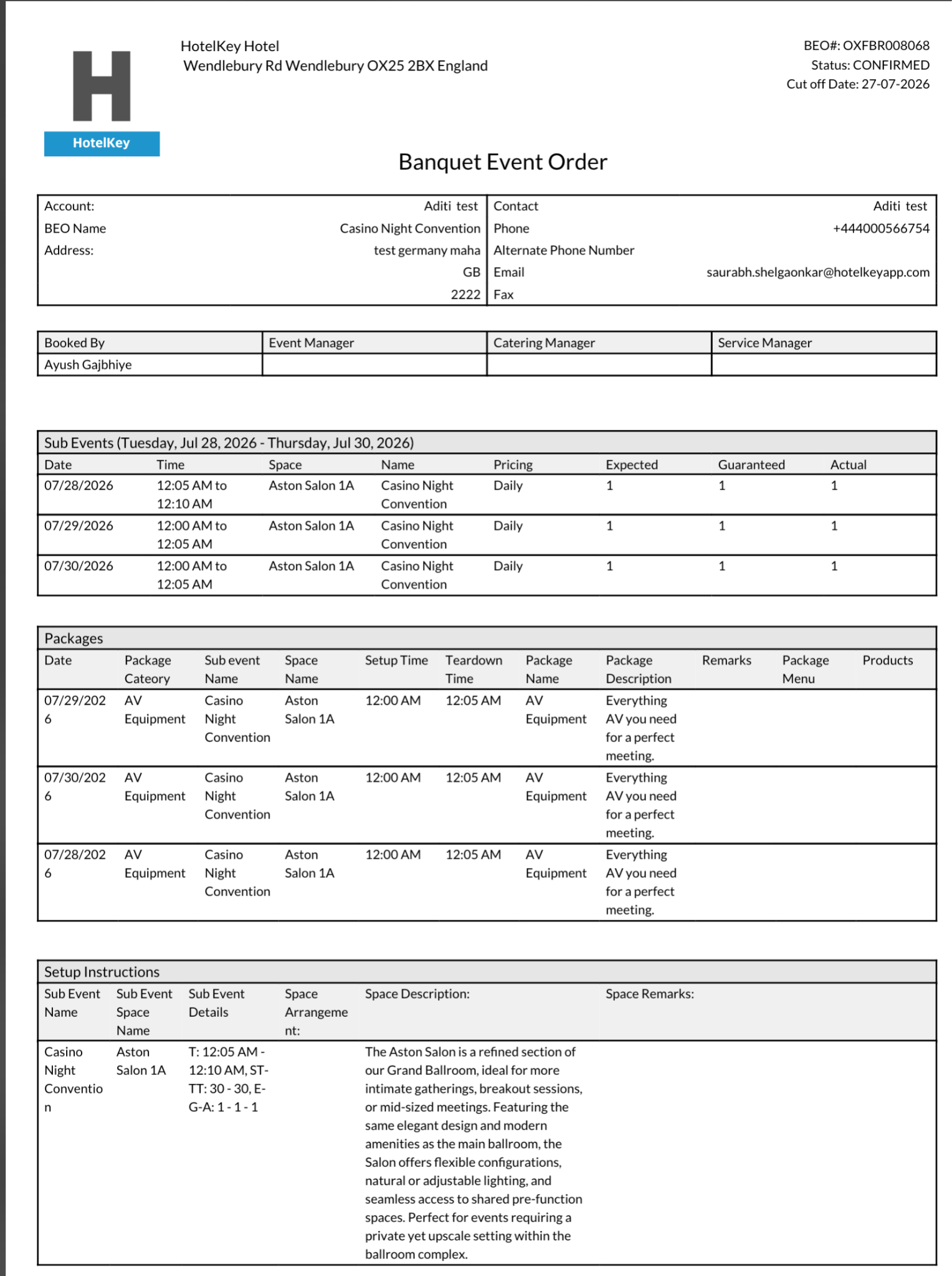
To better support unique property branding and specialized operational requirements, EventKey now offers fully Custom BEO Creation. Properties looking to tailor or adjust their Banquet Event Order layouts can submit an Incident (INC) request directly to our specialized Stationery Team. Once received, our team will review the proposed changes and, upon verification of layout feasibility, implement and deploy the customized BEO template directly to your property’s environment.
Implementation & Setup
-
📚 Knowledge Base: N/A
-
🔐 Permissions: N/A
-
⚙️ Configuration: Custom BEO Stationery changes
-
👤 Who configures: EventKey Support Team via request from property.
ENTEK-260: Embedded Web Payment Links in Event Contracts
ENHANCEMENT PERMISSION REQUIRED
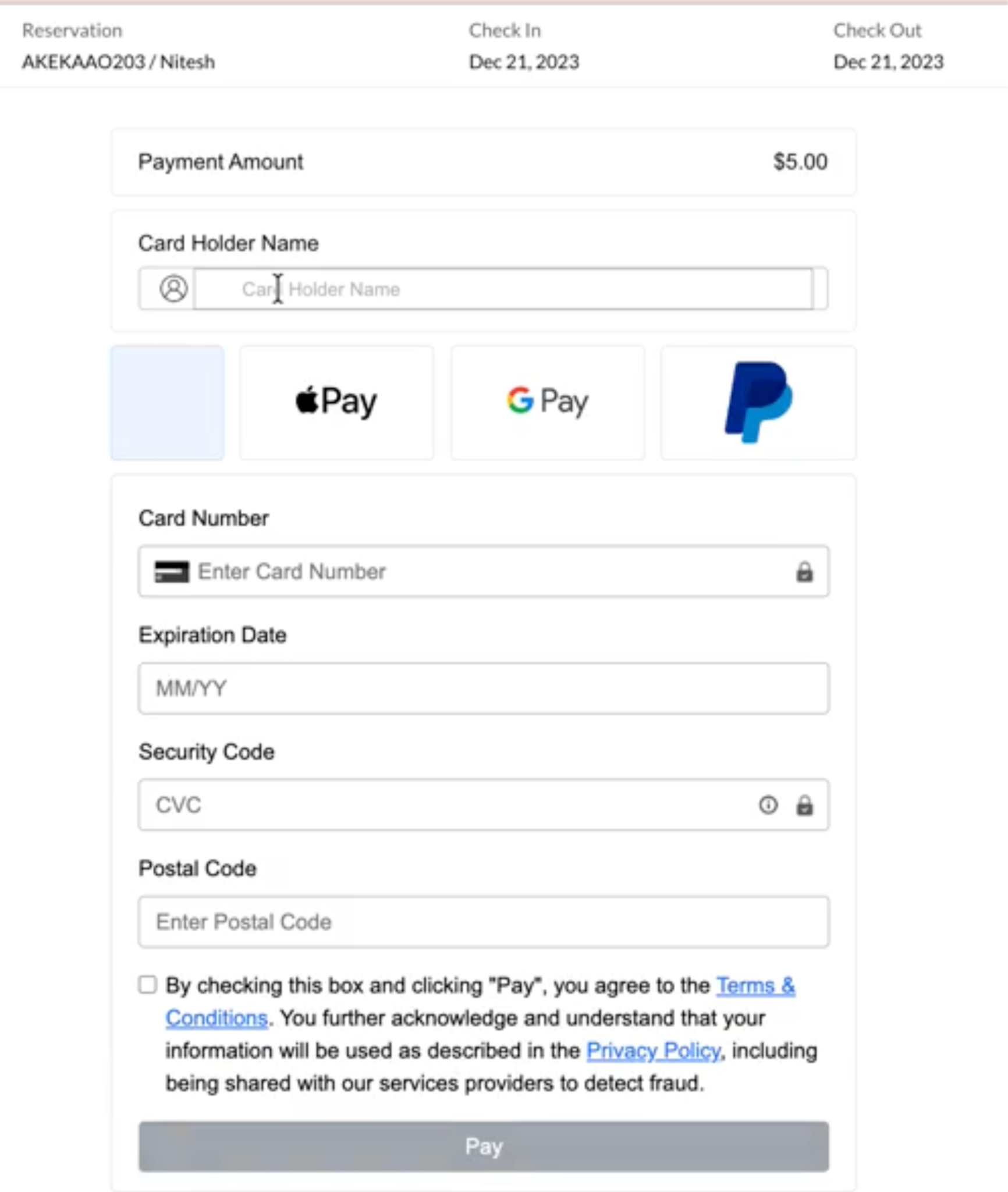
To streamline deposit collection and accelerate contract execution, EventKey now supports embedding dynamic Web Payment Links directly into Event Contracts. Prior to generating a contract, users will be guided through a required setup workflow to generate a payment link by entering payment notes, validating payer details, setting the payment amount due, and defining an expiration date. Once generated, the active link is automatically embedded into the contract document. Clients receiving the contract can simply click the link to be securely redirected to a payment iFrame to complete their transaction, with all successful payments automatically posted directly to the corresponding EventKey folio.
Important Note: This feature is only available for properties on integrated payment gateways who have set up their property as a “store front” with the payment provider.
Implementation & Setup
-
📚 Knowledge Base: Web Payment Links for Event Payment Collection
-
🔐 Permissions: EVENT_PAYMENT_LINKS
-
⚙️ Configuration: N/A
-
👤 Who configures: Event Manager or Event Coordinator